
Notifications & Integrations
dsh-update-lens
1207627875/dsh-update-lens · ★ 0
 1207627875
Read-only update checker for DeepSeek Harness (dsh): version comparison across npm and GitHub, an in-app update notification, and breaking-change annotations on release notes.
Manifest details
安装
dsh plugin --profile web add 'github:1207627875/dsh-update-lens#b9b6380b88e147204c8de05c951b1ac6d0fdab40'GitHub 源码安装:首次需按提示配置 allowBuilds 构建授权后重试
For install and environment setup, plus plugin development tutorials, see DSH community docs ↗
README
Table of contents


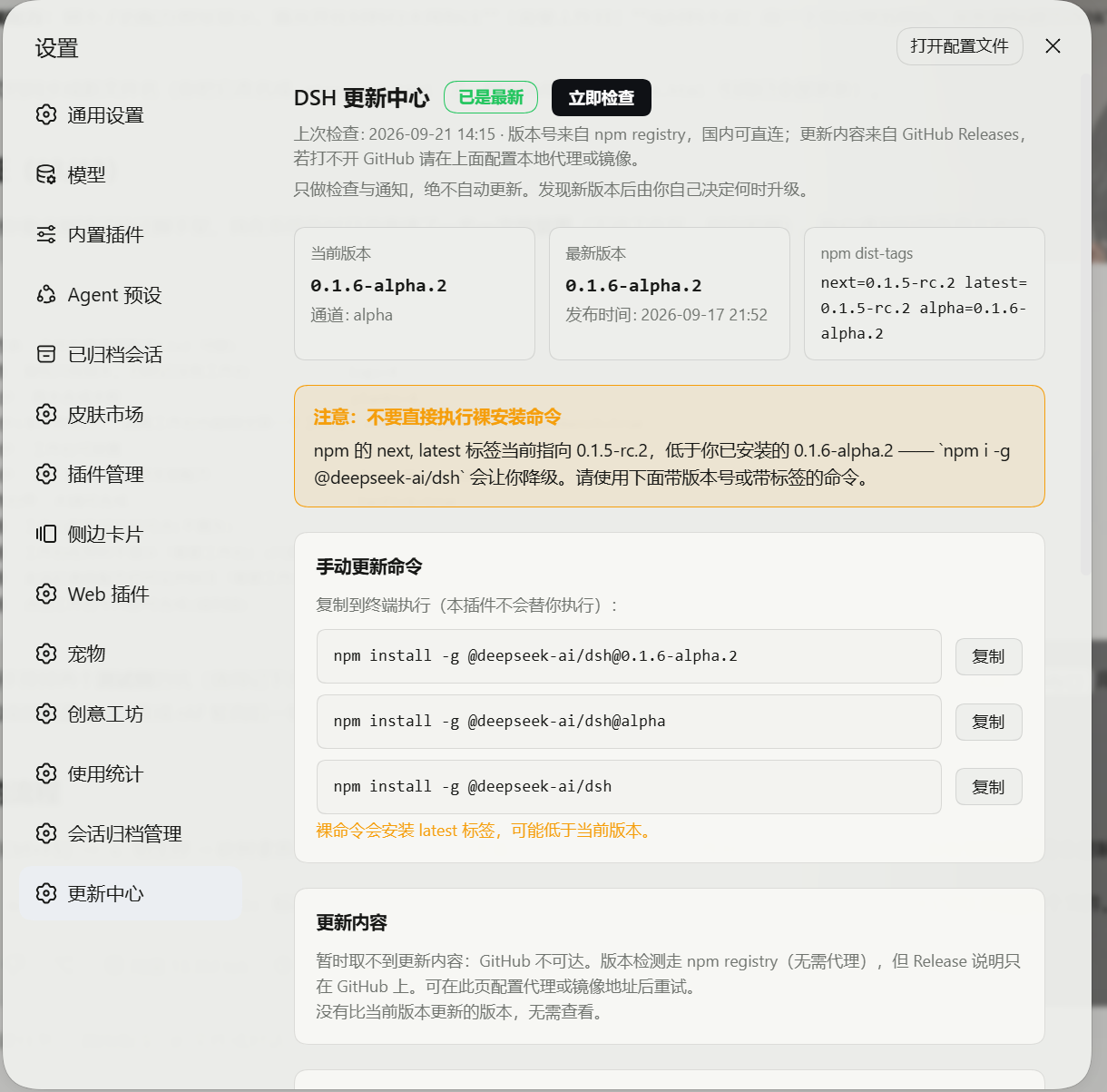
A read-only update checker for DeepSeek Harness (dsh): it shows the latest official version, the version you run, the release notes — and flags the changes that could break what you already have. It notifies you; it never updates anything for you.
中文 · English
Why
dsh ships often, and its release notes mix "new features" with "this package name is no longer compatible, update your plugin". What you actually need is two things: is there a newer build, and will this update break what I rely on. This plugin answers those two and stops there. The upgrade command is offered to copy — running it stays your decision.
Where it lives
| Location | Contents |
|---|---|
| Settings → Update center (nav slot 160) | Installed / latest version, channel, npm dist-tags, release notes (zh/en), risk flags, network sources, settings, manual update commands |
| Bottom-right overlay | Appears when a newer version exists: "copy command / not now / ignore this version" |
| Settings nav entry | Becomes "Update center ●" while an update is available |
Breaking-change annotation (the main difference from similar plugins)
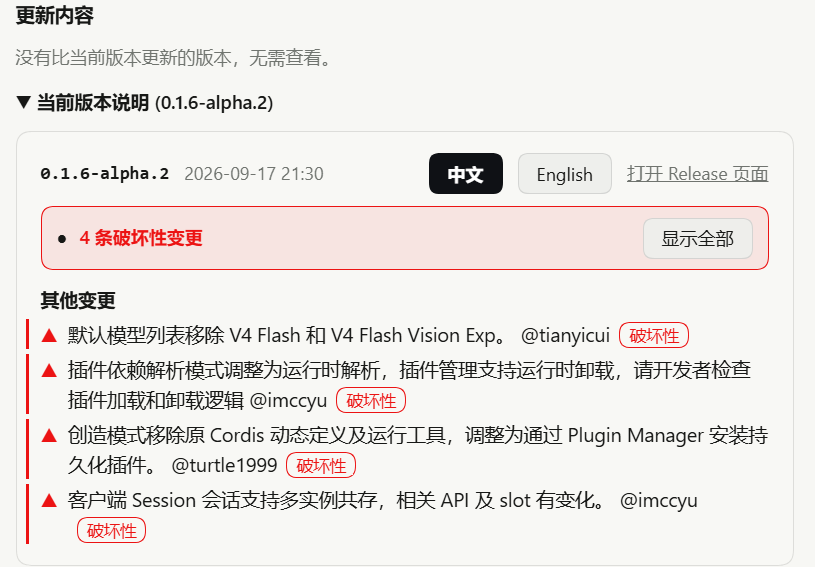
Every bullet in the release notes is graded, shown with a coloured bar and a badge; hovering reveals the words that produced the verdict — no black box:
| Tier | Meaning | Typical triggers |
|---|---|---|
| ▲ Breaking (red) | Something is gone, no longer compatible, or you must act | 不兼容 no-longer-compatible, 移除/removed, 删除/deleted, 弃用/deprecated, 重命名/renamed, 必须/must, 请开发者检查 developers-should, 需适配 needs-adaptation, 需手动 manual |
| ! Caution (yellow) | Behaviour, defaults or interfaces moved | 调整/adjusted, 改为/changed-to, 上限/limit, 取消/removed-behaviour, 回滚/rollback, default, disable |
Two more rules:
- Interface + change = breaking: "with changes to related APIs and slots" — exactly what breaks a third-party plugin.
- Section-aware noise control: inside Bug Fixes and New Features / Improvements sections only top-tier words count, so "fixed a session that could not be restored" or "correct added/deleted line counts" are never flagged.
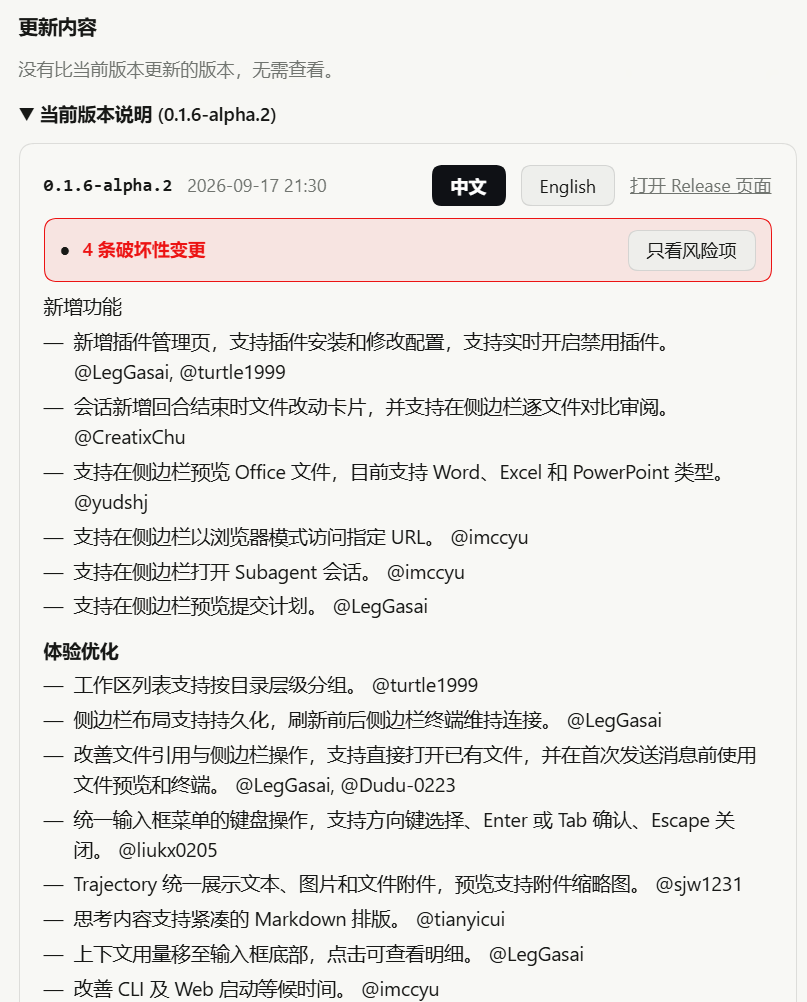
Per release you get an "N breaking / M to review" summary and an Only flagged filter; when the version you would upgrade to carries breaking changes, a red bar appears above the copyable command (the warning must be read before the line you paste into a terminal).
The rules are not guesswork: tests/notes-rules.mjs runs 271 assertions against
18 real release bodies (tests/fixtures/, captured from v0.1.0 through
v0.1.7-rc.2), many of them negative — "this look-alike sentence must stay quiet" —
each one corresponding to a false positive that actually happened.
Release notes have shipped in three shapes and the parser reads all three (a format change is exactly what silently breaks the per-section noise control):
| Version | Shape | Example |
|---|---|---|
| ~0.1.6 | markdown headings | ### 体验优化 / ### 问题修复 |
| 0.1.7-rc.2+ | emoji headings + bare label lines | ### 🐛 修复 / ### ⚠️ 调整, and the first ✨ 新增 has no # at all |
| 0.1.3 and older | HTML headings across two lines | <h3>新增功能 + </h3> |
After a new release appears, run node research/capture-fixtures.mjs and the suite
again — a format change then fails loudly instead of quietly.
Each card can be hidden on its own, so a growing back-log of releases does not pile up. Hiding only collapses the card — the facts (how many versions behind, the update target) are unchanged — and a "N version cards hidden · Restore all" line appears at the top of the section. Hiding the version you would upgrade to also silences its notification, so the button never looks broken.
Two different buttons, deliberately: Hide on a card collapses that card (restorable); Mute in the bottom-right notification silences only the notification and leaves the card — the card carries the pre-upgrade breaking-change warning, which muting should not quietly take away.
Install
# 1) into your profile (replace web with your profile name)
dsh plugin --profile web add github:1207627875/dsh-update-lens

# 2) enable it in Settings → Plugins, or add dsh-update-lens to that profile's
#    package.json dsh.profile.bundles array

# 3) restart the profile (Host-side code needs a restart; client changes need a page refresh)
Or let an AI assistant do it — paste this to any coding agent:
Install the DeepSeek Harness (dsh) plugin dsh-update-lens:
1. In the active profile run: dsh plugin --profile <profile> add github:1207627875/dsh-update-lens
2. Add dsh-update-lens to dsh.profile.bundles in that profile's package.json
3. Restart the profile, then GET http://127.0.0.1:3080/dsh-update-lens/status and confirm the JSON
   returns and current.version equals my dsh version
Requires dsh >= 0.1.6-alpha.2 (verified on 0.1.6-alpha.2 and 0.1.7-rc.2, including the _versions\ version-manager layout) and Node >= 20.
Sources and network
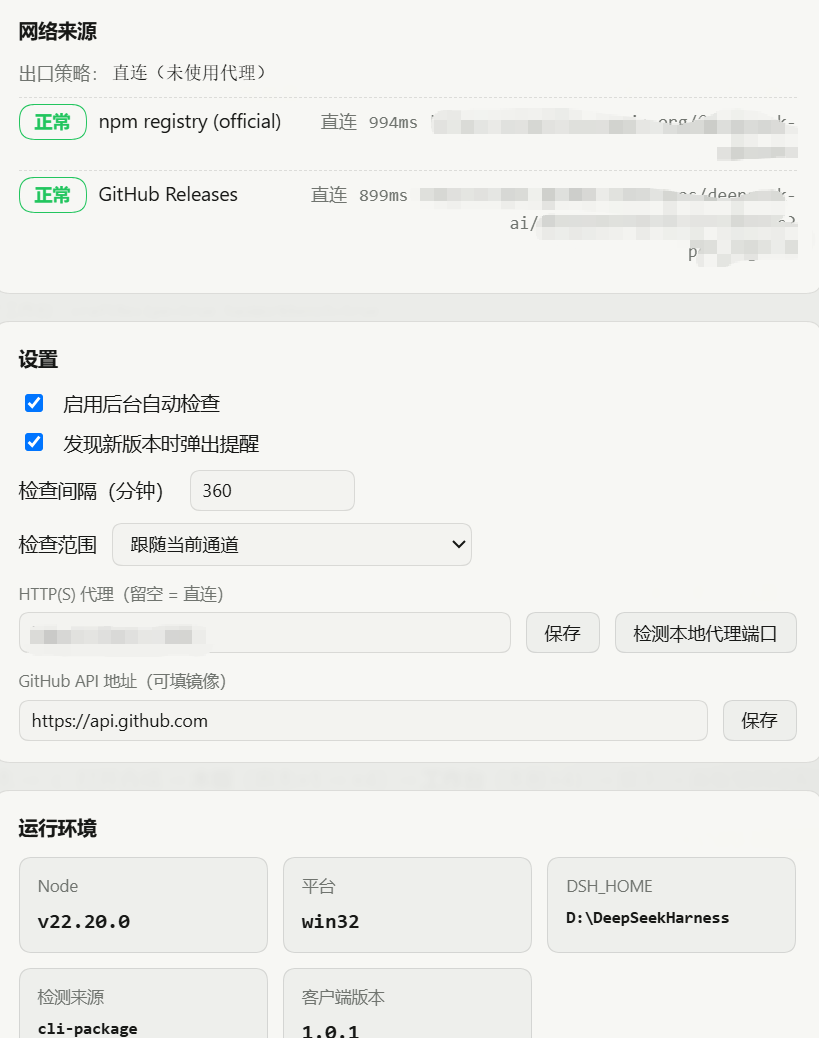
| Source | Used for | Notes |
|---|---|---|
registry.npmjs.org |
versions, dist-tags, publish times | primary |
registry.npmmirror.com |
same | fallback when the primary fails |
api.github.com/.../releases |
release notes | replaceable with a mirror you trust |
ungh.cc (third-party mirror) |
release notes | queried only when GitHub yields no bodies; same body format |
Release notes no longer hinge on GitHub alone: when GitHub returns no bodies the
check falls back to ungh.cc, a read-only mirror of GitHub data whose release
bodies use the same format (the parser is reused unchanged). The page says
"bodies came from the ungh.cc mirror" when that happens. A healthy GitHub means the
mirror is never contacted — it is a fallback, not a second dependency. If you
would rather not use it at all, point "GitHub API base" at your own mirror.
Comparison is real semver (including alpha.2 < alpha.10 and
0.1.6 > 0.1.6-alpha.2). The default follows the channel you installed from;
you can switch to "newest across every channel". A downgrade trap — a
dist-tag pointing below your installed build — is called out separately.
Proxy: requests go direct by default and ignore the system (WinINET)
proxy, so a stale, dead proxy registration cannot break the check. Only two
things are honoured: the proxy you set on the page, or HTTPS_PROXY /
HTTP_PROXY in the launch environment. When proxying, the agent and the request
must come from the same undici copy (Node's built-in fetch rejects a
foreign ProxyAgent with UND_ERR_INVALID_ARG); if that cannot be arranged the
page says "proxy unusable, fell back to direct" rather than pretending. Each
source row shows whether that request went direct or through the proxy.
Settings
- Background automatic check (on by default; first run 8 s after boot, never blocking)
- Interval (15 – 10080 minutes, default 360)
- Scope: follow the installed channel / newest across all channels
- Notify me when a newer version appears
- HTTP(S) proxy (empty = direct;
127.0.0.1:7890is accepted without a scheme) - GitHub API base (mirror allowed)
- Ignore this version (button in the notification)
State lives in $DSH_HOME/dsh-update-lens/{config,state}.json ($DSH_HOME defaults to ~/.dsh).
Screenshots
| Overview | Breaking-change annotation |
|---|---|
 |
 |
| Full notes + "only flagged" | Sources and settings |
|---|---|
 |
 |
Captured on a real install (dsh 0.1.6-alpha.2). The bottom-right notification
shot can only be taken while a newer version actually exists; see
docs/SCREENSHOTS.md for the capture list.
Tests
node tests/secret-scan.mjs       # keys / tokens / credentials / personal paths, PNG text chunks, full git history
node tests/encoding-check.mjs    # encoding guard: UTF-8 / BOM / mojibake / syntax
node research/verify-remote.mjs  # ground truth: download the published tarball, SHA-256 every file, rescan it
node tests/notes-rules.mjs       # annotation rules vs real release bodies (54 assertions)
node tests/ignore-versions.mjs   # per-version hide/restore: persisted, reversible, silences the target's toast
node tests/client-rev.mjs        # client revision lock: edit client.js, bump CLIENT_REV
node tests/notes-fallback.mjs    # notes without GitHub: dead GitHub base, mirror takes over, mirror unused when GitHub works
node tests/proxy-path.mjs        # direct / dead-proxy / live-proxy behaviour
node tests/host-runtime.mjs      # INVARIANTS of version detection (no hardcoded versions; skips offline)
node tests/host-smoke.mjs        # routes, same-origin guard, real network, disposal
node tests/resolve-check.mjs     # install location: profile link, bundles list, client path
node tests/live-verify.mjs       # real HTTP against the RUNNING instance (capabilities, hide round trip, same-origin)
node research/scan-shim-encoding.mjs  # BOM/mojibake in .cmd/.bat/.ps1 (the garbled first line at launch)
node research/capture-fixtures.mjs --refresh  # re-capture real release bodies with the Host's cleaner
Privacy
This repository contains no keys, tokens, credentials, or personal paths — and that is not a claim based on someone having looked at it:
tests/secret-scan.mjsscans three places: the working tree, every blob in git history (something committed and later deleted still ships), and the PNG text chunks of the screenshots (an image can carry tEXt/iTXt/EXIF metadata that no amount of looking at the picture will reveal);- it also lists long random-looking strings for human review, so a custom-format token that no known prefix matches still surfaces;
research/verify-remote.mjsdownloads the actually published tarball, compares every file's SHA-256 against the working tree, and runs the secret scan again inside that copy — answering "what is on the remote", not "what I think I pushed".
The plugin itself needs no credentials: it reads only the public npm registry and GitHub Releases.
What it is not
- Not an updater. No download, no replace, no global npm install. If you want one-click update with backup and rollback, use Airmetro/dsh-update-checker.
- Only the dsh core, not your installed third-party plugins; for that use stuarthu/dsh-update-notifier or a marketplace plugin. They do not conflict with this one.
- The annotation is a keyword rule set, not language understanding: every verdict is explainable (the matched words are shown), but a breaking change phrased without any signal will be missed, and strong wording can over-flag. Where the two languages disagree, the worse side wins.
- It only reads public data: every request is a GET, and the only write routes
(
/check,/config,/dismiss) touch this plugin's own config file and require a same-origin request.
Encoding safety (development rule)
This repo carries a hard rule, learned from a real incident: a PowerShell bulk
replace read UTF-8 sources with the system ANSI code page and wrote them back as
UTF-8. Every Chinese string became mojibake, and 更新中心 ● lost the ● byte
which swallowed the closing quote — SyntaxError: Invalid or unexpected token, i.e. a plugin that cannot load. Therefore:
- sources, config and docs are UTF-8 without BOM;
- text I/O must declare its encoding; PowerShell
Get-Content/Set-Contentwithout an explicit encoding must not touch files containing non-ASCII; node tests/encoding-check.mjsmust pass after any bulk edit, andgit diffmust be reviewed for mojibake before committing;- a
SyntaxErrormeans the work is not finished.
.gitattributes pins text-file line endings so Git cannot rewrite content across platforms.
License
MIT © 2026 1207627875
Related plugins
dsh-im
 xmanrui
/dsh-im
通过扫码把IM机器人接入DeepSeek Harness(支持飞书、微信、钉钉等)。
dsh plugin --profile web add github:xmanrui/dsh-imdsh-pocket
 shaobeichen
/dsh-pocket
手机远程访问 DSH Web 界面:扫码即用局域网或公网(cloudflared 隧道)访问,实时同屏、移动端适配布局,带设置页管理。
dsh plugin --profile web add github:shaobeichen/dsh-pocketDSH Startup Screen
 6shenhonghong9
/dsh-startup-screen
DeepSeek Harness 启动界面与启动动画:黑幕 DeepSeek 标识 → 过曝洗白 → 暖白档案底板 → 交互式访问授权序列(需要访问许可 / 身份资料确认 / 接收访问需求 / 开始读取权限 / 读取完毕·核验通过 / 欢迎访问)。中文主字 + 英文等宽副标题,真声素材 + 界面音效,身份名称等参数在 DSH 设置页可改。web profile 与 DeepSeek Harness Desktop 桌面端通用。桌面端(Windows)播放启动动画期间把标题栏整层透明化:最小化/最大化/关闭按钮与其底色一并不可见,播放结束自动还原。
dsh plugin --profile web add 'github:6shenhonghong9/dsh-startup-screen#1f35ea33810e02a900b31df01f9c806f92f398df'dsh-qqbot
 tencent-connect
/dsh-qqbot
让 QQ Bot 接入 DeepSeek Harness(dsh)的官方插件
dsh plugin --profile web add github:tencent-connect/dsh-qqbotdeepseek-harness-mobile
 sorsama
/deepseek-harness-mobile
DeepSeek Harness 的 Android 伴侣应用:经局域网用手机聊天、看目标、审批与收通知;Kotlin + Jetpack Compose
dsh plugin --profile web add github:sorsama/deepseek-harness-mobiledsh-bridge
 wenbin-wb
/dsh-bridge
DeepSeek Harness 多通道远程访问与全域安全门禁插件 手机扫个码,人不在电脑前也能继续用 DeepSeek Harness。躺在沙发上、出差在外、跨网访问——都不用守着电脑,也不用自己搭公网服务器,扫码就能在手机/平板或任意设备上接着干。 把你本地的 DeepSeek Harness 无缝延伸到手机、平板、公网、甚至微信 / QQ /…
dsh plugin --profile web add github:wenbin-wb/dsh-bridge