
Workflow & Automation
dsh-plugin-deep-paper-reading
1283011852/dsh-plugin-deep-paper-reading · ★ 1
 1283011852
DeepSeek Harness plugin: registers the 文献精读模式 (Deep Paper Reading) agent preset — figure-by-figure, experiment-by-experiment close reading of a single biomedical paper.
Manifest details
安装
dsh plugin --profile web add 'github:1283011852/dsh-plugin-deep-paper-reading#ad2b397a39be60ff12c80ae4eef07463f0ac95c8'GitHub 源码安装:首次需按提示配置 allowBuilds 构建授权后重试
For install and environment setup, plus plugin development tutorials, see DSH community docs ↗
README
Table of contents
A DeepSeek Harness plugin that ships the 文献精读模式 (Deep Paper Reading) agent preset: install it and the preset picker gains a mode for figure-by-figure, experiment-by-experiment close reading of a single biomedical paper.
Since v0.2.0 the report is diagram-first. The paper's logic chain is drawn as a flowchart instead of described in prose, and the judgement sections (figure/text consistency, experiment strength, claim-evidence gap, limitation risk, term relations) each get a figure. A Word conversion standard ships with the skill, so the report exports to a compliant .docx.
- Keywords:
dsh-plugin·deepseek-harness·agent-preset· paper reading · diagrams · DOCX - License: MIT
What changed in 0.2.0
| Change | Detail |
|---|---|
| Logic chain as a diagram | New Phase 7 "Visualization Assembly" with 8 required figures (V1–V8) plus 4 conditional/optional ones. A prose or ASCII logic chain is no longer an acceptable deliverable. |
| Judgement figures | Beyond the logic chain: figure/text consistency matrix, experiment-strength matrix, claim-evidence ladder, limitation risk map, text↔figure map, term/mechanism map. |
| Offline renderer | scripts/render-diagram.py turns a spec JSON into a PNG (and Mermaid source) with Pillow only — no Node, no Chromium, no network. A spec without a source line is rejected. |
| Word conversion standard | references/docx-conversion-standard.md: page setup, style matrix, table column cap, table-title-above / figure-title-below, the ○ △ × – glyph set, a 25-item acceptance list, and recorded render tiers. |
| Stronger checks | check-composition.py now verifies that every file SKILL.md tells the agent to open is actually packaged, and that V1–V8 are declared in both SKILL.md and the visualization spec. CI renders the sample figures. |
| The skill is no longer byte-identical to upstream | The skill body was edited for the above (it used to be a verbatim copy); provenance notes updated. |
What it can do
Full introduction (Chinese, with four capability figures): docs/skill-intro.md.
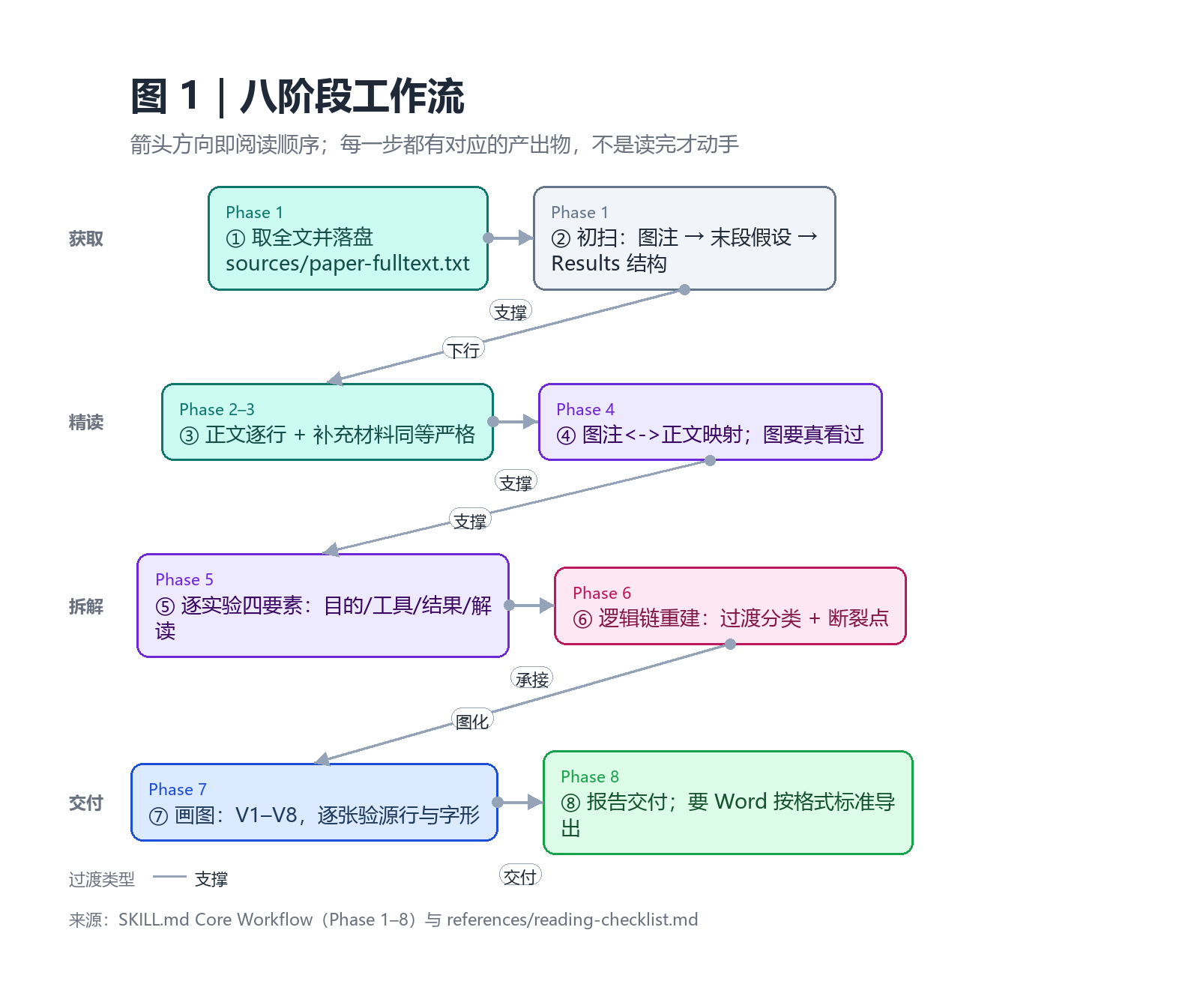
The eight-phase workflow — arrow direction is reading order, and every phase has an artifact:
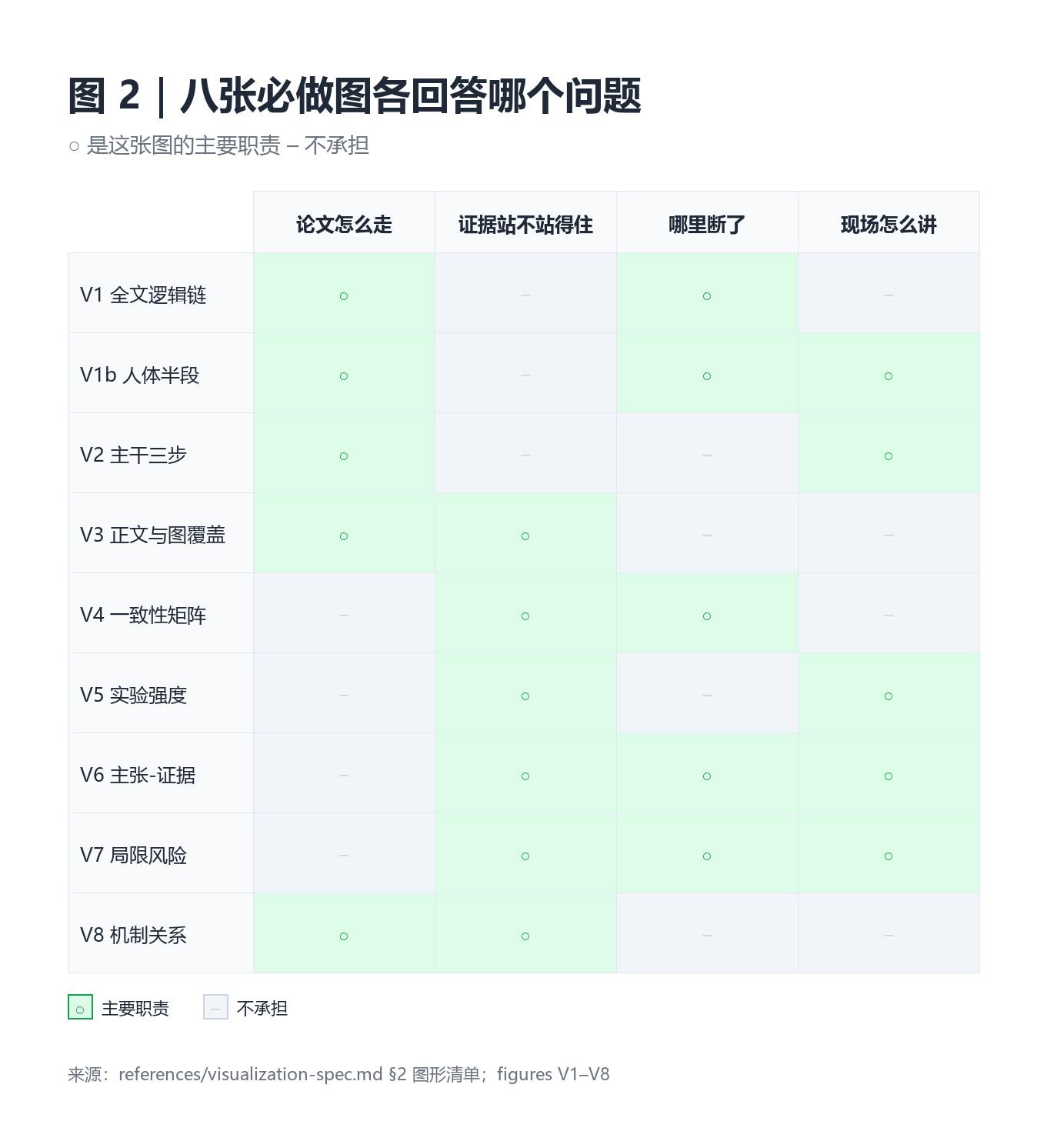
Which required figure answers which question — structure, evidence, gap, and stage delivery are separate jobs:
Also: deliverables and the gates they must pass · what a real run looks like
What the mode does
- Acquire and first-pass scan the paper; persist the full text to
sources/paper-fulltext.txt - Read the main text line by line
- Treat supplementary material with the same rigor; label anything unobtainable as missing
- Build the figure-legend ↔ main-text correspondence table plus V3 (text↔figure map) and V4 (consistency matrix)
- Decompose every experiment into purpose / design & tools / results / interpretation, plus V5 (strength overview)
- Reconstruct the logic chain, classifying each transition as elimination, extension, mechanism, application, or validation — unclassifiable transitions become dashed edges
- Render V1–V8, then check each PNG for existence, width, real Chinese glyphs, and the three-line caption
- Assemble the report; export to Word following the bundled standard
Three hard constraints live in the persona:
- Evidence boundary — never invent figure panels, legends, numbers, p-values, sample sizes, catalog numbers, or a claim of full-text access.
- Figures must actually be looked at — if a judgement rests on a legend rather than the image, say so.
- Figures must actually be drawn — an ASCII sketch, a table drawing, or an empty placeholder is not a figure; if nothing renders, say "unrendered (reason)" and keep the Mermaid source.
Figure inventory
| ID | Figure | Kind | Level |
|---|---|---|---|
| V1 | Full-paper logic chain (layers + transition types + dashed breaks) | flow | required |
| V2 | Trunk only (the three steps you must remember) | flow | required |
| V3 | Text↔figure bipartite map | flow | required |
| V4 | Legend/text consistency matrix | matrix | required |
| V5 | Experiment evidence-strength overview | matrix | required |
| V6 | Claim-evidence sufficiency ladder | matrix | required |
| V7 | Limitation risk map (impact × severity) | scatter | required |
| V8 | Term/mechanism relation map | flow | required |
| V9 | Alternative-hypothesis decision tree | flow/tree | conditional |
| V10 | Cohort / enrollment flow | flow | conditional |
| V11 | Experimental timeline | timeline | optional |
| V12 | Evaluation radar | — | default: do not draw |
Rendering ladder (record the tier in every caption): A mmdc → B npx -y @mermaid-js/mermaid-cli → C python scripts/render-diagram.py spec.json --out fig.png --mermaid fig.mmd (offline, Pillow only) → D unrendered, labelled.
python presets/deep-paper-reading/skills/deep-paper-reading/scripts/render-diagram.py \
  --selftest --tmp /tmp/diagram-check
See references/visualization-spec.md and assets/diagram-specs.md.
Install
1. As a bundle (needs the dsh CLI)
dsh plugin --profile web add github:1283011852/dsh-plugin-deep-paper-reading
# DSH Desktop: pnpm dsh plugin --profile web add github:1283011852/dsh-plugin-deep-paper-reading
No prepare script and no npm dependencies, so pnpm's git-build permission prompt does not apply. Restart DSH, then pick 文献精读模式 in the preset picker. Remove with dsh plugin --profile web remove dsh-plugin-deep-paper-reading.
2. As a preset package (.dshpreset) — no CLI
Download dsh-plugin-deep-paper-reading-<version>.dshpreset from Releases and import it in DSH Desktop. The desktop validates, previews, and atomically installs into the user preset root; an existing preset id is never overwritten. This path touches no profile configuration.
3. Skill only
cp -r presets/deep-paper-reading/skills/deep-paper-reading ~/.agents/skills/
Then deep-paper-reading is callable through the skill tool in any mode, without the mode persona. The skill directory carries scripts/render-diagram.py, so the rendering capability travels with it. (DSH does not scan ~/.claude/skills/.)
Usage
Start a session on 文献精读模式 and point it at a PDF or DOI. The report lands in paper-reading/<short-slug>-精读报告.md, extracted text and page renders under sources/, diagram PNGs plus their specs under paper-reading/figures/ — unless the workspace already has an established layout.
The skill assumes a working PDF toolchain (python + PyMuPDF). If it is missing the agent says so rather than pretending it read the full text.
Layout
├── package.json                    # dsh.bundle.patch → cordis.patch.yml
├── cordis.patch.yml                # registers this package's presets/ as a roster root
├── index.js                        # boot-time self-check row
├── presets/deep-paper-reading/
│   ├── agent.cordis.yml            # persona (incl. VISUALS) + bundled skill mount
│   ├── preset.yml
│   ├── SOURCE.md
│   └── skills/deep-paper-reading/
│       ├── SKILL.md                            # 8-phase workflow
│       ├── assets/report-template.md           # report template (figure slots + captions)
│       ├── assets/diagram-specs.md             # V1–V11 specs (JSON + Mermaid)
│       ├── references/reading-checklist.md
│       ├── references/visualization-spec.md    # diagram contract
│       ├── references/docx-conversion-standard.md
│       ├── references/biomedical-tools.md
│       └── scripts/render-diagram.py           # offline renderer (Pillow)
├── scripts/build-dshpreset.mjs     # dependency-free .dshpreset packer
├── scripts/check-composition.py    # composition + bundled-file + V1–V8 checks (CI)
└── .github/workflows/              # ci.yml (incl. renderer selftest), release.yml
⚠️ Known impact
This plugin's patch replaces the whole config of the agent-presets row, because DSH patches replace a targeted row's config value rather than deep-merging its keys. Every key that row requires is therefore restated in cordis.patch.yml, which means:
- The
rootslist belongs to this plugin. If another bundle or your owncordis.patch.ymlalso configuresagent-presets, the later layer wins outright and the earlier roots disappear. To keep both, merge the tworootsarrays by hand in your profile patch instead of mounting both bundles. defaultis restated asstandard. Youragent-presets.defaultin$DSH_HOME/settings.yamllives in the settings layer, outranks the config, and is unaffected.
Prefer the .dshpreset install if you would rather not take either consequence — it changes no profile configuration.
Verification
What was actually checked before publishing, rather than assumed:
- Preset mounts:
agentPresets.standingKeyFor('deep-paper-reading')→mounted OK, which composes the plugin subtree for real. - Bundled skill travels with the preset:
customSkillDirsusesnew URL('skills/', baseUrl), and the presetIncludesetsbaseUrlto the composition's own directory, so the skill root resolves from the user root, this package'spresets/, or an imported.dshpreset. - Bundle install and patch application: in a throwaway profile,
dsh plugin addthis package, add thedsh-web-applayer, then--dump-config— the insert row lands and theagent-presetsoverride restates all four keys. - The
!!jsexpression evaluates:dsh --profile <test profile> --helploads every row and evaluates its config — exit 0, with the plugin's self-check row printingregistered from …\presets\deep-paper-reading. --dump-configproves the patch applied, not that it evaluated (it prints the!!jssource), which is why the step above is the one that matters.- Package format: the packer mirrors the DSH Desktop importer's constraints and CI re-reads the archive with
unzip. v0.2.0 run:12 files, 172.5 KiB → 71.2 KiB, with the renderer, spec and template files all inside. - Static composition checks:
python3 scripts/check-composition.py(every push). Since 0.2.0 it also verifies that every backtickedreferences/ · assets/ · scripts/path named in SKILL.md is really packaged, and that V1–V8 are declared in both SKILL.md andvisualization-spec.md. - Renderer self-test:
--selftestrenders all four kinds and asserts that a spec withoutsourceis rejected. Locally the four PNGs came out 1020×1640 / 1360×816 / 1760×1232 / 1984×876 px, all ≥1200 px, with real Chinese glyphs.
Not verified:
- That the preset appears in your picker — that requires one real install, the only step that must happen in a live environment.
- On a Linux box with no CJK font, the renderer falls back to box glyphs (with a stderr warning); switch to mermaid-cli there. CI installs
fonts-noto-cjkto cover that path. - The actual Word layout: this repo publishes the standard and template only; reflow in specific Word/WPS versions needs the visual acceptance pass in section 13 of the standard.
License and provenance
MIT — see LICENSE.
- The bundled skill is the author's own (frontmatter records MIT and
skill-author: user). Since 0.2.0 it is no longer a byte-identical upstream copy: Phase 7, the V1–V8 contract, the visualization spec, the diagram templates, the offline renderer and the Word standard were added, and the report template and checklist were rewritten to match. - The Cordis composition derives from a locally authored
scientific-evidence-en-modepreset: its tool surface is kept as-is, with the persona row rewritten (VISUALS paragraph added, OUTPUT updated), the bundled skill directory added, and display metadata written. - Mermaid conventions (
accTitle/accDescr,classDefonly,snake_caseids, node caps) follow the K-Densemarkdown-mermaid-writingstyle guides. - Orientation evidence that diagrams aid comprehension (not a validation of this design): Infographics Improve Comprehension and Recall at the Orthopaedic Journal Club (J Surg Educ, 2020) and Let Your Ideas Flow: Using Flowcharts to Convey Methods and Implications of the Results (J Microbiol Biol Educ, 2018, PMC5969414).
- See
presets/deep-paper-reading/SOURCE.md.
Related plugins
rea
 morluto
/rea
逆向工程 CLI/MCP 工具(rea-agents):用 agent 逆向应用行为到原生二进制。独立工具而非 DSH 插件——仓库根 package.json 无 dsh 字段,本条目仅作外部工具参考。
npx rea-agents@latest setupArchify DSH 集成
 tt-a1i
/archify/integrations/deepseek-harness
Archify 的 DeepSeek Harness 集成:经 @tt-a1i/archify-dsh 适配包安装,在 dsh 中生成经校验的自包含交互式架构图、流程图、时序图、数据流图与生命周期图。安装信息基于已发布的 1.0.0;候选 1.1.0 与未发布的源码修复不计入。
dsh plugin --profile web add @tt-a1i/archify-dsh@1.0.0dsh-plugin
 Q00
Q00/ouroboros/integrations/dsh-plugin
通过 DSH MCP 客户端挂载 Ouroboros 的纯配置包,在 DSH 中提供 36 个涵盖需求访谈、Seed、执行、评估与演化流程的工具。
dsh plugin --profile web add github:Q00/ouroboros#path:/integrations/dsh-pluginanswer-me-with-html
 QingYunA
/answer-me-with-html
Answer hard questions with a one-page HTML: the model writes a short Markdown draft; the bundled CLI handles templates, SVG auto-layout and an STE controlled-writing check.
dsh plugin --profile web add 'github:QingYunA/answer-me-with-html#aab9ea19f50f038054eeb60475bbb7ea26f149e3'dashi-taskboard
 chuspeeism
/dashi-taskboard/integrations/deepseek-harness
现代化可灵活嵌入的任务面板,支持 Codex、DeepSeek Harness
dsh plugin --profile web add 'github:chuspeeism/dashi-taskboard#9aa1f4e7936d841748ed4e0fc7781b57ae6ae6cc&path:/integrations/deepseek-harness'dsh-agent-teams
 NanmiCoder
/dsh-agent-teams
AgentTeams 多智能体团队。
dsh plugin --profile web add github:NanmiCoder/dsh-agent-teams