
UI Enhancements
dsh-git-commit-panel
135ty/dsh-git-commit-panel · ★ 0
 135ty
DSH web GUI plugin: a floating commit panel that appears when a workspace git repository has unstaged changes, with a hand-written or AI-generated commit message and commit / commit-and-push actions.
Manifest details
安装
dsh plugin --profile web add 'github:135ty/dsh-git-commit-panel#a84c9ee771d44d3269673f623562a551e5e364f5'GitHub 源码安装:首次需按提示配置 allowBuilds 构建授权后重试
For install and environment setup, plus plugin development tutorials, see DSH community docs ↗
README
Table of contents
English · 中文
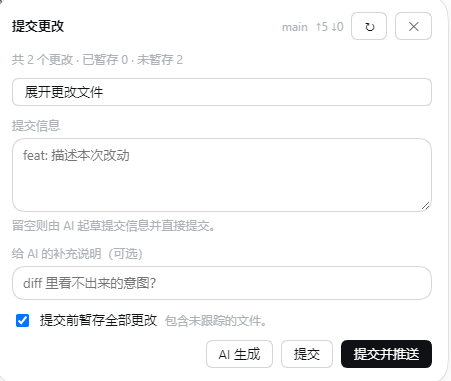
A DSH web GUI plugin: when the git repository of the current conversation's directory has unstaged or untracked changes, a small pill floats in the page showing the branch, how many changes are pending and the added/removed line totals (e.g. ⑂ main 6 changed +61 -5). Clicking it opens the commit card — write the message yourself or let AI draft it, then commit, or commit and push right away.
The rules, stated directly: the panel appears only when the current conversation's directory has unstaged or untracked changes; AI drafts are Conventional Commits — the first line is a type(scope): subject (scope optional), the type drawn from feat, fix, docs, style, refactor, perf, test, build, ci, chore, revert, with the type and scope in English and the subject under 72 characters; a message you write is committed without a format check. There are exactly two actions: commit, and commit and push.
What it does
- Appears only when it matters. A clean work tree leaves no UI at all, and you never have to open a tab or a panel first.
- Bound to the current conversation's workspace. The pill always belongs to the directory the conversation in the main view sits in: switch conversations and it follows; another conversation's or another registered workspace's changes never take its place. It stays hidden while that directory has no unstaged changes, is not a git repository, or is not a registered workspace.
- Write the message, or let AI draft it.
Generate with AIdrafts from the branch, the changed-file summary and diff excerpts using the deployment's default model (not the model your conversation has selected); an optional hint tells it the intent a diff cannot show. - An empty box is not an error. Press
CommitorCommit & Pushwith nothing typed and the message is drafted first, then committed. - Commits, or commits and pushes.
Stage all changes before committingdecides whether the work tree is staged wholesale (including untracked files) or only what is already in the index; a missing upstream comes back as an actionable error. - Local and workspace-gated. The browser cannot run git in an arbitrary directory, and the routes are reachable from this machine only.
- Speaks both languages, following the GUI locale, and follows the interface theme in light and dark alike.
Install
Requires DeepSeek Harness 0.2.1-rc.2 or newer and git on the host PATH. That floor is the plugin's engines.dsh declaration, which DSH uses for its install-time compatibility check.
The plugin is not published to npm; it ships from GitHub only. Take the prebuilt release asset — it already carries the built artifacts, so nothing runs a build script on your machine:
dsh plugin --profile web add https://github.com/135ty/dsh-git-commit-panel/releases/latest/download/dsh-git-commit-panel.tgz
That URL always resolves to the newest release, so a new version needs no README edit.
You can also install straight from the GitHub source (downloads the whole repo and builds locally; needs Node.js 24+):
# unpinned: always the default branch
dsh plugin --profile web add github:135ty/dsh-git-commit-panel

# pinned to a tag or commit — prefer this when installing from source
dsh plugin --profile web add github:135ty/dsh-git-commit-panel#v0.1.1

# a local checkout (development: a link dependency, live after a rebuild and a reload)
dsh plugin --profile web add E:/path/to/dsh-git-commit-panel
Then restart dsh web.
Install it from
dsh web/ the CLI only. The DSH Desktop client's install boundary accepts nothing butname@x.y.zfrom npm, so a GitHub-sourced plugin cannot be installed there — a limit of that client, not of this plugin.
A GitHub-source install needs one build approval
All three GitHub-source forms above install sources, and pnpm will not run a dependency's prepare script until it is allowed, so the first add fails and prints the names that need a decision. Put both into that profile's pnpm-workspace.yaml and re-run add:
allowBuilds:
  dsh-git-commit-panel: true   # this plugin's prepare: tsc + esbuild
  esbuild: true                # the esbuild prepare uses needs its platform binary
That is why the prebuilt asset is the recommended one: the tarball already carries a built lib/, so nothing runs a build script on the user's machine and the approval is not needed. Pin a source install with #v0.1.1 or #<sha> — otherwise a later push can change what an installed plugin runs without telling anyone.
Development and verification
npm install          # brings the @deepseek-ai/dsh-* declarations typecheck resolves against
npm run verify       # typecheck + build + artifact contract check
npm run build        # build only: client (esbuild) -> lib/client.js, host (tsc declarations + esbuild) -> lib/index.js
npm run pack:release # pack the prebuilt release tarball and print the upload commands and asset URL
lib/ is a build artifact and is committed: a GitHub-source install loads fine even when the repository's build script never ran.
Both halves bundle every @deepseek-ai/* import away — the host half runs on node:fs/node:path alone and the browser half requires only react, which the harness provides — so nothing has to be resolved at install time.
The browser harnesses drive a real Chromium (playwright-core is a dev dependency) against a running GUI, so they need a tokenised base URL; their artifacts land in artifacts/:
node scripts/verify-panel.mjs <base-url-with-token> [expected unstaged count]
node scripts/verify-workspace.mjs <base-url-with-token> <conversation workspace>
node scripts/verify-theme.mjs <base-url-with-token> <workspace path>
node scripts/verify-generate.mjs <base-url-with-token>   # needs a working default model
node scripts/verify-failure.mjs [base-url]               # brings its own scratch DSH_HOME
Only verify-generate.mjs spends a real model call; verify-failure.mjs boots against a deliberately invalid key (sk-invalid-key-for-failure-path-test). No real credential lives in this repository.
verify-pack.mjs needs no GUI: it exercises only the npm-report reader pack:release depends on.
npm run verify:pack
License
MIT.
Related plugins
dsh-web(原 dsh-web-ui)
 zhu1090093659
/dsh-web-ui
dsh-web(原 dsh-web-ui):任务看板、git 图、右侧面板、远程移动端 UI、桌宠、实时 token 统计与皮肤中心的全家桶。仓库已更名 zhu1090093659/dsh-web,根目录声明 dsh.bundle.patch,支持根 Git 入口安装。
dsh plugin --profile web add github:zhu1090093659/dsh-webdsh-web-all 聚合包(原 dsh-web-ui-all)
zhu1090093659zhu1090093659/dsh-web-ui/packages/dsh-web-ui-all
旧整包路径 packages/dsh-web-ui-all 已随仓库更名 dsh-web 迁移:现聚合目录为 packages/dsh-web-all,npm 聚合包 @linxin666/dsh-web-all。与总仓根 Git 入口是同一产品的两种整包方式,不重复计数。
dsh plugin --profile web add @linxin666/dsh-web-all@latestdsh-TUI
 ccch1mneyyy
/dsh-TUI
Claude Code 风格全屏终端 UI:像素鲸鱼顶栏、实时工作状态行、思考流式展开。
dsh plugin --profile web add github:ccch1mneyyy/dsh-TUIdsh-cc-tui
ccch1mneyyyccch1mneyyy/dsh-cc-tui
一个美观且实用的 Claude Code 风格 TUI 插件:像素鲸鱼顶栏、双流光大字、实时工作状态行、思考流式展开、双击 Esc 时间回溯、蓝白上下文进度条 + TPS 仪表。 零核心改动,纯插件挂载。安装插件即可启用,卸载后不会留下核心补丁。 献给钟爱tui的各位极客们 A beautiful, practical Claude…
dsh plugin --profile web add github:ccch1mneyyy/dsh-cc-tuideepseek-balance-whale-widget
 meteornox
/deepseek-balance-whale-widget
DSH 小鲸鱼余额挂件(DeepSeek Balance Whale Widget)
dsh plugin --profile web add github:meteornox/deepseek-balance-whale-widgetDSH-better-sidebar
 omdsh-dev
/DSH-better-sidebar
侧边栏完整工作台:内置文件渲染编辑、终端、Git 与子代理,支持三方插件注册新 Tab。
dsh plugin --profile web add github:omdsh-dev/DSH-better-sidebar