Usage & Billing
dsh-token-stats-18412203
1841220388zzzcccxxx-star/dsh-token-stats · ★ 2
 1841220388zzzcccxxx-star
DSH plugin: token usage & cost statistics per model / date / session with history backfill and CSV/JSON export
An English summary is not available; the Chinese summary is shown.
安装
dsh plugin --profile web add 'github:1841220388zzzcccxxx-star/dsh-token-stats#7bc65dc9901ba1dee62b49cee571eabcdd31c569'GitHub 源码安装:首次需按提示配置 allowBuilds 构建授权后重试
For install and environment setup, plus plugin development tutorials, see DSH community docs ↗
README
Table of contents
Token usage & cost statistics plugin for DeepSeek Harness (DSH).
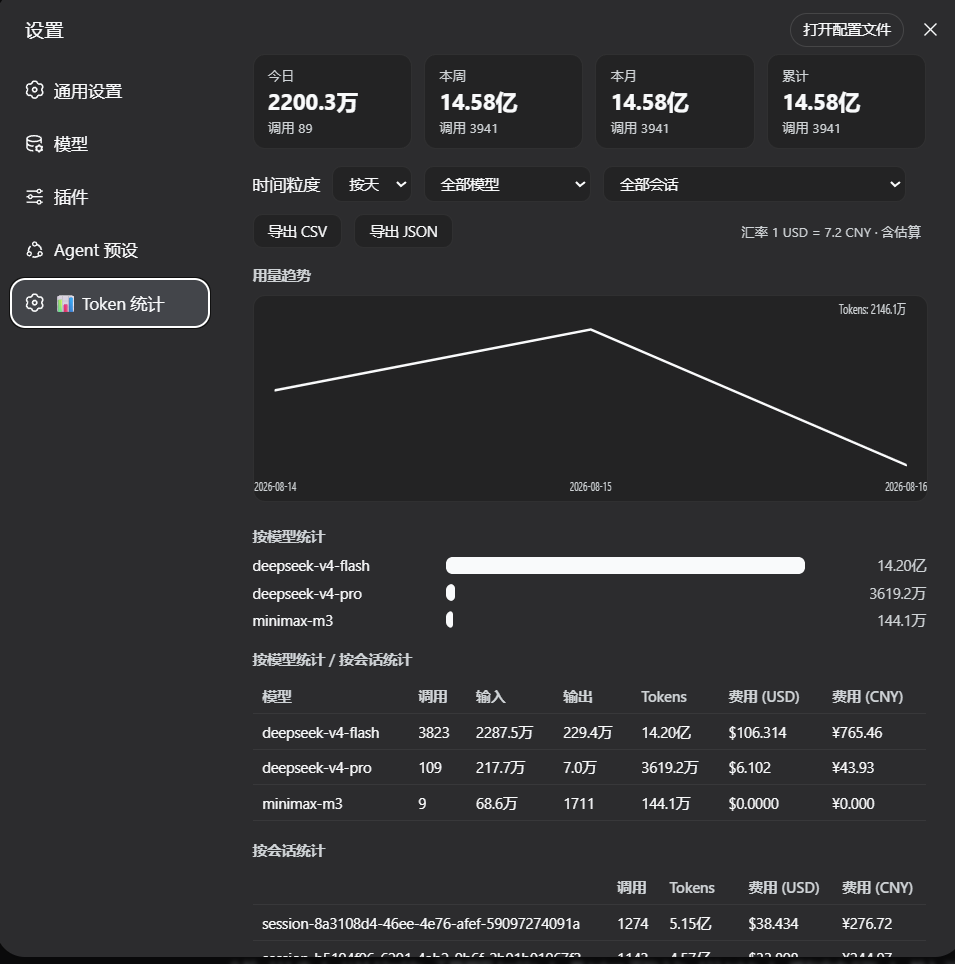
Tracks token consumption per model, per date, and per session with cost estimation in USD / CNY, served as a native page under Settings → 📊 Token Stats. Installed as an external DSH plugin, it loads automatically at DSH startup — no manual activation needed.
Features
- 📊 Native settings page (dark/light aware, follows DSH theme tokens, i18n zh/en)
- 📈 Daily / weekly / monthly trends with an SVG line chart (zero dependencies)
- 💰 Cost estimation (USD & CNY) from a built-in pricing table for DeepSeek, GPT, Claude, Gemini, Qwen…
- 🔁 History backfill: scans all persisted session logs at startup, so stats survive restarts
- ⚡ Fast: batched session-title reads with an in-memory cache (TTL 5 min), single-pass summaries, memoized pricing
- 📤 CSV / JSON export, filterable by model and session
Screenshot
Installation
The plugin is installed as an external DSH profile dependency.
Clone this repository to a local folder, e.g.
D:\dev\dsh-token-statsIn your DSH profile manifest (
~/.dsh/profiles/web/package.json):{ "dependencies": { "dsh-token-stats": "link:D:/dev/dsh-token-stats" }, "dsh": { "profile": { "bundles": ["@deepseek-ai/dsh-base", "@deepseek-ai/dsh-web-app", "dsh-token-stats"] } } }cd ~/.dsh/profiles/web && pnpm installRestart DSH web. Open Settings → 📊 Token Stats.
cordis.patch.ymldeclares the bundle-layer mount point so the plugin auto-loads at startup. With alink:dependency the profile mounts the source folder directly — after editing the plugin, just restart DSH web (no copy step).file:also works but needs a re-copy per change (.\sync-deploy.ps1automates that). Alternatively,dsh plugin --profile web add link:<path>forwards the install to pnpm; thedsh.profile.bundlesentry still needs adding by hand.
Compatibility
Declared per the official plugin contract and enforced by DSH ≥ 0.2.0 at install/startup preflight:
engines.dsh/peerDependencies["@deepseek-ai/dsh"]:>=0.1.0-rc.6 <0.3.0- Verified on 0.1.7-rc.2 (latest stable line) and 0.2.0-rc.1 (next preview line):
server APIs (
sessionQuery,tokenMeter.estimateMessage,session/event,llm/stream,webServer.register) and thesettings.sectionclient slot are all present in both lines.
DSH is developer preview and iterating rapidly. If the runtime version falls outside the declared range, DSH rejects the plugin at startup — update the range only after re-testing, or grant an exact-version exemption with
dsh plugin allow-version.
How it works
- Authoritative data = DSH persisted session logs:
assistant/messageevents carry realusage(input / output / cache-read / cache-write / reasoning tokens),request/headerevents carry provider/model. - A one-shot backfill at startup (
sessionQuery) rebuilds the in-memory aggregation index from all history (bounded concurrency). llm/streamusage chunks are captured for live (display-only) in-flight totals.- When an adapter reports no usage,
tokenMeter.estimateMessageis used and the record is flaggedestimated.
HTTP API (/token-stats/api)
| op | description |
|---|---|
summary |
today / week / month / total aggregates |
query |
time series (day/week/month) + per-model / per-session aggregates; filters: model, sessionId, from, to |
models |
built-in pricing table (USD per 1M tokens) + USD→CNY rate |
sessions |
session list (id + title) |
export |
CSV / JSON dump (format=csv|json, optional model / sessionId) |
Development
node --check index.js      # server half
node --check client.js     # browser half
node test-plugin.js        # standalone mock tests: correctness + performance benchmarks
.\sync-deploy.ps1          # only needed for file: installs; link: mounts restart to reload
Performance
Measured on the author's machine (14 sessions / ~10k records):
| endpoint | before | after |
|---|---|---|
sessions |
~1700 ms (N serial readTitle calls) |
~12 ms (one batched readTitleSnapshots + cache) |
summary |
~110 ms (4× full-array filters) | <1 ms (single pass) |
query |
~10 ms | ~18 ms at 10k records (memoized cost) |
License
MIT © 2026 quansheng
Related plugins
dsh-our-free-model
 Ebony-Vinyl
/dsh-our-free-model
Our Free Model(作者声明):装上即用、无需自备 API Key,可调用其聚合渠道的模型。渠道条件、账号要求与数据去向见「本站速览」;本站未实测。
Added:
dsh plugin --profile web add 'github:Ebony-Vinyl/dsh-our-free-model#5fcb5faf4da7843cb0d0e638ce665dd6cd4aafc1'dsh-ops
 T-Auto
/dsh-ops
Native file and PTC tools for DSH on Windows x64, Linux x64 and macOS arm64/x64; Windows-only optional Bash payload and host PowerShell integration
Added:
dsh plugin --profile web add 'dsh-ops@0.4.4'dsh-redteam-model
 SeaOf0
/dsh-redteam-model/plugins/dsh-hunter
DSH hunter plugin: FOFA / Hunter(qianxin) / Quake(360) aggregated asset search with unified DSL → per-platform syntax conversion, quota-aware pagination/export, API-key settings panel, and the code-audit live-verification pipeline (L0 fingerprint check on internet assets, L1 minimal-impact EXP only on user-authorized assets).
Added:
dsh plugin --profile web add 'github:SeaOf0/dsh-redteam-model#ce24bb25e35df8c8514e00e0d98f1a36d2e2a562&path:/plugins/dsh-hunter'dsh-cost-meter
 Han-1413141
/dsh-cost-meter
会话与当日 API 费用统计、预算图框(已用%)、官方余额、历史看板,支持峰谷计价与官方价格一键同步。
Added:
dsh plugin --profile web add github:Han-1413141/dsh-cost-meterDeepscient
 yzlin286-wq
/Deepscient/deepscient
DeepScient:科研版 Harness 的品牌、工作台界面、token 计费与文献 API 接入
Added:
dsh plugin --profile web add 'github:yzlin286-wq/Deepscient#088b0228df4fbb613d00d70823a325677f4970c2&path:/deepscient'DSH WorkBuddy Account Pool
 XDTrees
/dsh-workbuddy-xdpool
One DSH model pool for every free quota you have: merge all locally signed-in WorkBuddy accounts with auto-failover, sign in to 13 vendors by QR/web, aggregate 76 vendors' free tiers, plus a usage dashboard, model routing, a local OpenAI-compatible gateway and a points-automation suite.
Added:
dsh plugin --profile web add 'github:XDTrees/dsh-xdpool#8cfe4c330cccfb6acb8ddf898b62860f4de42d89'