UI Enhancements
dsh-harness-chat-control
1985899182/dsh-harness-chat-control · ★ 8
 1985899182
ChatGPT-style stop, revise, native annotation-chip quote, and an owned Better Sidebar 0.17.1 sidechat with reference-aware follow-up questions.
安装
dsh plugin --profile web add 'github:1985899182/dsh-harness-chat-control#a6aee9c6107d6e7438a449e31393d6a12fde563f'GitHub 源码安装:首次需按提示配置 allowBuilds 构建授权后重试
For install and environment setup, plus plugin development tutorials, see DSH community docs ↗
README
Table of contents
Bring ChatGPT-like conversation interactions to DSH Desktop.
Project goal: reproduce ChatGPT's two quote-based conversation workflows.
- Quote in the main chat: quote an answer and continue asking in the same conversation.
- Quote in the sidebar chat: carry the quote into Better Sidebar and ask in an independent sidebar session without changing the main chat.
UI examples
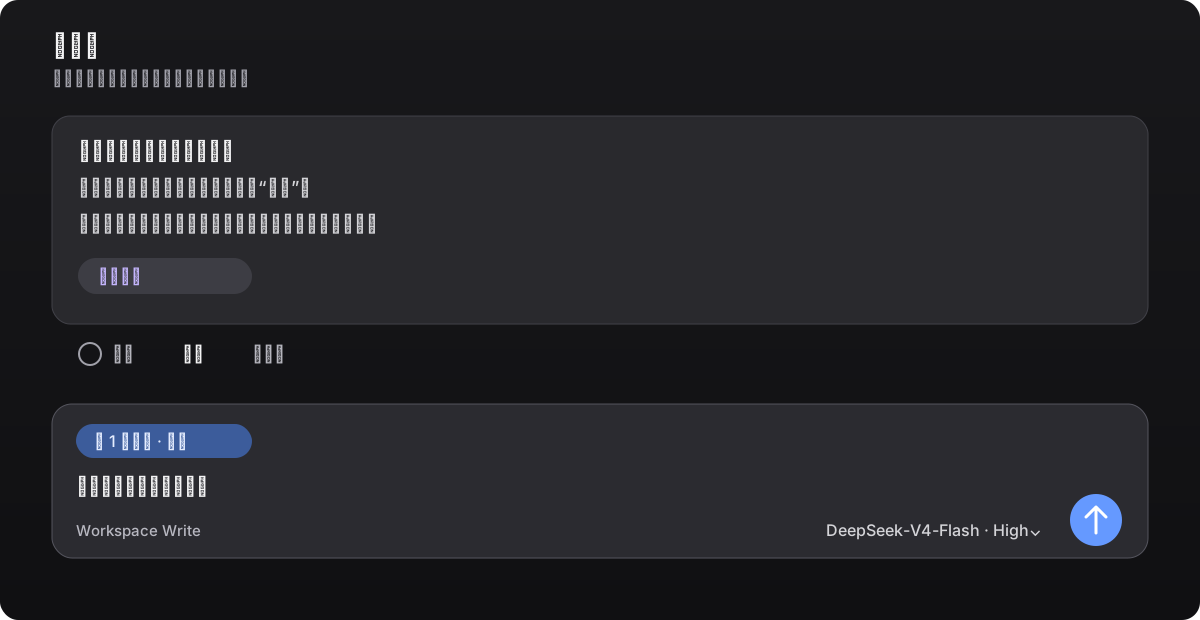
Quote in the main chat
Select text in an answer or click Quote in its action bar. The quote stays in the composer as an annotation chip; edit your question before sending.
Quote in the sidebar chat
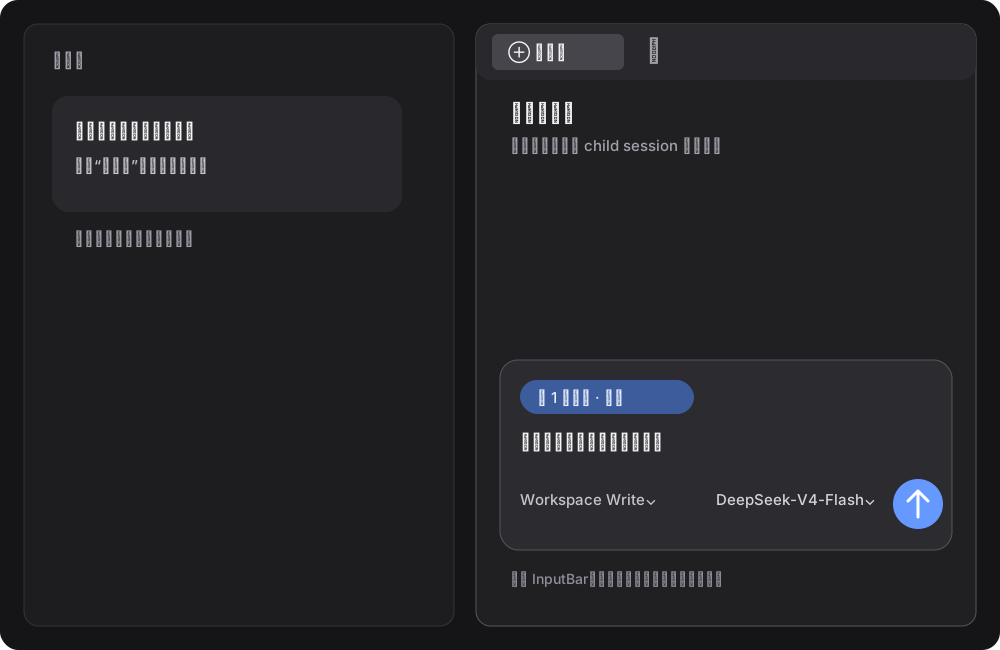
Click Ask in sidebar or choose Ask in sidebar chat from the text-selection toolbar. The sidebar keeps Better Sidebar's native composer and model selector. Text outside the quote chip is entirely user input, and nothing is sent until you click Send.
Features
- Main-chat quotes: quote a full answer or a selected fragment without leaking Markdown markers such as
>or---into the prompt. - Native annotation chip: the composer shows the quote as a
1 annotationchip. You can edit the question or remove the chip before sending. - Embedded sidebar: embeds and pins the
dsh-better-sidebar@0.28.0SideChatView, transcript mapping, and styles. It works without Better Sidebar installed, and this project's sidechat remains authoritative when another version is present. - Sidebar quote: keeps Better Sidebar's native conversation layout and DSH's session/model capabilities. Main and sidebar sessions stay independent.
- Model selection: the native model selector applies only to the current sidebar session.
- Edit and resend: click the pencil next to a user message to load the original text into the native composer. Sending replaces the visible branch in the same conversation instead of creating duplicate chats.
- Stop generation: reuses DSH's native stop/send state and does not intercept or submit native events twice.
The plugin adds the quote chip, entry points, and session routing; the sidebar layout, transcript, and child-session lifecycle come from the pinned Better Sidebar 0.28.0 source so another plugin version cannot take over.
Compatibility
| Component | Version |
|---|---|
| DSH Desktop (Windows) | 0.12.1 |
DeepSeek Harness / @deepseek-ai/dsh |
0.2.1-rc.2 |
dsh-better-sidebar |
0.28.0 |
| Node.js | >=20 |
| pnpm | 10.x or 11.x |
dsh-better-sidebar@0.28.0 targets Harness 0.2.1-rc.2. Pin Sidebar to 0.28.0 on DSH Desktop 0.12.1 (which ships Harness 0.2.1-rc.2). Harness 0.2.1-rc.2 removed the webRuntime service; this plugin now admits requests through connection.requestRejection().
Install
Use the DSH plugin command for every installation. Fully quit DSH Desktop, then run this in Windows PowerShell:
$env:DSH_HOME = "$env:APPDATA\dsh-desktop\harness"
dsh plugin --profile web add --save-exact --allow-build=node-pty "git+https://github.com/1985899182/dsh-harness-chat-control.git#v0.3.5"
If dsh is not on PATH, use the CLI bundled with DSH Desktop; it still executes the same dsh plugin install command:
$desktopNode = 'D:\DSH\DSH Desktop\resources\app\node_modules\node\bin\node.exe'
$desktopDsh = 'D:\DSH\DSH Desktop\resources\app\node_modules\@deepseek-ai\dsh\lib\bin.js'
$env:DSH_HOME = "$env:APPDATA\dsh-desktop\harness"
& $desktopNode $desktopDsh plugin --profile web add --save-exact --allow-build=node-pty "git+https://github.com/1985899182/dsh-harness-chat-control.git#v0.3.5"
The explicit HTTPS Git URL prevents pnpm from interpreting GitHub shorthand as SSH. If your network requires a proxy, set HTTP_PROXY, HTTPS_PROXY, or ALL_PROXY before running the command. After a first install, or when the plugin is not already live, fully restart DSH Desktop; for a live upgrade, follow DSH's refresh prompt.
If the profile already uses Sidebar 0.24.x, use the same dsh plugin command to pin the compatible version first:
$desktopNode = 'D:\DSH\DSH Desktop\resources\app\node_modules\node\bin\node.exe'
$desktopDsh = 'D:\DSH\DSH Desktop\resources\app\node_modules\@deepseek-ai\dsh\lib\bin.js'
$env:DSH_HOME = "$env:APPDATA\dsh-desktop\harness"
& $desktopNode $desktopDsh plugin --profile web add --save-exact --allow-build=node-pty dsh-better-sidebar@0.28.0
Then run the standard install command above.
Usage
- Main chat: click Quote in an answer's action bar, or select text and choose Add to chat; add your question and send it.
- Sidebar chat: click Ask in sidebar, or choose Ask in sidebar chat from the selection toolbar; select a model, enter your question, and send it.
- Edit and resend: click the pencil beside a user message, edit the text in the native composer, and send. The new answer appears at the original position.
- Tab management: right-click a right-sidebar tab to choose Close other tabs, Close tabs to the right, or Close tabs to the left.
Development
npm test
This validates the manifest, loader declarations, PowerShell installer, and JavaScript syntax.
Release
Current milestone: v0.3.5, validated against DSH Desktop 0.11.0 / 0.12.0 and Harness 0.2.0-rc.2, with dsh-better-sidebar@0.28.0 sidechat embedded. This release adds Close other tabs, Close tabs to the right, and Close tabs to the left to the right-sidebar tab context menu: the entries register through the host's sidebar.right.tab.menu.item slot, close through the host's closeIn, follow the real tab-strip order for left/right, and grey out when there is nothing to close. It keeps the v0.3.3 multi-tab sidechat fix: the plugin switches the sidechat tab kind to the host's native multi-instance mode (the same multiple switch the built-in terminal and browser kinds use) at install time and before every open, so each quote opens its own side-chat tab and several quoted terms can sit side by side. Verified on DSH Desktop 0.12.0 (Harness 0.2.0-rc.2): three consecutive selections through "Ask in sidebar chat" produced three independent side-chat tabs, each keeping its own reference annotation, and all three batch-close entries were verified in the same window. Recheck native Slots, sidechat API, and state interfaces after upgrading DSH or the Harness major version.
License
MIT
Related plugins
dsh-web(原 dsh-web-ui)
 zhu1090093659
/dsh-web-ui
dsh-web(原 dsh-web-ui):任务看板、git 图、右侧面板、远程移动端 UI、桌宠、实时 token 统计与皮肤中心的全家桶。仓库已更名 zhu1090093659/dsh-web,根目录声明 dsh.bundle.patch,支持根 Git 入口安装。
Added:
dsh plugin --profile web add github:zhu1090093659/dsh-webdsh-web-all 聚合包(原 dsh-web-ui-all)
zhu1090093659zhu1090093659/dsh-web-ui/packages/dsh-web-ui-all
旧整包路径 packages/dsh-web-ui-all 已随仓库更名 dsh-web 迁移:现聚合目录为 packages/dsh-web-all,npm 聚合包 @linxin666/dsh-web-all。与总仓根 Git 入口是同一产品的两种整包方式,不重复计数。
Added:
dsh plugin --profile web add @linxin666/dsh-web-all@latestdeepseek-balance-whale-widget
 meteornox
/deepseek-balance-whale-widget
DSH 小鲸鱼余额挂件(DeepSeek Balance Whale Widget)
Added:
dsh plugin --profile web add github:meteornox/deepseek-balance-whale-widgetdsh-cc-tui
 ccch1mneyyy
/dsh-cc-tui
一个美观且实用的 Claude Code 风格 TUI 插件:像素鲸鱼顶栏、双流光大字、实时工作状态行、思考流式展开、双击 Esc 时间回溯、蓝白上下文进度条 + TPS 仪表。 零核心改动,纯插件挂载。安装插件即可启用,卸载后不会留下核心补丁。 献给钟爱tui的各位极客们 A beautiful, practical Claude…
Added:
dsh plugin --profile web add github:ccch1mneyyy/dsh-cc-tuidsh-TUI
ccch1mneyyyccch1mneyyy/dsh-TUI
Claude Code 风格全屏终端 UI:像素鲸鱼顶栏、实时工作状态行、思考流式展开。
Added:
dsh plugin --profile web add github:ccch1mneyyy/dsh-TUIDSH-better-sidebar
 omdsh-dev
/DSH-better-sidebar
侧边栏完整工作台:内置文件渲染编辑、终端、Git 与子代理,支持三方插件注册新 Tab。
Added:
dsh plugin --profile web add github:omdsh-dev/DSH-better-sidebar