UI Enhancements
dsh-armory
2026heshao/dsh-armory · ★ 58
 2026heshao
Unified Skill + MCP + Expert board for DeepSeek Harness (desktop app and Web GUI) — global panel page, JSON import, WorkBuddy connector & SkillHub & Expert market installs, tool-usage tailor…
安装
dsh plugin --profile web add 'dsh-armory@2.4.3'从 npm 安装预构建包
For install and environment setup, plus plugin development tutorials, see DSH community docs ↗
README
Table of contents
- Install in one line
- What it solves
- Screenshots
- MCP — global board
- MCP — connection details
- Tool Tailor — tool-usage ledger
- Experts — summoned list
- Market — three direct sources
- Features (MCP board)
- Install (details)
- Usage
- Opening the panel
- Global vs project
- Adding a server
- Tools and credentials
- FAQ
- Interface language
- Compatibility
- Documentation
- Links
- License
中文 | English
The all-in-one control board for DeepSeek Harness: MCP servers · skills · experts · plugins · tool-usage ledger · four markets — browse, search, install and summon in one place. Forked from Imzl-zl/dsh-mcp-manager-ui (MIT) and extended into a full armory.
New in v2.4.2: documentation release — the README (both languages) now matches what actually ships: the three entry seats with six modes, how to hide the floating button, and the v2.4.1 SkillHub detail fixes. The runtime code is byte-identical to v2.4.1. See the changelog.
Install in one line
# npm (recommended: no build-approval step, ready to use)
dsh plugin --profile web add dsh-armory

# GitHub
dsh plugin --profile web add github:2026heshao/dsh-armory
Restart DSH, then open Big Fish Armory from the global panel list at the top of the sidebar (next to "Plugins") — or use the floating button bottom-right, or the sidebar bottom entry. Desktop users on the desktop profile: swap --profile web for --profile desktop.
What it solves
| Pain point | How this plugin helps |
|---|---|
| MCP config means hand-editing YAML with no feedback on whether it connects | Visual panel: status, tool schemas, enable/disable, reconnect — global & per-project scopes, project changes apply to live sessions instantly |
Installing skills means hunting for SKILL.md repos everywhere |
Direct markets: SkillHub (190k+ skills), WorkBuddy connectors (316) — search, filter, one-click install with per-file sha256 verification |
| You install a skill from the market, then cannot find it on the board or tell which one is new | Recognisable installs: cards show "installed …" with a 7-day highlight and relative time; the filter bar lays skills out newest-first as a "recently installed" timeline; when the board name differs from the market name, the original is shown |
| The list card shows a summary, but opening the detail makes it blank and the title falls back to the slug | Details read the right fields: SkillHub puts the name and summary under the response's skill object (displayName / summary_zh); empty values from the detail endpoint never overwrite what is already on screen, and the list summary shows while loading |
The detail's "homepage" opens api.skillhub.cn — a JSON endpoint a browser cannot render (405) |
Links go where browsers can go: API URLs are rewritten to the public page https://skillhub.cn/<namespace>/<slug>, and the button is not rendered at all when there is no browsable page |
| The floating button sits on top of board content and offers no way to close it | You own the entries: right-click or long-press the button to hide it (with a hint on how to reopen), it steps aside while the board occupies the centre column, and the six entry modes guarantee you are never left with no way in |
| Every MCP's tool descriptions eat context tokens; zero-use tools sit there for free | Tool Tailor: scans local session logs for per-tool call counts / errors / latency, plus a skill-level usage ledger; prune dead tools with one click |
| Migrating from Claude/Cursor/VS Code means copying config by hand | Detects local configs from 11 clients and imports them with a preview |
| OAuth-protected or key-protected servers and plugins just fail, with no hint why | Plugin market (the DSH community list) with per-entry installability, one-click MCP OAuth (RFC 9728 → 8414 → 7591 → 7636 PKCE → 8707, three callback fallbacks ending at "paste a token"), and a credential prompt before install that fills ${...} placeholders so the server works on first connect |
A unified board for DeepSeek Harness (Web and desktop): six top-level tabs — MCP, Skill, Expert, Plugins, Tool Tailor and Market — reachable from the global panel list at the top of the sidebar or the floating button. The panel floats above the session — it never interrupts an ongoing conversation.
| Tab | Manages |
|---|---|
| MCP | MCP servers: connection status, tool list, enable/disable, import, market install |
| Skill | Skills: enable/disable of SKILL.md folders, source directories, session audit scan, six categories (dev / design & creative / docs & office / productivity / ops / uncategorised), grid or list view |
| Expert | WorkBuddy expert directory (429 experts / 15 industries, including 53 expert teams): browse, search, and "summon" one into a new session as an independent agent preset. Team experts summon with their full roster — member personas are materialised locally and the lead is handed a runtime bridge that maps WorkBuddy's TeamCreate / Agent(name=…) onto DSH's subagent |
| Plugins | One searchable directory backed by the DSH community list (the community catalogs); host-shipped components in that list are labelled display-only. Install goes through the host's pluginManager.installBundle and needs a host restart to take effect |
| Tool Tailor | Per-tool call counts, error rates and context-token cost from local session logs, plus a daily wire-tax trend sampled from the tool list actually sent to the model (request/header) and compared with the registry snapshot; dead tools shown inline and prunable. Shows all tools with their real call counts by default — toggle "zero-call only (N)" to narrow. A persistent "showing N/M tools" read-out makes the filter state unmistakable |
| Market | Sub-tabs: WorkBuddy connectors (316), SkillHub skills (190k+), DSH community plugins, WorkBuddy experts (429) — browse, search, one-click install. Installed state is remembered across pages in ~/.dsh/armory/install-state.json |
The Skill panel reads DSH's custom skill directory (default
~/.agents/skills): each skill is a folder with aSKILL.md, whose frontmatter declares the invocation policy (disable-model-invocation/user-invocable). User-invocable skills automatically appear in the/command menu of the chat box.
Screenshots
One shot per main board tab (captured on the Windows desktop app, light theme). The v2.0.0 Plugins page, the OAuth flow and the v2.1.0 README preview are not pictured yet:
MCP — global board
Global / per-project scope tabs, inline enable/disable toggles; global and project servers may share a name while staying independent:

MCP — connection details
Transport, connection parameters, call timeout and config source at a glance; below is the server's registered tool list (170 here — expand any row for its full input JSON Schema):

Tool Tailor — tool-usage ledger
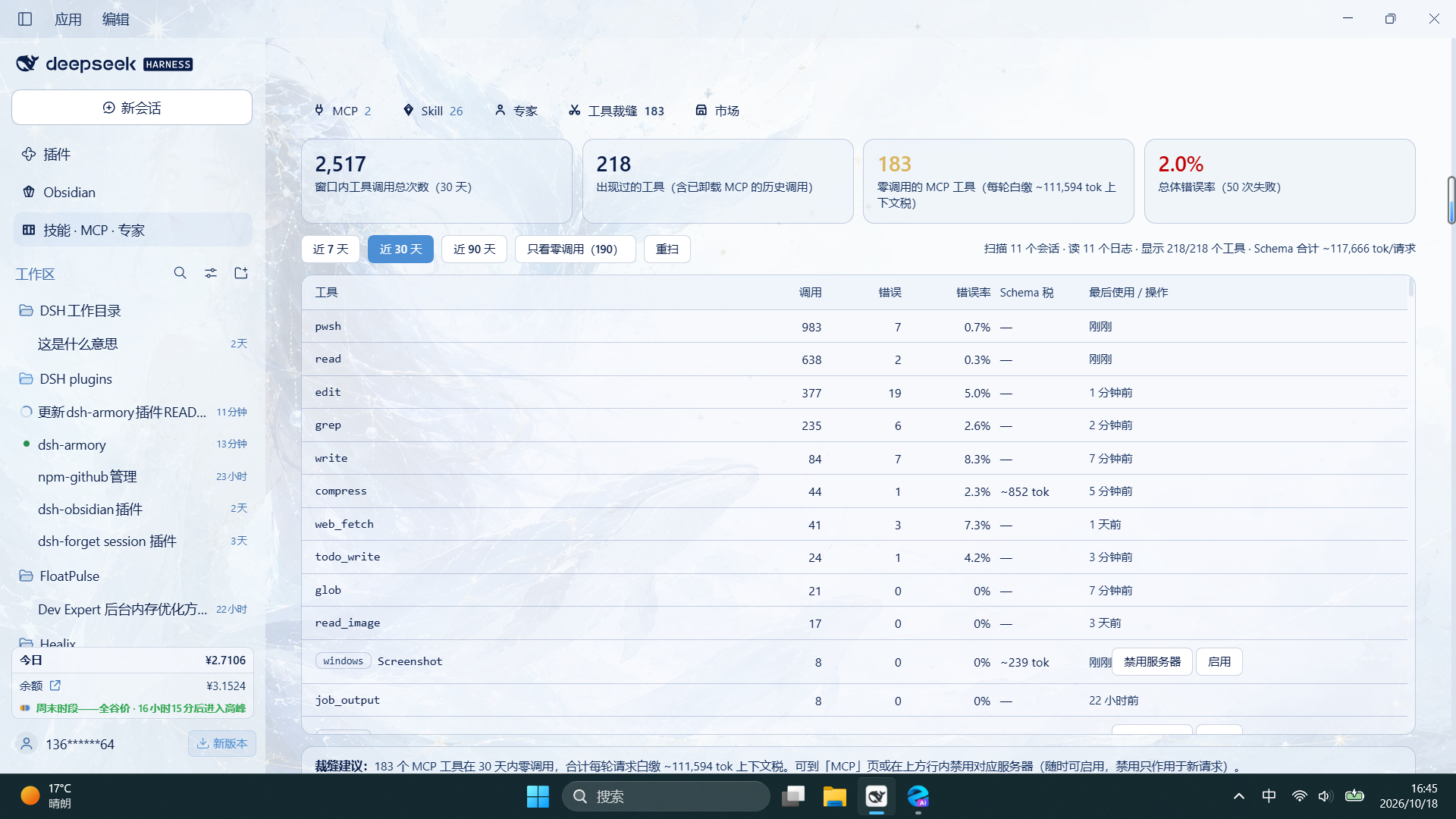
Four metric cards for the 30-day window (total calls / tools seen / zero-call MCP tools / overall error rate), one row per tool with calls, errors, error rate, Schema context tax and last use, and a persistent tailor suggestion at the bottom. Shows all tools with real call counts by default; "zero-call only (N)" narrows the view. Below the cards sits a second trend: the tool list actually sent to the model in every request (request/header), sampled per day, together with "how many times that list changed inside the window" and the timestamp of the latest one. When local logs are shorter than the selected window, the note bar says so plainly ("window N days, calls I could read span only M days"), so "this number hasn't moved in days" is attributable on screen instead of looking like a broken ledger:
Below the tool table is a new skill ledger: calls are grouped by the skill name in the skill tool's arguments, with calls / errors / last use per skill, and registered skills that were never invoked are added as zero-call rows — so it is obvious which skills are registered but unused. Calls whose arguments carry no skill name are counted separately on screen; when the registry is unavailable, the panel lists only skills seen in logs instead of faking a zero.
Experts — summoned list
One card per summoned expert / expert team: bundled skills, details, dismiss; team experts expose a "roster" block in the detail dialog (each member's duty and persona file path):

Market — three direct sources
Connectors (official WorkBuddy distribution, 316 entries; installable ones are labeled "install", CLI-based / token-dependent ones honestly show "view only" with the reason):

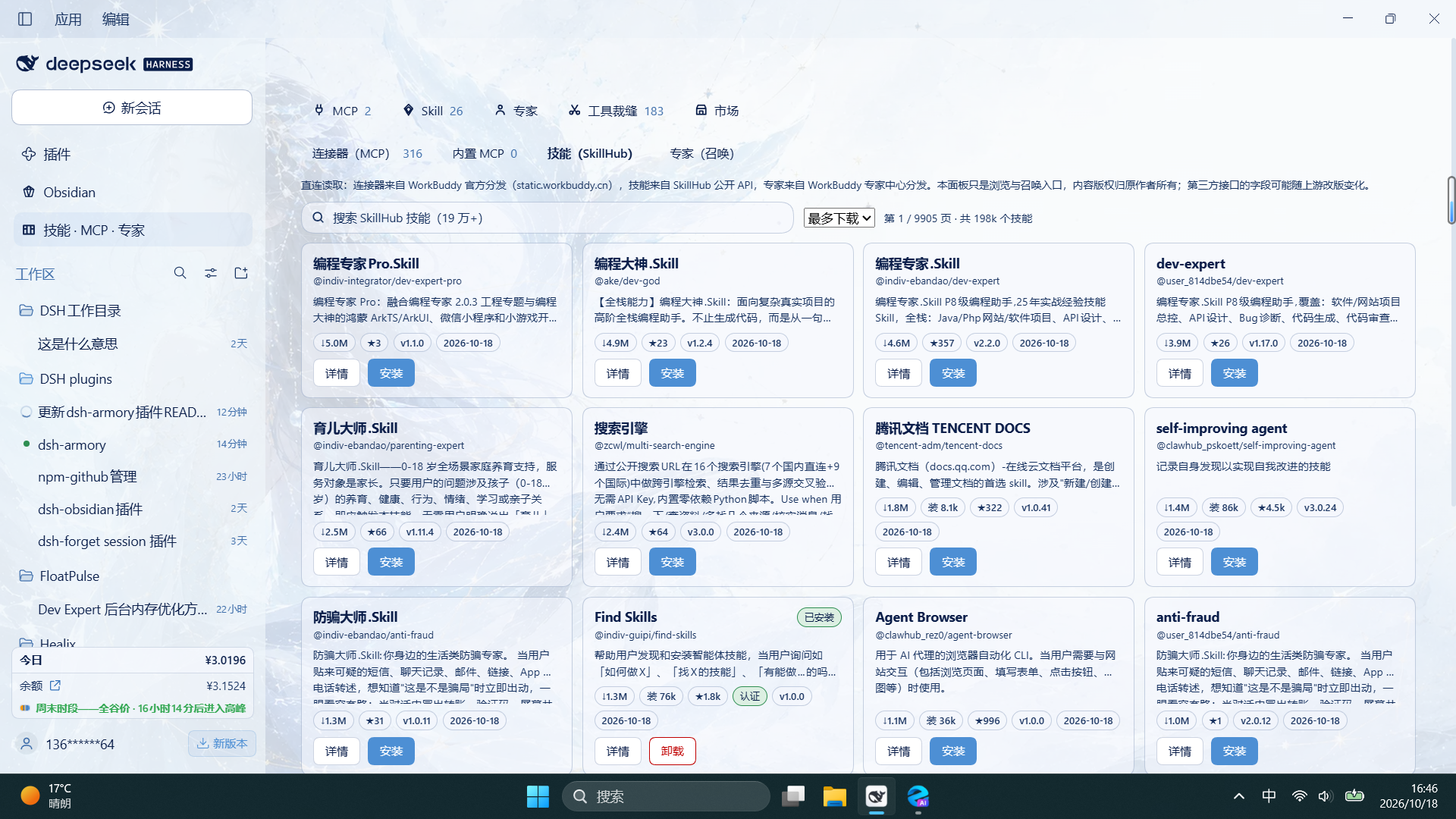
Skills (public SkillHub API, 190k+ skills; search + sort + pagination, installed ones show an "installed" badge with one-click uninstall):
Experts (WorkBuddy expert center, 429 experts / 15 industries; category filter + keyword search, "summon" straight from the card):

Features (MCP board)
- Inspect every MCP server's status, transport, connection parameters, and tool list; expand a tool to see its full input JSON Schema (required/optional, types, enums, defaults, raw JSON)
- Filter by transport (HTTP/stdio) and status, search by name/command/URL
- Enable, disable, reconnect, add, edit, remove; reveal masked credentials temporarily with the eye button and copy with one click
- Global + project scopes: global servers live in the Web profile and are available to every project; project servers live in that project's
.dsh/mcp.jsonand are visible only to its sessions. A project can also hide any global MCP - Three entry seats, six modes: the Big Fish Armory row in the global panel list at the top of the sidebar (the host's own mechanism, next to "Plugins"), the draggable floating button (position remembered) and the sidebar bottom entry all open the same panel. The "Entries" menu in the panel header switches between six combinations (two / one / three seats); all three can never be off, and the floating button cannot be hidden while it is your only entry (since 2.4.1 you can also right-click or long-press the button itself to hide it)
- WB Market (direct installs): a third board tab with two markets in one place —
- Connectors (MCP): reads the official WorkBuddy distribution ZIP (
static.workbuddy.cn, the same source the WorkBuddy desktop app uses) on demand — 316 connectors, 242 installable (mostly streamable-http), while 74 CLI-based or WorkBuddy-token-dependent ones are honestly labeled "view only" with the reason. Installing = merging the connector'smcpServersinto your MCP config through the same pipeline as "Import JSON" (admission, duplicate skip, entry-id reservation), in either global or project scope. The ZIP is ETag-cached under~/.dsh/wb-market/and decompressed with Node's built-in zlib — zero new runtime dependencies. Before installing, a connector that pins a local executable is checked first: a missing file or unsupported platform is blocked with the exact path instead of being written and then losing its tools after ten reconnect attempts (issue #3). Cards report the real connection state — connected / needs authorization / not connected — and a 401/403 offers Re-authorize instead of a reconnect that cannot help; details show the authorization expiry and can refresh it, writing the new credential back to the config - Community MCP (official Registry, new in 2.4.4): switch the Connectors tab to community entries from the official MCP Registry, with no WorkBuddy account; keyword search, cursor pagination, an "only directly runnable (npx / uvx)" filter, details with the launch command, args, environment variables and runnability, and "Add MCP" that only prefills the form and writes nothing until you confirm. Community entries are not reviewed by the Armory, and a permanent notice says so; the data layer accepts only active, runnable entries and https repository links
- The community badge shows the size of the whole catalog (since 2.4.5): the Community MCP badge on the Connectors tab stays on screen and shows the total number of catalog entries, not how many rows this query read. The official Registry returns no total, so the panel counts page by page in the background (up to 12 pages per session, progress kept locally so the next visit resumes): an exact number once it reaches the end, an "N+" lower bound while counting, and "..." before it starts. The toolbar still shows the rows read by the current query, and both tooltips spell out which measure you are looking at
- MCP entries you add now start on Windows (2.4.5): the host spawns stdio servers without a shell, while
npx/npmon Windows are.cmdwrappers, so a bare spawn exits withENOENTin milliseconds (the panel just shows "Connection closed" until the reconnect budget runs out). The single write boundary rewrites a barenpx/npminto the absolutenode.exeon that machine plus the CLI entry script, and injects a writable npm cache directory (an existingnpm_config_cachesetting is never overwritten). Non-Windows commands, absolute paths,uvx,${VAR}and!!jsare passed through untouched. Trade-off: the rewritten command is specific to that machine, so moving the config elsewhere means adding the connector again, and every rewrite is reported in the install notice - Skills (SkillHub): reads the public SkillHub API (
api.skillhub.cn, 190k+ skills) with keyword search, four sort orders, and pagination; details include publisher verification and security-scan status. Installing = downloading file-by-file, verifying each against the manifest's sha256, and writing into~/.agents/skills/(the same discovery scope as the official skill subsystem) — effective immediately. Installed skills show an "installed" badge, support one-click uninstall, and reinstalling updates them. After an install or uninstall the Skill tab's count badge and board list realign with the new set immediately — no tab switch or panel reopen needed. Downloads sorting is now done within the current page (the upstreamsortBy=downloadshangs), while the other sorts still go remote; each request gives up after 15s and reports a localized error - Skills belong to their respective authors. Both upstreams are third-party interfaces whose fields may change; the panel carries a persistent note saying so
- Connectors (MCP): reads the official WorkBuddy distribution ZIP (
- Experts (direct, 1.9.0) — a dedicated board tab (the sidebar entry is renamed Skills · MCP · Experts):
- Directory: reads the official WorkBuddy expert center distribution (
expert_center.json, 429 experts / 15 industries, ETag-cached under~/.dsh/wb-market/experts/) with category filter, keyword search, and a detail dialog (persona, bundled skills, sample prompts) before you summon - Where the persona comes from (2.4.3): detail and summon resolve the persona in this order — local override, local WorkBuddy cache (
~/.workbuddy/plugins/cache/experts/<plugin>/<version>/agents/), public distribution URL, then a stand-in. Roughly four in ten experts listed upstream (185 of 429, e.g. "Skill Smith" / skill-smith) have no publicly distributed persona file at all; if your WorkBuddy has used one, its cache is read directly, and when all three proper sources are empty a stand-in persona is built from the public description, tags and sample prompts of the expert center, with its first paragraph stating that it is not the original text. Every expert stays viewable and summonable (issue #5). - Summoning = appending one independent agent preset row to the profile patch (a
@deepseek-ai/dsh-agent-presetentry that mirrors the built-instandardpreset, with only the persona prefix swapped for the expert's full persona). New sessions then offer WorkBuddy Expert · … and that expert takes over the session, while the standard tools / planning / compaction / delegation stay intact. Multiple experts coexist; writes go through the existing patch pipeline (file lock + version check + atomic write), preserving other rows, comments and!!jsexpressions - Bundled skills: tick to install them too — a full local WorkBuddy cache (
~/.workbuddy/plugins/cache/experts/) is copied wholesale into~/.agents/skills/(prefixedwbexpert__, discovered by the skill registry immediately); without a cache it falls back to the CDN's singleSKILL.mdand labels the source honestly - Team experts (summonable since 1.9.4): WorkBuddy's 53 "expert teams" assume
TeamCreateandAgent(name=…), neither of which DSH has. Summoning now also writes one file per member persona under~/.dsh/wb-market/experts/teams/<expert>/, and appends a runtime adaptation block to the lead's persona: creating the team becomes a no-op (the roster is fixed at summon time); dispatching a member becomessubagent(afterread-ing that member's persona into the prompt), with sequential SOPs passingrun_in_background: falseso the lead waits for the result; follow-ups usesend_message. The original rules — never ghost-write a member's output, never connect members directly, everything relayed through the lead — are preserved verbatim. Member personas stay out of the system prompt (otherwise every turn would pay for all five), and are read only when dispatching - Dismissing removes that preset, its skill directory and the team member personas (hot-reloaded, no restart)
- Directory: reads the official WorkBuddy expert center distribution (
- Summon menu (in-session quick access, enhanced in 1.9.3) — the small board icon at the right of the composer toolbar opens three categories (Skills / MCP / Experts); hovering a category expands its submenu, and clicking an entry writes a reference into the composer (skills =
/skill-name, MCP = names themcp__server__*tools, experts = attaches to the current session):- Six rows per screen, scrollable: a submenu shows six entries at a time and scrolls for the rest (thin themed scrollbar), while the Manage skills / MCP / experts… button stays pinned to the bottom instead of scrolling away
- Most-recently-used first: entries you just used float to the top with a "recent" badge, the rest keep their original order; the recency pool holds 40 entries
- Experts attach / swap / detach at any time: click one to take over the current session (including one already mid-conversation), click another to replace it, click the chip's × to drop it. It affects only that session — no tool catalog changes and no profile edits. The choice is remembered per session in
~/.dsh/wb-market/experts/session-persona.json(only which session has which expert): switching sessions, restarting the host, or an agent rebuild after context compaction brings the expert back automatically; only the × button cancels it for good. Stand-in personas are never persisted - What you see is what's active: once an expert is attached, the session header shows the expert that is actually in effect (the host's "preset chosen at session creation" label steps aside while an expert is attached); the header badge, the composer chip and the menu stay in sync within the same frame after attach / swap / detach
- Plugins page (new in 2.0.0; DSH community only since 2.3.x): one searchable, filterable directory backed by the
the community catalogslist, each entry labelled with whether it can be installed —- DSH community: the
the community catalogslist (a single bare-JSON file, 5000+ entries, jsdelivr primary → fastly fallback), slimmed toSLIM_MAX_BYTES = 3MBbefore caching; update checks resolvemainto the latest commit SHA via the GitHub API and fetch from the immutable@<SHA>URL (bypassing jsDelivr's 12h CDN cache on branch URLs; falls back to the branch URL + conditional ETag requests when the API is unreachable) - Dual community aggregation (2.3.x): a second community registry,
the community catalog(CC0, distributed via its npm packagedsh-plugin-catalogon jsDelivr primary/fallback mirrors), is merged on top — only its npm-installable entries (git-only never listed), deduplicated by npm name with the primary source winning, for a ~7.2k all-installable directory; fetching resolves the npm latest version then pulls the jsDelivr@<version>immutable URL (same mechanics as the primary's SHA pinning). Both sources sync in parallel with independent fault tolerance: one going down costs its slice, never the panel - Host components: entries in that list shipped with the DSH host (the
@deepseek-ai/prefix) are labelled "host component" and cannot be installed from the market - Installing goes through the host's
pluginManager.installBundle, and the host must be restarted for the plugin to load. A missingpluginManager, an entry with no npm package name, and a host component each produce a specific message instead of failing silently
- DSH community: the
- One-click MCP OAuth (new in 2.0.0):
@deepseek-ai/dsh-mcp-clientaccepts onlyrequestInit.headersand has no authProvider, so OAuth has to complete before install — this plugin runs the flow and writesauthorization: Bearer <token>into the patch headers, then refreshes it —- Implements RFC 9728 (protected-resource metadata) → RFC 8414 (authorization-server metadata) → RFC 7591 (dynamic client registration) → RFC 7636 PKCE (S256 only) → RFC 8707 (
resourceparameter) - Three callback fallbacks: a local
127.0.0.1:<random port>/callbackcaptures the code automatically (the common case) → when the registered client only accepts a custom scheme, it asks for the full callback URL to be pasted → otherwise it falls back to "paste an access token" - A 401 from the server pops the "Authorize {server}" dialog and opens the browser for you
- Implements RFC 9728 (protected-resource metadata) → RFC 8414 (authorization-server metadata) → RFC 7591 (dynamic client registration) → RFC 7636 PKCE (S256 only) → RFC 8707 (
- Credential prompts before install (new in 2.0.0): scans
mcpServersfor${...}placeholders, opens "Fill in {connector}'s credentials", and installs with them; leaving a field blank means "I'll do it later" and the panel says "N placeholders left as-is". Connectors with no placeholders install straight through - Install-state ledger (new in 2.0.0):
~/.dsh/armory/install-state.json(INSTALL_STATE_VERSION = 1) records each connector / skill / plugin'ssource {marketplace, url, kind}, so the market can filter installed entries across pages and distinguishes "installed by this plugin" from "configured by hand elsewhere". A failed registration never blocks the install - Skill board categories (new in 2.0.0): skills are grouped into dev / design & creation / docs & office / productivity & automation / ops / uncategorised, with grid and list views, a category filter and a persistent "showing N/M skills" line. Details add the category, source directory and file location, with one-click "copy SKILL.md path" and "copy @session reference"
- Skill board scope switch (issue #8): the board now has a Global / workspaces segmented control at the top, matching the MCP page's scope semantics. Selecting a workspace lists only the project-level skills found in that workspace under
<cwd>/.agents/skillsand<cwd>/.dsh/skills(the source filter narrows to "project .agents/skills / project .dsh/skills"); if the project has none, the board shows an empty state — switch back to Global for user-level and bundled skills. The choice is stored in the URL hash (skillws), so refresh and shared links return to it; a removed or renamed workspace falls back to Global. PreviouslyskillScopeArgreceivedundefined, so the board only scanned user-level and bundled directories and no project-level skill could appear - Skill uninstall (new in 2.2.0): skills in user-level / project-level directories can be deleted from the detail pane (inline second confirmation, permanent, no undo), while skills shipped with DSH, registered at runtime, or living in custom directories stay read-only and say so. The host only exposes read endpoints, so removal is handled by this plugin's
removeSkill: source allowlist → strict root containment → parent-directory realpath → symlinks unlinked without touching their targets → the folder must containSKILL.mdand stay under the root - Live skill-set refresh (new in 2.2.0): installing or uninstalling from the market, and uninstalling from the board, all broadcast on a module-level change bus. The top Skill badge and the board list subscribe to the same bus and re-read the truth, with a sequence guard on the badge fetch so rapid toggles cannot roll the number back. The new set is reflected immediately — no tab switch or panel reopen
- Model-side skill disable / release (new in 2.4.4): in the Tool Tailor's skill ledger, the inline Disable button writes
disable-model-invocation: trueinto theSKILL.mdfrontmatter (the host's official key), so the model no longer loads that skill or pays its context tax, while manual/references keep working; Release removes the key and restores it. Only user-level and project-level standard skills roots are accepted: source allowlist → absolute path with strict root containment → realpath must stay inside;bundled/runtime/customskills get no button. Duplicate keys are collapsed and every other byte, including line endings, is preserved - Recognisable skill installs (new in 2.4.0): every Skill card / list row shows an "installed …" badge — green with relative time within 7 days ("installed 3 hours ago"), "N days ago" within 30 days, an absolute date beyond. The timestamp prefers the first-install time recorded in the install-state ledger, then the directory creation time, then its mtime; skills shipped with DSH or registered at runtime have no install event and show no badge. The filter bar adds a recently installed timeline (newest first), and when a board name (from
SKILL.md'sname:) differs from the market name recorded in the ledger, the card carries a "from market: original name" badge and the detail pane adds an original-name row. Data comes from the newskillInstallInfoRPC (the host scans the standard skill roots and reads only the first 4KB of eachSKILL.md); the host must be restarted once to register it, and the board says so explicitly instead of showing nothing - Skill details and market homepage fixed (new in 2.4.1): SkillHub's detail endpoint keeps the name and summary under the
skillobject (displayName/summary_zh), while the old mapping only read the root — so the detail dialog showed the slug as the title and an empty body. Values now fall back throughskill.displayName → root name → slugandskill.summary_zh → skill.summary → legacy fields, icon / created date / category / source / publisher come from the same place, and merging the response into the list entry never lets empty strings overwrite what is already shown (0andfalsestill win). The summary from the list is visible while the detail loads. Ahomepagepointing atapi.skillhub.cn(a JSON API that returns 405 in a browser) is rewritten tohttps://skillhub.cn/<namespace>/<slug>, with a second guard at render time, and feedback links prefer the GitHub repository when one can be resolved (issue #4) - The floating button can be hidden, and it steps aside for the board (new in 2.4.1): right-click or long-press (about half a second, works with touch and stylus) opens a menu with Hide floating button, followed by a 6-second hint saying where to reopen it. When the board occupies the centre column the button collapses automatically instead of covering list and detail text, and returns when you leave the board — without changing your chosen mode. If the button is your only remaining entry the item is disabled and explains why: pick another mode in the "Entries" menu before hiding it, so you can never end up with an armory that cannot be opened
- Custom suites (new in 2.2.0): bundle skills you use together. The Suites button in the Skill board toolbar opens a manager: pick skills on the left, arrange them on the right (click + or drag one in, drag to reorder, delete with an inline confirmation), and one save overwrites the whole set into
~/.dsh/armory/suites.json(staging + atomic rename; invalid input is rejected without touching the file). The composer's Skills submenu shows a suite group at the top — one click expands the suite in member order into multiple/nametokens in the draft. Limits: 100 suites, 40 members each; members count individually toward "recently used" rather than the suite name - Marketplace registry (new in 2.0.0): market sources are no longer hard-coded — they live in
~/.dsh/armory/marketplaces.json(REGISTRY_VERSION = 1), fall back to the built-in defaults when missing or corrupt, persist on first read, and can be added / edited / removed. Writes are staging + atomic rename - Instant community list (new in 2.0.0): the last successful slim list is mirrored into
localStorage(7 days / 4MB cap, older snapshot kept on quota errors), so the first paint renders the snapshot before the real result silently replaces it (zero network, zero IPC). When no source is reachable it says "showing the local cache" instead of an empty list - Faster plugin market (2.3.0 optimization): the community directory is prefetched and cached in layers, so opening the Plugins tab no longer waits for a full request —
- Directory prefetch: the market panel reads the community directory 400ms after mount; when the first paint hits the browser snapshot (see above) it renders immediately, so the Plugins tab is usually ready when you get there
- Clickable affordance: plugin cards that open a README use
cursor:pointer, an accent hover border and a:focus-visiblering, and respond to Enter / Space. The Install button stops propagation, so pressing it never opens the card as well - Card layout (2.3.0 optimization): DSH community plugin cards now use five fixed horizontal lines — a 32px avatar with a single-line title, one official / repository line, a two-line 38px summary, up to three tags in 18px, and a 38px footer (stars + verification date + install). Every card is exactly 176px tall, so install buttons line up across each row. The verification version moves into the icon tooltip, the owner appears once, a failed avatar falls back to the initial, and installed / host-component states stay visible in the footer. This applies only to community plugin cards; connector, skill and expert cards are untouched
- Community README preview (new in 2.1.0): click any card under Plugins → DSH community and the plugin fetches and renders that repository's README in place (headings, paragraphs, lists, tables, code blocks, quotes, and
<p align="center"><img …>banners) —- On demand, fetched once: the README is deliberately kept out of the slim directory cache and only fetched when you open a card; it tries
README.md/readme.md/Readme.md/README.MD/README.markdown/README_EN.mdin that order, and when the repository field holds an npm package name it asksregistry.npmjs.orgforrepositoryfirst, then fetches the raw text from GitHub - Limits and cache: 20s per fetch, 160k characters of body (truncated and labelled when longer); successful reads are cached to disk per repository / npm name for 7 days, so reopening the same plugin is instant, and when the network is down / rate-limited / the repository is gone it falls back to the cache and says so
- Images and safety:
http(s)images go through the read-onlywsrv.nlproxy (output=webp&q=72&w=880, allow-listed hosts only); relative paths are resolved against the repository URL and skipped when they cannot be; the body is turned into React elements by a small hand-written parser — neverdangerouslySetInnerHTML— andjavascript:/data:/vbscript:pseudo-links are downgraded to plain text - Jump to the end: a "Jump to end" pill stays in the modal's bottom-right corner (sticky inside the dialog, keyboard-focusable, smooth scroll); at the bottom it rests below Close / Install / Reload rather than covering that row
- On demand, fetched once: the README is deliberately kept out of the slim directory cache and only fetched when you open a card; it tries
- Community directory and update-probe fixes (2.1.0): the instant-open snapshot no longer shadows the real list (previously the real result was dropped once the snapshot painted, leaving the directory stuck on the old snapshot), and update probing now follows the same source chain as the directory itself (it asks the source the cache actually came from, then falls back to the others, first ETag wins) — fixing the "directory opens but every update check says
probe-failed" trap on machines where the primary source is unreachable - Who made it, and is it still maintained? (new in 2.3.0): every market card carries a zero-network "people" signal first — the publisher's avatar / name and last-updated date (SkillHub publisher or GitHub repo owner for skills, repo owner for plugins and community entries, the directory's own avatar and update time for experts). Opening a detail pane then makes one on-demand call to the public GitHub API to add the maintainer's profile, last commit, open issues, stars, license and primary language, plus an honest badge for committed in the last 30 days / no update for over 6 months / archived. Requests are cached for 6 hours and reuse ETags, at most 8 repositories per call; unauthenticated rate limits fall back to the old cache and say so. A lookup failure only hides that row — it never blocks the detail body
- Recent activity (new in 2.3.0): a timeline at the top of the Market page that belongs only to this machine — it compares the last successful directory load with this one and reports added, removed, and version or verification-status changes, with entry names and relative timestamps. No network, no telemetry, no invented online counts or live feed; when nothing changed it says so. Events expire after 7 days, at most 8 are kept, and you can clear them in one click. Skills are only recorded on the default page with no keyword and the default sort, so paging and searching cannot manufacture fake activity; clicking an entry switches to that tab and clears its search, filters, sort and page so you land on the unfiltered full market
- Loadout (new in 2.3.0): the "Loadout" button in the Market header exports this machine's MCP servers, skills, experts and plugins as a shareable JSON file — names, types, sources, versions and the minimum identity fields only. It never contains keys, headers, URL query parameters or environment-variable values, and skill bodies and expert personas stay out too. A friend's loadout can be pasted or opened from a file; the panel compares it item by item as
installed / update available / not installed, and "Find in market" only jumps to the matching market with a search term — it never installs or writes configuration automatically. Capped at 200 items / 256KB, with truncation labelled - Reach real people (new in 2.3.0): detail panes open with real exits — a repository and its discussions / issues when one can be resolved, the upstream homepage when there is one, and a prefilled GitHub issue to the Armory for any entry; you can also copy the feedback template (entry, type, source, version, environment) and edit it before posting. All links open in a new tab, and you see the content before anything is submitted. There is deliberately no in-app forum, likes or bookmarks: send people to where the community already is instead of building an empty stage inside the plugin
- Faster market loading (2.4.4 optimization): the host-side market and expert data layers now load on first use; the first paint prefetches only the current tab (the unconditional 400ms prefetch of plugin and expert directories is gated); the plugin snapshot compares a signature, is written on an idle frame and has a 4.5MB budget; the skill list uses stale-while-revalidate; the connector count is cached for 10 minutes; the Tool Tailor report is cached per
days, deduplicates concurrent calls and supports arefreshbypass; hovering a card prefetches its details, and switching categories reuses loaded data. Diagnosis, measurements and per-item rollback switches are in market load performance - Security hardening (2.4.4): external links go through one allowlist —
httpsonly,httponly for loopback, andjavascript:/file:/data:are rejected before any process starts;revealSkillaccepts only a skill name and scope, with the path resolved by the host registry; community repository links are https-only; skill-disable writes are pinned to the four standard skills roots and verified by realpath - Import MCP configuration from other clients installed on this machine: Claude Code, Codex (
config.toml), OpenCode (including.jsonc), pi, Claude Desktop, Cursor, Windsurf, VS Code, Gemini CLI, Roo Code, and the cross-tool shared config. Everything is previewed before writing, with "merge" and "replace" modes - Follows the DSH dark/light theme and adapts to narrow/mobile widths
- Update notice and one-click upgrade: a dismissible banner when a newer release exists (at most one check per day; disable with
DSH_ARMORY_DISABLE_UPDATE_CHECK). Nothing happens until you press Upgrade — it never auto-updates; the upgrade itself is executed by DSH's official pluginManager, which handles version checks and rollback. Local dev copies installed vialink:/file:/github:get no button (it would replace your link with an npm package) - What changed, said once: after the version changes, the first time you open the panel a small card lists what's new; confirming it never shows it again, and it uses no network and sends nothing
Install (details)
# npm (recommended)
dsh plugin --profile web add dsh-armory

# GitHub
dsh plugin --profile web add github:2026heshao/dsh-armory
Then restart DSH (restart the desktop app, or dsh web for the browser GUI; desktop users: swap --profile web for --profile desktop). To upgrade: npm installs can click the in-panel upgrade banner; GitHub installs re-add with a new tag:
dsh plugin --profile web update dsh-armory
To uninstall (your configured MCP entries stay in place):
dsh plugin --profile web remove dsh-armory
Details, local development installs, and troubleshooting: docs/installation.md (Chinese).
Do not add
dsh-armoryto the profile'scordis.patch.yml, an agent preset, or an extra--patchfile by hand — the plugin command already does that, and duplicating it fails loudly on purpose.
Usage
Opening the panel
Three entry seats, one panel:
- The "Big Fish Armory" row in the global panel list (top of the sidebar): the host's official panel list, right next to "Plugins" — the primary entry;
- Floating button (bottom-right): draggable, position remembered;
- Sidebar bottom entry: a 42px row (icon + label) when the sidebar is expanded, an icon button once it collapses into the rail.
The panel floats above the session; closing it ("Close" or Esc) does not affect the conversation.
Which seats stay is chosen in the panel header's Entries menu, six modes: Global panel + floating button (recommended) (default) / Global panel only (top-left, next to "Plugins") / Global panel + sidebar bottom entry (no floating button) / Floating button only / Sidebar bottom entry only / All three entries. All three can never be off — the panel opens only from those seats, so the menu is a "keep at least one" combination rather than three independent switches. The choice lives in localStorage, so a different browser or cleared storage means picking again.
Two self-service rules for the floating button (since 2.4.1):
- Right-click or long-press it (about half a second) for a menu with Hide floating button — no hunt for the Entries menu. A 6-second hint then says where to reopen it. If the button is the only entry left, that item is greyed out and points you to the Entries menu: keep another seat before losing this one.
- It auto-collapses while the board occupies the centre column: the button is an overlay and would sit on the list and detail text; it comes back as soon as you leave the board, and your mode is untouched.
Global vs project
Tabs switch between "Global" and each project:
| Tab | Stored in | Visible to | When changes take effect |
|---|---|---|---|
| Global | The Web profile's cordis.patch.yml |
every project | DSH hot-reloads, usually immediately |
| A project | That project's .dsh/mcp.json |
only that project's sessions | as soon as it is written |
serverName is scoped: different projects, and global vs project, may reuse the same name with independent connections; duplicates inside one scope are rejected.
Adding a server
Two ways, both from the panel toolbar:
- Add MCP: fill in
command/args/env/cwd(stdio) orurl/headers(HTTP), with presets for common servers. - Import JSON: paste another client's configuration, preview, then write. "Merge (update by name)" and "replace" modes; field mapping and limits in docs/json-import.md (Chinese).
Tools and credentials
The detail pane lists the tools a server currently registers; expand one for its full input schema. Credential fields are masked by default — the eye button asks the Host for the effective runtime value and shows it temporarily, with one-click copy. If you do not actually edit a field, saving keeps the original reference instead of writing secrets back into the configuration file.
FAQ
The panel says a server is "disabled", but the model reports unknown tool "mcp__xxx__...".
That server is disabled, so it registers no tools. Enable it in the panel.
I upgraded but the skill detail is still blank, or the floating button behaves as before.
Check two things. First, that the new package actually landed: after dsh plugin --profile web update dsh-armory, the first panel you open shows a "vX.Y.Z update" card whose title is the version currently installed — or read the version field of ~/.dsh/profiles/<profile>/node_modules/dsh-armory/package.json. Second, quit DSH completely and start it again — the market field mapping lives in host-side modules (lib/wb-market.js, lib/index.js) that are loaded once at process start, so reloading the panel only refetches the UI bundle. If one specific skill still has no summary, post its slug in an issue and that response gets checked on its own.
Opening an expert, the detail says this persona is not the original text?
That is the stand-in, not an error. About four in ten experts in the upstream expert center (185 of 429, "Skill Smith" among them) only have a directory entry — there is no persona file at the public distribution URL — and when the local WorkBuddy cache does not have it either, the Armory builds a stand-in from the public description, tags and sample prompts, so the expert stays viewable and summonable; it only reproduces "who this roughly is and what they own", not the original working method. To use the original, save it as ~/.dsh/wb-market/experts/overrides/<plugin>.md (e.g. skill-smith.md); the next detail view uses it automatically and labels the source "local override" — delete the file to fall back to cache, distribution or the stand-in. The first paragraph of the stand-in also gives the exact path on this machine.
How do I upgrade? Why did the panel not notify me?
GitHub tag-pinned installs never cross versions — re-add with the new tag (github:2026heshao/dsh-armory#v1.9.0). The banner only queries this repo's GitHub Releases, at most once a day, is dismissible, and never acts on its own.
Will editing touch my other configuration?
No. Global edits only rewrite the entries declared by @deepseek-ai/dsh-mcp-client that this plugin manages, preserving other plugin rows, comments, and !!js expressions.
Does uninstalling remove my configured MCPs?
No. Uninstalling the plugin leaves existing @deepseek-ai/dsh-mcp-client rows in the profile untouched.
Interface language
The plugin ships Chinese (source language) and English:
- Precedence:
localStorage['dsh-armory.locale'](explicit override) -> DSH Settings -> General language ->navigator.language->zh-CN. - Fallback:
zh*renders Chinese,en*renders English. Other languages (ja,de,fr, ...) have no translation yet and fall back to English instead of showing Chinese to users who cannot read it. - Covered: panel UI, buttons / dialogs / empty states, the post-upgrade "What changed" body and where-to-find hints.
- Not translated: third-party content such as connectors, skills, experts, and community READMEs stays in the publisher's original language.
- Force English: run
localStorage['dsh-armory.locale'] = 'en-US'in DevTools and reload; delete the key to follow the DSH language again. The host language is honored even on a Chinese OS (the panel no longer depends on the browser locale).
Compatibility
| Item | Verified |
|---|---|
| DeepSeek Harness | 0.1.5-rc.1 and above (verified through 0.2.1-rc.2, DSH 44.7.0) |
| Node.js | whatever runtime DSH ships/supports |
| Platform | Windows; Linux/macOS share the same DSH Web contracts |
Documentation
- Installation and upgrades (Chinese)
- JSON import (Chinese)
- Design and limits (Chinese)
- Market load performance (Chinese)
- Official DeepSeek Harness plugin publishing guide
Links
License
MIT
Related plugins
dsh-web(原 dsh-web-ui)
 zhu1090093659
/dsh-web-ui
dsh-web(原 dsh-web-ui):任务看板、git 图、右侧面板、远程移动端 UI、桌宠、实时 token 统计与皮肤中心的全家桶。仓库已更名 zhu1090093659/dsh-web,根目录声明 dsh.bundle.patch,支持根 Git 入口安装。
Added:
dsh plugin --profile web add github:zhu1090093659/dsh-webdsh-web-all 聚合包(原 dsh-web-ui-all)
zhu1090093659zhu1090093659/dsh-web-ui/packages/dsh-web-ui-all
旧整包路径 packages/dsh-web-ui-all 已随仓库更名 dsh-web 迁移:现聚合目录为 packages/dsh-web-all,npm 聚合包 @linxin666/dsh-web-all。与总仓根 Git 入口是同一产品的两种整包方式,不重复计数。
Added:
dsh plugin --profile web add @linxin666/dsh-web-all@latestdeepseek-balance-whale-widget
 meteornox
/deepseek-balance-whale-widget
DSH 小鲸鱼余额挂件(DeepSeek Balance Whale Widget)
Added:
dsh plugin --profile web add github:meteornox/deepseek-balance-whale-widgetdsh-cc-tui
 ccch1mneyyy
/dsh-cc-tui
一个美观且实用的 Claude Code 风格 TUI 插件:像素鲸鱼顶栏、双流光大字、实时工作状态行、思考流式展开、双击 Esc 时间回溯、蓝白上下文进度条 + TPS 仪表。 零核心改动,纯插件挂载。安装插件即可启用,卸载后不会留下核心补丁。 献给钟爱tui的各位极客们 A beautiful, practical Claude…
Added:
dsh plugin --profile web add github:ccch1mneyyy/dsh-cc-tuidsh-TUI
ccch1mneyyyccch1mneyyy/dsh-TUI
Claude Code 风格全屏终端 UI:像素鲸鱼顶栏、实时工作状态行、思考流式展开。
Added:
dsh plugin --profile web add github:ccch1mneyyy/dsh-TUIDSH-better-sidebar
 omdsh-dev
/DSH-better-sidebar
侧边栏完整工作台:内置文件渲染编辑、终端、Git 与子代理,支持三方插件注册新 Tab。
Added:
dsh plugin --profile web add github:omdsh-dev/DSH-better-sidebar