Usage & Billing
dsh-notify-cues
3332210/dsh-notify-cues · ★ 2
 3332210
DSH Windows 通知插件:按 turn/end 的真实结束原因区分「完成 / 中断 / 出错 / 额度耗尽 / 被阻塞 / 需要操作」,各类独立提示音与 toast,任务栏闪烁可开关,附图形化设置页。
An English summary is not available; the Chinese summary is shown.
安装
dsh plugin --profile web add 'github:3332210/dsh-notify-cues#3f5186180f275437957e55a67670618555bed936'GitHub 源码安装:首次需按提示配置 allowBuilds 构建授权后重试
For install and environment setup, plus plugin development tutorials, see DSH community docs ↗
README
Table of contents
Windows notifications for DeepSeek Harness that tell you why a turn ended — finished, interrupted, failed, out of budget — each with its own chime, instead of reporting every stop as "task complete".
Pure PowerShell notification runner: no .NET desktop runtime, no audio assets, no helper executable. All six chimes are synthesized on the fly.
中文 | English
The plugin is aimed at Chinese users first, so the default README is Chinese: README.md. This file is the English translation.
The problem
Every Windows notification plugin for DSH decides "done" from agent/status → idle. That is true when a turn finishes and when you press stop. So interrupting a task gives you a cheerful "task complete" toast.
The reason is already in the session log — DSH appends it itself:
this.session.append("turn/end", { turn, reason: turnEnds })
reason.kind comes from TurnEndReasonMap, and a cancellation carries a nested cause:
type TurnEndReason     = 'completed' | 'aborted' | 'error' | 'max-tokens'
                       | 'interrupted' | 'blocked' | 'forked'
type TurnEndCancelCause = AgentCancelCause | { kind: 'legacy' }
type AgentCancelCause   = { kind: 'user' } | { kind: 'parent' }
                        | { kind: 'hook'; reason: string } | { kind: 'disposed' }
Pressing stop is { kind: 'aborted', reason: { kind: 'user' } }. The information was always there; this plugin reads it.
Six situations, six chimes
| Situation | Signal | Default chime | Sounds like |
|---|---|---|---|
| Completed | completed |
completed |
D5→A5 rising pair |
| Interrupted | aborted + reason.kind === 'user' |
interrupted |
A5→A4 falling, cut short |
| Failed | error |
error |
low, dissonant, falling |
| Output limit hit | max-tokens |
maxTokens |
three sharp pips |
| Blocked | blocked, or aborted + reason.kind === 'hook' |
blocked |
flat double knock |
| Your input is needed | approval/asked, ask_user_question |
attention |
E5-G5-B5 arpeggio |
aborted with parent (a delegating agent cancelled its child) or disposed (session teardown) stays deliberately silent — that is lifecycle noise, not news. TurnEndReasonMap is documented as merge-extensible by other packages, so an unrecognized kind is silent rather than guessed at.
Taskbar behaviour: the chat-app pattern
Flashes a few times to catch your eye, then stops animating but leaves the taskbar button lit until you come back — the same thing QQ and WeChat do.
flashAfter |
Behaviour |
|---|---|
holdUntilFocused (default) |
Flash 3×, then hold the attention highlight until focused |
stop |
Flash 3× and stop |
keepFlashing |
Animate until focused |
Windows never flashes a foreground window, so none of this fires while you are already looking at DSH.
Settings page
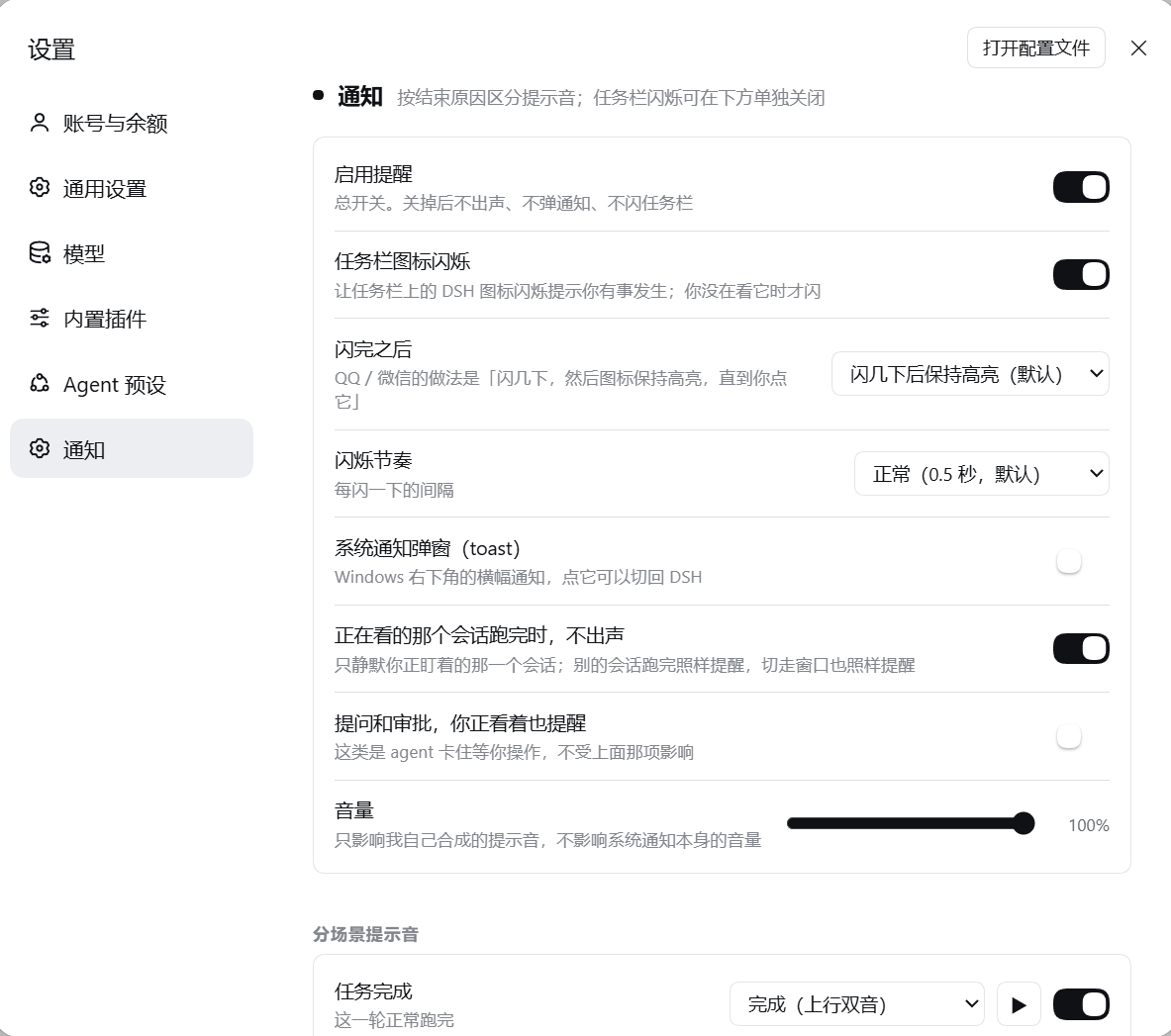
Registers a section into DSH's own Settings dialog (through the settings.section slot), not a bespoke popup:
- master switch · taskbar flash · toast — independent
- flash count, pace, and what happens after the flash
- "stay quiet when the conversation on screen finishes" — see below
- volume
- per-situation enable + sound picker + preview button
Every control persists immediately. No code editing, no restart.
Quiet means this conversation, not the window
The rule is not "silence everything while the page is focused". The client reports which session the main view is showing, and the host silences a completion only when the finishing session is the one you are reading:
| You are… | A turn finishes | Result |
|---|---|---|
| reading session A | session A | quiet |
| reading session A | session B | notifies |
| in the settings dialog | any session | notifies |
| switched to another app | any session | notifies |
| a question or approval arrives | — | always notifies |
A missed chime is worse than a redundant one, so the presence channel fails open: if the browser never reports, notifications fire.
Install
Requires Windows 10/11.
Into a profile
# 1. copy the plugin into your profile
$dest = Join-Path $env:USERPROFILE '.dsh\profiles\<profile>\node_modules\dsh-notify-cues'
New-Item -ItemType Directory -Force -Path $dest | Out-Null
Copy-Item package.json, cordis.patch.yml, lib -Destination $dest -Recurse -Force

# 2. print the loader specifier for step 3
#    `name` MUST be a file:// URL: the Cordis loader calls a bare import(name),
#    and a filesystem path fails with ERR_UNSUPPORTED_ESM_URL_SCHEME.
node -e "console.log(require('node:url').pathToFileURL(process.argv[1]).href)" "$dest\lib\index.js"
Append to ~/.dsh/profiles/<profile>/cordis.patch.yml, substituting the URL printed above:
- insert:
    - id: dsh-notify-cues
      name: 'file:///.../node_modules/dsh-notify-cues/lib/index.js'
      inject: ['subprocess', 'webServer']
      config:
        notifications: true
Then fully restart DeepSeek Harness and open Settings → Notifications.
Local development mount
If your profile is not owned by the desktop application, you can mount a checkout directly and get hot reload:
dsh --profile <name> --patch /path/to/dev.patch.yml web
dev.patch.yml ships with a REPLACE/WITH placeholder for name. A profile the desktop app owns is refused with profile "X" is managed exclusively by the Electron application — install into it instead.
Configuration
~/.dsh/dsh-notify-cues.json, edited through the settings page or by hand. Re-read on every notification, so a hand edit takes effect immediately.
| Field | Default | Meaning |
|---|---|---|
notifications |
true |
Master switch: no sound, no toast, no flash |
flash |
true |
Taskbar flash |
flashCount |
3 |
Opening burst length |
flashTimeout |
500 |
Milliseconds per pulse |
flashAfter |
holdUntilFocused |
stop · holdUntilFocused · keepFlashing |
toast |
true |
System notification popup |
volume |
1 |
Chime volume, 0.1–1.0 |
quietOnForeground |
true |
Quiet only for the conversation you are reading |
alwaysNotifyAttention |
true |
Questions and approvals ignore the rule above |
dedupMs |
1500 |
Repeat-notice window, scoped per (session, situation) |
per.<situation>.enabled |
true |
Switch for one situation |
per.<situation>.toast |
true |
Toast for one situation |
per.<situation>.sound |
situation name | Tone name, ding, none, or a .wav path |
Situation keys: completed, interrupted, error, max-tokens, blocked, attention.
HTTP API
Same-origin only (Sec-Fetch-Site checked; cross-site gets 403).
| Endpoint | Method | Purpose |
|---|---|---|
/dsh-notify-cues/config |
GET/POST | Read / merge-patch the config |
/dsh-notify-cues/presence |
GET/POST | Browser presence: {visible, focused, viewedSessionId} |
/dsh-notify-cues/test?scene=<name> |
GET | Fire a real notification now |
/dsh-notify-cues/keys |
GET | Situation and tone names |
Two deliberate design decisions
The debounce is scoped per (session, situation), not per session. The first implementation used a session-wide window; a test immediately caught a real bug — an approval prompt followed by a failure would swallow the failure notice. Only a repeated notice of the same situation is suppressed now.
An answered question suppresses the following "completed" chime, but never a failure or an interruption. Answering resumes the turn, which then ends as completed; chiming "done" right after you clicked is pure noise. If that turn instead fails or is interrupted, that is real news and still fires.
Testing
node test/run.mjs                              # logic suite
node test/client-contract.mjs lib/client.js    # browser bundle contract
node test/manifest.mjs package.json            # manifest vs installed harness
node test/patch-shape.mjs cordis.patch.yml dev.patch.yml
node test/patch-loadable.mjs dev.patch.yml
node test/sim-append.mjs                       # profile patch stays valid
test/run.mjs is a small in-process runner rather than node --test: the DSH file sandbox forbids named pipes, and the built-in runner spawns its child over one.
Checks that need a local harness install (its app.asar) report skipped instead of failing when it is absent. Point them at a different install with DSH_ASAR=/path/to/app.asar.
The pure-logic suite covers the situation mapping (all five abort causes), the gating rules, config round-tripping, argument construction, and end-to-end dispatch through a fake plugin context — including several cases that pin "an interruption must never report as completed".
Known limitations
- Windows only. The notifier drives WinRT toasts and
FlashWindowEx. - The first toast registers an AppUserModelID. An unpackaged process has no package identity, so Windows drops toasts (
0x80073D54) until the AUMID key and a Start Menu shortcut exist. The plugin creates a dedicatedDeepSeek Harness Notifications.lnk— deliberately notDeepSeek Harness.lnk, which belongs to the desktop client installer. - No in-toast answering.
ask_user_questiongets a normal toast plus flash; you answer in the DSH UI. The interactive dropdown is what forces a .NET dependency, which this plugin avoids on purpose. - The taskbar "hold" highlight relies on
FLASHW_TIMERNOFGwithout the animation flag. Windows 11 no longer exposes the oldWS_EX_FLASHINGbit, so this cannot be asserted programmatically — it was confirmed by eye on one machine. If it does not hold for you, usekeepFlashingorstop. - Developed against DSH
0.2.0-rc.2. An older plugin in this ecosystem notes that0.1.0-rc.6emits noturn/endat all; on such a version only the foreground heuristics would work.
Repository layout
dsh-notify-cues/
├── lib/
│   ├── index.js          # host: turn/end mapping, gating, config + presence API
│   ├── client.js         # browser: settings section + presence reporter
│   └── notify.ps1        # tone synthesis, WinRT toast, taskbar flash
├── cordis.patch.yml      # bundle patch for package installs
├── dev.patch.yml         # hot-reload overlay (fill in the name: placeholder)
├── docs/
│   ├── DSH-API-CONTRACTS.md  # verified DSH 0.2.0-rc.2 plugin contracts
│   ├── asar.cjs              # helper for reading app.asar
│   └── probe-asar.mjs        # in-memory full-text search over app.asar
└── test/                 # see Testing
docs/DSH-API-CONTRACTS.md is a line-cited reference for the contracts this plugin depends on: the session/event listener signature, the full turn/end type tree, the slot API (which kind requires which option, and how inject becomes props), the webServer route contract, and the host plugin export shape. Handy when extending it.
Credits
Built after reading two plugins in the same ecosystem, both of which had already solved problems this one had to solve:
- dsh-notify-win — WinRT toast construction, the AppUserModelID self-registration dance (and why the shortcut name must not collide with the installer's), and the
EnumWindows+FlashWindowExapproach. - aokamoaki/dsh-notify — per-situation sound types, and the insight that "input needed" notices must bypass foreground suppression.
Neither is a dependency and no code was copied; their sources and READMEs were read as prior art.
License
MIT — see LICENSE.
Related plugins
dsh-our-free-model
 Ebony-Vinyl
/dsh-our-free-model
Our Free Model(作者声明):装上即用、无需自备 API Key,可调用其聚合渠道的模型。渠道条件、账号要求与数据去向见「本站速览」;本站未实测。
Added:
dsh plugin --profile web add 'github:Ebony-Vinyl/dsh-our-free-model#5fcb5faf4da7843cb0d0e638ce665dd6cd4aafc1'dsh-ops
 T-Auto
/dsh-ops
Native file and PTC tools for DSH on Windows x64, Linux x64 and macOS arm64/x64; Windows-only optional Bash payload and host PowerShell integration
Added:
dsh plugin --profile web add 'dsh-ops@0.4.4'dsh-redteam-model
 SeaOf0
/dsh-redteam-model/plugins/dsh-hunter
DSH hunter plugin: FOFA / Hunter(qianxin) / Quake(360) aggregated asset search with unified DSL → per-platform syntax conversion, quota-aware pagination/export, API-key settings panel, and the code-audit live-verification pipeline (L0 fingerprint check on internet assets, L1 minimal-impact EXP only on user-authorized assets).
Added:
dsh plugin --profile web add 'github:SeaOf0/dsh-redteam-model#ce24bb25e35df8c8514e00e0d98f1a36d2e2a562&path:/plugins/dsh-hunter'dsh-cost-meter
 Han-1413141
/dsh-cost-meter
会话与当日 API 费用统计、预算图框(已用%)、官方余额、历史看板,支持峰谷计价与官方价格一键同步。
Added:
dsh plugin --profile web add github:Han-1413141/dsh-cost-meterDeepscient
 yzlin286-wq
/Deepscient/deepscient
DeepScient:科研版 Harness 的品牌、工作台界面、token 计费与文献 API 接入
Added:
dsh plugin --profile web add 'github:yzlin286-wq/Deepscient#088b0228df4fbb613d00d70823a325677f4970c2&path:/deepscient'DSH WorkBuddy Account Pool
 XDTrees
/dsh-workbuddy-xdpool
One DSH model pool for every free quota you have: merge all locally signed-in WorkBuddy accounts with auto-failover, sign in to 13 vendors by QR/web, aggregate 76 vendors' free tiers, plus a usage dashboard, model routing, a local OpenAI-compatible gateway and a points-automation suite.
Added:
dsh plugin --profile web add 'github:XDTrees/dsh-xdpool#8cfe4c330cccfb6acb8ddf898b62860f4de42d89'