
Models & Providers
dsh-codex-model-effort-selector
ABING1111/dsh-codex-model-effort-selector · ★ 23
 ABING1111
Codex desktop style model + reasoning-effort selector for DeepSeek Harness: one trigger, one popover, a model list pane and a pixel-replica effort slider.
Manifest details
安装
dsh plugin --profile web add 'github:ABING1111/dsh-codex-model-effort-selector#816b636fa3b6af95d3c229e7cb3d24040cf7fec0'GitHub 源码安装:首次需按提示配置 allowBuilds 构建授权后重试
For install and environment setup, plus plugin development tutorials, see DSH community docs ↗
README
Table of contents
- Table of contents
- What it is
- Features
- Reasoning-effort pane
- Model pane (two-level drill-down)
- Two details that are easy to miss
- Dark mode
- Accessibility & robustness
- Install
- Requirements
- Option 1 — DSH Desktop plugin panel (recommended)
- Option 2 — command line (non-desktop profiles only)
- Verify it took effect
- Updating & uninstalling
- Usage
- Compatibility & known limitations
- Development
- Project layout
- Docs
- FAQ
- Credits & license
A Codex-desktop-style "model + reasoning effort" selector for DeepSeek Harness (DSH): it replaces the compact model seat above the composer with a Codex-style popover — one trigger, two panes.





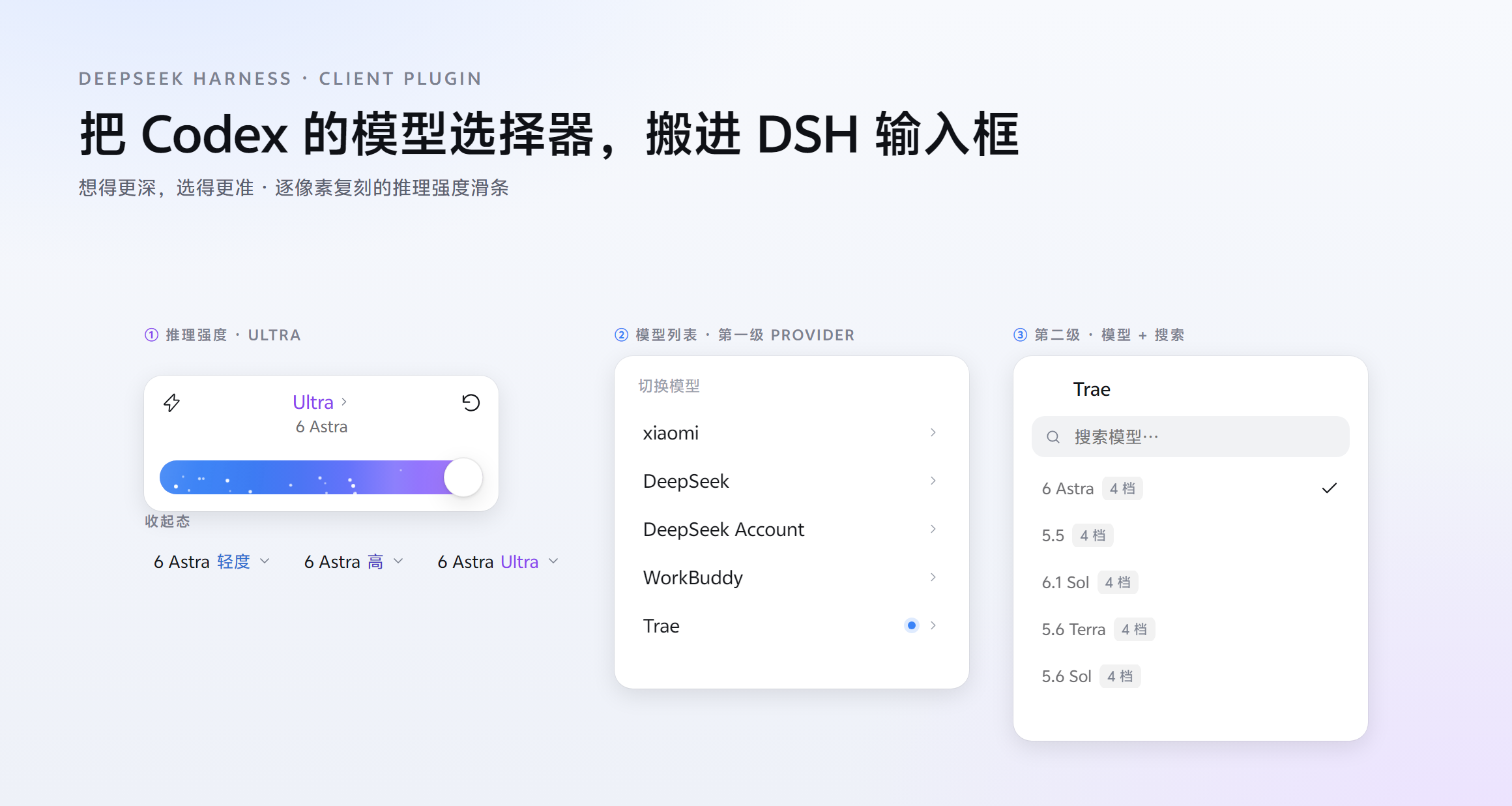
This image and every other screenshot below are rendered from the plugin's real CSS and class names, extracted verbatim from
client.jsbytest/make-readme-shots.mjs(only the React runtime is replaced). They are not hand-drawn mockups.
中文说明 · English
Table of contents
- What it is
- Features
- Install
- Usage
- Compatibility & known limitations
- Development
- Project layout
- Docs
- FAQ
- Credits & license
What it is
DSH ships a tiny model button above the composer. This plugin takes over that
seat (via priority: -1) and opens a Codex-style popover with two panes:
| Pane | Contents |
|---|---|
| Reasoning effort | A pixel-replica Codex effort slider: evenly spaced stops, one colour per stop, a violet stardust rail at Ultra |
| Model list | A provider-grouped two-level drill-down (provider → models + search), each row badged with its level count |
One trigger drives both, exactly like the Codex desktop app.
The geometry is not eyeballed. Card height, rail position and size, knob
diameter, tick dots and row pitch were all measured frame-by-frame from a
93-frame recording of the Codex desktop app (the recording is 1.385×, so
CSS px = recorded px ÷ 1.385); colours were sampled the same way. Full
measurements are in docs/SPEC.md.
Features
Reasoning-effort pane
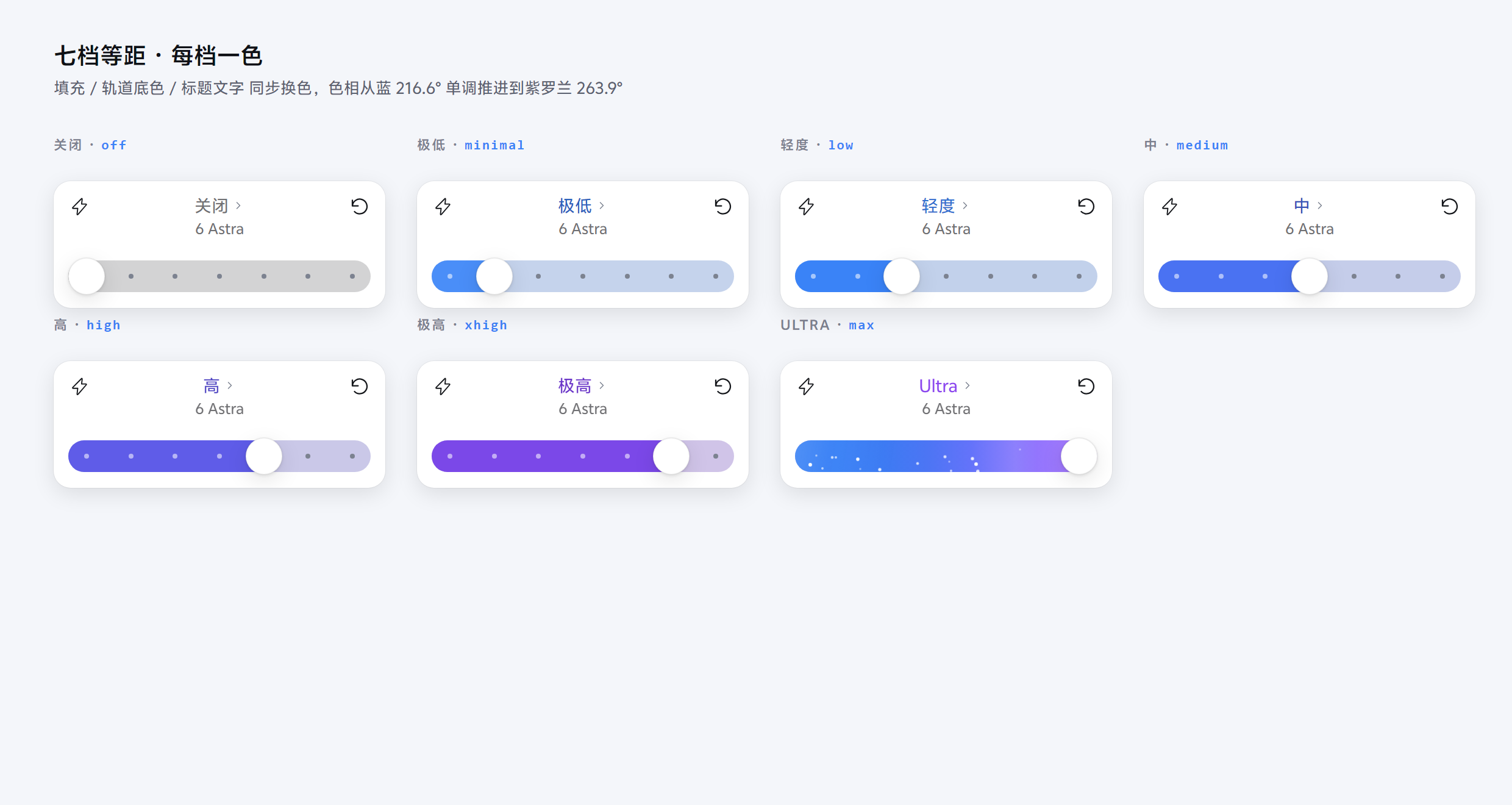
- Evenly spaced stops: re-ordered to whatever levels the model actually declares — as many
stops as the model has. The Codex ladder holds up to 7:
off → minimal → low → medium → high → xhigh → Ultra - One colour per stop: fill, rail tint, heading ink and the collapsed trigger all
change together — hue advances monotonically from blue
216.6°to violet263.9°, instead of only Ultra being special - Drag tracks the pointer: while dragging the knob follows continuously (no snapping); snapping happens on release
- Keyboard:
←/→or↑/↓move one stop,Home/Endjump to either end - Ultra: the rail switches to an animated violet gradient plus 22 stardust particles, and shows a "consumes quota faster" warning for 1.8 s
- Fast toggle (⚡): visual only — it does not change real speed or usage
- Reset button: restores the model's default level
Fast on / off
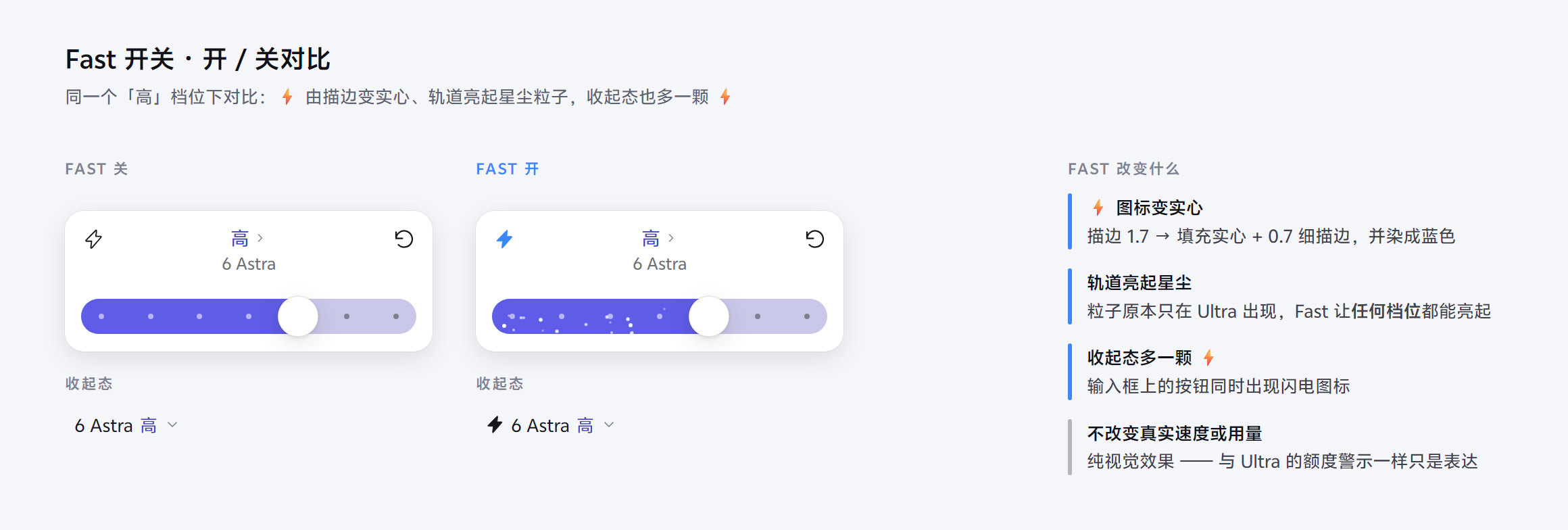
The same high level, side by side — the ⚡ turns from an outline into a solid bolt, the rail
lights up with stardust particles, and the collapsed seat grows its own ⚡. None of it changes
real speed or usage.
Model pane (two-level drill-down)
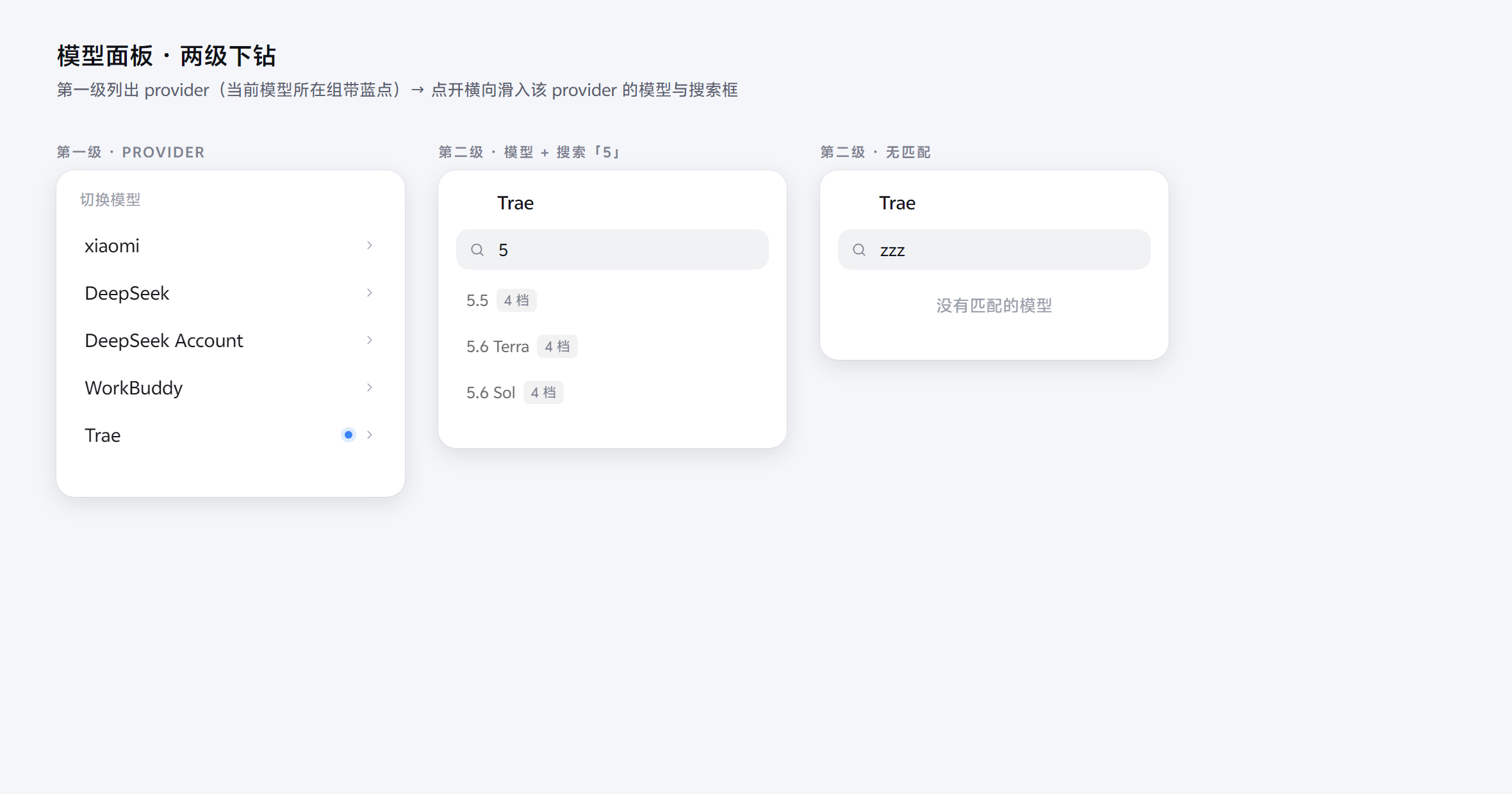
| Level | Contents |
|---|---|
| First | Provider list; the provider holding the current model carries a blue dot on the right. Each row is just provider name + dot + trailing chevron |
| Second | Slides in after tapping a provider: back button + provider title + search box + that provider's models |
- Each model row carries an "N levels" badge; models without reasoning support are greyed out as "unsupported"; the current model shows a check mark
- Search: case-insensitive, with non-contiguous in-order character matching (the same rule the official menu uses)
- Switching model lands on the middle level:
floor(n/2)— 4 levels → the 3rd; models with no levels omit thereasoningEffortkey entirely (absent means "no opinion", which differs from an explicitnull) - Provider load failures are surfaced, not swallowed: once this plugin shadows the
official seat, the official per-provider failure messages become its responsibility —
a failing row reads
{name} failed to load: {message}instead of a blank panel Escapesteps back one level at a time: second → first → effort pane → closed
Two details that are easy to miss
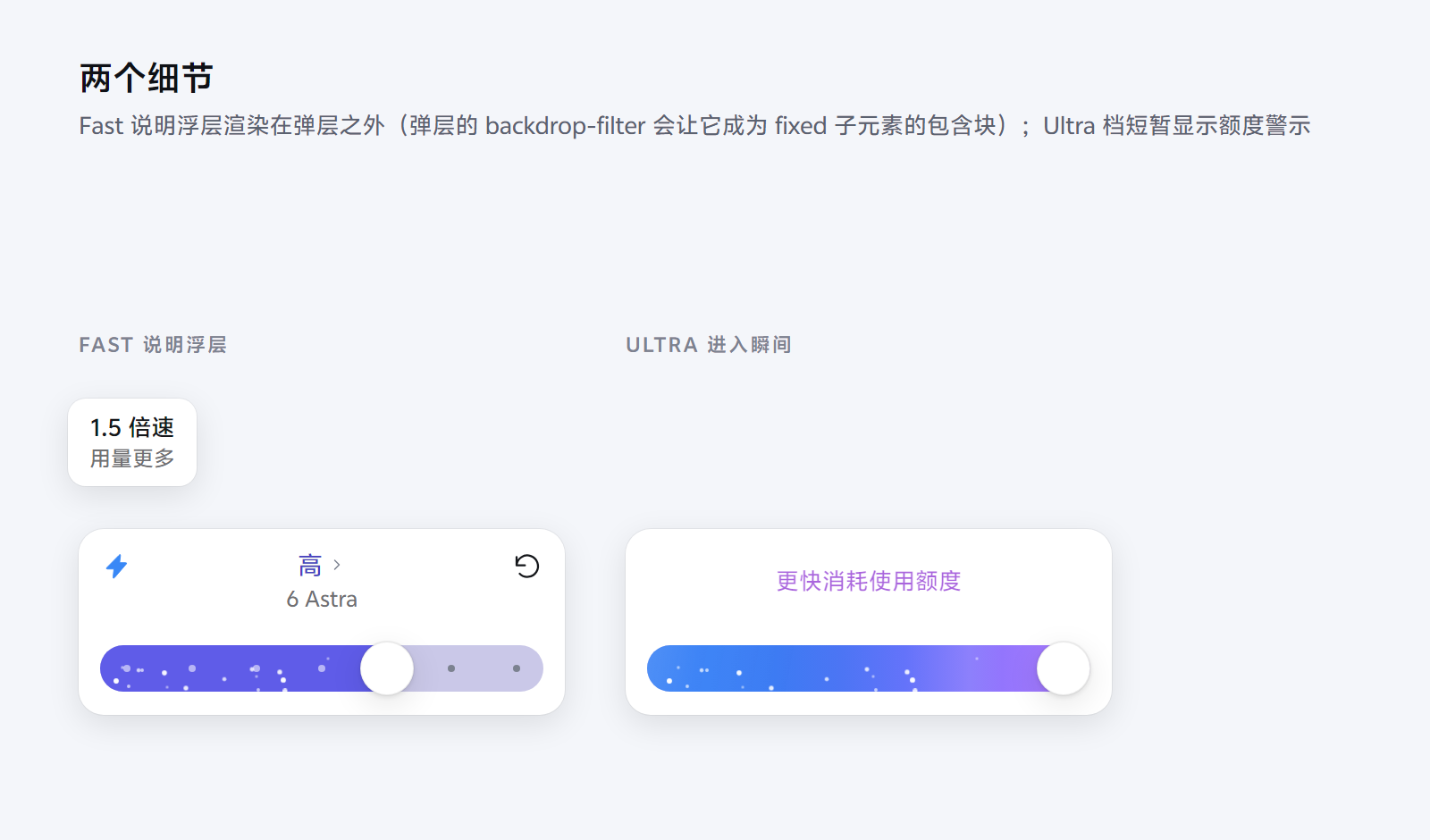
- The Fast tooltip is a
position:fixedlayer: as a child of the popover it would be clipped byoverflow:hidden, so it is rendered as a fixed layer and positioned dynamically - The Ultra warning's timing: the moment you cross into Ultra from a non-Ultra level, the middle column and both tool buttons fade out while the warning fades in with a single sweep (1.1 s, 0.2 s delay); it then stays for 1.8 s before fading back to the level heading. So the warning appears immediately rather than after 1.8 s. Staying on Ultra does not re-trigger it, and leaving Ultra restores the heading instantly (no need to wait out the 1.8 s)
Dark mode
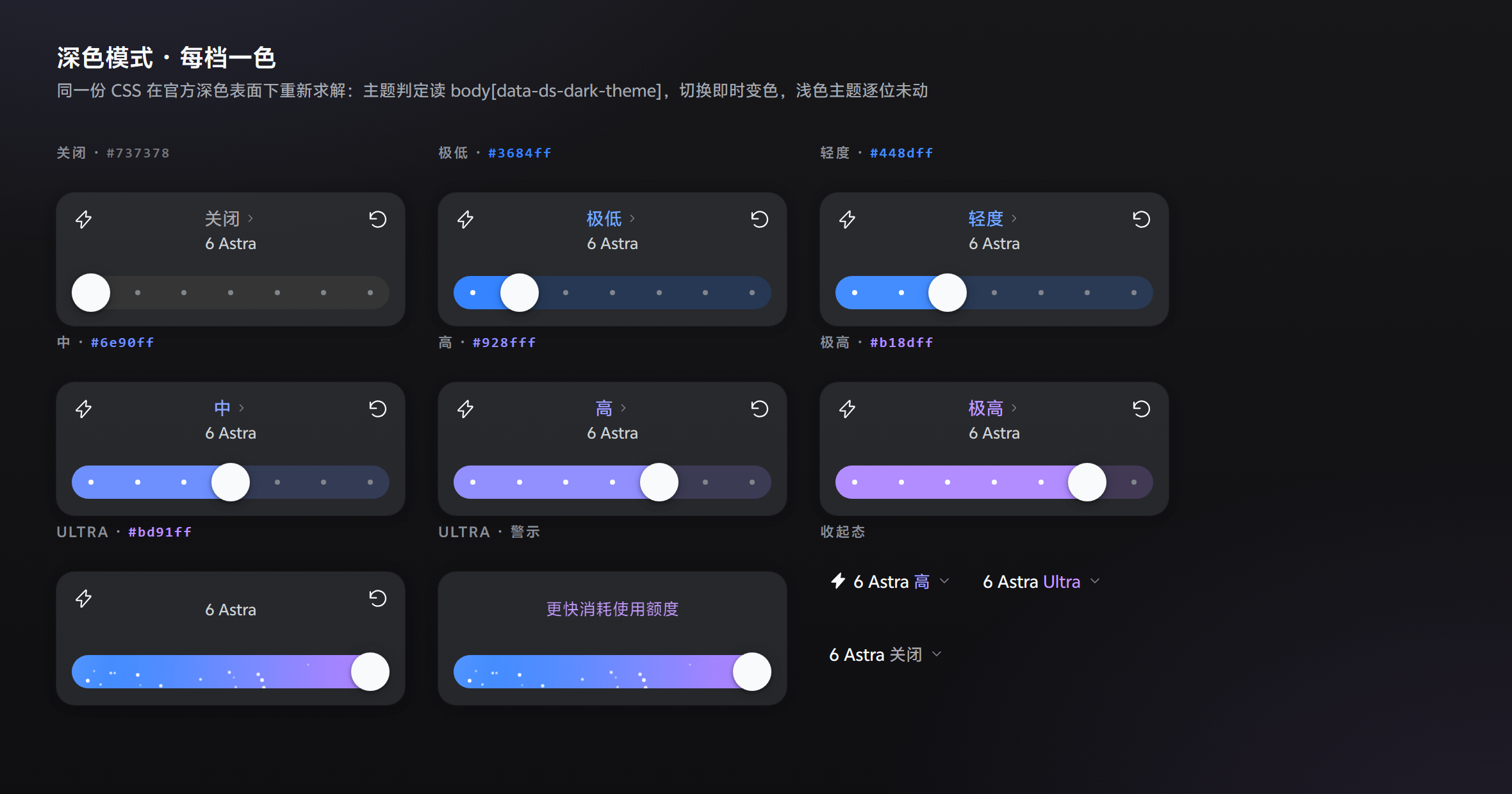
Same layout, same real CSS as the other shots — rendered on the shipped dark surfaces: the seven levels live, the Ultra warning state and the collapsed seats. In the dark theme the entire palette is re-solved against the shipped dark surfaces:
- Theme detection reads the official signal: the
data-ds-dark-themeattribute on<body>(set by the official theme boot script; every shipped dark token keys off that same selector). It deliberately does not useprefers-color-scheme— when the user pins "dark" while the OS is light, the media query disagrees with the palette actually in force. AMutationObserversubscription recolours live when the theme is switched in settings, no reload needed - All seven stops re-solved: v1.0.0's light inks all fall below AA on the dark card
(
highreached only 1.83:1 — practically invisible). The dark table keeps the same hue axis (blue → violet) but luminance now rises with effort — on a dark card, "darker" means "less visible" - The rail becomes an inset groove
#232324: the pale#e8e7e8was an 11.3:1 glare bar on the dark card - The knob becomes a bright puck: the token it inherited resolved to
#2c2c2ein dark, nearly identical to the track — the knob simply vanished - The Ultra warning sweep inverts: the light theme sweeps a dark band over violet text, which drops below contrast on a dark card, so dark sweeps a light band; all 15 gradient stops were lifted above the track floor too
- The light theme is bit-for-bit unchanged: both palettes are validated against every WCAG
floor by
test/palette.mjs(24 assertions), with a regression guard against light values leaking back into the dark table
Accessibility & robustness
role="slider"witharia-valuemin/max/now/valuetext; the popover carriesaria-expanded/aria-haspopup/aria-busyand isinertwhile closed- Every fill and ink clears its WCAG floor in both themes (asserted per-item
by
test/palette.mjs, once per palette) - Dark mode: see the section above — official signal detection, shipped dark surfaces, live recolouring on theme switch
- Fail-open: it registers no host hooks, emits no events and touches no official classes or text. If any anchor is unrecognisable (directory not ready, not its own session, subagent session) it does nothing, leaving the official UI intact
Install
Requirements
- DSH
0.2.1-rc.2(also runs on0.2.0-rc.2; the label child slot degrades gracefully) - No build step:
client.jsis the release artifact — hand-written and statically auditable
Option 1 — DSH Desktop plugin panel (recommended)
The desktop profile is managed exclusively by Electron, so it cannot be installed
from the CLI. Use the panel:
- Copy this directory anywhere on your machine (do not move or delete it afterwards)
- Open DSH Desktop → Settings → Plugins → Add plugin
- Enter the full path of this directory (not a zip, not
package.json) - Tick the trust confirmation → Install → Enable now
- If prompted to restart, fully quit and reopen DSH Desktop
Option 2 — command line (non-desktop profiles only)
dsh plugin --profile web add link:"<absolute path to this directory>"
dsh --profile web --dump-config    # confirm dsh-codex-model-effort-selector appears
Verify it took effect
After restarting DSH, open the model name below the composer — it should expand into the Codex-style popover (effort slider + model list).
dsh plugin --profile desktop list | Select-String codex-model-effort
Updating & uninstalling
- Updating: reinstall from the panel / point it at the new directory, then fully quit and reopen DSH Desktop.
- Uninstalling: from the panel, or
dsh plugin --profile <profile> remove dsh-codex-model-effort-selector. - ⚠️ Do not delete a junction with
Remove-Item -Recurse— it can follow the link and delete the plugin's own files.
Usage
Collapsed (one button on the right of the composer, still carrying the level colour):
[ ⚡ 6 Astra Ultra ⌄ ]
Once open:
| Action | Result |
|---|---|
| Drag the rail / tap it | Change level; dragging tracks continuously, releasing snaps to the nearest stop |
←/→ ↑/↓ / Home End |
Change level from the keyboard |
| Tap the middle heading | Flip to the model list's first level |
| Tap a provider row | Slide in that provider's model list (with a search box) |
| Tap a model | Switch model, return to the effort pane, landing on the middle level |
Esc |
Step back: second level → first level → effort pane → closed |
| ⚡ | Fast visual toggle (visual only) |
| ↻ | Reset to the model's default level |
Compatibility & known limitations
| Item | Notes |
|---|---|
| DSH | Verified on DSH Desktop 0.2.1-rc.2 (Windows); 0.2.0-rc.2 still works |
| Runtime dependencies | None (client.js is hand-written, zero-build, zero third-party code) |
| Theme | Follows DSH theme tokens (--dsw-*), falling back to neutral grey + #4d93f8 |
| Platform | Verified on Windows; other platforms untested |
- A restart is required (the client bundle is injected at startup)
- Depends on the official slot contract: if the official
conversation.input.modelshape changes, this plugin silently falls back to doing nothing rather than breaking the official UI - Child-slot declarations are exclusive, and this plugin does not compete for them:
conversation.input.model.labelexists only while the entry that declares it is mounted — and the official seat entry declares it too. The registry throwsslot "..." is already declaredfor the second declarer. This plugin therefore declares and renders neither that child slot nor anything else: claiming it throws the official registration away, and then switching this plugin off empties the seat, so the model selector vanishes from the composer and the official one cannot come back (it had never registered in the first place). The cost is that the official "1017" badge, which decorates the model name, is not drawn while this plugin holds the seat — the badge is decoration, the selector is the feature. See docs/INCIDENTS.md, incident 20 - The official model menu loses its entry point: that seat was the only entry to the
official menu; switching models still works through this plugin's pane and the official
/modelcommand - Levels come from the model: the slider only shows the reasoning levels the current model actually declares; with no reasoning metadata the pane says "this model provides no reasoning effort levels"
- The name "Ultra": the
maxlevel is called Ultra in Codex and this plugin keeps that naming; if a model names its top level differently, that model's own name is shown - Model ordering follows the host catalog: models the catalog does not list are not shown in the pane
Development
The package itself is dependency-free — no npm install needed:
# syntax check
node --check client.js

# offline assertion suite (47: loading / registration contract / shadowing / geometry /
# palette / theme wiring / fail-open / accessibility / two-level drill-down /
# child-slot ownership)
node test/verify.mjs

# palette assertions (24: the three WCAG floors for BOTH themes + monotonic hue +
# chroma + uniqueness + theme-signal checks)
node test/palette.mjs

# collapse-bug regression (6: runs BOTH the buggy and the fixed state machine)
node test/collapse-regression.mjs

# seat-lifecycle regression (8: replays load -> shadow -> "switch the plugin off"
# against the REAL shipped SlotCore)
node test/seat-lifecycle.mjs
# point it at a custom install with the DSH_ASAR or DSH_RESOURCES env var

# integration against the REAL SlotCore (9; auto-skips when DSH is not installed)
node test/slots-integration.mjs

# encoding guard (26: every text file must be clean, BOM-free UTF-8)
node test/encoding.mjs

# regenerate the README screenshots (extracts the real CSS from client.js; needs Edge/Chrome)
node test/make-readme-shots.mjs

# build the browser preview page (same real-CSS extraction, light and dark side by side)
node test/make-preview.mjs   # then open test/preview.html

# regenerate the dark-mode comparison shot (light vs dark, headless real-CSS render)
node test/make-dark-shot.mjs   # writes docs/images/dark-mode.png
A few deliberate choices in the test bench:
test/verify.mjsactually executesclient.js, captures the slot it registers, and asserts the registration shape matches the official docstest/palette.mjsreads the real colour values out of the source and computes contrast, so changing a colour re-validates ittest/collapse-regression.mjsimplements the buggy state machine too: it first proves that version really does expand everything on one click, then proves the fixed one does not — a regression test should not only test the good versiontest/seat-lifecycle.mjsunpacks the real shippedSlotCoreout ofapp.asarand replays the whole seat lifecycle: the official entry must register successfully, and switching this plugin off must hand the seat back to it. A control case replays the old (buggy) shape to prove that failure path is really being caughttest/slots-integration.mjsunpacks the real SlotCore out ofapp.asar, drives it with this plugin's real registration, and end-to-end verifies shadowing and uninstall recovery
Project layout
client.js                  release artifact: the browser bundle, hand-written, zero-build, auditable
index.js                   host-side half, deliberately empty — it only makes this package a node on the cordis tree
cordis.patch.yml           inserts this package into the profile's composition layer
package.json               declares dsh.bundle.patch and dsh.client (with its inject dependencies)
locale/{zh,en}.json        plugin title & description shown in the plugin manager
icon.svg                   plugin icon
docs/                      architecture, incident postmortems, pixel spec and the images used here
test/                      offline assertions + palette + collapse regression + real-SlotCore integration + shot generator
Docs
| Document | Contents |
|---|---|
| docs/ARCHITECTURE.md | How it works: seat takeover, state machine, geometry, colour, particle maths, accessibility, test-bench strategy |
| docs/INCIDENTS.md | Incident postmortems: symptom → root cause → fix → assertion. Start here when something looks wrong |
| docs/SPEC.md | Frame-by-frame measurement spec and replica fidelity comparison (original vs this plugin) |
| CHANGELOG.md | Release-by-release changes |
FAQ
Nothing happens after installing.
First fully quit and reopen DSH Desktop (not just the window). If it still does not
work, check the plugin's detail page for an error line — the host JSON.parses
package.json directly, so a malformed manifest (a BOM, for instance) gets the whole
package discarded and the UI shows nothing at all.
The official model menu still opens instead.
That means the plugin was not loaded. Make sure it is actually enabled in the profile and
that you fully restarted DSH Desktop. This plugin shadows the official seat with
priority: -1, and test/slots-integration.mjs asserts that against the real SlotCore.
The pane says "the host listed no providers".
That means the host's model catalog is empty — it is not the plugin's fault: the
official /model command is empty at that moment too. Check DSH's Settings → Models /
Account: usually there is no available provider, or the account cannot get a token.
The pane says "no session yet — send a message to pick a model". You are sitting on a fresh, empty session shell, where the composer has no session id yet. Send a message, or open an existing session.
The level the slider shows is not what I expected. The slider only shows the levels the current model actually declares. With no reasoning metadata, the pane says "this model provides no reasoning effort levels".
Credits & license
- The model pane's interaction follows the two-level drill-down of Bai-2008/a-better-dsh-codex-effort-slider (this plugin adopted it to replace an earlier, self-contradictory collapsible-set scheme).
- The original geometry and palette take a Codex desktop recording as their primary
evidence and were cross-checked against other community Codex slider ports; see the
evidence section of
docs/SPEC.md. - The target host is deepseek-ai/deepseek-harness;
this plugin only uses its public surface (slots, the
modelDirectoriesservice and semantic DOM anchors). - Licensed MIT (see LICENSE). No optional third-party code: the bolt and chevron icons are hand-drawn paths, and the particle layer and all CSS are hand-written.
Related plugins
dsh-plugin-reasonix
 esengine
/DeepSeek-Reasonix/integrations/dsh-plugin
把 Reasonix 作为 dsh 子智能体接入:一层配置补丁让 subagent-acp 提供方启动 reasonix acp,并以 reasonix 工具暴露给模型。纯配置、无代码、不在 npm;接入的是子智能体,不是模型服务商。
dsh plugin --profile web add 'github:esengine/DeepSeek-Reasonix#af0e954f5629492980718fc0e36030fec0abc682&path:/integrations/dsh-plugin'dsh-purge
 YuJunZhiXue
/dsh-purge
DeepSeek Harness 破甲:让所有模型都能破甲,不同模型可换不同提示词;默认提示词面向国模「小码酱」。Jailbreak for every model — swap prompts per model. 求 Star 收藏 ⭐ 如要二开,请查看署名要求部分
dsh-purge-mmparko
 mmparko
/dsh-purge
DeepSeek Harness 破甲:让所有模型都能破甲,不同模型可换不同提示词;默认提示词面向国模「小码酱」。Jailbreak for every model — swap prompts per model. 求 Star 收藏 ⭐ 如要二开,请查看署名要求部分
dsh plugin --profile web add 'github:mmparko/dsh-purge#033e6bd1e0f101352b39075ecd0d758ffef26b76'dsh-connect-workbuddy
 dingminhua
/dsh-connect-workbuddy
把本机登录的 WorkBuddy 模型(国内版与国际版)接入 DeepSeek Harness:每次刷新按上游目录自动读取每个模型的积分倍率,支持逐模型图片输入开关、多账号切换与账号池自动换号,并提供每日签到、卡片与输入框里的胶囊积分读数等只读积分概览。
dsh plugin --profile web add 'dsh-connect-workbuddy@5.15.0'dsh-image-gen
 shanliuling
/dsh-image-gen
让 DeepSeek Harness 像 ChatGPT 一样,在对话里直接生成图片。
dsh plugin --profile web add github:shanliuling/dsh-image-genagent-vision-toolkit
 Anionex
/agent-vision-toolkit
为纯文本模型"看图“设计更好的视觉工具箱和技能,支持多图理解,图片问答,前端UI还原、GUI 自动化等,并可选无缝接入多个主流agent,直接识别粘贴图片| A vision toolkit and skill designed for text-only llms — image Q&A, long-screenshot OCR, frontend UI restoration, and GUI automation, with optional seamless integration for Codex, Claude Code, Pi, Oh My Pi, and OpenCode
dsh plugin --profile web add github:Anionex/agent-vision-toolkit