
Memory
dsh-message-minimap
AFAP/dsh-message-minimap · ★ 1
 AFAP
用户消息导航条插件:在 DeepSeek Harness Web GUI 会话聊天窗左侧显示一条迷你导航条(minimap),用刻度标出每一条用户消息的位置,悬停预览消息摘要,点击/拖动即可快速跳转定位。
Manifest details
安装
dsh plugin --profile web add 'github:AFAP/dsh-message-minimap#31de99238635679d2a78d5113e0d58155366f4b9'GitHub 源码安装:首次需按提示配置 allowBuilds 构建授权后重试
For install and environment setup, plus plugin development tutorials, see DSH community docs ↗
README
Table of contents
- 1. The problem it solves
- 2. Features
- Preview
- 3. Directory layout
- 4. Quick start
- Manual install from a source directory (for equivalent verification)
- Verify it loaded
- 5. Usage
- 6. Official capabilities it relies on
- 7. Implementation notes
- 8. Troubleshooting
- 9. Security & compliance
- 10. Development & build
- 11. License
A slim minimap rail on the LEFT edge of the DeepSeek Harness Web GUI chat pane: every message you sent becomes a tick — hover for a preview, click to jump, drag to scan long sessions.

1. The problem it solves
In a long session, going back to "what did I say earlier?" means endless wheel scrolling. The assistant's replies are long and dense, and your own messages get buried in between.
This plugin adds a thin navigation rail on the left edge of the chat pane (like the VS Code minimap):
chat scroll pane (overflow-y: auto, long sessions are paged)
  │  each turn = one tick (including not-yet-loaded history, from the official turnOutline projection)
  │  ticks of in-viewport turns = bold highlight
  │
  ▼  hover a tick → preview card (index / total + prompt excerpt + time line)
  ▼  click a tick → smooth-scroll to that turn (official loadThrough(seq) pages it in first)
  ▼  click/drag the rail → proportional jump
Read-only: the client only reads the conversation DOM already rendered in the browser (chat rows carry stable data-chat-flow-kind / data-chat-flow-key / data-chat-turn anchors) and scrolls the existing chat scroll container. The full list comes from the official turnOutline session projection (whole-log turn outline: turn number, turn/start seq, bounded prompt/response previews), and paging uses the official sessions.binding(id).session.loadThrough(seq) ("page backwards until the window covers seq").
Since 0.5.0 the host half is a no-op: no route, no session-log parsing. That also drops the dependency on the on-disk log layout, which changed in 0.1.7 (
session.v3/v4.jsonl.zstd, new container format).
Compatibility: requires DSH ≥ 0.1.7 (
turnOutlineis provided by@deepseek-ai/dsh-session-turn-outline, registered by thedsh-web-appcomposition). On older versions the rail degrades to loaded turns only.
2. Features
- ✅ A compact, vertically centered rail on the chat pane's left edge (not full height) — zero layout interference.
- ✅ One tick per turn (i.e. per message you sent), evenly spaced on the rail (oldest at top, newest at bottom) — never scattered by message sizes.
- ✅ Immune to history paging: ticks cover ALL turns (including history not yet rendered via "load older") — sourced from the official
turnOutlineprojection, so the full ladder shows as soon as the session opens, without scrolling up yourself. - ✅ Exact jumps: an unloaded turn is fetched with the official
loadThrough(seq)in one call ("page backwards until the window covers that turn'sturn/startseq") — no blind page-by-page probing, and no drift. - ✅ Ticks of the turns inside the viewport are auto-bolded, following the scroll in real time.
- ✅ Fisheye magnification while sweeping the rail: the tick under the pointer grows longest, its neighbors grow by a cosine distance falloff (CSS-transitioned) — spot the target at a glance.
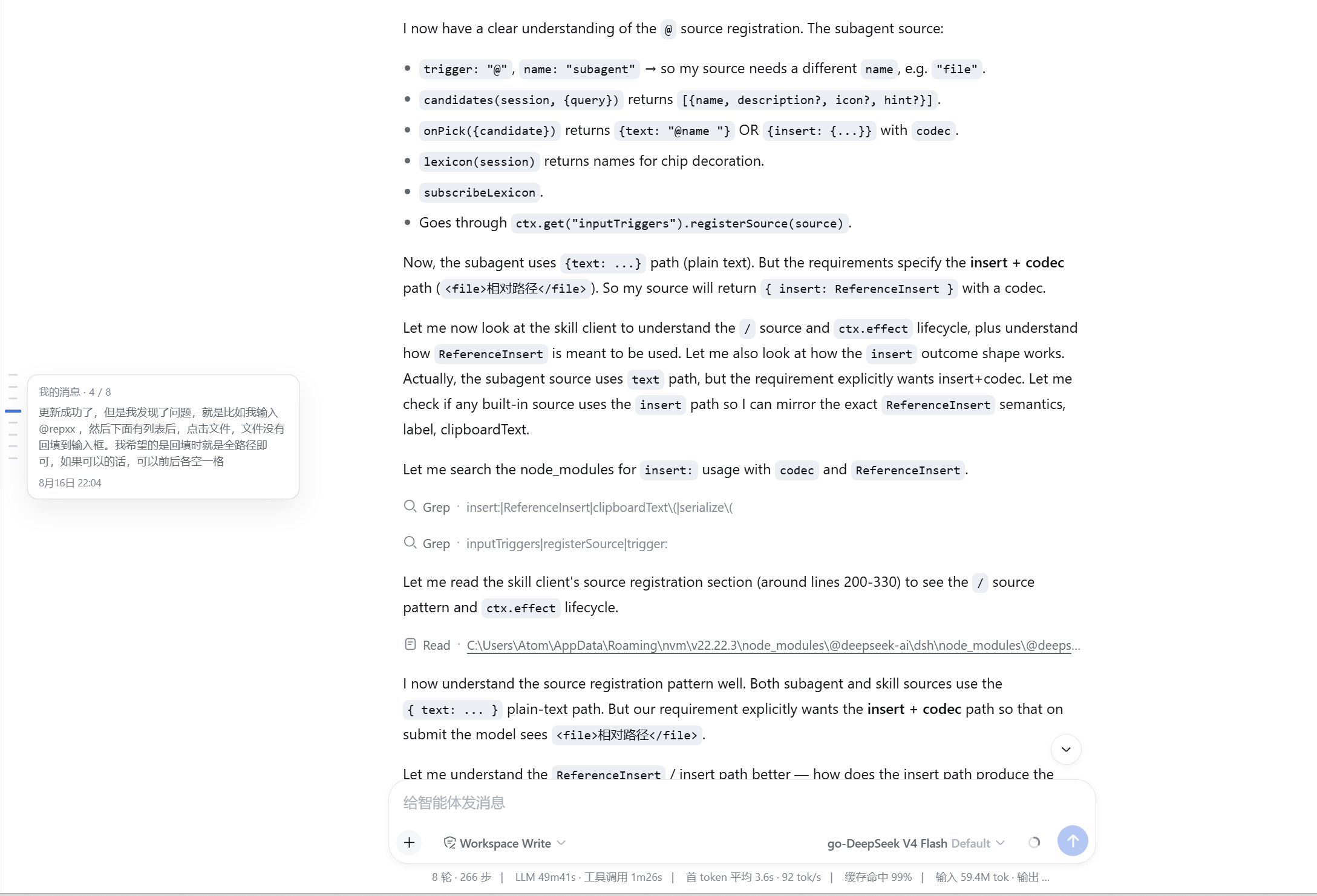
- ✅ Hovering a tick pops a preview card:
My message · 3 / 12plus the prompt excerpt and a dedicated time line (taken from the rendered turn). - ✅ Clicking a tick smooth-scrolls to that turn (parked ~18% below the pane top).
- ✅ Clicking or dragging the rail background jumps proportionally, like a scrollbar.
- ✅ Follows streaming output, history loading, session switches and window resizes automatically (MutationObserver + scroll/resize + polling fallback).
- ✅ Hides itself when the content doesn't overflow, when there are no turns, or on the new-session hero screen — zero layout interference.
- ✅ Bilingual (zh/en) UI strings following the GUI language.
- ✅ Keyboard accessible: ticks are native
<button>s — Tab to focus, Enter to jump.
MVP limitations: no ticks for assistant messages/errors/branches; no text search over ticks; no persisted on/off toggle (always auto show/hide).
Preview
| Hover a tick: preview card (excerpt + dedicated time line) |
|---|
 |
3. Directory layout
dsh-message-minimap/        # repo root = npm package root
├── package.json            # dsh.bundle.patch + dsh.client (browser declaration) + exports["./client"]
├── cordis.patch.yml        # composition row: a single plugin record (no route, no config)
├── LICENSE                 # MIT
├── screenshot/             # screenshots for the README "Preview" section
└── lib/
    ├── index.js            # host half: pure marker row (no-op, zero deps), only so the Loader sees this package
    └── client.js           # browser bundle: the rail (mounted via conversation.session.header.utilities)
4. Quick start
One-line install (GitHub):
dsh plugin --profile web add github:AFAP/dsh-message-minimap
Then restart dsh web to take effect.
After installation the plugin lives at
$DSH_HOME\profiles\web\node_modules\dsh-message-minimap(cloned by pnpm from GitHub), independent of the source checkout location.
Upgrade:
dsh plugin --profile web update dsh-message-minimap
Uninstall:
dsh plugin --profile web remove dsh-message-minimap
Manual install from a source directory (for equivalent verification)
dsh plugin --profile web add "D:\path\to\dsh-message-minimap"
Verify it loaded
Open a session with several exchanges whose content overflows and scrolls → a ticked rail appears at the chat pane's left edge; hovering a tick shows the message excerpt.
5. Usage
- Open any long historical session (or chat past one screenful).
- Look at the centered rail on the chat pane's left edge: each small tick is one message you sent (one turn); the ticks of turns currently inside the viewport are bolded.
- Hover a tick: a preview card pops to the right with "My message · n / total", the prompt opening and that turn's clock.
- Click a tick: smooth-scrolls to that turn; if it hasn't been rendered by "load older" paging yet, the plugin calls the official
loadThrough(seq)to page it in first, then jumps. - Click or drag the rail outside the ticks: proportional jump (equivalent to scrollbar dragging).
- The rail hides itself when the session is too short (under one screen), has no turns, or shows the blank new-session hero.
6. Official capabilities it relies on
No route is added: the plugin only consumes official DSH interfaces (available since 0.1.7):
| Capability | Purpose |
|---|---|
turnOutline session projection |
Whole-log turn outline: each turn's turn, its turn/start seq, and bounded prompt/response previews. The ticks ARE its entries — no manual "load older" needed. |
sessions.binding(sessionId).session.loadThrough(seq) |
The official jump loader: pages backwards until the window covers seq. Clicking an unloaded tick calls it once. |
conversation.loadOlder() / the "load older" button |
Fallback when loadThrough is unavailable: pull one page at a time. |
DOM anchors data-chat-turn / data-chat-flow-kind / data-chat-flow-key / data-chat-flow |
Decide whether a turn is rendered, locate the scroll target, measure "in view". |
The conversation.session.header.utilities slot |
Mount the rail (always mounted for the active session). |
7. Implementation notes
| Concern | Approach |
|---|---|
| Anchor source | The chat package stamps every rendered row with data-chat-flow-kind (user rows are kind "user"), data-chat-flow-key, and the owning turn number data-chat-turn; the paged column carries data-chat-flow. |
| Full-list data | props.useProjection("turnOutline") yields every turn (turn / seq / prompt / response); when the projection is missing the rail falls back to rendered turns only. |
| Jumping to an unloaded turn | Call loadThrough(seq) (the official exact loader), then poll [data-chat-turn] until the turn appears and land on it; if loadThrough is unavailable, fall back to repeated page pulls (service loadOlder(), then the pager button) and stop with a warning after 3 stalled cycles. |
| Loaded detection | Purely "does a row with this data-chat-turn exist" — independent of window length or whether a page contains user messages. |
| Scroll container | Nearest overflow-y: auto/scroll ancestor of the first visible flow item; auto-hides in the export layout (data-conversation-scroll, nothing scrolls). |
| Geometry mapping | The tick column is compact and centered (fixed 10px pitch; height ≈ min(10px × count + 28px, pane height × 0.55)); ticks are evenly spaced by index. Rail drags map proportionally to scroll position; row offsets are only used for jump targets and in-view detection. |
| Sync | MutationObserver (childList/subtree/characterData, covering streaming) + container scroll + ResizeObserver + 1s polling fallback (late mount / session switch), rAF-throttled with shallow equality; projection changes drive ticks through React rendering. |
| Time line | turnOutline carries no timestamps: a rendered turn lends its clock from the user bubble's time element (class suffix timeStart/timeEnd, independent of the build hash); the line stays empty otherwise. |
| Mount point | The conversation.session.header.utilities slot (always mounted for the active session); the component renders only the position: fixed rail, no inline chrome. |
| Styling | Injected <style data-plugin-css> like the shipped bundles; everything uses DSW theme variables, auto light/dark. |
8. Troubleshooting
| Symptom | Where to look |
|---|---|
| Rail not visible | Confirm dsh web was restarted; the session needs turns and scrollable overflow; search F12 Console for dsh-message-minimap. |
| Ticks cover only the recent slice | The turnOutline projection isn't in effect: check DSH ≥ 0.1.7 and that the dsh-web-app composition includes session-turn-outline (dsh --profile web --dump-config | Select-String turn-outline); without it the plugin degrades to rendered-only ticks. |
| Clicking an early tick doesn't jump | The plugin calls loadThrough(seq) (retrying every second if needed) and lands once the turn enters the DOM; if history is exhausted and the turn doesn't exist (forked/deleted), it stops in place. On give-up the Console logs a [dsh-message-minimap] warning — set localStorage.dmm.debug=1, reload and reproduce to capture the trace. |
| Tick positions drift | Async image/attachment loads change heights — the MutationObserver self-corrects; if it persists, scroll or resize once to force a recompute. |
| Clicks don't jump | Check whether you're in the export/print layout (data-conversation-scroll) — it has no internal scroll container and the plugin hides itself. |
| Styling looks off | Confirm the theme variables (--dsw-*) exist; the plugin ships no colors of its own and follows the DSW theme. |
9. Security & compliance
- Read-only: no business-DOM mutation, no event interception (outside its own rail), no file reads or writes, no network requests.
- Zero host capability: the host half is a no-op — no routes, no session-log access, no config keys.
- Minimal disclosure: it only uses the bounded previews the official projection already provides; no extra session content is read or stored.
- No persistence: nothing written to localStorage / cookies (except the optional
dmm.debugswitch you set yourself); uninstalling leaves no trace.
10. Development & build
Plain JS, no build step. lib/index.js (host half) is a no-op marker with zero imports; lib/client.js is a classic script (window.__ModuleLoader__.load) served directly by the client module system at /plugins/dsh-message-minimap/client.js.
11. License
MIT © AFAP
Related plugins
hindsight#coding-agents
 vectorize-io
/hindsight/hindsight-integrations/coding-agents
Hindsight:会学习的 Agent 长期记忆系统,自动召回/保存、知识页、深度反思与按仓库隔离的记忆银行。
dsh plugin --profile web add github:vectorize-io/hindsight#path:/hindsight-integrations/coding-agentsdsh-memory-plugin
 volcengine
/OpenViking/examples/dsh-memory-plugin
面向 DeepSeek Harness 的 OpenViking 记忆与上下文插件:pre-step 自动召回与画像注入、会话捕获、`viking://` URI 防护,以及对接 OpenViking 服务端的 recall/write 记忆工具。
dsh plugin --profile web add @openviking/dsh-memory-pluginmemos
 memtensor
/memos
给你的 Agent 持久记忆与成长能力
dsh plugin --profile web add @memtensor/memos-cloud-dsh-plugin@latestdsh-purge-kingchar
 kingcharleslzy-ai
/dsh-purge
让 AI 更专注地辅助学习与动手实验:DSH 附加组件,提供状态自检、提示词与规则管理、本机备份与回滚。
dsh plugin --profile web add 'github:kingcharleslzy-ai/dsh-purge#27919a326b6615b1968661a3e749760cec3a2e07'dsh-context
 bowenliang123
/dsh-context
上下文洞察面板:一眼看清模型上下文窗口的组成与变化——构成对照窗口大小、按请求历史趋势、压缩/注入事件、消息级 token 统计。
dsh plugin --profile web add dsh-contextmemsearch
 zilliztech
/memsearch/plugins/dsh
MemSearch plugin for DeepSeek Harness: shared markdown memory across agents, with capture, on-demand recall, memory-recall skill, and a skill-candidate review panel.
dsh plugin --profile web add '@zilliz/memsearch-dsh@0.1.8'