UI Enhancements
dsh-sidebar-git-graph
AFunDog/dsh-sidebar-git-graph · ★ 2
 AFunDog
DSH right-sidebar page: a read-only Git commit graph (VS Code style branch/merge lanes). Works with or without dsh-better-sidebar.
安装
dsh plugin --profile web add 'github:AFunDog/dsh-sidebar-git-graph#4dfefb3cc465be189fa1806f0bc9a33d30006a95'GitHub 源码安装:首次需按提示配置 allowBuilds 构建授权后重试
For install and environment setup, plus plugin development tutorials, see DSH community docs ↗
README
Table of contents


A right-sidebar page for DSH (DeepSeek Harness) that draws the current session's repository as a branches-and-merges commit graph — VS Code style: colored lanes, bezier curves where branches split and merge, ref chips, per-commit details — with a working-tree Changes area above it, for every working tree of the repository.
Read-only. It never runs checkout, commit, reset, rebase, fetch, push,
add, restore or worktree add/remove/prune. The only git commands it runs are rev-parse,
status, for-each-ref, log, diff and worktree list.
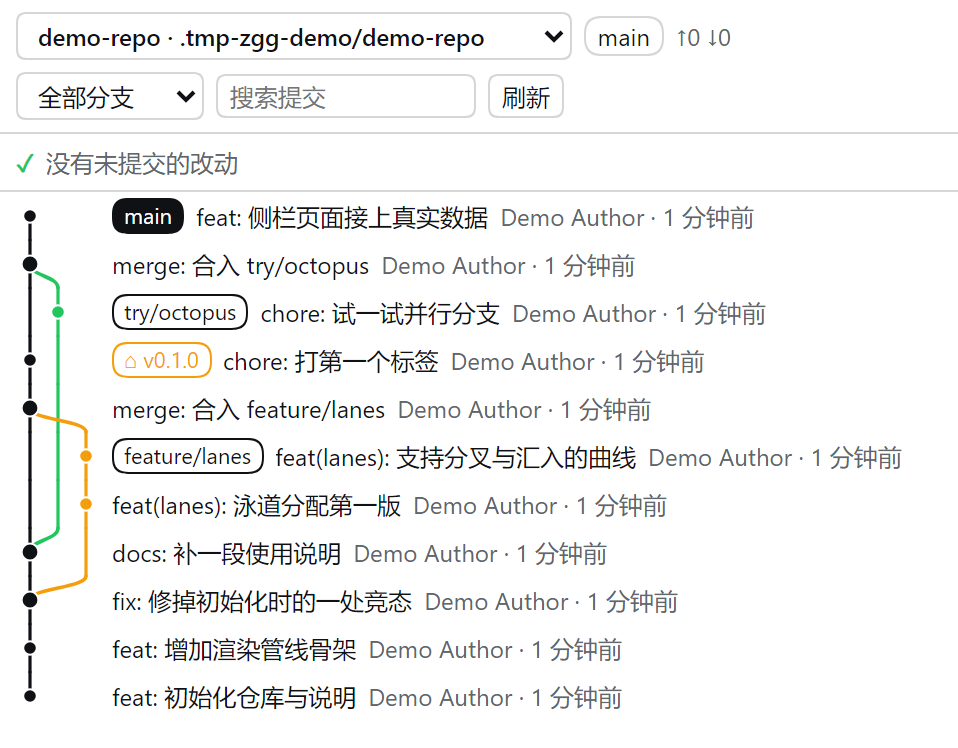
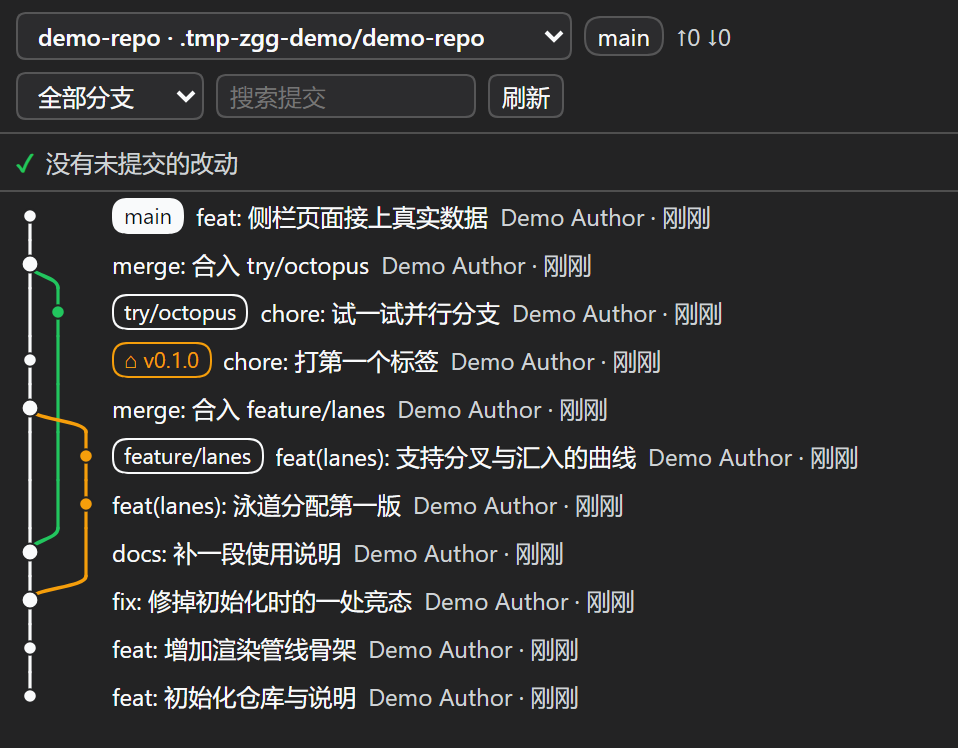
中文说明见 README.md。Contributing / internals / the full trap list live in AGENTS.md.
Features
- Working-tree changes, VS Code style — a Changes and a Staged Changes section above
the graph (plus Merge Changes during a merge), each row carrying its status letter
(
M/A/D/R/C/U) and its added/deleted line counts. Click a file to expand its diff inline; the sections fold and remember it. - Branch/merge relationships at a glance — one lane per concurrent line of history, curved connectors where a branch forks or merges back, thicker dots on merge commits, and the HEAD lane emphasized.
- Ref chips per commit — local branch / remote branch / tag, with the current branch filled in the theme's brand color and the theme's matching on-brand foreground.
- One workspace, several repositories — a workspace often holds more than one repository (this
project's own checkout has a nested one under
vendor/@zeng/). The header then grows a picker listing every repository it found; the choice is remembered per workspace. A workspace that is itself only a subdirectory of a repository works too — the enclosing repository is offered as well. Discovery never leaves the workspace: it scans downwards, bounded by depth, directory count, repository count and a time budget. - Every working tree of the repository — a repository can have several
(
git worktree add), each on its own branch with its own uncommitted changes, and the linked ones usually live outside the workspace directory entirely (in the case this feature was built for, they are sibling directories). The picker lists all of them, each labelled with its own branch, so you can switch between the main working tree and a linked one and see that working tree's graph and changes. The main working tree, detached heads and locked working trees are marked; working trees whose directory is gone are skipped and counted in a notice rather than silently dropped. Because the list comes fromgit worktree list, it works from any of them — standing in a linked working tree also offers you the main one. - Header at a glance — repository name, current branch,
↑ahead ↓behind, dirty-file count. - Tells you when its picture of the remote is behind — the graph is drawn from your local
repository and this page never touches the network that is the read-only promise. So a merge
that just happened on the remote is invisible here until someone runs
git fetch. Rather than leave you wondering whether the graph is wrong, the page says how long ago the repository last fetched (past 6 hours), and which local branches are behind their upstream. A repository that has never been fetched is reported as having no remote instead of as stale. - Follows the session's worktree label — when
@zeng/dsh-session-worktreeis installed and enabled, the page opens on the working tree that session is labelled with, instead of whatever repository the working directory happens to sit in. Which repository wins: your click in the picker → the session's worktree label → the last repository remembered for this workspace → the repository of the working directory → the first one found. The page says when it is following the label, and says so more loudly when it cannot (a label pointing at a directory that is gone, is not a repository root, or is outside what this page may read) — it never silently swaps in a different repository. Uninstalling or disabling that plugin restores the previous behaviour exactly. - Commit search — highlights matches and steps through them (the graph stays intact; it never re-lays-out a filtered list).
- Details on click — including which files that commit touched. Full sha, author + email,
absolute time, parents, participating refs; below that, the list of changed files with their
status letter (
A/M/D/R/C/T), the original name for renames, and per-file+/−counts. Click a file and its patch expands in place — the same rendering and the same feel as the Changes area. A merge commit is compared against its first parent and the heading says so (otherwise you would think the files were written by the merge itself); a binary file says "binary file, no line-by-line diff" when expanded instead of showing you an empty diff. - Virtualized list — a 2000-commit window still renders only the visible rows; nothing is requested while the page is not the visible tab.
- Honest error states — not a git repository / no
gitonPATH/ no workspace / trust fence refused / git failed each get their own message instead of a blank page. - Zero dependencies, no build step — the host half is plain ESM, the browser half is a
single hand-written client-bundle file. What you read in
lib/is what runs.
Install
dsh plugin --profile web add github:AFunDog/dsh-sidebar-git-graph
Then restart dsh web (the host half adds a route) and hard-refresh the browser. Open the right
sidebar and pick Git graph — from the + menu when dsh-better-sidebar is installed, or from
the sidebar's guide page on a bare DSH (the + control is not drawn while that pane already
holds the guide tab). The page follows the session you are viewing:
switch sessions and it re-reads that session's workspace.
# pin a tag (recommended: lockfiles record the resolved commit)
dsh plugin --profile web add github:AFunDog/dsh-sidebar-git-graph#v0.2.0

# from a local clone (absolute path only — relative paths are rejected by spec parsing)
dsh plugin --profile web add /path/to/dsh-sidebar-git-graph
With or without dsh-better-sidebar
The page works both ways, and picks automatically:
| Your setup | What happens |
|---|---|
| dsh-better-sidebar installed | The page registers through its public ctx.betterSidebar.registerTab service: it shows up in the + menu, gets a card in Settings → Side cards (with an on/off switch and a per-plugin setting for the commit window), and appears under Git graph. |
| Bare DSH | The page registers with DSH's own sidebar tab type (ctx.sidebarRightTabs + the sidebar.right.pane.tab slot) — same column, same + menu, minus the settings card. |
Settings
| Setting | Where | Default | Meaning |
|---|---|---|---|
| Commits loaded per read | Settings → Side cards → Git graph → feature settings (dsh-better-sidebar only) | 400 |
100–2000. Bigger is more complete and slower on first read. |
| Repository scan depth | same place | 5 |
0–8. How deep to look for repositories to offer in the picker; 0 means "no scan — only the repository the working directory is in". Lower it if a huge workspace reports an incomplete list. |
| History scope | page header | all branches | All branches or current branch only. |
| Commit search | page header | — | Highlights matches and steps through them. |
Limitations
- Read-only by design. No staging, no commit, no checkout, no push. To change the working tree, use another tool.
- Untracked files carry no
+/−counts.git diff --no-indexcompares exactly two paths, so per-file counts would mean one process per file — hundreds of them in a repository that has not beenadded yet. The section header counts what it can and leaves the rest blank rather than printing a0that would read as "nothing changed". A file changed on both sides shows up in both sections, which is what the two sections are for. - A nested repository is one non-clickable row.
gitdoes not descend into a repository inside a repository (even with-uall), so the outer repository sees a single directory and there is no diff to show for it. The page says so on the row instead of doing nothing when clicked. - At most 3000 rows, and at most 512 KiB of patch per file; both are reported in the page rather than silently cut.
- The window is bounded (up to 2000 commits per read, default 400); older history is reported as truncated rather than silently dropped.
- Repository discovery is bounded, and it scans the filesystem. Depth, directory count,
repository count and elapsed time are all capped; hitting a cap is reported in the page instead
of being hidden, and lowering the scan depth is the fix. Directories that never hold repositories
of interest (
node_modules,target,.venv, build output, …) are not descended into — though each of them is still stat'd once, so a repository that happens to be namedbuildis still found. - The picker only offers what is reachable from the workspace — the workspace itself, something
inside it, the repository that encloses it, or a working tree of the repository the workspace
is in (as reported by
git worktree list). The host refuses any other path even if the browser asks for it, and re-checks withrev-parsethat the path really is a repository root. - A deleted working directory is skipped instead of being fatal. The path held by the
session/tab may be a linked working tree that has already been removed (deleting them once the
work is done is the normal case). The host walks on to the first candidate that still exists and
says which directory is gone and where it drew instead — rather than answering with nothing but
工作目录不存在. - A working tree is read on its own.
git statusandgit logare per working tree, so each one shows its own branch, its own uncommitted changes and its ownHEAD; the page never merges two working trees into one view. Working trees that are gone (prunable) and bare repositories are listed as a count in a notice rather than offered. - A commit's file list is capped at 2000 files (an initial commit in a large repository can touch tens of thousands); past that the page says "N in total, first M listed" rather than quietly listing fewer. A merge commit lists what changed against its first parent (the same convention VS Code uses), and an empty commit says so.
- Search does not filter the graph — filtering would break lane continuity, which is the whole point of the page; matches are highlighted and stepped through instead.
- Lane colors are derived from DSH theme tokens with
color-mix(). On a browser withoutcolor-mix(), lanes fall back to the four theme state colors in rotation. - Verified on DSH
0.1.7-rc.2withdsh-better-sidebar0.21.1; the native fallback path is covered by the same tests but has had less real-world use. - The npm name
dsh-git-graphbelongs to a different plugin by another author (enoughpower/dsh-git-graph). This one is@zeng/dsh-sidebar-git-graphand is currently distributed from GitHub only.
Development
No build step: edit lib/, restart dsh web for host-half changes, hard-refresh for browser-half
changes (a changed client bundle is picked up with a reload — its rev is re-derived from the
file's mtime).
npm test # = node scripts/test.mjs: node --check on every lib file, then every test
The architecture map, the lane-layout invariant, the theme-token checks and the implementer traps live in AGENTS.md.
License
MIT — see LICENSE.
Related plugins
dsh-web(原 dsh-web-ui)
 zhu1090093659
/dsh-web-ui
dsh-web(原 dsh-web-ui):任务看板、git 图、右侧面板、远程移动端 UI、桌宠、实时 token 统计与皮肤中心的全家桶。仓库已更名 zhu1090093659/dsh-web,根目录声明 dsh.bundle.patch,支持根 Git 入口安装。
Added:
dsh plugin --profile web add github:zhu1090093659/dsh-webdsh-web-all 聚合包(原 dsh-web-ui-all)
zhu1090093659zhu1090093659/dsh-web-ui/packages/dsh-web-ui-all
旧整包路径 packages/dsh-web-ui-all 已随仓库更名 dsh-web 迁移:现聚合目录为 packages/dsh-web-all,npm 聚合包 @linxin666/dsh-web-all。与总仓根 Git 入口是同一产品的两种整包方式,不重复计数。
Added:
dsh plugin --profile web add @linxin666/dsh-web-all@latestdeepseek-balance-whale-widget
 meteornox
/deepseek-balance-whale-widget
DSH 小鲸鱼余额挂件(DeepSeek Balance Whale Widget)
Added:
dsh plugin --profile web add github:meteornox/deepseek-balance-whale-widgetdsh-cc-tui
 ccch1mneyyy
/dsh-cc-tui
一个美观且实用的 Claude Code 风格 TUI 插件:像素鲸鱼顶栏、双流光大字、实时工作状态行、思考流式展开、双击 Esc 时间回溯、蓝白上下文进度条 + TPS 仪表。 零核心改动,纯插件挂载。安装插件即可启用,卸载后不会留下核心补丁。 献给钟爱tui的各位极客们 A beautiful, practical Claude…
Added:
dsh plugin --profile web add github:ccch1mneyyy/dsh-cc-tuidsh-TUI
ccch1mneyyyccch1mneyyy/dsh-TUI
Claude Code 风格全屏终端 UI:像素鲸鱼顶栏、实时工作状态行、思考流式展开。
Added:
dsh plugin --profile web add github:ccch1mneyyy/dsh-TUIDSH-better-sidebar
 omdsh-dev
/DSH-better-sidebar
侧边栏完整工作台:内置文件渲染编辑、终端、Git 与子代理,支持三方插件注册新 Tab。
Added:
dsh plugin --profile web add github:omdsh-dev/DSH-better-sidebar