Just for Fun
dock-media
AKS1st/dock-media · ★ 0
 AKS1st
Media player for the dock file explorer: plays audio (MP3, WAV, OGG, FLAC, M4A, ...) and video (MP4, WebM, MOV, ...) files, with a music player for pure audio and fullscreen playback for video.
安装
dsh plugin --profile web add 'dock-media@0.1.2'从 npm 安装预构建包
For install and environment setup, plus plugin development tutorials, see DSH community docs ↗
README
Table of contents
The best media player plugin in the DSH ecosystem — no contest. Pure audio (MP3, WAV, FLAC, M4A, ...) gets a proper music player; video (MP4, WebM, MOV, ...) gets fullscreen playback. Instead of loading a whole file as base64, dock-media streams bytes over HTTP Range (206 Partial Content), so large files open instantly and seeking stays smooth.
Media player plugin of the dock family: registers the media file viewer for audio + video extensions against the dock-files file domain, plus the matching editor-area view; it streams media bytes through its own /dock-media/source host route (Range-aware, so the <audio> / <video> element can seek and stream progressively).
Preview
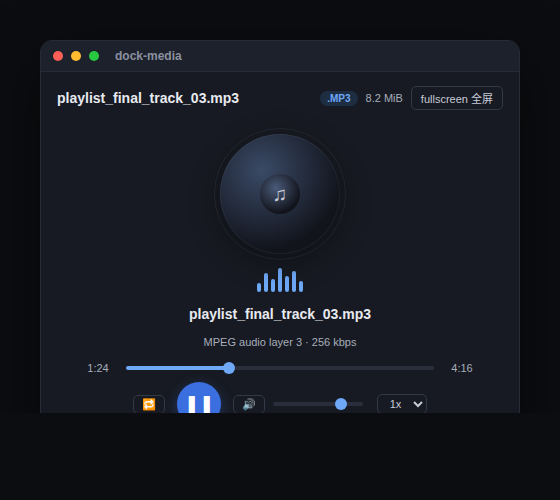
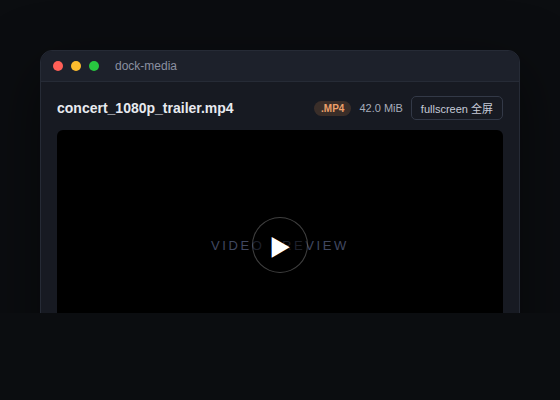
Features
- Dual-mode playback: pure audio (MP3/WAV/OGG/OPUS/FLAC/AAC/M4A/WebA...) opens a music player (spinning record + equalizer animation + custom transport); video (MP4/M4V/WebM/MOV/MKV/OGV/AVI/TS/3GP...) opens a native fullscreen-capable video player.
- Streaming, not buffering: unlike dock-images (whole-file base64), dock-media streams the file bytes via
/dock-media/sourcewithRange→206 Partial Content+Accept-Ranges: bytes. Large files open instantly, the seek bar works, and the whole file is never loaded into memory. - Fullscreen: both video and the music player support one-click fullscreen (browser Fullscreen API on the container; falls back to a fixed
inset:0overlay when unavailable). In fullscreen the header becomes a translucent floating bar for an immersive view. - Music player: play/pause, drag to seek, current/total time, volume, mute, playback speed (0.5x–2x), repeat-one; the spinning record and equalizer animate with playback state.
- Format badge & size:
/dock-media/probereturns file size and media kind, so the header shows the.MP3/.MP4badge and size immediately. - Graceful degradation: container/codec combos the browser cannot decode (e.g. AVI, FLV, WMV, MPG, MIDI, WMA) show a clear notice instead of a black box or endless spinner.
- Safe rendering: media is handed to the native
<audio>/<video>element viasrc; no innerHTML / dangerous DOM injection.
Supported formats
| Category | Extensions |
|---|---|
| Audio | mp3, wav, ogg, oga, opus, flac, aac, m4a, weba, wma, mid, midi |
| Video | mp4, m4v, webm, mov, mkv, ogv, avi, mpg, mpeg, flv, wmv, 3gp |
Note: whether the browser plays a file is decided by the codec, not the container/extension. Mainstream encodings —
mp4(H.264),webm(VP8/VP9/AV1),mp3,flac,ogg— essentially always play; old containers such asavi,flv,wmv,mpgare not decodable in most browsers and dock-media will tell you honestly (use a system player for those)..tsbelongs to TypeScript source (handled by dock-editor); dock-media does not claim it.
Dependencies
| Dependency | Type | Notes |
|---|---|---|
| dock >= 0.1.0 | peer (required) | workbench shell: the editor-area view, floating windows and ctx.workbench come from it |
| dock-files >= 0.1.0 | peer (required) | file-domain service: dock-media is dispatched as the media viewer |
| DSH Web environment | runtime | required; client platform is Web |
cordis ^4.0.0-rc.7 |
peer | plugin framework (ships with DSH) |
react ^18.2.0 |
peer (optional) | needed for client rendering; without it the viewer UI does not activate |
Optional companions: coexists with other viewers such as dock-editor, dock-markdown and dock-images, each taking over its own extensions.
Install
Requires dock and dock-files:
Recommended install from the npm registry:
dsh plugin --profile web add dock-base
dsh plugin --profile web add dock-files
dsh plugin --profile web add dock-media
Or install from GitHub (alternative):
dsh plugin --profile web add github:AKS1st/dock
dsh plugin --profile web add github:AKS1st/dock-files
dsh plugin --profile web add github:AKS1st/dock-media
Security
The /dock-media route only accepts requests from trusted origins (loopback / trustedHosts plus same-origin check); source is GET (streaming) and probe is POST (metadata). Read paths only need to be absolute — they are not confined to the session workspace, because the conversation context can mention media outside it (e.g. ~/Music/..., ~/.dsh/skills/...) and the player opens them; paths are read-only, never written back.
License
MIT
Related plugins
dsh-pet#dsh-pet
 PC2005-cloud
/dsh-pet/dsh-pet
DSH Web UI 桌面宠物:25 个透明动画、屏幕漫游、点击反应与拖拽,附可复现的素材生成链。
Added:
dsh plugin --profile web add github:PC2005-cloud/dsh-pet#path:/dsh-petpetdex
 crafter-station
/petdex
面向 Codex、Claude Code、DeepSeek Harness、Hermes、OpenCode、Gemini CLI 等的动画桌宠公共图鉴
Added:
dsh plugin --profile web add github:crafter-station/petdexpetdex
crafter-stationcrafter-station/petdex/packages/petdex-desktop-native/integrations/dsh
A public gallery of animated pets for Codex, Claude Code, DeepSeek Harness, Hermes, OpenCode, Gemini CLI, and more.
Added:
dsh plugin --profile web add 'github:crafter-station/petdex#31c0aee7f4fb387774b87d40e8047dc0f9cea94b&path:/packages/petdex-desktop-native/integrations/dsh'OpenBitFun
 GCWing
/OpenBitFun/extensions/dsh-openbitfun
DeepSeek Harness plugin bundle exposing the OpenBitFun Agent SDK Host as dsh tools
Added:
dsh plugin --profile web add 'github:GCWing/OpenBitFun#9ea94cb52e9ce725fc7aa154bd0a0a0d0effc6ef&path:/extensions/dsh-openbitfun'dsh-ads
 Nagi-ovo
/dsh-ads
2005 年中文站点风格的整活广告插件:侧栏广告/信息流/角落弹窗 + 假关闭叉,素材全虚构。
Added:
dsh plugin --profile web add github:Nagi-ovo/dsh-adsdsh-expression
 yyh-001
/dsh-expression
陪 AI 斗图的搞笑插件:说个感觉,AI 帮你搜到、发出那张恰到好处的真实表情包。
Added:
dsh plugin --profile web add dsh-expression