
Vision & Multimodal
dsh-echelon
Abnerluo123/dsh-echelon · ★ 2
 Abnerluo123
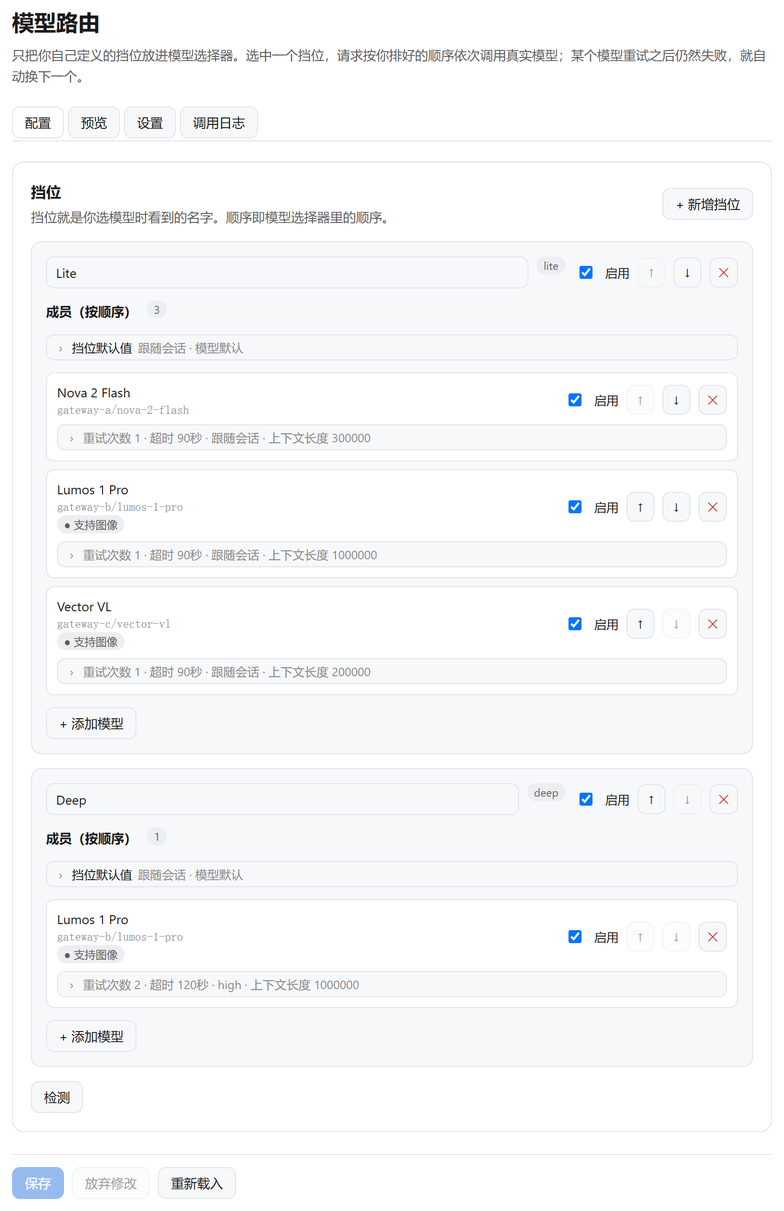
Echelon for DeepSeek Harness: name a few tiers, and each one becomes an ordered chain of real models with retries, failover, reasoning-level translation, context-window routing and vision routing.
Manifest details
安装
dsh plugin --profile web add 'dsh-echelon@1.3.0'从 npm 安装预构建包
For install and environment setup, plus plugin development tutorials, see DSH community docs ↗
README
Table of contents
- What it solves
- Three things that matter
- Models of different capability can back each other up
- A cleaner picker
- Compatible with existing plugins
- Quick start
- Advanced
- How the timeout is decided
- How the inputs behave
- How it differs from other tools
- Keywords
- Other install methods
- Known limitations
- Development
- License
Tier-based model routing for DeepSeek Harness. Collapse a dozen models into a few names you choose; behind each name is an ordered chain of real models — called in order, retried, failed over automatically.


dsh plugin --profile desktop add dsh-echelon
What it solves
The DSH model picker lists every model you can reach. With a few providers that becomes a dozen entries of differing names and capabilities, so each new conversation starts with "which one this time?".
Echelon replaces that with naming: define a few tiers (daily, deep, free…) and the picker shows only those names.
Three things that matter
Models of different capability can back each other up
This is the least obvious part. Mixing unequal models in one chain hits three obstacles, and each one turns "automatic failover" into silent degradation:
| Obstacle | What Echelon does |
|---|---|
Reasoning levels named differently (medium / max / not declared) |
One vocabulary off / low / middle / high / xhigh, translated per member at dispatch; a level that cannot land falls back to the member's own default |
| Different context windows (1M beside 300K) | Advertises the largest window, then picks a member that fits this request |
| Different vision support (multimodal beside text-only) | An image request skips members that cannot see |
So the strong and the cheap model can share one chain: small requests go cheap, large ones land on the big window, image requests land on the one that can see. You never have to know which happened.
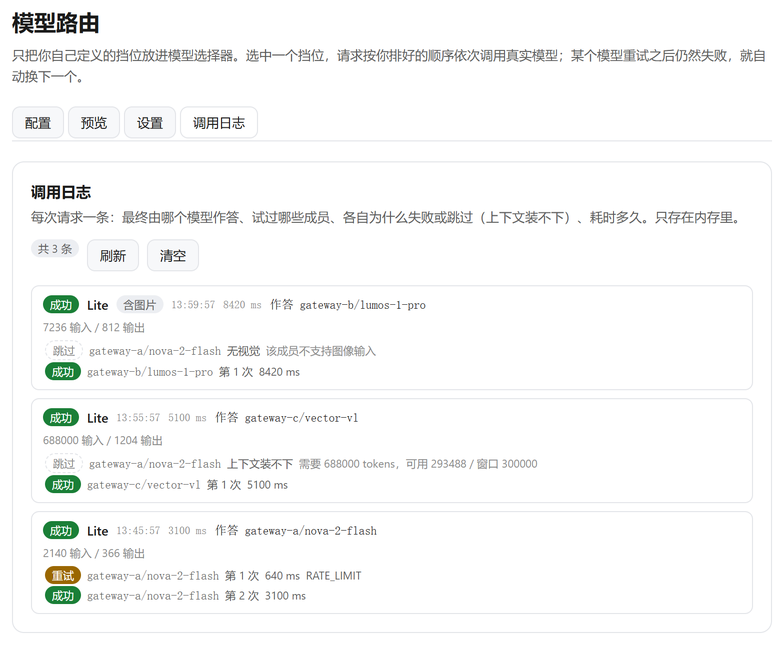
One request in this log triggered all three: an image skipped the vision-less member, a large context skipped the small-window member, then a rate-limited call succeeded on retry.
A cleaner picker
Hide the real models, leave your tiers. The default is "show everything" — hiding is something you choose after a tier works. Hiding lifts automatically when no tier can dispatch, so the menu can never become an empty list that locks you out of settings.
Compatible with existing plugins
A member can be another plugin's route, because they are all just provider/model strings: dsh-our-free-model lanes, dsh-model-fusion's auto, anything that registers a provider.
No DSH patching. Echelon registers one provider route and wraps one public read-only method to implement hiding.
Quick start
dsh plugin --profile desktop add dsh-echelon
Requires DSH ≥ 0.2.0-rc.1 and Node ≥ 22.14.0. Restart dsh afterwards and reload the page.
- Configure → New tier, give it a name.
- Add models in priority order — that order is the failover order.
- Once it answers, switch Settings → What the model picker shows to "Tiers only".
A fresh install shows everything, so none of your models disappear.
Advanced
- Per-member controls: retries, timeout, reasoning effort, context window, max output, vision (force it for a model that supports images but does not declare them).
- Timeout measures progress, not traffic: a lane that only sends keepalives, empty deltas or usage rows is still dead and still fails over; reasoning counts as progress. 3–60s, default 6s on a fresh install, switchable off. DSH retries a failed turn itself, and a retry usually beats waiting.
- Tier defaults: one timeout and retry count for the whole chain, used by members that do not set their own.
- Default level for new chats: follow the model, or pin one of the five levels.
- Reasoning mapping switch: on means one five-level vocabulary in the picker, translated onto each member at dispatch (nearest published level, or the model's default when it publishes none); off shows each model's own levels and forwards them as written. The per-member control in the editor always offers only that model's own levels — it pins one member, so it must not name a level that member cannot honour.
- Image routing: an image-bearing request prefers a member that can see. With Settings → Advanced → Vision compatibility on, only images inside the window keep the whole chain on vision members (the last five messages by default, or a number of minutes); outside it, text-only members are candidates again and receive
[图片]as text, leaving them to infer the content from the conversation. Members that can see still get the real image. Off by default, which is the earlier behaviour: any image still in the conversation requires vision. - Request log: each turn shows tier → real model, how the level was translated (
xhigh → max, or not sent at all), every member tried, why each was skipped, duration and tokens. Written to disk, so a restart does not erase it; 128 turns kept by default, switchable off. - Context shorthand:
1m,256k,128kor plain digits — no counting zeros.k=1000,m=1000000 (decimal, so what the field shows is what it means). - Saves apply immediately: no restart, no page reload. One button top-right: save-and-reload when there are edits, plain reload when there are none.
- Settings file:
$DSH_HOME/model-router/settings.json, hand-editable (and"128k"is accepted there too); writes go through a temp file and a rename.
How the timeout is decided
The panel shows one line; the detail lives here.
The watchdog measures progress, not traffic. The difference matters: many gateways keep a stalled stream warm with heartbeats, empty deltas or usage-only rows, and a rule of "any data arrived" lets such an attempt run forever while the screen stays blank.
Counts as progress: a text-delta / reasoning-delta with non-whitespace text (one character is enough), a tool call with a name or non-empty arguments, a block boundary, the finish chunk. Does not count: empty strings, whitespace-only deltas, usage-only rows, unknown heartbeat types.
One budget covers all three places a member can stall:
| Stage | Before | Now |
|---|---|---|
resolveModelInfo |
no deadline (a hang left the log empty) | 8s, then degrades to "capabilities unknown" |
prepareCall |
no deadline | the member's own budget |
| streaming | only when nothing at all arrived | same budget, judged by progress |
On timeout the member's request is cancelled, and cleanup is bounded to one second — otherwise the cleanup itself blocks on the same read, which is how an 8-second budget produced a 277-second attempt.
On false positives: a model that thinks keeps emitting reasoning deltas and is never cut off, and a model waiting on a local command has already finished its call with a tool-call block — so a ten-minute local task is unaffected.
How the inputs behave
- Nothing is validated or corrected while typing: you can clear "90" to "9", to empty, and retype.
- Normalisation happens once, on blur or Enter: below the minimum becomes the minimum, above the maximum becomes the maximum, empty means "unset".
- No stepper arrows; arrow keys and the wheel cannot change a value.
How it differs from other tools
Echelon is a DSH plugin, not a standalone model gateway — that difference decides what it is good for:
| Echelon | LiteLLM / One-API / New-API / OpenRouter | |
|---|---|---|
| Form | plugin inside DSH | standalone service exposing an OpenAI-compatible endpoint |
| Reach | only inside DSH | any OpenAI-compatible client (Cursor, Cline, Cherry Studio, Chatbox…) |
| Setup | install into DSH | run a service, configure ports and keys |
| Routes by | tier + context size + image + effort level | usually model name, weights, quota, rate limits |
| Answers | "which model should DSH use" | "one entry point for every client" |
So if you want a single OpenAI-compatible entry point for Cursor, Cline, Cherry Studio or Chatbox, LiteLLM or One-API is the right tool — Echelon does not expose an external endpoint and cannot do that.
If you want to stop memorising a dozen model names inside DSH, with automatic failover that also respects context size and images, that is what Echelon is for. The two can coexist: register LiteLLM as a DSH provider and let Echelon put it in the same tier as your free lanes.
Keywords
English: model router, model cascading, sequential fallback, automatic failover, multi-provider LLM, provider routing, rate-limit handling (HTTP 429), request retry, reasoning-effort mapping, context-window routing, vision / multimodal routing, DeepSeek Harness plugin
中文:模型路由 / 模型聚合 / 挡位 / 按序降级 / 接口兜底 / 失败自动切换 / 渠道自动切换 / 防限流 / 429 处理 / 免费模型聚合 / 多供应商 LLM / 思考档位映射 / 上下文窗口路由 / 视觉能力路由
Other install methods
| Method | Command |
|---|---|
| npm (recommended) | dsh plugin --profile desktop add dsh-echelon |
| Pin a version | append #v1.9.0 |
| GitHub source | dsh plugin --profile desktop add github:Abnerluo123/dsh-echelon |
| Plugin market | Plugins → Market, search Echelon |
Replace desktop with your profile name (dsh profile list).
Verify: dsh plugin --profile desktop list should contain dsh-echelon, and Echelon appears in settings.
Uninstall: dsh plugin --profile desktop remove dsh-echelon. Settings stay in settings.json; delete that file to remove them completely.
Known limitations
- Hiding wraps
llm.listModels: DSH has no catalog-filter hook, so code that reads an adapter directly is not filtered. - The request log keeps a bounded history: 128 turns by default, written to disk so a restart does not clear it. It is a debugging view, not an audit trail; the oldest turns are dropped past the limit.
- An undeclared vision capability is unknown: still a candidate for image requests, but never preferred.
ABORTEDandCONTEXT_WINDOW_EXCEEDEDnever fail over: you cancelled the first; the second would not fit elsewhere either.- The internal route id remains
model-router: the rebrand did not change it, so saved sessions and settings keep working.
Development
node --test test/               # 219 tests, no network needed
node scripts/verify-profile.mjs # can the current profile load this plugin?
test/integration.test.js uses the real LlmRuntime, when the DSH app packages are present locally, to exercise registration, dispatch, hiding and failover.
| File | Responsibility |
|---|---|
index.js |
Host entry: register the route, catalog filter, settings API |
src/adapter.js |
Chain dispatch, streaming, retries, failover, log writes |
src/config.js |
Normalization, chain expansion, context and modality filters |
src/effort.js |
Effort vocabulary and per-member translation |
src/tokens.js |
Request size estimation and image detection |
src/catalog.js |
Catalog filter (hiding) and the unfiltered read |
client.js |
Settings page and request-log view |
License
MIT
Related plugins
dsh-plugin-browserskill
 Tencent
/BrowserSkill/packages/dsh-plugin-browserskill
BrowserSkill 的 DeepSeek Harness 浏览器自动化桥接插件,通过原生浏览器工具控制可见的 Chrome 和 Edge Agent Window,支持可访问性与 VOM 页面观察、截图、隔离的多会话控制和 Web UI 实时观察浮层。
dsh plugin --profile web add github:Tencent/BrowserSkill#path:/packages/dsh-plugin-browserskillmodlens
 liustack
/modlens
为纯文本模型架起视觉桥梁:粘贴图片,输出结构化 JSON 证据(OCR、版面、语义)。
dsh plugin --profile web add @liustack/modlensdsh-vision-router
 ysr666
/dsh-vision-router
为纯文本 Agent 提供视觉能力:内置免 Key 视觉链 + 像素级视觉工具(看图问答、定位、裁剪、像素对比、取色、OCR、矢量化、抠图、截图);粘贴图片即可用。
dsh plugin --profile web add github:ysr666/dsh-vision-routerdsh-windows-mcp
 helloHub1212
/dsh-windows-mcp
Windows desktop automation for DeepSeek Harness — plugs CursorTouch/Windows-MCP (screenshot, UI automation, input, clipboard, processes, registry) into DSH through the official MCP client bridge.
dsh plugin --profile web add 'github:helloHub1212/dsh-windows-mcp#4d086f3cd9001fb1b812425f34180778c68ee989'dsh-vision-toolkit
 Anionex
/dsh-vision-toolkit
让纯文本模型更好地做视觉任务:带意图的图片问答、长截图 OCR、UI 还原等。
dsh plugin --profile web add @dsh-external/dsh-vision-toolkitdsh-ads
 dsh-external
/dsh-ads
DSH Web UI 广告层:2005 中文站风格侧栏广告/信息流/角落弹窗 + 关闭叉热区远小于视觉(素材全虚构整活插件)
dsh plugin --profile web add github:dsh-external/dsh-ads