
Notifications & Integrations
dsh-chime-akotap
AkotaP/dsh-chime · ★ 0
 AkotaP
DSH web plugin: per-event notification chimes for approval, question, interruption and completion — each with its own source and volume, configured on the plugin's own page
Manifest details
安装
dsh plugin --profile web add 'github:AkotaP/dsh-chime#5fccc1154a4f5c9e01cac835a02b09fe4c031378'GitHub 源码安装:首次需按提示配置 allowBuilds 构建授权后重试
For install and environment setup, plus plugin development tutorials, see DSH community docs ↗
README
Table of contents
English | 中文
A DeepSeek Harness (DSH) web plugin for per-event notification chimes.
Four chimes
| Chime | When it rings |
|---|---|
| Approval | A tool call is waiting for your decision (pendingInteraction === 'approval') |
| Question | ask_user_question, or a plan review (question / plan-review) |
| Interruption | The conversation cannot continue because of an error — a final one; failures that get retried stay silent |
| Completion | The task has really finished: no running agent, no running subagents, no background jobs left |
Features
- Link-based sources — the plugin never copies your audio files:
- an
http(s)link, or - the full path to a local audio file (e.g.
/home/you/ding.mp3on Linux/macOS,E:\Sounds\ding.mp3on Windows), served by the plugin's own host half as a same-origin URL.
- an
- Per-chime volume — 0–100, fully independent.
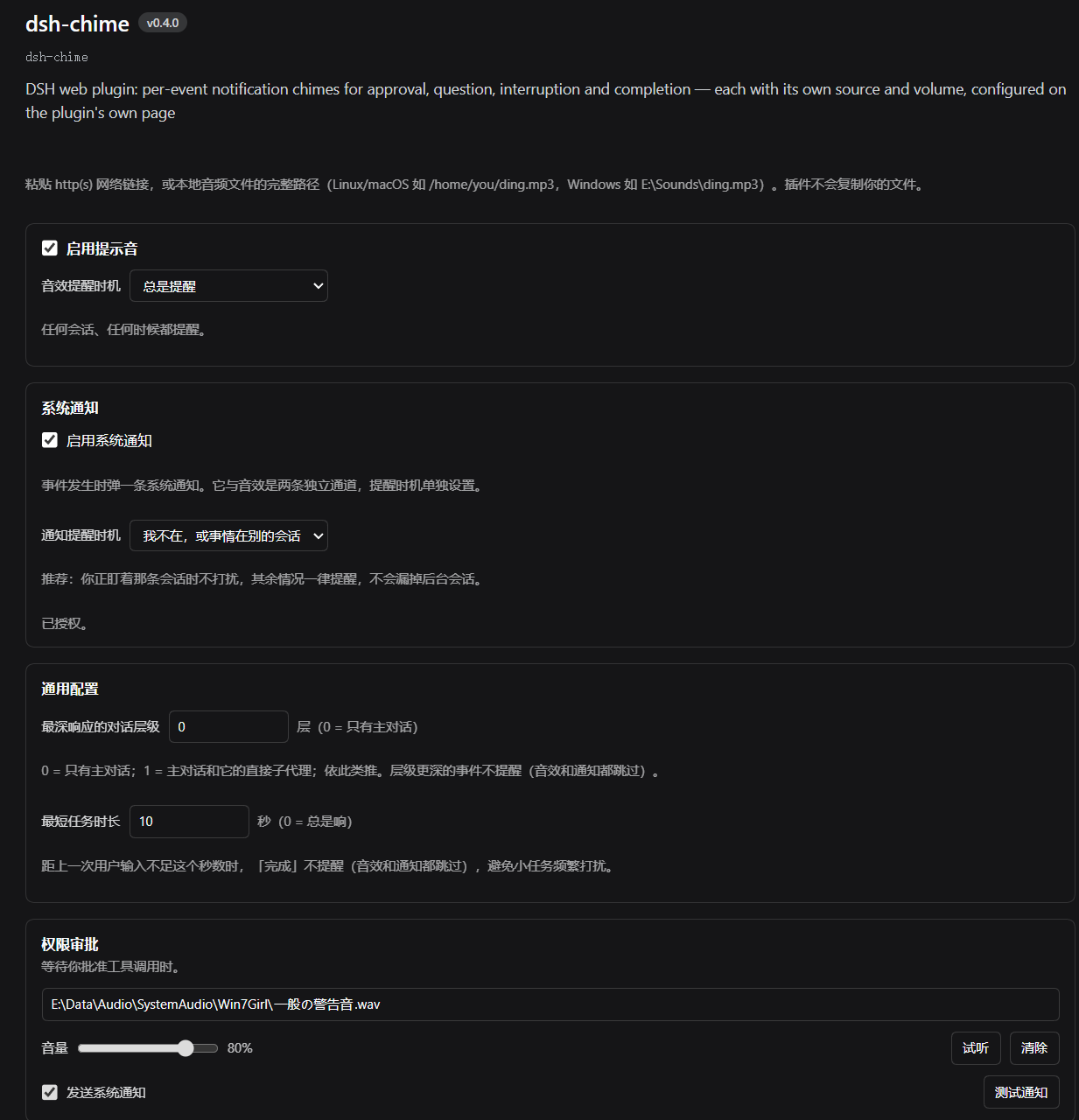
- Attention timing — five policies over two dimensions at once: which session the event came from, and whether the DSH window has focus. Current session only / only when I am away / away or another session (recommended) / always / never. Sound and notifications pick independently but share one judgement.
- Rings from the background — with the window hidden or parked for twenty minutes, a chime fires the moment the event lands instead of waiting for you to switch back.
- System notifications (independent switch) — a desktop notification per event, through the system notification centre on Windows, macOS and Linux. It is a second, independent channel with its own timing policy, and clicking one jumps straight back to the conversation that raised it. An experimental toggle also asks the Desktop shell to bring its window to the front (off by default, Desktop installs only).
- No false positives — background bash jobs or subagents still running never trigger "completion", and retried failures never trigger "interruption".
- Silent by default — an unconfigured chime stays silent; there is never a built-in fallback tone.
Where to configure
Plugins → this plugin's page (or the Chime card). The form renders directly on the plugin page — no drilling into a component row.
Changes take effect immediately; there is no save button.
Install
Installing changes the profile configuration under
%USERPROFILE%\.dshand requires restarting DSH (which interrupts running sessions). Please confirm first.
Repository: https://github.com/AkotaP/dsh-chime
From the Plugins page: sidebar Plugins → Add plugin, and enter the repository address https://github.com/AkotaP/dsh-chime (the same field also accepts the npm package name dsh-chime, an absolute local directory path, or a tarball). DSH probes the repository with git ls-remote before handing it to pnpm; once installed, confirm it shows as enabled in the list.
One command (equivalent):
dsh plugin --profile desktop add https://github.com/AkotaP/dsh-chime
# Once published to npm, the package name works too:
# dsh plugin --profile desktop add dsh-chime
Let the agent install it (paste this into a DSH agent):
Install this repository into the current DSH
desktopprofile:https://github.com/AkotaP/dsh-chime. Use the sidebar Plugins page's Add plugin, ordsh plugin --profile desktop add https://github.com/AkotaP/dsh-chime. After installing, confirmdsh-chimeis present in the profile'sdsh.profile.bundles, then ask me first before restarting DSH. After the restart, confirm the Chime card on the Plugins page opens the configuration form.
Local development (link a checkout into a profile so source changes apply live): see Development below.
After installing, restart DSH; the Chime card on the Plugins page shows the configuration form. To uninstall: remove it from the Plugins page, or dsh plugin --profile desktop remove dsh-chime (and confirm the entry is gone from dsh.profile.bundles).
How it works
- Mostly a Client plugin. Configuration lives in
localStorage(dsh.chime.config.v1); nothing is written to your DSH profile. - A thin host half exposes two loopback HTTP routes:
GET /dsh-chime/asset?path=<absolute path>— audio bytes with the rightContent-Type,Range/206support, andCache-Control: no-storeGET /dsh-chime/list?path=<directory>— directory entries (currently unused; that entry point is parked)
- Why the host route reads local files: DSH's Client Remote surface does not mount
workspaceFiles, and the native directory picker can select a directory but not list one. Exposing the file through DSH's own HTTP server turns it into a same-origin URL the browser treats like any other resource — nothing is copied to disk, and no Remote channel is involved. - Playback uses Web Audio (
AudioContext+decodeAudioData+BufferSource+GainNode). The plugin unlocks itsAudioContexton the firstpointerdown/keydown, after which automatic playback is allowed. - Event-driven first, polling as a fallback: the plugin subscribes to DSH's
uiSession.sessionStatusandsessions.list, evaluates the moment either changes, and evaluates once more when the window returns to the foreground; the 400 ms poll is only a safety net. Background pages get throttled — a hidden tab'ssetTimeoutis stretched to a second or more, and Chrome's Memory Saver can freeze such a tab outright — so a poll-only detector could hold a "question" or "approval" chime back until you switched back to DSH. The subscriptions ride DSH's remote channel and never touch a timer. - Notifications are a second, independent channel: they read only
config.notify(master switch + per-event toggles), go through the browser'sNotification, and are alwayssilent: true— sound belongs to the chime channel, or you would hear two tones. The first use needs one "Allow" click in the settings form, because browsers require the permission prompt to come from a user gesture; unsupported or denied environments degrade to silence without errors. Clicking a notification switches the main area back to the Session that raised it through ui-workspace'sopenSession; an unknown Session or a host without that service falls back to focus only, never to an error. Desktop installs additionally have an experimental "bring the window to the front" switch (notify.raiseWindow, off by default): Windows identifies the Desktop window by process, restores minimized windows, and asks the desktop shell to show tray-hidden windows, then verifies the actual foreground window. If a visible background window still cannot be activated, one brief minimize/restore cycle is used as a last resort and may flicker. macOS and Linux use DSH'sdsh://open. Concurrent clicks share one short-lived helper; the OS can still deny activation, and failures retain diagnostics rather than guaranteeing success. A Web page has no window control, so browser installs skip it. - Event detection mirrors DSH's own sidebar state machine. In particular,
runningonly means the agent loop is busy — it does not mean the task is finished — so "completion" uses a composite test (seeCONTRACT.md§3).
Development
pnpm install
node build.mjs                 # emits lib/index.js and lib/client.js
node test/detect.test.mjs      # 43 event-detection cases
node tools/verify-apply.mjs    # activates the client half against a stub context
node tools/verify-host-routes.mjs
# Install into a profile for development (symlinks the repo, backs up package.json)
node tools/link-install.mjs web
Build note:
build.mjsdrives the platform esbuild binary directly withstdio: 'inherit'. esbuild's JS API spawns its binary with piped stdio, which the DSH file sandbox rejects withEPERM.
Architecture, the DSH API surface used, and the event rules are in CONTRACT.md.
Release history is in CHANGELOG.md.
Compatibility
- Node.js
>=20 - DSH
>=0.2.0-rc.2
License
Related plugins
dsh-im
 xmanrui
/dsh-im
通过扫码把IM机器人接入DeepSeek Harness(支持飞书、微信、钉钉等)。
dsh plugin --profile web add github:xmanrui/dsh-imdsh-pocket
 shaobeichen
/dsh-pocket
手机远程访问 DSH Web 界面:扫码即用局域网或公网(cloudflared 隧道)访问,实时同屏、移动端适配布局,带设置页管理。
dsh plugin --profile web add github:shaobeichen/dsh-pocketDSH Startup Screen
 6shenhonghong9
/dsh-startup-screen
DeepSeek Harness 启动界面与启动动画:黑幕 DeepSeek 标识 → 过曝洗白 → 暖白档案底板 → 交互式访问授权序列(需要访问许可 / 身份资料确认 / 接收访问需求 / 开始读取权限 / 读取完毕·核验通过 / 欢迎访问)。中文主字 + 英文等宽副标题,真声素材 + 界面音效,身份名称等参数在 DSH 设置页可改。web profile 与 DeepSeek Harness Desktop 桌面端通用。桌面端(Windows)播放启动动画期间把标题栏整层透明化:最小化/最大化/关闭按钮与其底色一并不可见,播放结束自动还原。
dsh plugin --profile web add 'github:6shenhonghong9/dsh-startup-screen#1f35ea33810e02a900b31df01f9c806f92f398df'dsh-qqbot
 tencent-connect
/dsh-qqbot
让 QQ Bot 接入 DeepSeek Harness(dsh)的官方插件
dsh plugin --profile web add github:tencent-connect/dsh-qqbotdeepseek-harness-mobile
 sorsama
/deepseek-harness-mobile
DeepSeek Harness 的 Android 伴侣应用:经局域网用手机聊天、看目标、审批与收通知;Kotlin + Jetpack Compose
dsh plugin --profile web add github:sorsama/deepseek-harness-mobiledsh-bridge
 wenbin-wb
/dsh-bridge
DeepSeek Harness 多通道远程访问与全域安全门禁插件 手机扫个码,人不在电脑前也能继续用 DeepSeek Harness。躺在沙发上、出差在外、跨网访问——都不用守着电脑,也不用自己搭公网服务器,扫码就能在手机/平板或任意设备上接着干。 把你本地的 DeepSeek Harness 无缝延伸到手机、平板、公网、甚至微信 / QQ /…
dsh plugin --profile web add github:wenbin-wb/dsh-bridge