
Models & Providers
dsh-model-tweaks
AkotaP/dsh-model-tweaks · ★ 0
 AkotaP
DSH web plugin: a Model Capabilities page in Settings — manage per-model Context Window, Max Output, Input Modalities and Reasoning Levels (Default = drop the field), plus global preset lists.
Manifest details
安装
dsh plugin --profile web add 'github:AkotaP/dsh-model-tweaks#36d6891687204ccbe87ac72cf492524c65cfd86d'GitHub 源码安装:首次需按提示配置 allowBuilds 构建授权后重试
For install and environment setup, plus plugin development tutorials, see DSH community docs ↗
README
Table of contents
中文 | English
A DSH (DeepSeek Harness) web plugin: adds a Model Capabilities page to Settings for managing each model's context window, max output, input modalities and reasoning levels, plus the plugin's own global preset lists.
Supports DSH 0.1.7-rc.2 and later (0.1.x).
What it does
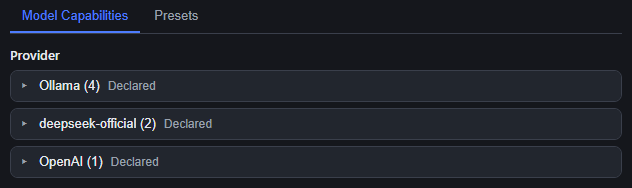
- Location: Settings → Model Capabilities (two tabs: Model Capabilities / Presets).
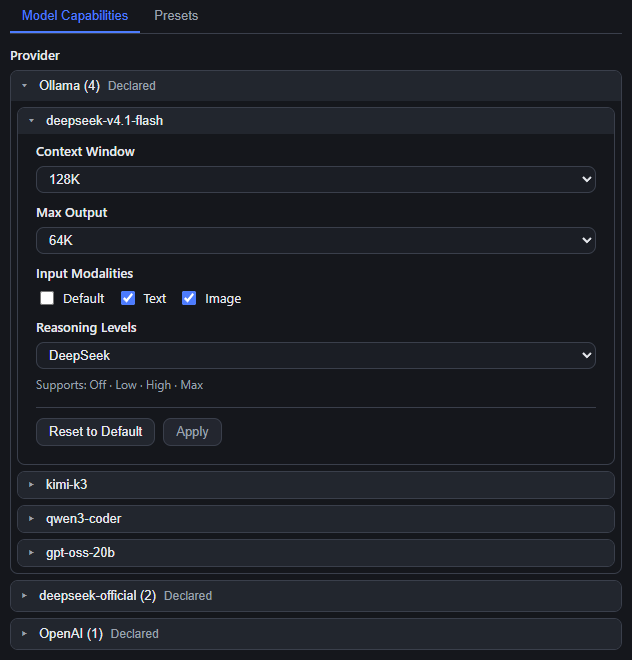
- Two-level collapsible cards: click a provider card title to open the group, click a model card title to select it and expand its capability editor inside the card (click again to collapse).
- Four fields: Context Window, Max Output, Input Modalities (Text / Image only — DSH has no audio/video), Reasoning Levels (dropdown: Default / Global / named preset / Custom…).
- Draft + Apply: only the
Applyinside that model's editor writes tosettings.yamlunderllm-pi-ai.Reset to Defaultis a draft action too — it still needsApply. - Choosing
Defaultdeletes the field (nevernull/0/an empty object) and hands the value back to the DSH engine.
Presets
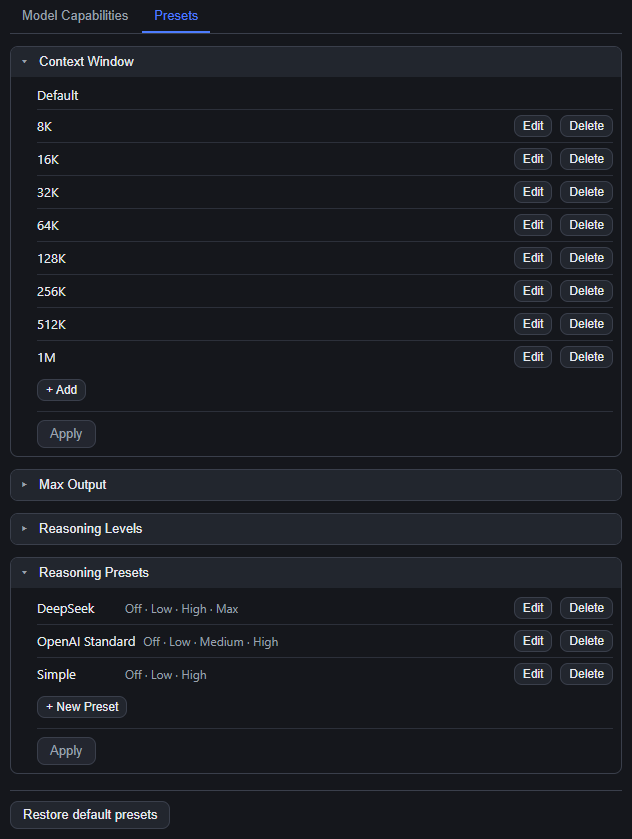
The Presets tab manages four plugin-owned lists. Each one is a card, and every card has its own Apply at the bottom (draft mode as well):
| Card | Built-in contents |
|---|---|
| Context Window | Default, 8K, 16K, 32K, 64K, 128K, 256K, 512K, 1M (decimal 8000…1000000) |
| Max Output | Default, 4K, 8K, 16K, 32K, 64K, 128K, 256K |
| Reasoning Levels | off, minimal, low, medium, high, xhigh, max (add / edit / delete / reorder) |
| Reasoning Presets | DeepSeek · OpenAI Standard · Simple (each starts with off; create, edit, delete, reuse across models) |
- Stored in
{DSH_HOME}/dsh-model-tweaks/presets.json; a missing or broken file falls back to the built-in defaults instead of failing. Restore default presetsat the bottom of the page brings back the built-in lists.- One
Applysubmits the whole preset document — one document is never half-saved.
Install
Installing changes the profile config under
%USERPROFILE%\.dshand requires a DSH restart (which interrupts running sessions). Confirm before installing.
Repository: https://github.com/AkotaP/dsh-model-tweaks
Install from the Plugin page: sidebar → Plugin → Add plugin, and enter the repository address https://github.com/AkotaP/dsh-model-tweaks (the same field also takes the npm package name dsh-model-tweaks, an absolute local directory, or a tarball). DSH probes the repository with git ls-remote before handing the spec to pnpm; afterwards check that the entry is enabled in the list.
One command (the equivalent):
dsh plugin --profile desktop add https://github.com/AkotaP/dsh-model-tweaks
# once published to npm: dsh plugin --profile desktop add dsh-model-tweaks
Let an agent install it (paste this into an agent running in DSH):
Install this repository into the current DSH desktop profile:
https://github.com/AkotaP/dsh-model-tweaks. Use Add plugin on the sidebar's Plugin page, ordsh plugin --profile desktop add https://github.com/AkotaP/dsh-model-tweaks. Then confirm the profile'sdsh.profile.bundleslistsdsh-model-tweaks, ask me first before restarting DSH, and after the restart verify that the Model Capabilities tab appears in Settings.
Restart DSH afterwards and the Model Capabilities tab appears in Settings. To uninstall: remove it from the Plugin page, or run dsh plugin --profile desktop remove dsh-model-tweaks (and make sure dsh.profile.bundles no longer lists it).
⚠️ The first save materializes that provider's whole
modelsarray into the user layer ofsettings.yaml(existing DSH behaviour — the official Models page does the same), which then shadows the same provider's list incordis.patch.yml. To recover, delete the entirellm-pi-ai.providers.<provider>.modelskey fromsettings.yaml.
Test
node --test # same as pnpm test; run from the repository root
Fully offline — no DSH and no browser. test/support/harness.mjs loads the built artifacts lib/index.js / lib/client.js through a stub module graph and a minimal React.
| Test file | Contracts it pins |
|---|---|
test/manifest.test.mjs |
The three ids that must agree (cordis.patch.yml insert.id / __ModuleLoader__.load({id}) / the host's exported name), dsh.client.inject, the host must not import an undeclared @deepseek-ai/*, built-in defaults identical on both halves |
test/host-api.test.mjs |
API fences (403/405/404/415/413), get enumeration plus effective/userDeclared, the whole-array save shape and Default = delete the field, out-of-range thinking level → 400, settings-conflict 409, preset-file fallback |
test/client-page.test.mjs |
Both tabs and the four controls, Input Modalities has no Audio/Video, draft semantics (no write on change, exactly one save per Apply, Default → null), card collapse/selection, per-card Apply, CSS injected after removing the stale tag |
MIT. See CHANGELOG.md for the change history; implementation notes live in docs/HANDOFF.md and the interface contract is docs/CONTRACT.md.
Related plugins
dsh-plugin-reasonix
 esengine
/DeepSeek-Reasonix/integrations/dsh-plugin
把 Reasonix 作为 dsh 子智能体接入:一层配置补丁让 subagent-acp 提供方启动 reasonix acp,并以 reasonix 工具暴露给模型。纯配置、无代码、不在 npm;接入的是子智能体,不是模型服务商。
dsh plugin --profile web add 'github:esengine/DeepSeek-Reasonix#af0e954f5629492980718fc0e36030fec0abc682&path:/integrations/dsh-plugin'dsh-purge
 YuJunZhiXue
/dsh-purge
DeepSeek Harness 破甲:让所有模型都能破甲,不同模型可换不同提示词;默认提示词面向国模「小码酱」。Jailbreak for every model — swap prompts per model. 求 Star 收藏 ⭐ 如要二开,请查看署名要求部分
dsh-purge-mmparko
 mmparko
/dsh-purge
DeepSeek Harness 破甲:让所有模型都能破甲,不同模型可换不同提示词;默认提示词面向国模「小码酱」。Jailbreak for every model — swap prompts per model. 求 Star 收藏 ⭐ 如要二开,请查看署名要求部分
dsh plugin --profile web add 'github:mmparko/dsh-purge#033e6bd1e0f101352b39075ecd0d758ffef26b76'dsh-connect-workbuddy
 dingminhua
/dsh-connect-workbuddy
把本机登录的 WorkBuddy 模型(国内版与国际版)接入 DeepSeek Harness:每次刷新按上游目录自动读取每个模型的积分倍率,支持逐模型图片输入开关、多账号切换与账号池自动换号,并提供每日签到、卡片与输入框里的胶囊积分读数等只读积分概览。
dsh plugin --profile web add 'dsh-connect-workbuddy@5.15.0'dsh-image-gen
 shanliuling
/dsh-image-gen
让 DeepSeek Harness 像 ChatGPT 一样,在对话里直接生成图片。
dsh plugin --profile web add github:shanliuling/dsh-image-genagent-vision-toolkit
 Anionex
/agent-vision-toolkit
为纯文本模型"看图“设计更好的视觉工具箱和技能,支持多图理解,图片问答,前端UI还原、GUI 自动化等,并可选无缝接入多个主流agent,直接识别粘贴图片| A vision toolkit and skill designed for text-only llms — image Q&A, long-screenshot OCR, frontend UI restoration, and GUI automation, with optional seamless integration for Codex, Claude Code, Pi, Oh My Pi, and OpenCode
dsh plugin --profile web add github:Anionex/agent-vision-toolkit