
Memory
dsh-software-tools
AllenLogo/dsh-software-tools · ★ 0
 AllenLogo
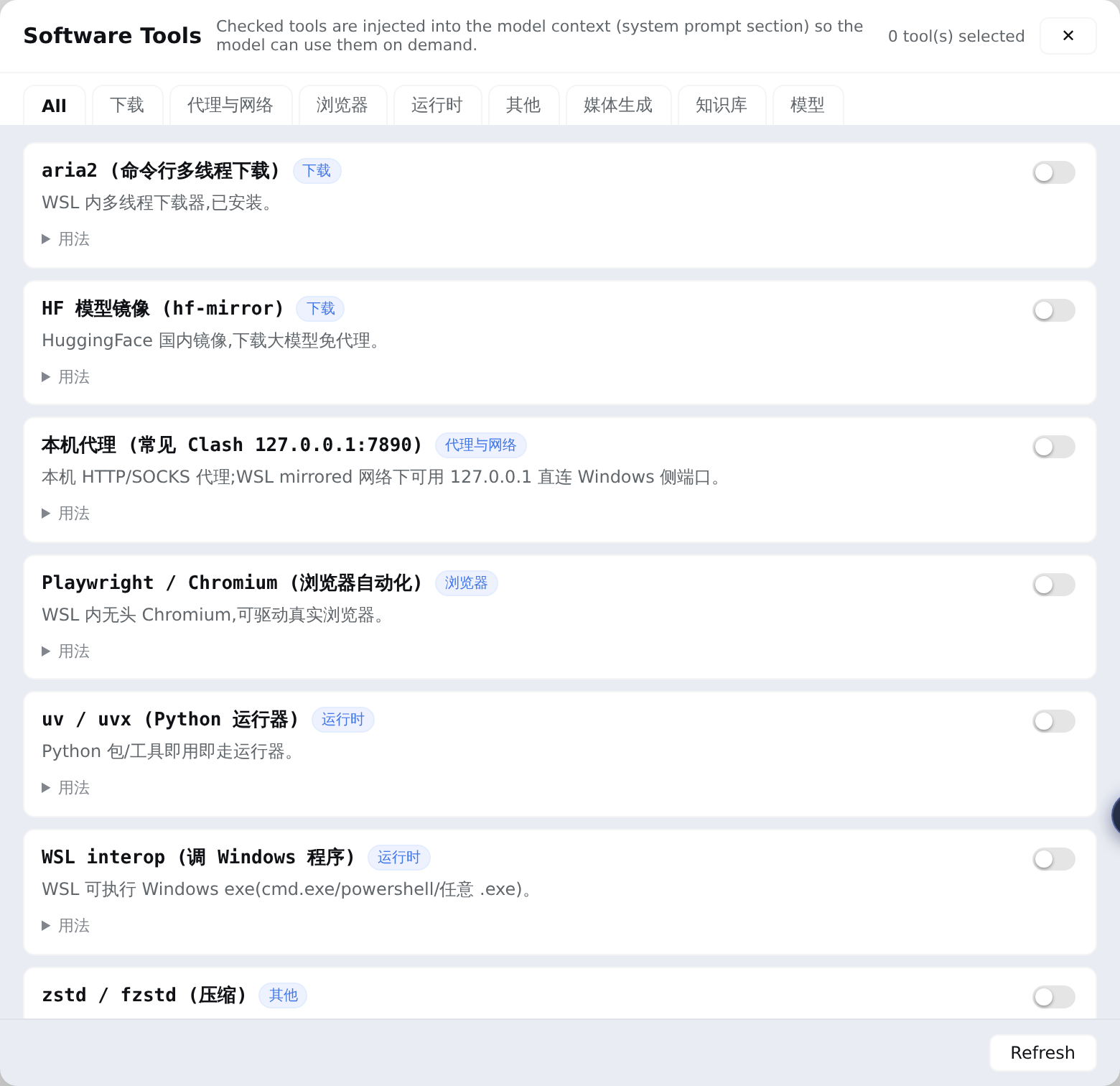
Sidebar 【软件工具】manager for DeepSeek Harness Web: a curated inventory of local WSL/Windows software tools; checked tools are injected into the model's system prompt as a compact section…
Manifest details
安装
dsh plugin --profile web add 'github:AllenLogo/dsh-software-tools#f3509151d72a90dc50ed82ef149796e648e22bec'GitHub 源码安装:首次需按提示配置 allowBuilds 构建授权后重试
For install and environment setup, plus plugin development tutorials, see DSH community docs ↗
README
Sidebar 🔧 软件工具 manager for DeepSeek Harness Web. Maintain a curated inventory of local software — WSL CLI tools and Windows apps reachable via interop — and check the ones you want the model to know about. The checked set is injected into the model's system prompt as a compact section, so every session knows what software exists on this machine and how to call it. 中文说明见 README.zh.md。
Problem
A model (e.g. deepseek-v4-flash) has no idea that you have IDM, ComfyUI, Obsidian, aria2… installed, let alone how to invoke each one. This plugin turns "local software inventory + invocation recipes" into a checkable, persisted, auto-injected system-prompt section: the model reads the usage field and runs the ready-made command.
Features
| Capability | Detail | |
|---|---|---|
| 🔧 | Sidebar panel | Tools grouped by category; toggling takes effect on the model's very next request — no restart |
| 📥 | Built-in + user catalog merge | Portable built-in catalog (aria2 / proxy / playwright / uvx / interop / zstd …); user entries in catalog.json override built-ins by id |
| 🧠 | System-prompt injection | Checked tools become a compact section on every assembly (systemPrompt.section, same seam as persona / plan-mode) |
| 🛠 | Bundled skill | Ships add-software-tool: the model learns to write newly installed software into the user catalog — no rebuild, no restart; entries are scoped to usage, not tuning |
| 🔒 | Loopback RPC | Panel ↔ host over a loopback-pinned RPC channel; reads local JSON only |
Install
dsh plugin --profile web add dsh-software-tools
If your pnpm supply-chain policy blocks dsh plugin add, install manually: copy the package into ~/.dsh/profiles/web/node_modules/ and append to ~/.dsh/profiles/web/cordis.patch.yml:
- insert:
    - id: dsh-software-tools
      name: dsh-software-tools
      config: {}
- insert:
    - id: software-tools-skill
      name: '@deepseek-ai/dsh-skill-filesystem'
      config:
        providerName: software-tools-skill
        includeDefaultRoots: false
        customSkillDirs:
          - !!js process.getBuiltinModule('node:path').join(process.getBuiltinModule('node:path').dirname(process.getBuiltinModule('node:module').createRequire(baseUrl).resolve('dsh-software-tools/package.json')), 'skills')
Restart dsh web and hard-refresh (Ctrl+Shift+R). A 软件工具 row appears in the panel rail (between Automation tasks and Task Board).
Configuration
All optional; zero-config by default:
| Field | Default | Meaning |
|---|---|---|
settingsDir |
$DSH_HOME/software-tools |
State directory holding selection.json + catalog.json |
State files
| File | Purpose |
|---|---|
<settingsDir>/selection.json |
{"ids": ["aria2", …]} — current selection |
<settingsDir>/catalog.json |
{"tools": [entry…]} — user catalog; same id overrides a built-in |
Entry fields: id ([a-z0-9-]{1,32}, unique), name, category (download/proxy/media/browser/knowledge/runtime/model/misc), desc (≤40 chars, panel only), usage (≤5 directly executable lines, injected into the system prompt).
An entry is usage instructions only: written for the session that is about to call the tool — what it is, when to use it, the first command to run. Tuning/ops/troubleshooting/history (VRAM gates, quantisation and KV flags, measured throughput, port-change steps, migration history…) does not belong here; it belongs in the tool's own docs (README / deploy report / cheat sheet), with at most a
details in <path>pointer. The entry is injected on every request, so length is cost — and tuning needs far more context than a few lines.
Adding a tool
Tell the model "add XXX to 软件工具" — the bundled add-software-tool skill researches the software and writes it into catalog.json (no rebuild, no restart; visible on panel refresh). You can also edit catalog.json by hand.
How it works
- Host half (
src/index.ts): registerssystemPrompt.section(software-tools, order 200) rendered from the current selection, plus the loopback RPC channel/ _dsh-software-tools(list/set). - Browser half (
src/client/): contributes two official seats —sidebar.panellist(list: the rail row, whoseidis the panel key and whoselabelis a thunk so the title follows the active locale) andmain(keyed: the panel body the layout renders in the centre). Both wait onctx.slots.inject(key, ...)for ui-layout / ui-sidebar to declare the seat. Built bytsdowninto a lazy-CJS__ModuleLoader__bundle (React comes from the host shell). - Skill (
skills/add-software-tool/): mounted viadsh-skill-filesystem'scustomSkillDirs, scoped to the plugin's own directory so user skill roots stay untouched.
License
Related plugins
hindsight#coding-agents
 vectorize-io
/hindsight/hindsight-integrations/coding-agents
Hindsight:会学习的 Agent 长期记忆系统,自动召回/保存、知识页、深度反思与按仓库隔离的记忆银行。
dsh plugin --profile web add github:vectorize-io/hindsight#path:/hindsight-integrations/coding-agentsdsh-memory-plugin
 volcengine
/OpenViking/examples/dsh-memory-plugin
面向 DeepSeek Harness 的 OpenViking 记忆与上下文插件:pre-step 自动召回与画像注入、会话捕获、`viking://` URI 防护,以及对接 OpenViking 服务端的 recall/write 记忆工具。
dsh plugin --profile web add @openviking/dsh-memory-pluginmemos
 memtensor
/memos
给你的 Agent 持久记忆与成长能力
dsh plugin --profile web add @memtensor/memos-cloud-dsh-plugin@latestdsh-purge-kingchar
 kingcharleslzy-ai
/dsh-purge
让 AI 更专注地辅助学习与动手实验:DSH 附加组件,提供状态自检、提示词与规则管理、本机备份与回滚。
dsh plugin --profile web add 'github:kingcharleslzy-ai/dsh-purge#27919a326b6615b1968661a3e749760cec3a2e07'dsh-context
 bowenliang123
/dsh-context
上下文洞察面板:一眼看清模型上下文窗口的组成与变化——构成对照窗口大小、按请求历史趋势、压缩/注入事件、消息级 token 统计。
dsh plugin --profile web add dsh-contextmemsearch
 zilliztech
/memsearch/plugins/dsh
MemSearch plugin for DeepSeek Harness: shared markdown memory across agents, with capture, on-demand recall, memory-recall skill, and a skill-candidate review panel.
dsh plugin --profile web add '@zilliz/memsearch-dsh@0.1.8'