
Notifications & Integrations
dsh-notify-win
Andyqwe44/dsh-notify-win · ★ 3
 Andyqwe44
Native Windows toast + taskbar flash for DeepSeek Harness when a task finishes or your input is needed.
Manifest details
安装
dsh plugin --profile web add github:Andyqwe44/dsh-notify-winGitHub 源码安装:首次需按提示配置 allowBuilds 构建授权后重试
For install and environment setup, plus plugin development tutorials, see DSH community docs ↗
README
Table of contents
DeepSeek Harness (DSH) Windows notification plugin — native toast + taskbar flash when a task finishes or your input is needed.
English | 中文



📸 Screenshots
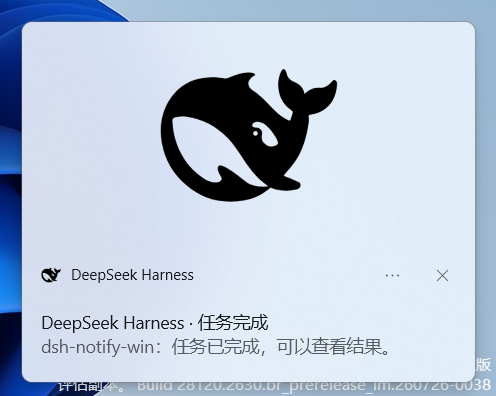
Task finished
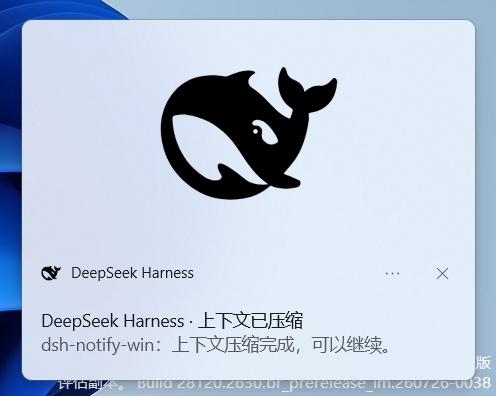
Context compacted
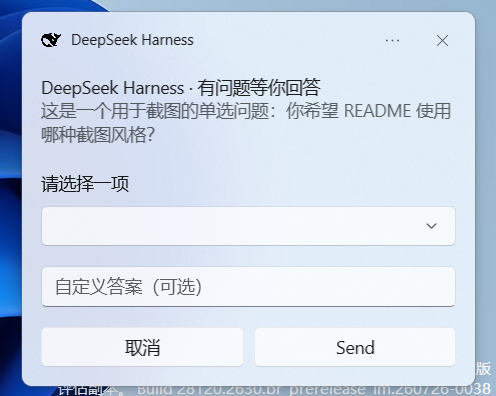
Question — single select
Toast timeout → taskbar flash
Screenshots are from Windows 11. The taskbar flash is animated; the screenshot shows the DSH taskbar button highlighted by the system warm pulse.
✨ Features
- 🔔 Native Windows toast (bottom-right, Win10/11 system style)
- 💡 Taskbar flash (
FlashWindowEx) when DSH is in the background; the OS stops it as soon as DSH comes to the foreground - 🖱️ Click-to-focus — clicking a toast opens DSH and switches to the corresponding session
- ✅ Triggers when a task finishes (root agent goes
idle) - 🧭 Tells you WHY it stopped — the toast reflects the
turn/endreason instead of always claiming success: normal finish, output-token ceiling (max-tokens), blocked pre-step, LLM failure (provider-neutral code + retry count), or cancellation. See Stop conditions. - 🗜️ Triggers when context compaction finishes — and alerts when it fails (
compaction/endwitherror) - ❓ Triggers when your input is needed (approval /
ask_user_question) - 📋 Question toast with pages: a single question shows its native dropdown (up to 5 options) plus a custom-answer text box. Two or more questions become one paged toast (
问题 i/n+ 上一题 / 下一题 / 提交 / 取消); every page keeps its dropdown choice and custom text when you page back, and a已答:…line keeps the other answers visible. - 🧷 Resident helper, plugin lifetime: one
dsh-toast-question.exeis started when the plugin is applied and reused for every question. Disabling the plugin or quitting DSH shuts it down (stdio EOF when DSH exits), so no per-question process spawn and no orphan process. - ✅ One honest receipt: submitting closes the question toast; nothing else pops up until the model answers, and then exactly one toast appears — the model's first line, filled to the toast width and cut with
…when it is longer (no “已提交” / “已送达” / “已收到并回应” stages, no title line). Text that can only exist if the whole round trip really happened. If the model produces no visible text, nothing is shown (no invented receipt). Cancelling says “没有向 DSH 提交任何答案”; a card that could not be filled says “请在 DSH 窗口中手动回答”. - 🖱️ Answering from the toast reaches the agent: the chosen options (and custom text, across multiple questions) are applied to the official question card and submitted, so the blocked
ask_user_questioncall returns immediately - ⏰ Timeout flash: if any toast is ignored and dismissed by the system timeout, the taskbar flashes; it stops as soon as DSH is foreground or the question is answered in the window
- 🖼️ Badge-only toasts: no hero banner in any kind — just the app icon in the header, so notifications stay compact
- 🪪 Toasts are attributed to DeepSeek Harness with its own icon (registered AppUserModelID); the generic PowerShell toast identity is used only as a last resort if the branded notifier cannot be created
- 🚀 No DSH service, model approval, or settings namespace — just one resident helper child process
🚀 One-line install
dsh plugin --profile web add dsh-notify-win
Requires
pnpmon PATH (corepack enableif missing). See Install for details.
Install
Prerequisite: pnpm
corepack enableOr without admin, put a user-level shim in a PATH directory:
Set-Content -Path "$env:LOCALAPPDATA\Microsoft\WindowsApps\pnpm.cmd" -Value "@echo off`r`ncorepack pnpm %*`r`n"
corepack pnpm --version
Install the plugin
# From npm (recommended)
dsh plugin --profile web add dsh-notify-win

# Or directly from GitHub:
dsh plugin --profile web add github:Andyqwe44/dsh-notify-win

# If github: is blocked, use SSH:
dsh plugin --profile web add git+ssh://git@github.com/Andyqwe44/dsh-notify-win.git
Verify
dsh --profile web --dump-config # look for: # == dsh-notify-win / - id: dsh-notify-winRestart and test
dsh webComplete any task. The first notification self-registers the branded toast identity (Start Menu shortcut + AppUserModelID, one-time). If the toast header still shows
DeepSeekHarnesswithout an icon, restart Explorer once:Stop-Process -Name explorer -Force; Start-Process explorer
Requirements
- Windows 10/11 (x64)
- DeepSeek Harness, any profile (
webrecommended) - .NET 10 Desktop Runtime (x64) — required: the resident toast helper is the only notification implementation. All toasts (done / compact / alert / notice, interactive approval and questions) go through it. Install with
winget install Microsoft.DotNet.DesktopRuntime.10or from https://dotnet.microsoft.com/download/dotnet/10.0. No PowerShell script is used.
Configuration
Edit $env:USERPROFILE\.dsh\profiles\web\cordis.patch.yml:
- id: dsh-notify-win
  config:
    doneTitle: 'DeepSeek Harness · Task complete'
    doneBody: 'Your task has finished.'
    compactTitle: 'DeepSeek Harness · Context compacted'
    compactBody: 'Context compaction finished, you can continue.'
    questionTitle: 'DeepSeek Harness · Action needed'
    questionBody: 'An approval or decision is waiting.'
    askTitle: 'DeepSeek Harness · Question for you'
    askBody: 'The assistant asked you something.'
    dedupMs: 1500              # suppress duplicate notifications within this window
    questionToastDuration: 'short'  # 'short' (~5s) or 'long' (~25s) for ask_user_question toasts
    doneToastDuration: 'short'      # 'short' (~5s) or 'long' (~25s) for done/compact/alert/notice toasts
    approvalToastDuration: 'long'   # 'short' or 'long' for interactive approval requests
    helperLog: ''              # optional file for helper protocol/toast diagnostics
    answerPendingTimeoutMs: 30000  # how long a parked answer waits for the browser half before warning
    answerSpeechTimeoutMs: 90000   # how long to wait for the model's first line after delivery
    showProject: true          # prefix body with project label

    # Stop-reason notifications (defaults are Chinese; shown here in English)
    notifyOnCancel: true       # notice when the user cancels a running turn
    notifyOnError: true        # alert on max-tokens / blocked / LLM failure / failed compaction
    includeErrorCode: true     # append the machine-readable failure code to an error body
    cancelledTitle: 'DeepSeek Harness · Cancelled'
    cancelledBody: 'The task was cancelled.'
    hookCancelledBody: 'Blocked by a hook: {message}'
    maxTokensTitle: 'DeepSeek Harness · Output ceiling reached'
    maxTokensBody: 'The response hit the output limit and was truncated. Send "continue" to resume.'
    blockedTitle: 'DeepSeek Harness · Turn blocked'
    blockedBody: 'A pre-step check rejected this turn.'
    errorTitle: 'DeepSeek Harness · Task interrupted'
    errorBody: 'The task stopped abnormally: {hint}'    # {hint} = built-in code hint or provider message
    retrySuffix: ' (retried {retry}/{retryMax} times)'
    compactionFailedTitle: 'DeepSeek Harness · Compaction failed'
    compactionFailedBody: 'Context compaction failed: {message}'
Templates support {message}, {code}, {hint}, {reason}, {retry}, {retryMax}.
To disable:
- id: dsh-notify-win
  disabled: true
Restart after install/disable changes (web profile HMR is disabled by default).
Stop conditions
agent/status only says idle; it does not say why. The plugin therefore caches the
turn/end reason (which is always appended immediately before the idle transition)
and turns it into the notification:
turn/end reason |
Notification | Notes |
|---|---|---|
completed |
done | normal finish |
max-tokens |
alert | output-token ceiling; the turn was truncated |
blocked |
alert | a pre-step hook/plugin rejected the turn |
error |
alert | LLM failure; body carries the code hint + retry count |
aborted (user, parent, legacy) |
notice | lightweight "cancelled" |
aborted (hook) |
notice | body names the hook reason |
aborted (disposed) |
silent | disposal cancels the driver right before teardown |
interrupted, forked |
silent | durable history markers (resume / fork seeds), never live stops |
| unknown (future reason) | alert | rendered from unknownStopBody (default text is Chinese) |
A failed context compaction (compaction/end with error) raises its own alert; a
successful one still shows the "context compacted" toast.
error notification details come from the provider-neutral LlmFailure.code
(RATE_LIMIT, SERVER, TIMEOUT, TRANSPORT, EMPTY_RESPONSE,
CONTEXT_WINDOW_EXCEEDED, QUOTA, AUTH, MISSING_CREDENTIAL,
INVALID_CREDENTIAL, ACCOUNT_TOKEN_INVALID, STREAM_CLOSED, NO_ADAPTER,
UNKNOWN_MODEL, INVALID_CONFIG, UNSUPPORTED_OPTION, ABORTED, UNKNOWN, …).
Unlisted codes fall back to the provider message. Retry counts come from the
durable llm/retry events — the framework has no distinct "retries exhausted"
reason, so the plugin reports the retry count from the last retry record
(retrySuffix, default Chinese).
How it works
| Concern | Implementation |
|---|---|
| Trigger "done"/alert/notice | session/event → turn/end reason cache + agent/status idle (root agents only) |
| Trigger "compact" / compaction failure | session/event → compaction/end |
| Trigger "question" | approval/request waterfall (toast + DSH panel) + tools/execute for ask_user_question |
| Done/compact/alert/notice toast | Resident .NET helper notify op; WinRT Windows.UI.Notifications, NotifyIcon balloon fallback. No per-notification process |
| Interactive approval toast | DSH's own approval panel still shows; the toast is a remote control using the same question op: one fixed-choice card (允许一次 / 拒绝, no free-text input). Its answer is parked for the browser half, which switches to the owning session and clicks the panel; the panel remains the authority. Cancelling the toast leaves the decision to the panel, and an aborted turn retires the toast |
| Interactive question toast | Resident .NET helper question op, spoken to over the child's stdin/stdout (newline-delimited JSON). One question = one card; several questions = one paged card (问题 i/n, 上一题/下一题/提交), with each page's draft restored through the toast defaultInput attribute |
| Question answer receipt | The helper reports the selection and dismisses the question toast; the host parks it for the browser half, checks the ask_user_question tool result, then shows exactly one toast — spoken with the model's first line (filled to the toast width, cut with …). No pending, delivered or title toast |
| Toast identity / protocol / focus | Helper startup registers the branded AUMID, Start Menu shortcut and dsh-notify:// handler; clicking a toast focuses DSH in-process (or via --focus on the cold path) |
| Helper lifetime | Plugin apply starts it → ctx.effect disposal sends shutdown; DSH exit closes stdin (EOF) and the helper exits; a crashed host leaves no orphan |
| Taskbar flash | EnumWindows + FlashWindowEx (FLASHW_TRAY | FLASHW_TIMERNOFG = 2 | 12 = 14); the OS stops it when DSH is foreground, with no periodic re-pulse |
| Execution | Every notification, question and toast click goes through the resident .NET helper; there is no PowerShell path |
The plugin registers no service, tool, or settings namespace — a plain consumer row, safe in any profile.
Helper lifecycle
| Event | What happens |
|---|---|
| Plugin applied (DSH start, reload) | The host probes --check once, then spawns dsh-toast-question.exe --serve and waits for its ready line (5 s). The helper registers the toast identity and protocol on the way up. |
| Non-interactive notification | One JSON notify line on the helper's stdin — no new process. The helper shows the toast and watches Dismissed/Activated. |
| Question asked | One JSON question line on the helper's stdin — no new process. |
| User answers | The helper emits answer and removes the question toast; the host parks it for the browser half. |
| Tool result returns | The host compares the returned answers with the toast's (a mismatch is reported), then waits for the model's first line and shows it as the only receipt, cut to the toast width. |
| Question answered in the DSH card | The host sends resolved; the helper stops the flash and removes the question toast. |
| Plugin disabled / profile row removed | ctx.effect disposal sends shutdown; the helper exits within 1.5 s (force-terminated otherwise). |
| DSH quits or crashes | The helper's stdin reaches EOF and it exits on its own; the managed subprocess range is also reaped by DSH. |
Known limitations
- Native toast text is compact: only about 4 lines are displayed, so long content is truncated.
- The native selection dropdown may collapse when the pointer moves onto the popup; if the toast is then dismissed by timeout, the taskbar flash still reminds you, and it stops once DSH is foreground.
- The .NET 10 Desktop Runtime is a hard requirement. Without it the helper cannot start and no notification can be shown; the host logs an explicit error. There is no PowerShell fallback.
- The helper is a single long-lived process. If it crashes, the next notification asks the host to spawn it again; until then, notifications are dropped with a log line.
FlashWindowExuses the system's warm-pulse highlight; custom colors are not possible.- Windows never flashes the foreground window — the taskbar button only flashes when DSH is in the background; an active flash is stopped by the OS when the window comes to the foreground.
- A cancelled turn is reported as "cancelled" (not "task complete"); set
notifyOnCancel: falseto silence it, ornotifyOnError: falseto silence abnormal-stop alerts. - Notifications are deduplicated per session within
dedupMs(default 1500 ms). A secondidlefor an already-reported turn stays quiet. - Multi-question toasts page by re-showing the native toast. Windows animates the old toast out and the new one in, so each page change has a short visual gap; the
已答line carries the context across it. Multi-question cards always use the long duration (about 25 s). - A custom answer wins over the dropdown selection on the same page, exactly like the previous single-question toast; clear the text box if you only want the dropdown choice.
- The receipt cannot be faked by the UI: “spoken” is the model's own first line (cut with … to fit one toast line) and is the only toast shown after submitting. If the model produces no visible text (for example it immediately calls another tool), no receipt toast appears at all.
- If the DSH window is closed, the browser half cannot fill the official card; an honest “未收到 DSH 确认” follows after
answerPendingTimeoutMsand you can still answer in DSH. - Windows does not allow an unpackaged desktop identity to delete its own toasts from Action Center. A toast whose question has already been settled can stay listed until it expires; clicking it does nothing.
Development
npm run build     # publish the helper to artifacts/ and stage it into lib/
npm run check     # syntax check
npm test          # flash-policy + smoke + proof-pipeline + helper protocol tests
npm run build requires the .NET 10 SDK (the runtime is enough to run the
published exe). It publishes into artifacts/publish/ and copies only the final
dsh-toast-question.exe into lib/, which is the directory npm ships. The
helper is locked while a helper is running, so quit DSH (or stop
dsh-toast-question.exe) before rebuilding. If dotnet is not on PATH, set
DOTNET to the full path of the SDK's dotnet.exe.
npm test runs four suites: test/flash-policy.mjs (the flash policy and the
absence of the old scripts), test/smoke.mjs (notification logic with a fake
helper), test/proof.mjs (question → parked answer → tool result → first line,
using a fake helper that speaks the real protocol), and
test/helper-protocol.mjs (the real exe: --check, ready, ping,
shutdown, and exit on stdin EOF).
Project layout
dsh-notify-win/
├── Directory.Build.props        # all generated output goes to artifacts/
├── artifacts/                   # build output (gitignored)
│   ├── bin/                     # compiled assemblies
│   └── publish/                 # single-file helper before staging
├── scripts/
│   └── build-helper.mjs         # dotnet publish + stage exe into lib/
├── src/DshToastQuestion/        # C# source only (no bin/obj)
│   ├── DshToastQuestion.csproj
│   ├── Program.cs               # entry point, CLI modes, stdin dispatch
│   ├── State.cs                 # shared state, constants, JSON options
│   ├── GlobalUsings.cs          # project-wide usings
│   ├── Protocol/
│   │   ├── WireModels.cs        # JSON messages and question models
│   │   └── HelperOutput.cs      # stdout protocol + XML escaping
│   ├── Notifications/
│   │   └── Notifications.cs     # notify op, toast delivery, balloon, tracking
│   ├── Questions/
│   │   ├── QuestionFlow.cs      # flow state, start/finish
│   │   ├── QuestionRendering.cs # toast XML, paging, drafts
│   │   ├── QuestionInteraction.cs # activated actions, submit, answers
│   │   └── QuestionStatus.cs    # host status -> receipt toasts
│   ├── Platform/
│   │   ├── ToastIdentity.cs     # AUMID, Start Menu shortcut, protocol
│   │   ├── DshWindow.cs         # find/focus/launch DSH
│   │   └── TaskbarFlash.cs      # FLASHW_TIMERNOFG / FLASHW_STOP
│   ├── Interop/
│   │   └── NativeMethods.cs     # P/Invoke, COM interfaces, structs
│   └── Logging/
│       └── HelperLog.cs         # optional --log file
├── lib/                         # npm package: JS, assets, staged exe
│   ├── index.js                 # host half: events, helper lifecycle, proofs
│   ├── client.js                # browser-side click-to-focus + card driver
│   ├── dsh-toast-question.exe   # staged by npm run build (gitignored)
│   └── dsh-*.png / dsh-*.ico    # branding assets
├── test/                        # fake helper + four test suites
├── docs/                        # landing page and screenshots
├── cordis.patch.yml             # DSH bundle patch
├── package.json                 # dsh.bundle declaration + scripts
├── README.md
└── README.zh.md
Links
- 🌐 Landing page: https://Andyqwe44.github.io/dsh-notify-win/
Roadmap
- V1 (implemented): done + compact + question toasts; single-select dropdown with custom answer; Cancel / Send; timeout → taskbar flash.
- V1.1 (implemented): paged multi-question toast with per-page drafts (dropdown + custom text); multi-select question toast by numbered input; multi-question card driving; honest two-stage receipt backed by the tool result and the model's first line (filled to the toast width, cut with …).
- V1.2 (implemented): one resident .NET helper for every notification, toast identity, click-to-focus and the taskbar flash; no PowerShell/
.ps1path; every toast flashes only after it times out. - V2 (planned): fully self-contained packaging (no .NET runtime install) and/or background activation so toast buttons submit without any foreground activation.
License
Related plugins
dsh-im
 xmanrui
/dsh-im
通过扫码把IM机器人接入DeepSeek Harness(支持飞书、微信、钉钉等)。
dsh plugin --profile web add github:xmanrui/dsh-imdsh-pocket
 shaobeichen
/dsh-pocket
手机远程访问 DSH Web 界面:扫码即用局域网或公网(cloudflared 隧道)访问,实时同屏、移动端适配布局,带设置页管理。
dsh plugin --profile web add github:shaobeichen/dsh-pocketDSH Startup Screen
 6shenhonghong9
/dsh-startup-screen
DeepSeek Harness 启动界面与启动动画:黑幕 DeepSeek 标识 → 过曝洗白 → 暖白档案底板 → 交互式访问授权序列(需要访问许可 / 身份资料确认 / 接收访问需求 / 开始读取权限 / 读取完毕·核验通过 / 欢迎访问)。中文主字 + 英文等宽副标题,真声素材 + 界面音效,身份名称等参数在 DSH 设置页可改。web profile 与 DeepSeek Harness Desktop 桌面端通用。桌面端(Windows)播放启动动画期间把标题栏整层透明化:最小化/最大化/关闭按钮与其底色一并不可见,播放结束自动还原。
dsh plugin --profile web add 'github:6shenhonghong9/dsh-startup-screen#1f35ea33810e02a900b31df01f9c806f92f398df'dsh-qqbot
 tencent-connect
/dsh-qqbot
让 QQ Bot 接入 DeepSeek Harness(dsh)的官方插件
dsh plugin --profile web add github:tencent-connect/dsh-qqbotdeepseek-harness-mobile
 sorsama
/deepseek-harness-mobile
DeepSeek Harness 的 Android 伴侣应用:经局域网用手机聊天、看目标、审批与收通知;Kotlin + Jetpack Compose
dsh plugin --profile web add github:sorsama/deepseek-harness-mobiledsh-bridge
 wenbin-wb
/dsh-bridge
DeepSeek Harness 多通道远程访问与全域安全门禁插件 手机扫个码,人不在电脑前也能继续用 DeepSeek Harness。躺在沙发上、出差在外、跨网访问——都不用守着电脑,也不用自己搭公网服务器,扫码就能在手机/平板或任意设备上接着干。 把你本地的 DeepSeek Harness 无缝延伸到手机、平板、公网、甚至微信 / QQ /…
dsh plugin --profile web add github:wenbin-wb/dsh-bridge