
Sessions & Messages
dsh-md-studio
BioAIEvolu/dsh-md-studio · ★ 4
 BioAIEvolu
Markdown Studio:在 DSH 原生右侧文件预览与对话消息中渲染 Mermaid 图表、KaTeX 公式、GFM 表格、任务列表、脚注及代码高亮。渲染引擎随包内置,完全离线可用。 / Native DSH right-sidebar Markdown preview with Mermaid diagrams, KaTeX math…
Manifest details
安装
dsh plugin --profile web add 'dsh-md-studio@1.3.0'从 npm 安装预构建包
For install and environment setup, plus plugin development tutorials, see DSH community docs ↗
README
Table of contents
📄 Markdown Studio for DeepSeek Harness
Mermaid diagrams, math formulas and syntax highlighting rendered right inside DSH's native right-sidebar file preview — and in chat messages.
The rendering engine ships with the plugin — fully offline · no document changes needed · disable to restore the stock renderer




The same Mermaid block: stock preview vs Markdown Studio
Why
DeepSeek Harness's right-sidebar preview is great — except ```mermaid blocks show up as raw code. Existing workarounds open a separate panel or fetch rendering engines from a CDN.
Markdown Studio takes over the native preview's Markdown renderer: file reads, permission checks, reload and tab lifecycle all stay native — only the drawing is upgraded. Mermaid, markdown-it, KaTeX, highlight.js and DOMPurify ship inside the bundle, so diagrams work offline.
| Stock preview | Markdown Studio |
|---|---|
```mermaid shown as code |
Rendered in place as SVG + toolbar |
✨ Features
- 📈 Mermaid diagrams, chat + documents — the same pipeline renders
```mermaidblocks in chat messages and in opened documents: flowcharts, sequence, gantt, pie and the full Mermaid 11 family; per-diagram toolbar with diagram/source toggle · fullscreen (zoom & pan) · SVG download; automatic re-render on theme change - 🩹 Syntax auto-repair — the most common real-world breaker, ASCII parentheses inside node labels (
W2[Codex / Claude Code (ACP)]), is repaired and rendered with an "auto-repaired" badge. No need to edit your documents - 📐 KaTeX math — inline
$...$and display$$...$$ - 📝 Full GFM — tables, task lists, footnotes, heading anchors
- 🎨 Syntax highlighting — highlight.js common languages
- 🖼️ Local images — relative paths resolve beside the document through DSH's authenticated file route
- 📴 Fully offline — zero rendering network requests (asserted by automated tests); remote images authored in the document still load from their URLs
- 🛡️ Secure — DOMPurify sanitization for both document HTML and diagram SVG; scripts never execute; Mermaid runs in
strictmode
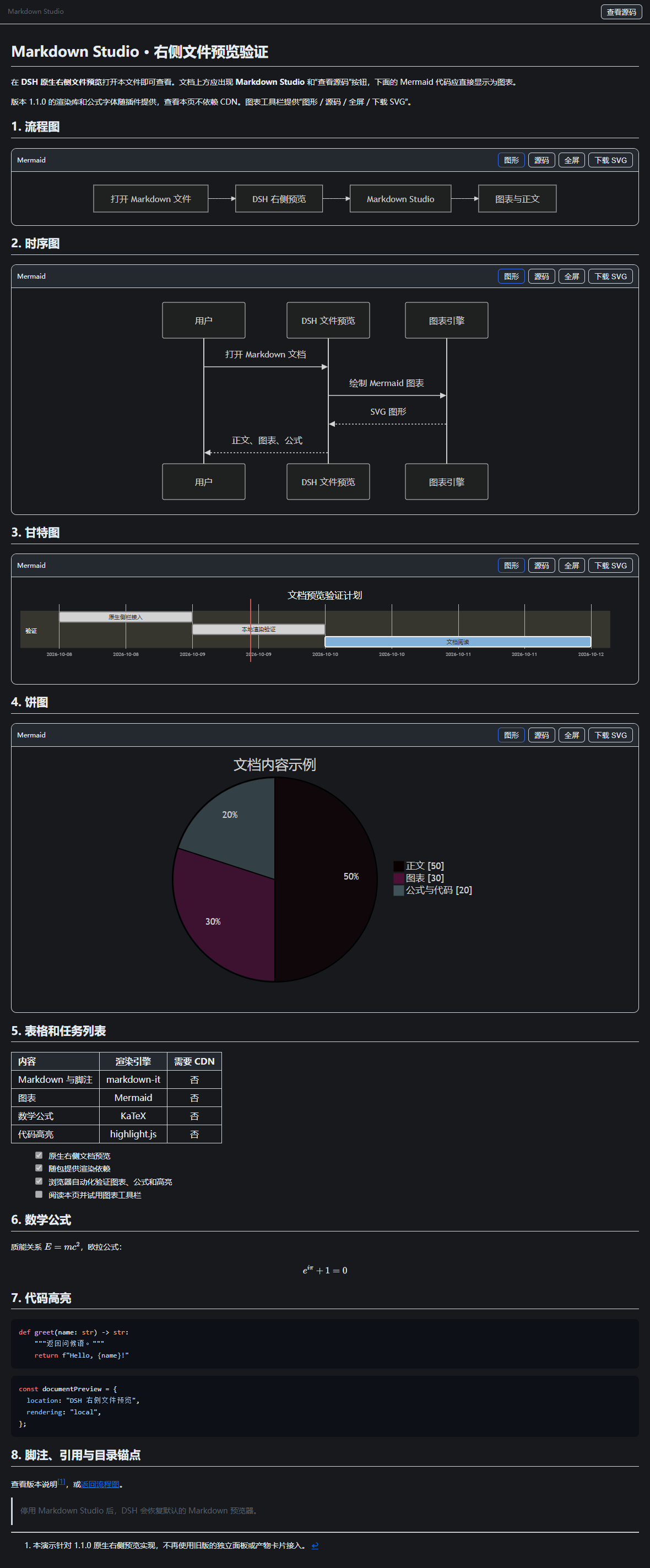
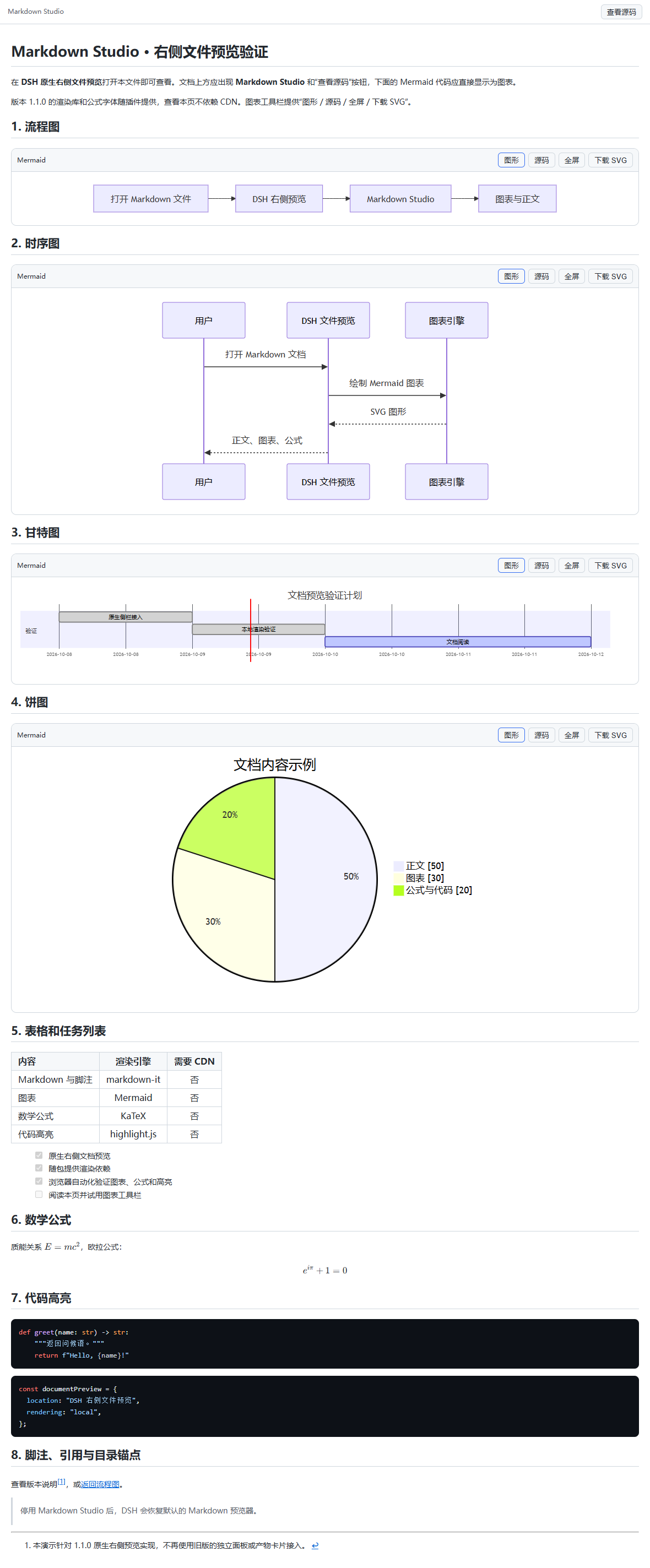
📸 Screenshots
| Dark | Light |
|---|---|
 |
 |
🚀 Install
Requires DeepSeek Harness
0.2.0-rc.2+(client slot API, see Compatibility)
Option 1 · In-app plugin market (dshmarket) — search dsh-md-studio.
Option 2 · CLI from GitHub
dsh plugin --profile desktop add github:BioAIEvolu/dsh-md-studio
Option 3 · CLI from npm (once published)
dsh plugin --profile desktop add dsh-md-studio
Restart DSH Desktop, then open any .md file in the right sidebar.
📖 Usage
- A Markdown Studio marker and a source toggle appear above the document
- Every Mermaid diagram gets its own toolbar: diagram / source / fullscreen / download SVG
- Fullscreen supports wheel zoom, drag pan and fit
- A broken diagram keeps its source plus the reason — other diagrams still render
- Disable the plugin anytime to restore the stock renderer
Try docs/demo.md — a document covering every feature.
🧠 How it works
No DOM scanning, no floating panel: the plugin registers on DSH's official document-preview slot and takes over the official Markdown key with higher priority.
flowchart LR
    A[Open .md file] --> B[DSH native preview]
    B --> C{document slot}
    C -->|Markdown Studio| D[This renderer]
    C -->|other types stay native| E[PDF / image / Excel / code]
    D --> F[markdown-it + GFM]
    D --> G[Mermaid]
    D --> H[KaTeX]
    F --> I[DOMPurify]
    G --> I
    I --> O[Right sidebar tab]
File reading, paging, reload and lifecycle remain DSH's job — the plugin only draws. Slot takeover is verified live via DSH Inspect: this plugin active: true, the official Markdown occupant yields.
✅ Quality
node test/browser.mjs loads the exact shipped bundle in a real Chromium with networking blocked (asserts zero network requests, zero page errors): 4 diagram types with visible labels, auto-repair, GFM, math, highlighting, toggles, fullscreen, SVG download, theme re-render, broken-diagram isolation, XSS sanitization, rapid file switching and disposal. Full list in the Chinese README.
⚠️ Compatibility
- Built for DSH
0.2.0-rc.2(engines.dsh: >=0.2.0-rc.2 <0.3.0-0); other versions unverified — open an issue if the slot API changes - Limits: 2M chars per document, 50k chars / 2000 lines / 2000 edges per diagram
- Sanitized Mermaid output: diagram interactions and external references are disabled
🛠️ Build from source
pnpm install --ignore-scripts
node scripts/build.mjs        # lib/ incl. fonts and license notices
node test/browser.mjs
node test/screenshots.mjs     # regenerate docs images
pnpm pack
lib/client.js is shipped in DSH ModuleLoader factory format; only React is required from the host.
🙏 Credits
- dsh-mermaid and dsh-artifact-preview — inspiration for the interaction design
- Libraries: Mermaid · markdown-it · DOMPurify · highlight.js · KaTeX — full notices in THIRD_PARTY_NOTICES.md
⭐ Support
If this plugin saves you time, please star the repo. Issues and PRs welcome — 中文文档.
License
MIT © BioAIEvolu
Related plugins
archify
 tt-a1i
/archify
架构图生成 Skill 总仓(多宿主):可校验的自包含架构图、工作流图、时序图、数据流图与生命周期图。DSH 安装不走本仓根——根目录不是 DSH bundle,请用适配包 @tt-a1i/archify-dsh(见 DSH 集成条目)。
dsh plugin --profile web add @tt-a1i/archify-dsh@1.0.0DeepSeek-Bot
 Fei2411
/DS-Bot/ds-bot
DS Bot: a team of long-lived Bots for DeepSeek Harness, with Main Bots, Bot-to-Bot messages and group chats
dsh plugin --profile web add 'ds-bot@0.2.4'Study-Mate
 Miaotofu01
/Study-Mate
StudyMate learning skills and lesson engine for DeepSeek Harness, Google Antigravity, Codex and ChatGPT Work.
dsh plugin --profile web add 'github:Miaotofu01/Study-Mate#d8114f38363272852b339d6788b2f8f007243b43'dsh-plugin-subscriptions
 V1ki
V1ki/dsh-plugin-subscriptions
把 ChatGPT(Codex)、Claude 与 Grok(X Premium)订阅用作 DeepSeek Harness 的 LLM provider——Web UI OAuth 登录,无需 API key
dsh plugin --profile web add github:V1ki/dsh-plugin-subscriptionsRabiRoute
 vb2250158
/RabiRoute/plugins/rabi-dsh-context
Connect DSH lifecycle events and conversation context to Rabi Manager.
dsh plugin --profile web add 'github:vb2250158/RabiRoute#e483f87e68cef2c8f5112b101e333b1a9577a9f7&path:/plugins/rabi-dsh-context'dsh-deepseek-web-login
 cv-superding
/dsh-deepseek-web-login
Unofficial DSH plugin: use chat.deepseek.com web models as a DSH LLM provider (browser login capture + PoW solving + SSE streaming + prompting-based tool calls), provider route deepseek-web
dsh plugin --profile web add 'dsh-deepseek-web-login@1.0.3'