Sessions & Messages
DSH-app-cathode
CaT-Hode/DSH-app · ★ 0
 CaT-Hode
DSH desktop plugin for Windows: one Electron window, shared Web sessions and plugins, live startup logs and update recovery.
安装
dsh plugin --profile web add 'github:CaT-Hode/DSH-app#f576cd811a9419e9f3219485c2207f25b47f770e'GitHub 源码安装:首次需按提示配置 allowBuilds 构建授权后重试
For install and environment setup, plus plugin development tutorials, see DSH community docs ↗
README
Table of contents
- See it in action
- One canvas. A workbench when you need it.
- Plugin pages and settings, together
- Skills and MCP belong to the workflow
- What makes it different
- Conversations and working content share a canvas
- Files, previews and Git stay close to the conversation
- Agents can put relevant content in front of you
- Side Chat is a conversation you can keep using
- Plugin compatibility goes beyond adding a button
- Skills, MCP and usage have clear destinations
- Quick start
- Requirements
- 1. Install into your Web profile
- 2. Activate it once
- 3. Open the desktop client
- Plugin compatibility and migration
- FAQ
- Development and credits
DSH App brings DSH conversations, projects, files and extensions into one workbench. Desktop and browser connect to the same web profile, keeping your existing models, sessions and compatible plugins. Open the right-hand workbench yourself, or let the agent in your current conversation control it.
This community plugin provides its own layout and Electron shell. Codex is an interaction design reference; DSH App does not depend on the Codex UI plugin and is not the official DeepSeek desktop client.
See it in action
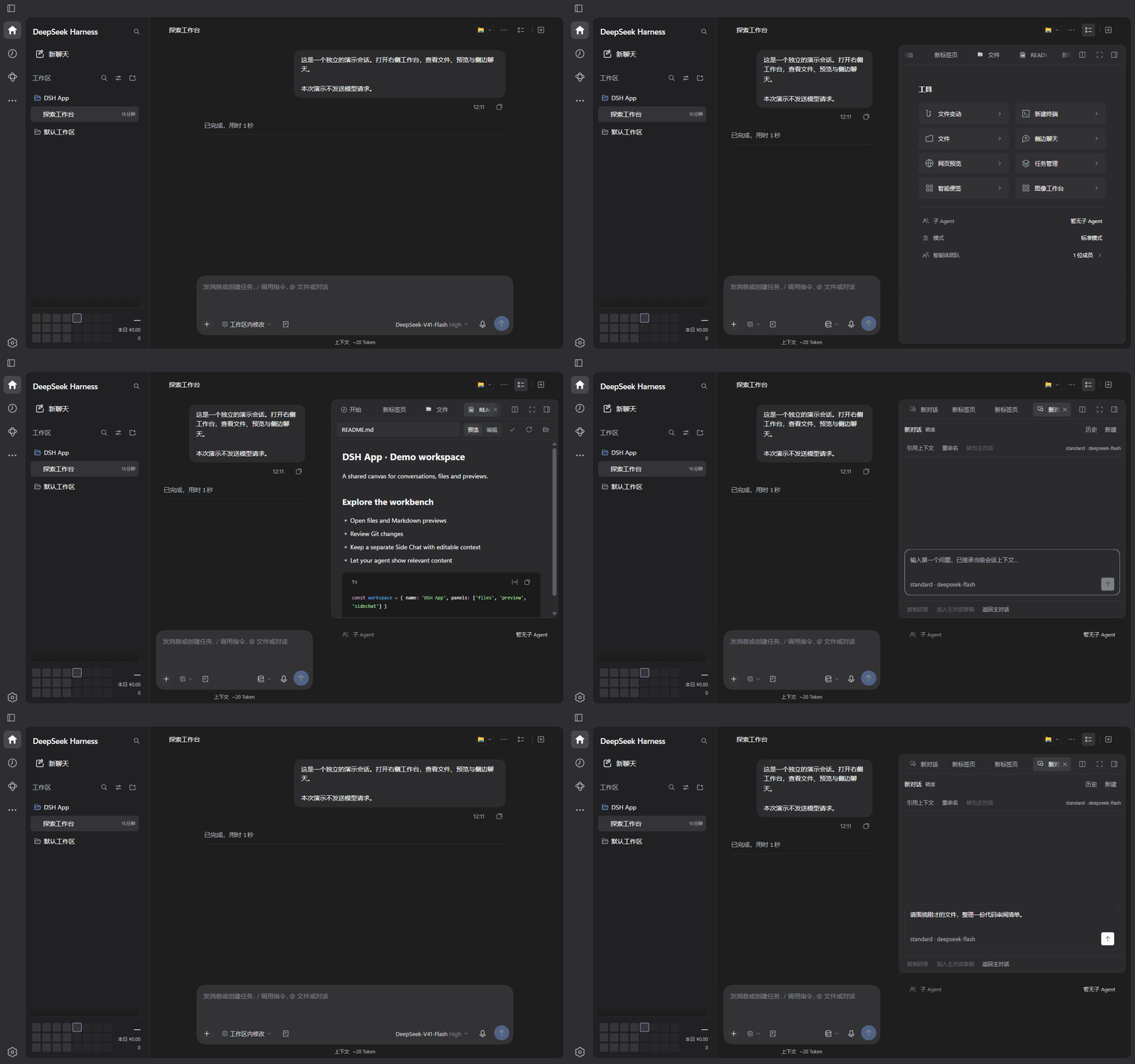
One canvas. A workbench when you need it.
The floating sidebar holds outputs, session information and working content. Opening it leaves reading space for the conversation; hiding it recenters the text. New chats start with the workbench hidden. Files, previews and Side Chat share one tool launcher.
Plugin pages and settings, together
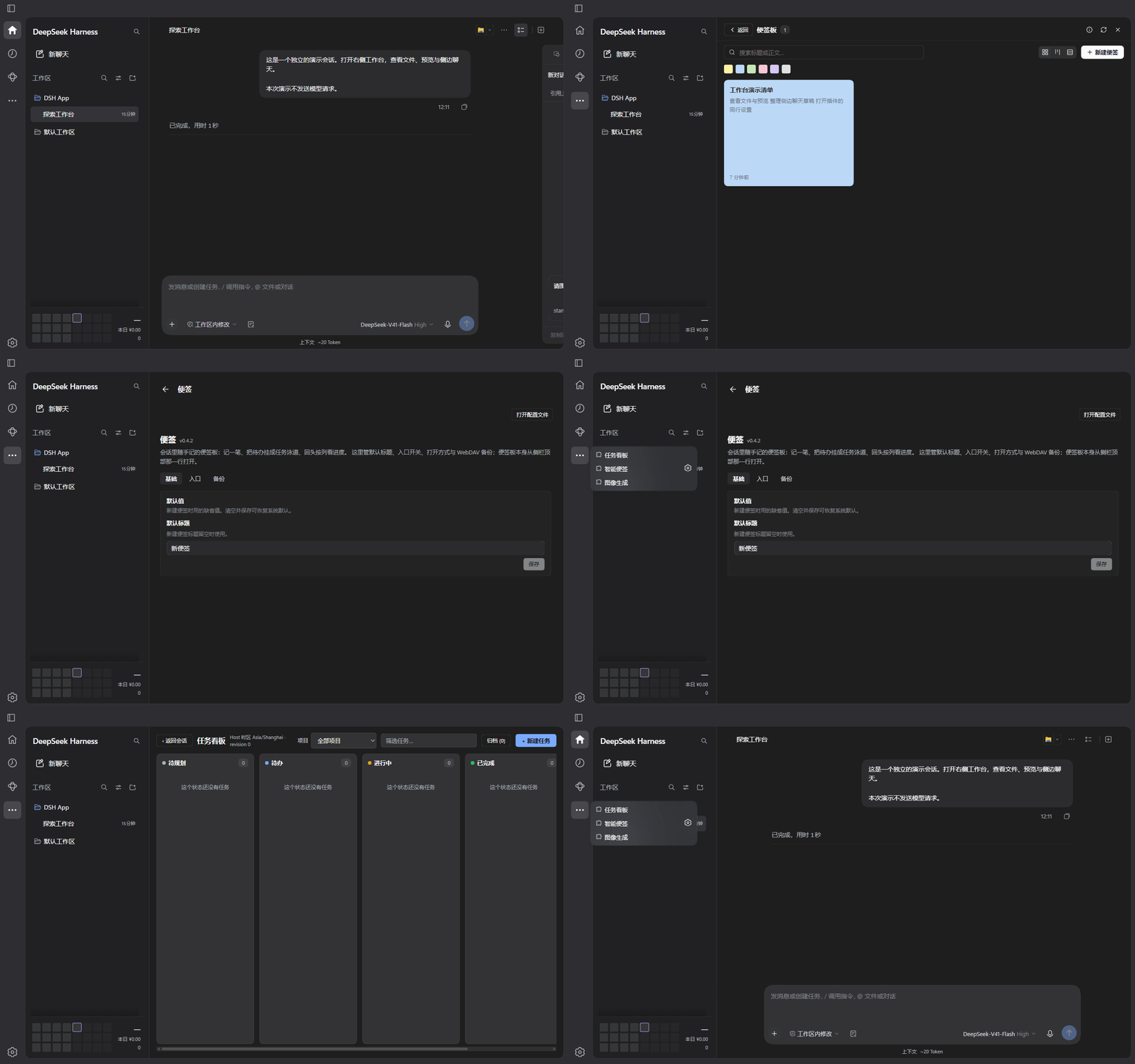
The left-rail … menu collects third-party extension pages. Separate settings open from a gear on the same row. A single-page plugin opens directly without a redundant settings button.
Skills and MCP belong to the workflow
Switch between Browse, Skills and MCP in one plugin center instead of searching through separate management plugins.
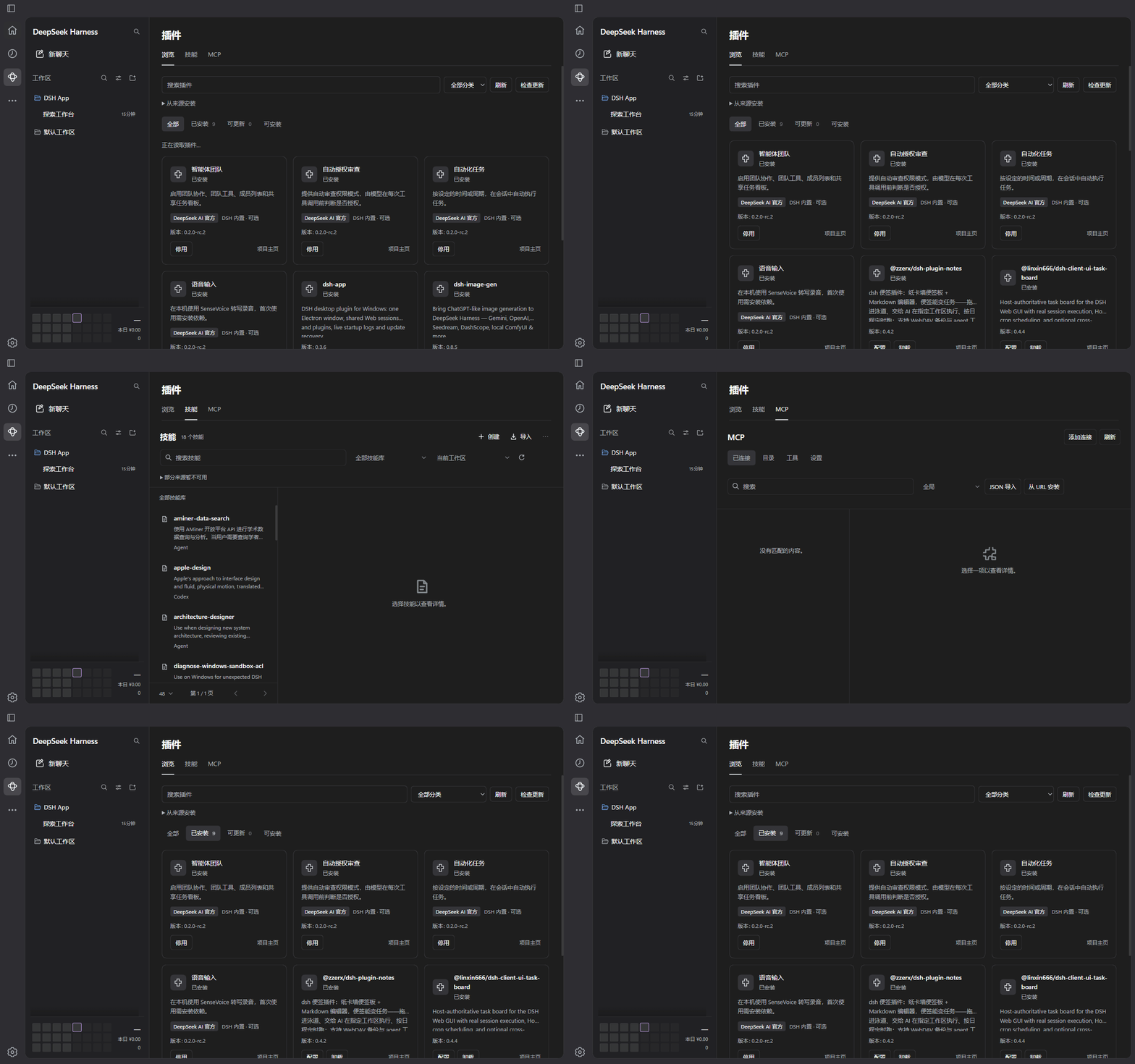
These GIFs show the current DSH App client using an isolated DSH 0.2.0-rc.2 configuration, a sample workspace and a locally prepared demonstration conversation. They contain no personal conversations or API keys. Side Chat shows an unsent draft; no model messages are sent. Pauses and playback timing are adjusted for clarity and are not a performance benchmark. The header is generated brand artwork; the GIFs show the actual interface.
Asset provenance and recording notes
What makes it different
Conversations and working content share a canvas
The navigation rail, project sidebar, header, composer and floating workbench use a consistent graphite surface hierarchy, with light and dark appearances. The message body and workbench coordinate their layout to keep conversations readable. The whale welcome screen asks what to do in the selected project; without a project it invites you to explore.
Files, previews and Git stay close to the conversation
Built-in tools include a file tree, search, uploads, ZIP downloads, CodeMirror editing, Markdown / Mermaid / HTML / web previews, Git changes and changes from the current AI turn. The Better Sidebar extension APIs remain available while its layout, start page and settings are redesigned. Working content restores with its conversation; the original sidebar plugin is not required.
Agents can put relevant content in front of you
Enable agent sidebar control to let the current agent open a file at a line, show a web page or extension tab, read tab state, switch content and hide the workbench. Commands bind to the calling conversation and receive client execution acknowledgements. Preparing a Side Chat draft and references never sends the message automatically.
// Open a file in the current workspace at a specific line
sidebar_open_view({ target: "src/main.ts", line: 20 })

// Prepare an editable review draft for the user
sidebar_open_view({
  target: "sidechat", type: "tab", title: "Code review",
  draft: "Please review the current changes",
  context: [{ title: "Focus", text: "Check error handling and boundary cases" }]
})
| Agent tool | Purpose |
|---|---|
sidebar_open_view |
Open a file, folder, web page, DSH resource or registered tab |
sidebar_get_tabs |
Read actual tabs, available content, visibility and connection state |
sidebar_activate_tab |
Activate a tab and reveal the workbench |
sidebar_close_tab |
Close a tab |
sidebar_set_visibility |
Show or hide the workbench while retaining its contents |
See the integrated sidebar guide for complete behavior, acknowledgement states and extension interfaces.
Side Chat is a conversation you can keep using
Side Chat supports multiple conversations, history, renaming, independent drafts and context references. Reference a main-chat draft, selected text or an open file. Copy an answer, add it to the main-chat draft, or turn a completed side conversation into a continuing main conversation. Streaming responses, reasoning, tools, subagents, stopping and reconnection remain available.
Later main-chat messages are not automatically synchronized into an existing Side Chat. You review and send the draft and references. Open side conversations can restore after a refresh or restart.
Plugin compatibility goes beyond adding a button
Third-party settings.section and settings.plugins.tab registrations retain their native forms and controllers. Pages and settings with reliable ownership share one row without duplicate destinations. Single-page plugins have no gear; multiple settings pages offer a chooser. The menu follows plugin registration, disabling and unloading.
The built-in marketplace places official plugins first and labels their provenance, version and optional bundled status. Install, update and uninstall operations enter a cancellable queue, apply through the official CLI after restart, and retain backup and recovery records.
Skills, MCP and usage have clear destinations
| Area | What it provides |
|---|---|
| Skills | Browse, create, edit, enable and import skills; connect local and project libraries; recover deleted skills |
| MCP | Connections, catalogs, OAuth, custom servers, tool policies, project scope and backup restoration |
| Cost and usage | Official DeepSeek balance, a local usage ledger, token heatmaps, model prices, historical costs and budgets |
| Current-session insight | Context use and composition, request trends, tool latency, failures and compaction activity |
| Desktop maintenance | Single instance and tray, in-window startup logs, diagnostics, retry and backup-supported update recovery |
Skills and MCP remain in the plugin center. Cost and usage keeps its own entry instead of being duplicated in the third-party … menu.
Quick start
Requirements
- Windows, Node.js 24+ and pnpm 11.
- DeepSeek Harness installed, with
dshavailable in your terminal. - Current plugin version: 0.3.7. Validated baselines: DSH 0.2.0-rc.2 / 0.2.1-rc.2, with Electron 44. Upgrading to 0.2.1 requires compatible IM Connect, Code Review and Simplify versions and removing the retired experimental Schedule bundle, now included in the official Web composition; retain existing configuration and data.
- Read the migration notes first if you already use separate sidebar, Codex UI, marketplace, MCP or cost plugins.
1. Install into your Web profile
dsh plugin --profile web add 'git+https://github.com/CaT-Hode/DSH-app.git'
Use the GitHub source, or pass a Releases .tgz path to the same command. This project currently does not use an npm release as its installation source.
2. Activate it once
dsh --profile web --no-open
Wait for the Web service to become ready, then stop it with Ctrl+C. The plugin records the DSH launch entry point.
3. Open the desktop client
$dshData = if ($env:DSH_HOME) { $env:DSH_HOME } else { Join-Path $HOME '.dsh' }
& (Join-Path $dshData 'profiles\web\node_modules\.bin\dsh-app.cmd')
Use step three for subsequent launches. Configure a model in Settings → Models and add a working directory. Closing the window keeps it in the tray; quit completely through the tray menu or dsh-app --quit.
Install DSH App into my web profile using https://github.com/CaT-Hode/DSH-app and its README. Verify Node.js 24+, pnpm 11 and the DSH core version. Back up the profile, handle conflicting plugins using the migration table, and preserve models, conversations, MCP storage, skills and accounting data. Use the GitHub source, activate Web once, then open dsh-app.cmd. Do not delete the DSH data directory.
Plugin compatibility and migration
These capabilities are integrated. Do not enable their original plugins in the same profile. Hiding a button can leave duplicate routes, services or listeners. Back up configuration and data before migrating; DSH App does not uninstall other plugins automatically.
| Integrated original plugin | Destination |
|---|---|
dsh-better-sidebar |
Right workbench: files, Git, previews and Side Chat |
@michengai/dsh-codex-ui |
DSH App navigation rail, project sidebar, header and conversation layout |
dshmarket |
Plugins → Browse |
dsh-mcp-connector |
Plugins → MCP |
dsh-cost-meter / dsh-context |
Cost and usage / current session |
@linxin666/dsh-client-ui-skill-explorer / @michengai/dsh-skills-manager |
Plugins → Skills |
Complete conflict and migration instructions · Licenses and attribution
Extensions checked in the installed client:
| Plugin | Verified scope |
|---|---|
@zzerx/dsh-plugin-notes 0.4.2 |
Page and same-row settings gear |
@linxin666/dsh-client-ui-task-board 0.4.4 |
Page, draft creation and deletion, disable and re-enable |
@linxin666/dsh-client-ui-git-graph 0.4.4 |
Real project branches and commit history |
dsh-image-gen 0.8.5 |
Native provider settings, single-page entry, disable and re-enable |
These records apply to specific versions, not the entire plugin ecosystem. Image generation was not requested, and Task Board checks did not execute model tasks.
FAQ
No. Both use the same conversations, models and plugin configuration when connected to the same backend and web profile. Open the current service in a browser from the header or tray menu.
Electron is an optional dependency; its first download needs network access. Check whether the package manager blocked its install script, or point DSH_APP_ELECTRON to a compatible electron.exe. Complete the initial Web activation before opening the desktop client.
New chats start with the workbench hidden. In an existing conversation, the upper-right list icon toggles it and + opens the tool launcher. Enable agent control in Settings → General → Workbench. Tools affect the calling conversation; disconnected commands wait for that conversation's view to reconnect.
Marketplace changes apply through a cancellable queue and restart. Disabling and uninstalling retain plugin data. Failed updates retain logs, queued operations and recovery backups. Updating the DSH core and migrating an old plugin are separate actions; a core rollback does not replace data migration.
The balance comes from the official DeepSeek account endpoint. Costs are local estimates based on configured model prices. Unpriced calls, estimated context composition and actual API tokens are labeled separately; character-based context estimates are not used for billing.
See the usage guide for navigation, configuration, diagnostics, updates and uninstalling.
Development and credits
client/ contains UI source, desktop/ the Electron shell, and lib/ Host services and integrated engines. npm run build generates the client and sandbox preload. Development setup and focused behavioral checks are documented in tests/README.md.
DSH App uses official DSH session, project, model, skill and connection services. The MCP engine is integrated from dsh-mcp-connector@0.2.63, and the sidebar engine from dsh-better-sidebar@0.24.1, retaining their licenses, provenance, hashes and modification records. Thanks to DeepSeek Harness and the community plugin authors.
Related plugins
archify
 tt-a1i
/archify
架构图生成 Skill 总仓(多宿主):可校验的自包含架构图、工作流图、时序图、数据流图与生命周期图。DSH 安装不走本仓根——根目录不是 DSH bundle,请用适配包 @tt-a1i/archify-dsh(见 DSH 集成条目)。
Added:
dsh plugin --profile web add @tt-a1i/archify-dsh@1.0.0DeepSeek-Bot
 Fei2411
/DS-Bot/ds-bot
DS Bot: a team of long-lived Bots for DeepSeek Harness, with Main Bots, Bot-to-Bot messages and group chats
Added:
dsh plugin --profile web add 'ds-bot@0.2.4'Study-Mate
 Miaotofu01
/Study-Mate
StudyMate learning skills and lesson engine for DeepSeek Harness, Google Antigravity, Codex and ChatGPT Work.
Added:
dsh plugin --profile web add 'github:Miaotofu01/Study-Mate#d8114f38363272852b339d6788b2f8f007243b43'dsh-plugin-subscriptions
 V1ki
V1ki/dsh-plugin-subscriptions
把 ChatGPT(Codex)、Claude 与 Grok(X Premium)订阅用作 DeepSeek Harness 的 LLM provider——Web UI OAuth 登录,无需 API key
Added:
dsh plugin --profile web add github:V1ki/dsh-plugin-subscriptionsRabiRoute
 vb2250158
/RabiRoute/plugins/rabi-dsh-context
Connect DSH lifecycle events and conversation context to Rabi Manager.
Added:
dsh plugin --profile web add 'github:vb2250158/RabiRoute#e483f87e68cef2c8f5112b101e333b1a9577a9f7&path:/plugins/rabi-dsh-context'dsh-deepseek-web-login
 cv-superding
/dsh-deepseek-web-login
Unofficial DSH plugin: use chat.deepseek.com web models as a DSH LLM provider (browser login capture + PoW solving + SSE streaming + prompting-based tool calls), provider route deepseek-web
Added:
dsh plugin --profile web add 'dsh-deepseek-web-login@1.0.3'