
Models & Providers
dsh-web-search-searxng-chaospar
Chaos-Paradox/dsh-search-proxy · ★ 2
 Chaos-Paradox
SearXNG-backed self-hosted metasearch provider for DeepSeek Harness (ctx.web), with a Plugins-page settings card
Manifest details
安装
dsh plugin --profile web add 'github:Chaos-Paradox/dsh-search-proxy#ae00970afc04f9f3a28a0d062553647e747672a5'GitHub 源码安装:首次需按提示配置 allowBuilds 构建授权后重试
For install and environment setup, plus plugin development tutorials, see DSH community docs ↗
README
English | 中文
Add web search without a search API key by default to DeepSeek Harness (DSH), or connect DSH to a proxy you already use.
- Want free search? Search through SearXNG, without installing Docker or Python yourself.
- Prefer official search? Keep it and use the optional proxy to help with connectivity and downloads.
Tested with: DSH 0.2.1-rc.3. See compatibility and test coverage for other versions and platforms.
Install and start
Upgrading from
dsh-web-search-searxng? Follow the migration guide first so your saved settings keep working.
1. Install the plugin. Open Plugins → Add plugin in DSH, paste this address, then enable the plugin. No Git required.
https://github.com/Chaos-Paradox/dsh-search-proxy/releases/download/v0.5.0/dsh-search-proxy-0.5.0.tgz
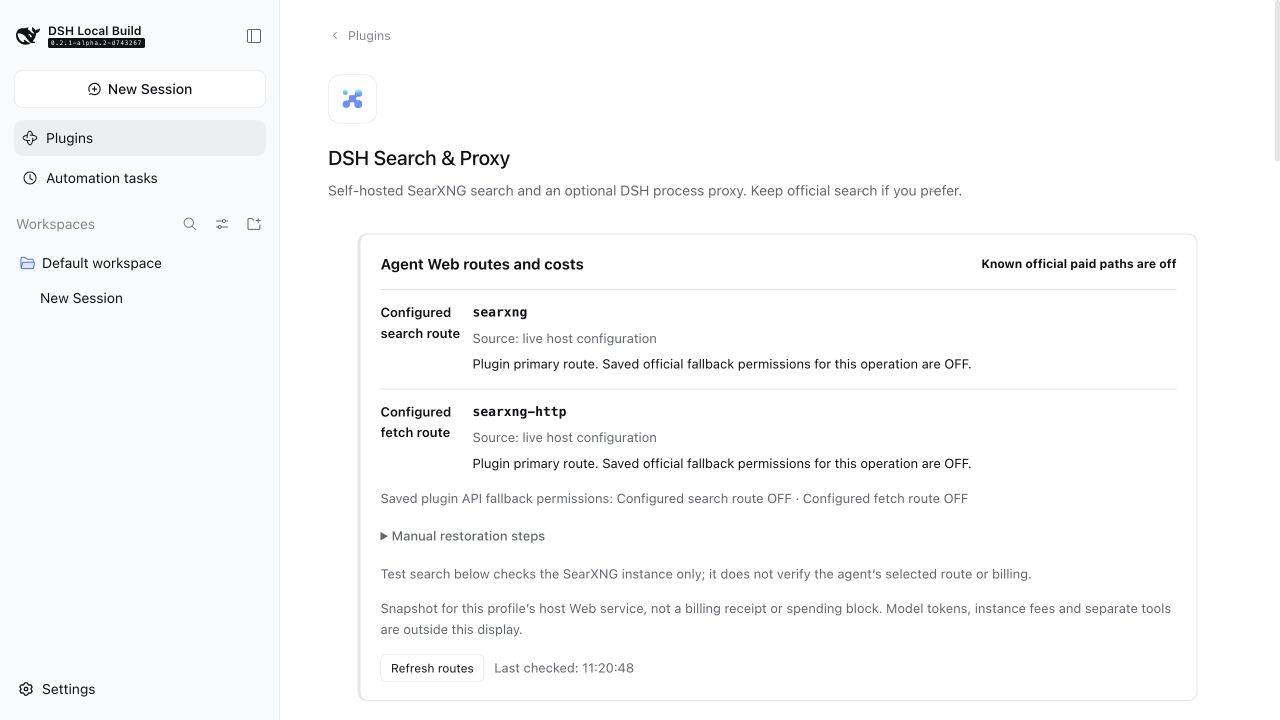
2. Start searching. Open Plugins → DSH Search & Proxy and click Prepare and start. Once the service shows Ready, choose your engines and language, save, and click Test search.
First use downloads the runtime; later starts reuse the cache. A prepared service starts and stops with the DSH backend. You can also connect an existing SearXNG instance. CLI installation and more options.
Just want the proxy?
Leave the plugin enabled and keep official search selected in DSH. You do not need to prepare local SearXNG. At the bottom of the plugin page, enter your existing proxy's host and HTTP / Mixed port, read the risk notice, and confirm to enable it.
The proxy is off by default. It may improve connectivity and download speed, depending on your network and proxy, and may affect other DSH network requests. See the proxy panel · Setup and risks.
Costs and further reading
The SearXNG path has no per-search API fee. Model calls and official services retain their own pricing; the plugin's paid fallback is off by default.
Related plugins
dsh-plugin-reasonix
 esengine
/DeepSeek-Reasonix/integrations/dsh-plugin
把 Reasonix 作为 dsh 子智能体接入:一层配置补丁让 subagent-acp 提供方启动 reasonix acp,并以 reasonix 工具暴露给模型。纯配置、无代码、不在 npm;接入的是子智能体,不是模型服务商。
dsh plugin --profile web add 'github:esengine/DeepSeek-Reasonix#af0e954f5629492980718fc0e36030fec0abc682&path:/integrations/dsh-plugin'dsh-purge
 YuJunZhiXue
/dsh-purge
DeepSeek Harness 破甲:让所有模型都能破甲,不同模型可换不同提示词;默认提示词面向国模「小码酱」。Jailbreak for every model — swap prompts per model. 求 Star 收藏 ⭐ 如要二开,请查看署名要求部分
dsh-purge-mmparko
 mmparko
/dsh-purge
DeepSeek Harness 破甲:让所有模型都能破甲,不同模型可换不同提示词;默认提示词面向国模「小码酱」。Jailbreak for every model — swap prompts per model. 求 Star 收藏 ⭐ 如要二开,请查看署名要求部分
dsh plugin --profile web add 'github:mmparko/dsh-purge#033e6bd1e0f101352b39075ecd0d758ffef26b76'dsh-connect-workbuddy
 dingminhua
/dsh-connect-workbuddy
把本机登录的 WorkBuddy 模型(国内版与国际版)接入 DeepSeek Harness:每次刷新按上游目录自动读取每个模型的积分倍率,支持逐模型图片输入开关、多账号切换与账号池自动换号,并提供每日签到、卡片与输入框里的胶囊积分读数等只读积分概览。
dsh plugin --profile web add 'dsh-connect-workbuddy@5.15.0'dsh-image-gen
 shanliuling
/dsh-image-gen
让 DeepSeek Harness 像 ChatGPT 一样,在对话里直接生成图片。
dsh plugin --profile web add github:shanliuling/dsh-image-genagent-vision-toolkit
 Anionex
/agent-vision-toolkit
为纯文本模型"看图“设计更好的视觉工具箱和技能,支持多图理解,图片问答,前端UI还原、GUI 自动化等,并可选无缝接入多个主流agent,直接识别粘贴图片| A vision toolkit and skill designed for text-only llms — image Q&A, long-screenshot OCR, frontend UI restoration, and GUI automation, with optional seamless integration for Codex, Claude Code, Pi, Oh My Pi, and OpenCode
dsh plugin --profile web add github:Anionex/agent-vision-toolkit