
Sessions & Messages
dsh-jump-rail
Memory455/dsh-jump-rail · ★ 2
 Memory455
DSH Web GUI conversation jump rail plugin
Manifest details
安装
dsh plugin --profile web add github:Memory455/dsh-jump-railGitHub 源码安装:首次需按提示配置 allowBuilds 构建授权后重试
For install and environment setup, plus plugin development tutorials, see DSH community docs ↗
README
Table of contents
简体中文 | English
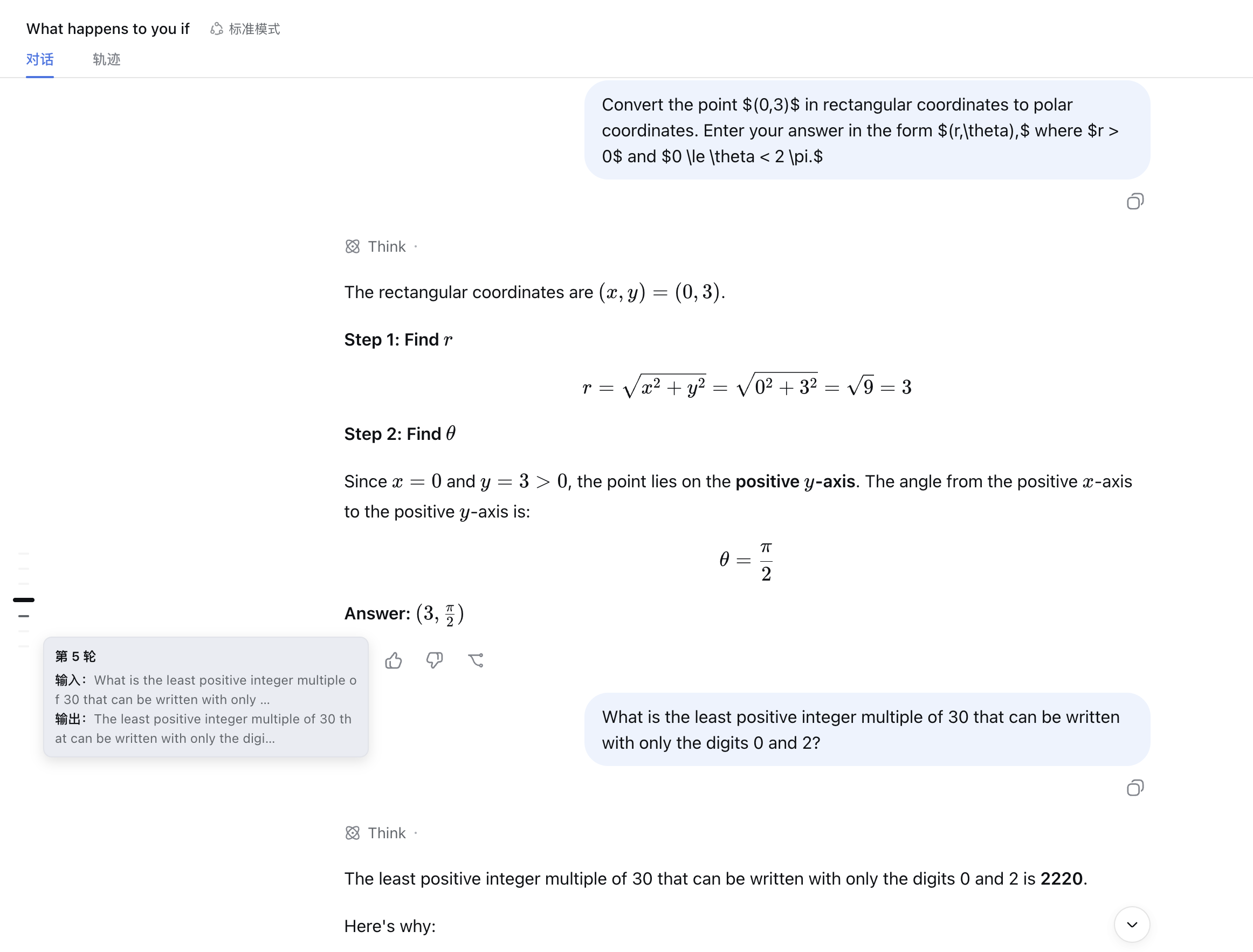
A lightweight conversation navigator for the DSH Web GUI. It adds a vertical rail of short markers to the left side of the chat, making it easy to see your current turn and jump around long conversations.
Features
- Displays one persistent marker for each conversation turn;
- Highlights the turn currently in the viewport with a brighter, thicker, and longer marker;
- Shows an input and output summary when you hover over a marker;
- Jumps directly to a turn's input when you click its marker;
- Appears only in chat views containing at least two turns;
- Automatically adjusts when the window, sidebar, or conversation content changes.
Installation
Installing from npm is recommended:
dsh plugin --profile web add @memory455/dsh-jump-rail
You can also install directly from GitHub:
dsh plugin --profile web add https://github.com/Memory455/dsh-jump-rail
To clone the source, build it locally, and install the local build:
# Clone the source
git clone https://github.com/Memory455/dsh-jump-rail.git
cd dsh-jump-rail

# Install dependencies and build
pnpm install
pnpm build

# Link the plugin to the DSH Web profile
dsh plugin --profile web add link:$PWD
Restart DSH Web after installation to activate the plugin.
Usage
Open a chat containing at least two conversation turns. The jump rail appears automatically on the left side of the conversation:
- As you scroll, the marker for the current turn is highlighted automatically;
- Hover over a marker to preview that turn's input and output;
- Click any marker to jump back to its corresponding turn.
The jump rail hides automatically when you switch to a non-chat view, such as the trajectory view.
# Install dependencies
pnpm install

# Typecheck, test, and build
pnpm typecheck
pnpm test
pnpm build

# Watch source files for changes
pnpm watch
After building locally, link the current directory to the DSH Web profile:
dsh plugin --profile web add link:$PWD
Restart DSH Web after linking the plugin.
License
Related plugins
archify
 tt-a1i
/archify
架构图生成 Skill 总仓(多宿主):可校验的自包含架构图、工作流图、时序图、数据流图与生命周期图。DSH 安装不走本仓根——根目录不是 DSH bundle,请用适配包 @tt-a1i/archify-dsh(见 DSH 集成条目)。
dsh plugin --profile web add @tt-a1i/archify-dsh@1.0.0DeepSeek-Bot
 Fei2411
/DS-Bot/ds-bot
DS Bot: a team of long-lived Bots for DeepSeek Harness, with Main Bots, Bot-to-Bot messages and group chats
dsh plugin --profile web add 'ds-bot@0.2.4'Study-Mate
 Miaotofu01
/Study-Mate
StudyMate learning skills and lesson engine for DeepSeek Harness, Google Antigravity, Codex and ChatGPT Work.
dsh plugin --profile web add 'github:Miaotofu01/Study-Mate#d8114f38363272852b339d6788b2f8f007243b43'dsh-plugin-subscriptions
 V1ki
V1ki/dsh-plugin-subscriptions
把 ChatGPT(Codex)、Claude 与 Grok(X Premium)订阅用作 DeepSeek Harness 的 LLM provider——Web UI OAuth 登录,无需 API key
dsh plugin --profile web add github:V1ki/dsh-plugin-subscriptionsRabiRoute
 vb2250158
/RabiRoute/plugins/rabi-dsh-context
Connect DSH lifecycle events and conversation context to Rabi Manager.
dsh plugin --profile web add 'github:vb2250158/RabiRoute#e483f87e68cef2c8f5112b101e333b1a9577a9f7&path:/plugins/rabi-dsh-context'dsh-deepseek-web-login
 cv-superding
/dsh-deepseek-web-login
Unofficial DSH plugin: use chat.deepseek.com web models as a DSH LLM provider (browser login capture + PoW solving + SSE streaming + prompting-based tool calls), provider route deepseek-web
dsh plugin --profile web add 'dsh-deepseek-web-login@1.0.3'