
Models & Providers
dsh-vault
Ox0400/dsh-vault · ★ 13
 Ox0400
Encrypted credential vault for DeepSeek Harness — AES-256-GCM + TOTP, model tools + Settings UI
Manifest details
安装
dsh plugin --profile web add github:Ox0400/dsh-vaultGitHub 源码安装:首次需按提示配置 allowBuilds 构建授权后重试
For install and environment setup, plus plugin development tutorials, see DSH community docs ↗
README
Table of contents
- Security & Implementation
- Entry Model
- Tools
- Basic (registered by default) — 11
- Management (Standard and up) — 53
- Import & export (Full, or Custom → Import-export) — 27
- Browser sessions (Full, or Custom → Browser sessions) — 8
- Backups & vault files (Full, or Custom → Backups & files) — 14
- Installation
- Option 1: Install from npm (easiest)
- Option 2: Install from GitHub (pin a tag or commit)
- Option 3: Install from a local path
- Option 4: Install from a tarball
- Command line
- 0. First: which command can you actually type?
- 1. What env is for
- 2. The commands
- 3. Shell quoting: not export $(…)
- 4. The master password
- 5. Install details
- Privacy of the breach check
- Strength indicator
- Environment export
- Tool profiles
- Configuration
- Development
- Keeping credentials out of public content
- Theming
- Packaging & Publishing
- Security Boundaries & Known Limitations
- What this protects
- What this does not protect
- Reducing the exposure
- Listed in






English | 中文
dsh-vault is a security-focused plugin for DeepSeek Harness that stores sensitive credentials — usernames, emails, phone numbers, passwords, TOTP secrets, and developer credentials like SSH connections, API keys, secrets, and OAuth access/refresh tokens — encrypted at rest, and exposes them to the model through CRUD, search, password generation, and TOTP tools, plus a Settings UI page.
Security & Implementation
- Zero external crypto dependencies: everything is built on Node's built-in
node:crypto(AES-256-GCM authenticated encryption, scrypt key derivation, RFC 6238 TOTP). - Master password: every entry is encrypted with a 256-bit key derived via
scrypt(master password, salt)and AES-256-GCM. The key never touches disk; after unlock it is cached in-process and re-derived on restart. - Tamper-evident: GCM auth tags plus a fixed-plaintext verification envelope — a wrong master password or modified ciphertext fails immediately, never returning garbage.
- No plaintext at rest: the on-disk document contains no plaintext credentials; each entry uses an independent random nonce.
- Atomic writes: reuses the harness
writeFileAtomic+ file lock; in-process writes are serialized, cross-process writers take the lock. - Search never leaks:
vault_searchreturns summaries only (id/title/kind/username/email/phone/host/port/url/tags) — never passwords, keys, tokens, or TOTP secrets. Full credentials are readable only via explicitvault_getby id.
Entry Model
Each record has a title, an optional kind, and any combination of fields:
| Field | Description |
|---|---|
kind |
login (default) / ssh / api-key / secret / oauth / cookie / card / custom |
username / email / phone |
Account identity |
password |
The password |
host / port |
SSH host and port (e.g. db.internal / 2222) |
privateKey |
SSH private key (PEM) |
apiKey |
API key |
secret |
Generic secret (client secret, shared secret, …) |
accessToken / refreshToken / expiresAt |
OAuth token pair and expiry (epoch millis) |
otpSecret |
TOTP secret (bare Base32 or otpauth:// URI) |
url / notes / tags |
Metadata |
Two kinds carry their own shape: a cookie entry stores a captured browser session, and a card entry stores cardNumber / cardExpiry (MM/YY) / cardCvv / cardHolder — search summaries expose only the expiry and holder, never the number or CVV, and the Bitwarden JSON export maps it to a card item (type 3, brand inferred).
| fields | Arbitrary key/value pairs (e.g. {"region": "us-east-1"}), searchable |
Tools
113 tools in five groups. Basic is what a default install registers; the rest are switched on through Tool profiles (Settings → Credentials → Permissions → Model tools).
Basic (registered by default) — 11
Eleven tools. Everything below is opt-in.
| Tool | Purpose |
|---|---|
vault_list |
List available vaults in the vault directory (one .json file per vault, excluding access/meta/export files) |
vault_search |
Search titles/categories/usernames/emails/phones/hosts/ports/URLs/notes/tags/custom fields (incl. numeric/boolean/nested values; whitespace-separated terms OR-match); optional createdAfter/createdBefore epoch-millis filters; returns secret-free summaries; limit must be an integer 1–100 |
vault_get |
Read a full entry by id (including all secrets) |
vault_add |
Add an entry (any combination of fields; empty strings/arrays are ignored) |
vault_update |
Update fields by id (unprovided fields kept; empty string clears a field; title is renamable; rotationDays: 0 clears rotation = never rotate) |
vault_delete |
Soft-delete an entry (moves it to the trash, still encrypted on disk) |
vault_fill |
Find the entry matching a host/URL/username/title and return its credentials |
vault_clipboard |
Fetch one entry secret field for direct copy (username/password/apiKey/...) |
vault_totp |
Generate the current 6-digit code for a stored otpSecret (or a bare Base32 / otpauth URI) |
vault_generate_password |
Generate a strong random password (length/classes/grouping) or a memorable passphrase (passphrase: true, EFF-style word list, words/separator/wordDigits) |
vault_strength |
Zero-dependency password strength estimate (score 0–100, weak/fair/strong/very strong) |
Management (Standard and up) — 53
Favourites, tags, history, health, templates, attachments, card and 2FA detail.
| Tool | Purpose |
|---|---|
vault_compare |
Compare two entries field by field (onlyA/onlyB/differ/equal) — field names only, never secret values |
vault_rename |
Rename an entry in one call (shortcut for vault_update) |
vault_restore / vault_purge / vault_restore_recent |
Bring a trashed entry back / purge it / undo the last delete |
vault_lock / vault_unlock |
Explicitly lock the vault (wipe the in-memory key) / re-unlock it |
vault_password_history |
List an entry's previous passwords (1Password/Bitwarden-style, newest first, capped at 10; current password excluded) |
vault_password_rollback |
Restore an entry password to a stored history entry (current password is archived first, so it is reversible) |
vault_apply_tags |
Bulk add/remove/replace tags on every entry matching a query (dry-run supported, no secrets) |
vault_totp_uri |
Build an otpauth:// provisioning URI for a stored or bare TOTP secret |
vault_rotation |
Report expired / due-for-rotation / expiring-soon credentials; soonWindowDays (1-90, default 7) tunes the soon horizon (no secrets) |
vault_health |
Vault health scan: weak/reused passwords, missing 2FA, insecure http:// sites, and an overall security score (0–100) |
vault_watchtower |
Watchtower-style per-entry risk analysis (1Password/Bitwarden-inspired): flags short/weak passwords, keyboard sequences, embedded years, common passwords, reuse, http:// sites, missing 2FA, expiry — with a 0–100 score and good/warn/poor verdict (no secrets); entry rows show ⚠ badges |
vault_breach_check |
Watchtower-style breach scan against Have I Been Pwned (k-anonymity: only the SHA-1 prefix leaves the machine), with an offline common-password fallback |
vault_integrity |
Verify the on-disk vault file decrypts correctly and matches the in-memory store |
vault_merge |
Merge one entry into another; keepSource: true keeps the source after merging |
vault_attach / vault_attachments / vault_attachment / vault_detach |
Attach files to entries (private keys, certs, configs, recovery codes) — stored base64 inside the encrypted entry, encrypted at rest; list names/sizes, read content, remove |
vault_quick_add |
Fast capture (title + one secret) with optional tags/notes |
vault_expiry |
Set/clear expiry (expiresAt: 0 removes it) |
vault_stats |
Overview counts incl. trashCount (no secrets) |
vault_verify |
Verify one entry or audit every entry (all: true) for per-kind completeness, port/expiry sanity (no secrets) |
vault_duplicates |
Find duplicate groups: mode = both (default) / title / content (no secrets) |
vault_report |
Printable inventory with expiry/rotation columns and a stats footer (no secrets) |
vault_match_url |
Find login entries matching a URL (Bitwarden/1Password-style: exact host, subdomain, parent domain, path-prefix; www./port normalization) with a 0–100 score — never returns the password |
vault_env |
Render env-flagged entries (tags contain env) as KEY=VALUE lines — see Environment export |
vault_copy |
Copy an entry (secrets included) into another named vault |
vault_templates |
Built-in + user-defined templates (save/list/remove), KeePassXC-style; built-ins now include Wi-Fi, Server, Database, Identity, Bank account, Card (1Password-inspired) |
vault_notes |
Append to or replace the free-form notes of an entry (a convenient shortcut for vault_update) |
vault_changes |
List vault activity within a time window (default 24h): entries created, updated, or soft-deleted, newest first |
vault_find |
Fuzzy-find entries: matching ignores case, punctuation and whitespace, so gh reaches GitHub |
vault_mask |
Redact likely credentials in arbitrary text (API keys, tokens, passwords, private keys) so it can be logged or quoted safely |
vault_history |
Show recent activity on the vault within this process, newest first: mutations (add/update/delete/restore/purge/merge/rollback) plus reads (read, totp), searches and vault switches. Records only the action, entry title and timestamp — never passwords, keys, usernames or other secret values |
vault_recent |
List the most recently created or updated entries (newest first), as secret-free summaries |
vault_pin |
Pin (favorite) an entry so it ranks first in search and list |
vault_unpin |
Unpin an entry (remove its favorite flag) |
vault_tags |
List every tag used across entries with the number of entries per tag |
vault_generate_username |
Generate a random username or an anonymous email suggestion |
vault_rotate_password |
Generate a new strong password, store it on the entry, and return the new value for the caller to hand to the target service |
vault_touch |
Mark an entry as recently used (update its updatedAt without changing content) |
vault_note_secret |
Store a single secret under a generated title (a one-off note without naming it) |
vault_search_advanced |
Search with multiple optional criteria: title substring, username/email substring, kind, tag, created-after/before (epoch millis), and favorite-only |
vault_count |
Return the number of active entries (optionally filtered by kind and/or tag) |
vault_set_icon |
Set the UI icon (emoji) and/or accent color on an entry |
vault_describe |
Describe an entry in plain language (kind, identity, host/url, tags, expiry) without revealing secrets |
vault_last_modified |
List entries most recently modified (updatedAt), newest first |
vault_has |
Quickly check whether the vault contains a credential matching a title/username/host (substring, or exact title when exact is set) |
vault_autofill_check |
Check whether the vault has a credential usable for a URL/host: returns the best matching entry (username/email only, never the secret) or a not-found verdict |
vault_undelete_all |
Restore ALL soft-deleted (trashed) entries back to the active set |
vault_get_many |
Read multiple entries by id, returning only the requested fields for each |
Import & export (Full, or Custom → Import-export) — 27
Migrating in and out of other password managers, bulk operations, and env/CSV/1Password/Bitwarden/KeePass/pass interop.
| Tool | Purpose |
|---|---|
vault_import_csv |
Bulk-import credentials from a CSV file (custom columns become fields; overwrite: true merges fields into existing entries instead of duplicating) |
vault_bulk_delete |
Soft-delete entries matching a query/kind/tag or explicit ids; confirm: true required (dry-run by default); trashed entries are restorable |
vault_export / vault_import |
Portable encrypted backup/migration of the whole vault (separate export password) |
vault_export_bitwarden / vault_import_bitwarden |
Bitwarden/Vaultwarden JSON interop (full field mapping, overwrite support) |
vault_import_bitwarden_encrypted |
Decrypt a Bitwarden password-protected JSON export (PBKDF2/Argon2id + HKDF → AES-256-CBC + HMAC) and import it; pass the export passphrase |
vault_import_manager_csv |
Password-manager CSV auto-detected by header: Bitwarden (login_uri/login_username/…), 1Password 8, Dashlane, NordPass, Keeper, LastPass (fav/grouping/extra); dryRun preview |
vault_import_kdbx |
KeePass KDBX: 3.1 and 4.x, AES-KDF or Argon2 (RFC 9106), AES-256-CBC or ChaCha20 payload, keyfile support |
vault_export_1password |
Export entries as a 1Password 1PUX archive (ZIP + export.data) for import into 1Password or re-import here; item categories map to login / credit card / API credential / server |
vault_import_1password / vault_import_1pif |
1Password 1PUX (ZIP) and legacy 1PIF text exports |
vault_import_enpass |
Enpass JSON export (folders → tags, typed fields, TOTP) |
vault_import_keepass_xml |
KeePass 2.x XML export (plaintext or ******** masked values) |
vault_import_chrome / vault_import_keychain |
Import passwords from Chrome's Login Data (macOS keychain / Linux keyring or peanuts / Windows DPAPI) or the macOS Keychain (internet passwords inet by default — the ones that actually back website logins — or generic genp via classes; session cache + preview, no prompt spam); every file import supports dryRun preview |
vault_import_firefox |
Firefox profile import (logins.json + key4.db, NSS 3DES / PBES2-AES, primary-password aware) |
vault_export_totp |
List every entry that has a TOTP secret, with its title and issuer label |
vault_bulk_export |
Export ALL entries (including secrets) as a JSON file for audit or migration |
vault_export_browser |
Export login entries in the browser password-manager CSV format (name,url,username,password) for importing into Chrome/Firefox/Edge |
vault_migrate_keepass |
Export entries in KeePass 2.x import CSV format (Group,Title,Username,Password,URL,Notes) for migrating into KeePass |
vault_export_keepass_xml |
Export entries as a KeePassXC-compatible XML document (KeePass 2.x schema) |
vault_import_browser |
Import a browser password-manager CSV (name,url,username,password — Chrome/Firefox/ Edge export format) |
vault_export_wallet |
Export entries as a directory tree of files compatible with pass (the standard Unix password manager): one file per entry containing the password, with metadata in comments |
vault_import_wallet |
Import entries from a pass directory tree: each .gpg file (or plaintext file) becomes an entry titled by its filename; the first line is the password, remaining lines are parsed as login:/email:/url: metadata. Returns added/skipped |
vault_export_env |
Write env-flagged entries (tags contain "env") to a .env file at the given path as KEY=VALUE lines (values shell-quoted) |
vault_export_csv |
Export vault entries to a CSV file (the same shape vault_import_csv accepts), optionally filtered by kind |
Browser sessions (Full, or Custom → Browser sessions) — 8
Capturing and replaying cookie sessions; needs the optional playwright-core.
| Tool | Purpose |
|---|---|
vault_session_open |
Open a real headed browser window at a URL so the user can log in manually (password, 2FA, captcha) — the portable way to capture login state for sites that block embedding — requires the optional playwright-core |
vault_session_collect |
Collect every cookie of an open browser session (incl. HttpOnly) and save it as a cookie entry |
vault_session_import |
Save session cookies from pasted JSON (devtools export shape) or a raw Cookie header string — the no-browser alternative |
vault_session_import_file |
Import a Netscape cookie-jar file (curl -b / wget / browser-extension export; the same format vault_session_export writes) |
vault_session_list |
List saved login sessions with cookie counts, expired and expiring-in-7d counts (no values) |
vault_session_export |
Export a saved session as a Cookie header value, a Netscape cookie-jar file (curl -b), raw JSON (Playwright addCookies shape), or a ready-to-run Playwright snippet |
vault_session_close |
Close an open browser login session (collected cookies stay in the vault) |
vault_session_prune |
Remove expired cookies from a saved session (session cookies are kept); preview: true reports without writing |
Backups & vault files (Full, or Custom → Backups & files) — 14
Backups, vault switching, rekeying, recovery codes and system search.
| Tool | Purpose |
|---|---|
vault_recovery_code / vault_verify_recovery / vault_recovery_status |
One-time vault recovery code (1Password/Bitwarden-style): 32-char code shown once, only its SHA-256 hash is stored; verify possession of the code; check whether one is set |
vault_rekey |
Upgrade the vault to fresh scrypt KDF parameters in place |
vault_switch |
Switch the active vault for this session |
vault_backup / vault_backup_now |
Timestamped encrypted backup named <vault>-backups-YYYY-MM-DD_HH-MM-SS-<hex>.json (owning vault + date visible); retention pruning keeps the newest N (maxBackups, default 10) |
vault_restore_backup |
Restore from a backup: mode: "merge" (default) copies the backup entries INTO the current vault so they appear in the entries list; mode: "replace" overwrites the whole vault with a safety snapshot first |
vault_vault_rename / vault_vault_delete |
Rename a named vault (file moves, active session follows) or permanently delete one (default vault protected) |
vault_search_system |
Search Chrome / Keychain for sites & usernames — never exposes passwords |
vault_backup_status |
Report how many days have passed since the last backup file was written (1Password-style backup reminder; new-style <vault>-backups-<date>.json and legacy vault-backup-<epoch>.json names are both recognized). Returns daysSinceBackup and a suggestion |
vault_search_history |
Search including soft-deleted (trashed) entries, marked with their deleted state |
vault_backups |
List available encrypted vault-backup-*.json files (newest first) with their absolute paths and timestamps |
Typical workflows: store an SSH credential (kind: ssh + host/port/username/password or privateKey) and have the model vault_search for the host then vault_get the connection details; keep api-key/oauth entries for API-gateway access/refresh token rotation.
Installation
dsh-vault is a bundle (a package declaring dsh.bundle): once installed into a profile, its cordis.patch.yml automatically inserts the vault plugin row (referenced by package name dsh-vault; the master password is injected via the DSH_VAULT_PASSWORD environment variable). The package ships a self-contained build script — git installs compile lib/ automatically.
All four install paths below are verified end-to-end (install → bundle layer recognized → plugin activates with all 7 vault_* tools registered → real vault_add/vault_get round trip → uninstall removes the layer):
| Path | Command | Build needed | allowBuilds |
|---|---|---|---|
| npm | add dsh-vault |
no (prebuilt lib/) |
no |
| GitHub | add github:Ox0400/dsh-vault#v0.1.1 |
yes (prepare) |
yes (first run) |
| local path | add /abs/path/to/dsh-vault |
no (link to built source) | no |
| tarball | add ./dsh-vault-0.1.1.tgz |
no (prebuilt lib/) |
no |
Option 1: Install from npm (easiest)
dsh plugin --profile web add dsh-vault
npm packages ship prebuilt lib/ artifacts — no allowBuilds, no local compilation, install and go. Set the master password before launching:
export DSH_VAULT_PASSWORD='your strong master password'
Option 2: Install from GitHub (pin a tag or commit)
dsh plugin --profile web add github:Ox0400/dsh-vault#v0.1.1
A git install fetches sources, not built artifacts, so the prepare script builds lib/ at install time. pnpm ≥10 blocks git dependencies from running build scripts by default. The verified flow:
Run the
addcommand — it fails with anallowBuildserror and prints the exact key to allow (the line containing the repo URL, including the resolved commit hash):allowBuilds: dsh-vault@https://codeload.github.com/Ox0400/dsh-vault/tar.gz/<sha>: trueAppend that exact key to the profile's
pnpm-workspace.yaml($DSH_HOME/profiles/<name>/pnpm-workspace.yaml):packages: - . allowBuilds: dsh-vault@https://codeload.github.com/Ox0400/dsh-vault/tar.gz/<sha>: trueRe-run the
add— pnpm now runs thepreparescript, buildslib/, and installs.
Pin a tag/commit so a later upstream push cannot silently change what runs on install. Treat the allowance for what it is: permission to execute that package's code on your machine at install time — only grant it to sources you trust.
Option 3: Install from a local path
dsh plugin --profile web add /absolute/path/to/dsh-vault
pnpm links the checkout into the profile; the bundle is recognized as long as lib/ exists (run pnpm build in the checkout first if needed).
Option 4: Install from a tarball
npm pack && dsh plugin --profile web add ./dsh-vault-0.1.1.tgz
The tarball ships prebuilt lib/ artifacts, so no build step or allowBuilds is required.
dsh plugin --profile web remove dsh-vault uninstalls (removes both the dependency and the layer).
Command line
The plugin hands the vault to the assistant. The bundled dsh-vault command
hands the same vault to shells and scripts, so a skill's child process can read
a secret without the plaintext ever entering the model's context.
0. First: which command can you actually type?
Nothing provides a dsh-vault binary until the package is installed — the
plugin is a Cordis bundle, and dsh has no plugin-subcommand registry (the
launcher parses only its own flags; dsh plugin … just forwards to pnpm, so
dsh web exec … hands its arguments to the web app and fails with
error: too many arguments). Pick your row before reading the examples:
| your setup | the command |
|---|---|
source checkout (git clone + pnpm build) |
pnpm vault — or node lib/cli.js, or ./lib/cli.js |
| plugin installed into a profile | pnpm dsh plugin --profile web exec dsh-vault |
globally installed (npm i -g dsh-vault) |
dsh-vault |
| nothing installed | npx dsh-vault |
# source checkout — this repository, right now:
pnpm vault list

# after a global install (or via npx) the same commands are:
dsh-vault list
npx dsh-vault list
Every example below is written as dsh-vault …; substitute the form from your
row (pnpm vault … in a checkout).
1. What env is for
get fetches one value and needs no tag. dsh-vault env is for the other
case: a script that needs several secrets at once. It prints the entries you
tagged env as shell assignments, so the script picks them up itself:
$ dsh-vault env
DEMO_API_KEY='sk-demo-123'
OTHER_PASSWORD='pw-not-exported'
eval "$(dsh-vault env)" reads those assignments into the current shell —
the usual reason to reach for it:
eval "$(dsh-vault env)"          # KEY=VALUE lines become shell variables
echo "$DEMO_API_KEY"
Two things worth knowing:
- Only
env-tagged entries are exported. With none tagged you getdsh-vault: nothing to export — no entry carries the "env" tag.; tag one in the UI (the entry's tags field) or withvault_update { id, tags: ["env"] }. - The name is derived from the title and field (
DASHSCOPE+apiKey→DASHSCOPE_API_KEY) unless the entry setsenvKeys— see Environment export.
Names — there are only three, and two of them are the word env on purpose:
| name | what it is | meaning |
|---|---|---|
env |
an entry tag | which entries dsh-vault env exports; nothing is exported without it |
env |
the command | prints exactly the entries carrying that tag |
envKeys |
an entry field (optional) | pin exact names, e.g. ["DASHSCOPE_API_KEY"]; the old singular envKey is accepted as a one-element shorthand |
Nothing else is called env*: list --json / show report envKeys (the names
an entry exports — what get accepts), envTagged (whether env includes it)
and hasTotp (whether totp can produce a code for it).
2. The commands
dsh-vault list                             # grouped: what `env` exports vs the rest
#   Exported by `env` (tag "env") — 1 entry:
#     a1b2c3d4-…  api-key   DASHSCOPE        → DASHSCOPE_API_KEY
#   Not exported (no "env" tag) — 1 entry; `get <name>` still works for it:
#     9f8e7d6c-…  api-key   Example Billing  → EXAMPLE_BILLING_API_KEY
dsh-vault get my-entry                     # the entry's primary secret, stdout only
dsh-vault get my-entry --field apiKey      # one named field
dsh-vault get my-entry --mask              # confirm it exists without printing it
dsh-vault show my-entry                    # non-secret metadata as JSON
dsh-vault totp my-entry                    # the current TOTP code (digits only)
dsh-vault totp my-entry --json             # + digits, period, secondsRemaining
dsh-vault env                              # env-tagged entries as KEY=VALUE
dsh-vault env --mask                       # human view, both sections as KEY=VALUE:
#   ## exported items
#   NPM_REGISTRY_API_KEY=npm_***
#   ## unexported items
#   EXAMPLE_BILLING_API_KEY=***
dsh-vault export-env .env                  # …or write them to a 0600 file
dsh-vault verify                           # check the master password, nothing on stdout
Secrets go to stdout and everything else (progress, errors) to stderr, so
$(dsh-vault get …) and pipelines behave. Exit codes: 0 ok, 1 runtime
error, 2 usage error.
totp exists so a script can automate two-factor login without ever handling the
long-lived secret: code=$(dsh-vault totp my-entry) prints six digits and nothing
else. get my-entry --field otpSecret would print the secret instead — use it
only when a tool genuinely needs to enrol the secret elsewhere. --json adds
secondsRemaining, which is what lets a caller wait for a fresh window rather
than race an expiring code.
3. Shell quoting: not export $(…)
eval "$(dsh-vault env)" is right; export $(dsh-vault env) is wrong. Command
substitution splits on whitespace and does not strip the quotes the CLI
emits, so a value containing a space breaks into the wrong words and every value
keeps its literal quotes:
$ export $(dsh-vault env); echo "$WITH_SPACE"
['pass]                     # split at the space
bash: export: `here': not a valid identifier
$ eval "$(dsh-vault env)"; echo "$WITH_SPACE"
[pass word here]            # read as intended
In a script, prefer the file form — no eval at all:
dsh-vault export-env .env && set -a && . ./.env && set +a
4. The master password
--password-stdin, then $DSH_VAULT_MASTER_PASSWORD (or $DSH_VAULT_PASSWORD),
then an interactive prompt that hides what you type (the terminal is switched
to raw mode; verify with tests/e2e/cli-prompt.mjs). It is not read from the plugin's config file, so
the CLI never depends on (or leaks) whatever the profile patch holds:
DSH_VAULT_MASTER_PASSWORD=… pnpm vault list
printf '%s\n' "$PASSWORD" | pnpm vault list --password-stdin
5. Install details
Source checkout:
git clone git@github.com:Ox0400/dsh-vault.git && cd dsh-vault
npm install && npm run build            # builds lib/, including executable lib/cli.js

pnpm vault list                         # the repo's own entry point (package.json script)
node lib/cli.js list                    # same thing, spelled out
./lib/cli.js list                       # the file is executable too
npm link                                # …or put a real `dsh-vault` on PATH
To develop the plugin against a profile you also link the checkout into the
profile and add a patch layer that inserts it (how this repository is normally
developed); the CLI needs none of that — it reads the vault file directly. A
hand-linked plugin has no .bin/dsh-vault shim, so pnpm … exec reports
Command "dsh-vault" not found unless you install it as a dependency
(pnpm dsh plugin --profile web add dsh-vault) or create the shim by hand:
ln -sf ../dsh-vault/lib/cli.js ~/.dsh/profiles/web/node_modules/.bin/dsh-vault
npm install:
pnpm dsh plugin --profile web add dsh-vault          # into a profile (plugin + CLI together)
pnpm dsh plugin --profile web exec dsh-vault list    # --profile is required

npm i -g dsh-vault && dsh-vault list                 # globally
npx dsh-vault list                                   # or not at all
The read commands (list, get, env, show, totp, verify, export-env) depend
on Node alone, which is why the global and npx forms work. Only writing to a
vault needs the harness runtime, and the plugin always has it.
Two more caveats on the profile route: its .bin shim can be pruned by a later
pnpm install, and pnpm dsh plugin --profile web add dsh-vault reconciles
dsh.profile.bundles from the package's dsh.bundle declaration — if your own
patch layer also inserts the plugin, that mounts it twice, so remove the patch
row first.
Privacy of the breach check
vault_breach_check (and the security page) can check passwords against Have I
Been Pwned. Exactly one thing leaves this machine:
GET https://api.pwnedpasswords.com/range/<FIRST 5 HEX CHARS OF SHA-1(password)>
Add-Padding: true
The response lists every suffix in that bucket (hundreds of hashes) and the match is computed locally — the full hash, the password, and the entry it belongs to never leave. A password already in the bundled common-password list is answered offline and produces no request at all; repeat lookups of the same prefix are cached in memory for an hour.
What k-anonymity does not hide, stated plainly:
- the five-character prefix (20 bits, one bucket in ~1M) goes to Cloudflare, together with your IP;
- an observer who can guess candidate passwords can compute each candidate's prefix and see whether you queried that bucket — that is the known limit of this protocol, not something the header fixes;
Add-Paddingonly removes the response-size signal (without it, a bucket's response length correlates with how common the password is).
To keep even the prefix on your machine, pass online: false — the check then
uses only the offline list, which is far smaller, so treat it as a screening aid
rather than a verdict.
Strength indicator
Each entry row shows a three-star indicator after its title — ☆☆☆ = 0 score, ★★★ = full marks — in six half-star steps:
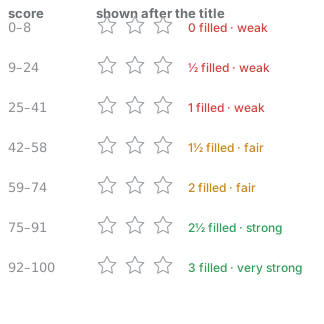
A half star is a real half-filled star, not a ½ next to it: the coloured copy
of the same three glyphs is clipped to a percentage, and ★/☆ share an advance
width so the clip lands exactly on a star boundary.
| score | filled stars | band |
|---|---|---|
| 0–8 | 0 | weak |
| 9–24 | ½ | weak |
| 25–41 | 1 | weak |
| 42–58 | 1½ | fair |
| 59–74 | 2 | fair |
| 75–91 | 2½ | strong |
| 92–100 | 3 | very strong |
Hovering it shows the exact score and verdict. The score is computed host-side (the list never receives the secret) and covers the entry's password or card PIN; machine-generated API keys and private keys are deliberately not scored, so every key does not sit at full marks.
Environment export
Entries tagged env can be materialised as KEY=VALUE lines (vault_env,
vault_export_env), and their names follow the field names every toolchain
expects:
| Entry | Exported key |
|---|---|
title DASHSCOPE, apiKey |
DASHSCOPE_API_KEY |
title DASHSCOPE, prefix: APP_ |
APP_DASHSCOPE_API_KEY |
envKey: "TAVILY_TOKEN", accessToken |
TAVILY_TOKEN |
…the same entry's refreshToken / fields.scope |
TAVILY_TOKEN_REFRESH_TOKEN / TAVILY_TOKEN_SCOPE |
The field suffix is vendor-standard:
apiKey → API_KEY,accessToken → ACCESS_TOKEN,refreshToken → REFRESH_TOKEN,privateKey → PRIVATE_KEY,password → PASSWORD,cardNumber → CARD_NUMBER.Set an entry's env-var names (optional field
envKeys, also viavault_add/vault_update, or comma-separated in the editor) when the derived names are not what your scripts expect. They are positional and used verbatim (no prefix, no title):envKeysexported ["DASHSCOPE_API_KEY"]DASHSCOPE_API_KEY=apiKey["GOOGLE_ACCESS_TOKEN", "GOOGLE_REFRESH_TOKEN"]...=accessToken,...=refreshToken["MY_KEY"]on an entry with 3 secretsMY_KEY,MY_KEY_REFRESH_TOKEN,MY_KEY_SCOPEEach name must be a POSIX identifier (
[A-Za-z_][A-Za-z0-9_]*), at most 8, and no duplicates.envKey(singular string) is still accepted as a one-element shorthand and is folded intoenvKeyson write.Custom fields are exported too, as
<BASE>_<FIELD>.
Upgrading: keys changed from
DASHSCOPE_APIKEYtoDASHSCOPE_API_KEYin 1.10.64 to match vendor conventions. SetenvKeyon an entry to pin an exact name if a script depends on the old spelling.
Tool profiles
The plugin ships 110+ model tools, but registers only 11 core tools by default (vault_list/search/get/add/update/delete/fill/clipboard/totp/generate_password/strength) to keep the model's tool catalog small and cheap.
Switch profiles in Settings → Credentials → Permissions → Model tools — it applies instantly (no restart) and is persisted per vault:
| Profile | Registers |
|---|---|
| Basic (default) | core only — everyday use |
| Standard | + management: favourites, tags, icons, expiry/rotation, health, duplicates/merge, attachments, templates, env masks |
| Full | everything, incl. bulk import/export, browser sessions, backups and vault-file operations |
| Custom… | core + any of: Management / Import-export / Browser sessions / Backups & files |
tools: basic|standard|full|custom can also be set in the plugin config; the UI choice wins and is stored in <vault dir>/tools.json (the process-wide tool catalog is not per vault).
Configuration
[!WARNING] Security: never put the master password in plaintext A profile patch (
cordis.patch.yml/cordis.yml) is a config file that is easy to commit to git, screenshot, or capture in logs — so a plaintextmasterPassword:row leaks the key to your whole encrypted vault. Always usemasterPasswordEnvand export the real password into the process/shell environment instead (e.g.export DSH_VAULT_PASSWORD='…'). See the community-plugin-audit handbook for the evidence-first checklist for credential-handling plugins.# ✗ DON'T — plaintext master password in a config file - id: vault name: dsh-vault config: masterPassword: 'my-secret'# ✓ DO — reference an environment variable; keep the file itself 0600 - id: vault name: dsh-vault config: masterPasswordEnv: DSH_VAULT_PASSWORD
| Option | Description |
|---|---|
masterPassword |
The master password inline (appears in cordis.yml; not recommended) |
masterPasswordEnv |
Environment variable name holding the master password (recommended) |
path |
Vault file path; defaults to $DSH_HOME/vault/default.json |
name |
Vault name for the default path (e.g. name: work → $DSH_HOME/vault/work.json) |
accessMode |
Access policy for the model tools. Three states: readonly (mutations rejected on tools + UI), ask (default — reads free, every add/update/delete goes through the harness approval channel so the user confirms each write), or auto (automatic read-write, no per-call prompt). The Settings UI offers this exact three-way choice and persists it to <vault dir>/access.json. |
autoCapture |
false (default). When true, the system prompt instructs the model to detect credentials shared in conversation and — per user preference — offer to save them with vault_add. |
lockTimeoutSeconds |
Auto-lock: after this many seconds of inactivity the vault re-locks (key wiped) and every read/write requires vault_unlock. 0/absent disables. |
exportPasswordEnv |
Environment variable holding the export/import password for vault_export/vault_import (never pass it as a model argument). |
backupRetention |
How many encrypted backups to keep (default 10); vault_backup prunes older copies. |
Example:
- id: vault
  name: dsh-vault
  config:
    masterPasswordEnv: DSH_VAULT_PASSWORD
    accessMode: ask
    autoCapture: true
With autoCapture: true, when you share a credential in chat (e.g. "my npm token is npm_…"), the assistant offers to store it; on your consent it calls vault_add immediately. With autoCapture off, credentials are only saved when you explicitly ask. The Settings UI shows the current mode (read-only / ask-before-write / automatic read-write) with a dropdown to switch it, an auto-capture toggle (detect credentials shared in chat → offer to save), a kind filter, a health & rotation summary, a trash view, and masked secret fields with a Show/Hide toggle.
The vault is created automatically on first tool use; every launch re-unlocks with the master password. Forgetting the master password = permanent data loss (no backdoor — by design).
Development
Clone and develop locally:
git clone git@github.com:Ox0400/dsh-vault.git
cd dsh-vault
pnpm install    # installs devDependencies (typescript/tsdown/vitest, …)
pnpm build      # builds host lib/*.js and the browser bundle lib/client.js
pnpm test       # runs the 506 vitest tests
Tests need harness peer packages such as
dsh-llm/dsh-system-prompt; inside the harness monorepo these resolve via workspace links.
The brand marks in the credential list are 68 SVG paths inlined into the browser bundle — no runtime dependency and no network call. They are generated, and the generator is committed:
npm i --no-save simple-icons@16      # 15 MB, dev-only: never a dependency of this package
pnpm gen:icons                       # refreshes src/client/site-icons.ts
pnpm gen:icons -- --check            # exits 1 when the table is stale
Only the glyph table is rewritten; the host→brand map (gist.github.com, console.cloud.google.com) is curated knowledge and is preserved. Brands that simple-icons has since removed (amazonaws, slack, linkedin, …) are kept and reported rather than dropped.
Common commands:
pnpm test          # unit + integration tests (vitest, 506)
pnpm typecheck     # tsc -p tsconfig.json --noEmit
pnpm build         # = build:host (tsc) + build:client (tsdown)
npm pack           # optional: tarball for `dsh plugin add ./dsh-vault-0.1.1.tgz`
All 506 tests pass (crypto / TOTP / password generation / store CRUD / gateway / integration).
Browser checks run against a real dsh web instead of vitest, and every one of
them refuses to operate on the default vault:
node tests/e2e/theme-check.mjs      # dual-theme tokens, ring track, attach row
node tests/e2e/polish-check.mjs     # empty-state copy, relative-age hover hints
node tests/e2e/contrast-audit.mjs   # WCAG sweep over all eight tabs, both themes
See tests/e2e/README.md for the safety rules and for the two traps that make a
contrast audit lie (serialised color(srgb …) values, and opacity counting as
part of the colour).
Keeping credentials out of public content
Everything in this repository is public — the npm tarball, the GitHub releases,
the issue and discussion posts. Before publishing, pnpm scan:secrets checks
the working tree, the tracked files and the commit messages for anything that
looks like a credential, and pnpm scan:public additionally checks every
release and comment already posted. The local half also runs in pnpm test, so
a committed secret fails CI rather than shipping.
Theming
The UI reads the host's design tokens instead of hard-coded colours. A local
semantic layer maps onto the real --dsw-alias-* namespace, with literal
fallbacks so the page still renders outside DeepSeek Harness:
--v-text: var(--dsw-alias-label-primary, #1f2328);
--v-border: var(--dsw-alias-border-l2, #d9d9d9);
--v-success-text: color-mix(in srgb, var(--v-success) 55%, var(--v-text));
Because the aliases flip with body[data-ds-dark-theme], light and dark follow
the host automatically — there is no second stylesheet and no theme prop.
Two rules the layer exists to enforce:
- Never use
state-*-primaryas body text. Those tokens are tuned for fills and icons: on white they measure 2.28:1 (success) and 2.15:1 (warn), far below WCAG AA. The--v-*-textvariants mix them towards the theme's own text colour, so one declaration darkens on light and lightens on dark (light 5.8/5.6/7.5:1, dark 12+/11+/6.5:1). - Never dim text with
opacity.opacity: .8turns a 5.8:1 colour into 3.9:1. Express "secondary" with a token (--v-text-2), not with transparency.
tests/e2e/contrast-audit.mjs verifies both across every tab in both themes.
Packaging & Publishing
This package is a standard npm bundle:
dsh.bundle.patch→cordis.patch.yml(the layer applied automatically when a profile lists this bundle)dsh.client→ browser-side declaration (exports["./client"]points atlib/client.js)preparescript → self-contained build on git install (tschost +tsdownclient)- No runtime
dependencies: what the host provides arrives throughpeerDependencies, so there are no duplicate instances.playwright-core— needed only by browser login sessions, and lazilyrequired — is an optional peer, so a normal install does not download it (~13 MB). Install it into your profile when you want those tools:cd ~/.dsh/profiles/web && npm i playwright-core
Distribution options:
npm pack                  # tarball → dsh plugin add ./dsh-vault-0.1.1.tgz
npm publish --access public   # registry → dsh plugin add dsh-vault
Security Boundaries & Known Limitations
What this protects
- A vault file that leaves the machine — a backup, a synced folder, a stolen disk. Entries are AES-256-GCM encrypted under a key derived from the master password with scrypt (N=32768, r=8, p=1, persisted in the document and raisable later; old documents stay decryptable).
- Other users on the same machine — the vault and every file the CLI writes are
0600. - Secrets reaching the model's context by accident —
vault_search/vault_updatenever return passwords, keys or tokens, and the CLI exists so a script can read a secret without it passing through a conversation. - A password embedded in config, when you use
masterPasswordEnvinstead ofmasterPassword(see the warning above).
What this does not protect
- Another plugin in the same host process. dsh-vault is itself a plugin: it runs in-process with the harness and decrypted entries live in that process's memory.
readonly/ask/autoconstrain the model's tool calls — they do not isolate plugins from one another. The harness states the same limit for its own credential store: agent tool processes run as your OS user, so it "cannot isolate secrets from the agent" (@deepseek-ai/dsh-credentials-local). Only running plugins out-of-process would change this, and no plugin can enforce that by itself. - A compromised machine or user account — a keylogger, a debugger attached to the harness process, or anything else running as you.
- A master password you typed into a file, a screenshot or a shell history. Hence
masterPasswordEnv. - What the model does with a value you let it read.
vault_getreturns it into that tool call's result, which is model context;vault_search/vault_updatenever expose one.
Reducing the exposure
lockTimeoutSeconds auto-locks an idle vault and vault_lock locks it on demand; both wipe the in-memory key. A master key held by the OS keychain (macOS Keychain / Windows Credential Manager / libsecret) would take the plaintext password out of config and environment files — the exposure that survives a disk copy — but it would not create an in-process boundary, because a plugin running as you can ask the keychain for the same item. The DSH project lists an OS-keychain credentials provider as deferred work.
Known limitation: this plugin targets single-machine / personal deployments; team-shared vaults are out of scope.
Listed in
- — official curated directory (Security & Safety section)
- awesome-deepseek-harness (Dominic789654) — community directory (Security section)
Submissions pending maintainer review: · 0xsline/awesome-deepseek-harness #563 · dsh-handbook #65
Related plugins
dsh-plugin-reasonix
 esengine
/DeepSeek-Reasonix/integrations/dsh-plugin
把 Reasonix 作为 dsh 子智能体接入:一层配置补丁让 subagent-acp 提供方启动 reasonix acp,并以 reasonix 工具暴露给模型。纯配置、无代码、不在 npm;接入的是子智能体,不是模型服务商。
dsh plugin --profile web add 'github:esengine/DeepSeek-Reasonix#af0e954f5629492980718fc0e36030fec0abc682&path:/integrations/dsh-plugin'dsh-purge
 YuJunZhiXue
/dsh-purge
DeepSeek Harness 破甲:让所有模型都能破甲,不同模型可换不同提示词;默认提示词面向国模「小码酱」。Jailbreak for every model — swap prompts per model. 求 Star 收藏 ⭐ 如要二开,请查看署名要求部分
dsh-purge-mmparko
 mmparko
/dsh-purge
DeepSeek Harness 破甲:让所有模型都能破甲,不同模型可换不同提示词;默认提示词面向国模「小码酱」。Jailbreak for every model — swap prompts per model. 求 Star 收藏 ⭐ 如要二开,请查看署名要求部分
dsh plugin --profile web add 'github:mmparko/dsh-purge#033e6bd1e0f101352b39075ecd0d758ffef26b76'dsh-connect-workbuddy
 dingminhua
/dsh-connect-workbuddy
把本机登录的 WorkBuddy 模型(国内版与国际版)接入 DeepSeek Harness:每次刷新按上游目录自动读取每个模型的积分倍率,支持逐模型图片输入开关、多账号切换与账号池自动换号,并提供每日签到、卡片与输入框里的胶囊积分读数等只读积分概览。
dsh plugin --profile web add 'dsh-connect-workbuddy@5.15.0'dsh-image-gen
 shanliuling
/dsh-image-gen
让 DeepSeek Harness 像 ChatGPT 一样,在对话里直接生成图片。
dsh plugin --profile web add github:shanliuling/dsh-image-genagent-vision-toolkit
 Anionex
/agent-vision-toolkit
为纯文本模型"看图“设计更好的视觉工具箱和技能,支持多图理解,图片问答,前端UI还原、GUI 自动化等,并可选无缝接入多个主流agent,直接识别粘贴图片| A vision toolkit and skill designed for text-only llms — image Q&A, long-screenshot OCR, frontend UI restoration, and GUI automation, with optional seamless integration for Codex, Claude Code, Pi, Oh My Pi, and OpenCode
dsh plugin --profile web add github:Anionex/agent-vision-toolkit