
Notifications & Integrations
dsh-plugin-notify
Pasumao/dsh-plugin-notify · ★ 5
 Pasumao
Adds Windows-native toast notifications and a system tray icon to dsh: alerts when the agent finishes, stops, or errors, with a tray menu to reopen the web page or quit the background process.
安装
dsh plugin --profile web add github:Pasumao/dsh-plugin-notifyGitHub 源码安装:首次需按提示配置 allowBuilds 构建授权后重试
For install and environment setup, plus plugin development tutorials, see DSH community docs ↗
README
Table of contents
dsh-notify


中文 | English
Native Windows toast notifications for dsh: when the agent stops running (finished / aborted / error / waiting for your choice / session closed), a native Windows Toast pops up automatically with the body labeled "workspace · session" — switch away from the window during long tasks and one glance at the toast tells you whether it's done.
Zero runtime dependencies, zero build; one dsh plugin add command and it's ready to use.
Screenshot
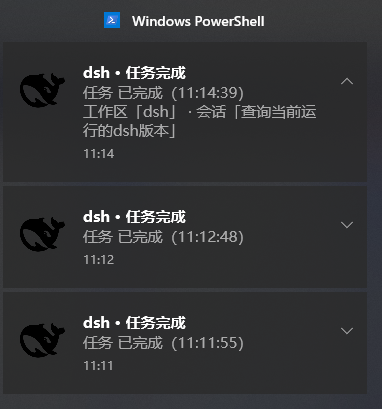
Real Windows Toast capture: the body is labeled "workspace · session".
Features
- Native Windows Toast notifications: when the agent stops running (finished / aborted / error / output limit reached / waiting for your choice / session closed), a system notification pops up automatically with the body labeled "workspace · session" — tell at a glance which session finished;
- Anti-spam:
rootsOnlydefaults to notifying only root sessions, so subagents won't flood you;cooldownMssets the minimum interval between two notifications of the same type in the same session; - Security hardening: the notification child process runs with a sanitized environment (variables whose names contain KEY / SECRET / TOKEN / PASSWORD are stripped, preventing credential leaks) — no leftover credentials or stray processes;
- Windows environment system-prompt section: injects a short Windows environment essentials section (encoding / path / process guardrails) into the agent's system prompt, toggled together with the master
enabledswitch; - Zero runtime dependencies, zero build: one
dsh plugin addcommand and it's ready to use.
Use cases
- Switch windows during long tasks: while a long LLM generation / batch job runs, switch to another app; when it ends, a toast pops up and one glance tells you the result;
- Unattended batch jobs: run multiple rounds overnight and get a Toast when everything is done — no need to keep watching the page;
- Multiple sessions at once: run several workspace sessions simultaneously; each notification body carries the "workspace · session" label, so nothing gets mixed up;
- Watching subagents: keep the default
rootsOnly: truewhen you only care about root-session results, and turn it off when you need to watch subagents.
Installation
dsh plugin --profile web add dsh-notify
Install from GitHub: dsh plugin --profile web add github:Pasumao/dsh-plugin-notify
Install from source (local development / debugging):
git clone https://github.com/Pasumao/dsh-plugin-notify.git
cd dsh-plugin-notify
npm install
# Mount into the profile as a link: dependency (package name: dsh-notify)
After installing, restart dsh web and the plugin is active.
Compatibility: Windows 10/11 · Node ≥ 22.5 · tested on DSH
0.2.0-rc.2.
Configuration
Override the config in the profile's cordis.patch.yml under the id dsh-plugin-notify. Common options:
| key | Default | Description |
|---|---|---|
enabled |
true |
Master switch: controls both Toast notifications and the system-prompt section injection |
cooldownMs |
10000 |
Minimum interval in milliseconds between two notifications of the same type in the same session |
rootsOnly |
true |
Notify only root sessions; subagents won't flood you |
titlePrefix |
'dsh' |
Notification title prefix |
Testing
node scripts/test-harness.mjs # Fires three real Toast notifications as a self-test
FAQ
- Not receiving notifications? Check that Windows "Settings → System → Notifications" allows PowerShell to show notifications, and that you are not in Focus Assist / Do Not Disturb mode;
- Only root-session notifications? Keep the default
rootsOnly: true; change it tofalsewhen you need to watch subagents; - Notifications too frequent? Just increase
cooldownMs(default 10000ms).
Related plugins
This plugin is part of the Pasumao dsh plugin ecosystem; the published plugins in the series work well together:
| Plugin (npm) | GitHub | Description |
|---|---|---|
| dsh-plugin-choice-refresh | GitHub repo | Choice enhancements: regenerate options / more options |
| dsh-plugin-dev-kb | GitHub repo | Plugin development knowledge base (full mirror of official docs + skills) |
| dsh-plugin-image-tools | GitHub repo | Image choice cards + inline images in replies + image pickup for blind models |
| dsh-plugin-table-zoom | GitHub repo | Floating window for long chat tables + one-click Markdown copy |
| dsh-plugin-windows-guard | GitHub repo | Windows environment guard: rule skills + mojibake detection / dangerous-write interception / encoding diagnosis & repair |
| dsh-plugin-workbench | GitHub repo | VS Code-style file explorer + editable preview (deprecated: dsh 0.1.5 ships a built-in file tree and doc preview) |
| dsh-plugin-context-trim | GitHub repo | Per-session injection gate: trim skills / tools / prompt sections per session |
For the other plugins in the series, see Pasumao · dsh plugins; if you find them useful, a ⭐ on GitHub is appreciated.
AI-generated disclosure
The code and documentation were generated with AI assistance (DeepSeek Harness), all human-reviewed and verified on a live machine (scripts/test-harness.mjs fires real Toast notifications as a self-test).
License
Related plugins
dsh-im
 xmanrui
/dsh-im
通过扫码把IM机器人接入DeepSeek Harness(支持飞书、微信、钉钉等)。
dsh plugin --profile web add github:xmanrui/dsh-imdsh-pocket
 shaobeichen
/dsh-pocket
手机远程访问 DSH Web 界面:扫码即用局域网或公网(cloudflared 隧道)访问,实时同屏、移动端适配布局,带设置页管理。
dsh plugin --profile web add github:shaobeichen/dsh-pocketDSH Startup Screen
 6shenhonghong9
/dsh-startup-screen
DeepSeek Harness 启动界面与启动动画:黑幕 DeepSeek 标识 → 过曝洗白 → 暖白档案底板 → 交互式访问授权序列(需要访问许可 / 身份资料确认 / 接收访问需求 / 开始读取权限 / 读取完毕·核验通过 / 欢迎访问)。中文主字 + 英文等宽副标题,真声素材 + 界面音效,身份名称等参数在 DSH 设置页可改。web profile 与 DeepSeek Harness Desktop 桌面端通用。桌面端(Windows)播放启动动画期间把标题栏整层透明化:最小化/最大化/关闭按钮与其底色一并不可见,播放结束自动还原。
dsh plugin --profile web add 'github:6shenhonghong9/dsh-startup-screen#1f35ea33810e02a900b31df01f9c806f92f398df'dsh-qqbot
 tencent-connect
/dsh-qqbot
让 QQ Bot 接入 DeepSeek Harness(dsh)的官方插件
dsh plugin --profile web add github:tencent-connect/dsh-qqbotdeepseek-harness-mobile
 sorsama
/deepseek-harness-mobile
DeepSeek Harness 的 Android 伴侣应用:经局域网用手机聊天、看目标、审批与收通知;Kotlin + Jetpack Compose
dsh plugin --profile web add github:sorsama/deepseek-harness-mobiledsh-bridge
 wenbin-wb
/dsh-bridge
DeepSeek Harness 多通道远程访问与全域安全门禁插件 手机扫个码,人不在电脑前也能继续用 DeepSeek Harness。躺在沙发上、出差在外、跨网访问——都不用守着电脑,也不用自己搭公网服务器,扫码就能在手机/平板或任意设备上接着干。 把你本地的 DeepSeek Harness 无缝延伸到手机、平板、公网、甚至微信 / QQ /…
dsh plugin --profile web add github:wenbin-wb/dsh-bridge