
Workflow & Automation
deep-read-summarize
PensiveFei/deep-read-summarize · ★ 45
 PensiveFei
Deep reading & summarization for DSH: books/papers/videos/web into structured Obsidian notes via plugin parsers, MapReduce parallel deep-read subagents, JSON Schema outputs and an idempotent cache.
安装
dsh plugin --profile web add github:PensiveFei/deep-read-summarizeGitHub 源码安装:首次需按提示配置 allowBuilds 构建授权后重试
For install and environment setup, plus plugin development tutorials, see DSH community docs ↗
README
Table of contents
- What it looks like
- What it does
- Structure
- Platform support
- Installation (DSH plugin)
- Quick start (~5 minutes)
- 1. Install
- 2. Verify installation (offline, no API key needed)
- 3. Feed a demo file with one command
- 4. Real run (requires DSH)
- Usage
- Frontmatter profiles (options.frontmatter)
- Video: full transcript (subtitles first, auto-transcription when none)
- Variance and influencing factors (why length and content may differ)
- Model
- Input
- Hardware
- Other
- How failures are handled
- Faster runs with the same quality gates
- Cost
- Security & copyright
- Development
- Compatibility
- License


Disclaimer: This is an unofficial third-party tool. It is not affiliated with, endorsed by, or sponsored by DeepSeek or the DeepSeek Harness project. "DeepSeek" and "DeepSeek Harness" are trademarks of their respective owners. This project only orchestrates the workflow tool available in your DSH environment; it does not redistribute any DeepSeek software.
⚠️ Most importantly: this is an "assisted deep-reading" tool, not a substitute for your own learning. It helps you quickly extract, summarize, and structure what you read, but real understanding, thinking, and critique must still come from you. Always treat the original source as authoritative — do not mistake the generated notes for the learning itself.
A deep-reading workflow for DSH (DeepSeek Harness): feed it a book, a paper, a video link, or a web page, and it produces a structured Markdown note (YAML frontmatter — ready for Obsidian, Logseq, static-site content folders, or any Markdown editor).
Content is split into chunks, read in parallel by multiple sub-agents, then merged into a Markdown file with YAML frontmatter. Key conclusions carry citations to the original source, and a quality check runs before the final draft.
If you run into problems, or see how it could be better, feel free to open a GitHub issue.
Note: DSH is currently a developer preview and its interfaces may change. This repo targets a specific version of the workflow-tool semantics — see Compatibility.
Platforms: Windows / macOS / Linux are equally supported (since 0.3.9) — see Platform support below.
What it looks like
(Images use absolute GitHub URLs so they render on npm too; the PNGs ship with the repository, not inside the npm package.)
| Deep-read paper note | Video note metadata |
|---|---|
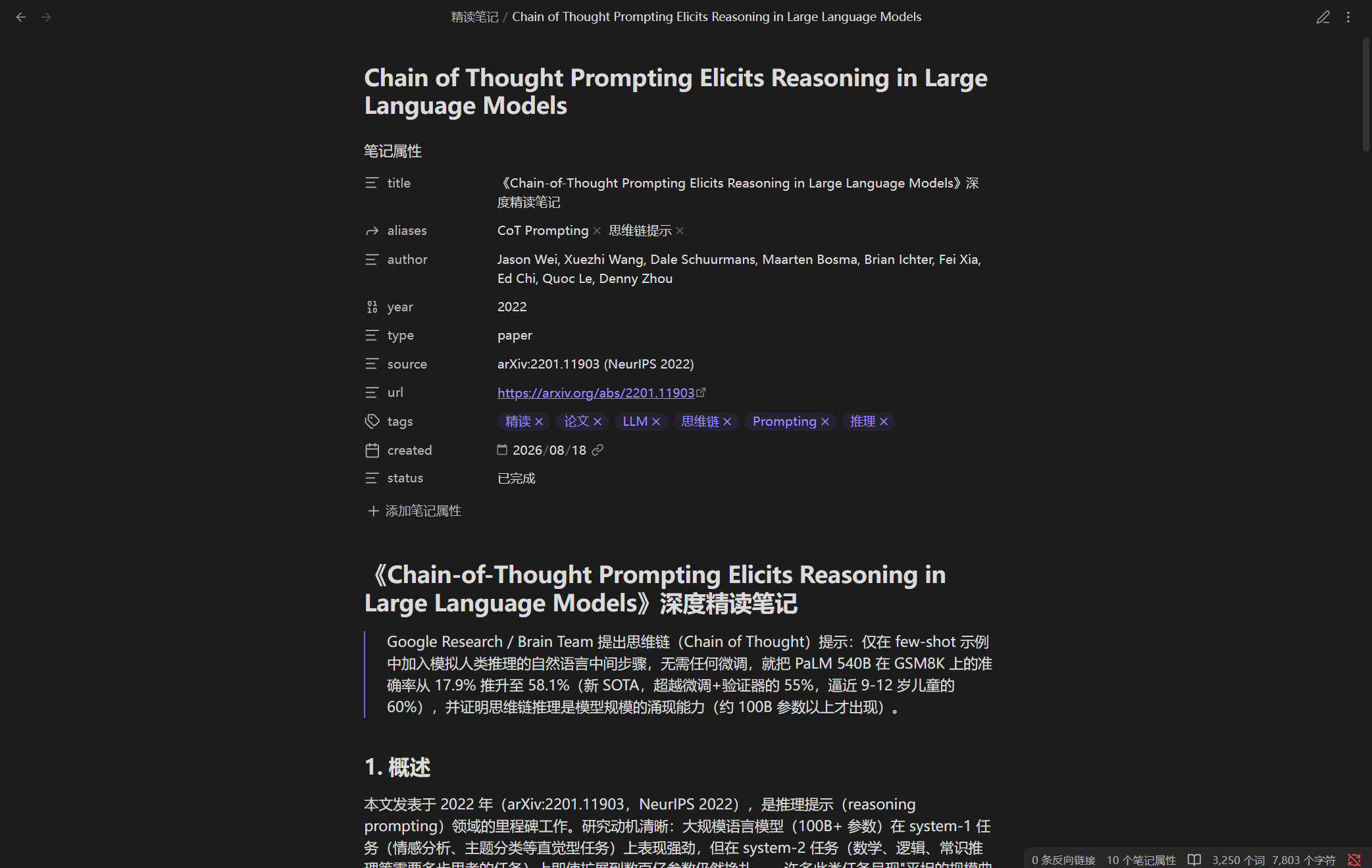 |
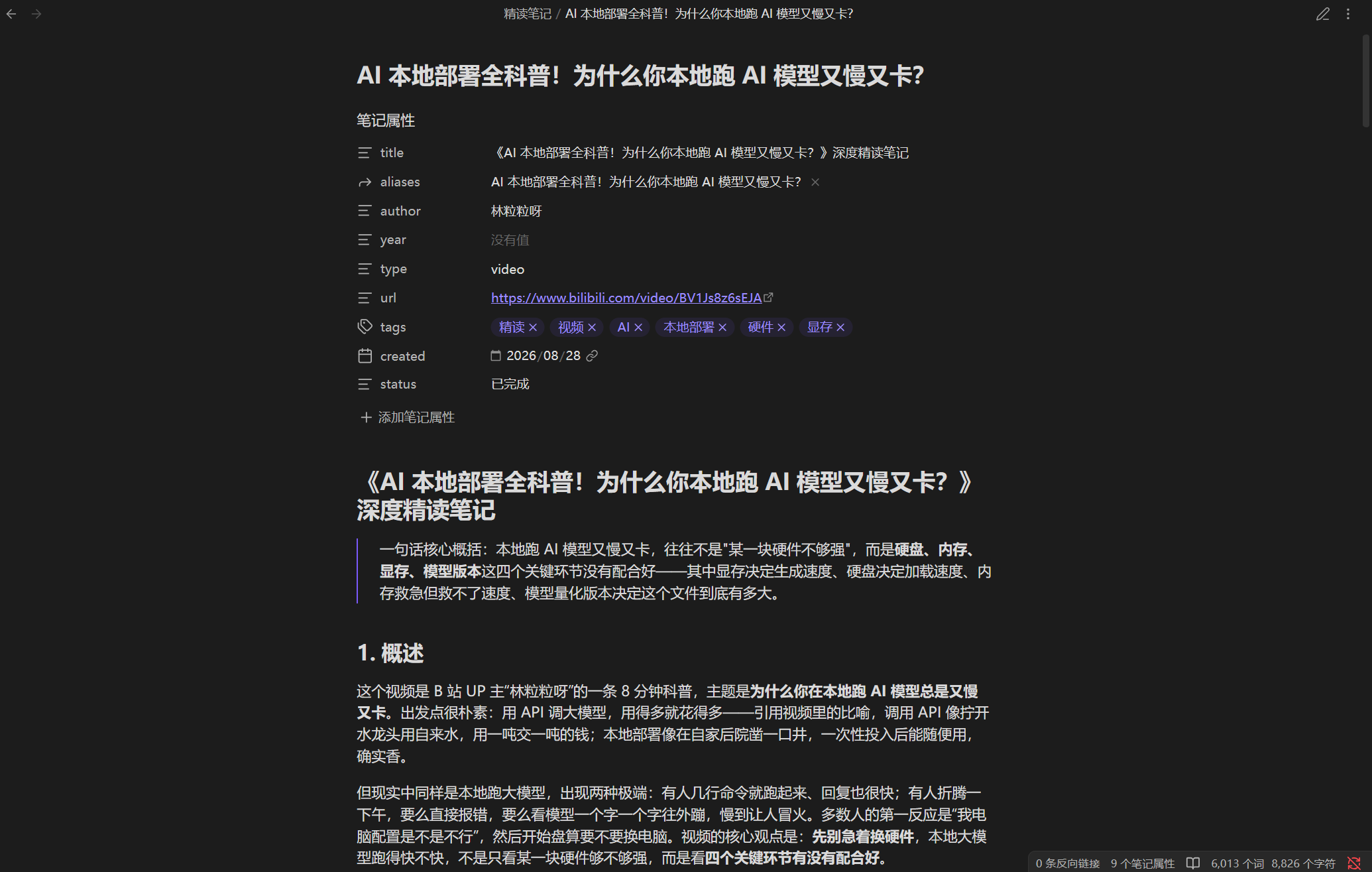 |
| Video note action items | In-chat digest |
|---|---|
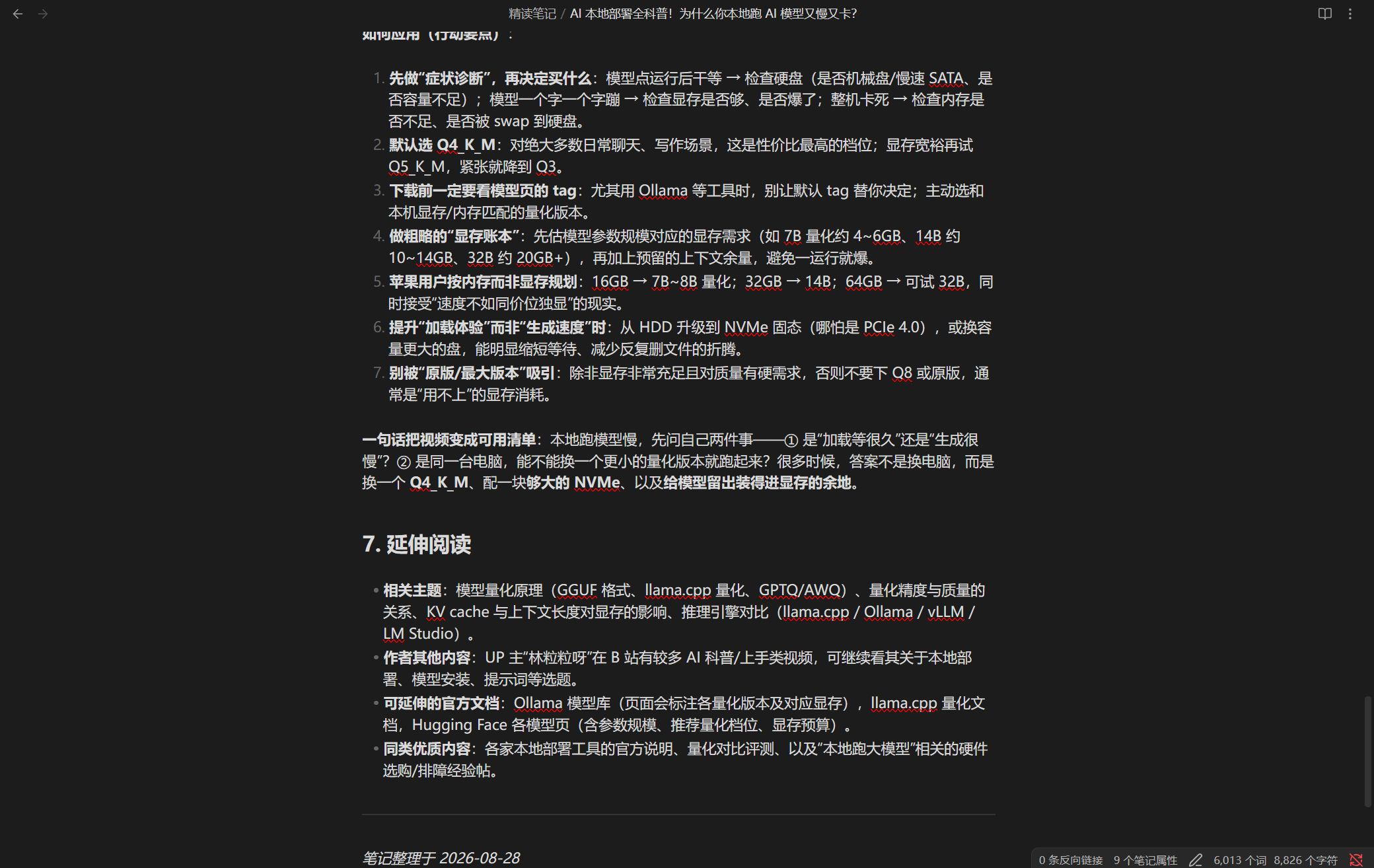 |
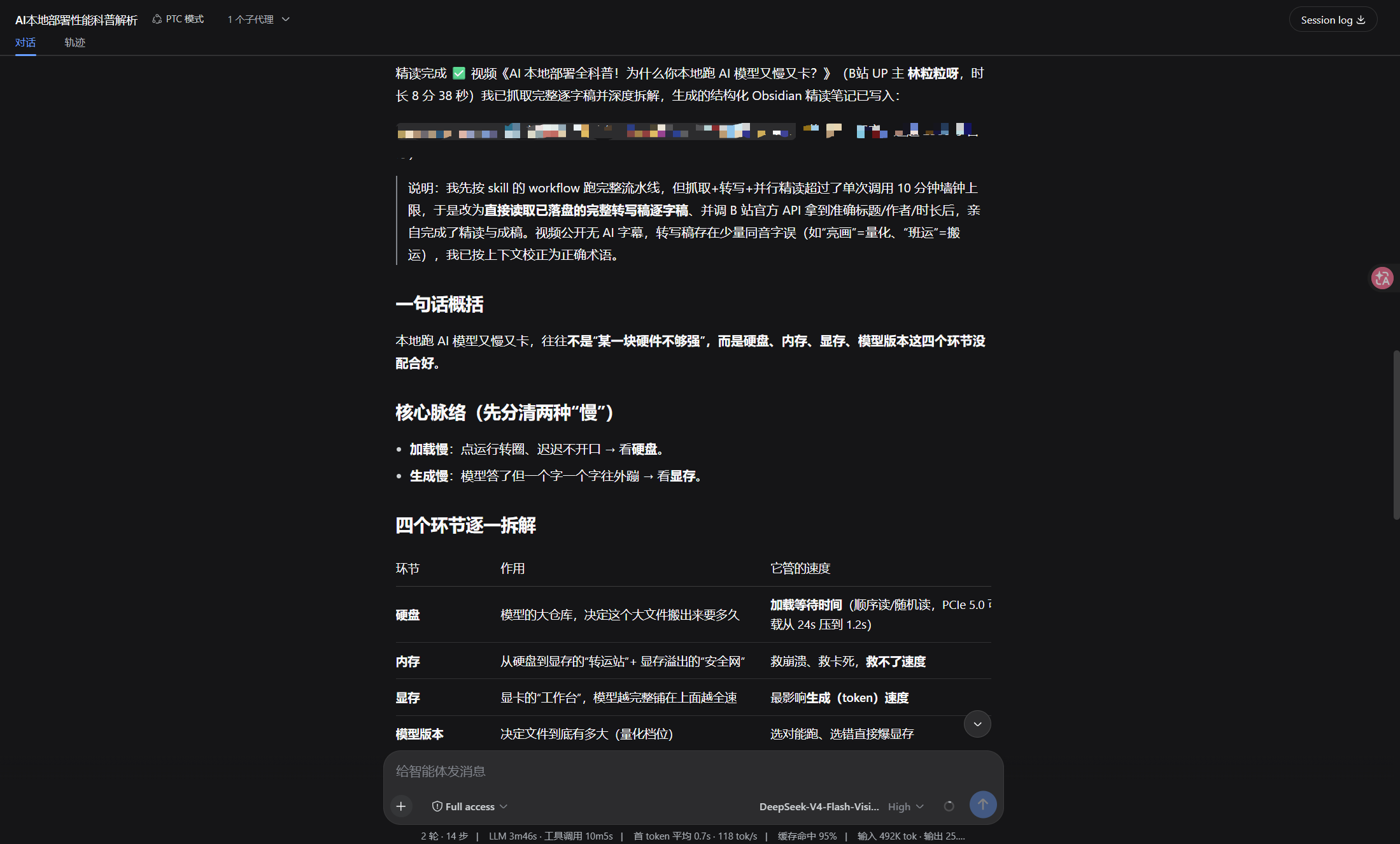 |
What it does
- Books (PDF/EPUB/MOBI), papers (arXiv/PDF/HTML), videos (subtitles first, auto-transcription when there are none — produces a full transcript for deep reading), web pages
- Long content is chunked and read in parallel by sub-agents, then merged
- The fetch/chunk plan and the quality check are constrained by JSON Schema, so their output is stable and machine-readable
- Chunk count — and therefore sub-agent count — is enforced by
maxChunks(a runaway plan blows the per-call time limit) - Key citations must carry page/chapter/paragraph references to reduce fabrication
- Configuration errors abort immediately; a chunk that fails to parse is skipped and marked as a gap
- Output is standard Markdown + YAML frontmatter: the body is plain CommonMark (no wikilinks, no callouts), so Obsidian (with Dataview), Logseq, Jekyll / Hugo / Astro content folders and any Markdown editor can consume it directly
Structure
Input (link or file path)
  │
  ▼
Parser registry ── book / paper / video / web
  │
  ▼
Wave 1  Fetch content → write temp file → build chunk plan
  │
  ▼
Wave 2  N sub-agents deep-read chunks in parallel (Map)
  │
  ▼
Wave 3  Merge draft + quality check (Reduce)
  │
  ▼
Markdown note
Three waves, normally N+3 sub-agent calls (fetch, N chunk reads, draft, and quality check). In auto mode, ambiguous PDFs, unfamiliar web pages, and text inputs require one additional lightweight classification call. An explicit type skips classification.
auto routes recognized video links, arXiv paper links, and ebook extensions directly to their parsers; columns, channels, and help pages on those sites still require classification. PDFs are classified as books or papers from their content. Failed classification returns stage: "detect" and asks for an explicit type. options.tempDir is a temporary root: each call creates its own run-* subdirectory, keeping fetched text, audio, and transcripts separate from other tasks.
Chunk plans are sorted, duplicate ranges trimmed, and gaps filled. Plans above maxChunks merge adjacent ranges instead of discarding the document tail. The returned coverageComplete indicates coverage of all declared lines based on a valid totalLines; without a line count, known ranges are retained, qualityPassed is set to false, and the coverage uncertainty is reported.
Quality checks combine code and source review. Code validates the supplied scalar/list frontmatter template, required sections, and length (CJK characters plus other words, excluding metadata, code blocks, HTML comments, and link URLs). A separate reviewer reads the current source file and returns per-chunk excerpts and line-bound evidence for verbatim quotations in section 4. A bare pass: true cannot override these checks. qualityChecks exposes the gates, and qualityEvidence exposes the source path and evidence. Source authenticity still depends on the reviewer's actual source reading; uncertainty fails the gate. Empty, rejected, or structurally degraded repairs retain the preceding usable note.
Direct workflow options are strict: minWords is an integer in 1–100000, maxChunks is a positive integer (values above 12 are capped), and maxRetries is an integer in 0–3. Invalid values and unknown keys fail before work begins. Plugin profile configuration instead warns per invalid field and uses its default, preserving host startup.
parsers/         Parsers for each input type, dispatched by type
  book.js        Books: PDF/EPUB/MOBI text extraction, chapter chunking
  paper.js       Papers: arXiv/PDF/HTML structure detection
  video.js       Video: full transcript (subtitles first; auto-transcribe via scripts/transcribe.js when none)
  web.js         Web pages: main-text extraction
  index.js       Registry: parser discovery and fallback
schemas/         JSON Schema for the output contract (injected into the script by workflow.js - single source of truth)
scripts/         lint (incl. line-ending/whitespace hygiene), security checks, cross-platform transcription bootstrap
lib/             Small standalone helpers
  cache.js         input fingerprint and idempotency records (for callers driving the workflow themselves -- the
                   workflow sandbox has no filesystem, so it cannot use this)
  workflow-script.txt  the workflow script body (plain text: read and edit it directly, no escaping involved)
tests/           tests and validation scripts (**not published to npm**, repo only)
workflow.js      the workflow meta and assembly logic (parser inlining, schema injection)
The script body lives in
lib/workflow-script.txton purpose: this file was corrupted twice by "escaping on top of escaping". It is plain text now, so reading and editing it needs no encoding step.
To override or add a parser, use the package's custom-parsers/ directory (included in npm packaging), or set the plugin-level config.customParsersDir to your own directory. This is not a workflow option. Per-profile directories remain isolated, and rebuilding skill content uses the current registry, including programmatic registrations. Parsers expose name, types, and buildPrompt(input, opts); registered types are inlined into the workflow and its schema.
File parsers bundle their CommonJS modules and literal relative .js, .cjs, and .json dependencies, preserving module constants, helpers, method shorthand, and cycles. Acorn parses JavaScript during script construction and is installed automatically by npm; it does not run in the workflow sandbox. Node built-ins, external packages, and dynamic require/import are unsupported in sandbox parsers and fail at build time. Programmatically registered functions must be self-contained; use a file parser for module closures.
Platform support
Windows / macOS / Linux are equally supported (since 0.3.9). The plugin itself only needs Node (which DSH ships); the extra tools each input type may use are installed per platform:
- Book / paper PDF →
pdftotext(poppler): macOSbrew install poppler, Windowswinget install poppler, Debian/Ubuntuapt install poppler-utils - Bilibili subtitles / audio →
curl: already present on Windows 10+, macOS and Linux — nothing to install - YouTube subtitles →
yt-dlp: macOSbrew install yt-dlp, Windowswinget install yt-dlp.yt-dlp, any platformpip install -U yt-dlp - Transcription when there are no subtitles →
uv(the script bootstraps a Python 3.12 env and installs faster-whisper): macOSbrew install uv, Windowswinget install astral-sh.uv, or the official installer script on macOS / Linux (handcurl -LsSf https://astral.sh/uv/install.shtosh)
Further notes:
- Transcription is the only part that needs an extra toolchain, and all three platforms share one Node script and one command:
node scripts/transcribe.js --audio <file> --out <txt>. - Transcription runs on CPU by default, so Apple Silicon / Intel Macs and Linux need no CUDA; GPU support needs a CUDA runtime and
options.device: "auto"will try it and fall back to CPU on failure. - Cache location per platform: macOS
~/Library/Caches/deep-read-summarize, Linux$XDG_CACHE_HOME/deep-read-summarize, Windows%LOCALAPPDATA%\deep-read-summarize. - A full transcription has been run successfully on real macOS hardware (since 0.3.12):
uvbootstraps Python 3.12, installs faster-whisper, downloads the model and writes the transcript — exit code 0. CI'smacos-latestjob separately covers platform path resolution and the whole test suite. If you hit an error on a Mac, please open an issue.
Installation (DSH plugin)
deep-read-summarize is a DSH plugin installable via npm or locally:
# npm install (includes Acorn for parser construction)
npm install deep-read-summarize

# or local install (dsh profile directory)
pnpm add ./deep-read-summarize-0.3.10.tgz
# then append to the dsh config's dsh.profile.bundles:
#   - deep-read-summarize
# restart dsh web (POST /dsh-market/restart)
After installation it registers:
- the
deep_read_summarizetool when the host provides tools and workflowEngine services; models send only input/type/options - the
deep-read-summarizeworkflow definition (meta + script), with the existing workflow-tool route retained for older hosts - the
deep-read-summarizeskill (skills/deep-read-summarize/SKILL.md) - four parsers (
parsers/) and JSON Schemas (schemas/)
Quick start (~5 minutes)
1. Install
# Option A: npm install directly (no clone needed)
npm install deep-read-summarize

# Option B: develop from source
git clone https://github.com/PensiveFei/deep-read-summarize.git
cd deep-read-summarize
npm ci             # install locked dependencies
2. Verify installation (offline, no API key needed)
node -e "console.log(require('deep-read-summarize').name)"
Seeing deep-read-summarize confirms the package loads. Source checkouts can additionally run npm test and npm run test:node; tests are not included in the npm package.
3. Feed a demo file with one command
node -e "const wf = require('./workflow.js'); console.log('meta:', wf.meta.name); console.log('parsers:', wf.parsers.list().map(p => p.name).join(', '));"
Output looks like:
meta: deep-read-summarize
parsers: book, paper, video, web
4. Real run (requires DSH)
Prefer passing the JSON below directly to deep_read_summarize. On older hosts, use the skill's meta + script with the existing workflow tool:
{ "input": "https://arxiv.org/abs/2307.09042", "type": "paper", "options": { "maxChunks": 4, "fastMode": true } }
The workflow returns a structured result: { ok, kind, title, filePath, qualityPassed, note }, where note is the final Markdown note.
⚠️ The caller persists the note. DSH's workflow contract gives the script no filesystem access — it only coordinates subagents — so the script returns the note body plus a suggested
filePathand never writes the file itself. The bundled SKILL.md tells the model to writenotetofilePathwith thewritetool after the run; do the same when you invoke the workflow by hand, or the note exists only in the return value.
Usage
The deep_read_summarize tool takes these parameters directly. On older hosts, use them as workflow args with the skill's meta + script:
{
  "input": "https://arxiv.org/abs/2307.09042",  // link or file path
  "type": "auto",   // auto | book | paper | video | web
  "options": {
    "minWords": 2500,
    "fastMode": false,        // true skips sections 5-7, faster
    "maxChunks": 4,           // chunk limit, 1-12 (default lowered to control sub-agent count and time)
    "transcribe": true,       // video: auto local transcription (faster-whisper) when no subtitles; false skips it — see Video
    "whisperModel": "small",  // video ASR tier: small | base | medium
    "language": "zh",         // video ASR language: use "en" for English-only videos
    "device": "cpu",          // ASR device: cpu (default) | auto | cuda; auto/cuda needs a CUDA runtime and falls back to cpu
    "maxRetries": 0,          // quality-check retries (default 0 = no retry; retrying is noticeably slower)
    "frontmatter": "obsidian", // key set: obsidian (default, for Dataview) | generic (drops the keys Hugo reserves) | minimal
    "requireCitations": true, // whether key conclusions must carry citations
    "includeTimestamps": false,
    "outputDir": "./output",    // note output directory (can point at your Obsidian vault or a static-site content folder)
    "tempDir": "./.tmp"        // temp file directory
  }
}
Examples:
| Type | input |
|---|---|
| Paper | https://arxiv.org/abs/2307.09042 |
| Book | local path, e.g. ~/books/xxx.pdf |
| Video | https://youtube.com/watch?v=xxx |
| Web page | https://example.com/article |
Notes are written to options.outputDir (default ./output, can point at your Obsidian vault or a static-site content folder), with the filename taken from the content title.
Frontmatter profiles (options.frontmatter)
The default is obsidian, with the same keys as earlier versions and safely quoted scalar/list values. Profiles exist because type, aliases and url are reserved keys in Hugo with different meanings -- dropping an Obsidian note into Hugo changes how the page renders, rather than adding a few harmless fields.
| Key | obsidian (default) |
generic |
minimal |
|---|---|---|---|
title |
yes | yes | yes |
aliases |
yes | -- | -- |
author / year |
yes | yes | -- |
type |
yes | -- | -- |
docType |
-- | yes | -- |
url |
yes | -- | -- |
sourceUrl |
-- | yes | yes |
tags |
yes | yes | yes |
created |
yes | -- | -- |
date |
-- | yes | yes |
status |
yes | yes | -- |
Why generic renames things:
typein Hugo selects the layout (type: videomakes it look forlayouts/video/)aliasesin Hugo is a list of old URLs that redirect to this pageurlin Hugo overrides the page's own path -- the source link would become the article's permalinkdateis the time key both Hugo and Jekyll understand;createdis just a custom field
An unknown value is fatal rather than silently ignored, matching how type is handled.
Video: full transcript (subtitles first, auto-transcription when none)
Video text extraction is a unified pipeline (the old "three tiers" are gone): the goal is to get the full transcript, then deep-read it.
⚠️ To preserve deep-reading quality, processing may take noticeably longer (a deliberate trade-off, not a hang): a subtitle-less video is transcribed first (roughly 0.5–2× the video length on CPU) before deep reading, so such videos are much slower than subtitled videos; in exchange you get a full transcript + real deep reading. Subtitled videos remain seconds-fast. Please do not mistake the slower transcription for a hang.
- Platform subtitles available (Bilibili's official API AI subtitles / YouTube CC) → use them directly (= full text, fastest, zero dependencies).
- No public subtitles → use the bundled transcription
scripts/transcribe.js(faster-whisper small / int8 / VAD / Chinese) to get the full text. - Neither works → degrade gracefully: prompt the user to supply a transcript manually, or fall back to
descas background; never block.
options.transcribe: default true (auto-transcribe when no subtitles); set false to skip transcription (use subtitles/desc or degrade).
Transcription toolchain: uv provisions Python 3.12 and installs faster-whisper==1.2.1 from the Tsinghua mirror; models use HF_ENDPOINT=https://hf-mirror.com and the local cache. Healthy cached environments run directly without requiring uv or a separate Python import probe. Actual interpreter and dependency versions are recorded in the cache's runtime.json; Python patch releases, uv, and all transitive dependencies are not fully pinned. PyAV decodes audio without a separate ffmpeg. All three platforms use node scripts/transcribe.js --audio <file> --out <txt>. CPU is the default; options.device: "auto" can try a supplied CUDA runtime and falls back to CPU. Cache roots are %LOCALAPPDATA%\deep-read-summarize on Windows, ~/Library/Caches/deep-read-summarize on macOS, and $XDG_CACHE_HOME/deep-read-summarize on Linux (falling back to ~/.cache). Python provisioning tries a mirror and then direct GitHub; DRS_UV_PYTHON_MIRROR overrides it, with an empty value selecting direct downloads.
⚠️ The first transcription downloads the model first (small ≈ 484 MB, via hf-mirror, not GitHub) and may take a few minutes — please be patient; it downloads only once on your machine, then every later transcription uses the cache and starts instantly. Only subtitle-less videos trigger transcription (subtitled videos use their subtitles directly — no trigger, no download).
Quality/speed: small + int8 quantization + VAD silence filtering gives usable Chinese quality and is CPU-friendly. Subtitled videos are not transcribed (fast); subtitle-less videos are transcribed at roughly 0.5–2× the video length on CPU.
Failure handling: install/download failures report an error and degrade (prompt for a manual transcript), never silently and never blocking for long. Use options.transcribe: false to skip transcription.
How to know what source was used: source info is not written into the note (to keep it clean); it surfaces in: ① the run log's [source] <value> -> <label> line; ② the textSource field in the returned result (subtitle / transcription / desc / manual).
Variance and influencing factors (why length and content may differ)
Output length and content vary noticeably with the model and the input; this is normal.
Model
- ASR model tier:
small(default, usable for Chinese) →base(faster, slightly lower quality) →medium(better, slower). Adjust withoptions.whisperModel; download size and speed grow with the model. - Language/accent: Chinese/English/mixed language, dialect, accent, stress → different transcription accuracy and time; for pure English video you can set
language: "en". - Deep-reading LLM: uses the host DSH model; different context/reasoning models → different quality, length, and speed.
- Non-determinism: both the LLM and ASR are stochastic, so re-running the same input may produce slightly different results (content/length).
Input
- Video:
- Whether public subtitles exist is the biggest differentiator — public subtitles = seconds-fast; login-only AI subtitles or no subtitles = triggers transcription, noticeably slower.
- Length: longer video = longer transcription (≈ 0.5–2× the video length on CPU).
- Audio quality/noise/low volume/pure BGM/no voice: transcription is error-prone or empty; supply a transcript manually in that case.
- Paper/book/web page:
- Format: PDF/EPUB/MOBI/HTML/arXiv; scanned OCR, broken PDFs, dense formulas/figures → different extraction quality and time.
- Term density/length → different chunk count and deep-reading depth.
- Chunking structure: different types chunk differently (chapter/topic/paragraph), affecting output structure and coverage.
Hardware
- GPU vs CPU: GPU transcription can be an order of magnitude faster than CPU (
device='auto'picks automatically). Subtitle-less videos are ≈ 0.5–2× the length on CPU.
Other
- First run vs reuse: the first run downloads the model (≈ 484 MB); later runs reuse the cache.
- Token/cost: chunk count, length, and citations drive token usage;
fastMode/maxChunkssave tokens. - Citation/fabrication: transcription or OCR errors may be quoted as "original text"; re-check key citations.
- Boundaries: pure BGM, distorted audio → empty/poor transcription; no subtitles and transcription unavailable → degrade to a prompt for a manual transcript.
How failures are handled
Two classes:
- Configuration errors (missing input, invalid type, malformed options): throw immediately and abort — no half-baked output.
- Content problems (fetch failed, a chunk's deep-read failed): return
{ ok: false, stage, fatal: false }and let the caller decide. A failed chunk is skipped and marked as a gap in the draft; the whole run is not aborted.
Faster runs with the same quality gates
- Prefer
deep_read_summarizeon supported hosts: the model submits parameters instead of reproducing the entire workflow script. Older hosts retain the existing route. - All known source lines remain covered. Up to three reading tasks run concurrently, and each free slot immediately starts another task. Line-balanced chunks avoid one oversized task holding up a batch.
- Independent source review remains enabled, with duplicate full Map notes removed from review contexts. Missing line counts, failed reads, and description-only video sources cannot be fixed by rewriting the draft, so those states no longer consume full repair loops.
- Video
textSource: "desc"is explicitly degraded and cannot pass as a complete deep read. Bilibilipselects the matching CID, part title, and duration. - Returned
timingsreports stage durations in milliseconds. Compare the same sources, model, output size, and quality gates; scheduling simulations are not real LLM speedup measurements.
This release does not lower model size, output length, or source coverage. Persistent ASR workers, transcript caching, and hierarchical review need separate quality and performance benchmarks.
Cost
Token use depends on document length, chunk count, and output size. Source review reads the document again, and each repair round adds a repair and a review call. fastMode reduces output sections; reducing maxChunks limits agent count while preserving the complete source.
Programmatic lib/cache callers: URL trailing slashes, explicit empty queries, and fragments are preserved because they may select different content. New fingerprints are isolated from old records, so an upgrade can cause one reprocessing pass. Callers must still verify source freshness and configuration before reusing results.
Security & copyright
- Fetching videos/web pages makes external requests, executed by sub-agents under DSH's sandbox and approval policy; don't let a model run arbitrary scripts unattended.
- Sub-agents need appropriate permissions to write files; if permissions are insufficient, the workflow returns the content and the main agent handles persistence.
- Local transcription: video transcription (faster-whisper) runs locally; audio/subtitles do not leave your machine; network requests to the corresponding platforms are made only when fetching video metadata/subtitles/audio.
- This repo contains only the pipeline itself: workflow definitions, parser code, prompt templates, schemas. It contains no extracted copyrighted content. Test fixtures are self-written public-domain fables. When you process copyrighted material with this workflow, responsibility for the output is yours.
Development
npm install
npm run lint       # node --check on all JS
npm test           # fixture tests (35, all offline)
npm run validate   # pre-release validation (including security checks)
npm publish automatically runs prepublishOnly (tests + lint + security checks) first; any failure blocks the publish.
See CHANGELOG.md for changes and CONTRIBUTING.md for contribution guidelines.
Compatibility
Verified host: DSH 0.2.0-rc.2 (Node 24). The dependency surface is exactly two things:
| Surface | Current contract | How this repo uses it |
|---|---|---|
| workflow script hooks | agent() / pipeline() / parallel() / phase() / log() / args |
only agent/parallel/phase/log/args; agent() options limited to label/phase/schema (the engine accepts only label/phase/schema/provider/model and treats anything else as fatal) |
| JSON Schema subset | type / properties / required / additionalProperties / items / enum / const / oneOf plus annotation keys |
both agent() schemas verified against the host's real assertObjectJsonSchema |
Two contract details that bite:
- The script sandbox has no filesystem, network, timers or
require— it coordinates subagents; the caller persists the note (see ⚠️ above). - Breaking the schema subset terminates the run rather than degrading: the engine raises
UNSUPPORTED_SCHEMAand the whole workflow fails.npm testcarries a regression for this, including a reverse assertion so the checker cannot pass vacuously.
After upgrading DSH, run npm test and npm run test:node; if something breaks, cross-reference CHANGELOG.md.
License
MIT — see LICENSE.
Related plugins
rea
 morluto
/rea
逆向工程 CLI/MCP 工具(rea-agents):用 agent 逆向应用行为到原生二进制。独立工具而非 DSH 插件——仓库根 package.json 无 dsh 字段,本条目仅作外部工具参考。
npx rea-agents@latest setupArchify DSH 集成
 tt-a1i
/archify/integrations/deepseek-harness
Archify 的 DeepSeek Harness 集成:经 @tt-a1i/archify-dsh 适配包安装,在 dsh 中生成经校验的自包含交互式架构图、流程图、时序图、数据流图与生命周期图。安装信息基于已发布的 1.0.0;候选 1.1.0 与未发布的源码修复不计入。
dsh plugin --profile web add @tt-a1i/archify-dsh@1.0.0dsh-plugin
 Q00
Q00/ouroboros/integrations/dsh-plugin
通过 DSH MCP 客户端挂载 Ouroboros 的纯配置包,在 DSH 中提供 36 个涵盖需求访谈、Seed、执行、评估与演化流程的工具。
dsh plugin --profile web add github:Q00/ouroboros#path:/integrations/dsh-pluginanswer-me-with-html
 QingYunA
/answer-me-with-html
Answer hard questions with a one-page HTML: the model writes a short Markdown draft; the bundled CLI handles templates, SVG auto-layout and an STE controlled-writing check.
dsh plugin --profile web add 'github:QingYunA/answer-me-with-html#aab9ea19f50f038054eeb60475bbb7ea26f149e3'dashi-taskboard
 chuspeeism
/dashi-taskboard/integrations/deepseek-harness
现代化可灵活嵌入的任务面板,支持 Codex、DeepSeek Harness
dsh plugin --profile web add 'github:chuspeeism/dashi-taskboard#9aa1f4e7936d841748ed4e0fc7781b57ae6ae6cc&path:/integrations/deepseek-harness'dsh-agent-teams
 NanmiCoder
/dsh-agent-teams
AgentTeams 多智能体团队。
dsh plugin --profile web add github:NanmiCoder/dsh-agent-teams