
Workflow & Automation
dsh-yolo-mode
SeverusZh/dsh-yolo-mode · ★ 3
 SeverusZhCurated
dsh-yolo-mode - an LLM-powered auto-approval plugin for DeepSeek Harness sandbox escalations (built-in presets + custom permission levels, fail-closed)
Manifest details
安装
dsh plugin --profile web add github:SeverusZh/dsh-yolo-modeGitHub 源码安装:首次需按提示配置 allowBuilds 构建授权后重试
For install and environment setup, plus plugin development tutorials, see DSH community docs ↗
README
Table of contents
⚡ dsh-yolo-mode
A DeepSeek Harness plugin that uses an LLM to auto-adjudicate sandbox escalation requests







Maintenance status: DSH now ships an experimental Auto review capability (
@deepseek-ai/dsh-experimental-auto-review— per-tool LLM authorization review that replaces manual approval under theaskapproval policy), which overlaps with this plugin's "LLM-judge auto-approval". As a result this plugin may stop being maintained in the future; if you want the official native auto-approval, evaluate that experimental feature. The current version still tracks DSH compatibility (most recently tested on 0.2.1-rc.2).
When a session is in a writable sandbox mode and the approval policy is ask, dsh-yolo-mode intercepts escalate sandbox to ... requests and, according to the preset you choose or a custom permission hierarchy, has an LLM adjudicate "allow / deny / delegate". Any uncertain or failed path never allows escalation (fail-closed).
✨ 功能特性 / Features
- LLM auto-adjudication: in a
workspace-writesession,danger-full-access/workspace-writeescalation requests are graded by an LLM (allow / deny / unsure), removing the manual prompt when the verdict is confident. - Built-in presets:
off/strict/balanced(default) /permissive/yolo/custom, spanning the full range from "delegate everything to a human" to "deterministically allow everything". - Custom hierarchy:
levelssupports per-target-mode and per-tool (tools.<toolName>)allow / judge / delegate / denypolicies, pluserror/unsurefallbacks. - Per-preset default prompts: when
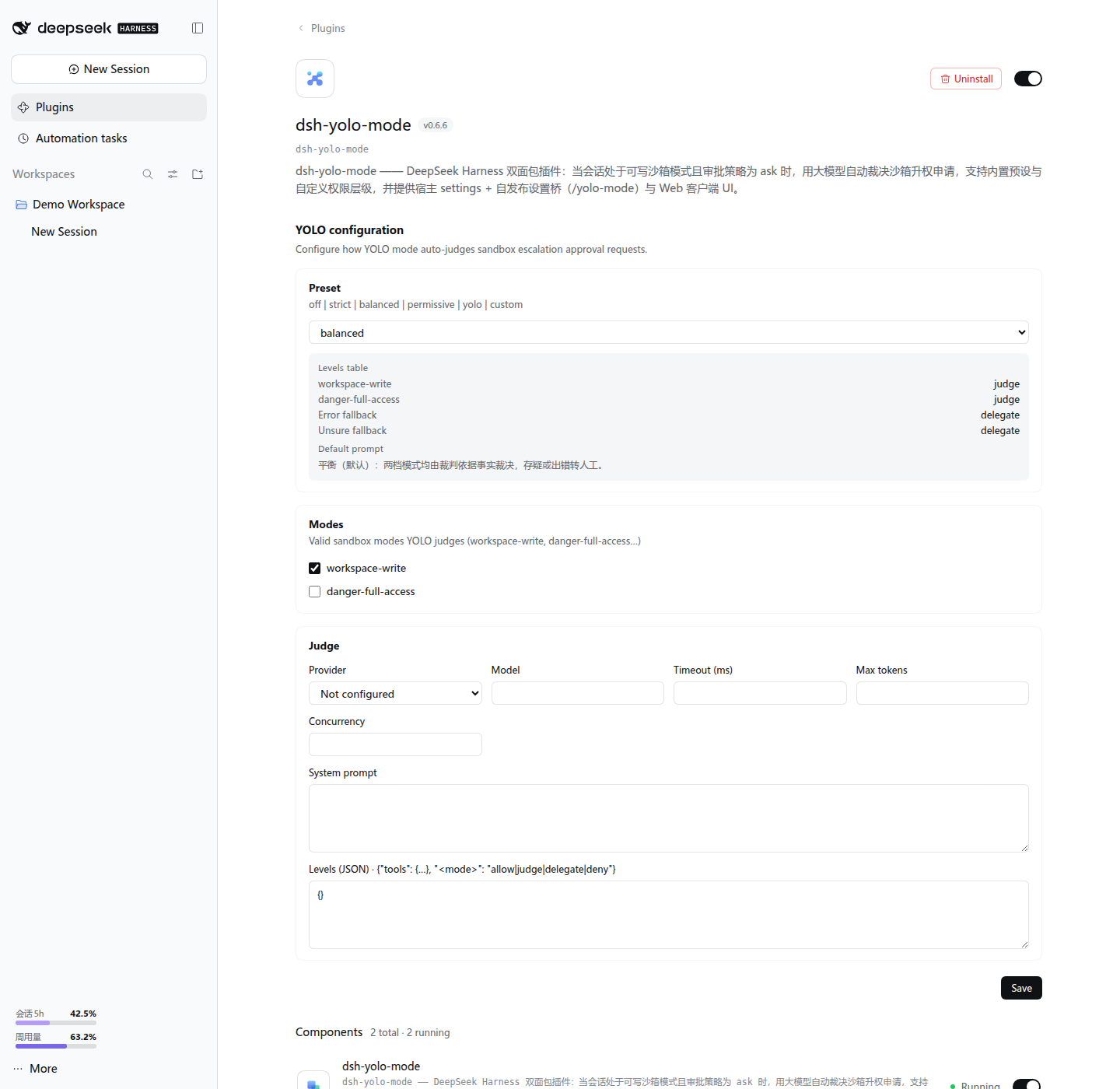
judge.systemPromptis empty, the judge prompt for the preset is used automatically (strict is the most conservative, permissive is lenient, custom follows the hierarchy table). - Graphical configuration: the plugin detail page lets you edit the preset / effective modes / judge model (dropdown) / hierarchy table online, effective on save; plus an input-bar status chip and a decision-statistics panel.
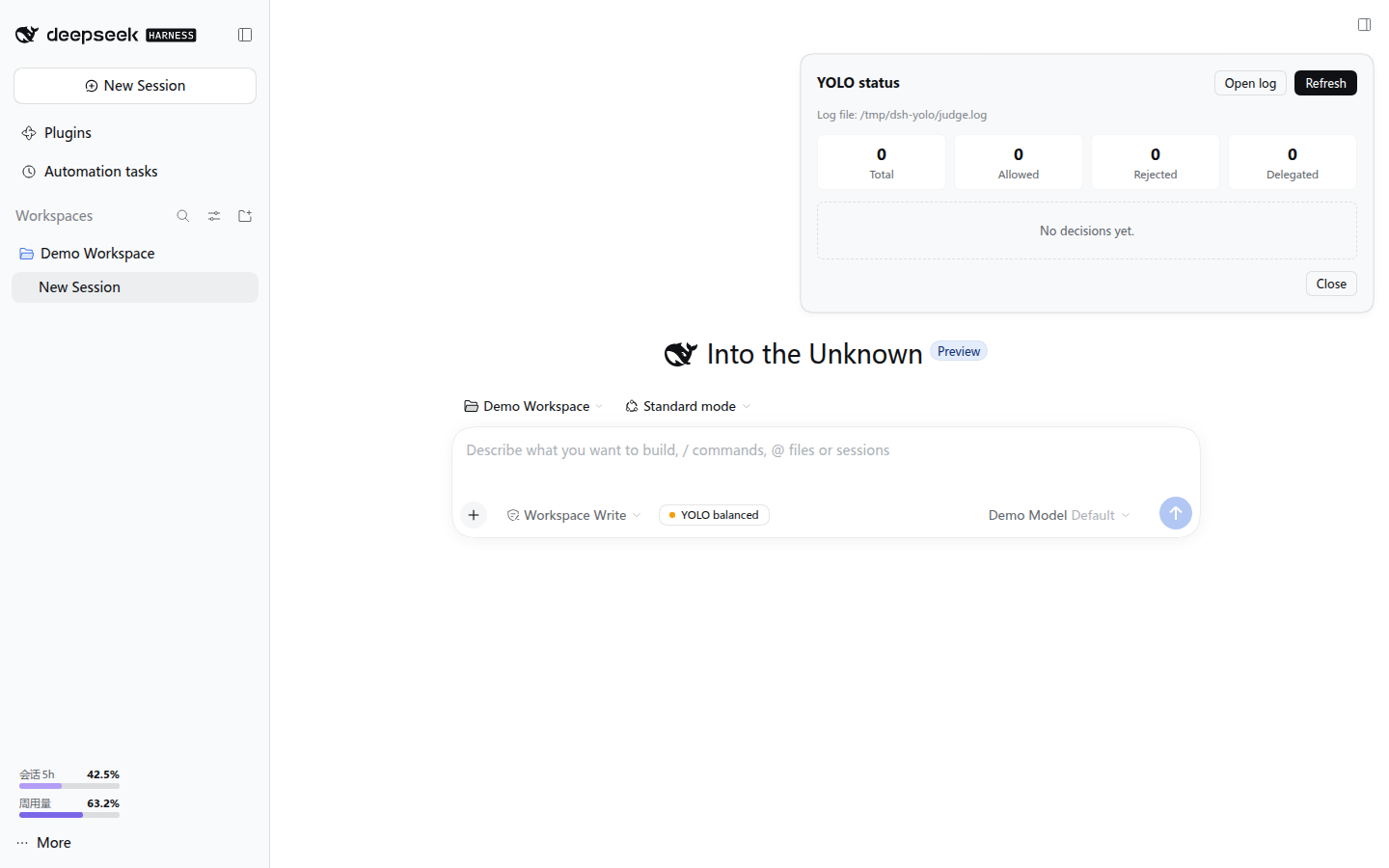
- Full audit trail: every verdict is written to a JSONL log with tool, target mode, current mode, reason, decision and outcome; the status dialog has a one-click "Open log" that opens it in the system default application.
- fail-closed: timeouts, invalid output, model unavailability, concurrency overflow and every other exceptional path fall back to "deny" or "delegate".
📦 安装 / Install
1. Install the plugin package
# From npm
dsh plugin --profile web add dsh-yolo-mode

# Or from a local path
dsh plugin --profile web add <absolute path to project>
2. Optional: Override the plugin configuration
dsh plugin add automatically mounts both the yolo-mode and yolo-mode-bridge
entries via the cordis.patch.yml shipped with the package — you do not need to
insert them manually. To adjust the configuration, override the main entry by id in
$DSH_HOME/profiles/web/cordis.patch.yml:
- id: yolo-mode
  name: dsh-yolo-mode
  config:
    preset: balanced
    judge:
      provider: <provider>
      model: <model>
Note: do not add
yolo-mode/yolo-mode-bridgewith- insert:again, or startup will fail withduplicate loader entry id: yolo-mode.
Restart DSH and refresh the browser for the changes to take effect.
Installation notes
- Prefer
dsh plugin --profile web add dsh-yolo-modedirectly (the npm release already includes the build output; peer dependencies are provided by DSH's$DSH_HOME/profiles/node_modulesfallback, so it works out of the box). - When developing with a local
link:, the checkout must live under$DSH_HOME/profiles/(or the repo must carry its own node_modules); otherwise the@deepseek-ai/*peer dependencies fail withERR_MODULE_NOT_FOUNDbecause Node resolves them along the real path.
⚙️ 配置 / Configuration
All fields of the plugin line's config are optional; unset fields use their defaults:
| Field | Type | Default | Description |
|---|---|---|---|
preset |
off|strict|balanced|permissive|yolo|custom |
balanced |
Preset to use; when custom, levels takes precedence |
modes |
string[] |
['workspace-write'] |
Only intervene when the session's effective sandbox mode ∈ this list (read-only / workspace-write / danger-full-access) |
levels |
object |
{} |
Permission hierarchy table; levels.tools.<toolName> overrides per tool for any preset |
judge.provider |
string |
'' |
Judge model provider; empty = not configured (judge decisions fall back as errors) |
judge.model |
string |
'' |
Judge model; the judge is enabled only when both provider and model are non-empty |
judge.systemPrompt |
string |
'' |
Judge system prompt; empty = use the preset default |
judge.timeoutMs |
number |
20000 |
Per-judge timeout (ms) |
judge.maxTokens |
number |
4096 |
Max output tokens for the judge (reasoning models need a larger value, see below) |
judge.concurrency |
number |
2 |
Max concurrent judges; overflow falls back as an error |
includeSubagents |
boolean |
true |
Whether subagent sessions are adjudicated too |
auditFile |
string |
'' |
Audit log path; empty = %TEMP%/dsh-yolo/judge.log |
⚠️ Reasoning models must raise
judge.maxTokens: if the judge model emits an internal reasoning / chain-of-thought block before the final JSON verdict, the token budget is consumed by that reasoning; when the budget is too small,contentis empty withfinish_reason=length, the judge fails withBAD_OUTPUTand falls back to "delegate" (under the defaultbalancedpreset this shows up as a manual approval prompt every time). The default was raised from256to4096; if you still hit fallbacks, raise it further (e.g.8192). Such failures carryerror: "BAD_OUTPUT"in the audit log.
Permission hierarchy levels
levels:
  workspace-write: judge        # target mode -> policy
  danger-full-access: judge
  error: delegate               # judge-error fallback
  unsure: delegate              # judge-unsure fallback
  tools:
    pwsh: delegate              # per-tool override, highest priority
    write: allow
Policy values are allow | judge | delegate | deny; priority: levels.tools[toolName] → base row (for custom, levels[targetMode]; other presets use a built-in table).
🎯 预设 / Presets
| Preset | workspace-write |
danger-full-access |
Error fallback | Unsure fallback | Description |
|---|---|---|---|---|---|
off |
delegate | delegate | delegate | delegate | Do not intervene; delegate everything to a human |
strict |
judge | delegate | rejected | delegate | Adjudicate workspace-write only; danger-full-access always delegates |
balanced (default) |
judge | judge | delegate | delegate | Adjudicate all escalation targets; error / unsure delegates |
permissive |
judge | judge | delegate | allowed-once | Adjudicate all targets; unsure counts as allow (use with care) |
yolo |
allow | allow | — | — | Deterministically allow everything, zero LLM calls |
custom |
per levels |
per levels |
per levels.error |
per levels.unsure |
All fields open |
Default judge prompt per preset (used automatically when judge.systemPrompt is empty):
| Preset | Default judge stance |
|---|---|
off / yolo |
No judge invoked |
strict |
Most conservative: danger-full-access always denied; only a minimal-scope workspace-write with a very strong justification is allowed |
balanced |
General audit: facts only, loop prevention, deny/unsure when in doubt |
permissive |
Lenient: leans to allow when the justification is reasonable and the scope is acceptable; denies only clearly destructive / supply-chain risks |
custom |
Adjudicate per the levels hierarchy table, falling back to levels.error / levels.unsure when in doubt |
🖥️ 界面 / UI
- Input-bar chip: shows
YOLO <preset>; clicking it opens a statistics panel (total approvals / allowed / denied / delegated + a recent-decisions table, 5 per page, with previous / next page navigation). - Open log: the "Open log" button in the top-right of the dialog opens the audit JSONL (the
auditFileconfig or the default%TEMP%/dsh-yolo/judge.log) in the system default application; if the file does not exist yet it reports that there are no records. - Configuration page: the plugin detail page lets you edit the preset, effective sandbox modes, judge model (provider / model dropdowns, taken from the Harness model configuration) and hierarchy table (JSON) online; switching the preset auto-fills that preset's default prompt and hierarchy table, and saving takes effect immediately with success / failure feedback.
🖼️ 界面预览 / Screenshots
The screenshots below come from a throwaway local preview instance; the example data is for demonstration only:
🔒 安全 / Security
- fail-closed: only an explicit
allowreturns a one-shotallowed-once; every other path denies or delegates. - Loop prevention: the judge prompt is isolated from the agent context, preventing a model from using the Web approval flow to loop back and self-approve
danger-full-access. - No policy rewriting: acts only as a responder under the
askpolicy and does not change DSH's sandbox / approval vocabulary. - Conservative by default: the default preset is
balanced(unsure → delegate);permissive/yoloare not enabled by default. - Audit: each verdict writes one JSONL line containing
{time, sessionId, origin, toolName, callId?, targetMode, currentMode, justification, decision, outcome, reason?, error?}.errorappears only on a judge failure (its value is aJudgeErrorcode such asBAD_OUTPUT/TIMEOUT/STREAM_ERROR/NO_ADAPTER);outcome:"delegate"witherror= judge failure delegated to a human, withouterror= judge actively delegated — the two are distinguishable. - Failures are visible: the statusView payload carries
judgeErrors: { count, lastError?, lastErrorTime? }(cumulative judge-failure count and the most recent error code), so judge anomalies no longer stay buried inlogger.warnonly.
🧩 兼容性 / Compatibility
Since DSH 0.2.1 the compatibility gate prefers engines.dsh. This plugin declares engines.dsh: ">=0.1.7-rc.1" (no upper bound), keeps the dsh peers at >=0.1.7-rc.1, and has been checked on:
| DSH version | Status |
|---|---|
| 0.1.5-rc.1 | ✅ Tested |
| 0.1.5-rc.2 | ✅ Tested |
| 0.1.6-alpha.2 | ✅ Tested |
| 0.1.7-rc.1 | ✅ Tested |
| 0.1.7-rc.2 | ✅ Tested |
| 0.2.0-rc.1 | ✅ Tested |
| 0.2.1-rc.1 | ✅ Gate + 141 tests + build |
| 0.2.1-rc.2 | ✅ Gate |
Only versions that were actually run are listed; untested versions are omitted.
v0.6.6 supports DSH 0.1.5-rc.1+ (the @deepseek-ai/dsh-* peer was relaxed to >=0.1.7-rc.1); all of the versions above passed a real-Cordis probe: the settings subsystem was migrated to 0.1.7's SettingsForms (plugin Config schema + volatile hot-reload + a self-built settings page); on 0.1.7-rc.2 the provider/model directory is read via the client's remote.llm + remote.session; on 0.2.0-rc.1 it passes the new compatibility gate and loads normally; 0.2.1-rc.1 passes the gate, 141 tests and the client build, and 0.2.1-rc.2 passes the gate. The 0.2.1 remote.llm / remote.session directory APIs remain present. For older DSH (0.1.0-rc.6 / rc.8), use the last compatible npm version, 0.4.1.
🛠️ 开发 / Develop
npm test        # node --test full test suite
npm run build   # build the client bundle (rolldown)
📄 许可证 / License
Related plugins
rea
 morluto
/rea
逆向工程 CLI/MCP 工具(rea-agents):用 agent 逆向应用行为到原生二进制。独立工具而非 DSH 插件——仓库根 package.json 无 dsh 字段,本条目仅作外部工具参考。
npx rea-agents@latest setupArchify DSH 集成
 tt-a1i
/archify/integrations/deepseek-harness
Archify 的 DeepSeek Harness 集成:经 @tt-a1i/archify-dsh 适配包安装,在 dsh 中生成经校验的自包含交互式架构图、流程图、时序图、数据流图与生命周期图。安装信息基于已发布的 1.0.0;候选 1.1.0 与未发布的源码修复不计入。
dsh plugin --profile web add @tt-a1i/archify-dsh@1.0.0dsh-plugin
 Q00
Q00/ouroboros/integrations/dsh-plugin
通过 DSH MCP 客户端挂载 Ouroboros 的纯配置包,在 DSH 中提供 36 个涵盖需求访谈、Seed、执行、评估与演化流程的工具。
dsh plugin --profile web add github:Q00/ouroboros#path:/integrations/dsh-pluginanswer-me-with-html
 QingYunA
/answer-me-with-html
Answer hard questions with a one-page HTML: the model writes a short Markdown draft; the bundled CLI handles templates, SVG auto-layout and an STE controlled-writing check.
dsh plugin --profile web add 'github:QingYunA/answer-me-with-html#aab9ea19f50f038054eeb60475bbb7ea26f149e3'dashi-taskboard
 chuspeeism
/dashi-taskboard/integrations/deepseek-harness
现代化可灵活嵌入的任务面板,支持 Codex、DeepSeek Harness
dsh plugin --profile web add 'github:chuspeeism/dashi-taskboard#9aa1f4e7936d841748ed4e0fc7781b57ae6ae6cc&path:/integrations/deepseek-harness'dsh-agent-teams
 NanmiCoder
/dsh-agent-teams
AgentTeams 多智能体团队。
dsh plugin --profile web add github:NanmiCoder/dsh-agent-teams