
Development & Runtime
dsh-ros2
StvLi/dsh-ros2 · ★ 25
 StvLi
The Deepseek Harness ROS 2 plugin can be used to efficiently diagnose issues and perform joint debugging.
Manifest details
安装
dsh plugin --profile web add github:StvLi/dsh-ros2GitHub 源码安装:首次需按提示配置 allowBuilds 构建授权后重试
For install and environment setup, plus plugin development tutorials, see DSH community docs ↗
README
Table of contents
- Screenshots
- Features
- Quick start
- Requirements
- Install the plugins (9 npm packages, since the monorepo split)
- Minimal configuration (per-bundle, whole-object replacement)
- Three-minute taste
- Tool reference
- L1 read-only diagnostics
- L2 management (approval-gated)
- L3 visualization
- L4 realtime vision (parallel VLM over ROS2, headless image topics)
- RViz2 offscreen rendering (dsh_ros2_rviz_offscreen)
- MoveIt2 motion — five essential modes, one tool
- Safety framework
- Robot profiles & communication topology
- Bundled skills
- Configuration
- Project layout
- Plugin split (9 packages)
- Troubleshooting / FAQ
- Development
- Roadmap
- Docs
- Contributing
- Acknowledgments
- License
ROS2 debugging toolset and robot-state vision analysis for DeepSeek Harness (DSH), shipped as a plugin. 中文版见 README_CN.md.






版本对应关系:npm 上的
dsh-ros2@0.1.0就是本仓库当前版本(monorepo 布局)。 GitHub 的v0.8.0 ~ v0.15.0标签是已废弃的旧单体布局历史,从未发布到 npm。 版本号在 2026-08 monorepo 拆分时重新基线。详见 docs/versioning.md。
dsh-ros2 gives a DSH agent full robot development / debugging capabilities on any host with ROS2, organized in four capability tiers:
| Tier | Capability | Safety boundary |
|---|---|---|
| L1 | Read-only diagnostics: package/workspace/dependency checks, node/topic/service/action/param/interface enumeration, one-shot topic sampling, TF tree queries, whole-graph topology JSON, ros2doctor, bag summaries, MoveIt discovery, robot-profile load, safety-state read & VLM semantic arbitration |
Pure read-only, no approval |
| L2 | Approval-gated management: colcon build (background job), rosdep install, message skeleton generation, param set, bounded bag record, one-click ROS2 install, launch management, rosbag replay, MoveIt motion, zero-pose calibration, robot registration & topology learning, safety_monitor start / human-gated lock / unlock |
Writes always ask first (fail-closed) |
| L3 | Visualization: RViz2 / rqt lifecycle management, screenshots, multimodal vision description, xdotool-level window interaction | Local session operations; interaction is confined to an application allowlist and asks first outside it |
| L4 | Realtime vision: parallel VLM ROS2 node + image-topic acquisition (headless; vision_bringup periodically refreshes per-topic bridges), plus RViz2 offscreen rendering (OGRE kernel → /rviz/scene topic) |
Pure software/GPU rendering, no display needed |
All tools run plain ros2 / colcon / rosdep CLI commands on the host; L1 never modifies anything, L2 always asks first.
Screenshots
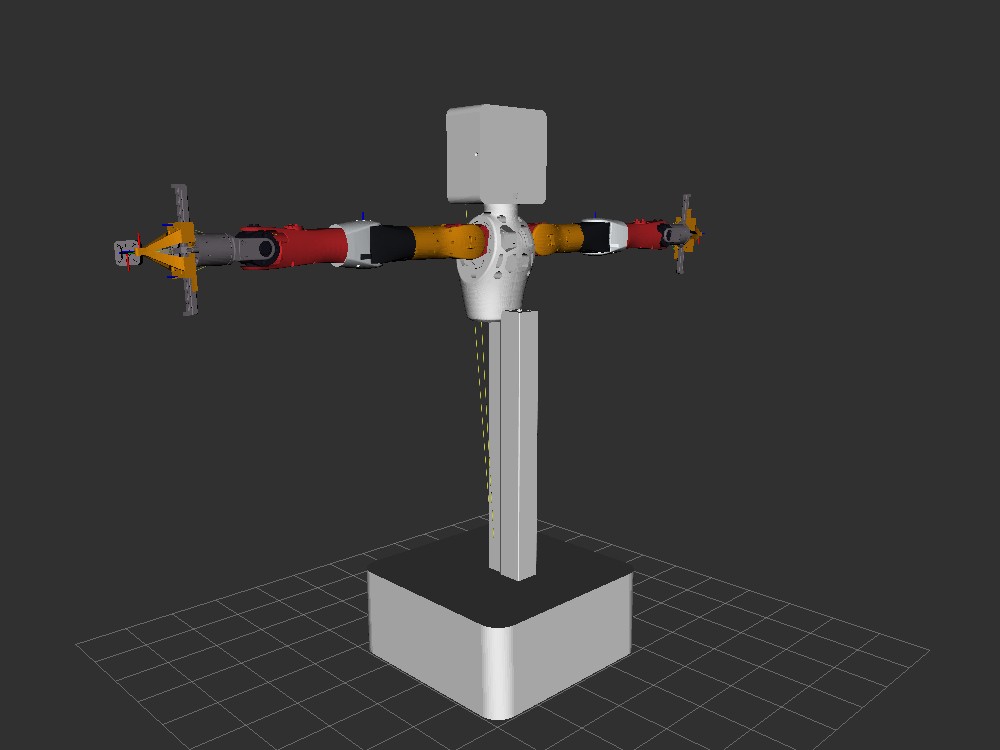
RViz2 offscreen render (latest lite_urdf, real material colors) |
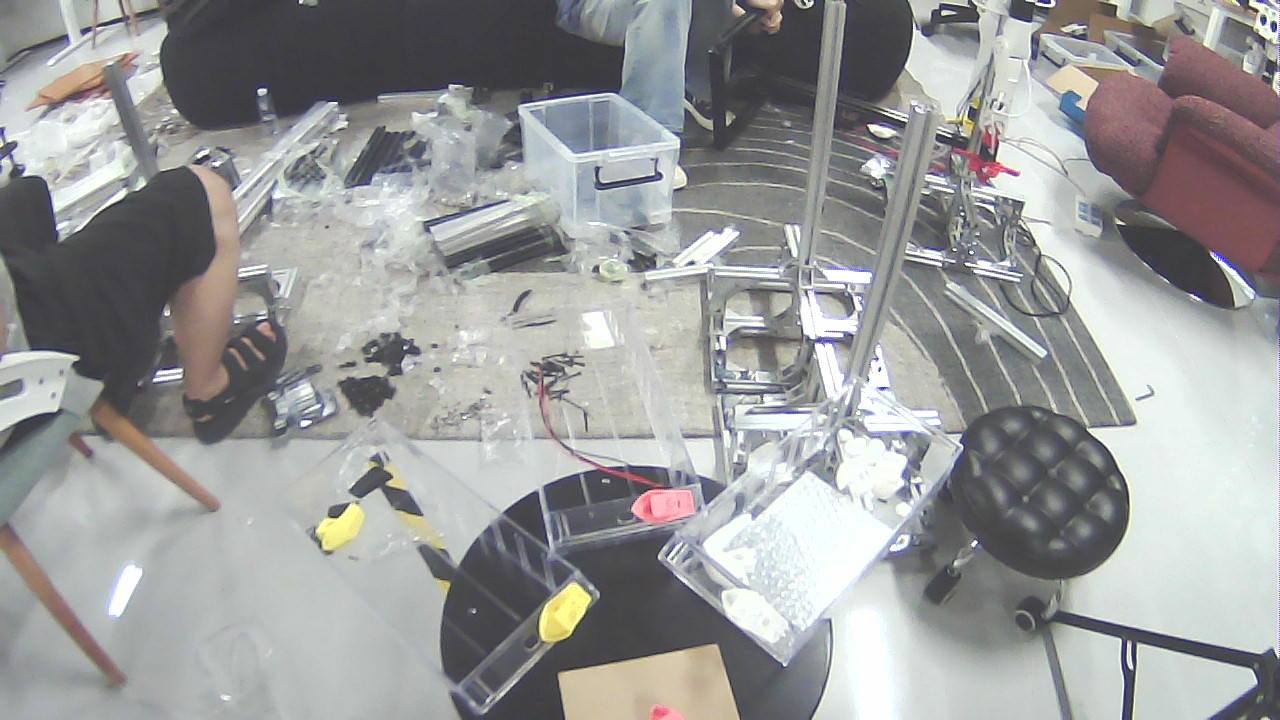
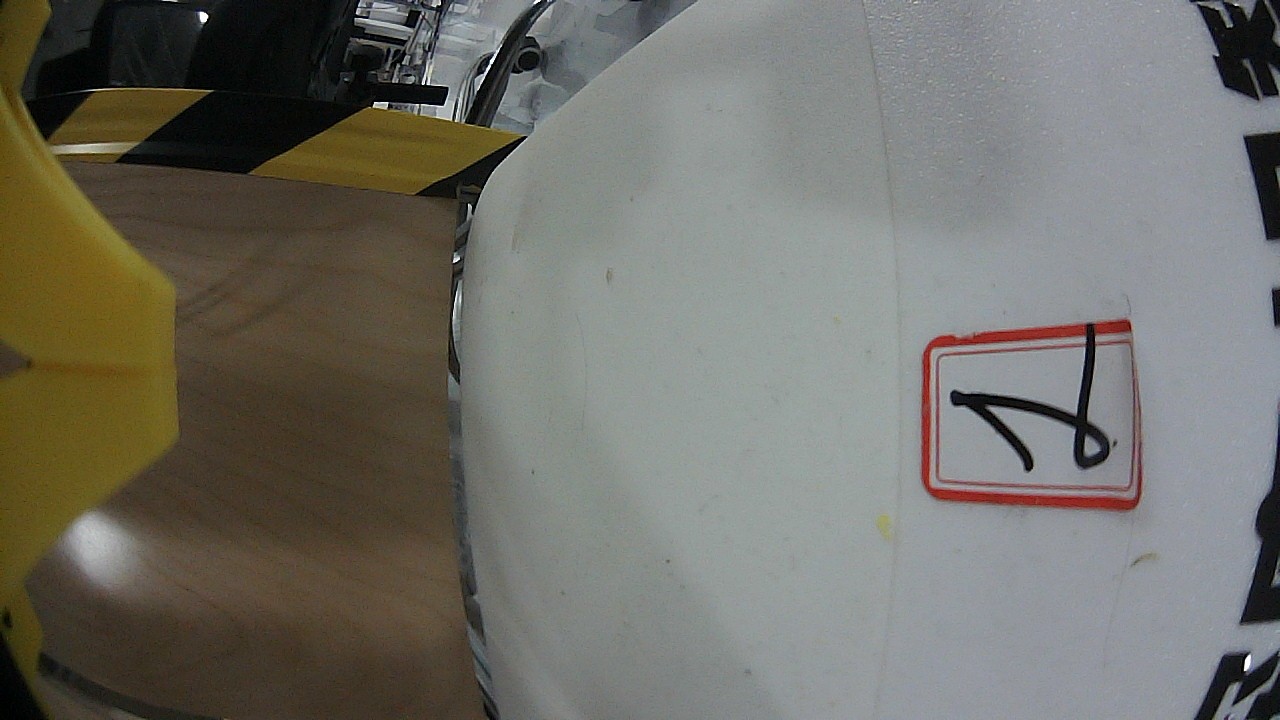
Head camera | Wrist-left camera | Wrist-right camera |
|---|---|---|---|
 |
 |
 |
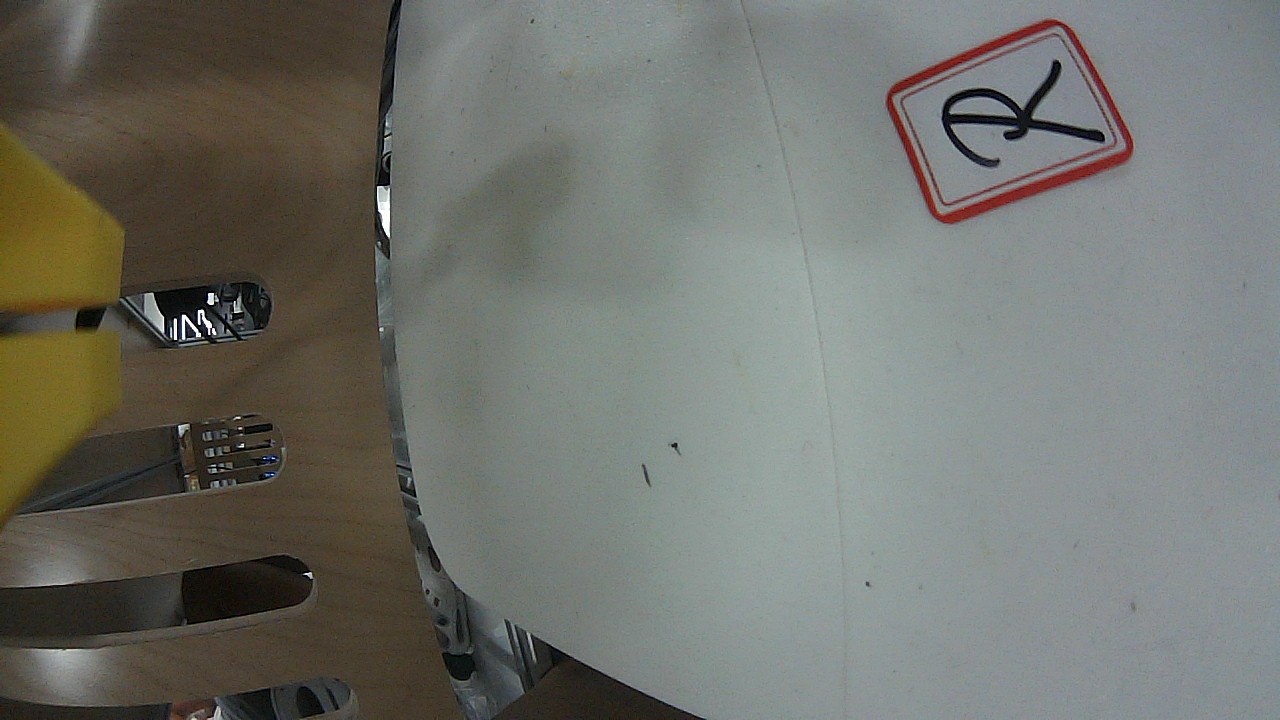 |
Left:
rviz_offscreen_noderenders with the real rviz stack (OGRE) and publishes to the/rviz/sceneimage topic. Right: three frames grabbed from live camera topics byros2_image_snapshot(1280×720). Full test record:docs/test-robot-state-vision.md.
Features
- Zero-intrusion diagnostics: 83 tools cover most ROS2 debugging scenarios — from "is the package installed?" to "what is on this topic right now?", one command, one answer;
- Whole-graph topology:
ros2_graphfolds nodes/publishers/subscribers/services/actions into one JSON — see the system structure in seconds; - Approval-gated writes: builds, dependency installs, message scaffolding etc. go through the DSH approval service; fail-closed, denial = failure;
- Visualization as a service: "see" headlessly — screenshots / multimodal description / window interaction are fully local, no remote display;
- Parallel realtime vision: the VLM runs in a separate ROS2 process (
vlm_node, service/vlm/describe); images come from topics (sensor_msgs/Image/CompressedImage);vision_bringupauto-creates one bridge per image topic, headless-ready; - RViz2 offscreen rendering (motion render ~22 Hz on llvmpipe; 30 Hz full rate with GPU): the real rviz render kernel (
rviz_common+ OGRE) renders any.rvizscene on a virtual display and publishes it as an image topic — no screenshots, no X11 window-stacking dependency. Performance optimizations: open3d low-poly meshes (scripts/simplify_visual_meshes.py) + direct OGRE pixel read (no PNG round-trip) + double-render elimination → motion rendering 1.9 → ~22 Hz on llvmpipe (11×), and 30 Hz full rate with NVIDIA GPU passthrough (v0.9.3), memory −2.5×; - Real-time safety framework (
safety_monitornode +robot_safety_*tools, see Safety framework): layered defense — tool-layer safety gate (pre-execution/safety/statecheck) → reactive monitors (motion tracking/stall with hysteresis, joint-feedback loss, watchdog, optional torque) → event-driven VLM semantic arbitration → human arbitration. LatchedNORMAL/LOCKEDstate machine (lock persists until a human unlocks; non-fatal events never lock); every threshold/topic/lock-action is registered per robot in the profilesafetysection; the geometric pre-check (joint limits / velocity / FK self-collision) is a reserved layer; - Bundled skills (9): one carrier per recurring journey —
ros2-diagnostics(which tool when, narrow-down methodology),ros2-bringup-recovery(environment → launch → verify),ros2-liveness-triage(rates and payload in one or two calls),ros2-tf-integrity(edges, lookups, missing broadcaster),robot-registration/robot-retrieval(body profile and instant reuse),robot-state-vision-analysis(status → render → VLM → cross-check),robot-motion-control(the one plan → validate → approve → execute → verify path) androbot-safety-procedure(latch, LOCKED, boundaries).
Quick start
Requirements
- A host with ROS2 (Jazzy verified; Humble should work),
ros2onPATH; - Node
^22.19 || >=24(DSH host requirement); - L4 vision additionally needs Python 3
rclpyand an OpenAI-compatible VLM gateway (e.g. Gemini or a self-hosted gateway).
Install the plugins (9 npm packages, since the monorepo split)
Install the domain bundles you need — or the dsh-ros2 aggregate, which
mounts core/profile/moveit/safety/vision (81 tools + the 9 skills). Add the
optional dsh-ros2-state for the family's full 83 tools. All packages are
published to npm at 0.1.0 (see docs/versioning.md for
the GitHub ↔ npm version correspondence).
Via the DSH plugin CLI (recommended; resolves through npm):
# full set (aggregate; pulls core/profile/moveit/safety/vision as deps)
dsh plugin --profile <profile> add dsh-ros2
# or lean installs — e.g. diagnostics only:
dsh plugin --profile <profile> add dsh-ros2-core
# dsh-ros2-common is a plain library, auto-installed as a dependency.
Via npm directly (same packages; useful for inspecting/installing the optional add-ons):
# the aggregate (mounts dsh-ros2-common/core/profile/moveit/safety/vision = 81 tools)
npm install dsh-ros2
# optional add-ons — the sidecar data plane + its control-plane state client.
# `dsh-ros2-state` is NOT part of the aggregate's patch; its own 2 tools
# (state_get / state_snapshot) are what take the family from 81 to 83:
npm install dsh-ros2-state dsh-ros2-sidecar
Package roles:
dsh-ros2(aggregate) ·dsh-ros2-common(shared library) ·dsh-ros2-core(core diagnostics) ·dsh-ros2-profile(profiles/topology) ·dsh-ros2-moveit(MoveIt motion) ·dsh-ros2-safety(safety framework) ·dsh-ros2-vision(vision pipeline) ·dsh-ros2-state(state client) ·dsh-ros2-sidecar(data-plane daemon).
Prompt guidance.
dsh-ros2-corecontributes a system-prompt section that points the model at this toolchain for ROS2 work — discover the graph withros2_*, load the body withrobot_load/robot_topology, plan and act throughmoveit_*/robot_safety_*(approval-gated, gated on/safety/state) — instead of ad-hocros2CLI calls or privaterclpyscripts. Any install that includes core therefore carries it, thedsh-ros2aggregate included.The section is rebuilt on every assembly from the tools that are registered at that moment, so a core-only install is never told to call
moveit_moveorrobot_safety_*it does not ship. It is registered with the plugin's own lifetime: disabling or removing the plugin removes it from the prompt, so an unloaded dsh-ros2 leaves no residue.
Minimal configuration (per-bundle, whole-object replacement)
After the split, each bundle carries its own run-seam config (same keys
repeated per id) and the vision provider lives only on dsh-ros2-vision:
# fragment of a DSH profile patch (id-targeted config overrides)
- id: dsh-ros2-core                 # also: -profile / -moveit / -safety
  config:
    rosSetup: source /opt/ros/jazzy/setup.bash &&   # prepare the ROS2 environment
    workspaceRoot: /home/you/ros2_ws                 # default cwd for colcon/rosdep
- id: dsh-ros2-vision
  config:
    rosSetup: source /opt/ros/jazzy/setup.bash &&
    vision:
      provider: gemini                               # mock | gemini | openai
      apiKey: ${VLM_API_KEY}                         # ${ENV} 引用从环境变量解析,勿明文写 key
- id: dsh-ros2-safety
  config:
    safetyStrict: warn                               # 'warn' (default) | 'reject' (fail-closed); LOCKED always rejects
Three-minute taste
ros2_topology --tf                  # WHOLE system (nodes/topics/services/actions/TF) in one call
ros2_graph                          # whole system topology in one shot
ros2_topic_list                     # all topics and types
ros2_topic_echo /joint_states       # sample one frame of joint states
ros2_tf_list                        # TF tree edges
ros2_doctor                         # system health report
Tool reference
Tools live in domain packages: L1/L2/L3 →
dsh-ros2-core;motion_validate/moveit_*→dsh-ros2-moveit;robot_*/ros2_zero_pose_semantics→dsh-ros2-profile;robot_safety_*→dsh-ros2-safety; vision tools →dsh-ros2-vision.
L1 read-only diagnostics
| Tool | Command behind it | Purpose |
|---|---|---|
ros2_pkg_list |
ros2 pkg list |
Installed packages (optional substring filter) |
ros2_pkg_prefix / ros2_pkg_executables |
ros2 pkg prefix <pkg> / ros2 pkg executables [pkg] |
Install prefix of a package / executables (structured) |
ros2_colcon_list |
colcon list |
Packages in a colcon workspace |
ros2_rosdep_check |
rosdep check --from-paths src --ignore-src |
Dependency health (missing deps = finding, not error) |
ros2_node_list |
ros2 node list |
Running nodes |
ros2_node_info |
ros2 node info <node> [-v] |
Subscribers / publishers / services / actions of one node |
ros2_topic_list |
ros2 topic list -t |
Topics with types |
ros2_topic_find |
ros2 topic find <type> |
Topics carrying a message type |
ros2_topic_info |
ros2 topic info <topic> [-v] |
Topic metadata / QoS |
ros2_topic_echo |
ros2 topic echo <topic> --once |
One message sample (JSON when possible); --qos-reliability / --qos-durability overrides reach TRANSIENT_LOCAL latched topics |
ros2_topic_hz |
ros2 topic hz <topic> [--window N] |
Measure publish frequency (average/min/max/std dev over the window); natural termination = measurement timeout |
ros2_env_check |
resolved-setup probe | Self-check the environment: which setup is sourced, path existence, visible packages/nodes |
ros2_workspace |
source <ws>/install/setup.bash && |
Switch/show the workspace in-session (use/show/reset) — no config edit, no restart. use requires approval: sourcing the file executes it, and the override then applies to every later command |
ros2_topic_bw / ros2_topic_delay |
`ros2 topic bw | delay ` |
ros2_service_list |
ros2 service list -t |
Services with types |
ros2_service_type / ros2_service_find |
`ros2 service type | find ...` |
ros2_action_list |
ros2 action list -t |
Actions with types |
ros2_action_info |
ros2 action info <action> |
Action type & status |
ros2_action_type |
ros2 action type <action> |
Action type |
ros2_param_list |
ros2 param list <node> |
Parameters of a node |
ros2_param_get |
ros2 param get <node> <param> |
Read one parameter value |
ros2_param_dump |
ros2 param dump <node> |
Dump all parameters of a node |
ros2_interface_show |
ros2 interface show <type> |
Full field definition of a message/service/action |
ros2_interface_list / ros2_interface_prototype / ros2_interface_package |
`ros2 interface list | prototype |
ros2_graph |
ros2 node list + per-node node info |
Folded JSON topology graph |
ros2_topology |
one rclpy process (no per-verb CLI spawns) |
Whole-system snapshot in one call: nodes with their pub/sub/services, topics with types and pub/sub counts, services, actions, plus optional TF frames and parameters. Prefer it over several narrower calls |
ros2_tf_list |
same rclpy snapshot |
TF edges from /tf and the latched /tf_static (both dynamic and static frames) |
ros2_tf_echo |
same rclpy snapshot |
Transform between two frames, including the inverse edge |
ros2_doctor |
ros2 doctor |
System health report |
ros2_bag_info |
ros2 bag info <path> |
Bag summary |
moveit_discover |
scans MoveIt packages + parses SRDF + probes move_group | Discover MoveIt2 config packages (any package shipping an SRDF), their planning groups and named poses, and whether /move_action / /execute_trajectory / /compute_cartesian_path are online. Pass srdf to parse a specific file directly — generic, not bound to a specific package |
robot_safety_state |
ros2 topic echo /safety/state --once |
Read the latched safety state (NORMAL / LOCKED + severity + trigger cause + detail); reports monitor_running: false when the monitor is offline |
robot_safety_arbitrate |
ros2 run dsh_ros2_safety safety_vlm_arbitrate ... |
Event-driven VLM semantic arbitration (plan change / post-anomaly): fixed-format prompt + fresh offscreen frame via /vlm/describe; any non-safe verdict flags human arbitration |
motion_validate |
motion_validator.py --trajectory <file> --config <json> |
Deterministic pre-execution validation (read-only): joint limits, NaN/Inf, names & group coverage, timestamps/duration, freshness, optional workspace box, fingerprint + TTL — collision/singularity stay with MoveIt planning |
L2 management (approval-gated)
Every L2 tool performs a write operation and asks the user first via the DSH approval service (fail-closed when unavailable or denied). The read-only helpers ros2_jobs_list / ros2_job_status need no approval.
| Tool | Command behind it | Notes |
|---|---|---|
ros2_colcon_build |
colcon build [--packages-select ...] [--symlink-install] |
Runs as a background job (ctx.jobs); returns jobId, track with ros2_job_status |
ros2_rosdep_install |
rosdep install --from-paths src --ignore-src -y |
dryRun previews with --simulate |
ros2_interface_create |
writes <root>/<pkg>/<msg|srv|action>/<Name>.* |
Skeleton generator; never overwrites existing files |
ros2_param_set |
ros2 param set <node> <param> <value> |
JSON numbers/booleans are typed, other values treated as strings |
ros2_bag_record |
ros2 bag record <topics...> --output <dir> |
Bounded recording: stops automatically after duration seconds |
ros2_jobs_list |
ctx.jobs.list |
Background jobs of this agent (read-only) |
ros2_job_status |
ctx.jobs.get |
Status of one job by id (read-only) |
ros2_install |
FishROS one-click installer (interactive PTY session) | When ROS2 is missing: check probes (installed / installed-not-sourced / absent); start (approval) launches the installer; send / status / stop drive and observe the interactive menus |
ros2_bag_play |
ros2 bag play <path> [--topics ...] [--rate X] [--loop] [--start-offset S] |
Replay a rosbag into its topics (approval-gated; publishes to the graph); foreground for timeoutMs |
ros2_topic_pub |
`ros2 topic pub "" [-r Hz] [-n N | --once |
ros2_run |
ros2 run <pkg> <executable> [args] |
Run any installed ROS2 executable (approval-gated): foreground (bounded) or background job |
ros2_process_cleanup |
pgrep -f '[p]attern' + kill |
Kill leftover ROS2 processes matching a pattern (self-safe); approval-gated |
ros2_service_call |
ros2 service call <svc> <type> "<yaml>" |
Call a service (approval-gated); response parsed from the repr |
ros2_action_send_goal |
ros2 action send_goal <action> <type> "<yaml>" [--feedback] |
Send an action goal (approval-gated); returns goal id + status |
ros2_daemon |
`ros2 daemon status | stop |
ros2_param_delete |
ros2 param delete <node> <param> |
Delete a node parameter (approval-gated) |
ros2_lifecycle |
`ros2 lifecycle get | list |
ros2_component |
ros2 component list / load <container> <pkg> <type> |
Component containers list (L1) / load (L2 approval) |
ros2_launch |
ros2 launch <pkg> <launch_file> [args] |
Launch a launch file as a background job (approval-gated; returns jobId, stop via DSH job controls) |
ros2_zero_pose_semantics |
publish-zero → offscreen render → VLM → confirm | Calibrate zero-pose semantics interactively (generic): analyze renders the all-zero pose and asks the VLM its posture across three aspects (arm: lateral_raise/hanging, elbow: forward/upward, palm/camera-mount: up/forward/down); confirm records the user-approved combo (or a customText free-text description) to ~/.dsh-ros2/zero-pose.yaml for skills |
robot_register |
collects URDF/TF/cameras/MoveIt/zero-pose → writes ~/.dsh-ros2/robots/<name>.yaml |
Register a robot body profile on first contact (approval-gated) for instant later reuse |
robot_load |
reads ~/.dsh-ros2/robots/<name>.yaml |
Load a registered robot profile as structured JSON (fast path — no discovery); empty name lists all profiles |
robot_topology |
aggregate snapshot + progressive node learning (strict schema) | Robot comms topology trade-off: snapshot (approval) records node/topic/service lists (light, not verbose); learn (approval) records ONE important node's role/description + pub/sub/srv/act; show (read-only) reads them back |
moveit_move |
unified: /move_action + /execute_trajectory |
One tool, five essential modes (approval-gated): joint_abs, joint_rel, pose_abs, pose_rel (frame ee/world), trajectory. Generic: standard moveit_msgs + SRDF only. Single motion path: plan → deterministic validation (motion_validator, robot profile for full limits) → human approval (validation summary shown) → execute → verify. Gates on /safety/state (LOCKED always rejected; monitor-down per safetyStrict) |
robot_safety_start |
ros2 run dsh_ros2_safety safety_monitor --profile <yaml> |
Start the generic safety monitor as a background job (approval-gated); all robot-specific values come from the profile safety section |
robot_safety_lock / robot_safety_unlock |
`ros2 service call /safety/set_lock | unlock ...` |
moveit_status |
probes move_group interfaces + samples /joint_states |
Runtime status: online probe + current joint state + SRDF planning frame (read-only) |
L3 visualization
GUI lifecycle + screenshots + multimodal vision ("see first, then move") + xdotool-level interaction ("see and move"). Screenshots use Pillow ImageGrab on X11 (no extra CLI install); vision providers are pluggable; interaction requires xdotool (sudo apt install xdotool).
| Tool | Purpose |
|---|---|
ros2_gui_start |
Launch RViz2 (with -d config) / rqt_graph / rqt on the host display; sessions are tracked |
ros2_gui_list |
Tracked sessions + X11 windows (wmctrl -lG) |
ros2_gui_close |
Close a session (SIGTERM) |
ros2_screenshot |
Capture the screen or one window to a PNG |
ros2_vision_describe |
Describe an image with the configured multimodal model (Gemini / OpenAI / mock). The path must be a real PNG/JPEG/GIF/WebP — the content is sniffed before anything is uploaded — and at most 20 MiB; a larger or non-regular file is refused without being read |
ros2_gui_observe |
Ensure a GUI is running → screenshot → return the multimodal description (the "see it" workflow) |
ros2_gui_interact |
unified xdotool interaction: action=click (click/scroll, button 4/5 = scroll), action=drag (press-drag-release: RViz2 orbit/pan/zoom), action=key (combos like ctrl+shift+r or typed text). Confined to an application allowlist (default rviz2 / rqt / rqt_graph, configurable via guiAllowedApplications); any other target — including omitting windowTitle, which acts on whatever is focused — requires approval |
Interaction recipes (model-facing): orbit the RViz2 view with ros2_gui_interact {action: "drag", windowTitle: "rviz2", button: 1, toX: <dx>, toY: <dy>}, zoom with action: "drag", button: 3, reload a display config with ros2_gui_interact {action: "key", keys: "ctrl+shift+r"}. When wmctrl cannot enumerate windows (e.g. no window manager on the display), window-relative interaction reports "window not found" — fall back to absolute screen coordinates, which now asks for approval because it targets whatever window is focused.
Why the allowlist: action=key types arbitrary text into the targeted window, so an unrestricted target is a host-level input-injection path (typing into a terminal runs commands). The allowlist is a convenience control — any process can retitle its own window, so a title match is not proof of identity; the approval gate is the boundary, and it fails closed (no approval service = denial). See docs/safety.md.
L4 realtime vision (parallel VLM over ROS2, headless image topics)
Perception matches the robot-control stack: the VLM runs in a separate ROS2 process (vlm_node, service /vlm/describe + cached topic /vlm/description), and images come from sensor_msgs/Image topics, never X11 screenshots — headless-ready. Acquisition (ros2_image_snapshot) needs no custom package (plain rclpy); only ros2_vlm_analyze/ros2_vision_analyze require the dsh_ros2_vlm ROS2 package (vlm/) — build/run see docs/architecture.md §4. When the pipeline is down, ros2_vlm_analyze/ros2_vision_analyze return an explicit VLM_UNAVAILABLE + degradation hint, and the snapshot JPEG can be read directly by the Agent's own multimodal model.
| Tool | Purpose |
|---|---|
ros2_image_snapshot |
Grab one frame from a topic (raw/compressed) and save as JPEG — plain rclpy script, no custom ROS2 package needed; --v4l ffmpeg fallback for silent topics; the JPEG is ready for the Agent's own multimodal model |
ros2_vlm_analyze |
Analyze an image file or the bridge's latest frame (useBridge) via the parallel VLM |
ros2_vision_topics |
List live image topics with their auto bridge service names |
ros2_vision_doctor |
One-shot pipeline self-check: vlm workspace built / vlm_node+vision_bringup running / gateway reachable / visible image topics / apiKey resolution status (config/env/secrets/missing) + build-launch guidance |
ros2_vision_set_key |
Store the user-provided VLM API Key into ~/.dsh-ros2/secrets.json (0600, outside the repo — never committed, never uploaded, never echoed); use it when a tool returns VLM_API_KEY_REQUIRED |
ros2_vision_analyze |
Analyze any topic's latest frame via its auto bridge (ros2_vision_analyze {topic, prompt}) |
# build + launch the vision pipeline (auto bridge per image topic)
# Build the workspace OUTSIDE /tmp: a reboot wipes /tmp, and a `rosSetup` that
# sources a deleted workspace is the misconfiguration documented in
# docs/feedback-env-recovery.md. Use any persistent path (`~/vlm_ws` here).
mkdir -p ~/vlm_ws/src && ln -s <repo>/vlm ~/vlm_ws/src/dsh_ros2_vlm
cd ~/vlm_ws && colcon build --symlink-install && source install/setup.bash
VLM_API_KEY=... ros2 run dsh_ros2_vlm vlm_node &       # parallel VLM process
ros2 run dsh_ros2_vlm vision_bringup &                 # discover topics, one bridge each
RViz2 offscreen rendering (dsh_ros2_rviz_offscreen)
The real rviz rendering stack (rviz_common + OGRE + rviz_default_plugins) loads a .rviz scene offscreen under Xvfb and publishes it to the /rviz/scene image topic — read from the render kernel, not X screenshots, no window-stacking dependency.
# build (needs a colcon workspace like vlm_ws — keep it out of /tmp)
ln -s <repo>/offscreen ~/vlm_ws/src/dsh_ros2_rviz_offscreen
cd ~/vlm_ws && colcon build --symlink-install && source install/setup.bash
# run (config_path points at a .rviz scene file)
xvfb-run -a -s "-screen 0 1280x800x24" ros2 run dsh_ros2_rviz_offscreen rviz_offscreen_node \
  --ros-args -p config_path:=/tmp/robot_scene.rviz -p topic:=/rviz/scene \
  -p width:=800 -p height:=600 -p rate:=5.0
Robot body mesh rendering essentials (pitfalls collected; details in docs/architecture.md §4.4):
- Jazzy RobotModel properties: use
Description Source: Topic+Description Topic: <topic>(the legacyRobot Description:is ignored →Linksempty); - mesh paths: use absolute paths or a
file://prefix in the URDF (bare paths fail inresource_retriever); the description publisher must stay alive (transient-local, late subscribers miss it otherwise); - URDF must bind to TF by name: URDF link names must exactly match the live TF frame names (publishing the robot's actual
/robot_descriptionworks). Mismatch → every link transform lookup fails → all meshes pile at the fixed-frame origin; - View distance: Orbit
Distance≈ 1.5–2.0 m for an RViz-like close full-body view (> 5 m shrinks the robot to a tiny center blob); - Health signal: ~3 s after startup the node logs
FM: ... frames=NandtransformHasProblems(...)=0— meshes correctly bound to TF.
MoveIt2 motion — five essential modes, one tool
Design intent. Robot motion through MoveIt is, at its core, only five
operations: set joints absolutely, nudge joints relatively, place the
end-effector at an absolute pose, move it by a relative delta, or execute a
pre-planned trajectory. Rather than a growing zoo of named tools, dsh-ros2
abstracts them into one tool moveit_move with a mode parameter — so the
interface stays small, predictable and scriptable, and works with any MoveIt
package (it reads the SRDF and speaks only standard moveit_msgs).
| Tool | Role |
|---|---|
moveit_discover (L1) |
Read any MoveIt package's SRDF: planning groups, named poses, chain tip; probe the standard interfaces (/move_action, /execute_trajectory, ...) online |
moveit_status (L1) |
Runtime probe: interfaces online + current /joint_states sample + SRDF planning frame |
moveit_move (L2, approval) |
One tool, five modes: joint_abs (joints "j1:=v1 j2:=v2"), joint_rel (deltaJoints = current + delta), pose_abs (pose "x y z rx ry rz" in the planning frame), pose_rel (deltaPose "dx dy dz drx dry drz", frame ee/world), trajectory (execute a saved trajectory JSON) |
moveit_move {mode: "joint_abs", group: "right_arm", joints: "right_shoulder_roll:=0.5"}
moveit_move {mode: "joint_rel", group: "right_arm", deltaJoints: "right_elbow_pitch:=-0.2"}
moveit_move {mode: "pose_rel",  group: "right_arm", deltaPose: "0.05 0 0 0 0 0"}
moveit_move {mode: "pose_abs",  group: "right_arm", pose: "0.5 0 0.8 0 0 0"}
moveit_move {mode: "trajectory", group: "right_arm", trajectory: "/tmp/traj.json"}
How it works. moveit_discover/moveit_status tell you what you can move
(groups, joints, EE link from the SRDF chain tip, online state); moveit_move
turns any mode into a standard MoveGroup goal (/move_action), executes via
/execute_trajectory, and — with planOnly + trajectoryOut — saves the
planned trajectory so mode: "trajectory" can run it later (plan/execute
separation). Nothing is bound to a specific MoveIt package; only the SRDF path
matters (auto-resolved by package scan, or explicit srdf/package).
Safety framework
Design intent. A two-tier strategy that keeps real-time and semantic
judgment apart (full contract: docs/safety-handover.md, the handover doc for
downstream robot-adaptation agents — generic framework/interfaces belong here,
body-specific data sources/schemes/algorithms belong downstream):
tool-layer safety gate (pre-execution: /safety/state LOCKED; monitor-down per safetyStrict)
  → reactive monitors (in-execution: motion tracking/stall + hysteresis,
    joint-feedback loss, watchdog, optional torque; detect at control frequency,
    response budget ≤100 ms)
  → VLM semantic arbitration (post plan-change / anomaly, seconds — pulled up only when needed)
  → human arbitration (non-safe verdicts always escalate; human-gated unlock)
safety_monitornode (dsh_ros2_safetypackage): subscribes the joint feedback (+ optional commanded stream / torque stream), runs the checkers on acontrol_frequencytimer, and latchesLOCKEDon any CRITICAL event — the latch persists until a human unlocks (no auto-reset into the same danger). Publishes/safety/state(transient-local),/safety/event,/safety/heartbeat,/safety/lock_active; services/safety/get_state,/safety/unlock,/safety/set_lock.- Latched lock, non-fatal never locks: any CRITICAL event latches
LOCKED(the latch persists until a human unlocks — no auto-reset into the same danger); watchdog separatescritical(down → lock) fromobserved(down → WARNING only); single-frame noise is filtered by M-of-K hysteresis; aWARNINGnever latches. Tool-layer fail-closed on monitor-down is persafetyStrict: 'reject'(default'warn'proceeds with a warning). - Per-robot registration:
robot_registerwrites a genericsafetysection (URDF-derived velocity/effort limits) and auto-launches the monitor;robot_profile.py safety set <key> <json>updates any threshold/topic/list (schema-validated). Torque checking auto-disables when no effort feedback exists. Reserved layers (interfaces registered, not implemented): the geometric pre-check (joint-limit / velocity / FK self-collision on the command path —motion.max_velocity/max_acceleration), the computed-torque feedforward input (torque.feedforward_topic), YOLO-style lightweight triggers, and the non-ROS estop path (estop). - Tool-layer gate:
moveit_moveconsults/safety/statebefore executing — LOCKED always rejected (SAFETY_LOCKED); if the monitor is unreachable,safetyStrict: 'reject'(fail-closed) or'warn'(default) proceed-with- warning.robot_safety_arbitrateruns the fixed-format VLM arbitration and flags any non-safe verdict for human arbitration. - Forensics: a ring buffer of joint/torque samples is dumped to
forensics.dump_diron every CRITICAL lock, for post-hoc / VLM diagnosis.
# build the safety package (same colcon workspace as vlm/ and offscreen/)
ln -s <repo>/safety ~/vlm_ws/src/dsh_ros2_safety
cd ~/vlm_ws && colcon build --symlink-install && source install/setup.bash
The safety_core pure logic ships with a fault-injection self test
(python3 packages/safety/safety/scripts/safety_core.py --selftest, 12 scenarios) — no ROS2
needed to verify the state machine.
Robot profiles & communication topology
Design intent. A robot's body (URDF links/joints, cameras, MoveIt groups,
zero-pose semantics) and its comms graph are costly to rediscover every time.
The plugin persists them as a structured profile (~/.dsh-ros2/robots/<name>.yaml):
register once on first contact, then load instantly forever after. For the
comms graph, full verbosity does not scale (a complex robot has hundreds of
topics/services), so the design is a trade-off: an aggregate snapshot
(light node/topic/service lists) plus progressive learning of only the
important nodes as you actually work with them.
| Tool | Role |
|---|---|
robot_register (L2) |
Collect body info (URDF links/joints, TF root, cameras, MoveIt SRDF groups, auto-links the zero-pose calibration and a generic safety section with URDF-derived limits) into the profile; auto-launches the safety monitor (startSafety: false to skip) |
robot_load (L1) |
Load the profile as structured JSON — the fast path, no rediscovery; empty name lists all |
robot_topology (L1/L2) |
Comms graph: snapshot (L2, aggregate lists), learn (L2, one important node's role/description + pub/sub/srv/act, strict schema), show (L1, read back), diagnose (L1 — knowledge-augmented diagnosis: cross-references the learned knowledge base + snapshot against the LIVE graph: missing / new / drift / topic_drift), search (L1 — efficient retrieval in the knowledge archive: reverse-lookup by topic / keyword match on name/role/description/connections) |
ros2_zero_pose_semantics (L2) |
Calibrate zero pose via render + VLM + user confirm (arm/elbow/palm combos or free text); the profile auto-includes it |
Two bundled skills complete the workflow: robot-registration (first-contact
flow: ask name/URDF → collect → register → verify, plus the topology baseline
snapshot) and robot-retrieval (load the profile instantly and bring up
renders/diagnostics/motion from it, including the learned topology and zero-pose
semantics).
How it works. Everything is plain structured YAML under ~/.dsh-ros2/ —
robots/<name>.yaml (body + topology) and zero-pose.yaml (calibration).
robot_register snapshots the body; robot_topology snapshot snapshots the
aggregate layer; robot_topology learn appends one node at a time (idempotent
merge) as you discover what matters. robot_load and robot_topology show read
them back instantly — one call instead of N discovery calls.
The knowledge base is consumed, not just stored. robot_topology diagnose
(L1, read-only) is the entry point for knowledge-augmented diagnosis: it
loads the learned nodes + snapshot and cross-references them against the LIVE
ros2 graph —
missing: learned nodes that are offline now (controllers/publishers down) — highest priority;new: live nodes not in the knowledge base (learn candidates);matched[].drift: per learned node, expected pub/sub/srv/act vs actual (a missing topic = a gone connection; a new topic = the node changed);topic_drift: aggregate snapshot topics vs live topics.
The ros2-diagnostics and robot-retrieval skills both start diagnosis with
diagnose and close the loop by learning important new nodes — so the
knowledge base improves with every session and every diagnosis gets faster.
Bundled skills
| Skill | Content |
|---|---|
ros2-diagnostics |
Which tool to use when, narrow-down methodology, debugging "topic has no data" / message-mismatch / TF problems |
ros2-bringup-recovery |
Journey "it won't come up": ros2_env_check → ros2_workspace use (in-session, no restart) → launch → job tracking → doctor verification |
ros2-liveness-triage |
Journey "is it alive / why stale": ros2_topology {rates} → ros2_topic_sample → read publisher count / rate / QoS, with the timeout semantics that cause false alarms |
ros2-tf-integrity |
Journey "is the TF tree right": frames beside the graph, /tf + latched /tf_static edges, inverse-edge lookups, localizing a missing edge to its broadcaster |
robot-state-vision-analysis |
Full pipeline: status → offscreen render → VLM → cross-check (includes Jazzy Description Source/Topic, URDF↔TF frame-name matching, file:// meshes, view distance, FM frames signal, calibrated zero-pose semantics) |
robot-registration |
First-contact flow: ask name/URDF → collect body info + zero-pose calibration → robot_register → topology baseline snapshot |
robot-retrieval |
Instant profile load (robot_load) and bring-up of renders / diagnostics / motion; read & progressively learn the comms topology (robot_topology) |
robot-motion-control |
Journey "can it move / how": moveit_status → group discovery → planOnly → motion_validate → the single approval- and /safety/state-gated execution path → pass/fail verification |
robot-safety-procedure |
Journey "is it safe": robot_safety_state first, LOCKED as a stop signal, VLM arbitration (uncertain ≠ safe), the six layers and their explicit boundaries |
Configuration
| Key | Type | Default | Meaning |
|---|---|---|---|
rosSetup |
string | '' |
Shell prefix to prepare the environment, e.g. source /opt/ros/jazzy/setup.bash && |
timeoutMs |
number | 15000 |
Per-command timeout |
rosLogDir |
string | '' |
Override ROS_LOG_DIR (helps when ~/.ros/log is not writable) |
workspaceRoot |
string | '' |
cwd for colcon / rosdep when a tool omits cwd |
includeStderr |
boolean | false |
Attach trailing stderr to successful results |
display |
string | '' |
DISPLAY override for GUI/screenshot tools |
screenshotDir |
string | '' |
Screenshot output dir (default $TMPDIR/dsh-ros2) |
screenshotCommand |
string | '' |
Custom screenshot command; {output} is replaced with the PNG path |
guiAllowedApplications |
string[] | [] |
Applications ros2_gui_interact may drive without approval; empty = rviz2 / rqt / rqt_graph |
vision.provider |
string | 'mock' |
mock | gemini | openai |
vision.apiKey |
string | '' |
Your API key (user-supplied; never logged) |
vision.model |
string | '' |
Model override (e.g. gemini-2.5-flash, gpt-4o-mini) |
vision.baseUrl |
string | '' |
API base URL override (OpenAI-compatible endpoints) |
rosLogDiralso covers ROS2 Python CLIs spawned by tools (topic echo/pub,ros2 run); additionallyrunCommandauto-falls back to a writable dir when~/.ros/logis not writable.
Project layout
dsh-ros2/                      # pnpm monorepo (workspace root, private)
├── pnpm-workspace.yaml        # packages/*
├── tsconfig.base.json
├── packages/
│   ├── common/                # dsh-ros2-common (not a bundle): runner / parse / toolkit + scripts/robot_profile.py (zero-copy)
│   ├── core/                  # dsh-ros2-core (61 tools): L1 diagnostics + L2 management + L3 GUI + diagnostics/bring-up/liveness/TF skills + gui.ts + pty_session.py
│   ├── profile/               # dsh-ros2-profile (4 tools): robot_register/load/topology + zero-pose calibration + registration/retrieval skills
│   ├── moveit/                # dsh-ros2-moveit (4 tools): discover/status/motion_validate/moveit_move + moveit_*.py + motion_validator.py + robot-motion-control skill
│   ├── safety/                # dsh-ros2-safety (5 tools): robot_safety_* + safety/ ROS2 pkg + safetyStrict config + robot-safety-procedure skill
│   ├── vision/                # dsh-ros2-vision (7 tools): vision tools + vlm/ + offscreen/ ROS2 pkgs + vision provider service + state-vision skill
│   └── dsh-ros2/              # aggregate bundle (empty apply, backward compat)
├── docs/                      # architecture.md · safety.md / safety-handover.md / safety-todo.md / safety-gpt-review.md · test-*.md · plugin-split-plan.md
├── .github/workflows/         # CI: Node 22/24 → workspace typecheck/test/build + per-package tarball validation
└── CHANGELOG.md               # version history (Keep a Changelog)
Plugin split (9 packages)
Since v0.15.0 the plugin is a pnpm monorepo of 9 npm packages (per
docs/plugin-split-plan.md, ISP-tightened): 83 tools +
9 skills (the four original skills preserved with unchanged names and behavior).
Install the domain
bundles you need (or the dsh-ros2 aggregate for the full set):
dsh-ros2-commonis a plain library (not a cordis bundle) — shared runner, parsers, toolkit andscripts/robot_profile.py(zero-copy).- Cross-package runtime contracts stay unchanged:
/vlm/describe,/safety/state,/safety/set_lock…;safetyStrictsemantics unchanged. dsh-ros2-visionfixes the npm publish defect: itsfilesincludevlm/+offscreen/.- The vision provider is an optional cordis service (
dshRos2.vision);ros2_gui_observe(core) andros2_zero_pose_semantics(profile) degrade toVISION_UNAVAILABLEwhen it is absent.
Troubleshooting / FAQ
~/.ros/logPermission denied: ROS2 cannot write its log dir. SetrosLogDir(e.g./tmp/ros-log);runCommandalso falls back automatically.- A flood of
RTPS_TRANSPORT_SHM/ FastDDS SHM warnings in stderr: harmless noise when SHM transport is unavailable (common in containers/restricted environments); tools drop it by default. ros2 topic echoreturns empty: checkros2_topic_info -vfor publisher count and QoS; sample transient-local topics with--qos-durability transient_local.- Offscreen render: "all parts piled at origin": URDF link names do not match TF frame names (see mesh essentials #3); check the node log
FM transformHasProblems(<link>)=1first. - RobotModel shows no meshes (
Linksempty): on Jazzy you must useDescription Source/Topic; the legacyRobot Description:does nothing. Could not load resource ... Unable to open file: mesh paths need absolute paths or afile://prefix.- Description missing after the publisher exits: the URDF publisher must stay alive (transient-local only re-sends once to late subscribers; gone when the process exits).
vision_bringupmissed some image topics (2/4 measured): fixed — it now refreshes discovery every--refreshseconds (default 10), auto-spawning bridges for topics that appear later and stopping bridges for topics that disappear.
Development
Install with **pnpm 11.x** (the repo pins `packageManager: pnpm@11.22.0`; CI installs the matching
pnpm via `pnpm/action-setup@v6`). Node `^22.19 || >=24` is required.

```bash
pnpm install
pnpm run typecheck   # tsc --noEmit
pnpm run test        # vitest (425 cases; plus 11 sidecar + 15 zero-pose + 38 robot-profile + 16 private-path Python checks)
pnpm run build       # tsc -> lib/ + lib/types/
pnpm run audit       # supply-chain gate: runtime graph, high+ (the exact command CI runs)
pnpm run audit:all   # ... plus the dev-only tooling that CI's gate deliberately excludes
CI (.github/workflows/ci.yml): on push to main / PRs, runs typecheck/test/build on Node 22 and 24, and validates that the pnpm pack artifact contains the patch layer (cordis.patch.yml) and the build output.
Release workflow (npm & GitHub Releases): see PUBLISH.md.
Roadmap
-
vision_bringuppolling/refresh discovery (auto-bridge late topics, stop bridges for gone topics); - Zero-pose semantics: generic calibration flow (
ros2_zero_pose_semantics, render + VLM + user confirm, 3-axis combos) linked into robot profiles; - npm publishing (9 packages @ 0.1.0 on npmjs, published 2026-08-30;
dsh-ros2-state/dsh-ros2-sidecaradded 2026-09; see docs/versioning.md); - More ROS2 distros (Humble / Rolling) compatibility validation.
Docs
| Doc | Content |
|---|---|
docs/architecture.md |
Design overview, four tiers, L4 vision & offscreen rendering architecture, performance evolution, safety model |
docs/compatibility.md |
Compatibility baseline |
docs/safety.md |
Safety boundary: six layers (agent permission / human approval / motion validation / execution monitoring / post-execution verification / physical robot safety), fail-closed & degradation policy, "DSH is not a functional-safety system" |
docs/safety-handover.md |
Handover for downstream robot-adaptation agents: generic framework/interfaces vs body-specific data sources/algorithms, profile safety schema, interfaces |
docs/safety-todo.md |
GPT review decisions + batches: 0.14.1 done (deterministic validation), GUI allowlist landed (§17), still pending (audit JSONL / C++ real-time node ...) |
docs/test-robot-state-vision.md |
End-to-end real-robot tests: pipeline, realtime, mesh/TF binding fix & verification, 4-channel joint analysis (with images) |
docs/test-gpu-passthrough.md |
GPU passthrough verification: hardware, troubleshooting, results, usage |
CHANGELOG.md |
Version history (Keep a Changelog) |
docs/versioning.md |
GitHub tag ↔ npm package version correspondence (monorepo re-baseline; old single-package tags v0.8–v0.15 were never on npm) |
Contributing
Issues and PRs welcome (in Chinese or English). Please keep pnpm run typecheck && pnpm run test && pnpm run build green and update the relevant docs.
Acknowledgments
- DeepSeek Harness — plugin host framework;
- ROS2 / RViz2 community — rendering and toolchain foundations.
License
Related plugins
DSH-better-sidebar
 dsh-external
/DSH-better-sidebar
右侧侧边栏增强:文件预览/终端/Git,可拖拽自定义位置
dsh plugin --profile web add github:dsh-external/DSH-better-sidebarmirage#dsh
 strukto-ai
/mirage/typescript/packages/dsh
把文件系统与 bash 提供者换成 mirage 虚拟工作区:文件工具与 shell 命令作用于挂载的资源(RAM、S3、Redis、Slack、Gmail、Notion、Postgres)而非宿主磁盘,支持按挂载点设置读/写/执行模式、按命令选择沙箱(进程内 monty、pyodide、quickjs;远程 docker、e2b、daytona),并可在虚拟终端中安装 CLI(git、gh、slack、linear、ntn、gws,或自行注册的程序树)作为命令头词。
dsh plugin --profile web add github:strukto-ai/mirage#path:/typescript/packages/dshdeepseek-harness-desktop
 hairyf
/deepseek-harness-desktop
DeepSeek Harness Tauri 桌面版 | Only 5mb installer, zero environment setup. Windows / macOS / Linux.
dsh plugin --profile web add github:hairyf/deepseek-harness-desktopcc-safety-net
 kenryu42
/cc-safety-net
A coding agent CLI hook - block destructive commands and secret file access
dsh plugin --profile web add 'github:kenryu42/cc-safety-net#ae8af0330308ad0bc24b5389709060c7a07a6b8d'hol-guard
 hashgraph-online
/hol-guard
开源AI代理防病毒:运行时拦截风险工具、秘密访问、提示注入、恶意软件包、MCP服务器、插件和技能。
dsh plugin --profile web add github:hashgraph-online/hol-guarddsh-mobile
 saya-ch
/dsh-mobile
DeepSeek Harness 移动端适配与安全局域网访问插件,支持 Android App 和手机浏览器。
dsh plugin --profile web add github:saya-ch/dsh-mobile