
Development & Runtime
dsh-ssh
UynajGI/dsh-ssh · ★ 17
 UynajGI
SSH remote-execution plugin for DeepSeek Harness: ProxyJump chain, SFTP filesystem, subprocess and PTY over ssh2
Manifest details
安装
dsh plugin --profile web add github:UynajGI/dsh-sshGitHub 源码安装:首次需按提示配置 allowBuilds 构建授权后重试
For install and environment setup, plus plugin development tutorials, see DSH community docs ↗
README
Table of contents
English | 中文
SSH remote-execution plugin for DeepSeek Harness. Runs Bash, file tools, PTY terminals and LSP on a remote host over one SSH connection — ProxyJump chains, SFTP, full auth. Built on ssh2.
Install
dsh plugin --profile web add dsh-ssh
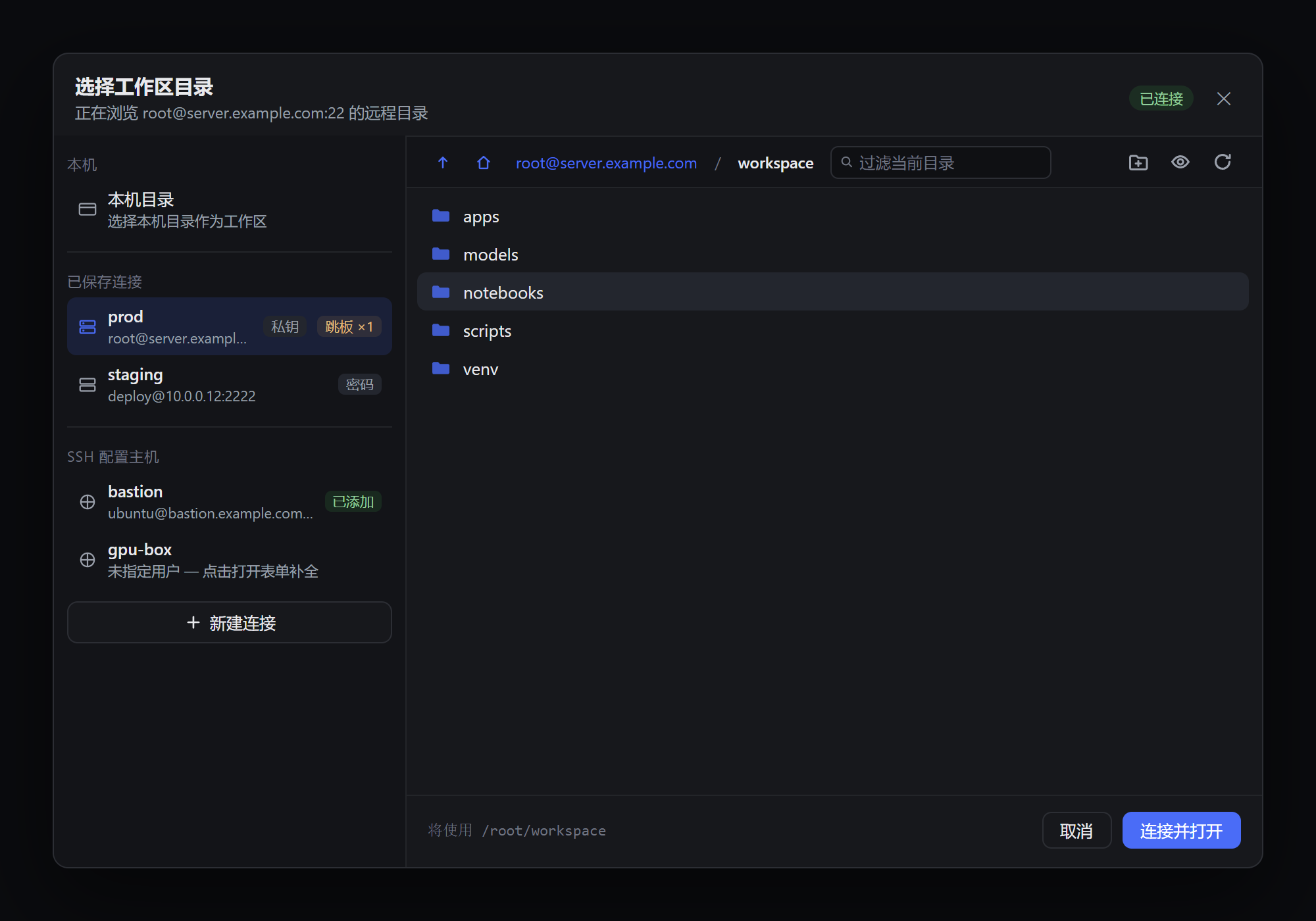
Or use the Web UI: Plugins → Add plugin → dsh-ssh. The bundle mounts the SSH providers and takes over the Add workspace flow — create real connections there. Needs DeepSeek Harness 0.2.x and Node ≥ 22.
A plain npm i dsh-ssh does not select the bundle; add it to dsh.profile.bundles yourself.
Configure
Only needed when composing providers by hand (cordis.yml):
- id: ssh-remote
  name: dsh-ssh
  config:
    host: server.example.com        # or a ~/.ssh/config alias
    username: root
    privateKey: ~/.ssh/id_ed25519   # path or PEM
    cwd: /root/workspace
    # jump:
    #   - { host: bastion.example.com, privateKey: ~/.ssh/id_ed25519 }
| Field | Default | Notes |
|---|---|---|
host username cwd |
— | required (cwd is an absolute POSIX path) |
port |
22 | |
password privateKey passphrase agent |
— | any auth mode; falls back to ~/.ssh identities |
jump |
[] |
ProxyJump chain, independent auth per hop |
readyTimeout keepaliveInterval keepaliveCountMax |
45000 / 0 / 3 | milliseconds |
strictHostKeyChecking knownHosts |
false / [] |
host-key verification |
Web profile:
subprocessandfsare single-slot services. Disable the local providers (dsh-subprocess-local,dsh-fs-sandbox) in the profile patch, or remote work silently runs on the harness host.
Limitations
- Remote pid is always
-1;terminatedoesn't reap descendants (SSH can't). - The SSH link doesn't auto-reconnect after a drop — recreate the connection.
streamTextis text-only; remote sessions aren't added to the local workspace registry.
Development
npm i
npm run typecheck
npm run build   # emits lib/ — the payload the harness loader imports
License
MIT
Related plugins
DSH-better-sidebar
 dsh-external
/DSH-better-sidebar
右侧侧边栏增强:文件预览/终端/Git,可拖拽自定义位置
dsh plugin --profile web add github:dsh-external/DSH-better-sidebarmirage#dsh
 strukto-ai
/mirage/typescript/packages/dsh
把文件系统与 bash 提供者换成 mirage 虚拟工作区:文件工具与 shell 命令作用于挂载的资源(RAM、S3、Redis、Slack、Gmail、Notion、Postgres)而非宿主磁盘,支持按挂载点设置读/写/执行模式、按命令选择沙箱(进程内 monty、pyodide、quickjs;远程 docker、e2b、daytona),并可在虚拟终端中安装 CLI(git、gh、slack、linear、ntn、gws,或自行注册的程序树)作为命令头词。
dsh plugin --profile web add github:strukto-ai/mirage#path:/typescript/packages/dshdeepseek-harness-desktop
 hairyf
/deepseek-harness-desktop
DeepSeek Harness Tauri 桌面版 | Only 5mb installer, zero environment setup. Windows / macOS / Linux.
dsh plugin --profile web add github:hairyf/deepseek-harness-desktopcc-safety-net
 kenryu42
/cc-safety-net
A coding agent CLI hook - block destructive commands and secret file access
dsh plugin --profile web add 'github:kenryu42/cc-safety-net#ae8af0330308ad0bc24b5389709060c7a07a6b8d'hol-guard
 hashgraph-online
/hol-guard
开源AI代理防病毒:运行时拦截风险工具、秘密访问、提示注入、恶意软件包、MCP服务器、插件和技能。
dsh plugin --profile web add github:hashgraph-online/hol-guarddsh-mobile
 saya-ch
/dsh-mobile
DeepSeek Harness 移动端适配与安全局域网访问插件,支持 Android App 和手机浏览器。
dsh plugin --profile web add github:saya-ch/dsh-mobile