
Sessions & Messages
dsh-session-delete
WSL043/dsh-session-delete · ★ 45
 WSL043
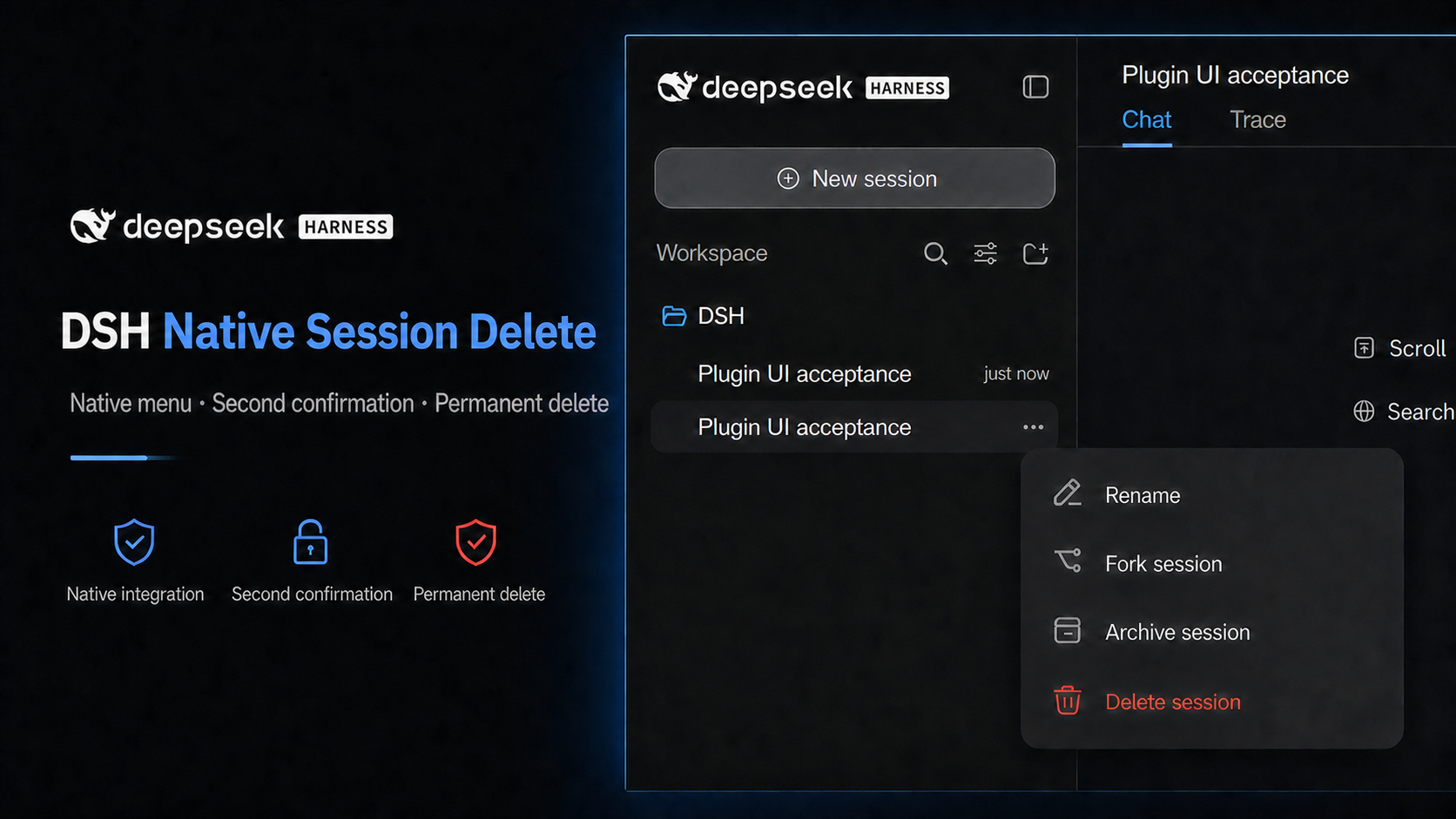
Adds a red permanent-delete action with a confirmation dialog to the native session menu.
安装
dsh plugin --profile web add github:WSL043/dsh-session-deleteGitHub 源码安装:首次需按提示配置 allowBuilds 构建授权后重试
For install and environment setup, plus plugin development tutorials, see DSH community docs ↗
Screenshots
README
Table of contents
This branch prepares the independent v2 candidate 2.0.0-alpha.1. It passed isolated Windows UI acceptance on official Alpha2 and remains unpublished.
See the latest stable Release; install the npm latest stable tag.
This working tree is a different candidate and inherits none of that release's RC or old Portable compatibility claims.
简体中文 · Unreleased scope · Safety boundary
v2 scope
Official DSH owns normal session browsing, search, archive, stop-and-archive and unarchive. This plugin adds one public-slot settings page for archive content search and cleanup:
- Search current user and assistant messages within archived IDs before applying the result limit, with plain-text snippets.
- Keep a four-concurrent-scan fallback when the optional full-text index is disabled. At most 20 results are returned; cancelling or changing a query stops subsequent batches.
- Restore through the official public unarchive operation, preserving the recorded workspace position.
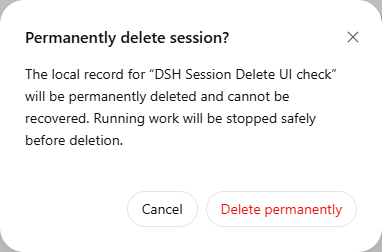
- The settings page and archived row menu share a second confirmation naming the exact session. Cancellation sends no delete request.
- Permanent deletion requires an archived, unloaded local session in current JSONL format and an exclusive official persistence write handle. Loaded idle/running sessions, other writers, migration-required and unknown formats are refused.
Stopping work or archiving does not guarantee that the host unloaded the session. The plugin does not stop or dispose another component's Agent and does not migrate sessions for deletion. After an operation it refreshes public lists; navigation stays with official DSH.
This is an independent plugin. This work does not preinstall it into official Desktop 1.x or modify an official ASAR.
Candidate compatibility boundary
The fixed v2 target is DeepSeek Harness 0.2.2-alpha.2 commit
f3803c96974ad4a94195fb97e5c637e9c2a3afe3 with Cordis 4.0.6-alpha.1. Isolated Windows UI acceptance passed on that official Alpha2. No RC or old Portable baseline is claimed.
The test used generated sessions; existing user installations and real-model calls were not validated.
See the stable maintenance branch for its support window. This v2 candidate remains unpublished and inherits no stable compatibility claims.
Install, update and uninstall
Do not install this working tree or unpublished candidate into a daily profile.
For the stable release, check the target DSH, profile, actual version resolved by latest, and its peer requirements.
Follow the stable installation guide
and enter dsh-chat-manager@latest on the official Plugins → Add plugin page.
Do not infer publication or host suitability from this branch's package.json.
Install, update and uninstall only the selected plugin layer; preserve sessions, unrelated plugins and user configuration. Restart DSH only with the user's permission. Remove the plugin through the official plugin page; uninstalling does not delete sessions. Agents must follow AGENTS.md and the stable guide above, pinning the verified resolved version when installing.
Stable maintenance checks upstream every hour. Compatibility patches publish automatically to npm and GitHub Releases after acceptance; failures block publication and report an error. This process does not publish or widen support for the v2 candidate.
Safety boundary
Permanent deletion cannot be undone. Verify the named target and back up anything needed before confirming. The plugin validates and removes only the confirmed session's independent JSONL directory. Uncertain paths, identity or writer ownership are refused. Incomplete cleanup retains the quarantine and is reported; a failed archive-marker update remains visible.
This is not secure erasure. External attachments, caches, logs, backups, cloud copies, other sessions and non-JSONL stores are outside its scope. A destructive acceptance test requires a disposable fixture session explicitly selected and confirmed by the user.
Feedback and license
Report an issue · Security · MIT · Third-party notices
This unofficial community plugin is not affiliated with or endorsed by DeepSeek.
Related plugins
archify
 tt-a1i
/archify
架构图生成 Skill 总仓(多宿主):可校验的自包含架构图、工作流图、时序图、数据流图与生命周期图。DSH 安装不走本仓根——根目录不是 DSH bundle,请用适配包 @tt-a1i/archify-dsh(见 DSH 集成条目)。
dsh plugin --profile web add @tt-a1i/archify-dsh@1.0.0DeepSeek-Bot
 Fei2411
/DS-Bot/ds-bot
DS Bot: a team of long-lived Bots for DeepSeek Harness, with Main Bots, Bot-to-Bot messages and group chats
dsh plugin --profile web add 'ds-bot@0.2.4'Study-Mate
 Miaotofu01
/Study-Mate
StudyMate learning skills and lesson engine for DeepSeek Harness, Google Antigravity, Codex and ChatGPT Work.
dsh plugin --profile web add 'github:Miaotofu01/Study-Mate#d8114f38363272852b339d6788b2f8f007243b43'dsh-plugin-subscriptions
 V1ki
V1ki/dsh-plugin-subscriptions
把 ChatGPT(Codex)、Claude 与 Grok(X Premium)订阅用作 DeepSeek Harness 的 LLM provider——Web UI OAuth 登录,无需 API key
dsh plugin --profile web add github:V1ki/dsh-plugin-subscriptionsRabiRoute
 vb2250158
/RabiRoute/plugins/rabi-dsh-context
Connect DSH lifecycle events and conversation context to Rabi Manager.
dsh plugin --profile web add 'github:vb2250158/RabiRoute#e483f87e68cef2c8f5112b101e333b1a9577a9f7&path:/plugins/rabi-dsh-context'dsh-deepseek-web-login
 cv-superding
/dsh-deepseek-web-login
Unofficial DSH plugin: use chat.deepseek.com web models as a DSH LLM provider (browser login capture + PoW solving + SSE streaming + prompting-based tool calls), provider route deepseek-web
dsh plugin --profile web add 'dsh-deepseek-web-login@1.0.3'