
Notifications & Integrations
dsh-screenshot
XEsx630/dsh-screenshot · ★ 0
 XEsx630
WeChat-style screenshot for the DeepSeek Harness composer: capture the screen (optionally hiding the DSH window), drag-select a region, and attach the image directly to the message. Windows + PowerShell server-side crop.
README body is shown in Chinese.
Manifest details
安装
dsh plugin --profile web add github:XEsx630/dsh-screenshotGitHub 源码安装:首次需按提示配置 allowBuilds 构建授权后重试
For install and environment setup, plus plugin development tutorials, see DSH community docs ↗
README
给 DeepSeek Harness(DSH)的 Web 输入框加一个「截图」按钮:点一下 → 遮罩框选(或先隐藏 DSH 窗口再截)→ 确认后裁剪好的截图直接出现在输入框的附件栏里,回车就能发。
从 0.2 起,截图走 DSH 自己的草稿附件通道:图片会作为真正的图片附件随消息发送,模型直接看到图;不再往草稿里塞 截图:<路径>,也不再需要 vision MCP。对不支持图片的模型,可以在菜单里切到「以文件路径发送」。
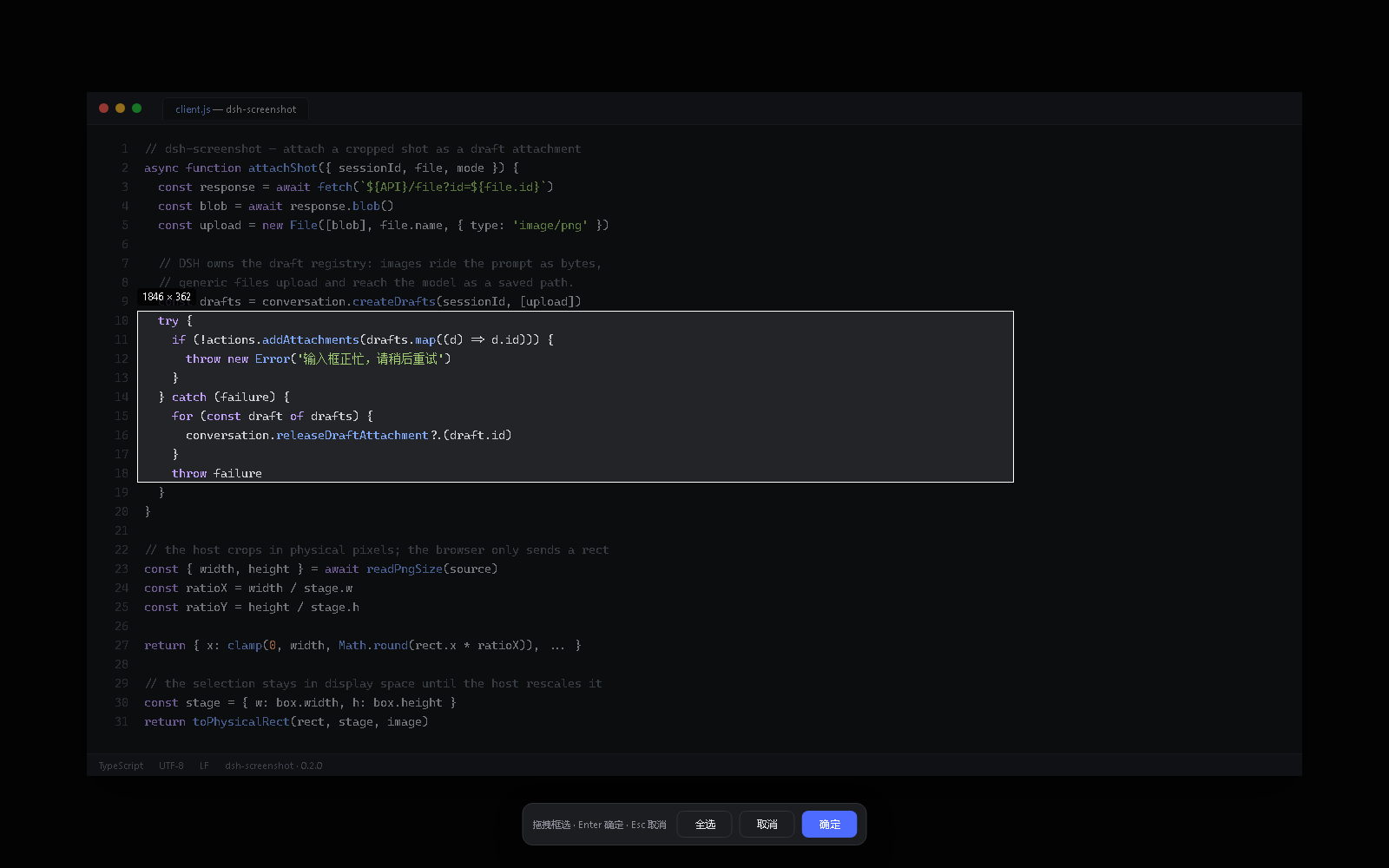
界面示意(演示数据):遮罩框选后点「确定」,截图会进入输入框的附件栏。
功能
- 三种截法:截取屏幕区域 / 隐藏 DSH 窗口后截图 / 截取全部屏幕(多显示器)
- 微信式框选:全屏遮罩、拖拽选区、实时显示物理像素尺寸,支持「全选 / 取消 / 确定」、
Enter确认、Esc取消 - 服务端裁剪:Host 用 PowerShell 裁图,浏览器只上报显示坐标和画布尺寸;用 PNG 真实宽高换算物理像素,不受浏览器缩放、系统 DPI、CSS 影响
- 原生附件:裁剪结果交给
ctx.conversation.createDrafts+inputActions.addAttachments,由 DSH 渲染附件卡、发送图片字节 - 失败可见:截图失败、输入框正忙、附件过大都会 toast 提示,不再静默吞掉
- 崩溃自恢复:隐藏窗口模式在被强杀后会由 Host 依据
.hwnd标记把窗口恢复回来 - 取消/发送后自动清理临时文件,超过 30 分钟的残留由后台清扫
安装
从 GitHub 安装
先确认你用的是哪个 profile:桌面端是 desktop,dsh web 命令行一般是 web。
# 桌面端
dsh plugin --profile desktop add github:XEsx630/dsh-screenshot

# 或 dsh web
dsh plugin --profile web add github:XEsx630/dsh-screenshot

# 指定版本
dsh plugin --profile desktop add "github:XEsx630/dsh-screenshot#v0.2.0"
dsh.bundle 清单会自动把插件挂进 profile。重启 DSH 并刷新页面。
本地开发安装
dsh plugin --profile desktop add link:E:/path/to/dsh-screenshot
# 然后在 ~/.dsh/profiles/desktop 里 pnpm install,重启
使用
- 点输入框左侧的「📷 截图」,选一种截法
- 等遮罩里的画面加载完,按住左键拖出一个区域
- 点「确定」(或按
Enter)→ 截图进入输入框上方的附件栏 - 继续打字或直接发送;不想发了就在附件卡上点 ×
菜单底部可以切换发送方式:
| 方式 | 模型拿到什么 | 适用 |
|---|---|---|
| 以图片附件发送(默认) | 图片内容(DSH 图片附件) | 支持视觉的模型;无需额外工具 |
| 以文件路径发送 | 一段指向只读保存路径的文本 | 纯文本模型 + 本地 vision/OCR 工具;或截图超过 6 MB 时自动降级 |
架构
┌─ 浏览器 ─────────────────────────────────────────────┐
│ 截图按钮 ──POST /capture──▶ 截图预览(GET /preview)   │
│    │                            │                    │
│    └── 遮罩拖拽(只算坐标)      │                    │
│         └──POST /crop {rect, stage}──▶ 裁剪好的 PNG    │
│                                        │             │
│ 取回 Blob ──▶ new File ──▶ createDrafts + addAttachments
└────────────────────────────────────────┼─────────────┘
                                         ▼
                              输入框附件栏(DSH 原生)
Host 侧:
screenshot.ps1抓屏(可选先隐藏前台窗口,DPI 感知),写临时 PNG- 浏览器显示预览、拖拽选区
crop.ps1按 PNG 真实尺寸换算后的物理像素裁剪- 裁剪结果通过
GET /file交给浏览器,随后删除
设计取舍:
- 裁剪放服务端:浏览器只做显示和坐标换算,避免 canvas 解码时序、
naturalWidth=0、CSS 缩放带来的 1×1 空图 - 坐标换算以 PNG 真实尺寸为准:
物理 = 显示坐标 × (PNG 宽 / 画布宽),浏览器缩放和 DPI 缩放都被吸收 - 图片字节走附件通道:不再依赖
$DSH_HOME/uploads路径,也不需要把路径塞进 prompt - 隐藏窗口有崩溃兜底:
screenshot.ps1隐藏前写<png>.hwnd标记,正常路径删除;进程被强杀时 Host 读标记调restore.ps1恢复
HTTP API(Host)
所有接口仅限本机回环地址,且要求同源。
| 方法 | 路径 | 说明 |
|---|---|---|
| POST | /api/screenshot/capture |
body {hideWindow?, allScreens?} → 抓屏到临时 PNG,返回 {id, width, height, url} |
| POST | /api/screenshot/crop |
body {id, rect:{x,y,w,h}, stage:{w,h}} → 裁剪,返回 {id, name, bytes, width, height, url} |
| GET | /api/screenshot/preview?id= |
抓屏预览 |
| GET | /api/screenshot/file?id= |
裁剪结果 |
| DELETE | /api/screenshot/preview?id= / file?id= |
删除临时文件 |
安全
- 路由只接受回环
Host(127.0.0.0/8、localhost、::1),拒绝sec-fetch-site: cross-site和跨源Origin id必须是 UUID,文件名由 Host 生成,不接受外部路径- 请求体上限 16 KB;响应
no-store、nosniff - 截图和裁剪全部在本机 PowerShell 中完成,不上传任何数据
- 临时文件目录:
$DSH_HOME/cache/dsh-screenshot(可用DSH_SCREENSHOT_DIR重定向),30 分钟 TTL
兼容性
- DSH ≥ 0.2(依赖
ctx.conversation.createDrafts/inputActions.addAttachments与fileUpload服务) - Windows:PowerShell 5.1 + .NET Framework 的
System.Drawing/System.Windows.Forms - 客户端注入
@deepseek-ai/dsh-client-runtime、dsh-client-ui-conversation、dsh-client-file-upload
开发
node --test            # 单元测试 + PowerShell 裁剪测试
npm run check          # 语法检查

# 真实抓屏测试(会截当前屏幕)
$env:DSH_SCREENSHOT_LIVE=1; node --test test/powershell.test.js
测试覆盖:坐标换算/边界钳制、PNG 头解析、信任栅栏、路由校验与错误码、crop.ps1 的真实裁剪与越界拒绝。CI 在 windows-latest 上跑 Node 22/24。
故障排查
| 现象 | 处理 |
|---|---|
| 按钮是灰的 | 当前会话未就绪,或输入框处于命令提交/发送阶段 |
| 「截图失败:无法启动 PowerShell」 | 检查 powershell.exe 是否在 PATH;企业策略可能禁用 Add-Type |
| 图片发送失败 | 模型不支持图片输入,或图片超出部署限制 → 菜单里关掉「以图片附件发送」 |
| 窗口没恢复 | 重新打开 DSH;残留标记会在下次启动时被清扫并恢复窗口 |
License
MIT
Related plugins
dsh-im
 xmanrui
/dsh-im
通过扫码把IM机器人接入DeepSeek Harness(支持飞书、微信、钉钉等)。
dsh plugin --profile web add github:xmanrui/dsh-imdsh-pocket
 shaobeichen
/dsh-pocket
手机远程访问 DSH Web 界面:扫码即用局域网或公网(cloudflared 隧道)访问,实时同屏、移动端适配布局,带设置页管理。
dsh plugin --profile web add github:shaobeichen/dsh-pocketDSH Startup Screen
 6shenhonghong9
/dsh-startup-screen
DeepSeek Harness 启动界面与启动动画:黑幕 DeepSeek 标识 → 过曝洗白 → 暖白档案底板 → 交互式访问授权序列(需要访问许可 / 身份资料确认 / 接收访问需求 / 开始读取权限 / 读取完毕·核验通过 / 欢迎访问)。中文主字 + 英文等宽副标题,真声素材 + 界面音效,身份名称等参数在 DSH 设置页可改。web profile 与 DeepSeek Harness Desktop 桌面端通用。桌面端(Windows)播放启动动画期间把标题栏整层透明化:最小化/最大化/关闭按钮与其底色一并不可见,播放结束自动还原。
dsh plugin --profile web add 'github:6shenhonghong9/dsh-startup-screen#1f35ea33810e02a900b31df01f9c806f92f398df'dsh-qqbot
 tencent-connect
/dsh-qqbot
让 QQ Bot 接入 DeepSeek Harness(dsh)的官方插件
dsh plugin --profile web add github:tencent-connect/dsh-qqbotdeepseek-harness-mobile
 sorsama
/deepseek-harness-mobile
DeepSeek Harness 的 Android 伴侣应用:经局域网用手机聊天、看目标、审批与收通知;Kotlin + Jetpack Compose
dsh plugin --profile web add github:sorsama/deepseek-harness-mobiledsh-bridge
 wenbin-wb
/dsh-bridge
DeepSeek Harness 多通道远程访问与全域安全门禁插件 手机扫个码,人不在电脑前也能继续用 DeepSeek Harness。躺在沙发上、出差在外、跨网访问——都不用守着电脑,也不用自己搭公网服务器,扫码就能在手机/平板或任意设备上接着干。 把你本地的 DeepSeek Harness 无缝延伸到手机、平板、公网、甚至微信 / QQ /…
dsh plugin --profile web add github:wenbin-wb/dsh-bridge