
UI Enhancements
dsh-quote-panel
a1297424439/dsh-quote-panel · ★ 0
 a1297424439
Real-time stock watch panel for DeepSeek Harness. A-share indices & stocks with intraday / daily / 60-minute K-lines, US indices & stocks, self-managed watchlist, draggable always-on-top overlay.
Manifest details
安装
dsh plugin --profile web add 'github:a1297424439/dsh-quote-panel#7e27b4b40141540438c52dbb500a907d7892f26c'GitHub 源码安装:首次需按提示配置 allowBuilds 构建授权后重试
For install and environment setup, plus plugin development tutorials, see DSH community docs ↗
README
Table of contents
English | 简体中文
A real-time stock watch panel for DeepSeek Harness (dsh web). Works as a draggable, always-on-top overlay inside your dsh session — no API key, no account, no cost.




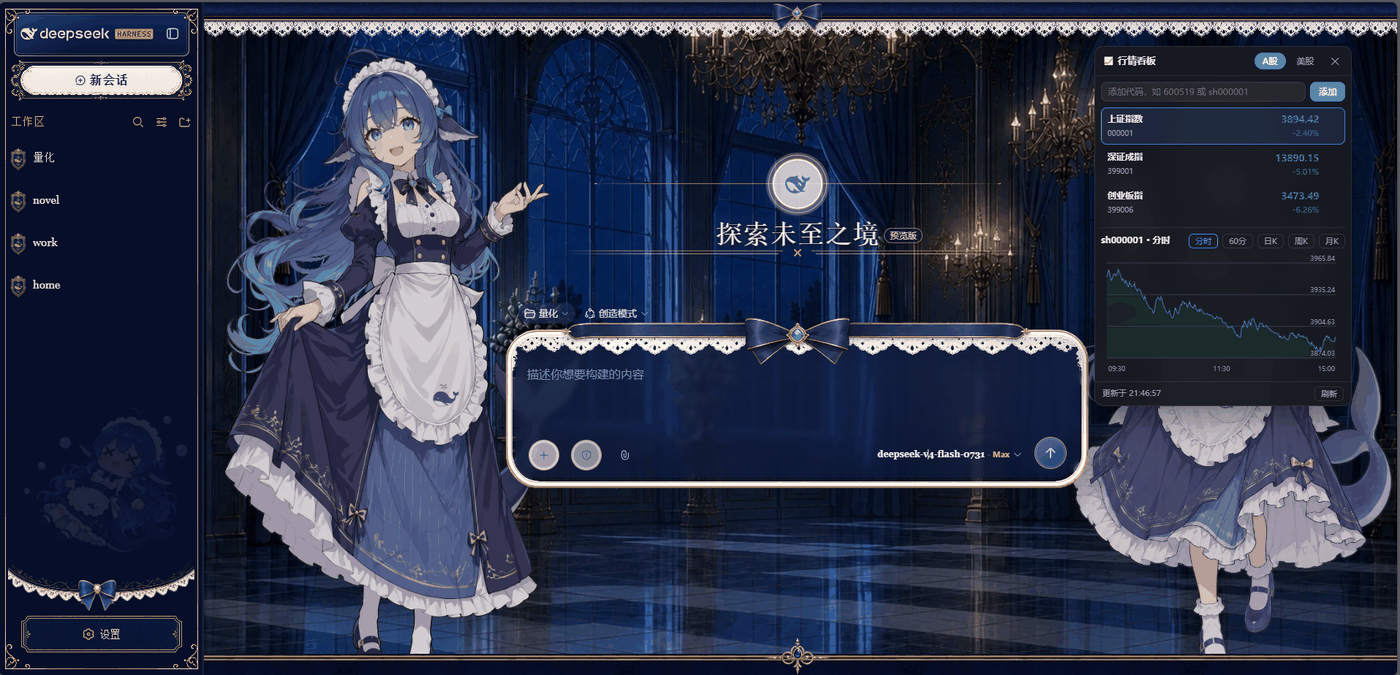
✨ Features
- A-share (CN): default page shows the three major indices — Shanghai Composite (
sh000001), Shenzhen Component (sz399001), ChiNext (sz399006); add any A-share code (600519,sh600519…) - US: default page shows Dow Jones (
DJI), Nasdaq Composite (IXIC), S&P 500 (INX); add any US ticker (AAPL,TSLA…) - K-lines: A-share intraday (分时) / 60-min / daily / weekly / monthly; US daily / weekly / monthly
- Watchlist: add / remove symbols per market, persisted in
localStorage - Auto refresh: quotes refresh every 5 s (CN) / 10 s (US), server-side
- Always-on-top & draggable: z-index pinned above any skin/theme overlay; drag the title bar anywhere; position is remembered
- 🐂 Cow Pet / 牛来 (added in v1.1, multi-skin in v2.2): click the 🐂 牛来 button in the panel header to summon a cow that roams your DSH session page. Whenever any symbol in your watchlist has
changePct > 0, the cow immediately does a two-step run + shouts\牛来/in a yellow speech bubble (twice, 320 ms apart). It floats inside the session page, scrolls with it, and auto-syncs your watchlist. Each time you open the pet it cycles to the next skin (Classic Cow / Plush Cow; the selection persists across refreshes). - Zero config: all data comes from free public endpoints (Tencent Finance, no key)
🚀 Installation
A bundle plugin: no approval prompts, survives restarts.
One-click install scripts (recommended)
The repo root ships two idempotent install scripts:
# Linux / macOS
bash install.sh

# Windows (PowerShell 5.1+)
powershell -NoProfile -ExecutionPolicy Bypass -File install.ps1
Each script automatically: copies the plugin source → writes dependencies["dsh-quote-panel"]="link:<absolute-path>" and the dsh.profile.bundles entry into the web profile package.json (with a backup first; idempotent) → runs pnpm install → prompts you to restart. Override defaults with the DSH_PROFILE_DIR / DSH_PLUGIN_DIR env vars.
From a local checkout (any OS)
- Clone / copy this repo into your
dsh-plugin-downloadfolder (or anywhere). - Open your web profile
package.json(default~/.dsh/profiles/web/package.json):- add to
dependencies:"dsh-quote-panel": "link:<absolute-path-to-this-repo>" - add
"dsh-quote-panel"todsh.profile.bundles
- add to
- Run
pnpm installinside the profile directory. - Restart
dsh web, then click the 📈 行情 button in the session header.
From npm / GitHub releases (v2.0+ published)
# npm
npm i -g dsh-quote-panel
# or add to your profile dependencies like any other dsh bundle plugin
The GitHub release page also bundles dsh-quote-panel-install.tar.gz (plugin + install.sh) for fresh environments.
🛠 Usage
- Open a dsh session page, click 📈 行情 (top-right of the conversation header).
- Switch markets with the A股 / 美股 tabs.
- Type a symbol in the box and press 添加 to extend the watchlist; hover a row and click ✕ to remove it.
- Click any row to load its K-line; switch period with the buttons (分时 / 60分 / 日K / 周K / 月K).
- Drag the panel by its title bar if it covers something — the position is saved.
🐂 Cow Pet / 牛来
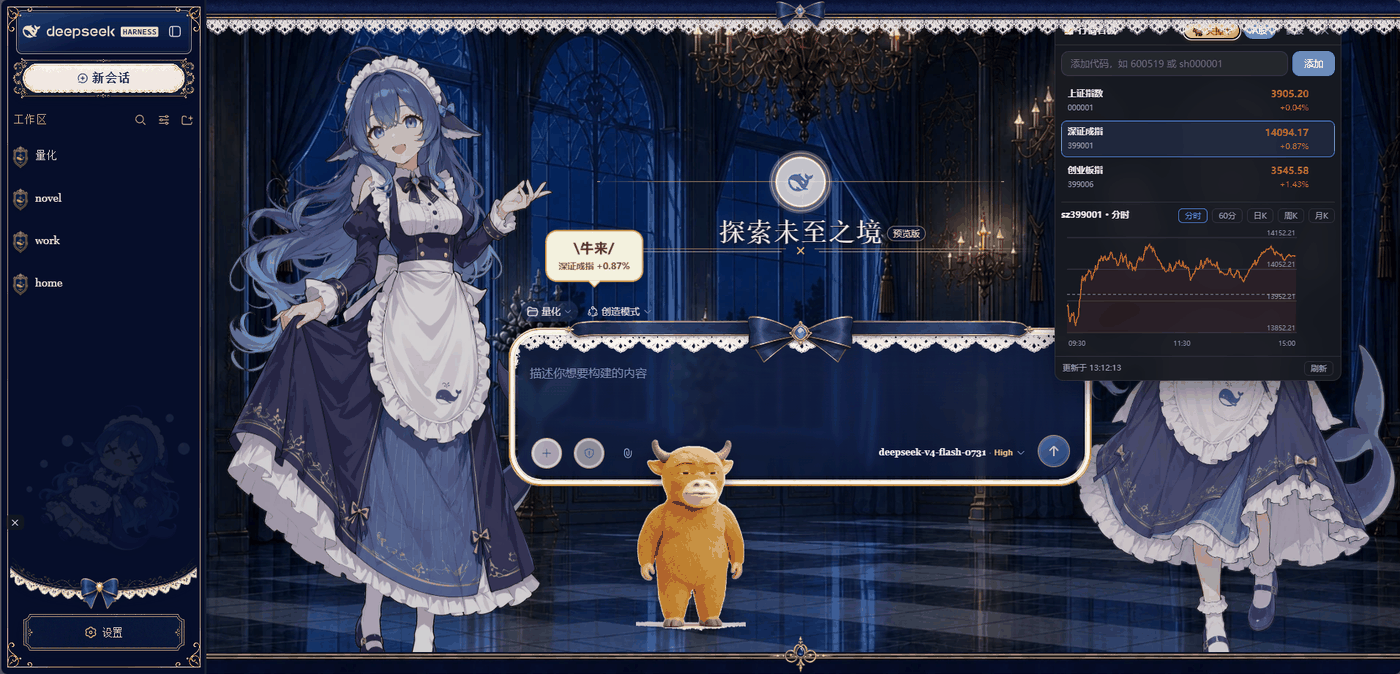
Click 🐂 牛来 in the panel header to summon a small cow that roams the bottom of your session page. Whenever any symbol in your watchlist is currently up (changePct > 0), the cow will:
- Run two quick steps (≈1.6 s, ~78 px horizontal hop, two jumps)
- Pause
- Pop a yellow speech bubble with bold
\牛来/plus a sub-line listing the up symbols (e.g.Kweichow Moutai +1.32% · SSE Composite +0.21%) - Throttle the same wave to ≈1.8 s so it doesn't spam
- When nothing is up anymore, return to idle wandering and the bubble fades
Data source is shared with the main panel — /dshq/quotes — so no extra endpoints and no extra cost.
Turning the pet off
Click the highlighted 🐂 关掉牛 button in the panel header, or the ✕ button on the overlay.
🗂 Data sources & disclaimer
| Market | Quotes | K-lines |
|---|---|---|
| A-share | Tencent qt.gtimg.cn |
Tencent ifzq.gtimg.cn (intraday / m60 / day / week / month) |
| US | Tencent qt.gtimg.cn |
Tencent ifzq.gtimg.cn (day / week / month) |
- All endpoints are free public web APIs. They may change, throttle, or disappear at any time — the panel degrades gracefully and shows the error.
- Not financial advice. The data is for study/research only; verify with your broker before making any decision.
- US intraday (分时) is not available from the free Tencent endpoints; US K-lines are daily and above.
💬 FAQ
Q: Do I need an API key? A: No. All quotes come from Tencent Finance's free public endpoints — zero config, zero cost.
Q: Why is there no US intraday chart? A: The free Tencent endpoints don't provide US intraday data; US K-lines are daily and above. This is a data-source limitation, not a bug.
Q: Quotes stopped updating / show an error? A: Free endpoints may be throttled or temporarily down. The panel shows the error and retries automatically; you can also hit the bottom 刷新 button. If it stays broken for a long time, it's likely a provider-side limit.
Q: Why doesn't the cow always shout?
A: The pet only triggers when any watchlist symbol is up (changePct > 0), with per-wave throttling (web 1.8 s; desktop 8 s + 70% probability). It wandering quietly during a flat/holiday session is expected.
Q: Where is my watchlist stored?
A: In browser localStorage (dshq.lists.cn/us). It survives refreshes and browser restarts; only clearing site data removes it.
Q: Which browsers are supported? A: Any modern browser (Chrome / Edge / Quark / Firefox / Safari) and Android WebView; the panel supports touch-drag.
🤝 Contributing
PRs and Issues are welcome!
- Code style: ESLint defaults, 2-space indent;
lib/is host & client source,desktop-pet/is the standalone Electron app - Run
pnpm check(ornpm run check) before submitting - Mention your test environment in the PR description for data-source / compatibility changes
- Chinese is fine in Issues
🗺 Roadmap
- Watchlist groups & drag-to-reorder
- More markets (HK stocks, crypto)
- K-line indicators (MA / MACD / KDJ)
- Customizable bubble style & shout phrases
- Pre-built Electron installers for Windows/macOS
⚙️ Compatibility
- dsh web (server side: Node ≥ 20, needs the
webServerservice — provided by dsh core) - Browser side: any modern browser / Android WebView (the panel supports touch drag)
- Tested on Linux and Windows deployments
🛠 Development
pnpm check # node --check both host and client sources
📄 License
MIT © 2026 dsh-quote-panel contributors
Related plugins
dsh-web(原 dsh-web-ui)
 zhu1090093659
/dsh-web-ui
dsh-web(原 dsh-web-ui):任务看板、git 图、右侧面板、远程移动端 UI、桌宠、实时 token 统计与皮肤中心的全家桶。仓库已更名 zhu1090093659/dsh-web,根目录声明 dsh.bundle.patch,支持根 Git 入口安装。
dsh plugin --profile web add github:zhu1090093659/dsh-webdsh-web-all 聚合包(原 dsh-web-ui-all)
zhu1090093659zhu1090093659/dsh-web-ui/packages/dsh-web-ui-all
旧整包路径 packages/dsh-web-ui-all 已随仓库更名 dsh-web 迁移:现聚合目录为 packages/dsh-web-all,npm 聚合包 @linxin666/dsh-web-all。与总仓根 Git 入口是同一产品的两种整包方式,不重复计数。
dsh plugin --profile web add @linxin666/dsh-web-all@latestdsh-TUI
 ccch1mneyyy
/dsh-TUI
Claude Code 风格全屏终端 UI:像素鲸鱼顶栏、实时工作状态行、思考流式展开。
dsh plugin --profile web add github:ccch1mneyyy/dsh-TUIdsh-cc-tui
ccch1mneyyyccch1mneyyy/dsh-cc-tui
一个美观且实用的 Claude Code 风格 TUI 插件:像素鲸鱼顶栏、双流光大字、实时工作状态行、思考流式展开、双击 Esc 时间回溯、蓝白上下文进度条 + TPS 仪表。 零核心改动,纯插件挂载。安装插件即可启用,卸载后不会留下核心补丁。 献给钟爱tui的各位极客们 A beautiful, practical Claude…
dsh plugin --profile web add github:ccch1mneyyy/dsh-cc-tuideepseek-balance-whale-widget
 meteornox
/deepseek-balance-whale-widget
DSH 小鲸鱼余额挂件(DeepSeek Balance Whale Widget)
dsh plugin --profile web add github:meteornox/deepseek-balance-whale-widgetDSH-better-sidebar
 omdsh-dev
/DSH-better-sidebar
侧边栏完整工作台:内置文件渲染编辑、终端、Git 与子代理,支持三方插件注册新 Tab。
dsh plugin --profile web add github:omdsh-dev/DSH-better-sidebar