
Development & Runtime
dsh-settings-size
alexzshl/dsh-settings-size · ★ 0
 alexzshl
Resizable DSH settings dialog: size presets plus width/height sliders in Settings → General, persisted per browser
Manifest details
安装
dsh plugin --profile web add 'github:alexzshl/dsh-settings-size#34d29e45f35f862452cb0eecc9b93e62d4318743'GitHub 源码安装:首次需按提示配置 allowBuilds 构建授权后重试
For install and environment setup, plus plugin development tutorials, see DSH community docs ↗
README
Table of contents
- What it is
- Install
- Uninstall
- Features
- Presets
- Sliders
- Also
- Parameters and defaults
- Compatibility and known limits
- Known limits
- Development
- Further reading (optional)
- Layer 1 — the panel size is hardcoded
- Layer 2 — every section caps its own content column
- Dual-face shape
- Selector strategy
- Why localStorage instead of Host settings
- Repository layout
- License
Give the DSH settings dialog a size you actually like. A 设置弹框尺寸 row for the DeepSeek Harness (
dsh) Web GUI — one-click presets, live width/height sliders, remembered locally.
中文 · Changelog · DSH plugin · MIT



What it is
The DSH settings dialog is hardcoded to 800×800, which feels cramped on a wide screen: after the 188px nav rail takes its share, the content column is left with roughly 612px. The size is not routed through any --dsw-* design token, so neither a theme nor the built-in appearance settings can reach it.
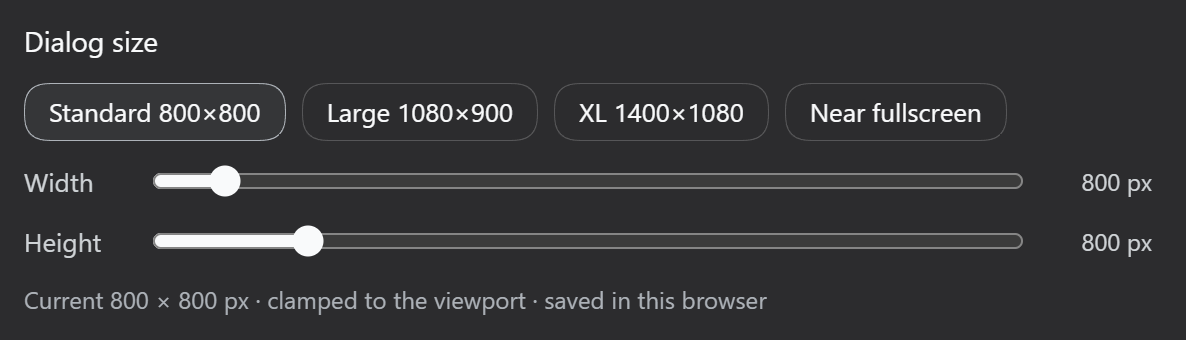
dsh-settings-size adds one row to Settings → General (right below 字体大小) with four presets and a pair of width/height sliders. Changes apply live — the dialog resizes while it is open — and the choice is written to localStorage, so it survives reloads.
- Shape: dual-face plugin (no-op host half + browser bundle)
- Applies to: the DSH Web GUI
- Persistence:
localStorage, keydsh-settings-size:size - No build step:
lib/*.jsis the shipped artifact
Install
Add this repository to the web profile:
dsh plugin --profile web add -w <path-to-this-repo>
-w is required: every profile directory ships a pnpm-workspace.yaml, so pnpm treats the profile as a workspace root and a bare add fails with ERR_PNPM_ADDING_TO_ROOT.
The command links this package and appends dsh-settings-size to dsh.profile.bundles. A running web server has to be restarted to load the new bundle layer:
# stop the current instance, then
dsh web
After the restart, open Settings → General — the 设置弹框尺寸 row should be right below 字体大小.
Edit ~/.dsh/profiles/web/package.json:
{
  "dependencies": {
    "dsh-settings-size": "link:<path-to-this-repo>"
  },
  "dsh": {
    "profile": {
      "bundles": [ /* …existing entries…, */ "dsh-settings-size" ]
    }
  }
}
Then run pnpm install inside ~/.dsh/profiles/web and restart dsh web.
Uninstall
dsh plugin --profile web remove -w dsh-settings-size
Then restart dsh web. The plugin's <style> tag is owned by ctx.effect and is removed on unload; the localStorage key can be left alone or cleared by hand.
Features
Presets
| Preset | Target size | Notes |
|---|---|---|
| 标准 (Standard) | 800 × 800 | the shipped size |
| 大 (Large) | 1080 × 900 | default |
| 超大 (XL) | 1400 × 1080 | |
| 近全屏 (Near-fullscreen) | 3000 × 2000 | deliberately oversized; min() clamps it to the viewport |
Sliders
| Control | Range | Step |
|---|---|---|
| Width | 640 – 3000 px | 10 px |
| Height | 560 – 2000 px | 10 px |
The dialog resizes as you drag — no close-and-reopen.
Also
- Never overflows the viewport: the rule reads
min(<target>px, calc(100vw - 32px)), so a small screen or narrow window stays safe. - This browser only: switching browsers, or clearing site data, returns to the default.
Parameters and defaults
| Item | Value |
|---|---|
| Starting size (nothing stored yet) | 1080 × 900 |
| Width range / step | 640 – 3000 px / 10 px |
| Height range / step | 560 – 2000 px / 10 px |
| Viewport gutter | 32 px on each side |
| Storage key | dsh-settings-size:size |
| Storage format | "<width>x<height>", e.g. "1080x900" |
| Row slot | settings.general.item, id: settings-size, order: 15 |
| Injected services | slots, locale |
| Locale namespace | settings.size (zh / en, follows the active DSH language) |
Compatibility and known limits
Manually verified against:
| DSH version | Result |
|---|---|
0.1.5-rc.2 |
✅ passes |
0.1.7-rc.2 |
✅ passes |
0.2.0-rc.1 |
✅ passes |
Versions not listed here are expected to work as well: the plugin depends only on the
settings.general.item slot, the slots and locale client services, and the settings dialog's DOM
structure — it reads no internal implementation or undocumented field. Compatibility results collected by
third-party platforms (such as dsh.so) are worth checking too.
If it misbehaves on your version, or you have an improvement in mind, please
open an issue or send a PR — include the output of
dsh --version and what you saw.
Known limits
- It depends on the dialog's DOM structure
role="presentation" > role="dialog"[aria-modal]. If a future DSH release reshapes that layer, only thePANELconstant inlib/client.jsneeds updating — which is exactly why the hashed class name is not used. - Web GUI only. The TUI and desktop profiles never load
dsh.client, so the plugin has no effect there. - No shipped file is modified — everything is done with overriding CSS and a slot registration.
- Sizes are CSS pixels; browser zoom scales the result like any other DSH UI.
Development
There is no build step: lib/client.js is a hand-written CJS bundle.
The web profile ships dsh-client-hmr, which polls every installed client bundle with fs.watchFile
and calls clientModules.rebuilt(id) as soon as one changes, then pushes the new module to the browser
over the /plugins/events SSE channel for a hot swap. Saving the file is enough — no refresh and no
restart (the poll adds a very short delay).
A restart of dsh web is only needed for changes to the host half (lib/index.js), cordis.patch.yml,
package.json, or the profile composition. For local work, a link: install is the easiest path:
dsh plugin --profile web add -w <path-to-this-repo>
Further reading (optional)
Layer 1 — the panel size is hardcoded
From SettingsRoot.module.css in @deepseek-ai/dsh-client-ui-settings-general:
.VOzbGW_panel {
  width: 800px;
  max-width: calc(100vw - 48px);
  height: min(800px, 100vh - 48px);
}
.VOzbGW_nav { width: 188px; }   /* fixed nav rail */
Layer 2 — every section caps its own content column
Widening the panel alone does not help: each section still clamps its content column, so the extra width stays empty:
| Section | Content cap |
|---|---|
.zGbnIq_section (models) |
max-width:720px |
.rtSEdW_section (agent presets) |
max-width:720px |
.pbvGtq_section (plugins) |
max-width:760px |
.qSYn7G_section (plugin inventory) |
max-width:760px |
This plugin overrides both layers.
Dual-face shape
The same shape as the shipped ui-* packages:
- Host half (
lib/index.js) — adsh.bundlepatch layer inserting one loader entry (settings-size); a no-opapply. - Browser half (
lib/client.js) — adsh.clientbundle served bydsh-client-modulesat/plugins/dsh-settings-size/client.js, executed throughwindow.__ModuleLoader__.load's CJS factory, withrequire()resolvingreactagainst the shell's module table. It keeps one owned<style>tag in sync, registers its zh/en dictionaries under thesettings.sizelocale namespace, and registers the row intosettings.general.itemwithlocale, so the owner injects a namespace-boundtand re-renders on a language switch.
Selector strategy
The override targets the DOM structurally, never through the CSS-module class name (whose hash changes with the file):
div[role="presentation"] > div[role="dialog"][aria-modal="true"] {
  width: min(<w>px, calc(100vw - 32px)) !important;
  height: min(<h>px, calc(100vh - 32px)) !important;
  max-width: calc(100vw - 32px) !important;
}
div[role="presentation"] > div[role="dialog"][aria-modal="true"] [class*="_section"] {
  max-width: none !important;
}
Two things worth noting:
- It cannot hit the wrong dialog. The attachment lightbox is also
role="dialog"+aria-modal="true", but it is a portal root — not a direct child of arole="presentation"container — so this combination matches only the settings panel. - Specificity already wins. The selector scores
0,2,3against the shipped.VOzbGW_panelat0,1,0. The!importantflags are there to survive future shipped edits, not because they are needed today.
Why localStorage instead of Host settings
DSH's Host settings wire only exposes an allowlisted set of namespaces to browser clients
(WEB_SETTINGS_NAMESPACES, see dsh-host-apiproxy), so a third-party namespace would answer
settings-not-exposed. A dialog size is a browser-side visual preference; localStorage matches the
boundary the product already keeps for remote browser preferences while still surviving a same-origin reload.
Repository layout
dsh-settings-size/
├── package.json         # dsh.bundle.patch + dsh.client declarations
├── cordis.patch.yml     # profile patch layer: loader entry id=settings-size
├── lib/
│   ├── index.js         # host half: no-op apply
│   └── client.js        # browser half: CSS override + settings row + i18n + persistence
├── docs/
│   ├── screenshot-zh.png
│   └── screenshot-en.png
└── README.md / README.en.md
Both hit this plugin as silent failures, and both are variable shadowing. Written down so the next author does not pay for them:
- Never name your stylesheet
stylesin a dynamic Cordis plugin. Dynamic client code is evaluated bynew Function("React", "console", "styles", "host", "harness", …), soconst styles = {…}shadows the injectedstyles.insertand every stylesheet insertion throwsstyles.insert is not a function— and if it sits inside atry/catch, nothing ever surfaces. - Never let a module-level updater share a name with a component's state setter.
const [size, setSize] = React.useState(current)shadows a module-levelsetSize(w, h). React's setter takes a single argument, sosetSize(1080, 900)stores the number1080— the UI then readsundefined × undefinedand the setting does nothing at all.
The common shape: an inner scope declares a binding with the same name as an outer one but different semantics, and the failure is silent. When debugging that class of problem, get runtime facts first (a DOM probe, the computed style) instead of guessing at selectors.
This has nothing to do with what the plugin does; it is the story behind one line in
package.json, kept here for plugin authors.
Since DSH 0.2.0, startup enforces a plugin's peerDependencies and refuses to load the plugin when
the range does not match. The check is dsh-app-boot's evaluatePluginCompatibility:
// only peers named @deepseek-ai/dsh or starting with @deepseek-ai/dsh-* are scanned
const requirement = ["workspace:^", "workspace:~", "workspace:*"].includes(range)
  ? runtimeVersion            // these three are replaced by the CURRENT runtime version
  : range;
if (!semver.satisfies(runtimeVersion, requirement, { includePrerelease: true })) peers[name] = range;
What this plugin does, and why:
- It declares
"@deepseek-ai/dsh": "*"— no major-version pin.*holds for every version (prereleases included), so the plugin is never refused. - Why that is safe here: the plugin uses only the
settings.general.itemslot, theslots/localeclient services, and the settings dialog's DOM structure — all long-stable contracts. It persists no data (the size lives in browserlocalStorage, independent of the DSH version), so there is no cross-version storage format to keep in step. Narrow the range if DSH ever ships a genuinely breaking slot or service change.
Three things that are easy to get wrong:
workspace:*/workspace:^/workspace:~are not "any version" — they are replaced by the current runtime version before comparison, so they mean "only this one version" and will be refused after the next DSH upgrade.- A range that is too narrow gets refused. This plugin declared
^0.1.0in 0.1.4, which stopped it from loading on DSH 0.2.0 (fixed in 0.1.5). - A
dshCompatibility-style field incordis.yml/cordis.patch.ymlis never read — that file is a patch array, so an extra key only makes the loader warn and skip the entry. The declaration can only live inpackage.json'speerDependencies.
License
MIT
Related plugins
DSH-better-sidebar
 dsh-external
/DSH-better-sidebar
右侧侧边栏增强:文件预览/终端/Git,可拖拽自定义位置
dsh plugin --profile web add github:dsh-external/DSH-better-sidebarmirage#dsh
 strukto-ai
/mirage/typescript/packages/dsh
把文件系统与 bash 提供者换成 mirage 虚拟工作区:文件工具与 shell 命令作用于挂载的资源(RAM、S3、Redis、Slack、Gmail、Notion、Postgres)而非宿主磁盘,支持按挂载点设置读/写/执行模式、按命令选择沙箱(进程内 monty、pyodide、quickjs;远程 docker、e2b、daytona),并可在虚拟终端中安装 CLI(git、gh、slack、linear、ntn、gws,或自行注册的程序树)作为命令头词。
dsh plugin --profile web add github:strukto-ai/mirage#path:/typescript/packages/dshdeepseek-harness-desktop
 hairyf
/deepseek-harness-desktop
DeepSeek Harness Tauri 桌面版 | Only 5mb installer, zero environment setup. Windows / macOS / Linux.
dsh plugin --profile web add github:hairyf/deepseek-harness-desktopcc-safety-net
 kenryu42
/cc-safety-net
A coding agent CLI hook - block destructive commands and secret file access
dsh plugin --profile web add 'github:kenryu42/cc-safety-net#ae8af0330308ad0bc24b5389709060c7a07a6b8d'hol-guard
 hashgraph-online
/hol-guard
开源AI代理防病毒:运行时拦截风险工具、秘密访问、提示注入、恶意软件包、MCP服务器、插件和技能。
dsh plugin --profile web add github:hashgraph-online/hol-guarddsh-mobile
 saya-ch
/dsh-mobile
DeepSeek Harness 移动端适配与安全局域网访问插件,支持 Android App 和手机浏览器。
dsh plugin --profile web add github:saya-ch/dsh-mobile