
Development & Runtime
dsh-worktree-alpacach
alpacachen/dsh-worktree · ★ 2
 alpacachen
A minimal worktree manager with one button and one dialog for DeepSeek Harness.
Manifest details
安装
dsh plugin --profile web add '@alpacachen/dsh-simple-worktree@1.1.3'从 npm 安装预构建包
For install and environment setup, plus plugin development tutorials, see DSH community docs ↗
README
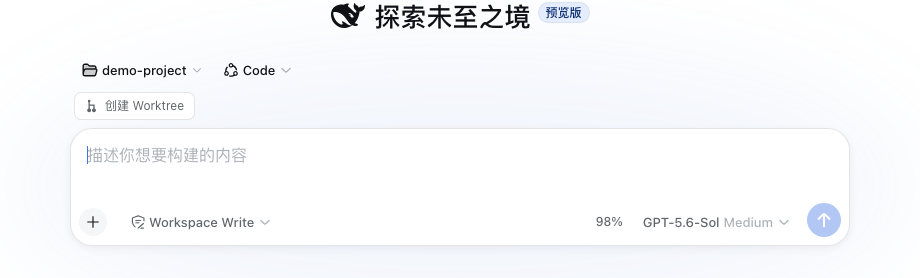
A Git worktree plugin for DeepSeek Harness that creates task branches, registers worktrees as DSH Workspaces, and opens isolated sessions.
npm package:
@alpacachen/dsh-simple-worktree



Simplified Chinese · English
Features
- Create a Git worktree from the new-session action in any Git Workspace.
- Choose the current branch or the repository's main branch.
- Register and open the new worktree as a DSH Workspace with an isolated session.
- Create task branches as
task/<name>. - Manage and remove linked worktrees from the Worktree Management settings page.
- No additional service or project configuration.
- Supports DSH themes, Chinese, and English.
Compatibility
Built against the DSH 0.2.1-alpha.2 client contract, with support for 0.1.5-rc.1 || 0.1.5-rc.2 || 0.2.1-alpha.2 (web and desktop profiles).
Usage
Install
dsh plugin --profile web add @alpacachen/dsh-simple-worktree
Restart dsh web after installation.
In the desktop app, install the package from Plugins → Add plugin, enable it, and restart the app and host.
You can also install from GitHub with dsh plugin --profile web add github:alpacachen/dsh-worktree.
Create from a new session
- Open New Session in a Git Workspace.
- Choose Create worktree above the composer.
- Enter a task name. The repository's main branch is selected by default.
- Click Create and open.
Manage worktrees
Open Settings → Worktree Management to scan every Workspace for Git projects and linked worktrees, inspect their branch and dirty state, and remove worktrees that are no longer needed.
The worktree is created at:
project.worktrees/login-fix/
└── branch: task/login-fix
The new Workspace is named <parent>/<task>. Removing the worktree Workspace does not delete its Git branch.
Related plugins
DSH-better-sidebar
 dsh-external
/DSH-better-sidebar
右侧侧边栏增强:文件预览/终端/Git,可拖拽自定义位置
dsh plugin --profile web add github:dsh-external/DSH-better-sidebarmirage#dsh
 strukto-ai
/mirage/typescript/packages/dsh
把文件系统与 bash 提供者换成 mirage 虚拟工作区:文件工具与 shell 命令作用于挂载的资源(RAM、S3、Redis、Slack、Gmail、Notion、Postgres)而非宿主磁盘,支持按挂载点设置读/写/执行模式、按命令选择沙箱(进程内 monty、pyodide、quickjs;远程 docker、e2b、daytona),并可在虚拟终端中安装 CLI(git、gh、slack、linear、ntn、gws,或自行注册的程序树)作为命令头词。
dsh plugin --profile web add github:strukto-ai/mirage#path:/typescript/packages/dshdeepseek-harness-desktop
 hairyf
/deepseek-harness-desktop
DeepSeek Harness Tauri 桌面版 | Only 5mb installer, zero environment setup. Windows / macOS / Linux.
dsh plugin --profile web add github:hairyf/deepseek-harness-desktopcc-safety-net
 kenryu42
/cc-safety-net
A coding agent CLI hook - block destructive commands and secret file access
dsh plugin --profile web add 'github:kenryu42/cc-safety-net#ae8af0330308ad0bc24b5389709060c7a07a6b8d'hol-guard
 hashgraph-online
/hol-guard
开源AI代理防病毒:运行时拦截风险工具、秘密访问、提示注入、恶意软件包、MCP服务器、插件和技能。
dsh plugin --profile web add github:hashgraph-online/hol-guarddsh-mobile
 saya-ch
/dsh-mobile
DeepSeek Harness 移动端适配与安全局域网访问插件,支持 Android App 和手机浏览器。
dsh plugin --profile web add github:saya-ch/dsh-mobile