
UI Enhancements
dsp-rdp
andarmworld/dsp-rdp · ★ 1
 andarmworld
Multi-machine RDP launcher for the dsh Web UI
Manifest details
安装
dsh plugin --profile web add 'dsp-rdp@0.2.5'从 npm 安装预构建包
For install and environment setup, plus plugin development tutorials, see DSH community docs ↗
README
Table of contents
简体中文 | English
For dsh Web 0.2.0-rc.2, using Apache Guacamole 1.6.0 to access multiple remote desktops. Since 0.2.0, machine configurations and complete connection histories are stored in the DSH instance and shared across browsers accessing that instance.
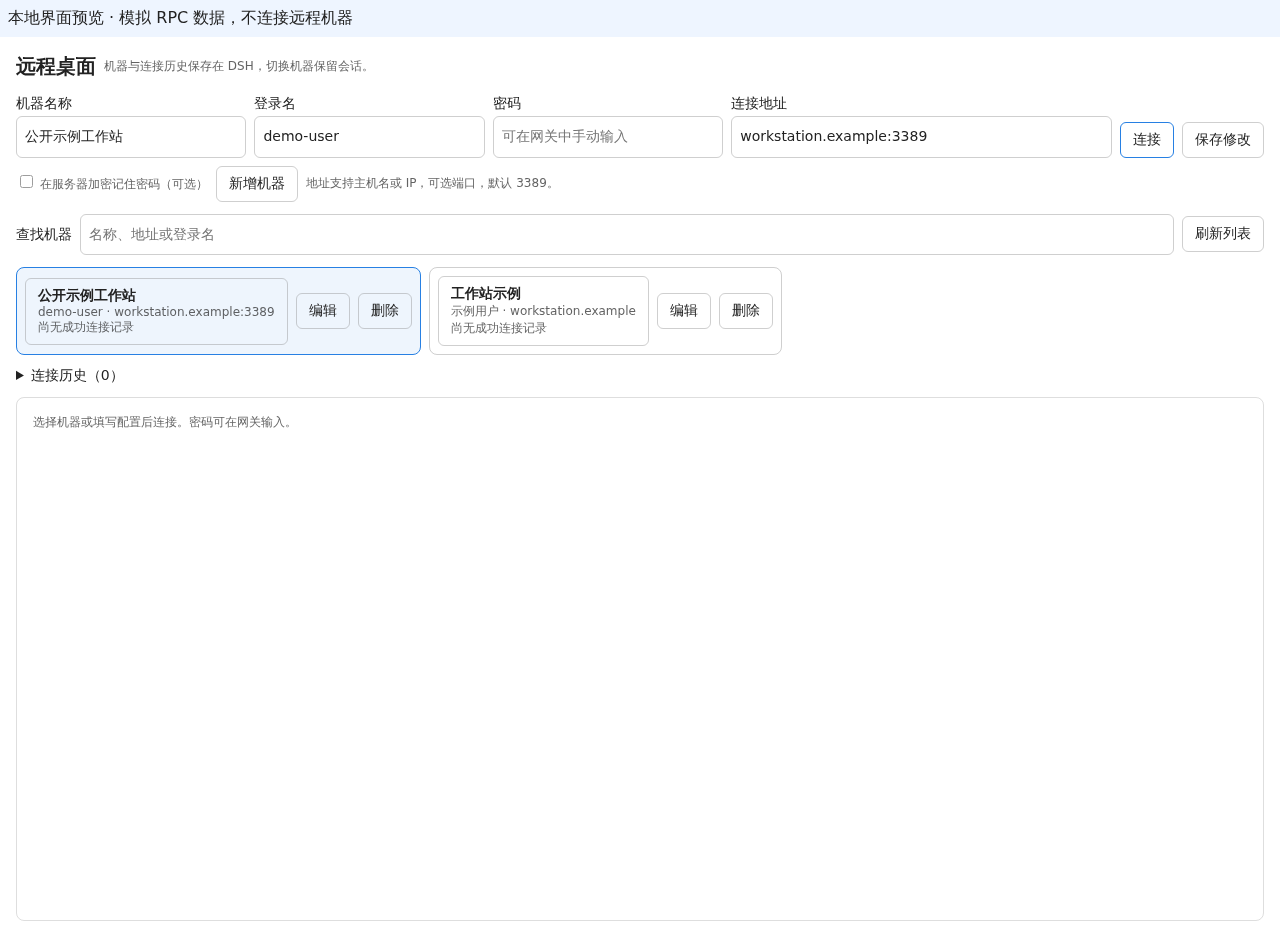
The form contains a machine name, Windows username, password, connection address, and buttons to connect or add a machine. Enter a hostname, IPv4 address, or bracketed IPv6 address, optionally followed by a port (3389 by default), such as 192.168.1.10:3389. Adding a machine only saves its configuration; connecting saves the configuration and opens the gateway. Leave the password blank to enter it manually at the gateway's NLA login prompt. Passwords are persisted only when you select the option to remember the password encrypted on the server. Clear that option and save an existing machine to remove its stored password.
Search machines by name, address, or username, and edit or delete their configurations. Switching machines preserves open iframes; disconnecting closes the embedded view. Connection history records individual attempts, desktop readiness, disconnections, and failures, with filtering by the current machine, refresh, and pagination. The server generates error details; the client reports only predefined reason codes.
Connection status comes from the Guacamole client. A connection is recorded as successful only when its state is CONNECTED, no login parameters remain to be entered, and both desktop dimensions are valid. Connections waiting for NLA credentials or displaying a shared desktop with zero dimensions are not marked as successful. The separate-window button becomes available when the desktop is ready and joins the same session through the current tunnel UUID. If the session cannot be reused, an error is displayed. Keep the original page open. Closing the separate window does not close the embedded view. Refreshing the entire host page unloads the embedded view; when you select a machine again, the server checks for an active session previously confirmed as ready.
Resizing or maximizing the separate window automatically fits the remote desktop and requests the corresponding resolution within the same session. After updating the plugin, refresh DSH and reopen the separate window to use the updated behavior.
Legacy browser entries remain in their original storage. Same-site connection IDs that match machines imported by the server use the server configuration. Unmatched or external entries appear in the legacy browser entries section and can be opened separately.
Interface preview
The image below shows the actual panel component in a local preview with mock RPC and generic sample data. It demonstrates the machine form, list, and connection-history controls. The preview does not connect to remote machines or establish that real remote desktop login has been validated.
Build and install
dsp-rdp is published on npm. Install it into the DSH Web profile:
dsh plugin --profile web add dsp-rdp
Availability in the in-app plugin center still depends on the community catalog scan. Publishing to npm does not mean the marketplace has already synchronized. Maintainer instructions are available in the npm release guide (Chinese).
You can also install the source version from the GitHub repository:
dsh plugin --profile web add github:andarmworld/dsp-rdp
To build and install from local source:
npm ci
npm run typecheck
npm test
npm run build
DSH_HOME=/path/to/isolated/dsh-home dsh plugin --profile web add /absolute/path/to/dsp-rdp
The server loads with the DSH plugin. The client uses DSH's native connection.rpc over the existing /api channel to call rdp/* methods. The server registers the corresponding /api/rdp/* routes within the existing DSH Web service. Machine management and history requests reuse the existing DSH service, address, and authentication. No separate API process, listening port, or management API reverse proxy is required. The client injection list includes @deepseek-ai/dsh-client-connection.
Gateway and storage
The plugin requires a running Guacamole 1.6.0 installation with a PostgreSQL data source, accessible through the same-site /guacamole/ path. The reverse proxy must support WebSocket Upgrade. The gateway host must be able to reach the target machines on TCP port 3389. gateway/compose.yaml provides a template for Guacamole, guacd, and PostgreSQL.
The plugin stores machines and history in DSH's native storage domain and does not create a separate SQLite database. Server configuration fields:
| Field | Default | Purpose |
|---|---|---|
guacamoleUrl |
http://127.0.0.1:18081/guacamole |
Gateway URL accessed only by the server |
gatewayUser |
dshadmin |
Gateway user for importing and connecting |
adminUser |
guacadmin |
Trusted local header identity for managing connections and permissions |
keyFile |
<DSH_HOME>/secrets/rdp.key |
Separate password-encryption key file |
Set these fields in the Web profile's plugin configuration, for example:
- id: ligoo-rdp
  name: dsp-rdp
  config:
    guacamoleUrl: http://127.0.0.1:18081/guacamole
    gatewayUser: dshadmin
    adminUser: guacadmin
    keyFile: /private/dsh-home/secrets/rdp.key
The gateway uses trusted local header authentication. Restrict gateway access to trusted local callers; external requests must not be able to supply an administrative identity. Keep the key file outside this repository and release packages. The server imports connections authorized for the gateway user and manages permissions for newly created connections. Operators of the same DSH instance share this plugin's data; protect access with DSH authentication.
Optional password storage uses AES-256-GCM encryption, with the key stored separately and protected by file permissions. Lists and history never return passwords. Temporary login credentials are passed to the gateway only for an explicit connection. Passwords are not written to browser storage, connection URLs, or logs. The browser automatically submits a password only once to a visible NLA password form on the same-origin gateway; it does not automatically retry an incorrect password.
Local interface preview
npm run preview
The preview binds only to 127.0.0.1:4173, renders the actual RdpPanel, and explicitly labels its mock RPC data. Use it to check the layout and interactions of the form, machine list, and history. It does not start a management API, proxy the gateway, connect to remote machines, or include hardcoded passwords. Validate real RPC, persistence, NLA, and remote desktop behavior inside DSH.
Validation and releases
Local checks cover address validation, encrypted storage, gateway API contracts, actual client identifiers, NLA and zero-size desktop readiness, form error recovery, iframe preservation, history pagination and terminal-state deduplication, and native RPC initialization. In a real browser, check layouts at widths of 375, 768, and 1280px. After entering login credentials, verify the real desktop, keyboard and mouse input, separate windows sharing the same session, and data recovery across browsers.
Unmounting the panel attempts to report a disconnection. If the browser process is terminated or the network is interrupted, the final request may not reach the server.
Before each release, commit changes locally in this repository with a message containing the version and implemented changes, and update CHANGELOG.md. Build the release package from that commit and record the target environment, version, commit hash, and validation results. Remote deployments and pushes require explicit authorization.
License
This project is licensed under the MIT License. Copyright belongs to andarmworld.
Related plugins
dsh-web(原 dsh-web-ui)
 zhu1090093659
/dsh-web-ui
dsh-web(原 dsh-web-ui):任务看板、git 图、右侧面板、远程移动端 UI、桌宠、实时 token 统计与皮肤中心的全家桶。仓库已更名 zhu1090093659/dsh-web,根目录声明 dsh.bundle.patch,支持根 Git 入口安装。
dsh plugin --profile web add github:zhu1090093659/dsh-webdsh-web-all 聚合包(原 dsh-web-ui-all)
zhu1090093659zhu1090093659/dsh-web-ui/packages/dsh-web-ui-all
旧整包路径 packages/dsh-web-ui-all 已随仓库更名 dsh-web 迁移:现聚合目录为 packages/dsh-web-all,npm 聚合包 @linxin666/dsh-web-all。与总仓根 Git 入口是同一产品的两种整包方式,不重复计数。
dsh plugin --profile web add @linxin666/dsh-web-all@latestdsh-TUI
 ccch1mneyyy
/dsh-TUI
Claude Code 风格全屏终端 UI:像素鲸鱼顶栏、实时工作状态行、思考流式展开。
dsh plugin --profile web add github:ccch1mneyyy/dsh-TUIdsh-cc-tui
ccch1mneyyyccch1mneyyy/dsh-cc-tui
一个美观且实用的 Claude Code 风格 TUI 插件:像素鲸鱼顶栏、双流光大字、实时工作状态行、思考流式展开、双击 Esc 时间回溯、蓝白上下文进度条 + TPS 仪表。 零核心改动,纯插件挂载。安装插件即可启用,卸载后不会留下核心补丁。 献给钟爱tui的各位极客们 A beautiful, practical Claude…
dsh plugin --profile web add github:ccch1mneyyy/dsh-cc-tuideepseek-balance-whale-widget
 meteornox
/deepseek-balance-whale-widget
DSH 小鲸鱼余额挂件(DeepSeek Balance Whale Widget)
dsh plugin --profile web add github:meteornox/deepseek-balance-whale-widgetDSH-better-sidebar
 omdsh-dev
/DSH-better-sidebar
侧边栏完整工作台:内置文件渲染编辑、终端、Git 与子代理,支持三方插件注册新 Tab。
dsh plugin --profile web add github:omdsh-dev/DSH-better-sidebar