
Sessions & Messages
dsh-inline-quote
anqifox/dsh-inline-quote · ★ 0
 anqifox
Inline quote reference chips for DeepSeek Harness: select text in a conversation, get a native composer chip.
README body is shown in Chinese.
Manifest details
安装
dsh plugin --profile web add 'dsh-inline-quote@0.1.1'从 npm 安装预构建包
For install and environment setup, plus plugin development tutorials, see DSH community docs ↗
README
Table of contents
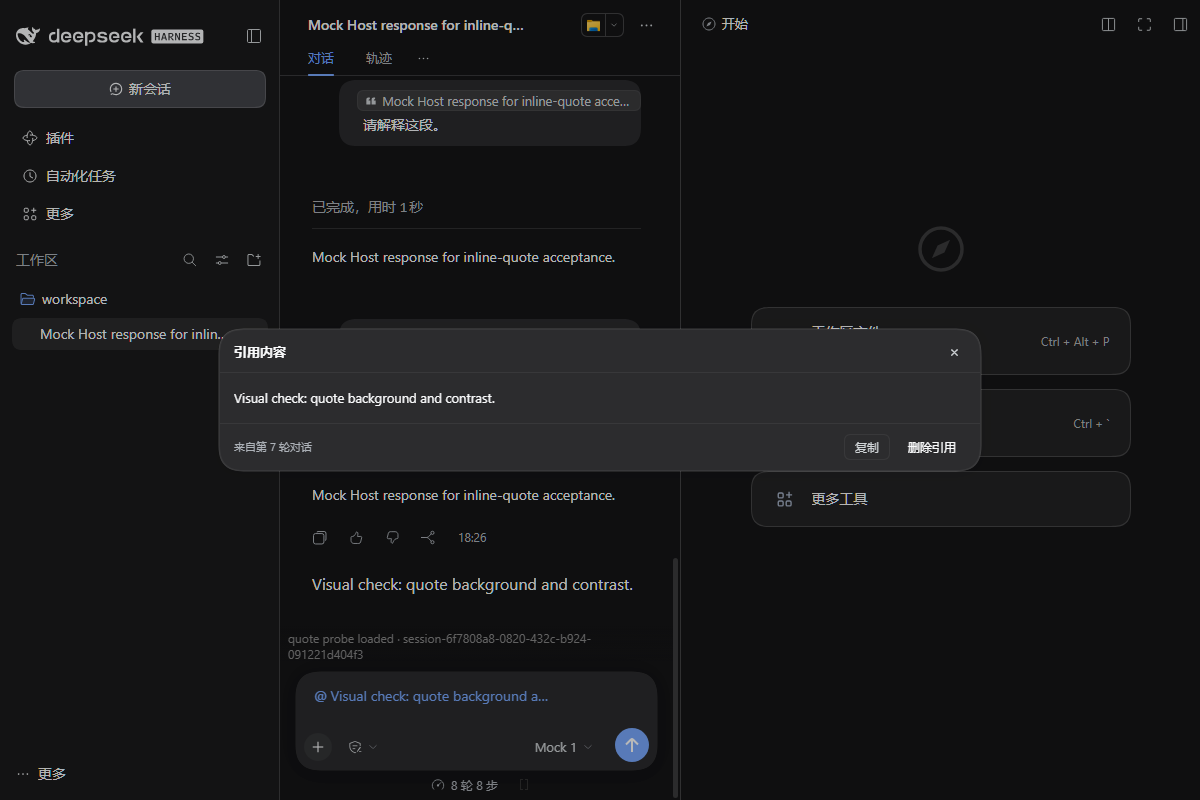
Select text. Click Quote. Keep the excerpt in your message.
为 DeepSeek Harness (DSH) 提供行内引用:在聊天中划选文字,点击 引用,即可将原文插入输入框,显示为可交互的引用标签(Chip),并与自己的文字混排。
A small Web Client plugin for DeepSeek Harness. Select text in a chat message, click Quote, and insert a native reference chip into the existing composer.
Features / 功能
- Inline quotes / 行内引用: Insert one or multiple excerpts alongside normal text, in any order.
- Native chips / 原生标签: Use DSH's existing composer instead of a separate chat or quote panel.
- Preview / 原文预览: Click a chip to read or copy the complete excerpt. Code excerpts retain indentation and line breaks.
- Edit / 编辑: Remove a quote from the draft or undo the deletion. Previously sent quotes remain read-only.
- Model context / 模型上下文: The full quoted text is passed with explicit
DSH_QUOTEboundaries, not just the short chip label.
Install / 安装
dsh plugin --profile <profile> add dsh-inline-quote
Replace <profile> with your DSH profile name. Restart or reload the relevant DSH client if your installation requires it.
How to use / 使用方法
- Open a conversation in DSH and select text in a completed message. / 在已完成的聊天消息中划选文字。
- Click 引用 / Quote beside the selection. / 点击浮现的「引用」。
- Continue typing around the inserted chip; click it to preview or remove it. / 在引用标签前后继续输入,点击标签查看原文。
Compatibility & limitations / 兼容性与限制
- Developed and tested against DSH
0.2.1-rc.3Web Client. Other DSH versions have not been verified. - The current release accepts selections within one completed chat row. Selection across multiple messages and quoting from the Trajectory / 轨迹 view are not available in the released version.
- The plugin uses some internal DSH Client interfaces. An upstream change may require a compatibility update.
- Drafts containing quote chips depend on this plugin. Send or clear those drafts before uninstalling it.
Development / 开发
Source: client.js · Changes · Issues · Pull requests.
The next feature being explored is selecting and quoting text from the Trajectory view. See the prototype PR; it is not part of the released version.
MIT License — see LICENSE.
Related plugins
archify
 tt-a1i
/archify
架构图生成 Skill 总仓(多宿主):可校验的自包含架构图、工作流图、时序图、数据流图与生命周期图。DSH 安装不走本仓根——根目录不是 DSH bundle,请用适配包 @tt-a1i/archify-dsh(见 DSH 集成条目)。
dsh plugin --profile web add @tt-a1i/archify-dsh@1.0.0DeepSeek-Bot
 Fei2411
/DS-Bot/ds-bot
DS Bot: a team of long-lived Bots for DeepSeek Harness, with Main Bots, Bot-to-Bot messages and group chats
dsh plugin --profile web add 'ds-bot@0.2.4'Study-Mate
 Miaotofu01
/Study-Mate
StudyMate learning skills and lesson engine for DeepSeek Harness, Google Antigravity, Codex and ChatGPT Work.
dsh plugin --profile web add 'github:Miaotofu01/Study-Mate#d8114f38363272852b339d6788b2f8f007243b43'dsh-plugin-subscriptions
 V1ki
V1ki/dsh-plugin-subscriptions
把 ChatGPT(Codex)、Claude 与 Grok(X Premium)订阅用作 DeepSeek Harness 的 LLM provider——Web UI OAuth 登录,无需 API key
dsh plugin --profile web add github:V1ki/dsh-plugin-subscriptionsRabiRoute
 vb2250158
/RabiRoute/plugins/rabi-dsh-context
Connect DSH lifecycle events and conversation context to Rabi Manager.
dsh plugin --profile web add 'github:vb2250158/RabiRoute#e483f87e68cef2c8f5112b101e333b1a9577a9f7&path:/plugins/rabi-dsh-context'dsh-deepseek-web-login
 cv-superding
/dsh-deepseek-web-login
Unofficial DSH plugin: use chat.deepseek.com web models as a DSH LLM provider (browser login capture + PoW solving + SSE streaming + prompting-based tool calls), provider route deepseek-web
dsh plugin --profile web add 'dsh-deepseek-web-login@1.0.3'