
Workflow & Automation
dsh-rea-agents
appthin/dsh-rea-agents · ★ 9
 appthin
Pinned-version REA for DeepSeek Harness: installs rea-agents locally, starts its MCP server from that pinned copy, and upgrades only when you press Update.
Manifest details
安装
dsh plugin --profile web add 'dsh-rea-agents@1.0.8'从 npm 安装预构建包
For install and environment setup, plus plugin development tutorials, see DSH community docs ↗
README
Table of contents
- Screenshots
- Installation
- Option 1: install from the Plugins page (Desktop)
- Option 2: install from the CLI (web / tui profiles)
- After installing the plugin
- Verifying
- Updating and uninstalling
- Where the controls live
- What the controls do
- Why Update may install an older release
- An unrelated package must not hold REA hostage
- Bringing your own engines
- What is pinned, and where it is written
- Safety commitments
- Troubleshooting
- /rea-agents/diagnose
- A withheld frida build script
- A tool reports provider_unavailable
- Development
- Layout
- License
A DeepSeek Harness plugin that pins REA (rea-agents) to one exact
version. It starts REA's MCP server (207 reverse-engineering tools) from the copy installed in your
profile, and the version moves only when you press Update on the plugin's own card.
Why pin instead of keeping npx -y rea-agents@latest?
- Results stop being comparable between sessions. A silent upgrade can change a tool's schema, its Evidence handling, or its defaults, and nothing on your side records that it happened.
- A compromised release is live immediately. There is no review step and no version to roll back to.
- "It worked yesterday" becomes unfalsifiable. You cannot tell whether the target changed or the tool did.
For a tool whose whole job is producing evidence you then reason about, always-fetch-latest is the wrong default. This plugin inverts it: boot reads the pinned copy from disk, and a newer release arrives only after you have seen the version number and asked for it.
Screenshots
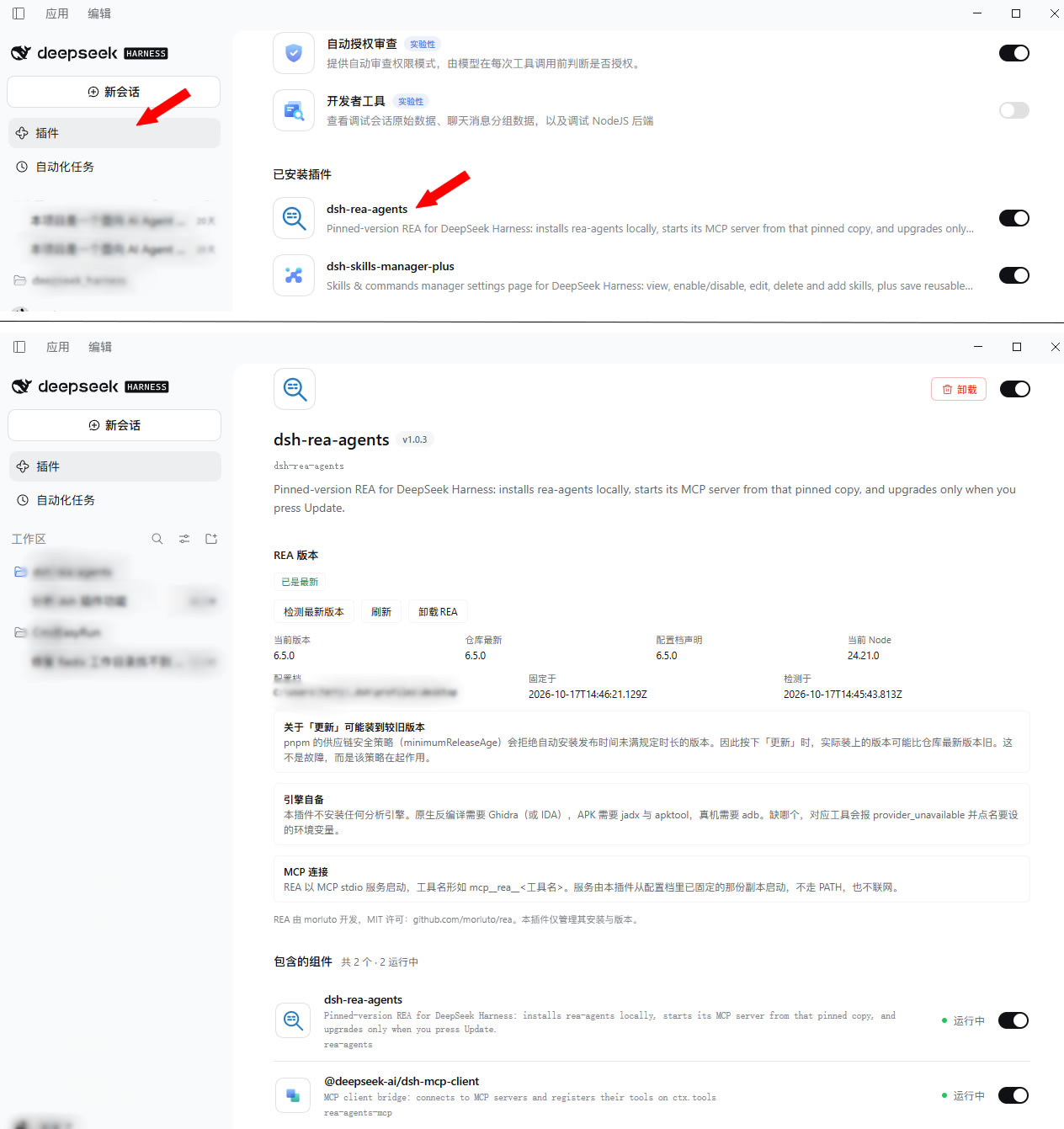
Plugins → dsh-rea-agents: version, install state and the actions that move it, on the plugin's own card.
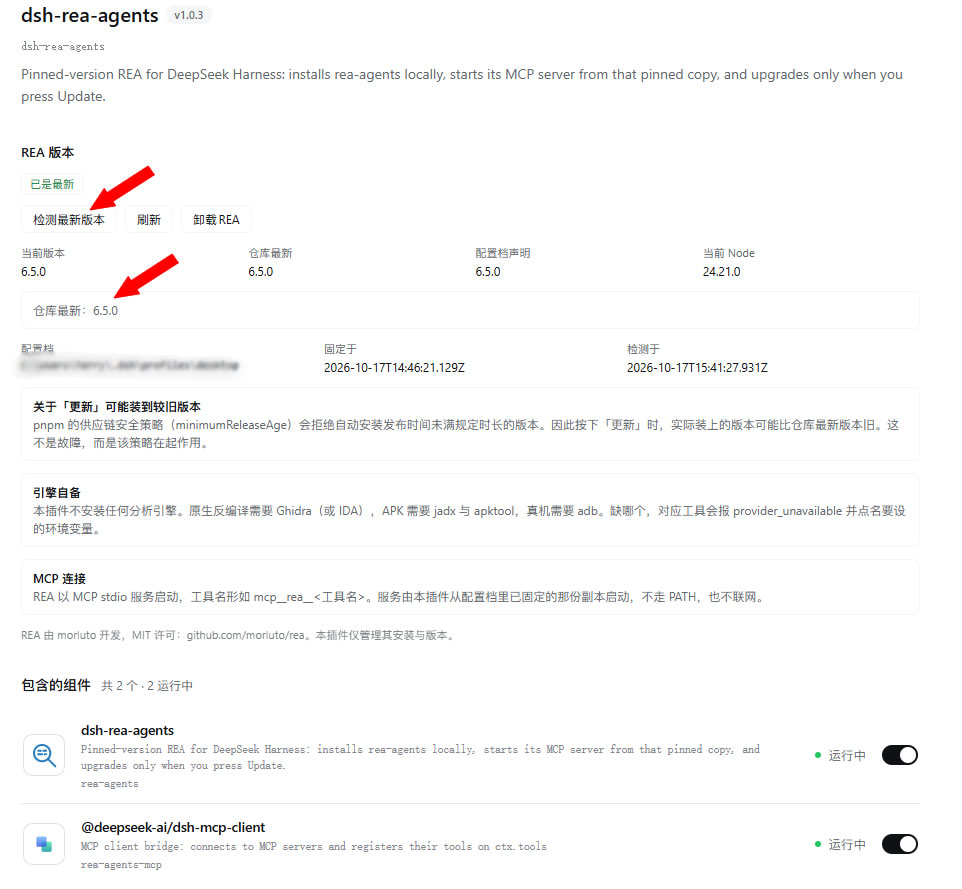
Check for a newer version: asks the profile's own registry (pnpm view), opening no second
network path.
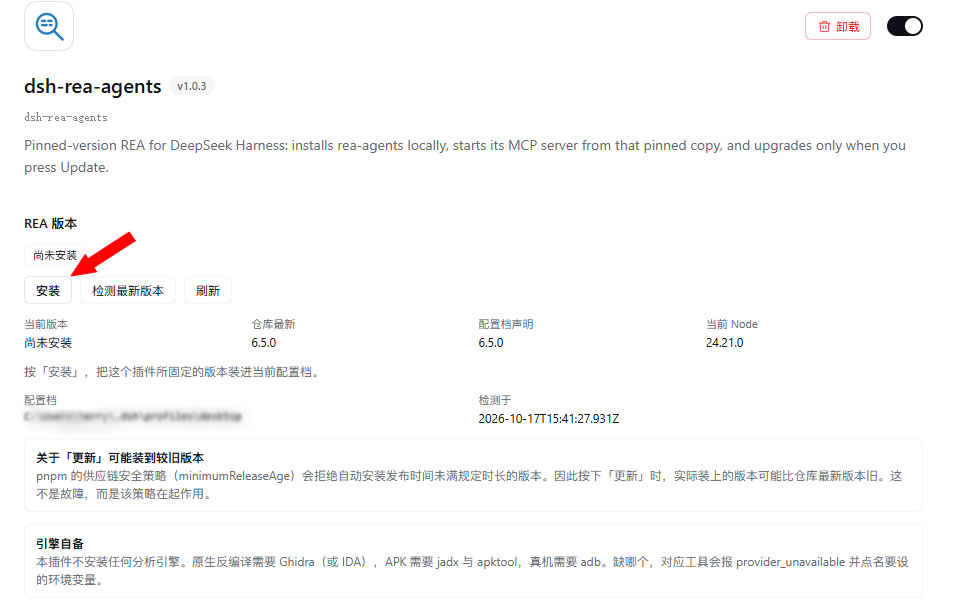
Not installed yet: pressing Install adds the pinned version to the current profile.
Installation
Requirements: DSH >= 0.1.6-alpha.1 and < 0.3.0 (declared explicitly against the prerelease
branches). The plugin itself requires Node >= 22.19.0; rea-agents declares
^22.19.0 || ^24.11.0 || >=26.0.0, and the card reports a mismatch before you install.
Option 1: install from the Plugins page (Desktop)
Open Plugins in the sidebar → Add in the top right → enter the source and install.
Desktop's profile is managed exclusively by the Electron application.
dsh plugin --profile desktop …is rejected outright by the CLI (error: profile "desktop" is managed exclusively by the Electron application). That is a hard constraint of DSH, not a limitation of this plugin. On Desktop, install from inside the app.
Option 2: install from the CLI (web / tui profiles)
# npm package (once published)
dsh plugin --profile web add dsh-rea-agents

# GitHub repository
dsh plugin --profile web add github:<your-account>/dsh-rea-agents

# Local directory (installed as a link, so edits take effect immediately — useful while developing)
dsh plugin --profile web add file:D:/path/to/dsh-rea-agents
Restart dsh afterwards (or wait for the profile to hot-reload); the controls appear on the Plugins → dsh-rea-agents card.
After installing the plugin
The plugin only pins REA, watches its version and opens the MCP connection. Installing REA itself
takes one more press of Install on the card, which writes the dependency, runs
pnpm add rea-agents@<version> --save-exact, and records what was pinned.
Verifying
Open dsh and go to Plugins → dsh-rea-agents; a "REA version" section should appear on the card. If it does not, work through these in order:
- Confirm the plugin is in the profile you are actually running (
dsh plugin --profile web ls). - Restart dsh once — the browser half's module table is built at startup.
- Open
http://127.0.0.1:<your port>/rea-agents/diagnoseand read where it stopped (next section). - If it still does not work, open an issue with the
/diagnoseoutput.
Confirming REA is actually connected
A version on the card only proves the plugin is running; it does not prove the MCP link is up. To confirm the tools really are usable, hand this to the assistant in DSH:
List your
mcp__rea__tools, then callmcp__rea__binary_sessionwith an empty{}and show me what it returns.
If the assistant can list a set of mcp__rea__ tools and binary_session comes back with a session
description rather than "no such tool", REA's tools are registered with the model.
Updating and uninstalling
dsh plugin --profile web ls                     # list installed plugins
dsh plugin --profile web add dsh-rea-agents      # update the plugin itself
dsh plugin --profile web remove dsh-rea-agents   # uninstall the plugin
Removing the plugin does not delete the rea-agents copy you installed. To remove both, press
Uninstall REA on the card first, then remove the plugin. Analysis engines are unrelated to this
plugin and are never deleted.
Where the controls live
They sit on Plugins → dsh-rea-agents → the card, between its description and "Included components", alongside that plugin's master switch and uninstall button. REA is a plugin, and its version is a property of that plugin — not a top-level preference like account or model settings.
The plugin's master switch is the master control: off removes both the MCP server and this section, on brings both back, and changing it needs no restart.
What the controls do
| Control | What it does |
|---|---|
| Install | Installs the version the registry currently offers, exactly, and pins it with --save-exact |
| Check for newer version | Asks the profile's own registry (pnpm view), reusing your registry, proxy and authentication settings |
| Update | Moves to that version in place — one pnpm add, not an uninstall followed by an install |
| Uninstall REA | Removes the pinned copy. REA's tools stop working until you install again |
| Refresh | Re-reads the on-disk state |
| Version comparison | Current, registry latest, profile declaration and Node version, side by side |
| Localization | A picker in the card's corner sets Follow interface / 中文 / English for this section; the choice is remembered in the browser |
| After an action | The state is re-read from disk, so a manual Refresh is not needed to see the new version |
The version on the card is read back from disk after every action, so what you see is the copy the MCP server will start.
The language picker applies to this section only and does not change DSH's own setting: you may prefer a Chinese interface while sharing English screenshots, or the reverse. Choosing "Follow interface" restores the default behaviour.
Why Update may install an older release
pnpm's supply-chain policy (minimumReleaseAge) refuses to install a version published more recently
than a configured window — it has not been public long enough for anyone to notice whether it is
malicious. That policy applies to this plugin's installs too.
So pressing Update may install 6.5.0 while the registry's newest is 6.6.0. The plugin says so
plainly: before you press, on the card, and again afterwards if it happens:
This installation used 6.5.0 rather than 6.6.0. Under pnpm's supply-chain policy (minimumReleaseAge), 6.6.0 has not completed its waiting period, so it was not installed.
This is not a failure to work around. A plugin that quietly bypassed the waiting period would be trading the guarantee that pinning was supposed to provide for the appearance of being up to date.
An unrelated package must not hold REA hostage
pnpm verifies the whole lockfile before changing anything, so if any entry in the profile has
not finished its waiting period, every pnpm operation is refused — even when that package has
nothing to do with REA. (That is exactly how it failed in the field: a fresh dshmarket release
blocked updating REA.) The plugin:
- parses the entries pnpm itself names as offending;
- retries once, exempting only those, with
--config.minimum-release-age-exclude; - says on the page which entries were exempted when an update needed that.
It never exempts REA itself. If the REA version you asked for is too new, the update stays failed and explains why — exempting it would quietly cancel the very waiting period you rely on. That is deliberate.
The exempted entries are not themselves changed; they simply stop blocking this one operation.
Bringing your own engines
This plugin installs no analysis engine, exactly like REA itself. REA is an adapter: a missing
engine makes only its own tools report provider_unavailable, and the message names the variable to
set.
| Capability | You provide |
|---|---|
| Native PE/ELF static analysis | Ghidra 12.1.x + JDK 21+, or your own IDA |
| APK resources / DEX | apktool, jadx |
| Devices / emulators | Android platform-tools (adb) |
| Packets / signals / firmware / WASM / SQLite | tshark, sigrok-cli, binwalk or unblob, WABT, Node's built-in SQLite |
Set them as user or system environment variables before starting DSH — the MCP server inherits the harness process environment:
GHIDRA_INSTALL_DIR     = D:\tools\ghidra_12.1.4_PUBLIC
JAVA_HOME              = D:\tools\jdk-21
REA_JADX_MCP_JAR       = D:\tools\jadx-headless-mcp-0.7.1-all.jar
REA_APKTOOL_COMMAND    = D:\tools\apktool\apktool.cmd
REA_ADB_PATH           = D:\Android\Sdk\platform-tools\adb.exe
REA_TSHARK_COMMAND     = D:\tools\Wireshark\tshark.exe
REA_CAPINFOS_COMMAND   = D:\tools\Wireshark\capinfos.exe
REA_SIGROK_COMMAND     = D:\tools\sigrok\sigrok-cli.exe
REA_WABT_BIN_DIRECTORY = D:\tools\wabt\bin
The MCP child process runs with a scrubbed environment (credential-shaped names and stale
DSH_*variables are removed). The variables above are not in that scrubbed set and are inherited normally. When pnpm is not on PATH, pointDSH_PNPM_PATHat the pnpm executable.
What is pinned, and where it is written
The plugin writes exactly two things, both inside the current profile:
<profile>/package.json                  # dependencies: rea-agents@<version>, declared exactly
<profile>/dsh-rea-agents/pin.json       # pin record: version, time, origin, withheld builds
It never reads or writes your patch layer cordis.patch.yml. Both loader entries come from this
plugin's bundle patch:
| Entry id | Purpose |
|---|---|
rea-agents |
This plugin's host half (pinning and installing REA) |
rea-agents-mcp |
The MCP server, started from the pinned copy inside the profile |
The MCP entry's command is the runtime already running the harness, not a node looked up on
PATH, and the launcher path is computed from the harness home. Both matter: the MCP child runs with a
scrubbed environment, so the path must be evaluated host-side rather than discovered in the child. The
launcher never consults PATH and never touches the network, so a boot cannot fetch or execute a
newly published release.
Why is the entry id
rea-agents-mcprather than the shorterrea-mcp? If your profile ever registered REA by hand, it may hold a- id: rea-mcp/disabled: trueoverride. Reusing the short id would let that line silently switch this plugin's MCP server off while the card kept working — a failure that looks like success. A distinct id keeps the two independent, and the old entry simply becomes inert.
Safety commitments
- Loopback only. The API is mounted on the same loopback web server, and non-loopback callers get a
- One package, nothing else. No dependency other than
rea-agentsis ever added to the profile. - No engines installed. Ghidra, IDA, jadx, apktool, adb and the rest stay yours to provide.
- Your patch layer is untouched. The pin record lives in this plugin's own state directory;
cordis.patch.ymlis never read or written. - The supply-chain policy is not bypassed. A version the waiting period held back is reported as such, not routed around through some other install path.
Troubleshooting
/rea-agents/diagnose
Answers one question that cannot be answered offline: did the browser half reach the page's module graph?
curl http://127.0.0.1:<port>/rea-agents/diagnose
graph.selfPresentbeingtruemeans the bundle was accepted by the page;falsemeans the problem is in package discovery (dsh.clientinpackage.json,exports["./client"], or whether the package resolves at all).gatesreports the composer's per-row gate: a row with no fiber, or with no resolution base URL, never reaches the page even though it appears in the Loader.selfRowsreports both therea-agentsandrea-agents-mcprows — the latter's module name,@deepseek-ai/dsh-mcp-client, contains no "rea", so it is matched by id here.
A withheld frida build script
Installing REA makes pnpm report ERR_PNPM_IGNORED_BUILDS for the optional frida dependency. The
package is installed and its CLI starts; only the runtime-instrumentation tools that need a compiled
Frida binding are unavailable.
The plugin judges success by what is on disk, and reports the withheld build as a milder fact of its own. Reading only the exit code would call your working copy a failed installation.
A tool reports provider_unavailable
That tool's engine is missing. Read the operation's provider diagnostics, or call binary_session and
check result.tool_availability, which names the environment variable to set. Once it is set, DSH must
be restarted — environment variables are read only at startup.
Development
npm test                # the main suite (host half + browser half)
npm run test:render     # browser half rendered in all three states: loading / ready / failed
npm run test:dict       # bilingual dictionary audit
npm run test:docs       # docs audit: cross-links, and screenshots.json vs what the READMEs embed
npm run test:discovery  # client-module discovery (dsh.client / exports["./client"])
npm run test:compose    # the resolution path against a real profile
| Suite | Coverage |
|---|---|
test/run.mjs |
Every host HTTP route, driven through the real apply() with a fake Cordis context; non-loopback refusal; version-string validation; the launcher's missing-pin remedy |
test/render.mjs |
Drives the browser half through a minimal React and asserts all three states produce content; statically checks that every rendered component is defined |
test/dictionary.mjs |
Both locales present, every key read, none read without being defined |
test/docs.mjs |
The bilingual cross-links resolve, and screenshots.json agrees with the images the READMEs embed, in both directions |
test/discovery.mjs |
Walks the composer's package-discovery steps one at a time |
test/compose-check.mjs |
Reproduces the composer's decision against a real profile |
The tests use no test framework — only what Node ships.
Layout
lib/index.js      Host half: pins the version, runs pnpm, publishes the loopback API
lib/client.js     Browser half: the configuration section on the plugin's card (lazy-CJS, no build step)
lib/rea-mcp.mjs   MCP launcher: resolves the pinned copy from the profile; no PATH, no network
cordis.patch.yml  Bundle patch: inserts the two loader entries above
License
The plugin's own code is MIT, see LICENSE.
REA is by morluto, MIT licensed. This plugin contains no REA source code and no third-party binaries — it downloads the package from the registry at your request. It also ships none of REA's documentation or skills: those belong to whatever installs them.
Related plugins
rea
 morluto
/rea
逆向工程 CLI/MCP 工具(rea-agents):用 agent 逆向应用行为到原生二进制。独立工具而非 DSH 插件——仓库根 package.json 无 dsh 字段,本条目仅作外部工具参考。
npx rea-agents@latest setupArchify DSH 集成
 tt-a1i
/archify/integrations/deepseek-harness
Archify 的 DeepSeek Harness 集成:经 @tt-a1i/archify-dsh 适配包安装,在 dsh 中生成经校验的自包含交互式架构图、流程图、时序图、数据流图与生命周期图。安装信息基于已发布的 1.0.0;候选 1.1.0 与未发布的源码修复不计入。
dsh plugin --profile web add @tt-a1i/archify-dsh@1.0.0dsh-plugin
 Q00
Q00/ouroboros/integrations/dsh-plugin
通过 DSH MCP 客户端挂载 Ouroboros 的纯配置包,在 DSH 中提供 36 个涵盖需求访谈、Seed、执行、评估与演化流程的工具。
dsh plugin --profile web add github:Q00/ouroboros#path:/integrations/dsh-pluginanswer-me-with-html
 QingYunA
/answer-me-with-html
Answer hard questions with a one-page HTML: the model writes a short Markdown draft; the bundled CLI handles templates, SVG auto-layout and an STE controlled-writing check.
dsh plugin --profile web add 'github:QingYunA/answer-me-with-html#aab9ea19f50f038054eeb60475bbb7ea26f149e3'dashi-taskboard
 chuspeeism
/dashi-taskboard/integrations/deepseek-harness
现代化可灵活嵌入的任务面板,支持 Codex、DeepSeek Harness
dsh plugin --profile web add 'github:chuspeeism/dashi-taskboard#9aa1f4e7936d841748ed4e0fc7781b57ae6ae6cc&path:/integrations/deepseek-harness'dsh-agent-teams
 NanmiCoder
/dsh-agent-teams
AgentTeams 多智能体团队。
dsh plugin --profile web add github:NanmiCoder/dsh-agent-teams