
Memory
dsh-keepsake
axuan-1314/dsh-keepsake · ★ 0
 axuan-1314
项目记忆自动提取+注入(cordis 插件):会话轮结束触发单次 LLM 提取,落盘 ~/.dsh/memory/projects/<slug>-<hash16>/memory/(.md+MEMORY.md 索引),经 durable 用户消息通道注入人设/索引(injectChannel 可回退到 systemPrompt 注入)。v1 单次调用简化提取。
Manifest details
安装
dsh plugin --profile web add 'github:axuan-1314/dsh-keepsake#bf295f6da3f5030eb9b9fceaeb78ea28803a00a0'GitHub 源码安装:首次需按提示配置 allowBuilds 构建授权后重试
For install and environment setup, plus plugin development tutorials, see DSH community docs ↗
README
Table of contents


English | 中文
A memory plugin for DSH (DeepSeek Harness). It remembers what you talked about, so your next conversation doesn't start from zero.
The problem
Every new DSH session starts blank. The API convention you settled on last week, this project's directory layout, the preference you'd rather not repeat — all of it has to be re-explained.
This plugin works in the background:
- Capture — when a turn ends, it decides whether anything is worth remembering and writes it to a local Markdown file.
- Carry — on every subsequent turn it injects the relevant memories back into context, so the model "remembers" you.
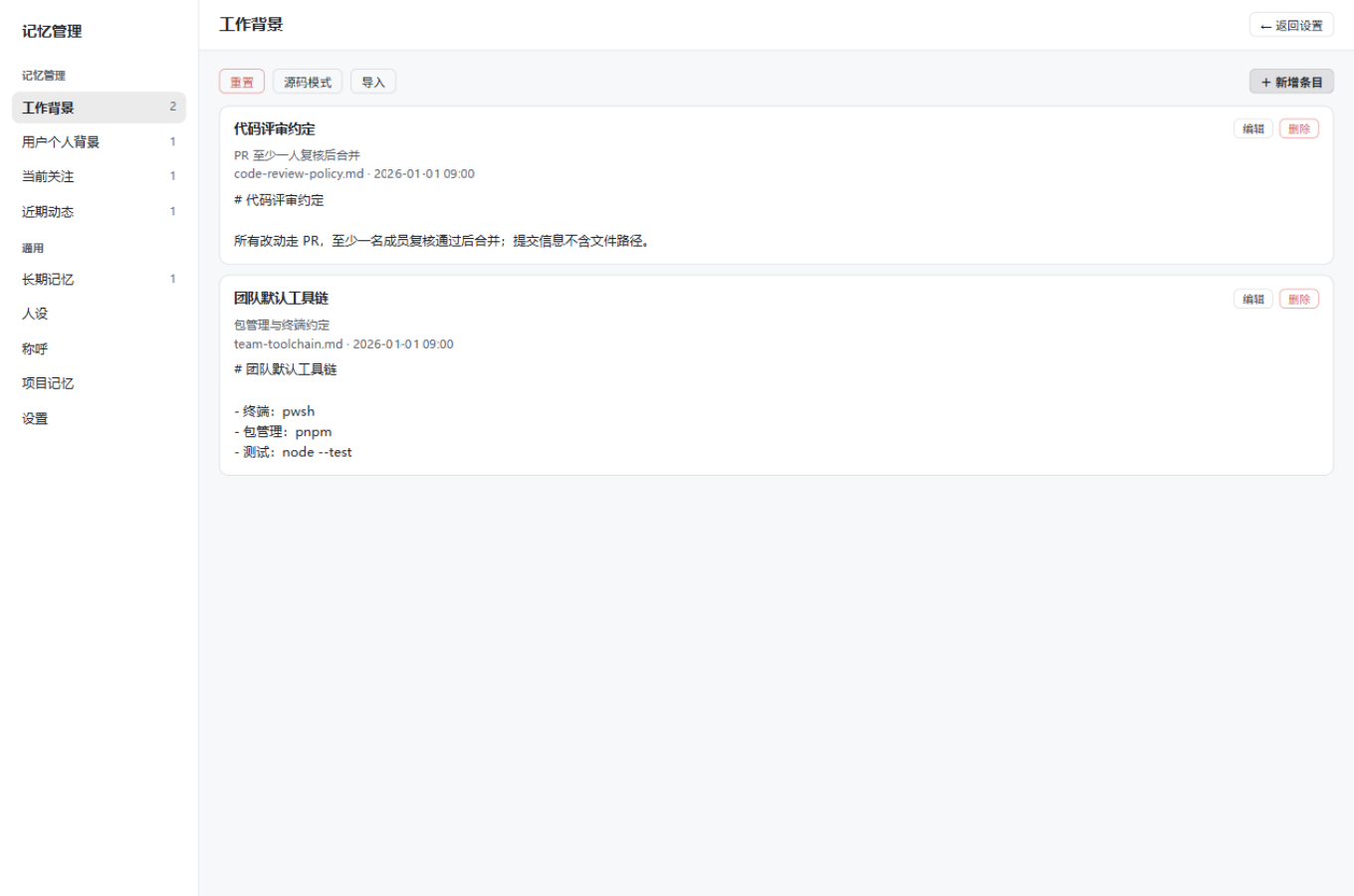
- Manage — a local panel where you can see, edit, and delete everything that was recorded, and edit your persona.
Memories live as plain Markdown under ~/.dsh/memory/. Open them in any editor, edit them, put them in git. Nothing is uploaded.
Install
dsh plugin --profile web add "https://github.com/axuan-1314/dsh-keepsake/archive/refs/tags/v0.7.1.tar.gz"
--profile can also be headless or desktop. Zero runtime dependencies — no npm install.
To install from main (includes work not yet tagged), swap the tag for heads/main: .../archive/refs/heads/main.tar.gz.
After installing, open a new session and talk for a few turns with real content, then check whether new .md files appeared under ~/.dsh/memory/. The panel lives in DSH settings under the "Memory" section.
Detailed install / upgrade / rollback steps are in docs/install.md (Chinese).
What changed recently
Since v0.7.1:
- Correction loop — previously a wrong memory could only be overwritten by chance on the next extraction, often leaving two contradictory facts. Now you can say "this one is wrong, it's actually X" — via
/memory fixin chat, or by clicking "correct this" on a panel search result. Changes are snapshotted and revertible. /memorycommand — keyword search over memories without opening the panel.- Memory tidy-up — the panel surfaces duplicate entries, stale entries, and index/disk mismatches. One-click index repair touches index lines only, never deletes entries.
- Project knowledge pages — compress a project's memories into 5 stable views (component map, core concepts, conventions, key decisions, in progress). Manually triggered, never automatic.
- Idle review (off by default) — let the model merge duplicates and clean up expired project memories while idle.
- Panel readability — the panel now uses its own opaque background colors. Previously, when a wallpaper plugin made the background translucent white, white text on the resulting light grey measured 3.10:1, and cards had no visible boundary against body text.
- Corrections no longer "half-apply" — every correction write used to degrade into an append, leaving both the old and new facts on disk. Fixed.
Full history in CHANGELOG.md; limits and deliberate non-features in ROADMAP.md.
Features at a glance
| Feature | Default | One line |
|---|---|---|
| Auto-extract + inject | on | Remembered after a turn, carried into the next |
| Management panel | — | Browse / edit / delete / import / persona / trash / snapshots |
| Content redaction | on | Keys, tokens, internal addresses never reach memory or prompts |
| Runtime memory layer | off | Compile entries into fixed-size profiles that ride along every turn |
| Semantic recall | off | Vector search by your current question |
| Project knowledge pages | manual | 5-page view per project |
| Idle review | off | Merge duplicates and prune while idle |
| Correction loop | — | A formal, revertible path for "this is wrong" |
Details on triggering, failure behavior, and how to turn each off are in docs/features.md (Chinese).
Configuration
For most people the panel is enough. You'd only edit cordis.patch.yml to pin a model for extraction, adjust injection budgets, or configure a semantic-recall endpoint.
| Key | Default | Meaning |
|---|---|---|
provider / model |
follow session route | Model used for extraction; must be set as a pair |
injectMaxChars |
30000 | Injection character budget |
injectMaxTokens |
24000 | Injection token budget (0 = off) |
redactionEnabled |
true |
Redaction master switch |
recallEnabled |
false |
Semantic recall switch |
All keys: docs/configuration.md (Chinese).
Where data lives
~/.dsh/memory/
├── global/                    # Global memory (cross-session)
│   ├── persona.md             # Persona
│   └── work-profile/ ...      # Four categories, each an index + entries
├── projects/<project>/memory/ # Project memory (isolated per workspace)
├── runtime/                   # Compiled runtime layer (deletable, rebuildable)
├── pages/                     # Knowledge pages (deletable, rebuildable)
├── backups/                   # Automatic backups
└── trash/                     # Recycle bin
The only source of truth is *.md and MEMORY.md. backups/, trash/, runtime/, and pages/ are copies or derived views — deleting them loses no memory (only the ability to roll back).
Full layout and file format: FORMAT.md.
Privacy: everything stays local. Extraction calls go through your current session's model route — there is no separate upload path. The API and panel bind to loopback only. Failure logs record error summaries, never conversation content.
Docs
| Document | Contents |
|---|---|
| docs/install.md | Install, upgrade, verify, uninstall, rollback |
| docs/features.md | Per-feature triggering, edge behavior, switches |
| docs/configuration.md | Every config key and default |
| docs/operations.md | Telemetry fields, REST endpoints, troubleshooting |
| FORMAT.md | Memory file format, directory conventions, format version |
| RUNTIME-FORMAT.md | Runtime memory layer format |
| CHANGELOG.md | Version history |
| ROADMAP.md | Design principles, known limits, deliberate non-features |
| CONTRIBUTING.md | Dev environment and PR conventions |
The docs/ pages are currently Chinese-only. FORMAT.md and RUNTIME-FORMAT.md are the interface specs and are precise enough to read alongside the code.
Development
npm test        # node --test, full unit suite
npm run check   # syntax check for lib/*.js
Zero dependencies — clone and run, nothing to install.
Related
Another DSH plugin by the same author, fully independent: dsh-usage-stats — token heatmap, trends, and per-model breakdown.
License
Related plugins
hindsight#coding-agents
 vectorize-io
/hindsight/hindsight-integrations/coding-agents
Hindsight:会学习的 Agent 长期记忆系统,自动召回/保存、知识页、深度反思与按仓库隔离的记忆银行。
dsh plugin --profile web add github:vectorize-io/hindsight#path:/hindsight-integrations/coding-agentsdsh-memory-plugin
 volcengine
/OpenViking/examples/dsh-memory-plugin
面向 DeepSeek Harness 的 OpenViking 记忆与上下文插件:pre-step 自动召回与画像注入、会话捕获、`viking://` URI 防护,以及对接 OpenViking 服务端的 recall/write 记忆工具。
dsh plugin --profile web add @openviking/dsh-memory-pluginmemos
 memtensor
/memos
给你的 Agent 持久记忆与成长能力
dsh plugin --profile web add @memtensor/memos-cloud-dsh-plugin@latestdsh-purge-kingchar
 kingcharleslzy-ai
/dsh-purge
让 AI 更专注地辅助学习与动手实验:DSH 附加组件,提供状态自检、提示词与规则管理、本机备份与回滚。
dsh plugin --profile web add 'github:kingcharleslzy-ai/dsh-purge#27919a326b6615b1968661a3e749760cec3a2e07'dsh-context
 bowenliang123
/dsh-context
上下文洞察面板:一眼看清模型上下文窗口的组成与变化——构成对照窗口大小、按请求历史趋势、压缩/注入事件、消息级 token 统计。
dsh plugin --profile web add dsh-contextmemsearch
 zilliztech
/memsearch/plugins/dsh
MemSearch plugin for DeepSeek Harness: shared markdown memory across agents, with capture, on-demand recall, memory-recall skill, and a skill-candidate review panel.
dsh plugin --profile web add '@zilliz/memsearch-dsh@0.1.8'