
Workflow & Automation
dsh-keep-awake
bearice/dsh-keep-awake · ★ 1
 bearice
Prevent the OS from sleeping while any DSH agent, subagent, or background job runs (SetThreadExecutionState / caffeinate / systemd-inhibit), with a web settings page
Manifest details
安装
dsh plugin --profile web add 'dsh-keep-awake@0.3.1'从 npm 安装预构建包
For install and environment setup, plus plugin development tutorials, see DSH community docs ↗
README
Table of contents
Keep-awake plugin for the DeepSeek Harness (UI follows the DSH global language)
Blocks OS sleep while any agent / subagent / background job runs · auto-release after a configurable grace period once idle · manual hold · optional display-on · optional: stay awake while scheduled tasks are pending · Windows / macOS / Linux · persisted settings · multilingual web settings page



English | 中文
Features
| Feature | Where | Details |
|---|---|---|
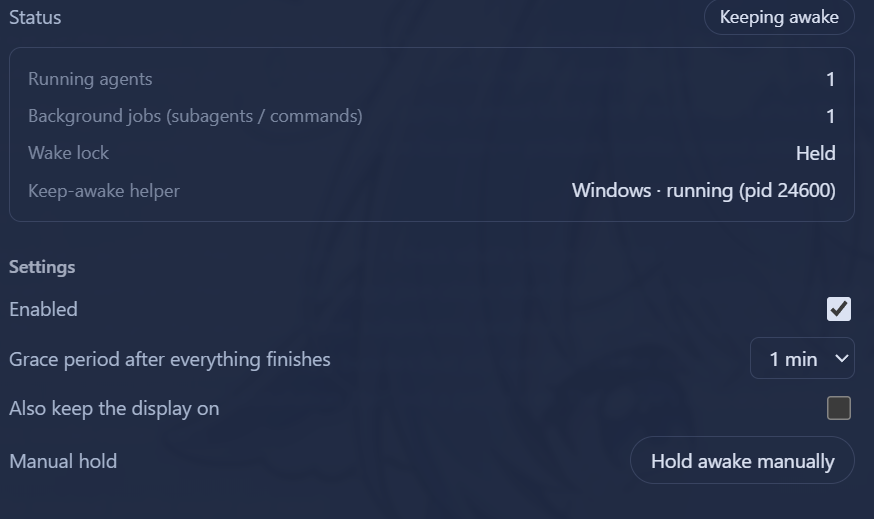
| Live status | Settings → Keep Awake | Status badge (Keeping awake / Grace Ns / Standby / Disabled / Helper error), running agent count, background job count, helper platform + PID |
| Activity detection | — | Running agents (main agent / subagents / workflow children) + running background jobs (run_in_background commands / background subagent tasks) |
| Grace period | Configurable | Automatically releases keep-awake 15s–5m (default 60s) after everything finishes |
| Manual hold | Settings page | Force-keep awake regardless of activity; click to release |
| Keep display on | Optional | By default only system sleep is blocked (display may turn off); opt in to keep the display on too |
| Scheduled-task hold | Optional, off by default | While enabled and any scheduled task is pending (status active), the wake lock is held so due tasks always fire; released through the grace period once tasks are cleared |
| Localization | Global | Follows the DSH global language (zh/en); auto-detects the browser/system language when unset; switches instantly (including the sidebar label) |
How it works
Polls every 5 seconds, with instant re-scan on events (agent/status, subagent/start|end, job set changes):
- Running agents: agents with
status === 'running'inagents.list()(covers the main agent, subagents, and workflow children) - Background jobs:
running/stoppingjobs fromjobs.list()(unowned) plusjobs.list(sessionId)for every live session (coversrun_in_backgroundcommands and background subagent tasks); job events come fromjobs.events.subscribe({ owners: 'all' }, ...) - Scheduled tasks (optional, off by default): with
scheduleHoldenabled, each rescan reads the Hostscheduleservice'scatalog()and counts tasks withstatus === 'active'; any pending task keeps the lock held.schedule/changedfires on the schedule service's own context and cordis events only bubble upward, so this plugin cannot subscribe — detection rides the 5 s poll: a newly created task arms the hold within one poll, deletions/pauses release through the grace period within one poll
When activity is detected, a platform helper process is started via the subprocess service (tree-level termination — the sleep flags release as soon as the process exits):
| Platform | Mechanism |
|---|---|
| Windows | PowerShell SetThreadExecutionState(ES_CONTINUOUS | ES_SYSTEM_REQUIRED) (adds ES_DISPLAY_REQUIRED when "keep display on" is enabled) |
| macOS | caffeinate [-d] -i -s |
| Linux | systemd-inhibit --what=idle --mode=block sleep 1e8 |
Settings
Changes made on the settings page are written through DSH's settings service into the profile's plugin patch (this plugin's own Loader row) and survive a restart:
| Key | Default | Description |
|---|---|---|
enabled |
true |
Master switch |
graceMs |
60000 |
Grace period after all activity ends (15s–5m) |
preventDisplaySleep |
false |
Also keep the display on |
manualHold |
false |
Manual hold |
scheduleHold |
false |
Stay awake while scheduled tasks are pending. When enabled the settings page shows the pending count and the next due time; on a host without the schedule service the option is inert and the page says so |
All of these fields are marked volatile in Config, so a change applies live without remounting the plugin. Every write carries a revision for optimistic concurrency: if two settings pages write at once, the later one gets a 409 and reloads the live values. On a host without a settings service (older DSH) the page still works, but changes last only until DSH restarts and the UI says so.
Compatibility
| Item | Requirement |
|---|---|
| DSH | >=0.2.0-rc.1 <0.3.0-0 (engines.dsh; developed against 0.2.1-rc.2, scheduleHold and the full regression verified against 0.2.1-rc.4) |
| Node | >=22 |
@deepseek-ai/schemastery |
~3.18.5 (volatile fields need .volatile(), added in 3.18.5; same range the host bundles) |
dsh.compatibility.dshReleases declares the releases actually verified: 0.2.1-rc.2 and 0.2.1-rc.4. scheduleHold relies on the Host's schedule service (bundled with every 0.2-line host); on a host without it the option degrades to a no-op and the settings page says so.
Localization
The UI uses the framework locale service (this plugin's locale namespace is keep-awake, zh/en dictionaries): when no language is explicitly set, the browser/system language is used; switching in DSH's language settings takes effect instantly (both the settings page body and the sidebar label follow).
HTTP routes (loopback)
GET /dsh-keep-awake/state— current state (activity counts, schedule-hold view (pendingSchedules/nextDueAt/scheduleService), helper process, config, plusrevisionandpersistent)PUT /dsh-keep-awake/config— update config, body{ "section": {...}, "revision": <optional> }; a stale revision returns409with the live state, an unknown key returns400
Install
# Inside the profile directory (e.g. ~/.dsh/profiles/web)
pnpm add "dsh-keep-awake@<source>"   # npm / github:bearice/dsh-keep-awake / link:<local path>
# and add "dsh-keep-awake" to dsh.profile.bundles in package.json
pnpm install
# restart the profile
Development
- For local development, mount the package into the profile via
link:(see Install above) and usenode --check lib/*.jsfor syntax checks - Layout:
lib/index.js(Host),lib/client.js(web settings page),cordis.patch.yml(mount line)
Related plugins
rea
 morluto
/rea
逆向工程 CLI/MCP 工具(rea-agents):用 agent 逆向应用行为到原生二进制。独立工具而非 DSH 插件——仓库根 package.json 无 dsh 字段,本条目仅作外部工具参考。
npx rea-agents@latest setupArchify DSH 集成
 tt-a1i
/archify/integrations/deepseek-harness
Archify 的 DeepSeek Harness 集成:经 @tt-a1i/archify-dsh 适配包安装,在 dsh 中生成经校验的自包含交互式架构图、流程图、时序图、数据流图与生命周期图。安装信息基于已发布的 1.0.0;候选 1.1.0 与未发布的源码修复不计入。
dsh plugin --profile web add @tt-a1i/archify-dsh@1.0.0dsh-plugin
 Q00
Q00/ouroboros/integrations/dsh-plugin
通过 DSH MCP 客户端挂载 Ouroboros 的纯配置包,在 DSH 中提供 36 个涵盖需求访谈、Seed、执行、评估与演化流程的工具。
dsh plugin --profile web add github:Q00/ouroboros#path:/integrations/dsh-pluginanswer-me-with-html
 QingYunA
/answer-me-with-html
Answer hard questions with a one-page HTML: the model writes a short Markdown draft; the bundled CLI handles templates, SVG auto-layout and an STE controlled-writing check.
dsh plugin --profile web add 'github:QingYunA/answer-me-with-html#aab9ea19f50f038054eeb60475bbb7ea26f149e3'dashi-taskboard
 chuspeeism
/dashi-taskboard/integrations/deepseek-harness
现代化可灵活嵌入的任务面板,支持 Codex、DeepSeek Harness
dsh plugin --profile web add 'github:chuspeeism/dashi-taskboard#9aa1f4e7936d841748ed4e0fc7781b57ae6ae6cc&path:/integrations/deepseek-harness'dsh-agent-teams
 NanmiCoder
/dsh-agent-teams
AgentTeams 多智能体团队。
dsh plugin --profile web add github:NanmiCoder/dsh-agent-teams