
Development & Runtime
dsh-mini-tui
boxeryao/dsh-mini-tui · ★ 11
 boxeryao
DSH-TUI: a lightweight and fast terminal plugin connected directly to the DSH runtime.
Manifest details
安装
dsh plugin --profile web add github:boxeryao/dsh-mini-tuiGitHub 源码安装:首次需按提示配置 allowBuilds 构建授权后重试
For install and environment setup, plus plugin development tutorials, see DSH community docs ↗
README
Table of contents
English | 中文
A minimalist terminal UI plugin for DeepSeek Harness (DSH). It keeps the complete agent and tool workflow while moving routine execution activity out of the way, leaving the terminal focused on your input and the model's final answer.
The interface, npm package, and GitHub repository share the name DSH Mini TUI / dsh-mini-tui: Mini describes less interface noise, not fewer Harness capabilities. Its playful Chinese nickname can continue as “单身汉 Mini TUI”, based on the sound of the DSH initials.
How DSH and Mini TUI fit together
DSH Mini TUI is the terminal presentation plugin for DeepSeek Harness, not a standalone agent framework. It controls how users enter messages, follow activity, and read answers in the terminal. DSH still owns how models and agents run.
DSH Mini TUI and dsh-TUI are independent plugin implementations in the community terminal-interface ecosystem for DeepSeek Harness.
dsh --profile tui
       │
       ▼
DeepSeek Harness (runtime and plugin system)
       │
       ├── model routing and credentials
       ├── standard Agent preset
       ├── tool execution and approvals
       ├── Sessions, logs, and persistence
       └── dsh-mini-tui (terminal presentation)
              ├── input and streamed answers
              ├── answer-first tool output
              ├── activity and failure states
              └── redraws, titles, and terminal interaction
| DeepSeek Harness owns | DSH Mini TUI owns |
|---|---|
| Model selection, routing, and calls | Startup screen, input, and answer rendering |
Agent lifecycle and the standard preset |
Answer-first conversation layout and activity states |
| Scoped tools, approvals, and cancellation | Terminal commands such as /verbose and /tool N |
| Session logs and the complete execution record | Resize redraws, window titles, and the Windows terminal experience |
| The DSH plugin ecosystem and capability composition | A restrained TUI surface for those capabilities |
Installing or removing Mini TUI therefore changes the interface to DSH. It does not replace DSH with another agent or reduce DSH's model, tool, or Session capabilities.
What Mini means: less process, more answer
The design principle is simple: tools should keep working without taking over the screen. Less routine status output means clearer context, less scrolling, and a conversation that is easier to read from beginning to end.
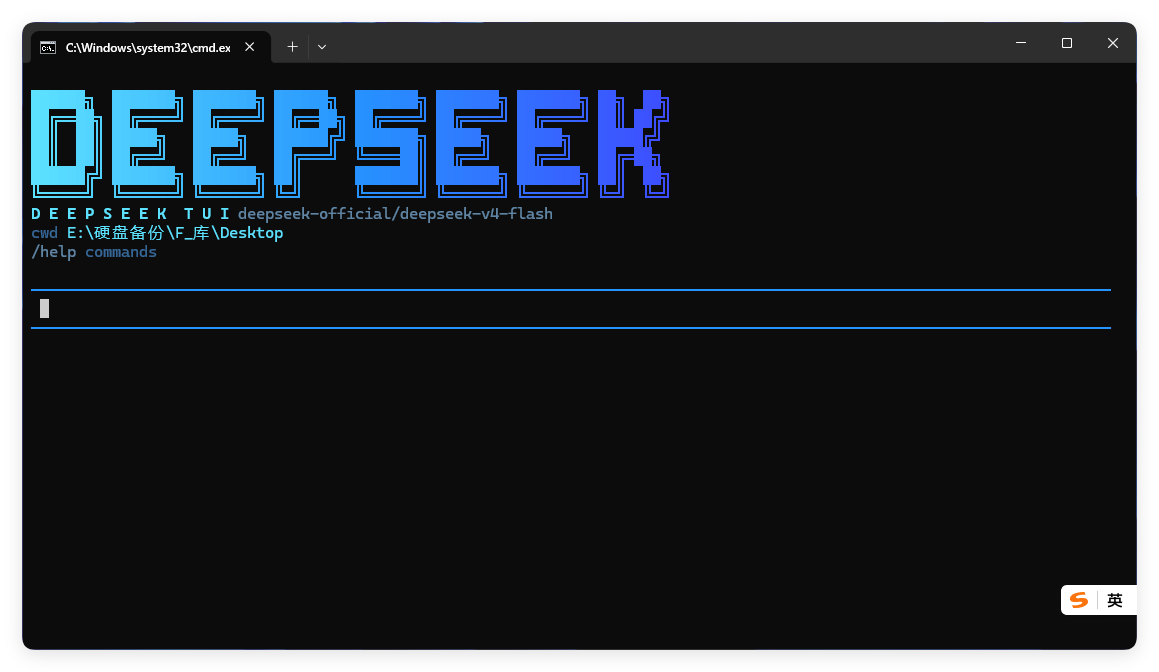
- Gradient identity — the
DEEPSEEKwordmark uses a true-color cyan-to-deep-blue gradient for a distinct, consistent terminal identity. - Compact runtime context — only the active model, working directory, and
/helphint remain below the wordmark; Session ID, platform version, permission mode, and the shortcut panel no longer crowd the dashboard. - Deep-sea palette — input borders, status labels, paths, and the thinking indicator share a restrained ocean palette designed for extended terminal use.
- Stable path colors — file and directory references receive deterministic colors, making targets easier to find in logs and retained tool details.
- Answer-first conversation flow — successful tool calls stay hidden by default, so the terminal primarily shows user input and model responses; failures still surface as one compact line instead of disappearing silently.
- Details on demand — minimal does not mean lost information.
/verbosereveals subsequent tool output,/tool Nopens retained call details, and the complete record remains durable in the DSH Session log. - Private thinking state — a concise
[thinking]indicator appears during model reasoning without printing internal reasoning content.
This is a deliberate tradeoff: the interface is Mini; the capability is not. DSH continues to own model routing, tool execution, approvals, the agent lifecycle, and Session persistence.
Why this plugin
- Lightweight — one focused terminal presentation layer with no Web application runtime.
- Fast workflow — responsive multi-line input, direct keyboard controls, and tool activity that stays out of the conversation by default.
- Deep-sea visual language — the startup dashboard, status labels, path references, and thinking state share one restrained ocean palette.
- Native DSH integration — uses DSH's scoped tools, approvals, agent lifecycle, and durable Session log directly.
Quick install
Install the latest DSH Mini TUI package from npm into the DSH tui profile:
dsh plugin --profile tui add dsh-mini-tui@latest
dsh --profile tui
Note: the
deepseek-harness-tuipackage on npm belongs to a different project. The correct package name for this project isdsh-mini-tui.
Launch from Windows Explorer
DSH Mini TUI includes a current-user context-menu installer. After installation, launch it from a directory background, a directory itself, or a drive:
- Open DSH TUI here — opens the selected directory with the standard permission mode.
- Open DSH TUI full access — opens it with
danger-full-access; this mode is enabled only when that explicit menu item is selected.
After installing the npm package into the default tui profile, run:
& "$HOME\.dsh\profiles\tui\node_modules\dsh-mini-tui\scripts\install-dsh-tui-context-menu.cmd"
When developing from this checkout, run:
.\scripts\install-dsh-tui-context-menu.cmd
To remove both entries:
.\scripts\uninstall-dsh-tui-context-menu.cmd
Installation and removal modify only HKEY_CURRENT_USER and do not require administrator rights. The menu ultimately runs dsh --profile tui, so DSH still provides the model, agent, and tool runtime.
Requirements
- Node.js 22.19 or later, or Node.js 24+
- pnpm 11+
- An existing DeepSeek Harness
0.1.0-rc.6installation - A model credential already configured in DSH, either through its credentials service or the launching environment
Develop from this checkout
pnpm install
pnpm run build
pnpm test
dsh plugin --profile tui add .
dsh --profile tui
The dsh plugin --profile tui add . command installs the current source checkout; regular users should prefer the npm quick-install command above. The package consumes published @deepseek-ai/* packages at 0.1.0-rc.6; it has no monorepo-relative or workspace:^ dependency.
Input and commands
- Enter sends the current message.
- Shift+Enter or Ctrl+J inserts a newline.
- Ctrl+V accepts bracketed multi-line paste;
/pastereads the Windows clipboard directly. /cancelor Ctrl+C cancels the active task./verbosetoggles bounded tool output for subsequent calls./tool Nprints the retained input and result for call numberN./helplists commands;/exitor/quitcloses the session.
Tool calls are quiet by default; failed calls print only one compact line. /verbose shows numbered summaries and bounded details for subsequent calls, and /tool N can inspect recently retained inputs and results. toolDetailMaxLines and toolDetailMaxCharacters default to 80 lines and 8,000 characters. toolDetailHistoryLimit keeps the latest 200 calls available to /tool N; older details leave process memory while complete values remain in the DSH Session log.
Scope
This repository owns only the terminal presentation plugin. DSH owns model routing, tools, permissions, persistence, and agent execution. The TUI is line-oriented and does not provide the Web client's graphical cards, session navigation, or full-screen scrollback.
License
Related plugins
DSH-better-sidebar
 dsh-external
/DSH-better-sidebar
右侧侧边栏增强:文件预览/终端/Git,可拖拽自定义位置
dsh plugin --profile web add github:dsh-external/DSH-better-sidebarmirage#dsh
 strukto-ai
/mirage/typescript/packages/dsh
把文件系统与 bash 提供者换成 mirage 虚拟工作区:文件工具与 shell 命令作用于挂载的资源(RAM、S3、Redis、Slack、Gmail、Notion、Postgres)而非宿主磁盘,支持按挂载点设置读/写/执行模式、按命令选择沙箱(进程内 monty、pyodide、quickjs;远程 docker、e2b、daytona),并可在虚拟终端中安装 CLI(git、gh、slack、linear、ntn、gws,或自行注册的程序树)作为命令头词。
dsh plugin --profile web add github:strukto-ai/mirage#path:/typescript/packages/dshdeepseek-harness-desktop
 hairyf
/deepseek-harness-desktop
DeepSeek Harness Tauri 桌面版 | Only 5mb installer, zero environment setup. Windows / macOS / Linux.
dsh plugin --profile web add github:hairyf/deepseek-harness-desktopcc-safety-net
 kenryu42
/cc-safety-net
A coding agent CLI hook - block destructive commands and secret file access
dsh plugin --profile web add 'github:kenryu42/cc-safety-net#ae8af0330308ad0bc24b5389709060c7a07a6b8d'hol-guard
 hashgraph-online
/hol-guard
开源AI代理防病毒:运行时拦截风险工具、秘密访问、提示注入、恶意软件包、MCP服务器、插件和技能。
dsh plugin --profile web add github:hashgraph-online/hol-guarddsh-mobile
 saya-ch
/dsh-mobile
DeepSeek Harness 移动端适配与安全局域网访问插件,支持 Android App 和手机浏览器。
dsh plugin --profile web add github:saya-ch/dsh-mobile