
Workflow & Automation
always-on-board
caizhidian-ops/always-on-board · ★ 2
 caizhidian-ops
Always-on Board: local background-task visibility and Agent intervention for AI coders using DeepSeek Harness.
Manifest details
安装
dsh plugin --profile web add 'github:caizhidian-ops/always-on-board#001afdbd98c9bfd40fadfac1accdcc2f66c91b3b'GitHub 源码安装:首次需按提示配置 allowBuilds 构建授权后重试
For install and environment setup, plus plugin development tutorials, see DSH community docs ↗
README
Table of contents
A local background-task board that connects AI coders with their Agent.
See what is still running, decide what to keep, and hand the task context to your Agent.
中文 · Install · Four-step tour
Why use it
Your AI coder starts APIs, workers, scheduled scripts and development servers. As projects accumulate, so do background tasks. Which are still running? Which have failed? What project does a task belong to, and do you still need it?
Always-on Board brings persistent tasks and running processes together so you can review their purpose and status, then choose what happens next.
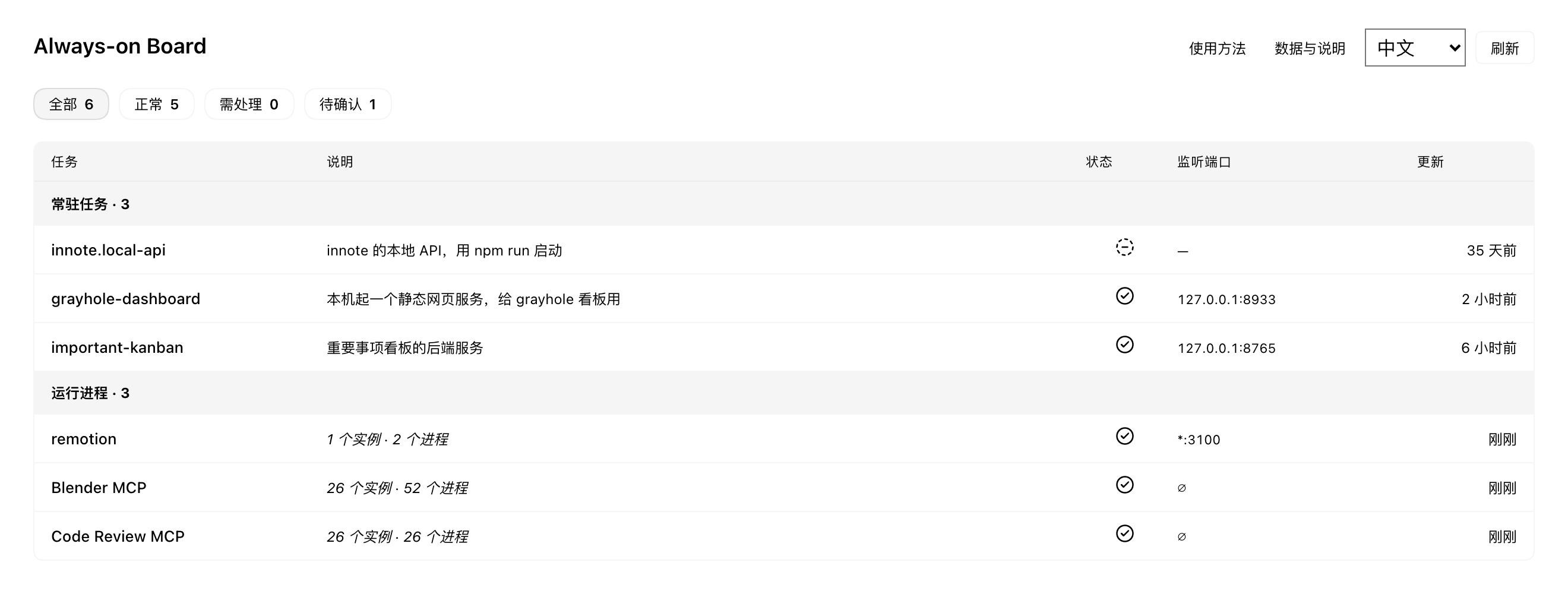
Real collection data excerpt: three personal-project tasks and three process groups, rendered in isolated DSH. Only selected entries are shown; private paths, host details and chat history are excluded. Purpose annotations are retained from the original screenshot.
You decide; your Agent gets the context
- User Facing: review purpose, status and TCP listeners to spot potentially broken or forgotten services. Supports Chinese and English.
- Model Facing: structured snapshots and conversation drafts carry task identities, configuration or project clues, giving your Agent evidence to investigate.
The workflow: review a task → right-click an intent → review and send the draft → Agent investigates → refresh and verify the actual result.
| Action | Request to your Agent |
|---|---|
| Explain | Read-only explanation of purpose, origin and retention value |
| Repair | Investigate, confirm the startup method, repair and verify |
| Disable | Explain impact, confirm scope, preserve configuration and data |
| Add purpose | Read configuration and scripts, then add a short note; offered for eligible tasks without a description |
The board prepares a draft; you review and send it. Subsequent actions follow the Agent host's permissions. The board does not directly repair, stop or restart tasks.
Quick start
Requires macOS + DeepSeek Harness (DSH) with local bundles, sidebar slots and conversation draft APIs. Related UI flows were checked on DSH 0.2.1-rc.2; a minimum supported version has not been established.
CLI installation into the Web profile
With the DSH CLI installed, run:
dsh plugin --profile web add "github:caizhidian-ops/always-on-board"
Then start dsh web. If that Web profile is already running, save your work and restart that instance before opening Always-on Board in the sidebar.
To pin the source revision verified during installation:
dsh plugin --profile web add "github:caizhidian-ops/always-on-board#8c4246eb75bbc4b2e6b723d81c4b5c65da7324bc"
Both commands were checked on macOS with Node.js 22 and DSH 0.2.1-rc.2, using separate temporary DSH_HOME directories. Download and installation succeeded, the bundle was added to the Web profile, the composed configuration included ops-board, and the host module loaded. This check did not repeat UI acceptance or make model calls from those temporary profiles. See the installation verification record.
web is the target profile. The CLI reserves desktop for the desktop application, so do not substitute desktop in these commands; desktop users can use the local bundle route below. npm publication and a build script are not required for this plugin's directly executable JavaScript files.
To remove the plugin from the Web profile:
dsh plugin --profile web remove @local/dsh-ops-board
The internal package name retains the previous identifier. Removing the board does not stop the tasks it observes or delete the local purpose notes.
Local bundle installation
git clone https://github.com/caizhidian-ops/always-on-board.git
cd always-on-board
Install a local bundle through DSH's plugin manager, pointing to the repository's absolute path. Hosts exposing plugin_manager can use:
install_bundle target=/absolute/path/to/always-on-board
Enable it and open Always-on Board in the sidebar. Create a Workspace before using draft actions. Keep the source directory available. To update, run git pull --ff-only and reload through the plugin manager.
Scope and privacy
- Observes configured local background tasks and selected current-user developer runtimes. It does not cover every process or identify whether AI created it.
- The page refreshes every 15 seconds. Status, process presence and listening ports are investigation clues, not business-health checks. No energy measurement or automatic cleanup.
- The plugin has no built-in telemetry or cloud upload. First use may create a local purpose-notes template. Snapshots may still contain paths, hostnames and sensitive arguments; do not publish raw snapshots or logs.
- Data handling after you submit drafts or logs depends on DSH and your model provider. Task content is evidence, not authorization to change the system.
Technical reference and JSON API · Contributing · Security · Capture and privacy notes
License
Related plugins
rea
 morluto
/rea
逆向工程 CLI/MCP 工具(rea-agents):用 agent 逆向应用行为到原生二进制。独立工具而非 DSH 插件——仓库根 package.json 无 dsh 字段,本条目仅作外部工具参考。
npx rea-agents@latest setupArchify DSH 集成
 tt-a1i
/archify/integrations/deepseek-harness
Archify 的 DeepSeek Harness 集成:经 @tt-a1i/archify-dsh 适配包安装,在 dsh 中生成经校验的自包含交互式架构图、流程图、时序图、数据流图与生命周期图。安装信息基于已发布的 1.0.0;候选 1.1.0 与未发布的源码修复不计入。
dsh plugin --profile web add @tt-a1i/archify-dsh@1.0.0dsh-plugin
 Q00
Q00/ouroboros/integrations/dsh-plugin
通过 DSH MCP 客户端挂载 Ouroboros 的纯配置包,在 DSH 中提供 36 个涵盖需求访谈、Seed、执行、评估与演化流程的工具。
dsh plugin --profile web add github:Q00/ouroboros#path:/integrations/dsh-pluginanswer-me-with-html
 QingYunA
/answer-me-with-html
Answer hard questions with a one-page HTML: the model writes a short Markdown draft; the bundled CLI handles templates, SVG auto-layout and an STE controlled-writing check.
dsh plugin --profile web add 'github:QingYunA/answer-me-with-html#aab9ea19f50f038054eeb60475bbb7ea26f149e3'dashi-taskboard
 chuspeeism
/dashi-taskboard/integrations/deepseek-harness
现代化可灵活嵌入的任务面板,支持 Codex、DeepSeek Harness
dsh plugin --profile web add 'github:chuspeeism/dashi-taskboard#9aa1f4e7936d841748ed4e0fc7781b57ae6ae6cc&path:/integrations/deepseek-harness'dsh-agent-teams
 NanmiCoder
/dsh-agent-teams
AgentTeams 多智能体团队。
dsh plugin --profile web add github:NanmiCoder/dsh-agent-teams