
Development & Runtime
dsh-ssh-ops
caoyiwei850/dsh-ssh-ops · ★ 58
 caoyiwei850Curated
SSH ops terminal for DSH Web UI: drive a connected server from the main conversation (ssh_connect/ssh_exec/ssh_read/ssh_write/ssh_disconnect) while keeping an interactive xterm.js terminal on the right.
Manifest details
安装
dsh plugin --profile web add github:caoyiwei850/dsh-ssh-opsGitHub 源码安装:首次需按提示配置 allowBuilds 构建授权后重试
For install and environment setup, plus plugin development tutorials, see DSH community docs ↗
README
Table of contents
中文 · English
DSH SSH Ops
An SSH operations plugin for DeepSeek Harness: drive the current server from the main conversation while keeping a real interactive terminal on the right, with built-in file management, port forwarding, and database management.






📖 New here? Start with the Product Guide — a ten-minute quick start, a feature walkthrough, the security model, and ready-made recipes.
v0.4.2: fixes bounded
sftp_readand saving a password profile without a password. File uploads show progress and completion, and stream through a temporary file before replacing the destination. See CHANGELOG.md. v0.4.1: remote-workspace relative paths now resolve against the session's current remote directory (cdinto a subdirectory andsftp_*relative paths follow; escapes of the bound root are still refused); incrementalssh_readstays incremental across capture-buffer rollover; SFTP directory transfers gain cancellation, an idle deadline, and partial-file cleanup; the workspace binding dropdown allows rebinding a workspace bound elsewhere. v0.4.0: moves dangerous-command confirmation to the host's native in-conversation approval —ssh_execandsftp_deletesuspend until the operator answers, a one-shot approval is bound to the command and server, and rejection, cancellation, or a missing approval channel fail closed; it also includes remote workspaces (bind a DSH workspace to a saved server directory;sftp_*uses that root and server automatically), incrementalssh_read, Ctrl-wheel terminal zoom and copy-on-select, warning/error log highlighting, and a remembered default username; fixes clientapply()retry residue,ssh_execcwd discovery for zsh/NAS custom login shells, official Desktop one-click updates, and hardens remote path symlink containment plus cross-read redaction. v0.3.22: adds three execution-policy tiers for agent-issued commands — a tier chip in the terminal's bottom-left corner (Standard / Custom release / Allow all; collapsed to a corner dot by default, expands on hover; loosening asks for confirmation and a switch applies to the current session only), a per-resource override under "Advanced options", and a third settings tab for the global default and the released categories. The agent can never widen the gate itself — switching is an operator-only RPC, and rejections carry the effective tier with guidance; the multi-server confirmation checkbox stays tier-independent. Released commands run as written (deletions no longer go through the trash — the warning says so). Fixes #33 —ssh_execon network devices (Huawei VRP / H3C Comware) stalled 15s and returned empty output: exec timeouts now settle locally before closing (a peer that never answers CHANNEL_CLOSE no longer hangs the caller), a probe timeout with zero bytes back marks the connection as a network-CLI device and reroutes into the interactive terminal with prompt-return as completion (first call downgrades in place; VRP/Comware/Cisco prompt recognition, paged output, human-readable errors instead of empty timeouts). Fixes three SOCKS5 dynamic-forwarding defects (externally triaged): the handshake parser retires after CONNECT — forwarded traffic no longer accumulates without bound (48 MiB forwarded used to add ~204 MiB resident), pipelined payloads are no longer dropped (buffered residue is flushed before the pipe), and the connection counter no longer decrements twice; also fixesgit clean -fd— the most common spelling — never having been caught due to a regex slip. v0.3.21: fixes the host-process crashes reported in #32 (Windows, uncaught exceptions killing the whole DSH process) — ① ssh2'sforwardOutthrows synchronously instead of reporting through the callback (Not connected) once the transport is gone, and tunnel listeners kept accepting after a drop: all three call sites (local / SOCKS5 / DB tunnels) now contain it, sacrificing only that connection; ② tunnel socket/channel had noerrorhandlers, so a local RST (ECONNRESET) — an 'error' with zero listeners — crashed the host: both sides now tear each other down, late channels are discarded, and racing accepts are refused; ③ transport loss, explicit disconnect and plugin unload now close tunnel listeners uniformly and retire DB tunnels attached to that SSH connection (transaction rollback, redis reconnect loop included) — no ghost listeners; ④ also fixes the tunnel panel'sTypeError: t2 is not a function(a render callback parameter shadowed the i18ntfunction; latent since 0.3.10, crashes the tab whenever the tunnel list is non-empty).
v0.3.20: adds a per-resource login command (an "Advanced options" field opening the terminal through exec+pty with
ssh -tsemantics —bash -ltemporarily drops an incompatible default shell (e.g. zsh) into bash, and session-shaped actions liketmux attachor cd-then-shell can become the login session itself; the command IS the whole session, and an edit applies to the next terminal without a reconnect); the ssh_exec cwd resolver's rejection semantics are split (multiple-candidate ambiguity vs busy/non-interactive now get distinct messages, the latter with a comm/pgrp/tpgid summary of rejected candidates — field triage at a glance; discussion from #31); deleting an SSH resource now also forgets the host's key-trust record so it no longer lingers under "trusted hosts".
v0.3.19: adds SSH agent forwarding (an "Advanced options" toggle per resource — a terminal on the jump host can authenticate onward to deeper hosts with your local keys, no private key per hop; a missing local ssh-agent fails the connect outright instead of silently downgrading); per-connection query-timeout override (
query_timeout_msondb_connect, so big queries and exports on slow databases are no longer cut off by the 35s default ceiling;0means unlimited); human-readable disconnect reasons when a device sendsSSH_MSG_DISCONNECTduring authentication (reason code + device text + two layers of hints); the settings-page "Server groups / Shared SSH credentials" panels now share one sliding segmented switch; the plugin row gets a display icon and bilingual title/description (DSH 0.2.x plugin manager, brand-blue terminal mark); and #29 is fixed —github:installs shipped nolib/, so the whole plugin failed to load; thepreparehook now builds it at install time. CI hardening: a Windows test leg, an npm-channel artifact smoke job, and the tarball file manifest under assertion.
v0.3.18: adds an interface-language pin — when DSH runs a language the plugin does not ship (e.g. Russian), set
autoApplySystemLanguage: false+languagein the settings file to pin the plugin language instead of being coerced to Chinese and overwritten; the default follow behaviour is unchanged. See "Pinning the interface language". Contribution: @alexeyfadeev (PR #28).
v0.3.17: fixes #27 — the i18n rename left the Sidebar registration throwing
ReferenceError, hiding the terminal UI entirely in 0.3.16; eslint now covers the client JSX and regression assertions were added.
v0.3.16: adds a bilingual UI — always following DSH's own language setting (including live switches, no reload), Chinese as the source language with an English overlay; the settings-nav label and terminal glyph follow along. The settings page gains a self-update bar (version badge, GitHub link, check-for-updates dialog, one-click update and a copyable manual command). lib build outputs leave the repo; the resource form is compacted; the broken ~/.ssh/config import is removed; the trusted-hosts list gains a delete button.
v0.3.15: adds dual-factor authentication — when a firewall/switch requires
AuthenticationMethods password,publickey(or the reverse), you can now configure a second factor of the opposite kind beside the password or private key in the resource or shared-credential form; such devices previously always failed to log in. SQL lexer hardening fixes two destructive-statement bypasses (backslash-quote dialects and PG dollar references; the Oracleq''alternating-quote idea was tested and rejected, kept as a regression probe). Session logs gain multi-select + select-all batch delete. The legacy floating-panel fallback is removed — the official right Sidebar is now the only host surface for the terminal.
v0.3.14: adds an operator-controlled, off-by-default AI auto-connect switch. When enabled, the agent can connect saved SSH resources by name and reveal the target terminal on the right. When disabled, saved resources remain hidden from the agent. Also fixes reading empty session logs.
v0.3.12: fixes
db_list_connectionsbeing rejected whenever a database connection exists because its strict output schema omittedusername(#23). Connection listings now identify the database, non-secret username, TLS mode and SSH route; SQLite shows its file path instead of:0. A regression test exercises the real DSH output validator.
New in v0.3.4: each split pane now gets its own connection — opening the same server in two panes creates two independent transports, terminals and working directories instead of mirroring one terminal; tick "reuse the open connection" in the connect dialog to share one on purpose. The pane the agent is acting on is now visible and switchable, marked with a blue robot badge — click another pane to re-target it. Peers whose SSH identification string does not follow RFC 4253 can now connect: when a device writes it malformed (a stray space in
SSH-2.0- OpenSSH, orSSH-2.1-), ssh2 previously failed with a bareInvalid identification stringthat named neither the device nor the reason; the plugin now retries once and normalizes that single line (the peer's software version is preserved and no crypto is weakened), while a genuinely unusable banner reports the peer's own bytes. Also fixes connecting from the settings page not opening or loading the SSH pane. Shared credentials, jump hosts, connection reuse and the terminal theme from 0.3.3 remain. See INSTALL.md for desktop install instructions.
Compatibility
- Target host: the DSH Desktop / Web Profile, declared via
engines.dshas the unbounded range>=0.1.5-alpha.1— hosts since 0.2.1-alpha.4 evaluate plugin compatibility by this field first (includePrereleasesemantics;engines.dshalone decides, peers no longer participate in the gate), covering every host version from0.1.5on (all prereleases included), so host upgrades require no release follow-up. The four official-packagepeerDependencieskeep the same range and continue to serve the npm install-time role. Validated on the0.2.0-rc.2desktop build. The plugin uses DSH's bundled Node.js runtime and does not require a systemssh,sftp, or standalone Node.js installation. - Current right Sidebar (required): the host must supply both
sidebarRightTabsandsidebarRight; SSH then runs as an official right-Sidebar tab and uses the host's split, resize, and fullscreen behavior. Hosts without those APIs no longer get a floating-panel fallback (removed): the host half (agent SSH/SFTP/database tools) keeps working, but no terminal UI is shown. - Interface language: follows the host language automatically (中文 / English), repainting on live switches; a third-party host locale the plugin does not ship (e.g. Russian) falls back to the default Chinese and is written back to the settings file — such setups can pin the language through the settings file (
autoApplySystemLanguage: false+language, see the Usage section). - File byte streaming: browser upload/download routes register only when the Web Profile exposes both
webServerand the request-origin guard; hosts without them retain the existing SFTP operations. Directory archive download returns501 archive-unavailableon every host, preventing traversal across differing SFTP-chroot and SSH-shell filesystem namespaces. - Upgrades: fully quit and restart the affected DSH Profile after installing or upgrading. SSH resources, known hosts, and credentials live in DSH-owned local storage outside the plugin package, so a normal upgrade does not remove them.
Screenshots
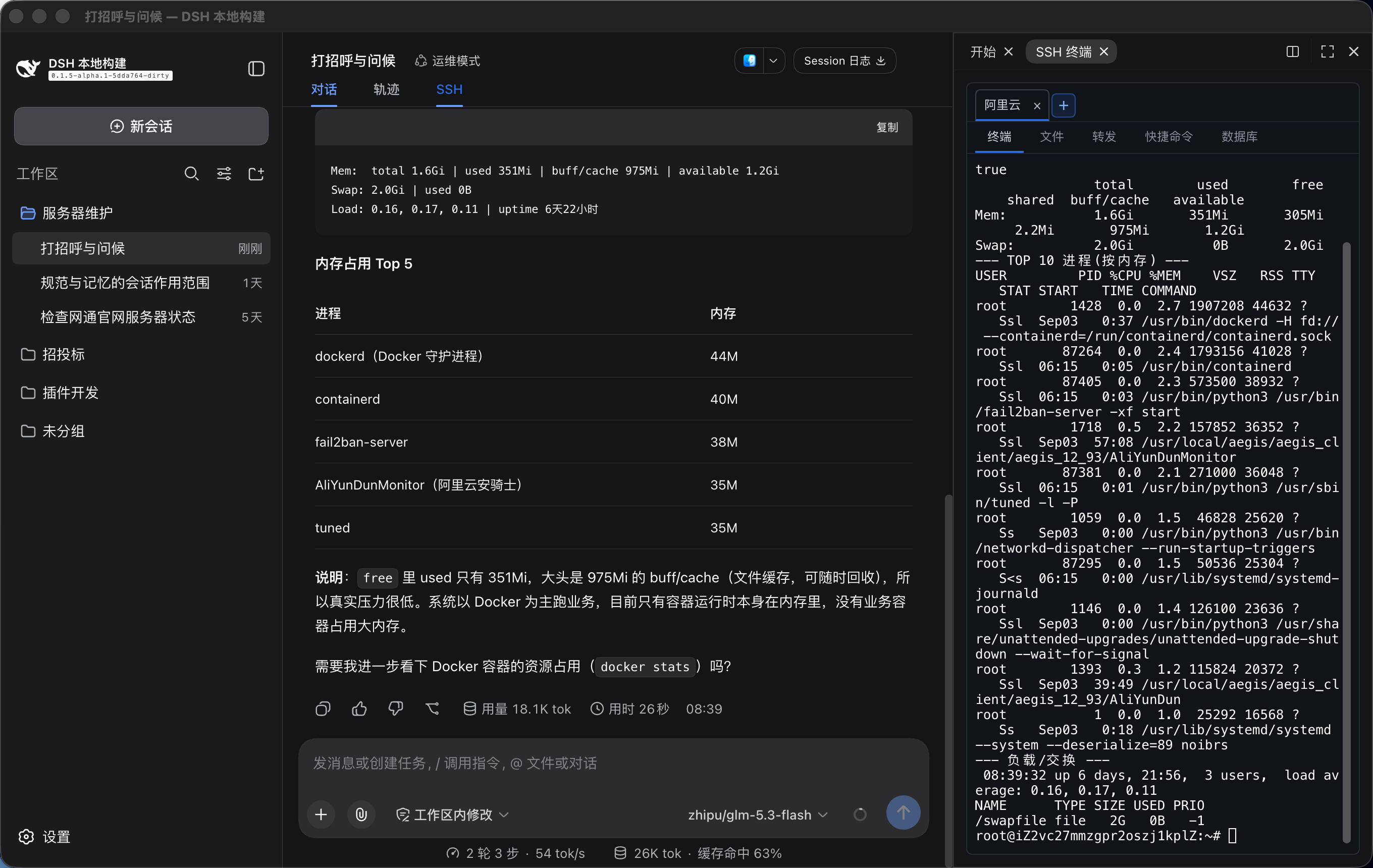
Drive the connected server from the main conversation while the interactive SSH terminal sits beside it as an official right-Sidebar tab:
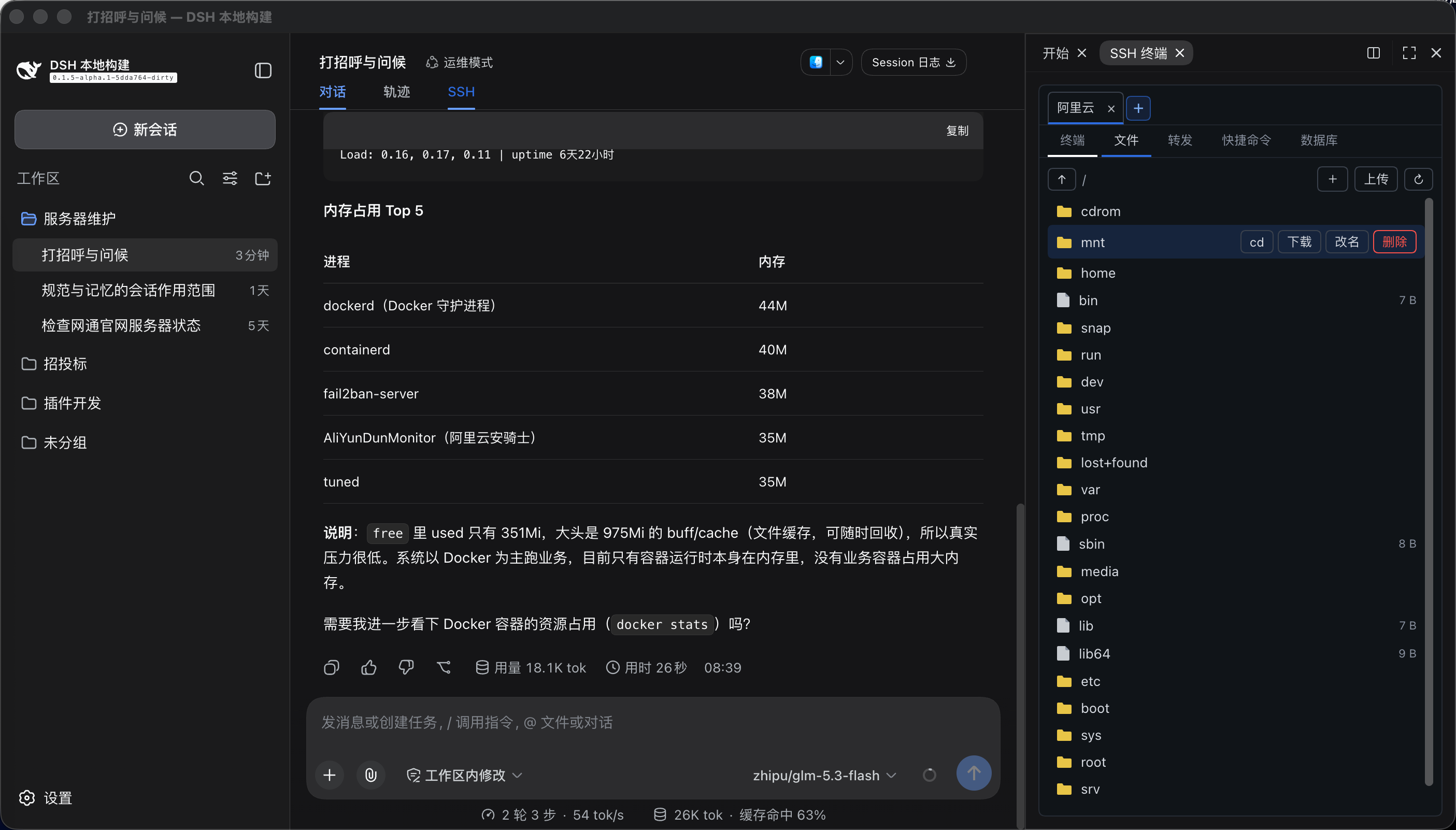
The Files tab provides SFTP management and can cd the interactive terminal into the selected remote directory:
What it does
- Official right-Sidebar integration (current DSH): the SSH terminal is a tab of the official right Sidebar, beside the built-in Files tab. The SSH button in the conversation header opens or focuses that tab (repeated clicks focus instead of duplicating). Use the official split view to see files and the terminal together; drag-resize, fullscreen, and collapse are the sidebar's, and the terminal re-fits automatically. Each split pane is independent: it keeps its own visible servers and selection, a new pane starts empty and never inherits another pane's servers, opening the same server in both panes gives each its own connection (reuse is opt-in), closing it in one pane leaves the other alone, and the host session is disconnected only once no pane shows it any more. The connection the agent is using carries an Agent badge — click the other pane to move the agent there. Connection lifetime is independent of the tab: switching tabs, collapsing the sidebar, closing the tab, or switching chats never disconnects SSH; terminal instances live in a client-side pool, so reopening restores the full scrollback while host-buffered output from the hidden period replays on return.
- Terminal follows DSH's theme: xterm draws to its own canvas and cannot inherit the CSS text color, so the plugin ships complete light and dark palettes (cursor and selection included) and repaints open terminals as soon as the host theme changes.
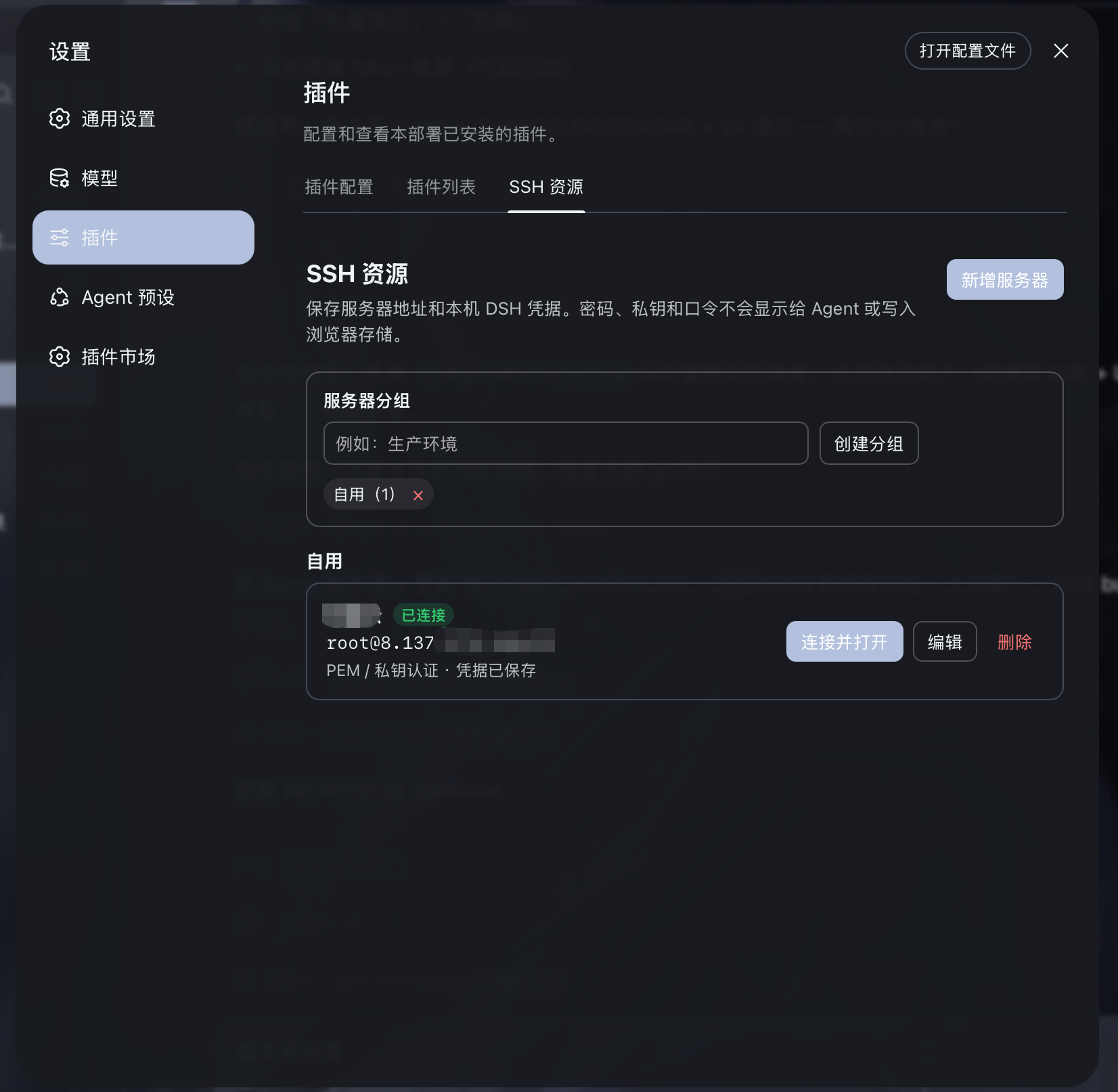
- Manage any number of servers and groups under Settings → SSH Resources. It is a first-class left-menu item beside General and Models, not a Plugins sub-tab. The top SSH button only opens or focuses the right-side terminal tab — it never disconnects.
- Saved remote project directory: a server resource can hold one optional absolute default project path. Enter project connects, opens the terminal, changes directory only after the existing idle-shell/single-PTY guard succeeds, and starts SFTP at the same path. Relative paths and control characters are rejected; resources without a project path retain the normal login-directory and SFTP-root behavior.
- Login command (optional): a saved server can carry one login command under "Advanced options" that replaces the server's default shell for the terminal session (an exec+pty channel with
ssh -tsemantics) — for servers whose default shell is incompatible (e.g.bash -lon a zsh machine), or to maketmux attach/ cd-then-shell the fixed login session. The command IS the whole login session: include-l(bash -l, not barebash) for normal profile loading; single line, no control characters; leave empty — or use a temporary connection — for the server's own shell. Agent forwarding and terminal resize behave identically on this path. - Remote workspace: under Edit SSH resource → Advanced (right below the default project directory) you can bind one DSH workspace to this server plus an absolute remote path. Inside that workspace the agent's
sftp_*calls default to that remote directory (relative paths resolve against it) and to the bound server, and the conversation states that the files live remotely — so the agent stops treating an empty local directory as the project. The boundary is stated out loud rather than implied: DSH's nativeread/write/edit/glob/grepand local bash stay on your machine (the host mounts exactly one filesystem backend, and this plugin does not touch it), so remote workspace is not a remote mount — read and write remotely withsftp_*orssh_exec. Built for #38. A binding may auto-connect on file operations, still gated by the settings switch that allows the agent to connect saved servers; an auto-connected machine is revealed in the right-side panel, so the operator always sees which server is in play. - Command library: the SSH panel has a dedicated Command Library tab with system inspection, service, Docker, logs, networking, storage, scheduler, and Ubuntu/RHEL/CentOS install/update templates. Search matches command names and contents. Custom commands are managed inside this tab; they are stored only in browser local storage and must never contain passwords, tokens, or other secrets.
- Server name, address, port, username, auth type, and group are stored in DSH local storage; there is no count limit.
- Passwords, PEM private keys, and passphrases are stored only in DSH's official local credentials store
~/.dsh/.credentials.yaml(owner-only permissions). Browser storage, agent context, tool results, and resource lists never read or display secrets. - Shared credentials: one password or private key can be saved as a shared credential and referenced by many servers and jump hosts (for example one operations key for a whole group, so a change lands everywhere at once). Deletion is refused while any server or jump chain still references it, and the secret is resolved host-side and handed straight to the SSH client — never into browser storage or agent context. Manage them under Settings → SSH Resources, where you can pick a PEM file or drop one into the dialog. Each server may bind a shared credential or keep its own dedicated one.
- ProxyJump: jump hosts are chosen from your saved servers instead of typed by hand, and passwords/keys/passphrases all come from the credential store; a jump host can reference a shared credential too. Saving and connecting reject a server that jumps through itself, a duplicate hop, or a missing resource. A chain holds up to 8 hops.
- One channel per pane by default: opening the same saved server in both split panes creates two independent connections — two channels, two terminals, no interference, each keeping its own working directory. Tick reuse the open connection in the connect dialog to share instead: this pane joins the live connection and shares its single terminal (useful when you want to watch the agent work in that same shell).
- The agent's target is visible and switchable: the connection the agent is using carries an Agent badge. Click the other pane's server tab or terminal area to move the agent there — agent tools that omit
connection_id(ssh_exec,sftp_*,tunnel_*, safety confirmation prompts) resolve to it. Switching to a connection that is gone is refused and leaves the previous binding intact, so the agent is never silently left with no target. - The main conversation auto-detects the currently-connected server on the right; the agent never has to ask the user for an internal connection id.
- Commands run through
ssh_execare echoed in the terminal and return exit code, output,cwd, duration, timeout, and truncation state. On Linux, the command inherits the verified directory of one idle POSIX interactive shell. Busy or ambiguous terminals and inaccessible directories are rejected; when no interactive shell is detectable, the login directory is used and clearly reported. - Manual terminal output is read on demand via
ssh_read; it is never silently injected into the conversation context. - Output sent to the model is redacted for private keys, Bearer tokens, common passwords/API keys (including bare
sk--prefixed keys), and database passwords. - Connection stability: SSH connections enable keepalive (20s interval, 3 checks), so NAT/firewalls no longer silently drop idle connections. Transport drops trigger exponential-backoff auto-reconnect (capped at 30s); a command that drops mid-run is retried once transparently. Transient connection failures auto-retry 3 times (auth failures excluded). Explicit disconnect or plugin unload never triggers reconnect; remote tunnels re-register automatically after a reconnect.
- Host-key verification (TOFU): SSH connections verify the server's host public-key fingerprint — first connect records and trusts it, later changes are rejected (guards against MITM / re-provisioned servers). Per-server
hostKeyModeselectsaccept-new(default) /verify(reject unseen) /off; on a changed fingerprint the connection is not retried and not auto-reconnected. Settings → SSH Resources lets you set the mode per server and manage trusted fingerprints with one-click forget. Verification runs before user authentication, so it is independent of who logs in or which password they use — the same server with an unchanged key never blocks another admin or vendor. - File management: a Files tab in the SSH panel browses the server's filesystem over SFTP with upload, download, mkdir, delete, and rename. The
sftp_*tools can also be used directly in the conversation. - Port forwarding: a Tunnels tab starts local forwards (this machine → server-reachable target) and remote forwards (server → this machine), with a live tunnel list and stop control. The
tunnel_*tools can also be used directly. - Multi-server batch: say "batch exec " in the conversation and the agent creates a batch task; the SSH panel pops a selection dialog listing all saved servers (including not-yet-connected ones) from SSH Resources for you to tick, then runs it concurrently after confirmation (each via its saved credentials: connect → run → disconnect), presenting results grouped per server (green success / red failure). The batch target is completely independent of the currently-open connection. When the command hits the safety policy, it is confirmed once as "command + N targets" rather than per-server. The legacy
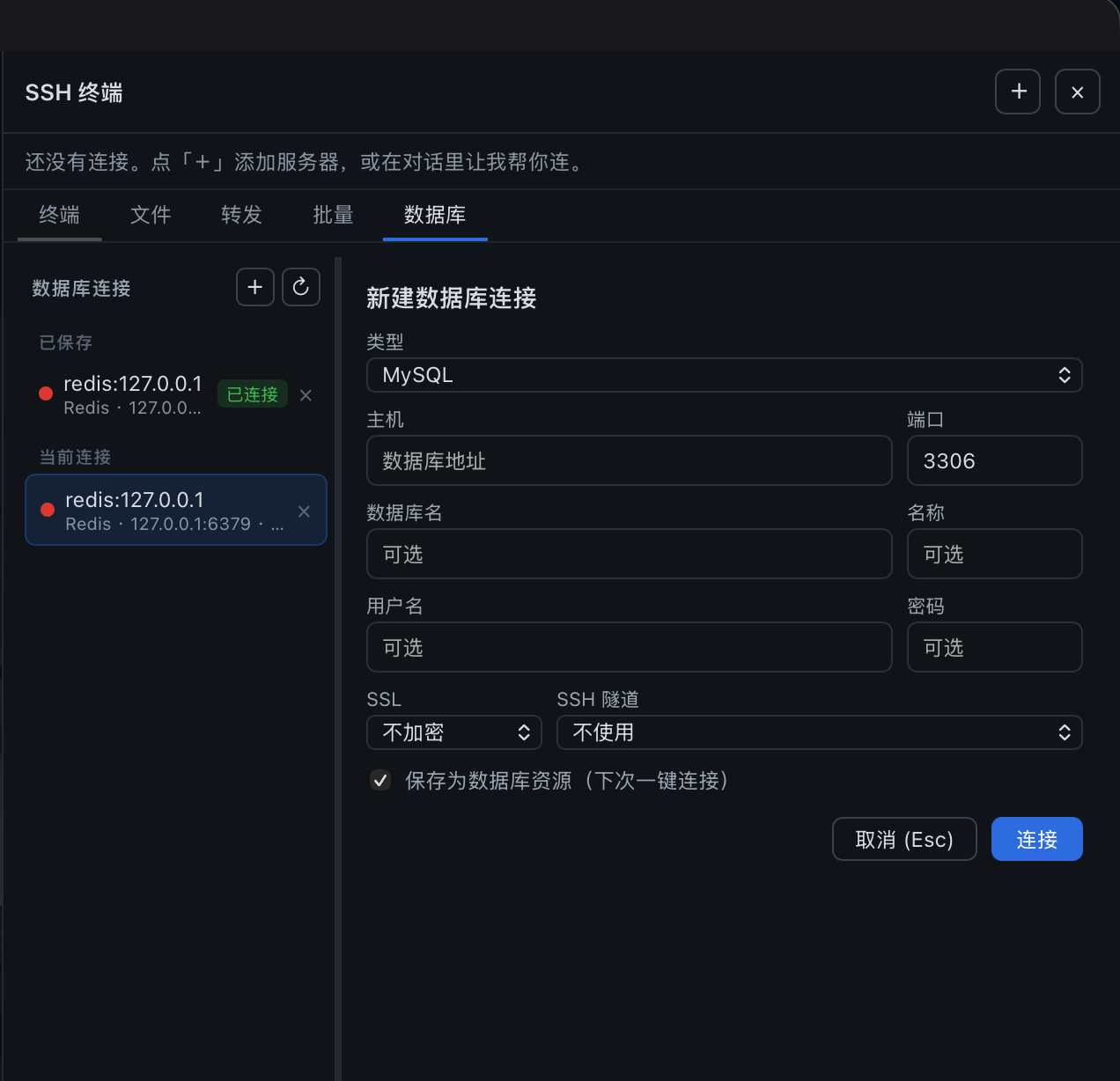
ssh_cluster(which fanned out over open connections with no confirmation) has been removed entirely: multi-server work goes only throughssh_batch's operator-ticked confirmation, so a one-server request can never silently hit every connection. - Databases: a Database tab connects to MySQL / PostgreSQL / Redis / MongoDB, runs SQL queries or commands manually, and shows results in a table. The
db_*tools can also be used directly.db_connectauto-tunnels over SSH: once a server is connected, loopback hosts (127.0.0.1 / localhost / ::1) are automatically tunneled through the current server to reach intranet databases.via_sshselectsauto(default) /yes/no; an explicitssh_connection_idtakes precedence.- Three SSL modes (
disabledplain /preferredencrypt-without-verify /verifyencrypt+verify-CA) for cloud-managed databases. - Database connections can be saved as profiles for one-click reconnect after restart; passwords are encrypted in the DSH credentials store; saved resources support renaming and collapsible grouping.
- Engineering loop:
db_queryis a lexical read-only gate (only SELECT/SHOW/DESCRIBE/EXPLAIN/read-only WITH pass; write-verb subqueries, PG data-modifying CTEs,SELECT INTO, andFOR UPDATElocking reads are rejected); queries stream with a default 200-row cap and 30s timeout (DSH_SSH_OPS_MAX_DB_ROWScan raise the cap to 5000; use the smallest production value needed; MySQL destroys the pool connection, PG paginates via a cursor); an interactive transaction workflowdb_tx_begin/execute/commit/rollback(dedicated connection, verify-then-commit, auto-rollback after 5 min idle);db_describe_tablereports indexes/foreign keys/DDL/row-count and size estimates;db_previewpaginates samples,db_explainshows the plan. The database panel adds a table tree, preview view, one-click CSV export (with BOM for Excel), and query history (last 50 per connection in localStorage). DB transport loss no longer crashes the process (handled uniformly across all four clients, never throwing). - High-risk SQL (
DROP DATABASE/SCHEMA/TABLE,TRUNCATE,SHUTDOWN) is auto-blocked, detected by statement verb (skipping strings/comments, supporting multi-statement), so keywords inside string literals are never false-positives.
Security boundary
DSH's own permission mechanism remains in effect. This plugin additionally stops agent tools from executing clearly irreversible or destructive operations, such as deleting files, dropping databases, formatting disks, terraform destroy, kubectl delete, docker prune, forced Git cleanup, and reboot/shutdown.
When the agent hits the blocklist it is not silently refused: the whole tool call suspends in the conversation while the host's native approval channel asks the operator (full command, target host, risk category, Approve / Reject). The agent cannot move an inch while waiting — no retries, no re-spelled workarounds, no parallel progress — and an absent operator means the call is treated as rejected (fail-closed). An approval is one-shot, bound to exactly that command on that machine, and burns on use. If the transport is lost after dispatch, a dangerous command is never transparently replayed; the call reports an outcome requiring verification instead. Approving a simple rm runs the reversible move to trash (see above); a host without an approval channel denies with an explicit reason too. Ordinary ops (configure SSL, install packages, edit configs, reload services) are unaffected.
The same model covers sftp_delete (it also uses the host's in-conversation approval; approval moves simple literal paths through the trash when possible) and db_execute high-risk SQL (DROP/TRUNCATE/SHUTDOWN): high-risk SQL keeps its backup-and-quarantine flow and still returns a copyable SQL card for the operator to paste into the database panel's SQL editor. SQL detection works by statement verb (skipping strings/comments, splitting on ; for multi-statement), so keywords inside string literals are never false-positives, and high-frequency CRUD passes through normally.
Installation
From GitHub (recommended)
dsh plugin --profile web add github:caoyiwei850/dsh-ssh-ops#v0.4.3
The git channel installs source; the prepare hook runs npm run build during install to produce the lib/ entry files, so no manual build is needed. Note: pnpm ≥ 10 blocks dependency build scripts by default — if the SSH tab does not appear after restart, check node_modules/dsh-ssh-ops/lib/ as described in INSTALL.md step 3: if it is missing, the build was blocked; run npm install && npm run build inside that package directory (or allowlist dsh-ssh-ops in the profile's pnpm onlyBuiltDependencies) and restart.
Then restart DSH Web:
dsh web
Open any session, click the top SSH tab, and use the right-side panel to connect to a server.
From a release archive
Download dsh-ssh-ops-0.4.3.tgz from GitHub Releases, then:
dsh plugin --profile web add /path/to/dsh-ssh-ops-0.4.3.tgz
dsh web
dsh-ssh-ops-0.4.3.zip is for offline review or further development; extract it and run npm install in the directory (the build runs automatically).
Usage
- Open Settings → SSH Resources and create a group or server resource; PEM /
.keyfiles can be imported directly. - A saved resource can be "connect & open" to auto-create a right-side PTY terminal. When editing, leaving a secret field blank keeps the existing value; clearing credentials requires explicit confirmation.
- The top SSH only toggles the right-side terminal; the
+in the top-right picks a saved resource or creates a non-persistent temporary connection. - In the main conversation, just say "check server memory usage" or "configure the Nginx SSL certificate". The agent can only operate the active connection and cannot read credentials; by default it also cannot enumerate saved resources or auto-connect with saved credentials — after enabling the switch in Settings → SSH resources → AI auto-connect, the agent may connect saved servers by name and switch the active connection (every connect opens a terminal in the right-side panel, so the operator always sees which machine the agent is on).
- For databases, have the agent call
db_connect(or create a connection yourself in the Database tab), then query/execute from the conversation. - The plugin UI language automatically follows DSH's own language setting (中文 / English): switching repaints the whole plugin UI immediately, agent-visible tool messages follow via write-back both live and after restart, and the settings-nav label and glyph for this plugin follow along.
Pinning the interface language. The follow behaviour can be switched off through the plugin settings file (~/.dsh/storages/ssh_ops_settings.json). This is meant for setups where DSH runs a third-party locale the plugin does not ship (e.g. Russian) — without a pin, such a locale is coerced to the default Chinese and the plugin would keep writing that back. Pin it to a fixed language instead:
{
  "unit": { "name": "ssh_ops_settings", "version": 1 },
  "global": null,
  "tables": {
    "settings": {
      "main": {
        "language": "en",
        "autoApplySystemLanguage": false
      }
    }
  }
}
autoApplySystemLanguage—true(the default; absent means the same) follows DSH's own language and writes it back on every load, exactly as before.falsepins the plugin to the storedlanguagevalue: the host language is neither followed nor written back, so the file stays as you edited it. On the first load after upgrading, the defaulttrueis materialized into the file so the knob is visible.language—"zh"or"en", the pinned language used whileautoApplySystemLanguageisfalse; ignored while auto-follow is on.- Edit the file while the harness is stopped (a running instance may rewrite it on load) and restart the harness afterwards to apply the change.
Agent tools
There are 34 agent tools. Omitting connection_id / db_connection_id targets the active connection — no need to call ssh_list / db_list_connections first.
SSH (7)
| Tool | Purpose |
|---|---|
ssh_list |
List open SSH connections and identify the active server; with AI auto-connect enabled, also lists saved servers (no credentials) |
ssh_connect |
Connect over SSH (password or private key) and make it the current server |
ssh_connect_profile |
Connect a saved SSH resource by name and make it the current server (opens its terminal in the right-side panel); only available after the operator enables AI auto-connect, otherwise it fails with a clear "ask the operator" error |
ssh_exec |
Run a command on the current server (inherits the interactive shell's cwd); returns exit code/output/cwd/duration/timeout/truncation/redacted state |
ssh_read |
Read right-side terminal output on demand — by default only what arrived since the previous read (history already in context is not repeated); mode: "tail" returns the full capture. Never silently injected |
ssh_write |
Send interactive input to a terminal; press_enter (default true) appends Enter so prompts are submitted like a real keypress (use connection_id to target a specific server's terminal) |
ssh_disconnect |
Close the current connection and its shell sessions |
Manual terminal context (2)
| Tool | Purpose |
|---|---|
ssh_terminal_sessions |
List low-sensitivity metadata and cursors for open terminals; never returns terminal content or credentials |
ssh_terminal_context |
After per-read user approval, read a bounded, redacted history range from a selected manually operated terminal without affecting the visible terminal scrollback |
SFTP (6)
| Tool | Purpose |
|---|---|
sftp_list |
List remote directory entries (with size/mtime/mode) |
sftp_read |
Read a remote file's contents (default cap 4 MiB) |
sftp_write |
Write text to a remote file (create or overwrite) |
sftp_mkdir |
Create a remote directory |
sftp_delete |
Delete a remote file or empty dir (requires host in-conversation approval; simple literal paths move to the trash when possible) |
sftp_rename |
Rename or move a remote path |
Port forwarding (3)
| Tool | Purpose |
|---|---|
tunnel_start |
Start a local forward (local, this machine → server-reachable target) or a remote forward (remote, server → this machine) |
tunnel_list |
List active tunnels |
tunnel_stop |
Stop a tunnel by tunnel_id |
Batch execution (1)
| Tool | Purpose |
|---|---|
ssh_batch |
Create a batch task over saved servers (including not-yet-connected ones) from SSH Resources; the operator ticks targets in the panel before it is dispatched concurrently, results grouped per server — only when the user explicitly asks for multi-server batch (the legacy ssh_cluster is removed entirely; there is no confirmation-free multi-server path) |
Database (14)
| Tool | Purpose |
|---|---|
db_connect |
Connect to MySQL / PostgreSQL / Redis / MongoDB; loopback hosts auto-tunnel through the current SSH server; three SSL modes |
db_list_connections |
List open database connections (only when the user asks) |
db_query |
Run a lexically enforced read-only query on MySQL/PostgreSQL (only SELECT/SHOW/DESCRIBE/EXPLAIN/read-only WITH pass; write verbs, SELECT INTO, FOR UPDATE locking reads and data-modifying CTEs are rejected); results stream with a default 200-row cap and 30s timeout; DSH_SSH_OPS_MAX_DB_ROWS can raise it to at most 5000 rows; supports ? / $1 placeholders |
db_execute |
Run a write statement (INSERT/UPDATE/DELETE/CREATE/ALTER); high-risk SQL (DROP/TRUNCATE/SHUTDOWN) is not executed, returns a copyable card |
db_list_tables |
List tables in the current schema of MySQL/PostgreSQL |
db_describe_table |
Full structure: columns, indexes, foreign keys, row-count/size estimates, plus MySQL SHOW CREATE TABLE DDL |
db_preview |
Paginated table sampling (bound LIMIT/OFFSET, injection-safe identifier whitelist) with a full-table row estimate — no SQL needed |
db_explain |
Execution plan (EXPLAIN FORMAT=JSON) to check index usage |
db_tx_begin / db_tx_execute / db_tx_commit / db_tx_rollback |
Interactive transaction workflow: begin → write → SELECT-verify → commit/rollback (dedicated connection, auto-rollback after 5 min idle) |
db_run |
Run a command on Redis (command+args), or find/findOne/insertOne/updateOne/deleteOne/countDocuments on MongoDB |
db_disconnect |
Close a database connection |
Use
db_queryfor read-only SQL,db_executefor SQL writes, anddb_runfor Redis/MongoDB. MySQL uses?placeholders; PostgreSQL uses$1placeholders.
Development
npm install
npm test        # db-lazy-load builds the host bundle itself when lib/ is absent
npm run build   # writes lib/ (host trio + client bundle); lib is a build output, never committed
npm run pack:release
lib/ is generated by npm run build and listed in .gitignore (PR diffs are no longer drowned in build output). Git-channel (github:) installs rely on the prepare hook to build lib/ at install time (with pnpm ≥ 10 the build must be allowlisted or run manually — see Installation); npm and tgz packages ship the artifacts. A plain npm install in the repo also runs one build.
Pushing a vX.Y.Z tag that matches package.json.version runs tests, builds the release assets, and publishes the same tarball to npm and GitHub Releases. Configure the repository NPM_TOKEN secret before the first release.
Artifacts are written to release/:
dsh-ssh-ops-0.4.3.tgz: installable directly by DSH.dsh-ssh-ops-0.4.3.zip: full offline source archive.
License
Related plugins
DSH-better-sidebar
 dsh-external
/DSH-better-sidebar
右侧侧边栏增强:文件预览/终端/Git,可拖拽自定义位置
dsh plugin --profile web add github:dsh-external/DSH-better-sidebarmirage#dsh
 strukto-ai
/mirage/typescript/packages/dsh
把文件系统与 bash 提供者换成 mirage 虚拟工作区:文件工具与 shell 命令作用于挂载的资源(RAM、S3、Redis、Slack、Gmail、Notion、Postgres)而非宿主磁盘,支持按挂载点设置读/写/执行模式、按命令选择沙箱(进程内 monty、pyodide、quickjs;远程 docker、e2b、daytona),并可在虚拟终端中安装 CLI(git、gh、slack、linear、ntn、gws,或自行注册的程序树)作为命令头词。
dsh plugin --profile web add github:strukto-ai/mirage#path:/typescript/packages/dshdeepseek-harness-desktop
 hairyf
/deepseek-harness-desktop
DeepSeek Harness Tauri 桌面版 | Only 5mb installer, zero environment setup. Windows / macOS / Linux.
dsh plugin --profile web add github:hairyf/deepseek-harness-desktopcc-safety-net
 kenryu42
/cc-safety-net
A coding agent CLI hook - block destructive commands and secret file access
dsh plugin --profile web add 'github:kenryu42/cc-safety-net#ae8af0330308ad0bc24b5389709060c7a07a6b8d'hol-guard
 hashgraph-online
/hol-guard
开源AI代理防病毒:运行时拦截风险工具、秘密访问、提示注入、恶意软件包、MCP服务器、插件和技能。
dsh plugin --profile web add github:hashgraph-online/hol-guarddsh-mobile
 saya-ch
/dsh-mobile
DeepSeek Harness 移动端适配与安全局域网访问插件,支持 Android App 和手机浏览器。
dsh plugin --profile web add github:saya-ch/dsh-mobile