
Sessions & Messages
dsh-remote-console
cccodder/dsh-remote-console · ★ 3
 cccodder
A right-sidebar SSH console for DeepSeek Harness where you and your agent share the same terminal and a unified activity log.
Manifest details
安装
dsh plugin --profile web add 'dsh-remote-console@0.10.7'从 npm 安装预构建包
For install and environment setup, plus plugin development tutorials, see DSH community docs ↗
README
Table of contents
- 30-second start
- What it is not
- At a glance
- Contents
- Why
- Install
- Usage
- Managing the host list
- Updates
- Security
- Permissions & external dependencies
- Reporting a vulnerability
- Environment variables
- Troubleshooting
- 1. ssh: command not found
- 2. Bad owner or permissions on ...
- 3. Password / host-key authentication stalls, agent writes rejected
- 4. Control socket unavailable
- 5. CONSOLE_CLOSED / NO_LIVE_CONSOLE after the terminal ended
- 6. Plugin market index does not update
- 7. Where are the logs? / enable the self test
- Compatibility
- Windows (experimental)
- Benchmark (loopback)
- Development
- Data directory
- License
DSH SSH plugin · right-sidebar SSH terminal · you and your AI agent share one PTY · built for DeepSeek Harness (DSH)
中文 | English



You ssh in and type the password; the agent can only wait on the side — it cannot see your terminal. This plugin puts the agent inside the terminal you are watching: you see what it runs, you can take over at any moment, and both sides land in one activity log.
An SSH console in the DSH right sidebar where you and your agent share one PTY. No new terminal to learn (rendering, input and window management are DSH's own), no DSH patch, no stored password.
30-second start
# CLI-managed profile (e.g. web)
dsh plugin --profile web add dsh-remote-console
# then add "dsh-remote-console" to that profile's dsh.profile.bundles and restart DSH
- Plugin market:
Discover → Add index sourceand pastehttps://cccodder.github.io/dsh-remote-console/market/index.json - Electron desktop app: search
dsh-remote-consolein its plugin manager (or pastegithub:cccodder/dsh-remote-console) - 0.10.4+: the configuration page checks for updates and updates in place through DSH's plugin manager (hot-applied, no restart)
Then: right sidebar → "SSH remote" → pick a host → you type the password → let the agent work in that same terminal.
What it is not
| You might expect | Answer |
|---|---|
| A remote development environment (file tree, workspace mirror, VS Code Remote style) | No. You get a real remote terminal; large files go through remote_upload / remote_download |
| An agent that connects behind your back and runs commands | No. It runs in the terminal you are watching — visible, interruptible, audited |
| Yet another terminal implementation | No. xterm rendering, input and window management are all DSH's own |
| A patched DSH fork | No. It only wraps public terminal services, so DSH upgrades need no re-patching |
At a glance
| Agent tools | 16: terminal 6 · files 4 · port forwarding 1 · audit 2 · host list 3 |
| File transfer | Streamed with sha256 on both sides; 256 MB per file by default, 1–2048 MB in the settings page |
| Terminal | DSH's native terminal, one shared PTY; exit codes come from a shell hook (OSC), not prompt guessing |
| Audit | Cross-session JSONL: commands, exit codes, approvals, transfer paths + sha256, tunnels; redacted |
| Dependencies | 0 runtime dependencies; no DSH patch; Node ≥ 20 |
| Tests | 197 tests including a real sshd in CI; npm releases carry provenance |
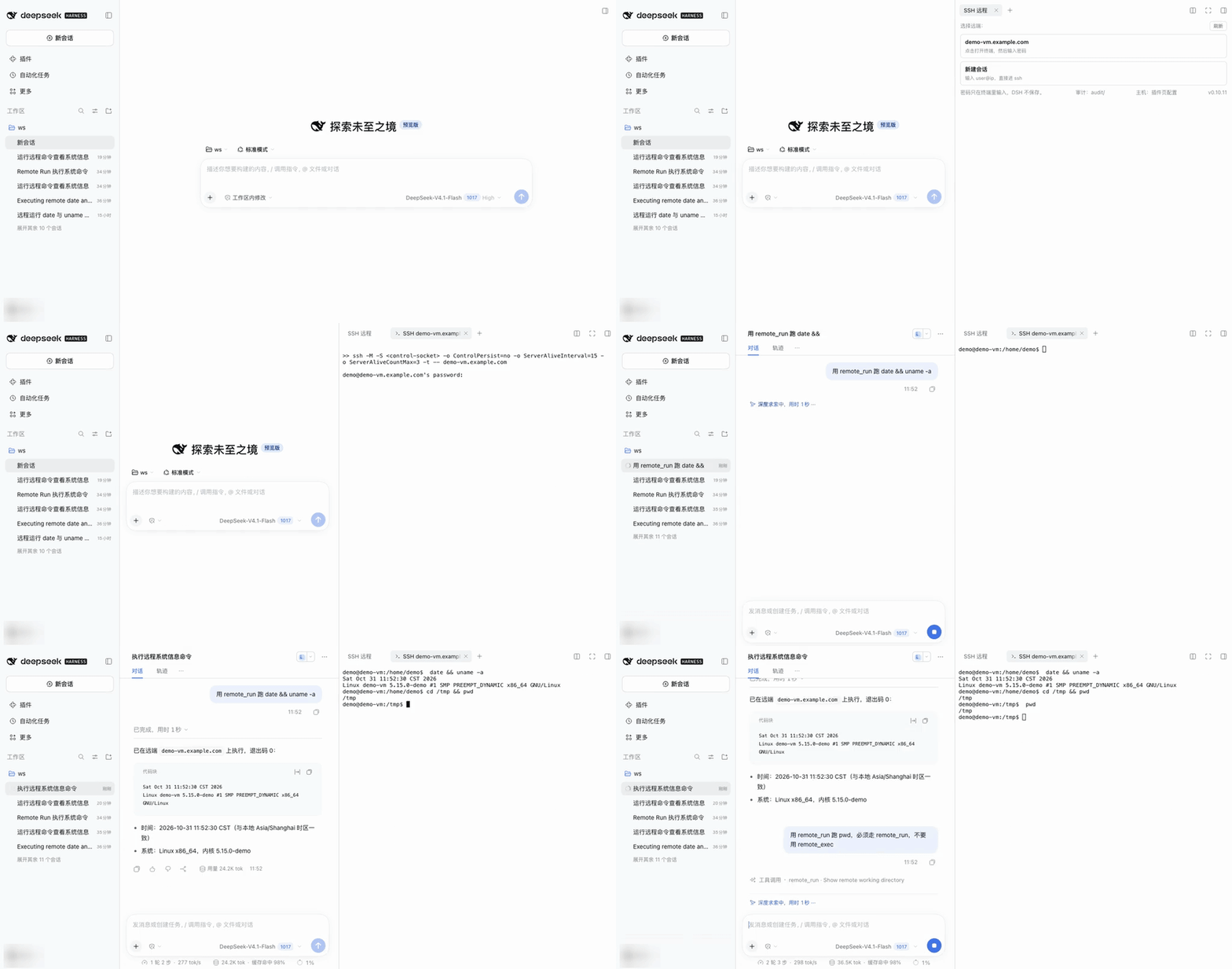
11 seconds end to end: pick a host → type the password → the agent runs date && uname -a in the same terminal → the human takes over with cd /tmp → the agent's pwd is still /tmp (same PTY). The example host demo-vm.example.com is a test sshd.
If this plugin saves you a few window switches, a ⭐ Star helps other DSH users find it.
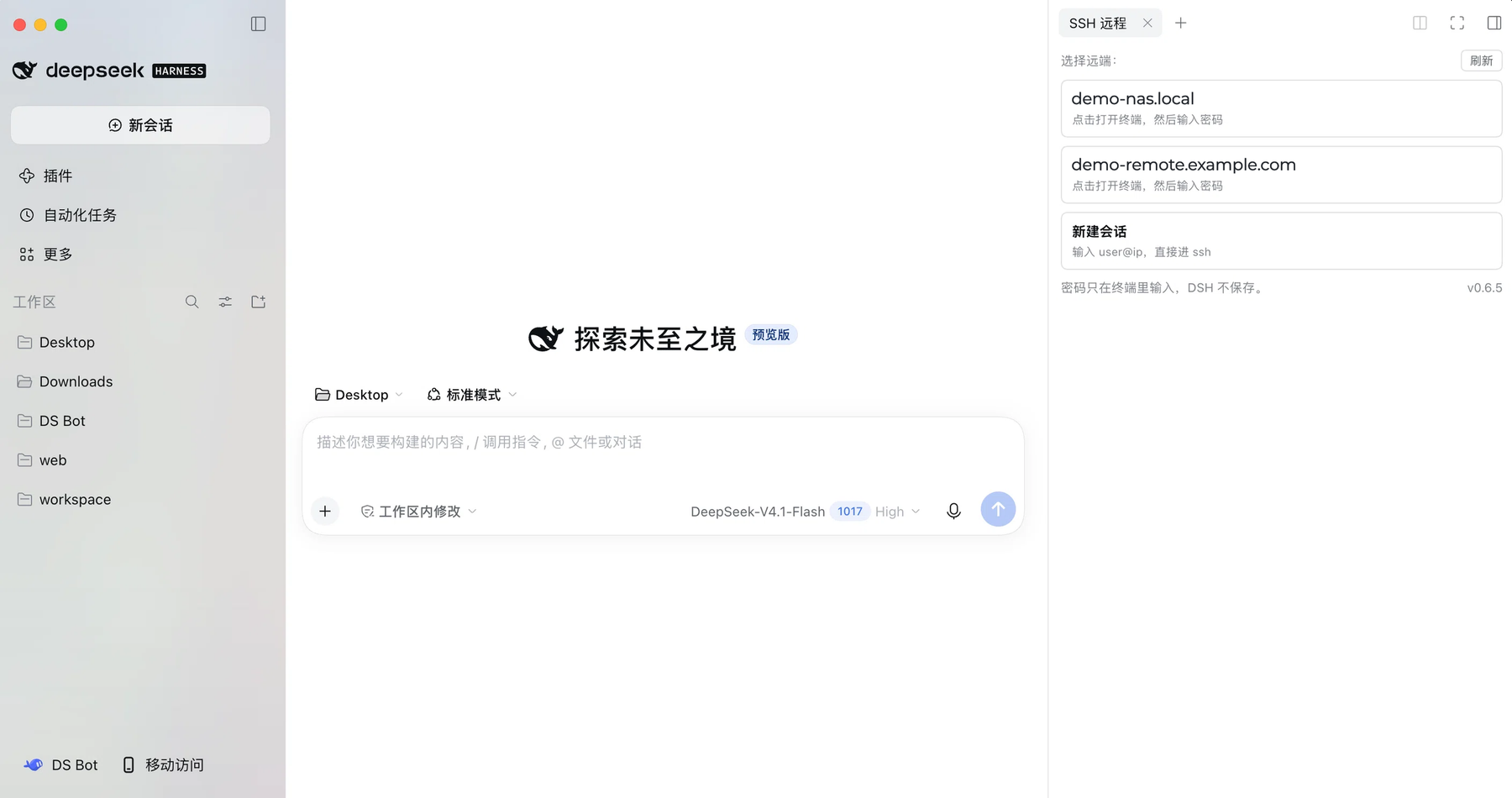
The "SSH remote" panel: click a host to ssh and type your password, or use "New session" with user@ip. The example host demo-vm.example.com is a local test sshd (example.com is the reserved documentation domain, not a real machine).
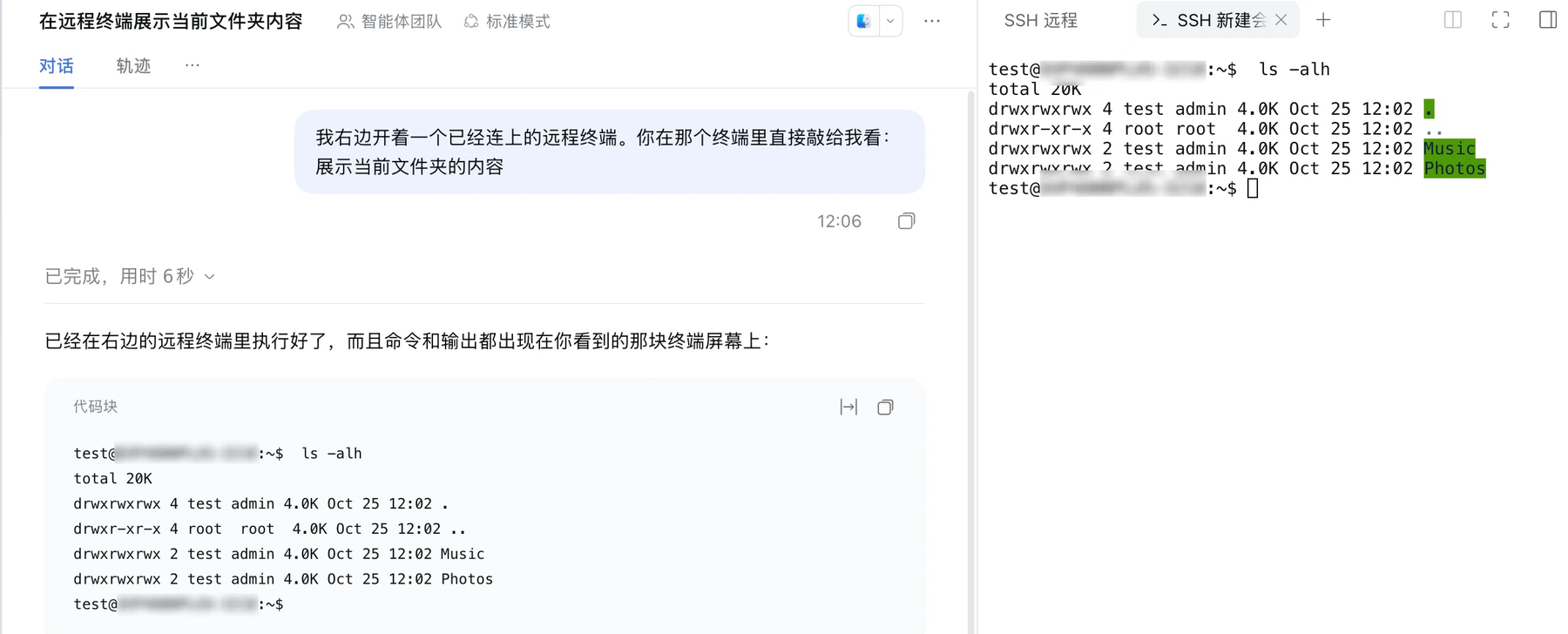
The agent runs commands in the terminal you are watching: the chat on the left shows its remote_run, the right is the same PTY; pwd is /tmp on both sides, so the human and the agent share one shell. The example host is the same demo-vm.example.com test machine.
Contents
Why · Install · Usage · Managing the host list · Updates · Security · Environment variables · Troubleshooting · Compatibility · Windows · Benchmark · Development · Data directory · License
Why
Agent remote execution is usually a second, invisible SSH channel: you cannot see what it
types, nobody can answer the password/sudo/host-key prompts, and shell state (cd,
export) is lost between calls.
This plugin puts the agent inside the terminal you are already watching. Its commands
appear in the window like human typing, and the exit code comes from the shell's own
PROMPT_COMMAND hook (an OSC marker), not from guessing at prompts.
Install
Requires DSH >= 0.2.1-rc.2 <0.3.0-0 and a system ssh client.
The full version / platform / capability matrix (including unverified items, the Windows status and
pnpm 11 installation notes) is in docs/compat.md.
npm package: dsh-remote-console (https://www.npmjs.com/package/dsh-remote-console).
Plugin market (recommended — gives a real Update entry): a DSH plugin market index (format 1) is published with the repository:
https://cccodder.github.io/dsh-remote-console/market/index.json
Add it under Discover → Add index source, then install from the list. When a newer version is published the entry shows "Update available" and DSH handles the update through the plugin manager.
CLI-managed profile (e.g. web):
# 1. install into a profile (replace "web" with your profile name)
dsh plugin --profile web add dsh-remote-console

# 2. add it to that profile's bundle list
#    $DSH_HOME/profiles/web/package.json:
#      "dsh": { "profile": { "bundles": [ ..., "dsh-remote-console" ] } }

# 3. confirm the layer is composed (expect: id: dsh-remote-console)
dsh --profile web --dump-config | grep -A2 dsh-remote-console
Electron desktop app: the desktop profile is owned by the app and the CLI refuses it
(profile "desktop" is managed exclusively by the Electron application). Install through the
in-app plugin manager: package name dsh-remote-console (npm), or the repository address
github:cccodder/dsh-remote-console (latest commit). It writes dependencies and
dsh.profile.bundles for you. The global dsh CLI may be older than the DSH bundled in the
app — the app's version is the one that counts.
No Python, no edits to ~/.ssh/config, no shell rc changes.
Usage
- Right sidebar → the "SSH 远程" guide card → pick a host (from
~/.ssh/config, or add one). - The terminal runs
ssh -M -S <sock> -t <host>;sshprompts for the password itself — the plugin never sees it. - Agent tools after login:
| Tool | Purpose |
|---|---|
remote_status |
Console, host, socket, state, last screen lines |
remote_run(command) |
Write into the same PTY (visible in the window), return output + real exit code (the PTY merges stderr into it) |
remote_exec(command, cwd?) |
Out-of-band execution over the ControlMaster socket: native stdout/stderr/exit code, no terminal noise |
remote_upload(local_path, remote_path, overwrite?) |
Local → remote: streamed, sha256 verified on both sides, no overwrite by default, 256 MB per file by default (1–2048 MB in the settings page) |
remote_download(remote_path, local_path, overwrite?) |
Remote → local: streamed, sha256 verified, no local overwrite by default, same limit |
remote_read_file(path, max_bytes?) |
Read remote text (128 KB default, 256 KB max); binary files are refused and redirected to remote_download |
remote_write_file(path, content, append?) |
Write ≤256 KB of UTF-8 text; content goes over stdin, never through the terminal window |
remote_forward(action, remote_port?, ...) |
start/stop/list for ssh -N -L 127.0.0.1:... tunnels, bound to loopback only |
remote_screen(lines) |
Current screen as plain text (ANSI stripped) |
remote_log(cursor) |
Incremental read of the unified JSONL log (human commands, agent commands, both outputs) |
remote_audit_read(cursor?, tool?) |
Read the cross-session audit trail: commands and exit codes, approvals, transfers, forwards, session start/end (no screen content) |
remote_audit_export(local_path, format?) |
Export the audit trail to a local jsonl / csv file (0600) for archiving or review |
remote_close() |
Close the ssh master, clean up socket/rendezvous files, stop this console's tunnels |
Which channel to use (the same rules are shown to the model)
| Task | Tool | Why |
|---|---|---|
| Anything the user should see (installs, builds, diffs, progress) | remote_run |
Runs in the terminal the user is watching; this is the expected way to work |
| Needs a tty or interaction (sudo password, vim, less, top, nested ssh, REPLs) | remote_run |
The out-of-band channel has no tty and fails with not a tty |
| Pure data collection, long output to parse | remote_exec |
Invisible to the user, native stdout/stderr, reliable exit code |
The rules are injected into the system prompt only while a console is connected (nothing is added
when there is none). Misuse gets a one-line correction in the result: a large remote_run output
suggests remote_exec next time, and remote_exec hitting "needs a tty" suggests remote_run.
remote_status also starts with the current channel summary and the routing rule.
Files and tunnels reuse the same authenticated connection: remote_upload / remote_download /
remote_read_file / remote_write_file / remote_forward go through the console's ControlMaster
socket — no password prompt, no re-authentication — but they require a live SSH terminal and fail
immediately once it ends (BatchMode=yes, fail closed). Writing sensitive paths such as ~/.ssh,
/etc, sudoers or a shell profile asks for approval once. The full capability matrix is in
docs/compat.md.
exit semantics: host launchers and "new session" are one-shot — when the remote shell
exits (exit/logout in a command, or ssh drops), the whole console ends, every remote_*
tool stops working, and a human must reopen the terminal and log in again. Such commands ask
for approval first, and the terminal says plainly that it has ended instead of pretending
the session is still usable.
Managing the host list
Hosts in the panel come from three places: ~/.ssh/config, the plugin settings page
(config.hosts), and hosts.tsv (written by the agent tools). Two ways to maintain them:
Option 1: the settings page (recommended)
Open Plugins in the sidebar (puzzle icon) → click the
dsh-remote-consolecard.The package detail page shows the "Hosts" configuration section; the configure button on the
dsh-remote-consolerow under "Parts" opens the same page.One host per line: an
~/.ssh/configalias, oruser@host[:port]; lines starting with#are comments. Example:web-01 ops@203.0.113.10:22Save. The host regenerates the sidebar "SSH remote" launchers: aliases go through the ssh config,
user@host:porttargets skip the menu and connect directly.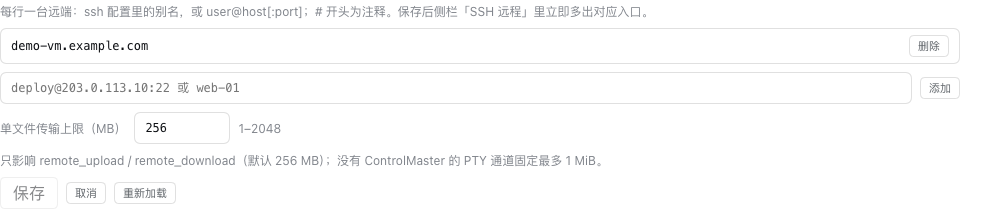
The same page has a "Per-file transfer limit (MB)" field: 256 by default, 1–2048 allowed. It caps
remote_upload / remote_download and takes effect immediately after saving (no plugin reload).
Platforms without ControlMaster fall back to the PTY channel, whose hard cap stays at 1 MiB
regardless of this setting. Headless deployments can set the same value with
DSH_RC_MAX_TRANSFER_MB (the settings page value wins).
If neither the section nor the "configure" button appears, the deployment does not provide DSH's settings service (
ctx.configForms). Use option 2 — the terminal is unaffected; the transfer limit stays at the default 256 MB (or useDSH_RC_MAX_TRANSFER_MB).
Option 2: ask the agent (no settings page needed)
Just say "add ops@10.0.0.5:22 to the SSH list"; the agent uses these tools:
| Tool | Purpose |
|---|---|
remote_host_add(spec) |
Add to hosts.tsv (plugin data dir, 0600); the panel picks it up on refresh; re-adding updates |
remote_host_list() |
List panel hosts and where each comes from (ssh config / settings page / hosts.tsv) |
remote_host_remove(spec) |
Remove from hosts.tsv only (ssh config, keys and remote data untouched) |
The two options store different things: the settings page writes config.hosts in the profile
patch, the tools write ~/.dsh/remote-console/hosts.tsv; the panel merges both.
Updates
Noticing a new version: the panel footer only shows the running version (e.g. v0.10.10).
The panel no longer checks for updates (one network request less, and a fresh panel opens without
waiting on the network). Version checks and one-click updates live in the settings page below.
Option 1 — one-click hot update in the settings page (recommended)
Sidebar → Plugins → dsh-remote-console → its configuration page. Opening the page checks
the latest release (GitHub, cached 10 minutes, with a Re-check button). Once a newer version is
available and npm has it, click Update to vX.Y.Z:
- the DSH plugin manager uninstalls the current version and installs the new one;
- DSH's HMR applies the change to the running process — no restart;
- the page reloads itself to pick up the new client bundle, and the version number changes.
Update checks first look at how this profile installed the plugin: an npm install queries the
registry order DSH/pnpm is configured with (mirror first, public fallback next), a git install pinned
to a version tag queries GitHub releases, and a local directory or link: install is never offered
an in-place update (so a development checkout is not overwritten). Results are cached for 10 minutes;
Re-check forces a fresh read.
A failed install rolls back to the current version and shows the original error. If DSH reports
that this change needs a restart, the page says so. Older deployments without
remote.pluginManager disable the button and fall back to options 2/3.
Upgrading from 0.10.9 or earlier: uninstall and reinstall once by hand. Those clients misread the plugin manager's return value, so the update button reports success without changing the version. One-click updates are reliable only from 0.10.10 on.
When a restart is needed: the Host half reloads in place through HMR, but the browser bundle graph is built from the paths resolved at startup. If the current version was installed from a local directory or a
link:spec, updating switches the source to npm and the paths change, so DSH does not rebuild that graph: the page says "installed vX, restart DSH once", and the version changes after the restart. Upgrades between npm-installed versions keep the same paths and need no restart.
Option 2 — plugin market
The plugin is published to npm with a format-1 market index:
https://cccodder.github.io/dsh-remote-console/market/index.json
Add it under Discover → Add index source; the entry then shows "Update available" when a
newer version is in the index, and DSH installs it through the plugin manager (dsh-remote-console@<version>
from npm). The install location and the data directory stay the same.
A third-party plugin installed from the market starts out disabled: click Enable now (or flip the plugin toggle) on the Plugins page, otherwise the sidebar "SSH remote" entry never shows up.
This is GitHub Pages, updated on every push (the first build takes about a minute). If it is unreachable, use the jsDelivr URL
https://cdn.jsdelivr.net/gh/cccodder/dsh-remote-console@main/market/index.json(branch cache up to ~12h), the raw GitHub URL, or hostmarket/index.jsonon your own static server — it is just a JSON document.
Option 3 — manual reinstall (no market enabled, or for cross-major troubleshooting)
- Sidebar → Plugins → installed plugins →
dsh-remote-console→ Uninstall (confirmed). - Add plugin →
dsh-remote-console(npm) orgithub:cccodder/dsh-remote-console(latest commit) → install → Enable now. - Restart the DSH desktop app once. The plugin re-runs
apply()on hot reload and the wrap is idempotent now, but a restart is the clean path (stale wraps from 0.6.0/0.6.1 need it).
Hosts and hosts.tsv live in ~/.dsh/remote-console/, outside the package, so uninstalling
does not lose them.
About one-click updates: DSH's own plugin manager only offers Update for official on-demand
plugins, so this plugin turns "uninstall → install" into a button on its configuration page
(0.10.4+) and lets HMR apply it live. The plugin market index (market/index.json in this
repository) still fits first installs and deployments without a configuration page.
If the index does not update or the version does not change after clicking update, see item 6 of
Troubleshooting.
Security
- Credentials never pass through the plugin: the password is typed into
ssh's own prompt.hosts.tsvstores only host/user/port (mode 0600), the data dir is 0700, and no key material is ever written. - Terminals are isolated per session: tools only accept consoles opened by the calling
session — ownership comes from
DSH_SESSION_IDat spawn time, the caller fromexec.agent.id. A mismatch makesremote_*fail withCONSOLE_FORBIDDEN, andremote_statuslists only this session's consoles. Audit records carry bothpidandsession, so a terminal can be traced back to the session that used it. - No writes during authentication: while the screen sits on
password:,(yes/no)?,Permission denied, etc., agent writes are rejected (AUTH_REQUIRED). - Dangerous-command approval:
remote_run/remote_execbypass the DSH sandbox, so the plugin adds a gate: patterns such asrm -rf,mkfs,dd of=/dev/*,shutdown/reboot, fork bombs,curl | sh,git push --force,DROP TABLEtrigger a one-shot approval card through DSH'sctx.approval. A grant covers that command only; with no approval service mounted the command fails closed.exit/logout/pkill sshinremote_run(which end the whole console) ask for approval too. - Transfers are verified, tunnels are loopback-only:
remote_upload/remote_downloadstream the bytes and compute sha256 on both sides (reported asverified: unavailableif the remote has neithersha256sumnorshasum); existing files are not overwritten unless you passoverwrite: true. Per-file limit is 256 MB by default and configurable in the settings page (1–2048 MB, same as theDSH_RC_MAX_TRANSFER_MBenvironment variable); over-limit transfers fail with a message that says where to change it.remote_forwardlistens on127.0.0.1only, so other machines on the LAN cannot reach it, and the tunnel stops when the terminal ends orremote_closeruns. Writing sensitive paths (~/.ssh,/etc, sudoers, shell profiles) asks for approval first. - Session logs disappear, the audit trail does not: the per-session JSONL with screen output is
deleted when the PTY ends; logs left behind by a DSH crash are swept on the next plugin start. A
separate audit trail (
audit/audit.jsonl) records agent actions only — redacted commands, exit codes, approvals, transfers, forwards, session start/end — survives sessions, can be disabled withDSH_RC_AUDIT=off, and is read/exported withremote_audit_read/remote_audit_export. Known secret shapes (Bearer tokens,sk-*,password=/token=/secret=) are redacted in both, but plaintext secrets inside command arguments can still appear during the session — prefer env vars orssh-agent. - Closing means revoking: closing the terminal tab kills the process tree immediately;
closing the browser kills it 8 s after the last window hold disappears (a refresh
reconnects and cancels); if DSH crashes, the PTY master disappears and
sshexits on HUP.
Permissions & external dependencies
This plugin runs remote commands, moves files and uses the network, so here is the whole exposure surface in one place (marketplaces and security scanners read this section).
| Capability | What it does | Boundary |
|---|---|---|
| Network | Only through the ssh connection you already authenticated (the ControlMaster socket, or the ssh process inside the terminal) — no second connection. The update check contacts the GitHub API and the npm registry DSH/pnpm is configured with, only while the configuration page is open; results are cached for 10 minutes and failures are silent |
Terminal features work offline; once the socket is gone every out-of-band call fails closed |
| Commands | The agent runs shell commands through remote_run / remote_exec |
Dangerous patterns (rm -rf, mkfs, dd of=/dev, shutdown, fork bombs, curl | sh, …) require a one-shot approval; with no approval service the command is refused |
| Files | remote_upload / remote_download read local files and write remote files; remote_read_file / remote_write_file read and write remote text |
No overwrite by default, sha256 on both sides; writing ~/.ssh, /etc, sudoers or a shell profile asks first; paths containing .. are refused |
| Credentials | The SSH password is typed into ssh's own prompt; the plugin never reads, stores or replays it; hosts.tsv holds only host/user/port (0600) |
Audit and logs are redacted and never contain the screen; DSH_RC_AUDIT=off disables the audit trail |
| Local files | Data dir ~/.dsh/remote-console/ (launchers, session logs, audit, hosts.tsv; files 0600, dir 0700); saving the settings page goes through DSH's config editor into the profile patch (config.hosts / config.maxTransferMB) |
Session logs are deleted when the terminal ends; the audit trail is separate and can be disabled |
| External services | None; no telemetry | — |
| Lifecycle scripts | No preinstall / install / postinstall / prepare; zero runtime dependencies, only DSH peer dependencies |
Installing never runs package scripts |
Executable artifact: bin/dsh-ssh is a POSIX sh menu/launcher. DSH executes it as the ssh launcher when
you click a host; it opens no port, does not stay resident and accepts no network input.
Failure bounds: when the terminal ends (ssh exits or the window closes) every remote_* tool fails
immediately and never silently reconnects. Platforms without ControlMaster (Windows OpenSSH) fall back to the
PTY: commands and data become visible in the window, one file is capped at 1 MiB and port forwarding is off.
Evidence: npm test runs 176 tests including a real sshd in CI; releases go through GitHub Actions with npm
provenance; isolated-profile install/boot verification is in docs/verify-e2e.md.
Reporting a vulnerability
Please report privately through GitHub Security Advisories, not in a public issue. The full policy (supported versions, what the plugin promises, known limitations) is in SECURITY.md.
Environment variables
| Variable | Default | Meaning |
|---|---|---|
DSH_REMOTE_CONSOLE_DIR |
$DSH_HOME/remote-console |
Data dir (logs/sessions/socks/bin) |
DSH_SSH_CONFIG |
~/.ssh/config |
Host alias source |
DSH_RC_DANGER_GUARD |
approve |
off disables the approval gate (still audited) |
DSH_RC_AUDIT |
on |
off stops writing the audit trail (reading/exporting existing records still works) |
DSH_RC_DRYRUN |
0 |
Wrapper dry-run: print the ssh command without running it |
DSH_RC_NO_CLEAR |
0 |
1 disables the automatic screen clear |
DSH_RC_SELFTEST |
0 |
Run the built-in self test once at startup |
Troubleshooting
Find the logs first (last item), then match your symptom. Version / platform differences (DSH 0.3.0, Windows, pnpm 11) are covered in docs/compat.md; the design behind authentication, approval and log retention is in the security model.
1. ssh: command not found
Symptom: the terminal's first line is bash: ssh: command not found; picking a host ends the
terminal immediately with "── ssh 已退出(退出码 127)──".
Cause: the plugin does not bundle ssh; it uses the system OpenSSH client, which is not on
your PATH.
Fix:
command -v ssh && ssh -V
# Debian/Ubuntu
sudo apt-get install -y openssh-client
# Fedora/RHEL
sudo dnf install -y openssh-clients
# macOS ships /usr/bin/ssh, so it normally needs no install
Windows is supported experimentally (PTY fallback, no port forwarding); see docs/compat.md.
2. Bad owner or permissions on ...
Symptom: the panel opens, but ssh inside the terminal exits at once with
Bad owner or permissions on /etc/ssh/ssh_config (or ~/.ssh/config).
Cause: ssh refuses config files with the wrong owner or permissions: system config must be
owned by root and not writable by group/others; the user config must be owned by you and writable
only by you (~/.ssh must not be writable by others either).
Fix:
ssh -G localhost >/dev/null        # reproduce first: no error means this is not your problem
ls -l ~/.ssh/config ~/.ssh
chmod 700 ~/.ssh
chmod 600 ~/.ssh/config
chown "$(id -un)" ~/.ssh/config
# when an image/container broke the system config
sudo chown root:root /etc/ssh/ssh_config
sudo chmod 644 /etc/ssh/ssh_config
Built-in fallback: when ssh -G localhost reports Bad owner, the plugin automatically switches to
-F ~/.ssh/config (or -F /dev/null) and writes an ssh config fallback line to wrapper.log.
You can also set DSH_SSH_CONFIG=~/.ssh/config explicitly and restart DSH.
3. Password / host-key authentication stalls, agent writes rejected
Symptom: the terminal sits on password:, (yes/no)? or Enter passphrase; agent tools return
AUTH_REQUIRED; remote_exec and file transfers return SSH_CLIENT_FAILED.
Cause: authentication must be completed by you in the terminal. The plugin never touches the
password and rejects agent writes during authentication; remote_exec and file transfers use
BatchMode=yes and will not prompt for a password.
Fix: type the password / yes / passphrase in the terminal window, then retry the tool. If it is
stuck, Ctrl+C back to the menu or shell and retry. To avoid typing it every time, use
ssh-agent + ssh-add (the plugin does not read your key; it reuses the login in the terminal).
Check what ssh is waiting for: the terminal's last line, or remote_status's screen output.
4. Control socket unavailable
Symptom: remote_status still shows the host, but remote_exec, file transfers and
remote_forward return SSH_CLIENT_FAILED / NO_LIVE_CONSOLE, or ssh says
Control socket ... has terminated; ~/.dsh/remote-console/socks/ has no socket or a dead one.
Cause: the ControlMaster is kept alive by ssh -M -S inside the terminal; it dies when ssh
exits, the network drops or the tab closes. The plugin does not rebuild the master and will not
re-authenticate with a stored password; a DSH restart clears stale sockets.
Fix:
ls -l ~/.dsh/remote-console/socks/      # current sockets
ps aux | grep "[s]sh -M -S"             # is the master still alive?
# close a stale master (<sock> from above, <host> the matching host)
ssh -S ~/.dsh/remote-console/socks/<sock> -O exit <host>
Then close the old tab and reopen the SSH terminal from the right sidebar and log in again. If the
socket path is too long (Unix sockets cap at roughly 108 bytes) and the bind fails, move the data
directory to a short path and restart DSH: DSH_REMOTE_CONSOLE_DIR=/tmp/rc (copy the old
hosts.tsv over to keep manually added hosts).
5. CONSOLE_CLOSED / NO_LIVE_CONSOLE after the terminal ended
Symptom: remote_run fails with CONSOLE_CLOSED: 终端已结束... or NO_LIVE_CONSOLE; the
terminal shows "── ssh 已退出(退出码 N)── / 这个终端已经结束".
Cause: launchers in the panel are one-shot. When the remote shell exits (exit / logout), ssh
drops, the network fails or you close the tab, the console ends and every remote_* tool stops
working; the plugin does not silently reconnect.
Fix: reopen the SSH terminal from the right sidebar and log in again. Use remote_exec for pure
data collection (it runs sh -c in a subprocess and does not end the terminal); exit / logout /
pkill ssh in remote_run require approval, which is the warning. Check for leftovers:
ps aux | grep "[s]sh -M".
6. Plugin market index does not update
Symptom: Discover shows no new version / no "Update available" / clicking update leaves the version unchanged; the index URL still returns old content.
Cause: the first GitHub Pages build takes about a minute; jsDelivr caches the branch for up to ~12 hours; the client's "update available" hint is cached for 10 minutes; DSH only provides a native Update entry for official on-demand plugins, so third-party plugins rely on the market index or a reinstall, and hot reload occasionally does not replace the old package.
Fix:
# 1. check whether the index lists the new version (replace 0.7.0 with the version you expect)
curl -fsSL https://cccodder.github.io/dsh-remote-console/market/index.json \
  | node -e 'let s="";process.stdin.on("data",d=>s+=d).on("end",()=>{const j=JSON.parse(s);console.log(j.plugins?.[0]?.versions?.slice(0,5).map(v=>v.version).join(" "))})'
# 2. try a mirror (different cache policy)
curl -fsSL https://cdn.jsdelivr.net/gh/cccodder/dsh-remote-console@main/market/index.json >/dev/null \
  && echo jsdelivr-ok
If the index does list the new version but the UI does not move, reinstall: Plugins → installed →
Uninstall → Add plugin → dsh-remote-console → install → enable → fully restart DSH. Hosts and
hosts.tsv live in ~/.dsh/remote-console/ and survive reinstall.
7. Where are the logs? / enable the self test
Symptom: you want to file an issue or debug, and the session logs seem to "disappear".
Cause: diagnostics live in the data directory (default ${DSH_HOME:-~/.dsh}/remote-console/);
the per-session JSONL is not kept after the PTY ends, so capture it while the problem is happening.
Fix:
ls -la ~/.dsh/remote-console/
tail -n 100 ~/.dsh/remote-console/plugin.log    # startup, framing, approvals, tool registration
cat ~/.dsh/remote-console/wrapper.log           # wrapper (e.g. ssh config fallback); no output = not triggered
ls -la ~/.dsh/remote-console/logs/              # session JSONL: exists only while a session runs
Save plugin.log and logs/ before reproducing. The built-in self test runs one PTY round trip
(result in selftest.log, about 2 seconds after startup):
# CLI / side instance
DSH_RC_SELFTEST=1 dsh verify --no-open --port 3999
# desktop app: put the variable in the app's launch environment and fully restart (macOS example)
launchctl setenv DSH_RC_SELFTEST 1
# undo afterwards: launchctl unsetenv DSH_RC_SELFTEST
cat ~/.dsh/remote-console/selftest.log
Attach plugin.log, selftest.log and the relevant logs/ excerpt to an issue, with host names,
user names and tokens removed.
Compatibility
The full version × platform × capability matrix (including unverified items and installation notes) is in docs/compat.md.
- The plugin wraps DSH's terminal services (
ctx.subprocess.spawnTerminal,ctx.terminalController.shells|retain, clientctx.webTerminals.launchShells). This is the common community-plugin approach but not a documented extension point; DSH changes to those internals need a matching update (engines.dshdeclares the tested range>=0.2.1-rc.2 <0.3.0-0; DSH 0.3.0 is not verified). - Platforms: macOS and Linux are fully supported; Windows is supported (experimental) — the terminal works, and tools fall back to the PTY channel when there is no ControlMaster (see "Windows (experimental)" below and docs/compat.md).
- Remote shells start as
bash -lito install thePROMPT_COMMANDhook. Without bash the plugin falls back to sentinel framing — same capability, slightly noisier screen. - No full terminal emulation: in-line overwrite is simplified, so
remote_screencan differ from the real screen in extreme TUI cases; trustremote_run/remote_execfor results.
Windows (experimental)
Windows takes a different connection path: its OpenSSH build has no ControlMaster, so there is
no reusable socket. The plugin starts the terminal through a Node wrapper (bin/dsh-ssh.mjs) and
the agent tools automatically fall back to the PTY channel when no socket exists.
- Terminal: works like macOS/Linux (the password is still typed into
ssh's own prompt; the plugin never sees it). - Tools:
remote_run,remote_exec,remote_read_file,remote_write_file,remote_upload,remote_downloadall work, with differences — commands and data pass through the user's window,remote_execmerges stdout/stderr, and transfers are capped at 1 MiB (base64 chunks through the terminal), regardless of the configurable per-file limit. - Not available:
remote_forward(port forwarding needs one authenticated reusable connection).remote_audit_*is unaffected. - Launchers are
node dsh-ssh.mjs --host/--target ...and use the Node that ships with DSH, so no extra system Node is needed. DSH Desktop runs its Host inside Electron, whereprocess.execPathis the app rather than Node; the plugin resolvesDSH_RC_NODE→ bundled Node →process.execPath(issue #26). - Windows ConPTY drops frames on a single large write, so PTY writes are sliced into 8-character
chunks with a 12 ms gap (tunable via
DSH_RC_WRITE_SLICE/DSH_RC_WRITE_GAP_MS); long commands and PTY transfers are correspondingly slower. - Experimental: there is no Windows machine on the build host, so the logic is verified through equivalent paths on Linux (Node wrapper, PTY chunked I/O, transport selection, automatic tool fallback); the real Windows conpty rendering and line-length limits still need a device check.
Benchmark (loopback)
scripts/bench.mjs measures the SSH channel alone (no DSH, no plugin): it starts a temporary sshd
on 127.0.0.1 and measures master establishment, exec round trips over the ControlMaster socket, and
1 MiB upload/download. Measured on this machine (2026-10-28, Linux x64, 6 vCPU, OpenSSH 9.2p1,
node scripts/bench.mjs --runs 60):
| Metric | Measured |
|---|---|
| Master establishment (connect + public-key auth + socket ready) | ~185–197 ms (median of 5; up to ~216 ms under load) |
| Exec round trip over the master (p50 / p95) | ~12 ms / 13 ms (60 samples; p95 ~19 ms under load) |
| 1 MiB upload | ~35–49 MiB/s (21–29 ms) |
| 1 MiB download | ~21–25 MiB/s (43–47 ms) |
Repeated runs on the same machine vary by roughly ±30% (other jobs run alongside in this container),
so the table gives ranges rather than single points. This is a loopback baseline: same machine,
no real network RTT, so do not extrapolate it to real hosts. What users feel is mainly two numbers:
opening a console is one SSH login (about 0.2 s of handshake, excluding typing a password); after
that, remote_exec, file transfers and tunnels reuse the same master, so each command costs
roughly one local process spawn plus one network RTT. Real networks depend on RTT, bandwidth,
cipher and remote load.
Reproduce (needs a local ssh and sshd; the script prints per-platform preparation commands when
either is missing; scripts/ is not published to npm, run it from the repository root):
node scripts/bench.mjs                 # human-readable table
node scripts/bench.mjs --runs 60 --json
Development
npm test        # unit tests + release metadata checks (real-sshd integration tests when ssh/sshd exist)
npm run verify  # version / client VERSION / changelog / market index consistency only
Unit tests need neither ssh nor a real PTY: tests/link-peers.mjs links the peer packages from
your global DSH install (CI installs them with npm install --no-save), and
tests/console.test.mjs replays OSC frames from a fake remote shell.
tests/integration-sshd.test.mjs starts a real temporary sshd and verifies login, socket reuse,
1 MiB transfers in both directions, port forwarding and exit-code passthrough; the whole group is
skipped when no ssh/sshd is available, so npm test passes on both kinds of machine.
- Development rules and branch model: CONTRIBUTING.md
- Agent rules: AGENTS.md
- Manual end-to-end verification: docs/verify-e2e.md
- Real-device release checklist: docs/dev/release-checklist.md
- Release process: bump version + CHANGELOG +
npm run market:indexin a release PR, merge, then publish thevX.Y.ZGitHub release; the workflow validates the tag, runs the tests, publishes to npm with provenance and attaches the.tgzto the release.
Data directory
${DSH_HOME:-~/.dsh}/remote-console/
bin/: host launchers generated from~/.ssh/config(dsh-ssh-<host>)hosts.tsv: manually added hosts (host/user/port)sessions/:terminal ↔ socketrendezvous (removed when the process exits)socks/: ControlMaster socketslogs/: session JSONL with screen output (deleted when the session ends)audit/audit.jsonl: cross-session audit trail — agent actions only: redacted command text, exit codes, approval outcomes, transfer paths and sha256, port forwards, session start/end. No screen output and none of the text the user typed. Rotates at 8 MB, keeps 5 files, mode 0600;DSH_RC_AUDIT=offstops writing. Read it withremote_audit_read, export withremote_audit_export.plugin.log: plugin diagnostics (no credentials)wrapper.log: wrapper diagnostics (e.g. ssh config fallback; written only when triggered)selftest.log: built-in self-test result whenDSH_RC_SELFTEST=1
License
MIT. See LICENSE.

Related plugins
archify
 tt-a1i
/archify
架构图生成 Skill 总仓(多宿主):可校验的自包含架构图、工作流图、时序图、数据流图与生命周期图。DSH 安装不走本仓根——根目录不是 DSH bundle,请用适配包 @tt-a1i/archify-dsh(见 DSH 集成条目)。
dsh plugin --profile web add @tt-a1i/archify-dsh@1.0.0DeepSeek-Bot
 Fei2411
/DS-Bot/ds-bot
DS Bot: a team of long-lived Bots for DeepSeek Harness, with Main Bots, Bot-to-Bot messages and group chats
dsh plugin --profile web add 'ds-bot@0.2.4'Study-Mate
 Miaotofu01
/Study-Mate
StudyMate learning skills and lesson engine for DeepSeek Harness, Google Antigravity, Codex and ChatGPT Work.
dsh plugin --profile web add 'github:Miaotofu01/Study-Mate#d8114f38363272852b339d6788b2f8f007243b43'dsh-plugin-subscriptions
 V1ki
V1ki/dsh-plugin-subscriptions
把 ChatGPT(Codex)、Claude 与 Grok(X Premium)订阅用作 DeepSeek Harness 的 LLM provider——Web UI OAuth 登录,无需 API key
dsh plugin --profile web add github:V1ki/dsh-plugin-subscriptionsRabiRoute
 vb2250158
/RabiRoute/plugins/rabi-dsh-context
Connect DSH lifecycle events and conversation context to Rabi Manager.
dsh plugin --profile web add 'github:vb2250158/RabiRoute#e483f87e68cef2c8f5112b101e333b1a9577a9f7&path:/plugins/rabi-dsh-context'dsh-deepseek-web-login
 cv-superding
/dsh-deepseek-web-login
Unofficial DSH plugin: use chat.deepseek.com web models as a DSH LLM provider (browser login capture + PoW solving + SSE streaming + prompting-based tool calls), provider route deepseek-web
dsh plugin --profile web add 'dsh-deepseek-web-login@1.0.3'