Usage & Billing
dsh-chatgpt-price
chaolee111/dsh-chatgpt-price · ★ 1
 chaolee111
ChatGPT per-country subscription price board for DeepSeek Harness: Plus/Go/Pro prices read from each country's App Store every day, converted to CNY at the live USD rate…
安装
dsh plugin --profile web add 'github:chaolee111/dsh-chatgpt-price#edf0add7425de8f7972fbf1c9b1712ed0b31278d'GitHub 源码安装:首次需按提示配置 allowBuilds 构建授权后重试
For install and environment setup, plus plugin development tutorials, see DSH community docs ↗
README
Table of contents

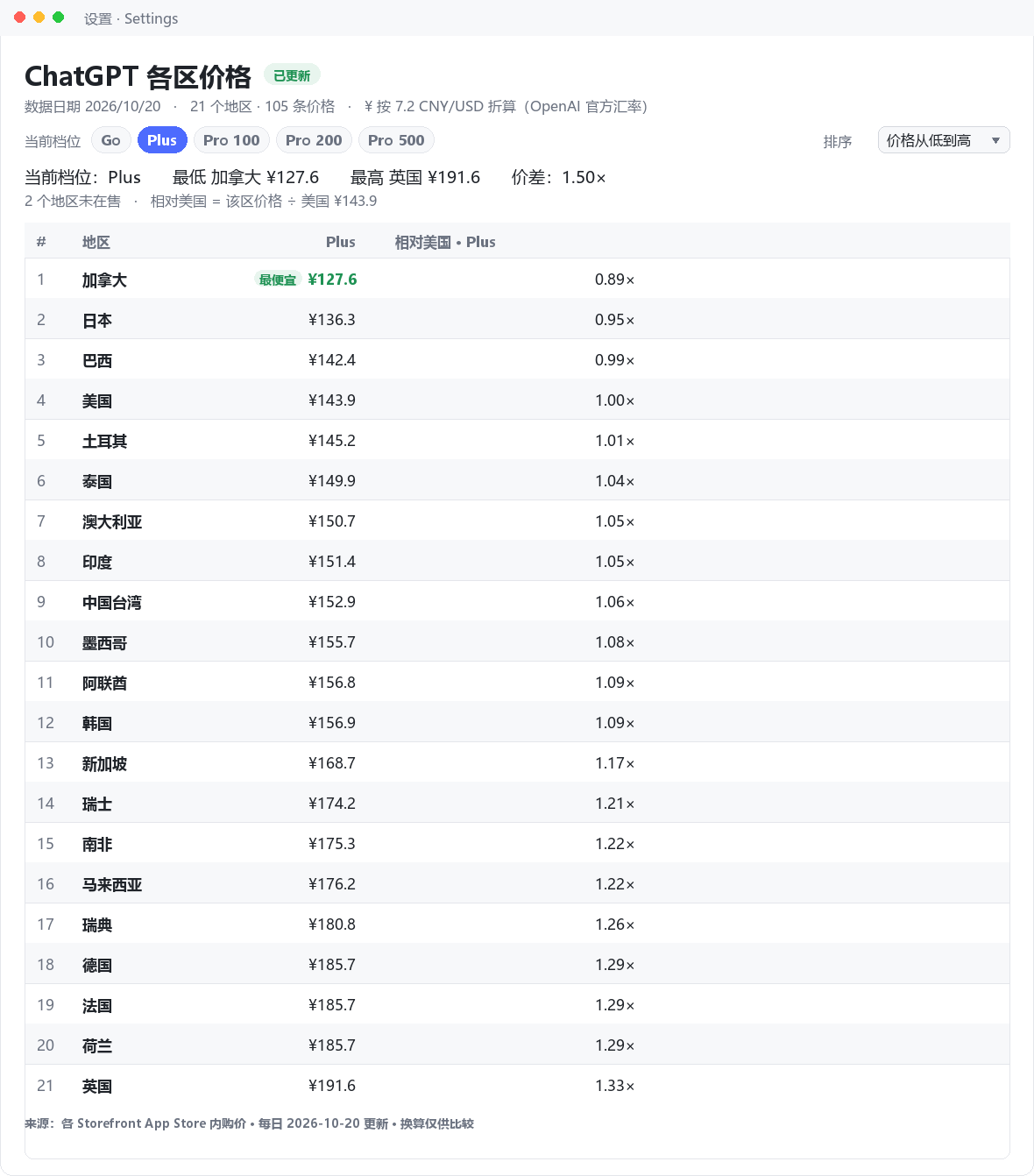
ChatGPT 各国订阅价格看板 — a DeepSeek Harness plugin that keeps a daily-refreshed table of what ChatGPT costs in each country's App Store (Go / Plus / Pro 100 / Pro 200 / Pro 500), converted to CNY at the live USD/CNY rate fetched on every refresh, with a day-over-day change mark, plan selection and per-plan sorting.
What it does
| Source | Apple's viewSoftware product endpoint, pinned to a storefront by header — public, fast, tax-inclusive in-app prices |
| Plans | Go · Plus · Pro 100 · Pro 200 · Pro 500 (consumables such as N Credits are dropped) |
| Regions | 33 storefronts by default, including PH / PK / VN / ID / EG / AR / CO / CL / NG / UA; HK / CN report "not sold there" instead of a fake price |
| Conversion | local → USD (per-currency rate) → CNY at the live USD/CNY rate of that same refresh |
| Refresh | once a day at refreshHour in timeZone, plus a boot refresh when the cache is older than 20 h |
| UI | a Settings page, plus an optional dsh-better-sidebar tab |
| Agent tools | chatgpt_price_board, refresh_chatgpt_prices |
界面用法
- 顶部档位按钮(Go / Plus / Pro 100 / Pro 200 / Pro 500)就是「当前档位」选择器: 摘要行的最低/最高/价差、相对美国列以及所有排序都按选中档位计算;再点一次已选 档位即回到「全部档位」,列出所有列。
- 「排序」下拉:默认顺序 / 价格从低到高 / 价格从高到低 / 相对美国从低到高。没取到 价格的地区始终排在最后,选择会被记住。
- 当前档位里最便宜的一格标「最便宜」,行首
#是当前排序下的名次。
Why the App Store and not chatgpt.com
chatgpt.com/pricing renders its price numbers client-side: the server HTML contains
plan cards with an empty price span, and the page is byte-identical for every
?country=. /backend-api/payments/checkout/prices answers 404. The App Store product
page, in contrast, is public, fast and embeds every in-app purchase as a
leadingText / trailingText pair ("ChatGPT Plus" → "¥3,000"). Two caveats the parser
handles:
- consumable rows (
100 Credits…) are not plans and are dropped; - the list contains a duplicate
ChatGPT Plusrow carrying the Pro-200 price, so duplicates are resolved to the lowest amount.
Why the fetch does not use apps.apple.com/{cc}/app/…
From a mainland-China egress that URL now answers 302 → /cn, and the CN storefront
does not sell this app, so the request lands on Apple's "Today" page with no product
data — every region failing with "no prices on the page". itunes.apple.com/WebObjects/ MZStore.woa/wa/viewSoftware is not geo-redirected and honours
x-apple-store-front: <id>-<n>,29, which pins the storefront regardless of the
visitor's IP.
The trap: a wrong <n> does not fail — Apple silently answers as the US store, HTTP
200 and all. So every response is validated against the storefront the page reports for
itself (storefront.cc) and rejected on mismatch, trying the next candidate header.
Measured 2026-10-30: suffix 1 for US/JP, 5 for CA, 2 for the other 30. A header
that answered correctly is remembered, so a warm board makes exactly one request per
region. Amounts come from buyParams' price field — an integer in thousandths of the
currency unit, exact where the display string is localised text.
Hong Kong and mainland China storefronts return 404 (the app is not sold there); those regions are reported as unavailable instead of being silently missing.
Install
The bundle is a normal file package; install the directory, not a tarball:
git clone https://github.com/chaolee111/dsh-chatgpt-price.git
dsh plugin --profile desktop add ./dsh-chatgpt-price
or from the Harness UI: Settings → Plugins → install bundle, choosing this folder.
The bundle patch inserts one host row (id: chatgpt-price). Restart the app to mount it.
Config
Override the row in the profile's cordis.patch.yml (a patch replaces the whole
config, so restate every key you keep):
- id: chatgpt-price
  config:
    regions: [US, JP, TW, SG, IN, GB, DE, BR, TR, AU]
    refreshHour: 9
    timeZone: Asia/Shanghai
| key | default | meaning |
|---|---|---|
regions |
33 storefronts | App Store storefront codes to track |
timeZone / refreshHour |
Asia/Shanghai / 9 |
when the daily refresh happens |
rateSources |
open.er-api → exchangerate-api → frankfurter | FX providers, tried in order on every refresh |
requestTimeoutMs |
20000 |
per-request timeout |
concurrency / requestsPerSecond |
4 / 6 |
politeness limits |
retries |
2 |
per-region retries after a failed page (404 is never retried) |
retryDelayMs |
800 |
retry backoff base; attempt N waits N × this |
retryMinutes |
5 |
re-run the whole refresh this long after a failed/partial run (0 disables) |
autoRefreshOnBoot |
true |
refresh at startup when the snapshot is older than 20 h |
maxHistoryDays |
90 |
days of history kept in the snapshot |
Architecture
lib/index.js    host half: schedule tick, routes, agent tools, config schema
lib/board.js    snapshot store: scrape → convert → persist (tmp + rename) → history
lib/scrape.js   storefront header table + page JSON island → { plan, amount, currency }
lib/money.js    price parsing (comma/space decimals, ISO codes) + FX conversion
lib/shared.js   route names, plan ids, record shapes
lib/client.js   browser half: Settings page + optional sidebar tab
locale/         display strings for plugin search (zh / en)
- Host half does one scrape per day for every tracked region, refetches the live FX table on the same run, writes an atomic JSON file, and exposes two routes and two agent tools. Every open window reads the cache, so ten windows cost zero extra requests.
- Browser half only reads the cached snapshot from the host and renders it with
theme tokens (
--dsw-alias-*), so light and dark follow the shell.
Routes and tools
| kind | name | purpose |
|---|---|---|
GET |
/plugins/dsh-chatgpt-price/snapshot |
the cached snapshot (loopback only) |
POST |
/plugins/dsh-chatgpt-price/refresh |
force a refresh, returns the new snapshot (loopback only) |
| tool | chatgpt_price_board |
read rows, filter by region / plan |
| tool | refresh_chatgpt_prices |
force a refresh and summarise the result |
The snapshot file is chatgpt-price.json in the DSH data directory.
Notes on the numbers
App Store in-app purchase list prices include local tax outside the US, while the web checkout may show a different figure for the same plan — the checkout page wins.
The ¥ column is a real-cost estimate, not a sticker conversion. Every refresh refetches the USD rate table and multiplies by the live USD/CNY rate, so the number tracks the market. Two things it cannot know:
- OpenAI's displayed 1 USD = 7.2 CNY is not a settlement rate. It is the figure OpenAI shows on its pricing pages; your card issuer still converts at the live rate.
- Card-side fees (a 1%–1.5% foreign-transaction fee on many Chinese cards) are not included, so the true bill can be a few percent above this column.
If every rate provider fails, the CNY column is left empty for that refresh rather than falling back to a fixed 7.2 — a made-up rate would look authoritative and be wrong.
Failure handling
The storefront requests leave through a proxy, and a proxy can answer one request with the wrong page (a bland shell with no product markup) while the next request for the same URL is fine. The board therefore never treats one bad answer as a fact:
- Per-region retry — a failed page is retried up to
retriestimes with linear backoff. A404is a verdict ("not sold in this storefront") and is not retried, and neither is a storefront mismatch (no header can fix a wrong region mapping). - Carry-forward — a region that still fails keeps its previous amounts, each marked
stale: true, so one bad page cannot blank a column. - Whole-run retry — a run that reads nothing, or only some regions, becomes due again
after
retryMinutesinstead of waiting for tomorrow's slot. The scheduler wakes every minute to check, and the snapshot message says how many regions recovered on retry. - Atomic write — the snapshot is written to a temp file and renamed, so a crash mid-write cannot leave truncated JSON behind.
The screenshot is regenerated from a real snapshot, with no hand-edited numbers:
python docs/make_screenshot.py "$env:USERPROFILE\.dsh\chatgpt-price.json" docs/screenshot.png
The script needs only Pillow. It re-applies the table's own ordering rules (plan selection, cheapest-first sort, vs-US ratio), so the picture matches what the plugin renders for the same data.
License
Related plugins
dsh-our-free-model
 Ebony-Vinyl
/dsh-our-free-model
Our Free Model(作者声明):装上即用、无需自备 API Key,可调用其聚合渠道的模型。渠道条件、账号要求与数据去向见「本站速览」;本站未实测。
Added:
dsh plugin --profile web add 'github:Ebony-Vinyl/dsh-our-free-model#5fcb5faf4da7843cb0d0e638ce665dd6cd4aafc1'dsh-ops
 T-Auto
/dsh-ops
Native file and PTC tools for DSH on Windows x64, Linux x64 and macOS arm64/x64; Windows-only optional Bash payload and host PowerShell integration
Added:
dsh plugin --profile web add 'dsh-ops@0.4.4'dsh-redteam-model
 SeaOf0
/dsh-redteam-model/plugins/dsh-hunter
DSH hunter plugin: FOFA / Hunter(qianxin) / Quake(360) aggregated asset search with unified DSL → per-platform syntax conversion, quota-aware pagination/export, API-key settings panel, and the code-audit live-verification pipeline (L0 fingerprint check on internet assets, L1 minimal-impact EXP only on user-authorized assets).
Added:
dsh plugin --profile web add 'github:SeaOf0/dsh-redteam-model#ce24bb25e35df8c8514e00e0d98f1a36d2e2a562&path:/plugins/dsh-hunter'dsh-cost-meter
 Han-1413141
/dsh-cost-meter
会话与当日 API 费用统计、预算图框(已用%)、官方余额、历史看板,支持峰谷计价与官方价格一键同步。
Added:
dsh plugin --profile web add github:Han-1413141/dsh-cost-meterDeepscient
 yzlin286-wq
/Deepscient/deepscient
DeepScient:科研版 Harness 的品牌、工作台界面、token 计费与文献 API 接入
Added:
dsh plugin --profile web add 'github:yzlin286-wq/Deepscient#088b0228df4fbb613d00d70823a325677f4970c2&path:/deepscient'DSH WorkBuddy Account Pool
 XDTrees
/dsh-workbuddy-xdpool
One DSH model pool for every free quota you have: merge all locally signed-in WorkBuddy accounts with auto-failover, sign in to 13 vendors by QR/web, aggregate 76 vendors' free tiers, plus a usage dashboard, model routing, a local OpenAI-compatible gateway and a points-automation suite.
Added:
dsh plugin --profile web add 'github:XDTrees/dsh-xdpool#8cfe4c330cccfb6acb8ddf898b62860f4de42d89'