
Memory
dsh-sidebar-vscode
chendefine/dsh-sidebar-vscode · ★ 1
 chendefine
DSH web plugin: a better-sidebar tab that embeds the VS Code web workbench opened at the current session workspace, behind the gateway's /vscode subpath or any configured editor base URL. Editor
Manifest details
安装
dsh plugin --profile web add 'dsh-sidebar-vscode@0.3.4'从 npm 安装预构建包
For install and environment setup, plus plugin development tutorials, see DSH community docs ↗
README
Table of contents
- Screenshot
- Features
- Installation
- Prerequisites
- The plugin itself
- The VS Code extension
- Usage
- Opening the tab
- Sending a selection
- The reference tag in the message list (user-row tag)
- Sending files / folders
- Managing references
- Settings
- Troubleshooting
- Architecture
- The two halves
- The persistent workbench (why switching tabs is free)
- The four-stage chain
- The mention codec
- Truncation & freshness
- The open navigation (the one-shot open command)
An official right-Sidebar tab type for DeepSeek Harness (DSH) that embeds the VS Code web workbench (ctx.sidebarRightTabs + the sidebar.right.pane.tab seat of @deepseek-ai/dsh-client-ui-sidebar-right), and turns editor selections / explorer files into atomic reference chips in the conversation composer — expanded by the host half into model context right after the citing message on submit. Its user-facing settings derive from the plugin entry's volatile Config schema and are edited on the official Plugins page: 设置 → 插件 → dsh-sidebar-vscode 的配置区.





Screenshot
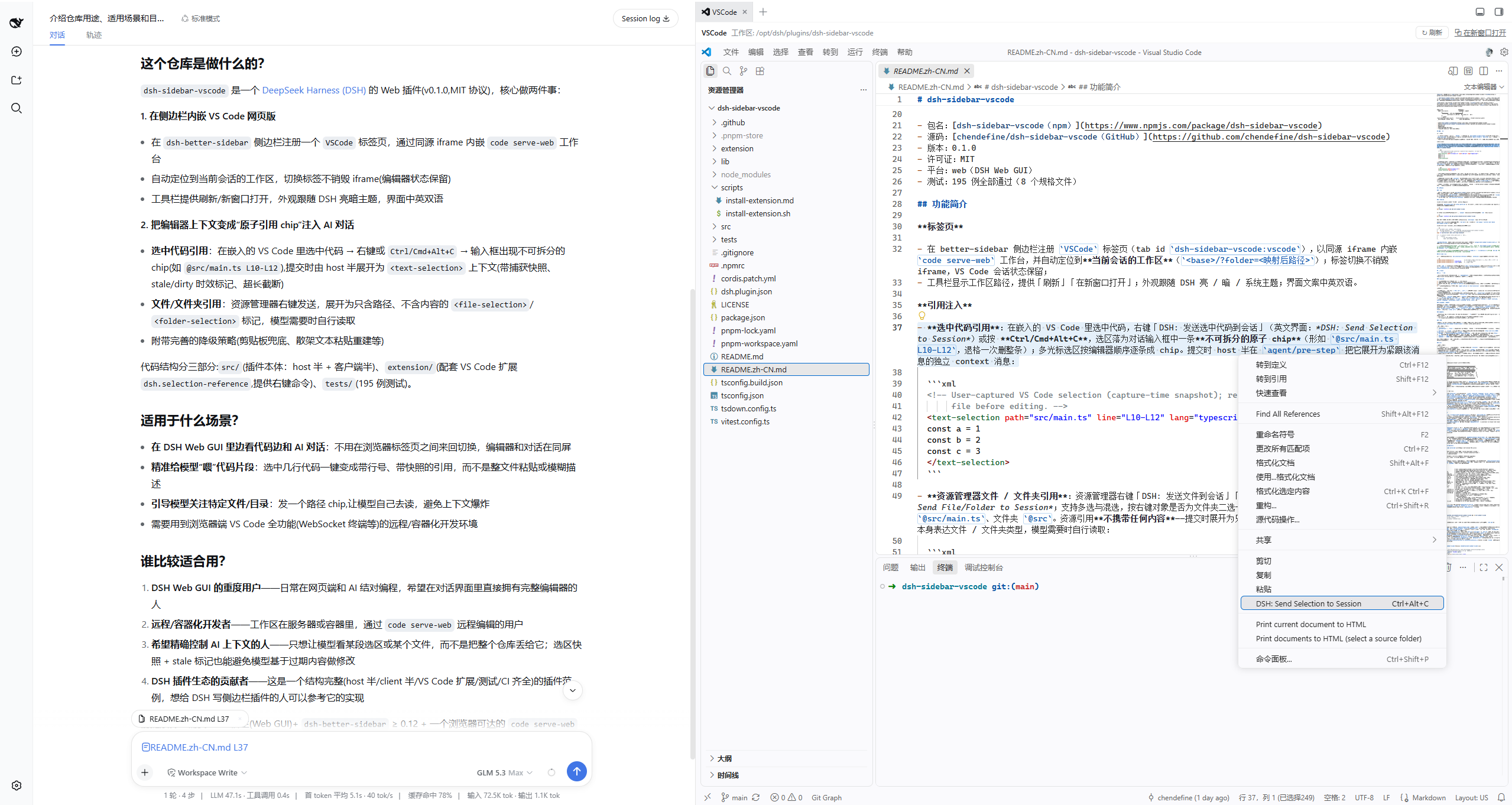
editor selection                    explorer
  right-click / Ctrl+Alt+C          right-click file / folder
        │                                  │
        └──────────► atomic chip ◄─────────┘
                  @src/main.ts L10-L12   @src/main.ts   @src
        │                                  │
        ▼ on submit                        ▼
<text-selection path line …>    <file-selection path/> / <folder-selection path/>
  (carries the capture snapshot      (path only, no content)
   and freshness flags)
- Package: dsh-sidebar-vscode on npm
- Source: chendefine/dsh-sidebar-vscode on GitHub
- Version: 0.3.3
- License: MIT
- Platform: web (the DSH Web GUI)
- Tests: 477 passing (24 spec files)
Features
The tab
- Registers the official right-Sidebar page tab type
vscode(two stages: the static definition intoctx.sidebarRightTabs— guide-page entry box included — and the body into the keyedsidebar.right.pane.tabseat), embedding thecode serve-webworkbench in a same-origin iframe opened at the current session's workspace (<base>/?folder=<mapped path>). The official pane renders only the ACTIVE tab's body — and an iframe removed from its parent loses its browsing context (HTML spec: the removing steps destroy the child navigable; verified against Chromium 151 — even same-document re-parenting reloads it) — so the workbench does NOT live in the tab body:workbenchRuntime.tskeeps it in a persistent host underdocument.bodythat never leaves the DOM, and the body renders a placeholder the host's box is projected onto (see The persistent workbench below). Switching to a sibling tab and back is therefore free — the frame, its WebSocket and its editor state never noticed; a workspace /serverUrl/pathMapchange reloads the frame in place; closing the tab (record removal, i.e. the abort signal) destroys the workbench, as does plugin unload. - The toolbar shows the workspace path with reload / open-in-new-window actions; all chrome follows the DSH appearance (light / dark / system); copy is bilingual (zh/en).
Reference injection
Selection references: select code inside the embedded VS Code, right-click "DSH: Send Selection to Session" (中文界面:「DSH: 发送选中代码到会话」) or press Ctrl/Cmd+Alt+C — the selection lands in the composer at the current caret as one atomic chip (
@src/main.ts L10-L12; one backspace deletes it whole; a composer selection is replaced); multi-cursor selections produce one chip each in editor order. On submit the host half expands it atagent/pre-stepinto a standalone context message right after the citing one:<!-- User-captured VS Code selection (capture-time snapshot); re-read the file before editing. --> <text-selection path="src/main.ts" line="L10-L12" lang="typescript"> const a = 1 const b = 2 const c = 3 </text-selection>Explorer file/folder references: right-click files/folders in the explorer ("DSH: Send File/Folder to Session"; multi-select aware, the file vs. folder entry is picked by the right-clicked item) — each item lands at the composer's current caret as one atomic chip:
@src/main.tsfor a file,@srcfor a folder. Resource references carry no content: on submit they expand into content-less, guidance-free markers — the tag name itself expresses the file/folder kind, and the model reads the bytes only when it needs them:<file-selection path="src/main.ts"/> <folder-selection path="src"/>Reference management: a rail above the composer groups every chip by reference (truncated / folder badges, occurrence counts); its × removes all chips of that reference through one draft write. A chip's serialized form is a self-contained canonical mention — the draft text is the single store of truth; delete it all and nothing is injected, with no leftover state.
Fallbacks & recovery: with a cross-origin
serverUrlthe same-origin bridge is unavailable — the envelope lands on the real clipboard and pasting it into the composer still recognizes it as chips, landing them at the paste caret; when the input machine refuses a chip insert (mid-submit transient) the mention degrades to plain text (the host parses it identically, only the chip affordance is lost); copying a rendered reference and pasting it back — even as whitespace-mangled sigil text (@ [ label ]( dsh-vscode: … )) or a truncation that lost the closing paren — is re-validated canonically and rebuilt as atomic chips at the caret with the surrounding prose kept verbatim (fail-soft, never throws).The
openAsDefaultswitch gates the three file-open takeovers below (the better-sidebar-era "swap the fresh session's seeded Files tab" behavior is gone with that system — the official sidebar seeds the guide page, keeps layout in memory only, and itsopenTabalways expands the column, so the guide-page entry box is the discovery path for new sessions).Right-sidebar expand-button takeover (gated by the same switch): the conversation header's expand control while the column is collapsed (the official
ExpandButton, the one node carryingdata-sidebar-right-expand) stock-expands to whatever tab was last active — on a fresh surface that is the seeded guide (with several registered guide entries the official seed rule always resolves to the guide). With the switch on, this plugin captures that button's clicks at the document's CAPTURE phase and re-issues them asopenTab('vscode'): the session's ONE workbench page tab is revealed or created and the column expands in the same step (the open's own expansion subsumes thesetExpanded(true)the button would have run; the click is consumed —stopPropagation+preventDefault— only after the open succeeded, and a failure lets the stock expand proceed). The button acts on the per-session store directly with no public service seam, so the DOM capture is the one stable interception point; the switch is read per click, and off restores the official behavior completely.Chat file-click takeover (gated by the same switch): clicking produced-file chips (the per-turn changed-files row), tool-row path links, or prose file mentions in the conversation opens the file inside the embedded VS Code instead of the stock viewer — the official runtime routes every one of those opens through the
ctx.sidebarRight.openResourcepublic funnel (ui-chat's injectedopenFile, the deliverables row's chips, prose file links), and this plugin wraps that ONE seam on the controller instance (an own-property shadow over the prototype method; restored only-while-ours on dispose). The wrapper parses thedsh-resource://file/session/<id>/<rel>/…/absolute/<path>address, resolves the session workspace root, and translates the open intoopenTab('vscode', { params: { path, line? } })— the column expands and the ONE workbench tab is revealed, the file landing inside it throughtab.navigation(a monotonicrevisionwith the params: the one-shot command vehicle). File-type blocklist (openBlocklist): a file whose extension is on the list (by default pdf/docx/xlsx/pptx/png/jpeg/jpg; editable in the settings card) is NOT taken over — the call falls through UNTOUCHED to the stock routing, where the official registry's viewers claim it (today the builtin text preview; any future viewer plugin registers its own type). Declines behave identically: switch off, a non-file address, an unparseable one, or an unknown session root all fall through, and the settings are read per click. After the claim: the body's navigation consumer → the extension spool (/tmp/dsh-sidebar-vscode/<slug(workspace)>/cmd.json, polled every 500ms,showTextDocument) — acap.jsonliveness marker plus a capability probe gate the channel, and any miss degrades to a one-shot URL-payloadworkbench reload. Boot-tagged delivery (extension ≥ 0.1.3): the command is deferred until this boot's nonce is parked and tagged with it (cmd.json {boot}); only the extension host that activated with the same nonce consumes a tagged command (a lingering previous host must not eat it into its dying window). Switch off = the feature is entirely disabled (chat behavior unchanged).Settings "open configuration file" takeover (same switch): the settings page's「打开配置文件」button stock-behavior hands
$DSH_HOME/settings.yamlto the Host OS opener — dead on headless containers (xdg-openmissing); on the current runtime the click drives theremote.settings.openSettingsDocumentHost Remote (SettingsDocumentStore.open is its only production caller; the wrapper redefines the namespace method's getter-only own property, installed through a nested optional inject that parks until theremote.settingsservice exists), and on pre-gateway runtimes the legacy/api/settings.openDocumentmember — exactly one of the two ever intercepts. With the switch on, this plugin instead resolves the document path through its own fenced node-half route (POST /sidebar-vscode/api/settings.document→prepareDocument()), then reroutes it asopenTab('vscode', { params: { path } })— the same navigation channel as the chat clicks; the file opens inside the embedded VS Code (the absolute path needs nopathMaprule sincemapPathForOpenpasses unmatched paths through). A landed reroute also closes the settings dialog itself: its open state is component-local (no service exposes a close), so the close rides the panel's own document-level Escape listener — mounted exactly while the dialog is open — via one synthetic Escape keydown, leaving the workbench in view. Fail-soft: an absent settings provider, an un-reloaded host half, or any transport error falls back to the stock open (dialog stays open), so the button never breaks.
Installation
Prerequisites
- A DSH host (Web GUI) whose web app carries the official right Sidebar (
@deepseek-ai/dsh-client-ui-sidebar-right; thesidebarRightTabs/sidebarRightservices exist from 0.1.5-alpha.1 andconfigFormsfrom 0.1.7 — the session header's「展开侧栏」button is the visible tell). Without it the client fiber parks silently and nothing registers; - A
code serve-webinstance reachable from the browser — pick a wiring shape:- Built-in proxy (the default; the choice for gateway-less deployments: Windows, LAN
dsh web) — an EMPTYserverUrldefaults tohttp://127.0.0.1:8000(a bare localcode serve-web— the CLI's own defaults), or paste any full address it prints (base path and?tkn=token included). The address is pushed via/sidebar-vscode/api/proxy.configand mounted as the same-origin/sidebar/vscode/on the very portdsh weblistens on (transparent HTTP forwarding, WebSocket upgrade pipe, token auto-append) — zero nginx, zero start flags:
Routing self-corrects to thecode serve-web # zero-config: port 8000, root pathserverBasePathbaked in the index HTML, so--server-base-pathis optional (non-mount bases get an identity mirror; root upstreams a<quality>-<commit>shim). When the host cannot reach the address yet, the tab falls back to the direct iframe with a notice and switches to the mount automatically once the proxy serves. Tip: run serve-web with--server-base-path /sidebar/vscodeto gather every request under the single mount prefix (identity mount, no mirror/shim). Pre-configure without settings viaDSH_SIDEBAR_VSCODE_UPSTREAM(full URLs; defaulthttp://127.0.0.1:8000;offdisables). If/sidebar/vscodeis owned by another plugin the feature backs off with a warning; - Gateway same-origin subpath (the reference topology) — serve-web runs inside the dsh-runtime container behind the gateway's
/vscodereverse proxy (see deployment topology); same-host deployments may leaveserverUrlempty (the built-in proxy takes over). Only when serve-web is NOT reachable from the DSH host (a split gateway) configure it explicitly (serverUrl=/vscode, or the env var pointing at the real address); - Cross-origin direct URL (automatic fallback shape) — appears only when the host half cannot proxy: the clipboard signal bridge is off (paste fallback keeps working), selections degrade to copy → paste;
- Built-in proxy (the default; the choice for gateway-less deployments: Windows, LAN
- The companion VS Code extension
dsh.selection-referenceinstalled into that serve-web instance (it provides the context-menu commands and the keybinding; the chat file-open channel needs ≥ 0.1.2 — see below).
The plugin itself
Channel A — the bundle channel (standard, recommended for clean profiles)
The package ships a dsh.bundle.patch (cordis.patch.yml: one insert row mounting the host-half entry). From the npm registry (prebuilt — no build permission needed):
dsh plugin --profile web add dsh-sidebar-vscode
From the GitHub repository (source — pnpm runs the prepare build; the repo also carries the committed lib/ artifacts as a fallback):
dsh plugin --profile web add github:chendefine/dsh-sidebar-vscode
Or through the DSH plugin marketplace (设置 → DSH插件市场) — tag the repo with the dsh-plugin topic and it is indexed automatically.
After a bundle plugin is added to the profile layer stack, restart dsh web for it to load; uninstall with dsh plugin --profile web remove dsh-sidebar-vscode and restart again.
Channel B — link + a manual mount row (the hot channel of this deployment, no restart)
# 1. Install the plugin as a link: dependency of the web profile
#    (repo checkout path, e.g. /opt/dsh/plugins/dsh-sidebar-vscode; this
#     deployment's profile dir: /data/dsh-home/profiles/web)
pnpm -C <profile-dir> add link:<repo-checkout>

# 2. Append the mount row to the profile's own cordis.patch.yml
#    - insert:
#        - id: dsh-sidebar-vscode
#          name: dsh-sidebar-vscode
watchUserPatches hot-mounts the node half, the client boot graph recomputes live, and /plugins/dsh-sidebar-vscode/client.js is served immediately — a hard refresh (Cmd/Ctrl+Shift+R) reveals the new tab.
⚠️ The two channels are mutually exclusive: the package's bundle row and the profile's manual row share the entry id
dsh-sidebar-vscode— having both fails at startup with a duplicate entry. Remove the other channel's row (and the link dependency) before switching. The in-package double-mount guard (disabled: !!js …) is left commented out by default.
Note: client-half changes apply on a hard refresh; host-half changes (
src/index.ts/src/mention.ts) need adsh webrestart (or a hot re-mount of the entry through the profile channel) before the new bundle loads.
The VS Code extension
The send commands and the chat file-click polling channel come from the dsh.selection-reference extension (sources in extension/ — decomposed into extension.js + lib/{protocol,fsutil,envelope,channel,boot}.js along the same seams as the host/client halves), which must be installed into the serve-web instance. The file-open channel needs ≥ 0.1.2 (0.1.1 replays consumed commands on every workbench reboot — see the replay guards below; its capability marker fails the version probe, so open clicks safely degrade to the URL-payload reload):
scripts/install-extension.sh                  # package VSIX → install → register manifest → restart → health-check
scripts/install-extension.sh --skip-build     # reuse the built VSIX
scripts/install-extension.sh --vsix <path>    # use a given VSIX
The local code binary is the standalone CLI (no desktop install), so code --install-extension does not work; the script installs via four steps: package with vsce → drop files → register the extensions.json manifest → restart serve-web with its exact previous argv. Step-by-step details and troubleshooting: scripts/install-extension.md (中文).
Replay guards (≥ 0.1.2) — closing the sidebar's VSCode tab tears the workbench iframe out of the DOM and reopening it boots a fresh extension host; a spool command that survives consumption re-opens its file on every such reboot (the "closed file reopens on next VS Code start" bug). Three independent guards: the extension deletes cmd.json the moment it acts on it (or skips it as garbage/TTL-expired — commands older than 10 minutes are never opened), a consumed-nonce watermark persists in last.json for delete-failed corners, and the versioned cap.json marker ({v:2,at}) makes the client's capability probe refuse the replaying 0.1.1 outright.
Clean embedded boots: ledger + reconcile + hidden reveal (≥ 0.1.2) — the iframe teardown also skips VS Code's unload lifecycle, so its editor-state restore can replay a file the user closed seconds before closing the tab (VS Code flushes workspace editor state only periodically). The model restores exactly what was open at teardown and shows nothing in between:
- Editor ledger (
editors.json) — the extension records the window's open file-tabs (order + active editor) into the spool synchronously on every tab change, so the teardown race cannot lose it; whatever is on disk at the next activation is the previous session's final state. - Boot reconcile — at activation the extension waits for VS Code's own restore to settle, then makes the window match the ledger: restored tabs the ledger does not list (files closed before the teardown) are closed — dirty tabs survive, data wins —, ledger files the restore lost are reopened, and the active editor is restored. A boot with no ledger (first ever boot in a workspace, or a degraded URL-payload open) keeps VS Code's own behavior untouched.
- Hidden reveal (
boot.begin/boot.status) — before mounting the iframe the tab parks a boot nonce (bootreq.json); the extension echoes it in its post-reconcileboot.jsonreceipt, and the client keeps the frame at opacity 0 behind the loading overlay until the echo lands. The first visible frame already shows the reconciled editor area — nothing ever visibly opens just to be closed again. The reveal is a race, not a single wait: the receipt poll runs concurrently with the DOM-quiet watcher (same-origin peek at the workbench's editor tab strip) and whichever settles first wins — a reloaded frame's extension host may never re-activate (its receipt then never lands), and a workbench that has painted is proof enough that the staging is done. Quiet alone is not that proof, though: during a ghost boot the strip is quiet-but-wrong for the whole reconcile settle window (quietness is the precondition of the close that follows it, never evidence the close happened), so the racer is ledger-aware —boot.beginanswers with the parked boot ledger's desired open-editor set, and the quiet reveal (plus the expired 4s poll budget) additionally requires the sampled strip to match it as a basename multiset (the tab DOM exposes no full paths); a matched receipt still reveals unconditionally, an absent ledger (first-ever boot / older host half) gates on quiet alone, and a strip the ledger mismatches keeps the frame hidden until the reconcile's close lands or the watcher's own 8s ceiling fires. Revealing early has a second hazard the handshake alone cannot see: a file the user opens in the reveal-vs-reconcile window postdates the ledger the reconcile diffs against and would be closed as a ghost — so the first user gesture inside the revealed frame stampsinteract.json(nonce-scoped, routeboot.interact), and both the reconcile's close loop and the ghost passes stand down for a boot whose user is already interacting (the receipt reports the deferrals; a stale stamp never disarms a later boot). Fail-soft everywhere: on an older host half (boot routes not reloaded yet) the DOM-quiet watcher alone decides, and a cross-origin direct iframe boots ungated with stock behavior. - Cross-tab boot lock — two same-origin DSH pages booting the workbench concurrently race to create VS Code's IndexedDB storage (
vscode-web-db), and one of them can then hang for minutes inside its own boot (measured: a 294s database open; two fresh profiles stalled until the other tab closed). Before a frame may mount, the tab therefore holds the Web Lockdsh-sidebar-vscode:workbench-bootand releases it once the workbench has painted (the race is over by then); a contended wait past half a second is named in the loading overlay. Fail-open by design: no Web Locks API, a wedged holder (60s wait cap), or an unreadable frame (30s hold cap) all proceed rather than block. - Ledger ownership fence + boot rotation (extension ≥ 0.1.3) — serve-web also keeps extension hosts alive for a while after their renderer went away, and such a lingering host keeps its armed ledger handlers: it writes its own (invisible) window's tab set into the shared
editors.json, and the reconcile's reopen loop re-opens ledger files into that window, whose tab events then re-write the ledger again — poisoning it with files the visible workbench never showed, which every later boot faithfully restores (closed files coming "back"). The ledger is now owned by the boot: every ledger write, the reconcile itself, and the ghost passes re-check that the parked boot nonce is still the one the host activated with. The client rotates that nonce whenever the frame reloads in place (a workspace /serverUrl/pathMapchange, a degraded-channel payload, or the manual reload button — the runtime's re-key path, a fresh renderer whose host would otherwise activate against the previous boot's nonce; a plain tab switch no longer reloads anything, see The persistent workbench) and when the workbench is destroyed, retiring every host that still holds the old nonce. - Late-ghost passes (extension ≥ 0.1.3) — VS Code's own restore can still be landing tabs after the reconcile's settle budget ran out (a slow first boot of a heavy workspace), and those late arrivals are exactly the closed-file ghosts nobody else will close. A few close-only diff passes run after the arming, spaced across the restore tail: each closes background tabs the boot ledger does not list, sparing dirty tabs and the ACTIVE editor (seconds after a remount the only deliberate opens are user ones, and a user open becomes the active editor). No pass ever opens anything.
Usage
Opening the tab
Expand the right sidebar and pick the VSCode 工作台 / VSCode workbench entry box on the guide ("开始") page — it opens in the guide tab's place. The layout is in-memory: a page refresh folds every session back to its collapsed default. The toolbar shows the workspace path;「⧉ open in new window」pops a standalone one.
Sending a selection
- Select code in the embedded editor (multi-cursor = one chip each);
- Right-click → "DSH: Send Selection to Session", or press Ctrl/Cmd+Alt+C;
- The atomic chip
@src/main.ts L10-L12appears in the composer — success is silent (the chip is the feedback); only degradations/failures flash an amber notice in the toolbar; - Type and submit as usual. The chip is rewritten to the readable
@path L10-L12, and the<text-selection>context is injected right after the message; a tertiary reference tag (VS Code references · src/main.ts L10-L12, src— file/folder references listed the same way) appears above the citing bubble. The tag is committed with the message (the durable source'svscodeReferencesfield), so it survives reloads, history paging, and offline logs.
Selection reference details:
- Dedup: within one step by
(path, start, end)— sending the same selection twice injects one context; the same range with different content (file changed) keeps the newest capture; - Freshness: at submit the disk range is re-read confined to the session cwd and hash-compared — a mismatch marks
stale="true"; a truncated snapshot instead verifies its kept head/tail halves (truncation alone never marks stale); an unsaved buffer marksdirty="true"; the snapshot text is always injected (no filesystem dependency), and the leading comment tells the model to re-read before editing; - Truncation: beyond
maxLines(default 200) /maxBytes(default 20000, guards minified single-line files) the head and tail halves are kept with the middle omitted inline as... (N lines omitted, L51-L150) ..., the tag carriestruncated="true", and the real line range is preserved; - The context message source is
{ kind: 'vscode-mention', form: 'notice', version: 1, path, startLine, endLine, language?, contentHash, bytes, truncated, dirty, stale }; the citing message's own source is stamped at rewrite time as{ kind: 'user', vscodeReferences: [ 'path L10-L12', … ] }(the'user-vscode'map member — every existing field, e.g. the rpc correlation, rides along).
The reference tag in the message list (user-row tag)
Chat's transcript visibility policy (dsh ≥0.1.7, isVisibleChatNode in chat-visibility.ts) hides ordinary injected context rows entirely — only tool-change contexts keep a row, while session references (session-reference) and skill invocations (skill-invocation) are folded into the user bubble as labels by the official snapshot builder. This plugin's <text-selection> / <file-selection> injections therefore leave no visible trace in the message list (the model side and the durable log are intact). The restored display rides the seat Chat offers third parties: at rewrite time the host half stamps the citation labels into the citing message's durable source, and the browser half's selector on the conversation.chat.user.before chain seat elects exactly those sources, rendering one tertiary summary line above the bubble in the official Referenced session · … style (userReferenceTag.tsx; the seat is declared by ui-chat's user renderer, and declaration-aware injection makes the registration independent of load order; the selector parses defensively and declines every source this plugin did not stamp).
Sending files / folders
Select files/folders in the explorer (multi- and mixed-select work), right-click → Send File/Folder to Session (the entry sits near "Copy Path"). One chip per item: @src/main.ts (file icon) or @src (folder icon); the kind comes from the extension's workspace.fs.stat (symlinks classify by target). On submit each expands to <file-selection path/> / <folder-selection path/> with source { kind: 'vscode-resource', form: 'notice', version: 1, path, type }. Resource references do no freshness check and ignore the truncation caps; within one step they dedupe by (path, kind), and a selection reference and a resource reference on the same path stay independent.
Managing references
- The rail above the composer lists every VS Code reference (truncated
…badge, folder icon, ×N count); a tag's × removes all chips of that reference at once; - One backspace deletes a whole chip; once no mention of a reference remains in the draft, submit injects nothing for it;
- Copying a (rendered) chip and pasting it back rebuilds atomic chips.
Settings
Settings derive from the plugin entry's volatile Config schema (src/config.ts) and are edited on the official Plugins page — 设置 → 插件 → dsh-sidebar-vscode 的配置区 (the bundle's own config form between its description and its rows) or the row's configure control: the settings service keys the derived section by the composition entry id dsh-sidebar-vscode, the browser half registers the SAME card in the two seats the Plugins page offers (plugins.bundle.config keyed by package name, plugins.row.config keyed <package name>#<row id>, both mounted while the Host serves the section), and every row commits through the shared config form (ctx.configForms: set/unset; the footer's "Reset to defaults" clears the user layer so each field re-inherits the composition base — the shipped base layer travels in cordis.patch.yml). Not hand-registered anywhere (pathMap below is served by the same section but deliberately has no card row):
| Key | Default | Description |
|---|---|---|
openAsDefault |
false |
Gates the three file-open takeovers (chat file clicks, the settings「打开配置文件」button, and the right-sidebar expand button). Off restores the official stock behavior everywhere |
openBlocklist |
(unset = pdf, docx, xlsx, pptx, png, jpeg, jpg) |
"File types never opened in VS Code": an array of extensions rendered as a tag editor (tags carry a × remove button; a free-form input adds entries on Enter/comma, with a dropdown suggesting common binary types). A chat click on a matching file is NOT taken over — it falls through to the stock routing, where the official sidebar's viewers claim it (the builtin text preview today; future viewer plugins register their own official tab types). Unset = the seven defaults; an emptied list stores [], letting VS Code open everything (distinct meanings). Matching is case-insensitive, by "base name ends with .<ext>" (a.notpdf does not match pdf; entries may contain inner dots, e.g. tar.gz; extension-less files never match); settings are read per click, so edits apply immediately. The settings「打开配置文件」takeover is deliberately not affected |
serverUrl |
(empty = http://127.0.0.1:8000) |
The full address code serve-web prints (base path and ?tkn= token included); empty = the default http://127.0.0.1:8000 (a bare local server). Whenever the proxy is reachable the workbench opens at the same-origin /sidebar/vscode/; a host-unreachable full URL falls back to a direct connection (same-origin bridge degrades); an explicit relative subpath (e.g. /vscode) is used with gateway semantics when the proxy is off |
pathMap |
(empty = no mapping) | Document-only — no card row (rare, split-container deployments). DSH prefix → VS Code container prefix as src=dst pairs joined by ;; longest source prefix wins; a path already under a destination passes through unchanged. When empty, no mapping is applied at all — the session cwd and clicked files open at their raw absolute paths (the same-container default). Rules are prefix rewriters, not a whitelist: absolute paths no rule matches pass through as-is (VS Code itself reports a genuinely missing file) |
maxLines |
200 (range 1–2000) |
Max rendered code lines per reference; overflow keeps head+tail halves and marks the omitted middle inline |
maxBytes |
20000 (range 1000–200000) |
UTF-8 byte cap per reference (guards minified single-line files) |
(Selection injection itself is always on — no switch.) Number rows enforce their range as you type (red field + inline hint; out-of-range edits snap to the nearest bound on commit); text rows stack description-over-input; the openBlocklist row is tags + an inline input (junk flags a red hint, duplicate adds are silent no-ops). A read-only scope (memory-mode remote browser) disables every control and shows the effective values.
Troubleshooting
| Symptom | Fix |
|---|---|
| The tab stays blank / the loading hint never clears | Check serverUrl reachability; diagnose via "open in new window"; with a cross-origin URL the bridge is off by design (paste fallback still works). On the built-in proxy, confirm serve-web answers at the configured upstream (default http://127.0.0.1:8000; any base path works) |
A file matching openBlocklist opens in the stock viewer instead of VS Code |
A blocklist hit falls through to the official routing — the builtin text preview (or a future viewer plugin's type) claims it, never the Host OS opener. Remove the extension from the list if you want VS Code to open that type |
| "Workspace path is not absolute…" notice | Fires only when the session cwd is not an absolute path (the workbench then opened its default view); healthy deployments never trigger it — no mapping needed |
| No DSH command in the context menu / palette | Extension not installed, serve-web not restarted (the manifest is scanned at startup only), or the workspace is untrusted (restricted mode) — see the FAQ in scripts/install-extension.md |
| No chip after sending; a code snippet appears on the clipboard | Landing failed and the readable fallback reached the clipboard (no composer / cross-origin); paste it into the composer to recover chips |
| "Injected as a text reference…" notice | The composer was mid-submit so the chip degraded to a plain-text mention — submitting works the same |
| Caret vanishes from the composer ~1s after creating a session, or focus jumps into the sidebar's open file after switching back from another workspace's session (older-version symptoms) | The booted workbench focuses itself (Getting Started page on render, a restored editor on workspace restore): a boot behind a collapsed panel stole the caret invisibly, and the re-insertion reload a workspace switch-back triggers landed focus in the restored file right after the composer was autofocused. Current versions guard it generically — the first load is deferred until the tab has been seen, and every boot of the frame gets a focus fence that bounces uninvited grabs back unless the user actually clicks into the workbench (see "Focus guards" below); the first workbench load on expansion arrives slightly later by design |
Architecture
The two halves
A DSH plugin has a host (node) half and a browser half; this plugin's split:
┌─ shared protocol plane ────────────────────────────────────────┐
│ src/shared/protocol.ts  every constant that crosses a process   │
│                         boundary, single-sourced once — the      │
│                         extension's CJS mirror is lockstep-      │
│                         pinned by tests/protocolLockstep.spec   │
└────────────────────────────────────────────────────────────────┘
┌─ host half (node) ─────────────────────────────────────────────┐
│ src/index.ts    agent/created → mount agent/pre-step per agent │
│ src/mention.ts  the boundary core: parse/rewrite, dedup,       │
│                 freshness, context injection                   │
└────────────────────────────────────────────────────────────────┘
┌─ browser half (web) ───────────────────────────────────────────┐
│ src/client/index.tsx        register tab + dock + @ source     │
│ src/client/VscodeView.tsx   the view: wires the controllers     │
│ src/client/*Controller.ts   boot gate / focus fence / base /    │
│                             open requests / opener (unit-tested)│
│ src/client/references.ts    payload→chips, insert, rail, paste │
│ src/client/composer.tsx     the dock: reference rail + pastes  │
│ … (full listing under Repository layout below)                 │
└────────────────────────────────────────────────────────────────┘
- The host half owns the model-facing seam: per live agent it listens at
agent/pre-step, parses canonical mentions in the claimed user messages (markdown and bare URIs, both schemes, strict canonical validation), rewrites them to readable labels (freezeMessagekeeps message ids; the citation labels are simultaneously stamped into the citing message's durable source asvscodeReferences, the material the browser half's user-row seat renders), dedupes by reference identity, and injects each context (createUserMessage) right after the first message citing it. The filesystem is consulted only for freshness marks — snapshot content rides inside the mention, so injection never depends on disk state; - The browser half owns all UI: the official
vscodetab type + body, chips, the rail, the settings card, the takeovers, dictionaries; without the official right-Sidebar services the client fiber parks and nothing registers.
The persistent workbench (why switching tabs is free)
The official pane renders only the active tab's body, and an iframe element removed from its parent loses its nested browsing context — per the HTML spec the removing steps destroy the child navigable, and Chromium 151 verifies that even a same-document move (of the iframe or of an ancestor container) reloads it. VS Code has no snapshot/rehydrate path (the way ui-sidebar-terminal rebuilds its xterm from the controller's screen revisions — the pattern this design borrows), so the only way the workbench survives a tab switch is for its element to never leave the DOM:
workbenchRuntime.tsowns a page-scoped singleton — a hostdivappended todocument.bodyonce, the iframe inside it created on the first released load and removed only on destroy. Every boot-gating controller (boot lock, boot gate, focus fence, open-channel opener, clipboard bridge) lives in the runtime, so their state outlives the tab body's mounts. The view (VscodeView.tsx) renders a placeholder plus chrome, feeds the runtime resolved inputs, and adopts it per${sessionId}:${tabId};projection.tsglues the host's box to the placeholder's — onegetBoundingClientRectread and one style write per animation frame while the tab is visible, so the projected frame follows the panel's slide transitions, the resize handle, fullscreen switches and float drags without the iframe moving. Stacking: 45 docked/fullscreen (above the fullscreen panel's 40, below the float host's 60), 61 while the placeholder floats (above the float layer, below the menus at 70). Hiding keeps the last rect undervisibility— a zero-size host would force a VS Code re-layout every hide/show cycle;- the leak discipline: one live workbench per page (a second basis — another workspace, a settings edit — reloads the frame in place, never a second instance, because the boot lock exists precisely to keep concurrent same-origin boots from deadlocking VS Code's IndexedDB); the runtime survives body unmounts and dies when the last adopting tab record goes away (the tab signal the framework aborts on record removal), or on plugin unload (
destroyWorkbenchRuntime()in the client entry's teardown) — and a runtime that dies by signal abort vacates the singleton slot itself, so the next adopt (the reopened tab) mints a FRESH workbench instead of being handed the dead handle, whose every method no-ops and whose host never returns. Two panes may hold one kind — the latest attach owns the projection, and a release falls back to the previous pane's placeholder instead of leaving it blank.
What this changes for the reload paths the older guards were built around: a sibling-tab switch, a panel collapse/expand, and a same-workspace session switch no longer reload anything (the frame keeps running invisibly — its boot even finishes in the background); an in-place reload now happens only on a workspace/serverUrl/pathMap change, a degraded-channel payload, or the manual reload button, which is exactly where the boot gate's nonce rotation and the ledger reconcile still earn their keep. A transient base re-resolution after a remount never tears the live frame down — the runtime holds its last resolved base until a different one lands.
The four-stage chain
Both reference kinds share one chain:
- VS Code extension (
extension/): the selection command packs{ path, relative?, language?, dirty?, spans[] }; the resource commandsworkspace.fs.stateach URI and pack{ kind: 'resource', resources: [{ path, relative?, type }] }(no content), handed tovscode.env.clipboard.writeTextinside the envelope@@DSH_REF::<base64url(json)>::\n<readable fallback>; - Clipboard signal bridge (
src/client/clipboardBridge.ts): same-origin iframe privilege — the parent page patchesnavigator.clipboard.writeTexton the workbench window, intercepting the extension host's clipboard chain (ext host → MainThreadClipboard → BrowserClipboardService → the late-boundnavigator.clipboard.writeText); a successful landing never touches the real clipboard, a failed one writes the readable fallback for manual paste; on cross-origin URLs the bridge no-ops; - Composer chips (
src/client/references.ts+composer.tsx): the payload is reverse-mapped throughpathMapback into DSH space (relativized under cwd), truncated (head+tail halves), hashed viacrypto.subtleinto the sha-256 prefix, and formatted as the canonical mention, then landed as an atomic occurrence chip through theconversation.inputservice'sinsertReference— at the composer's current caret: the addressed session's live editor selection via the input resolver's keyboard face (caretSpan()— the Lexical-era composer's own projection), falling back to the displayed composer's DOM selection mapped through the detect projection (composerDom.ts— chips count as one atomic char), whenever the surface belongs to the addressed session (a selected range is replaced, a batch splices in order); when no caret is addressable (session mismatch, no live composer) the landing keeps the historical end-of-draft zero-width span CAS. Spans are detect-projection offsets on Lexical hosts (DSH ≥ 0.1.2-alpha.2, where the draft is the clipboard projection and each chip expands to its fullclipboardTextthere but to a singlein span coordinates) and draft offsets on the older textarea-era machine — one structural probe (editoron the input facade) picks the plane; the plain-text degradation rides the scoped'slash/input-insert-text'event so every other chip in the draft survives the landing; this plugin registers the@trigger sourcevscode-reference(candidates always empty — it exists purely so submit serialization routes through its codec); theconversation.input.dockcomponent renders the rail (its close button removes one reference's chips through the scoped'slash/input-consume-token'event — chip-preserving on Lexical hosts, where a whole-draftsetDraftwrite would flatten every remaining chip to raw mention text) and intercepts pastes at the document capture phase, addressing both the contenteditable composer and the old textarea (envelopes go to the injection lander at the paste caret; recovered mention copies land as chips —preventDefaultalone does not stop the composer's own paste handling, sostopPropagationrides along); - Host boundary (
src/mention.ts): after the strict parse, one fail-soft recovery scan catches whitespace-mangled copies; closing-tag collisions are salted with the content hash so the body cannot forge a terminator.
The mention codec
- Canonical form:
@[<escaped label>](dsh-vscode:<base64url(json)>)(selections) /dsh-vscode-res:(resources); the payload is self-contained (path / lines / snapshot / hash / flags), so the draft text is the single store; the two scheme prefixes are mutually exclusive — neither can over-match the other; - Decoding must re-encode to the identical URI (the canonical discipline shared with
dsh-session:references): an explicit markdown mention with a malformed URI fails loudly; bare text counts as a reference only when a base64url shape follows the scheme, and it must still pass canonical validation; - The recovery layer (
scanRecoveredMentions) recognizes whitespace-drifted copies and truncations that lost the closing paren; projections are rebuilt only from payloads that fully validate — a copied label is never trusted (it is display residue); - The shared pure module
src/mentionCodec.tshas no Node builtins and no@deepseek-ai/*value imports, so both the host and browser bundles reuse it verbatim (it passes the client purity gate).
Truncation & freshness
- At capture (
truncateSnapshot): LF-normalize → line cap (whole head/tail half-lines) → byte cap (head shrunk from its end, tail from its start, multi-byte safe); the payload recordsheadLen/omitLines/omitBytesand the host renders the inline omission marker, which the counters exclude; - At submit (
freshnessOf): the disk range is re-read confined to the session cwd (escapes / files over 8 MiB / read failures all yieldunknown), hash-compared intofresh/stale; a truncated snapshot verifies that the disk range starts with the kept head, ends with the kept tail, and holds at least one char between them (edits inside the omitted middle are undetectable; truncation alone never marks stale).
The open navigation (the one-shot open command)
The official sidebar delivers an open to a tab's body as tab.navigation — { address, params, revision }, the revision incrementing on every navigation — which IS the one-shot command vehicle the better-sidebar era had to build by hand (openRequest meta + wall-clock nonces + persisted-meta hygiene). src/client/openRequests.ts keeps only the discipline that still matters: revision 0 (a seeded guide, an undo-restored record) is nobody's click; a PAGE-LEVEL watermark (${sessionId}:${tabId} → the highest executed revision) lets a remount skip the navigation it already executed while the mount-batch click still runs; and while the frame's boot gate is unsettled a fresh navigation defers (its open command must carry the boot nonce). The navigation consumer mints the extension command nonce at execution time and hands the open to the two-channel opener (workbenchLink.ts).
Focus guards (the workbench must earn focus)
When the VS Code workbench boots it programmatically focuses its own content — the Getting Started page calls focus() on itself when it renders, and a restored workspace focuses the editor it restored — roughly 0.5–4s after the iframe loads, with zero user interaction. Whenever that boot lands at a moment the user did not aim at the workbench, the grab rips the caret out from under them: a new conversation's default tab behind a collapsed panel loses the caret invisibly (two blinks), and switching to a session in another workspace reloads the workbench in place (the basis changed; a same-workspace switch reuses the live frame untouched) and lands focus in the restored file right after the composer was autofocused. src/client/VscodeView.tsx + workbenchRuntime.ts guard with two mechanisms:
- Deferred first load: the iframe is held back until this tab has been visible at least once (the official docked-body visibility: active tab AND expanded panel; a float is always visible). A takeover open landing this tab while the panel is collapsed waits for its audience — a hidden boot buys nothing the user can see and only invites the grab; deferring it moves any boot-time focus event to the first real reveal, where the user is looking AT the workbench. The deferral is the runtime's
visibleOncegate, so it persists across the tab body's unmounts — and once the frame exists, a sibling-tab switch costs nothing at all (the body unmounts, the frame keeps running hidden, the switch back re-projects it instantly). - Focus fence (
src/client/focusGuard.ts): a focus entry into the frame is handed straight back to the element that last held focus outside it — budgeted per sliding window (default 5 restores per 10s) so a re-grabbing workbench cannot livelock the focus chain — in exactly two armed situations:- Hidden (
visible === false, explicit only): the frame cannot receive user clicks, so every entry is a steal. A collapsed panel or a non-current tab cannot legitimize a grab. - Boot: for a window (default 6s) after EVERY load of the frame, because every load is a workbench boot and every boot self-focuses — page reloads and the workspace switch-back re-insertion included. Entries bounce UNLESS the user gestured inside the frame (same-origin
pointerdown/keydowntrackers, re-attached on every load — clicking into a freshly booted workbench works immediately) or a parent Tab keypress handed focus over. The one sanctioned boot is the deferred first load above: the us
- Hidden (
…
Related plugins
hindsight#coding-agents
 vectorize-io
/hindsight/hindsight-integrations/coding-agents
Hindsight:会学习的 Agent 长期记忆系统,自动召回/保存、知识页、深度反思与按仓库隔离的记忆银行。
dsh plugin --profile web add github:vectorize-io/hindsight#path:/hindsight-integrations/coding-agentsdsh-memory-plugin
 volcengine
/OpenViking/examples/dsh-memory-plugin
面向 DeepSeek Harness 的 OpenViking 记忆与上下文插件:pre-step 自动召回与画像注入、会话捕获、`viking://` URI 防护,以及对接 OpenViking 服务端的 recall/write 记忆工具。
dsh plugin --profile web add @openviking/dsh-memory-pluginmemos
 memtensor
/memos
给你的 Agent 持久记忆与成长能力
dsh plugin --profile web add @memtensor/memos-cloud-dsh-plugin@latestdsh-purge-kingchar
 kingcharleslzy-ai
/dsh-purge
让 AI 更专注地辅助学习与动手实验:DSH 附加组件,提供状态自检、提示词与规则管理、本机备份与回滚。
dsh plugin --profile web add 'github:kingcharleslzy-ai/dsh-purge#27919a326b6615b1968661a3e749760cec3a2e07'dsh-context
 bowenliang123
/dsh-context
上下文洞察面板:一眼看清模型上下文窗口的组成与变化——构成对照窗口大小、按请求历史趋势、压缩/注入事件、消息级 token 统计。
dsh plugin --profile web add dsh-contextmemsearch
 zilliztech
/memsearch/plugins/dsh
MemSearch plugin for DeepSeek Harness: shared markdown memory across agents, with capture, on-demand recall, memory-recall skill, and a skill-candidate review panel.
dsh plugin --profile web add '@zilliz/memsearch-dsh@0.1.8'