Sessions & Messages
dsh-session-save
chinacaa/dsh-session-save · ★ 2
 chinacaa
Save any DSH session to a single .dsproj file — Word-style save / save-as / autosave — and open it elsewhere to resume. 把会话存成单个工程文件,换机器打开就能接着聊。
安装
dsh plugin --profile web add 'dsh-session-save@0.2.3'从 npm 安装预构建包
For install and environment setup, plus plugin development tutorials, see DSH community docs ↗
README
Table of contents
Why
DSH keeps every conversation under ~/.dsh/sessions/ as an append-only zstd frame log. That is reliable, but it has three costs:
- Moving one conversation means moving a whole tree.
~/.dshholds sessions, memory, attachments, indexes and plugin state — gigabytes of unrelated things. - Archiving one conversation means copying an unnamed UUID directory. Two weeks later nobody remembers which discussion it was.
- Two machines taking turns is a coin flip. Syncing
~/.dshdirectly makes indexes, state and logs fight each other.
dsh-session-save collapses all of that into one file: one session = one .dsproj, named after the session title, containing the full history plus the memory of the workspace it belongs to. Sending it to a colleague, dropping it in a synced folder, committing it into a project — all just "one file".
What it does
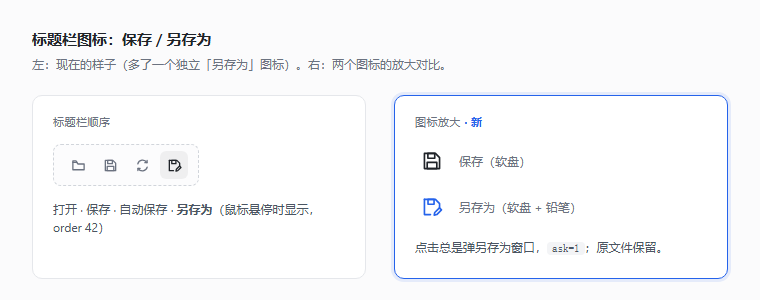
Four icons appear in the conversation header:
| Icon | Action | Behaviour |
|---|---|---|
| 📁 | Open | pick a .dsproj → import → jump to that session |
| 💾 | Save | shows Save As the first time, then overwrites the same file |
| 🔄 | Autosave | while on, writes the file at the end of every step |
| 📄✏️ | Save As | always asks for a name or location, keeps the original |
The blank-session hero row also gets an "Open" pill, so you can open a project before any conversation exists.
Install
# from npm
dsh plugin --profile web add dsh-session-save

# or straight from GitHub
dsh plugin --profile web add github:chinacaa/dsh-session-save
Restart DSH afterwards — plugins are composed at startup. The native Save As dialog picks an implementation per platform: powershell.exe on Windows, the built-in osascript on macOS, and whichever of zenity / kdialog / qarma / matedialog exists on Linux and the BSDs. With none of them (headless servers, remote shells, slim images) the UI falls back to an in-page path field, so nothing is lost.
# 1) link the repo into the profile
New-Item -ItemType Junction -Path "$env:USERPROFILE\.dsh\profiles\web\node_modules\dsh-session-save" -Target "<repo>"
# 2) profile package.json → dependencies: "dsh-session-save": "link:<repo>"
# 3) profile package.json → dsh.profile.bundles: append "dsh-session-save"
# 4) restart DSH
Do not just add an - id/name row to the profile's cordis.patch.yml — that file only overrides existing ids; new plugins need dsh.bundle.patch plus dsh.profile.bundles.
Three steps
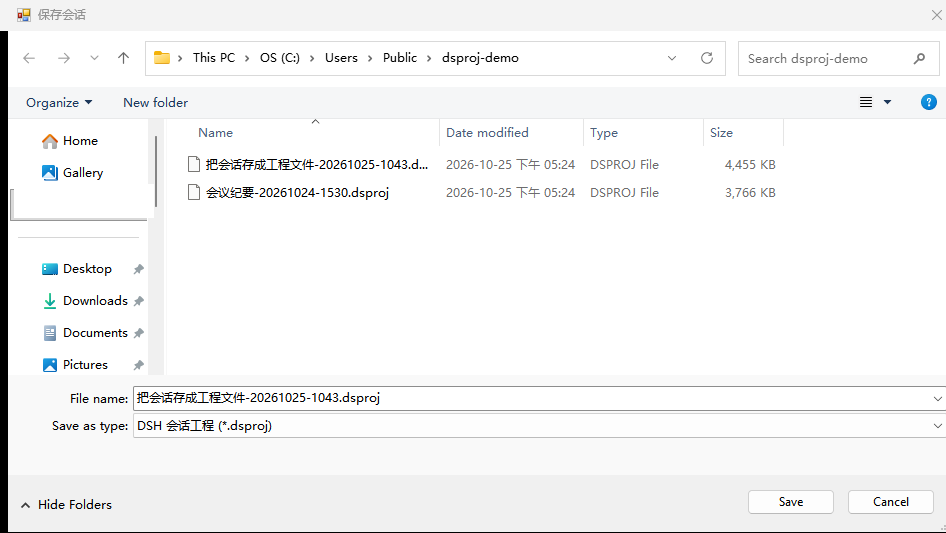
- Hit 💾 mid-conversation (or hit 🔄 for autosave — it saves once first).
- Confirm the name — the default is "session title + creation time", e.g.
save-session-as-project-20261025-1043.dsproj. - Every later 💾 overwrites that file; 📄✏️ makes a copy under a new name.
On the other machine: click 📁, pick the file, the session appears and the UI switches to it.
It asks before writing into an empty spot
The target of a save is the file at that path, not the path. So every write checks first that the file is still there:
- Manual save finds it gone (deleted, moved, or the drive / network folder is not mounted) → a panel shows the original path and offers create it here / save somewhere else / cancel. Nothing is written by default — no same-named empty shell left behind.
- Autosave finds it gone → turns itself off and tells you why (with the path); that round writes nothing.
- The whole folder missing (an unmounted network drive, say) behaves the same: "target folder does not exist" instead of quietly
mkdir -p-ing the directory and the file back into existence.
How files are named
<session title>-<YYYYMMDD-HHmm>.dsproj
- The title is the newest
session/titleevent (whatever DSH called it). - The timestamp is the session's creation time, not the save time — saving the same session twice always yields the same name.
\ / : * ? " < > |and control characters become spaces, runs collapse, 60 characters max.- A session without a title falls back to
20261025-1043-session-7f3a2c91.dsproj(time + first 8 id characters). - The directory is the last used one, Desktop on the first run.
- Overwriting never renames: the full path is remembered, so a later retitle does not spawn a new file.
What happens on open
flowchart TD
  A[read .dsproj] --> B{does this session id exist locally}
  B -- no --> C[ask: which workspace]
  C --> D[import, rewrite header.cwd to the local path]
  B -- yes · same createdAt · same cwd --> E[just switch to it, no copy no write]
  B -- yes · same createdAt · other cwd --> F[land a second copy under a new id]
  B -- yes · different createdAt --> G[conflict panel: pick one of four]
  D --> H[open the session]
  E --> H
  F --> H
  G --> H
- Ids must be unique per
DSH_HOME, so landing the same session in a different workspace issues a new id instead of duplicating it. - A missing workspace path falls back to the host's current directory; only frame 0 (the header) is rewritten, frames 1..n are copied byte for byte.
- Memory files are compared by sha256: identical ones are skipped, different ones are written as
xxx.from-dsproj-<date>— local memory is never overwritten. - A successful open remembers that
.dsprojas the session's save target.
The conflict panel shows both sides (title, creation time, size, workspace / exporting machine) with four choices: cancel, save as a copy, overwrite local (after a .bak-<timestamp>), use local.
Two machines, synced folders, autosave
Three layers of protection:
1. A lock inside the file. Every package carries LOCK.json (host, pid, at, writes), mirrored into manifest.json and summarised in SUMMARY.md.
2. A sidecar lock on disk. ${file}.lock is claimed with an exclusive wx create; a live pid on this host blocks, a foreign at within 15 minutes blocks, otherwise the write proceeds. A block returns 409 locked naming the holder.
3. A content fingerprint (CAS). Each write records the file's sha256. Before the next write it is recomputed; if it differs, the file changed elsewhere:
- manual save →
409 staleand a panel offering overwrite on disk / save as a new file / cancel; - autosave → turns itself off for that session and writes nothing.
Writes are atomic (tmp file + rename) so a sync client never picks up half a package. Paths inside OneDrive / Dropbox / Google Drive / iCloud / Nutstore / Box / Syncthing / Seafile / Baidu Netdisk trigger a warning that two machines with autosave on will overwrite each other — a warning, not a block.
In short: if two machines really take turns on one file, keep autosave on one of them only; the other machine will be stopped by the content check.
Security
Opening someone else's .dsproj is accepting a compressed archive from a stranger, so the plugin treats every package as potentially hostile:
- Entry-name traversal: every path segment is validated;
../../x,..\..\x, drive letters and UNC prefixes are rejected at read time, and each memory write target is re-joined and re-checked to stay inside the memory root. - Landing filenames: the session filename declared in
manifest.jsonmust matchsession[.tag].jsonl[.zstd], only its basename is used, the target must stay under~/.dsh/sessions, and an existing file is never overwritten. - Zip bombs: 64 MB per entry, 512 MB per package, 200× compression ratio (not applied below 4 MB), with the central-directory lengths checked before inflating.
- Write targets: saving is limited to the last used directory, the directory of an already-remembered file, or a location picked in the native dialog. Anything else — or overwriting a file this plugin did not produce — asks first.
- Route gate: all four
/apiroutes require a loopback host (127.0.0.1/localhost/::1), a same-originOrigin, and a non-cross-siterequest;sessionIdis shape-checked; failures never echo an absolute path. - Package integrity: every
manifest.partsentry is verified by sha256 and byte count, and mismatches refuse the import. Conversely, every content entry (session/,memory/workspaces/) must be declared inmanifest.parts— undeclared entries are refused, so a package cannot declare only its session and smuggle aMEMORY.mdinto your project notes.
Memory: off by default, and copies only
- Memory is not packaged by default.
~/.dsh/memoryholds your project notes, logs and whiteboard; not a byte of it goes into the package unless you hold Alt while clicking save/save-as, or pass?memory=1. - Opening a package that carries memory writes it as
xxx.from-dsproj-<date>copies — DSH will not read them as memory. After opening, the UI reports how many files landed as copies and how many clash with local names, with a panel offering Merge memory and Open memory folder. - Merge memory (
?memory=restore) only overwrites files that already exist locally with different content, backing each one up asxxx.bak-<timestamp>first. Files this machine does not have are not written at all — they are only listed in the dialog's "will be created" section. One exception:restorelands axxx.from-dsproj-<date>copy (never the original name) when a same-named memory directory exists but the file does not. - To spread memory onto a fresh machine, tick Merge and create in the same dialog (
?memory=new); only then may original names be written. - Why so strict: the
sha256values inpartsare computed by the packager. A poisonedMEMORY.mdcan be registered there with a matching hash and pass every check above — self-consistency is not trust. So "will DSH read this as memory" is broken only by renaming the landing file. Poisoning can therefore land in exactly two places: a file you already had (with a visible backup), or a new file you explicitly approved with Merge and create.
Inside a .dsproj
A dshproj/1 ZIP, byte-compatible with the dshproj CLI (same package format; the CLI itself lives elsewhere):
manifest.json                      metadata + per-entry sha256 + lock mirror
LOCK.json                          who wrote it, when, how many writes
session/session.v4.jsonl.zstd       the raw session log (zstd frames untouched)
memory/workspaces/<slug>/**         that workspace's project memory
SUMMARY.md                          human-readable digest
Offline, without DSH:
dshproj verify   session.dsproj                     # frame structure + entry hashes
dshproj info     session.dsproj                     # title, frame count, memory files
dshproj import   session.dsproj --cwd D:\elsewhere  # import under a new id
Code files are not included — a .dsproj holds the conversation and its memory. Use dshproj export --files to carry the workspace too.
FAQ
Does it save what I just typed? It saves what is already on disk; the step in flight may miss its last frame — click once more when it finishes.
Is autosave expensive? Each write re-packs the whole package (the log itself is append-only), debounced to at most one write per 1.5 s per step. For very large sessions prefer manual saves.
Linux / macOS? Yes. The host side is platform-neutral and the Save As / Open dialogs are picked per platform: WinForms panels through powershell.exe on Windows, Finder panels through osascript (choose file name / choose file) on macOS, and the GTK or KDE panel of the first tool found among zenity → kdialog → qarma → matedialog on Linux and the BSDs. With none of them the UI falls back to an in-page path field.
I deleted the file — what happens if I hit 💾 now? It stops and asks instead of silently creating a new one. The panel offers create it here (start a fresh package at the old path), save somewhere else (leave the old path alone), or cancel (write nothing). If autosave was on, it turns itself off and says so.
Will it clobber my memory files? Memory is not packaged by default; when it is, importing writes xxx.from-dsproj-<date> copies; Merge memory only touches files you already have, after a .bak-<timestamp> backup.
Why did the id change after opening? Because ids must be unique per DSH_HOME; the same session landing in a new workspace gets a fresh one and both histories survive.
Export without importing? Yes, it is just a ZIP — read it with dshproj verify/info.
Compatibility and versioning
| Line | Where | When it moves |
|---|---|---|
| package | version in package.json (SemVer) |
on 0.x, MINOR may break, PATCH fixes bugs |
| package format | dshproj/1 (FORMAT) |
only when the layout changes |
| lock format | dshproj-lock/1 (LOCK_FORMAT) |
only when LOCK.json gains fields |
| host range | engines.dsh, peer @deepseek-ai/cordis |
when new APIs or upstream bumps require it |
node scripts/bump.mjs patch     # bug fix
node scripts/bump.mjs minor     # feature
node scripts/bump.mjs major     # breaking
Commit, tag, push the tag — publishing takes care of itself. publish.yml runs the whole chain:
git commit -am "release vX" && git tag -a vX -m "vX"
git push origin main && git push origin vX
Publish to npm (with provenance) → pull that exact tarball back from the registry and verify its sha1 → create the GitHub Release from this version's CHANGELOG.md section → attach the tarball to the Release. No hand-written release notes and no manual Release step: CHANGELOG.md is the single source, and node scripts/release-notes.mjs <version> extracts the right section for you.
Re-running the same tag is safe: if the version is already on npm the publish is skipped, an existing Release is left alone, and the attachment is overwritten. So an earlier run that failed to attach the tarball is fixed by simply re-running.
Development
Zero runtime dependencies, plain ESM, node: builtins only; the client half only needs react.
node --check index.js client.js   # syntax
node test/client.mjs              # client wiring: five slot items, icon fingerprint, routes (both locales)
node test/smoke.mjs               # pack a fixture session, read the ZIP back, save twice
node test/open.mjs                # open paths: reuse / new cwd / need-workspace / frame diff
node test/conflict.mjs            # locks, four conflict modes, CAS, autosave (~30 s)
node test/dialog.mjs              # three-platform native dialogs: selector + argument assembly + CJK round trip
node test/security.mjs            # traversal / landing names / zip bombs / route gate / parts
node test/pathkey.mjs             # path keys: byte-for-byte check against DSH's own directory naming (run this first after a DSH upgrade)
To check the English word list after touching the client: DSH_TEST_LOCALE=en-US node test/client.mjs.
All seven suites run against their own temporary DSH_HOME (a fixture directory under os.tmpdir() built by test/fixture.mjs) and delete it afterwards, so your real ~/.dsh is never touched and no session has to "happen to exist".
Two exceptions: test/client.mjs is a pure in-memory wiring test with no fixture directory and no disk IO, and test/pathkey.mjs only calls two pure functions, so it writes nothing either. In test/dialog.mjs the selector checks, the AppleScript / zenity argument assembly and the script BOM checks are pure static verification and run anywhere, while only the few assertions that launch the real powershell.exe to verify CJK encoding are skipped off Windows (they print ⏭ 跳过 — a skip is not a pass). The other four are cross-platform.
Read AGENTS.md before touching code — the hard rules, the four host routes, the importPackage branch order and testing recipes all live there. CLAUDE.md is the short entry point and docs/TEST-MATRIX.md maps every feature to the test that covers it.
Known limits
- Only
dshproj/1packages are accepted; a package without asession/entry errors out instead of creating an empty session. - Session switching needs
uiWorkspace.openSession; front ends without it still import the session, they just do not navigate. - The cross-machine lock is a 15-minute window, not a heartbeat: a just-finished foreign writer can block you for up to 15 minutes.
- Two instances sharing one
DSH_HOMEoverwritestorages/session-save.jsonlast-write-wins, though each session keeps its own remembered path. - The "which workspace" list comes from
storages/workspace.json; a fresh machine has none, so use "choose another folder…". - The hero "Open" button only shows on a session with no messages yet; inside a conversation use the header 📁.
- Memory is not packaged by default; a package that carries it still lands copies on import until the user explicitly picks Merge memory / Merge and create (see above).
- Loopback only: reaching this DSH through a reverse proxy or from another machine's browser gets the four session routes a 403, by design.
License
MIT © 2026 chinacaa · see LICENSE
Related plugins
archify
 tt-a1i
/archify
架构图生成 Skill 总仓(多宿主):可校验的自包含架构图、工作流图、时序图、数据流图与生命周期图。DSH 安装不走本仓根——根目录不是 DSH bundle,请用适配包 @tt-a1i/archify-dsh(见 DSH 集成条目)。
Added:
dsh plugin --profile web add @tt-a1i/archify-dsh@1.0.0DeepSeek-Bot
 Fei2411
/DS-Bot/ds-bot
DS Bot: a team of long-lived Bots for DeepSeek Harness, with Main Bots, Bot-to-Bot messages and group chats
Added:
dsh plugin --profile web add 'ds-bot@0.2.4'Study-Mate
 Miaotofu01
/Study-Mate
StudyMate learning skills and lesson engine for DeepSeek Harness, Google Antigravity, Codex and ChatGPT Work.
Added:
dsh plugin --profile web add 'github:Miaotofu01/Study-Mate#d8114f38363272852b339d6788b2f8f007243b43'dsh-plugin-subscriptions
 V1ki
V1ki/dsh-plugin-subscriptions
把 ChatGPT(Codex)、Claude 与 Grok(X Premium)订阅用作 DeepSeek Harness 的 LLM provider——Web UI OAuth 登录,无需 API key
Added:
dsh plugin --profile web add github:V1ki/dsh-plugin-subscriptionsRabiRoute
 vb2250158
/RabiRoute/plugins/rabi-dsh-context
Connect DSH lifecycle events and conversation context to Rabi Manager.
Added:
dsh plugin --profile web add 'github:vb2250158/RabiRoute#e483f87e68cef2c8f5112b101e333b1a9577a9f7&path:/plugins/rabi-dsh-context'dsh-deepseek-web-login
 cv-superding
/dsh-deepseek-web-login
Unofficial DSH plugin: use chat.deepseek.com web models as a DSH LLM provider (browser login capture + PoW solving + SSE streaming + prompting-based tool calls), provider route deepseek-web
Added:
dsh plugin --profile web add 'dsh-deepseek-web-login@1.0.3'