
Sessions & Messages
dsh-session-management
cokiscarazo-rgb/dsh-session-management · ★ 4
 cokiscarazo-rgb
Bilingual DSH Web session manager for archiving, restoring, deleting local chats, and bulk data export from Settings.
安装
dsh plugin --profile web add github:cokiscarazo-rgb/dsh-session-managementGitHub 源码安装:首次需按提示配置 allowBuilds 构建授权后重试
For install and environment setup, plus plugin development tutorials, see DSH community docs ↗
README
Table of contents
English | 中文
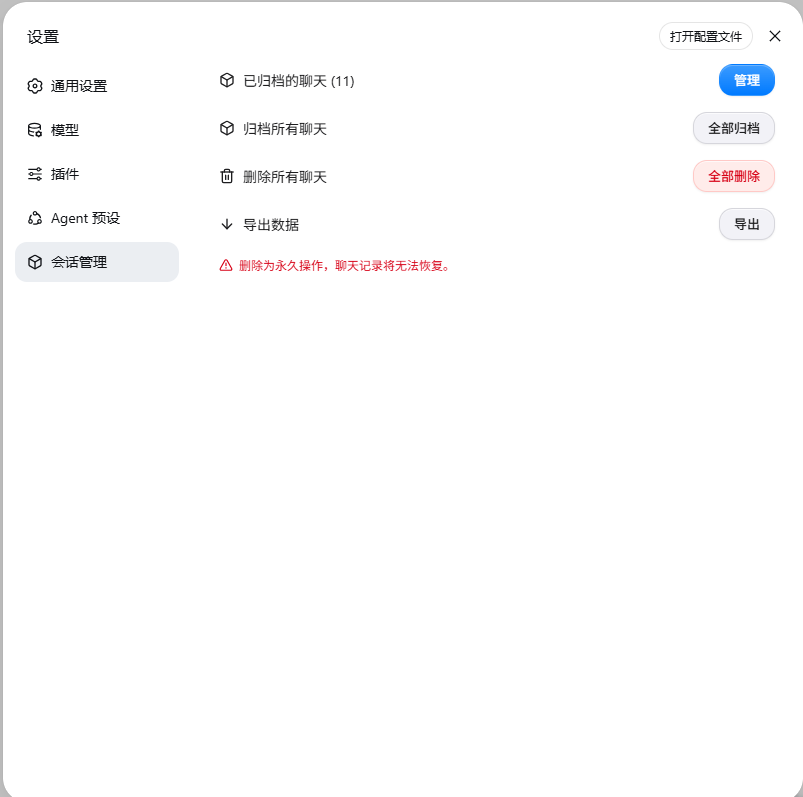
dsh-session-management is a session management plugin for DeepSeek Harness (DSH) Web that fills the gaps left by the official session management. From the Settings panel you can manage chat sessions in one place: archive, unarchive, truly delete local chat records, and export data in bulk. It is fully bilingual, switching instantly with the DSH locale setting.
Why this plugin
DSH Web does not ship complete session management today, and long-term users hit three pain points:
- Chats cannot be truly deleted: the official UI only offers "archive". Archiving merely hides a session from the sidebar; the chat records stay fully on disk, with no entry point to actually remove them.
- Archived chats cannot be restored: there is no "unarchive". Once archived, a session is unreachable from the list for good — invisible yet still on disk.
- Export is one-by-one manual: the official export handles a single session at a time, which means a lot of clicking once sessions pile up.
This plugin closes all three gaps: real deletion (removes the session log files on disk), restoration (unarchive one session or a whole group), and bulk export (ZIPs identical to the official format).
| Capability | Official DSH | With this plugin |
|---|---|---|
| Archive sessions | Supported | Supported, plus one-click archive-all |
| Unarchive | No entry point | Single / per-workspace / per-month, in bulk |
| Truly delete chat records | Hidden only, never deleted | Deletes the on-disk log files; running sessions are skipped |
| Export session data | One at a time, manual | One-click bulk export, byte-compatible with the official format |
Features
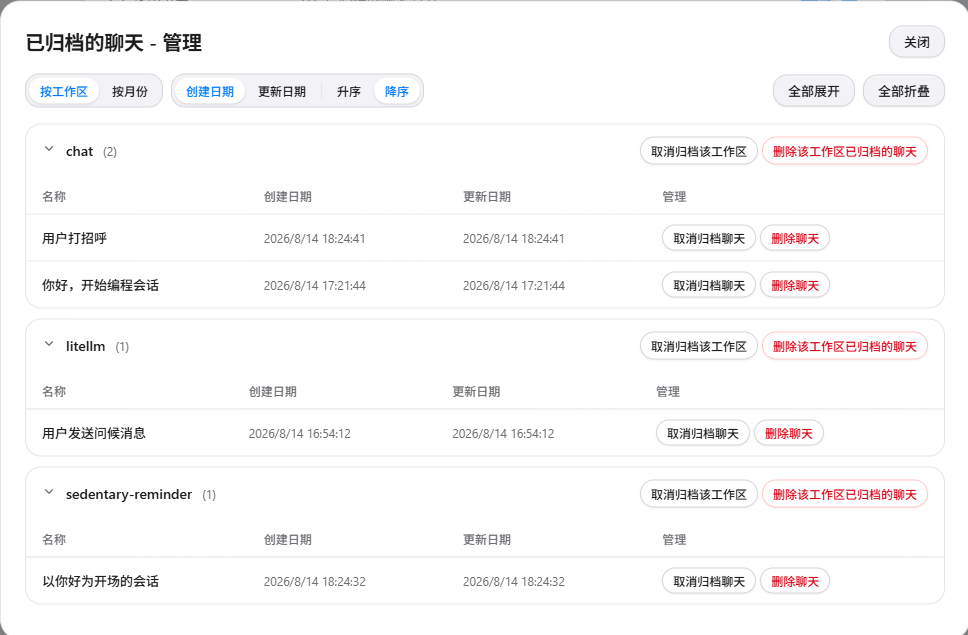
Archived chats management
Open the manage dialog and switch between two grouping views:
- By workspace: one group per workspace, rows sorted by time;
- By month: grouped by year-month (
August 2026,July 2026...), so archives across years are immediately clear.
Sort by created / updated date (ascending / descending), collapse or expand groups at will, and run batch actions per group — unarchive the group, or delete the archived chats of the group (only the group's archived sessions are affected; unarchived records are never touched).
| Grouping & sorting | Group-level batch actions |
|---|---|
|
|
Archive all chats
Archive every session at once: records stay fully intact, merely hidden from the sidebar list — unarchive them any time from the manage dialog.
Delete all chats
Truly delete local chat records: removes the session log files on disk (session.jsonl / session.jsonl.zstd and its twin), and cleans up workspace accounting and archive marks. Running sessions are skipped automatically to prevent logs from being rewritten.
Export data
One-click bulk export of every session: it walks all root sessions (subagent sessions included) and produces an official-format ZIP archive for each (dsh-session-<id>.zip) — no more exporting them one by one.
- Complete contents: session log, subagent sessions and media attachments in one package;
- Format compatible: byte-compatible with the official export format, ready for the official tooling to inspect or migrate;
- Backup before deletion: run "Export data" before "Delete all chats" to keep what matters while cleaning up the rest.
Bilingual UI
Copy switches instantly with Settings > General > Language; documentation and UI are maintained in both languages.
Installation
DSH plugins mount through a profile (dsh web uses the web profile). Restart dsh web after installing.
Prerequisites: Node.js (with npm); dsh plugin relies on pnpm (see FAQ if missing).
Option 1: from npm (recommended)
The plugin is published to npm as dsh-session-management. The command depends on how you run dsh:
Global dsh install (
dshis on your PATH):dsh plugin --profile web add dsh-session-managementRunning dsh via npx (not installed globally; you start it with
npx @deepseek-ai/dsh web):npx -y @deepseek-ai/dsh plugin --profile web add dsh-session-management
After installing, restart dsh web and open Settings to find "Session Manager". To upgrade, replace add with update (keep the npx -y @deepseek-ai/dsh prefix when applicable).
Version note: if npm/pnpm metadata caching or a mirror registry causes an older version to be installed (warning
declares no dsh.bundle), pin the latest version and re-install:npx -y @deepseek-ai/dsh plugin --profile web add dsh-session-management@<latest-version>Check the latest version:
npm view dsh-session-management version.
Option 2: from GitHub
git clone https://github.com/cokiscarazo-rgb/dsh-session-management.git
cd dsh-session-management

# Windows (PowerShell)
powershell -ExecutionPolicy Bypass -File scripts/install.ps1

# macOS / Linux
bash scripts/install.sh
The installer is idempotent and safe to re-run. It does two things:
- Copies the package into
$DSH_HOME/profiles/node_modules/dsh-session-management/; - Registers the loader entry in
$DSH_HOME/profiles/web/cordis.patch.yml:
- insert:
    - id: dsh-session-management
      name: dsh-session-management
Verification & uninstall
After installing, restart dsh web — the "Session Manager" entry appears in Settings. You can also confirm the plugin layer with dsh --profile web --dump-config (prepend npx -y @deepseek-ai/dsh when dsh is not global). If no entry shows up, the usual culprit is a missing restart.
To uninstall, run dsh plugin --profile web remove dsh-session-management (prepend npx -y @deepseek-ai/dsh when applicable) and restart dsh web; for manual installs, remove $DSH_HOME/profiles/node_modules/dsh-session-management/ and delete the insert entry from cordis.patch.yml.
FAQ
'pnpm' is not recognized/pnpm: command not found:dsh pluginrelies on pnpm internally. Install it first:npm install -g pnpmor enable it via Node's built-in corepack:
corepack enable pnpm. Verify withpnpm --version.An older version is installed / warning
declares no dsh.bundle: npm/pnpm metadata caching or a mirror registry delay. Check your registry withpnpm config get registry(if it is a mirror like npmmirror, switch back withpnpm config set registry https://registry.npmjs.org/), then re-install with the exact version (see the version note above).ERR_PNPM_IGNORED_BUILDSon first install: pnpm refuses build scripts; add the reported packages toallowBuildsin the profile'spnpm-workspace.yamland re-run.No "Session Manager" entry in Settings: make sure you restarted
dsh web, and that$DSH_HOME/profiles/web/cordis.patch.ymlcontains an insert entry withid: dsh-session-management.
How it works & limitations
- Archive: built on the official
workspaceRegistry.archiveSession; the archive set is persisted in the workspace domain and synced to clients via the official frame mechanism. Unarchive is not provided by the official API, so the plugin updates the workspace domain archive set directly; the change is broadcast through the officialdomain/changedevent. - Delete means delete: the session log files (including the zstd twin) are located and removed via the system command, then workspace accounting and archive marks are cleaned up; the search index is reconciled automatically by the official SQLite backend.
- Limitations:
- Running sessions are refused for deletion (to avoid logs being rewritten);
- Image attachments use content-addressed storage and may be shared across sessions, so they are not removed with a session;
- Subagent sessions are independent records; deleting a parent session does not cascade (they can be deleted individually).
License
MIT © cokiscarazo-rgb
Related plugins
archify
 tt-a1i
/archify
架构图生成 Skill 总仓(多宿主):可校验的自包含架构图、工作流图、时序图、数据流图与生命周期图。DSH 安装不走本仓根——根目录不是 DSH bundle,请用适配包 @tt-a1i/archify-dsh(见 DSH 集成条目)。
dsh plugin --profile web add @tt-a1i/archify-dsh@1.0.0DeepSeek-Bot
 Fei2411
/DS-Bot/ds-bot
DS Bot: a team of long-lived Bots for DeepSeek Harness, with Main Bots, Bot-to-Bot messages and group chats
dsh plugin --profile web add 'ds-bot@0.2.4'Study-Mate
 Miaotofu01
/Study-Mate
StudyMate learning skills and lesson engine for DeepSeek Harness, Google Antigravity, Codex and ChatGPT Work.
dsh plugin --profile web add 'github:Miaotofu01/Study-Mate#d8114f38363272852b339d6788b2f8f007243b43'dsh-plugin-subscriptions
 V1ki
V1ki/dsh-plugin-subscriptions
把 ChatGPT(Codex)、Claude 与 Grok(X Premium)订阅用作 DeepSeek Harness 的 LLM provider——Web UI OAuth 登录,无需 API key
dsh plugin --profile web add github:V1ki/dsh-plugin-subscriptionsRabiRoute
 vb2250158
/RabiRoute/plugins/rabi-dsh-context
Connect DSH lifecycle events and conversation context to Rabi Manager.
dsh plugin --profile web add 'github:vb2250158/RabiRoute#e483f87e68cef2c8f5112b101e333b1a9577a9f7&path:/plugins/rabi-dsh-context'dsh-deepseek-web-login
 cv-superding
/dsh-deepseek-web-login
Unofficial DSH plugin: use chat.deepseek.com web models as a DSH LLM provider (browser login capture + PoW solving + SSE streaming + prompting-based tool calls), provider route deepseek-web
dsh plugin --profile web add 'dsh-deepseek-web-login@1.0.3'