
Development & Runtime
dsh-balance
crazywoola/dsh-balance · ★ 28
 crazywoola
DeepSeek Harness balance plugin for the Settings page
安装
dsh plugin --profile web add github:crazywoola/dsh-balanceGitHub 源码安装:首次需按提示配置 allowBuilds 构建授权后重试
For install and environment setup, plus plugin development tutorials, see DSH community docs ↗
README
Table of contents
A DeepSeek Harness plugin for checking DeepSeek / StepFun API balances, available provider models, and multidimensional usage costs. The API key is used only by the local Host and is never sent to the browser.
The redesigned account ledger switches between DeepSeek and StepFun. Run pnpm preview to explore it with sample data.
The composer readout follows the current session’s provider and model. The Settings provider selection is independent.
Features
- DeepSeek: total, topped-up, and granted balances
- StepFun: available balance, total cash credited, total vouchers granted, and prepaid / postpaid account type
- Independent provider caches and case-insensitive Provider IDs
- Show the current provider, model, and balance below the composer, following both the selector and
/model - Fetch available models, owners, and creation dates from the selected provider’s
/modelsAPI - View actual usage costs by selected provider, model, session, and day in Settings, plus request details in the current session's Usage tab
- Mark missing usage, unknown providers, and unknown models as unpriced without estimating tokens
- Group dates in the browser's IANA timezone while applying DeepSeek peak pricing in Beijing time
- Show native USD and CNY costs separately;
usdToCnyenables a combined CNY total - Cache query results with manual refresh support
- Follows DeepSeek peak/off-peak pricing: the balance indicator below the composer turns orange during peak hours (09:00–12:00, 14:00–18:00 Beijing time)
- Native Simplified Chinese and English that follows the Harness system language
- Use the
DEEPSEEK_API_KEYsaved by Harness
Compatibility
Version 0.11.0 targets DeepSeek Harness 0.2.1-rc.2 (upstream release). Use Node.js 22.19+ (22.x) or 24+. All DSH peer and development dependencies are pinned to 0.2.1-rc.2. Harness 0.2.0-rc.2 users should keep plugin 0.10.2; Harness 0.1 APIs are no longer supported by this checkout.
To install from source, build and pack it locally, then pass the generated .tgz path to dsh plugin --profile web add /absolute/path/to/package.tgz and restart Harness:
pnpm install --frozen-lockfile
pnpm pack
Usage reads the current read-only session handles and excludes fork-inherited events using inheritedEventCount. The conversation tab refreshes when token usage changes or a turn finishes.
Global statistics skip sessions that the current dsh cannot read, such as unsupported historical formats or damaged logs, and show how many sessions were excluded. Partial results are retried on the next refresh without caching. An unreadable selected session, or a collection where every session fails to read, still reports an error instead of showing zero usage.
Usage breakdowns use counted tabs for models, providers, sessions, and dates, with a themed category selector on narrow screens. Lists default to 10 rows per page, with 5 / 10 / 20 options. The conversation page separates model summaries and requests, and requests can be filtered by model. Long names are truncated with their full value available on hover.
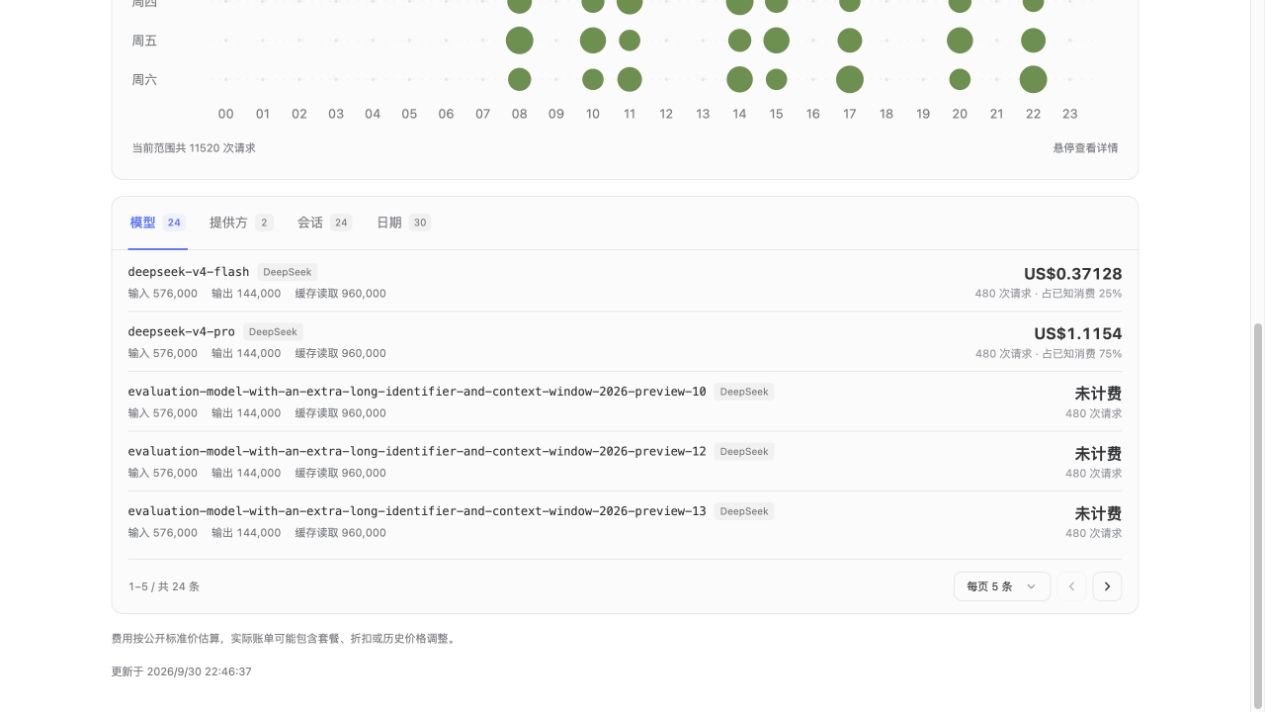
Install
dsh plugin --profile web add @pinkbanana/dsh-balance@latest
dsh --profile web
Open http://127.0.0.1:3080/ and go to Settings → Model Balances. The panel sits directly below Agent presets, and the balance summary also appears below the composer in existing sessions. Save the API key in Settings → Models or provide it through the DEEPSEEK_API_KEY environment variable.
Usage statistics read persisted session logs, including writes visible from active sessions. Prompt content is never exposed. To show a fixed-rate CNY conversion, add for example:
usdToCny: 7.2
Both the official provider ID deepseek-official and legacy deepseek are supported case-insensitively and share DeepSeek credentials, balance caches, and model caches. The composer retains the actual model ID, such as deepseek-flash; new models with unknown pricing remain unpriced.
StepFun setup
Add a custom provider in Settings → Models with Provider ID StepFun (stepfun, STEPFUN, and other case variants work) and save its API key. Harness derives the credential reference STEPFUN_API_KEY; setting that environment variable also works. Select StepFun in Settings → Model Balances.
The StepFun account API uses Bearer authentication at GET https://api.stepfun.com/v1/accounts. Amounts are shown in CNY. Cash and voucher totals are cumulative amounts as documented, not remaining balance components. The API does not report service availability, so a zero or negative postpaid balance is not labeled as unavailable service.
To use another credential reference, override the balance provider in this plugin's configuration (baseUrl is an API prefix; include /v1 for StepFun):
providers:
  - id: StepFun
    apiKeyRef: MY_STEPFUN_KEY
    baseUrl: https://api.stepfun.com/v1
Existing top-level apiKeyRef / baseUrl settings continue to serve DeepSeek. The providers entries override both balance and model queries. Custom model base URLs are not read automatically; balance queries default to official APIs. Balances, models, and Settings usage follow the selected provider. The composer follows the live session selection; the session Usage tab preserves historical usage across all providers.
Model lists use the StepFun list API at GET /v1/models, parsing id, owned_by, and created (Unix seconds) from each Model object. These fields are already returned in the list, so individual model retrieval is unnecessary. The Host route is GET /dsh-balance/api/models?provider=StepFun, with isolated provider caches and refresh=1 to force a refresh.
Usage accounting
Each request is attributed to its actual message source, with request headers as a fallback for older logs. Request time determines date grouping and peak pricing. Token totals include uncached input, output, cache reads, and cache writes. Settings defaults to the selected provider, with an All providers option; the session view keeps mixed-provider history.
Built-in estimates cover official DeepSeek USD rates and verified StepFun mainland CNY reference rates. Requests without supported pricing keep their token and request counts and show as unpriced. A similarly named DeepSeek model does not inherit official DeepSeek pricing on another provider. Entirely unpriced totals do not show $0; mixed totals include only known charges and carry a partial-cost label. Live account balances are separate from local usage estimates.
Extension and design
src/providers.tsholds shared provider metadata. The adapter table insrc/balance.tsdefines endpoints and response parsers; transport, errors, and caching are shared.GET /dsh-balance/api/balance?provider=StepFunselects StepFun. Omitting provider preserves DeepSeek compatibility;refresh=1bypasses that provider's cache. Unknown providers returnUNSUPPORTED_PROVIDER.- The layout draws on Codrops' Kononenko case study: oversized type, negative space, architectural grids, and geometric linework, implemented in original CSS with light/dark themes, narrow layouts, and reduced-motion support.
Development
pnpm install
pnpm check
pnpm preview
The preview uses no real credentials. Use ?lang=en&theme=dark for English/dark mode, or ?state=missing, error, empty, or loading to inspect those states. The sample model selector also exercises the composer readout. StepFun balance and model queries and the redesigned account page are available starting with 0.6.0. Live model balances, and usage accounting fixes are available starting with 0.7.0.
License
Native usage page
A Usage Statistics entry below Plugins in the native sidebar opens a standalone page. It defaults to all providers and all time, with provider/date-range filters and breakdowns by provider, model, session, and day. Native sidebar.panellist and main slots keep navigation, collapsed sidebar behavior, and active styling consistent with Harness. Plugin surfaces use Harness theme colors and radii.
Usage includes completed messages and failed, retried, or cancelled attempts with a reported stream usage sample. The final sample wins within an attempt; retry boundaries count separate calls. Inherited fork events are excluded. Open statistics refresh every 15 seconds and on focus/visibility return, without polling hidden pages. Manual refresh also populates the normal revision cache. Unknown prices remain unpriced.
Run pnpm preview and open ?page=usage (or ?page=usage&lang=en&theme=dark) to inspect the fixture page.
The activity punchcard groups requests by weekday and hour in the selected browser timezone. Dot area tracks request counts and follows provider/date filters, including DST repeated hours. Hover or use arrow keys for request/token details. Filters use themed, portaled listboxes with keyboard navigation, selection checks, Escape/outside-click dismissal, and typeahead.
v0.10.0 usage accounting
The conversation usage view has centered content, responsive padding and space for the composer. Cache input is counted once; duplicate settlements replace the previous sample, retries remain separate, and fork prefixes are excluded.
StepFun mainland API estimates use official standard CNY rates, verified on 2026-09-30, for step-5-preview, step-3.7-flash, step-3.5-flash and step-3.5-flash-2603. These reference estimates do not account for plans, discounts or unrecorded historical rate changes. USD and native CNY are shown separately; only an explicitly configured usdToCny rate enables a combined CNY total. Unknown rates remain unpriced. ?page=session previews the conversation view with 124 StepFun requests.
Related plugins
DSH-better-sidebar
 dsh-external
/DSH-better-sidebar
右侧侧边栏增强:文件预览/终端/Git,可拖拽自定义位置
dsh plugin --profile web add github:dsh-external/DSH-better-sidebarmirage#dsh
 strukto-ai
/mirage/typescript/packages/dsh
把文件系统与 bash 提供者换成 mirage 虚拟工作区:文件工具与 shell 命令作用于挂载的资源(RAM、S3、Redis、Slack、Gmail、Notion、Postgres)而非宿主磁盘,支持按挂载点设置读/写/执行模式、按命令选择沙箱(进程内 monty、pyodide、quickjs;远程 docker、e2b、daytona),并可在虚拟终端中安装 CLI(git、gh、slack、linear、ntn、gws,或自行注册的程序树)作为命令头词。
dsh plugin --profile web add github:strukto-ai/mirage#path:/typescript/packages/dshdeepseek-harness-desktop
 hairyf
/deepseek-harness-desktop
DeepSeek Harness Tauri 桌面版 | Only 5mb installer, zero environment setup. Windows / macOS / Linux.
dsh plugin --profile web add github:hairyf/deepseek-harness-desktopcc-safety-net
 kenryu42
/cc-safety-net
A coding agent CLI hook - block destructive commands and secret file access
dsh plugin --profile web add 'github:kenryu42/cc-safety-net#ae8af0330308ad0bc24b5389709060c7a07a6b8d'hol-guard
 hashgraph-online
/hol-guard
开源AI代理防病毒:运行时拦截风险工具、秘密访问、提示注入、恶意软件包、MCP服务器、插件和技能。
dsh plugin --profile web add github:hashgraph-online/hol-guarddsh-mobile
 saya-ch
/dsh-mobile
DeepSeek Harness 移动端适配与安全局域网访问插件,支持 Android App 和手机浏览器。
dsh plugin --profile web add github:saya-ch/dsh-mobile