
Memory
dsh-client-ui-obsidian-memory
detongz/dsh-client-ui-obsidian-memory · ★ 15
 detongzCurated
deepseek harness plugin obsidian memory
Manifest details
安装
dsh plugin --profile web add github:detongz/dsh-client-ui-obsidian-memoryGitHub 源码安装:首次需按提示配置 allowBuilds 构建授权后重试
For install and environment setup, plus plugin development tutorials, see DSH community docs ↗
Screenshots
README
Table of contents
- What it does
- Available Tools
- Quick Start
- 1. Prepare your vault
- 2. Install the plugin
- 3. Configure your vault path
- 4. Restart DSH
- Requirements & compatibility
- Permissions and risk
- Known issues
- The sidebar panel now renders (since 0.4.1)
- Build reproducibility (fixed in 0.4.0)
- Configuration
- Architecture
- Troubleshooting
- Development
- Compatibility harness
- License
🧠 Obsidian Memory for DeepSeek Harness — persistent memory via local Markdown vault
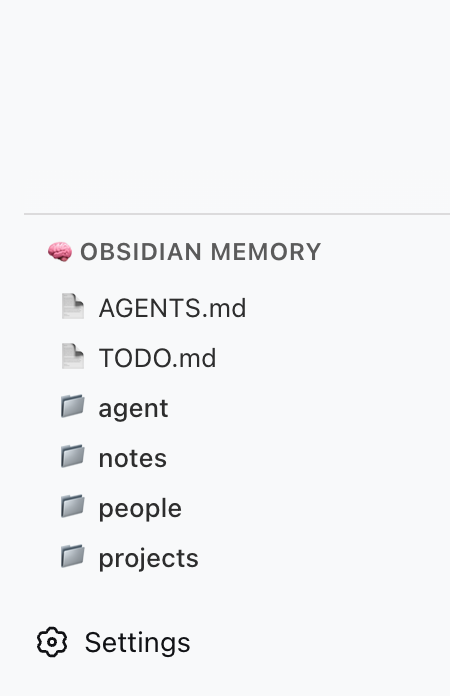
A DSH plugin that gives your AI agent persistent memory backed by a local Obsidian (or plain Markdown) vault. It registers 5 file-system tools (obsidian_memory_*) and renders a sidebar panel showing vault status and tool reference.
Inspired by @Saccc_c's Codex memory techniques.
What it does
- 5 memory tools — AI can read, list, search, write, and append to your local vault
- Sidebar panel — a vault directory browser, opened from a sidebar panel icon; the panel mounts in the layout's
mainslot (see Known issues for version caveats) - No external server — talks directly to the file system via DSH's host runtime
- Codex-compatible — works with the
Codex/directory structure recommended by the community
Available Tools
| Tool | Action |
|---|---|
obsidian_memory_read |
Read a Markdown or text file |
obsidian_memory_list |
List files and directories |
obsidian_memory_search |
Full-text search across .md and .txt files |
obsidian_memory_write |
Write or overwrite a file |
obsidian_memory_append |
Append content to the end of a file |
Quick Start
1. Prepare your vault
Create a Codex/ folder anywhere on your machine (e.g. inside an Obsidian vault):
~/Documents/Obsidian Vault/
└── Codex/
    ├── AGENTS.md      ← AI operating instructions
    ├── TODO.md        ← pending tasks / open loops
    ├── people/
    ├── projects/
    ├── notes/
    └── daily/
2. Install the plugin
One command, from anywhere:
dsh plugin add dsh-client-ui-obsidian-memory        # npm release (recommended)
# or install straight from source:
dsh plugin add detongz/dsh-client-ui-obsidian-memory
The plugin ships a
dsh.bundlemanifest, sodsh plugin addboth installs the package and activates it as a profile layer (the bundledcordis.patch.ymlinserts theobsidian-memoryentry). No manualcordis.patch.ymledit is needed to load the plugin.
3. Configure your vault path
Point the plugin at your Codex/ folder. In your profile's cordis.patch.yml:
- id: obsidian-memory
  config:
    vaultPath: /Users/YOURNAME/Documents/Obsidian Vault/Codex
Replace vaultPath with the absolute path to your Codex/ folder.
Alternatively set the environment variable OBSIDIAN_VAULT_PATH.
4. Restart DSH
dsh web # or however you launch DSH
After restart:
- The 5 tools are available to the AI when
vaultPathis configured - The sidebar panel does not currently appear — see Known issues
Requirements & compatibility
| Requirement | Verified |
|---|---|
| Node.js | ≥ 22 (verified on 22.22.2). DSH itself does not start on Node 18 (node:util has no parseEnv) or Node 20 (silent exit), so no lower floor is claimed. |
| DSH | 0.1.1-rc.2, 0.1.2-alpha.5, 0.1.2-rc.1, 0.1.5-alpha.1, 0.1.5-alpha.2, 0.1.5-rc.1, 0.1.5-rc.2, 0.1.6-alpha.1 — all verified 9/9 |
| DSH profile | web (only the web profile was exercised) |
The exact per-version verdict lives in package.json under
dsh.compatibility.dshReleases. Every compatible entry is backed by a real
install → start → uninstall run in a throwaway DSH_HOME; 0.1.3-alpha.1 and
0.1.3-alpha.2 are declared unknown because they could not be tested (no
published artifact; a failing CLI install). See
docs/COMPATIBILITY.md for the full matrix, the evidence
method and the reproduction command.
Permissions and risk
The plugin runs with the DSH host process's privileges and touches the file system directly:
- File access — reads and writes inside the directory given by
vaultPath. Paths are sandboxed:..traversal outside the vault is refused. - Network — none. The plugin makes no outbound requests and bundles no server.
- Commands / credentials — none.
- Lifecycle scripts —
prepare(runsnpm run build). Declared explicitly; it only ever runsrolldownlocally. The builtlib/is committed, so a git-based install is self-contained.
Read access to a vault means the AI can read anything inside vaultPath. Point
it at a dedicated Codex/ folder rather than a whole personal vault.
Known issues
The sidebar panel now renders (since 0.4.1)
The client half registers a global panel icon in the sidebar.panellist slot
(id: "obsidian-memory", order: 50, label "Obsidian Memory") and the vault
browser in the layout's main slot under the same key. Clicking the sidebar
icon calls ctx.layout.selectPanel("obsidian-memory"), which opens the panel in
the central column. This works on DSH versions that declare the sidebar.panellist
list slot and the keyed main slot (verified on the 0.1.5 / 0.1.6 line).
On DSH versions released before those slots existed, the two ctx.slots.inject
calls are simply inert: the plugin still loads, the 5 obsidian_memory_* tools
still work, and the sidebar icon simply does not appear. No crash, no install
failure — only the panel is unavailable on those older builds.
The five obsidian_memory_* tools are unaffected on every version above.
Build reproducibility (fixed in 0.4.0)
Before 0.4.0 the committed lib/ depended on the absolute path of the checkout:
rolldown's //#region comment embedded the CSS virtual module id, lightningcss
mixed the filename into its [hash] CSS-module prefix, and its export order
was not stable. npm run build now produces byte-identical output from any
directory, so the committed bundle matches a rebuild at the same Commit.
Configuration
| Option | Type | Default | Description |
|---|---|---|---|
vaultPath |
string |
— | Absolute path to your Codex/ vault directory |
Environment variable fallback (optional):
export OBSIDIAN_VAULT_PATH=/Users/YOURNAME/Documents/Obsidian Vault/Codex
If neither vaultPath in config nor the env var is set, the plugin logs a warning and skips tool registration.
Architecture
┌─────────────────────────────────────────┐
│ DSH Web (browser)                       │
│  ┌─────────────────────────────────┐    │
│  │ sidebar.obsidian-memory          │    │
│  │  ┌─────────────────────────┐    │    │
│  │  │ 🧠 Obsidian Memory      │    │    │
│  │  │  — tool reference       │    │    │
│  │  │  — vault structure      │    │    │
│  │  └─────────────────────────┘    │    │
│  └─────────────────────────────────┘    │
└─────────────────────────────────────────┘
                    │
┌───────────────────▼─────────────────────┐
│ DSH Host (Node.js)                      │
│  • reads / writes local files           │
│  • registers 5 obsidian_memory_* tools  │
└─────────────────────────────────────────┘
                    │
┌───────────────────▼─────────────────────┐
│ Local File System                       │
│  ~/Documents/Obsidian Vault/Codex/      │
└─────────────────────────────────────────┘
| Component | Role |
|---|---|
Host (lib/index.js) |
Node side: registers tools, reads/writes vault files |
Client (lib/client.js) |
Browser side: sidebar panel with static tool reference |
| Vault | Data source: local Markdown files |
Troubleshooting
| Symptom | Cause | Fix |
|---|---|---|
| Plugin not in Settings → Plugins | dsh plugin add installed an older version (pre-0.3.2) as a plain dependency |
Reinstall: dsh plugin add dsh-client-ui-obsidian-memory@latest |
| Tools not available to AI | vaultPath not configured |
Set vaultPath in cordis.patch.yml or env var |
| Sidebar panel not visible | Official DSH does not declare the sidebar.obsidian-memory slot |
Known issue — see Known issues; the tools still work |
| "Path traversal detected" error | AI tried to access files outside vault | All paths are sandboxed to vaultPath |
Development
git clone https://github.com/detongz/dsh-client-ui-obsidian-memory.git
cd dsh-client-ui-obsidian-memory
npm install
npm run build        # outputs lib/index.js + lib/client.js (byte-reproducible)
npm run watch        # dev mode with auto-rebuild
Build artifacts:
lib/index.js— host entry (tool registration + file I/O)lib/client.js— browser bundle (DSH closure-factory format, CSS inlined)
Compatibility harness
scripts/verify-disposable-profile.mjs runs the full install → start (host tools
- client bundle) → uninstall lifecycle against a throwaway
DSH_HOMEand prints a JSON evidence record. It never touches a real profile.
node scripts/verify-disposable-profile.mjs \
  --dsh /path/to/node_modules/@deepseek-ai/dsh/lib/bin.js \
  --version 0.1.5-rc.1 \
  --out evidence-0.1.5-rc.1.json
Optional flags: --source <plugin dir> (defaults to the cwd) and
--pnpm <path>. It exits non-zero unless all nine checks pass. Results feeding
dsh.compatibility.dshReleases are recorded in
docs/COMPATIBILITY.md.
License
MIT
Related plugins
hindsight#coding-agents
 vectorize-io
/hindsight/hindsight-integrations/coding-agents
Hindsight:会学习的 Agent 长期记忆系统,自动召回/保存、知识页、深度反思与按仓库隔离的记忆银行。
dsh plugin --profile web add github:vectorize-io/hindsight#path:/hindsight-integrations/coding-agentsdsh-memory-plugin
 volcengine
/OpenViking/examples/dsh-memory-plugin
面向 DeepSeek Harness 的 OpenViking 记忆与上下文插件:pre-step 自动召回与画像注入、会话捕获、`viking://` URI 防护,以及对接 OpenViking 服务端的 recall/write 记忆工具。
dsh plugin --profile web add @openviking/dsh-memory-pluginmemos
 memtensor
/memos
给你的 Agent 持久记忆与成长能力
dsh plugin --profile web add @memtensor/memos-cloud-dsh-plugin@latestdsh-purge-kingchar
 kingcharleslzy-ai
/dsh-purge
让 AI 更专注地辅助学习与动手实验:DSH 附加组件,提供状态自检、提示词与规则管理、本机备份与回滚。
dsh plugin --profile web add 'github:kingcharleslzy-ai/dsh-purge#27919a326b6615b1968661a3e749760cec3a2e07'dsh-context
 bowenliang123
/dsh-context
上下文洞察面板:一眼看清模型上下文窗口的组成与变化——构成对照窗口大小、按请求历史趋势、压缩/注入事件、消息级 token 统计。
dsh plugin --profile web add dsh-contextmemsearch
 zilliztech
/memsearch/plugins/dsh
MemSearch plugin for DeepSeek Harness: shared markdown memory across agents, with capture, on-demand recall, memory-recall skill, and a skill-candidate review panel.
dsh plugin --profile web add '@zilliz/memsearch-dsh@0.1.8'