
UI Enhancements
dsh-snapshot
dfsyjian/dsh-snapshot · ★ 1
 dfsyjian
DeepSeek Harness plugin: automatic file snapshots with a sidebar timeline and settings card
安装
dsh plugin --profile web add github:dfsyjian/dsh-snapshotGitHub 源码安装:首次需按提示配置 allowBuilds 构建授权后重试
For install and environment setup, plus plugin development tutorials, see DSH community docs ↗
README
Table of contents
A DeepSeek Harness (DSH) Web plugin for automatic snapshots and one-click rollback — before every write/edit it saves the target file contents, and before a shell deletion (Remove-Item, rm) it saves the doomed file's contents, so /rollback restores any earlier snapshot (modeled after Trae's checkpoint capability). It also ships a sidebar "snapshot timeline" panel and a settings card.
Features
Before every write/edit the target file contents are snapshotted, and a shell deletion (Remove-Item, rm) first snapshots the doomed file's contents; records append to the session's snapshots.jsonl. All snapshots triggered by the same user message are folded into one group: the timeline shows one row per message, and rolling back a row restores every change that message produced.
UI
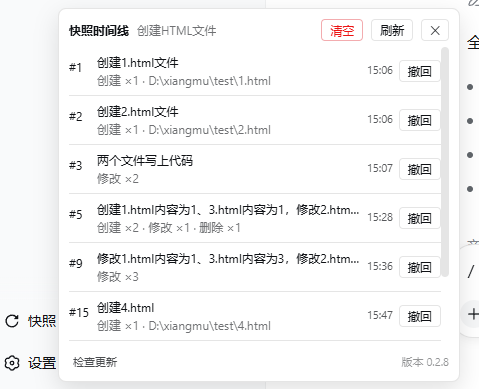
Snapshot timeline: the sidebar's bottom "Snapshots" button opens a panel listing the current session's history. One row is one message — all write/edit/delete mutations it triggered are folded together, showing the message preview and a per-kind summary such as
Create ×2 · Modify ×1(only kinds that occurred; counts are per file, repeated writes to the same file count once), plus the file path when the message touched a single file (rollback records read "Rollback to snapshot #N"). Click a row to roll back the whole message's changes (the current state is recorded first, so you can roll back again); rolling back a message folds away everything after it by default (collapseOnRollback). Hovering a row lists every file it touches with its Create/Modify/Delete kind, and hovering the time shows the full timestamp. The panel footer has a "Check for updates" entry on the bottom left and the plugin version on the bottom right. The header "Clear" button asks for confirmation before deleting all snapshots./rollbackpicker: typing/rollbackin the composer opens a searchable selection panel (the same popupSelect interaction as/model), so you do not need to memorize subcommands: a Clear snapshots command row at the top deletes every snapshot after an in-shell risk confirmation, and each snapshot is one Roll back to snapshot #N row whose detail shows the time and the Create/Modify/Delete file list — typing a sequence number, file name, or kind filters the rows instantly. Picking a rollback row shows the risk confirmation bar first; confirming runs the rollback.
- Settings card: the plugin config page shows a snapshot card with two-state switches for booleans and number fields that fall back to the plugin default when blank or restored; edits apply immediately.
Commands
Typing /rollback opens the selection panel; the full subcommand syntax:
/rollback listlists the snapshot history (one line per message)/rollback <seq> --yesrestores all the changes of one message (the current state is recorded first, so you can roll back again)/rollback --call <callId> --yesrolls back a single snapshot by tool call/rollback clear --yesclears all snapshots of this session
Install
Install the plugin into a profile (dsh web uses the web profile) with the dsh plugin command; it writes the dependency and the bundle list for you, no manual editing:
dsh plugin --profile web add dsh-snapshot
Prerequisites:
- A working
dshCLI on the machine. If it is not installed, run the same commands withnpx @deepseek-ai/dshin place ofdsh:
npx @deepseek-ai/dsh plugin --profile web add dsh-snapshot  # install the plugin into the web profile
npx @deepseek-ai/dsh web                                    # start dsh web
- A global
pnpmon the machine (dsh plugininvokes pnpm to install dependencies inside the profile directory); if it is missing, runnpm install -g pnpmfirst.
Then restart dsh web. dsh plugin adds dsh-snapshot to the profile's dependencies and dsh.profile.bundles (the bundle list is the enablement entry point), and the plugin's cordis.patch.yml injects the snapshot entry into the profile config tree.
For local development, build the source directory and point the profile at it with a link: dependency instead of the registry version (see "Development").
Upgrade
dsh plugin add does not bump an existing dependency, so upgrade by pinning the new version inside the profile directory:
cd ~/.dsh/profiles/web
pnpm add dsh-snapshot@<new-version>
Then fully stop and restart dsh web, and hard-refresh the browser with Ctrl+Shift+R (client-side copy such as the "Undo" button label lives in the browser bundle and keeps showing the old text until the cache is cleared).
Usage
Configuration (all optional; works with zero config)
| key | default | description |
|---|---|---|
enabled |
true |
Master switch; when off, new writes/edits/deletes are no longer captured, existing snapshots are kept (rollback still works) |
storeDir |
$DSH_HOME/snapshots |
Snapshot root directory, one subdirectory per session |
maxRetain |
100 |
Max snapshots kept per session; 0 means unlimited |
maxProjectRetain |
100 |
Project-wide cap: all sessions sharing a workspace (session cwd) share this quota; on overflow the oldest by capture time is pruned; 0 means unlimited |
pruneOrphans |
true |
Orphan pruning: when the workspace directory of a session no longer exists, all its snapshots are deleted (unrollbackable, space only); false keeps them |
collapseOnRollback |
true |
Collapse the timeline on rollback: restoring a message also removes that message and everything after it (rollback records included); the list keeps only the history before the rollback point. false keeps the superseded snapshots and the rollback record |
Configuration can be done in either of two ways; the keys match the table above.
Method 1: the settings page (form)
The client settings page shows the snapshot card under "Plugin Configuration"; the form edits every key in the table above. Saving writes through the host settings service into the snapshot: section of ~/.dsh/settings.yaml.
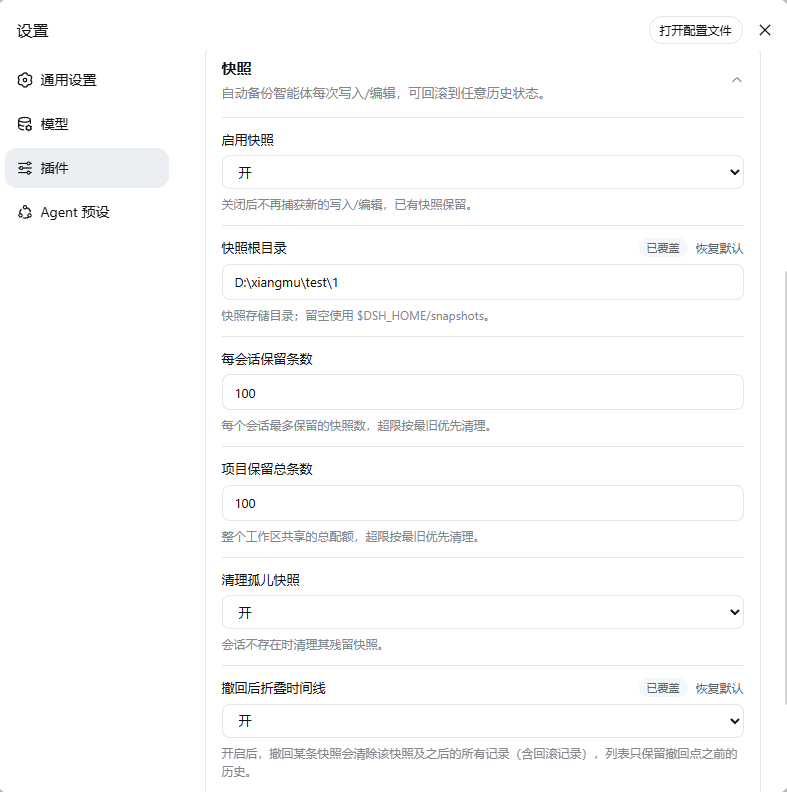
Whether the card is editable depends on the host's namespace allow-list (WEB_SETTINGS_NAMESPACES of dsh-host-apiproxy): when it contains snapshot the card renders an editable form, otherwise it only shows a note (form unavailable). Note that the allow-list is a constant baked into the host source, not a runtime setting — the npm release currently does not include snapshot, so the form cannot be edited under an npm host (it shows "form unavailable"); a local harness master source build already includes the namespace and edits directly. To get the form under the npm host, wait for a newer host release.
Method 2: edit the config file
Skip the settings page and edit a config file directly; either location works:
- The
snapshot:section of~/.dsh/settings.yaml(the same location the settings page writes to):
snapshot:
  storeDir: D:\xiangmu\test\1
  collapseOnRollback: true
- The profile's
cordis.yml(thewebprofile maps to~/.dsh/profiles/web/cordis.yml):
plugins:
  snapshot:
    storeDir: D:\xiangmu\test\1
Restart dsh web after editing for the change to take effect.
Development
pnpm install && pnpm typecheck && pnpm build
pnpm build runs tsc (server half, file-by-file emit) followed by tsdown (browser half bundled into a single lib/client.js, loaded by the loader module table).
- The build is fully self-contained: every
@deepseek-ai/*SDK package (includingreact) is declared in devDependencies and resolved from the npm registry; the tsconfig does not reference any harness source checkout. - Runtime dependencies:
@deepseek-ai/schemastery,@deepseek-ai/dsh-settings(with@deepseek-ai/cordis) are declared as peers and provided by the harness host; the other@deepseek-ai/*imports are allimport typeand erased at compile time. The client bundle only externalsreact,@deepseek-ai/dsh-client-runtime/client(snapshot storage engine) and@deepseek-ai/dsh-client-ui-primitives(icon components, both provided at runtime by the loader module table); everything else is inlined.
Related plugins
dsh-web(原 dsh-web-ui)
 zhu1090093659
/dsh-web-ui
dsh-web(原 dsh-web-ui):任务看板、git 图、右侧面板、远程移动端 UI、桌宠、实时 token 统计与皮肤中心的全家桶。仓库已更名 zhu1090093659/dsh-web,根目录声明 dsh.bundle.patch,支持根 Git 入口安装。
dsh plugin --profile web add github:zhu1090093659/dsh-webdsh-web-all 聚合包(原 dsh-web-ui-all)
zhu1090093659zhu1090093659/dsh-web-ui/packages/dsh-web-ui-all
旧整包路径 packages/dsh-web-ui-all 已随仓库更名 dsh-web 迁移:现聚合目录为 packages/dsh-web-all,npm 聚合包 @linxin666/dsh-web-all。与总仓根 Git 入口是同一产品的两种整包方式,不重复计数。
dsh plugin --profile web add @linxin666/dsh-web-all@latestdsh-TUI
 ccch1mneyyy
/dsh-TUI
Claude Code 风格全屏终端 UI:像素鲸鱼顶栏、实时工作状态行、思考流式展开。
dsh plugin --profile web add github:ccch1mneyyy/dsh-TUIdsh-cc-tui
ccch1mneyyyccch1mneyyy/dsh-cc-tui
一个美观且实用的 Claude Code 风格 TUI 插件:像素鲸鱼顶栏、双流光大字、实时工作状态行、思考流式展开、双击 Esc 时间回溯、蓝白上下文进度条 + TPS 仪表。 零核心改动,纯插件挂载。安装插件即可启用,卸载后不会留下核心补丁。 献给钟爱tui的各位极客们 A beautiful, practical Claude…
dsh plugin --profile web add github:ccch1mneyyy/dsh-cc-tuideepseek-balance-whale-widget
 meteornox
/deepseek-balance-whale-widget
DSH 小鲸鱼余额挂件(DeepSeek Balance Whale Widget)
dsh plugin --profile web add github:meteornox/deepseek-balance-whale-widgetDSH-better-sidebar
 omdsh-dev
/DSH-better-sidebar
侧边栏完整工作台:内置文件渲染编辑、终端、Git 与子代理,支持三方插件注册新 Tab。
dsh plugin --profile web add github:omdsh-dev/DSH-better-sidebar