
Models & Providers
AriaAgent
dqsjqian/AriaAgent · ★ 6
 dqsjqian
Industrial-grade C++20 Agent Tooling Framework GUI — provider-agnostic LLM agent with true SSE streaming, tool registry, approval gate. Built on Aria (C++20 MVVM).
Manifest details
安装
dsh plugin --profile web add github:dqsjqian/AriaAgentGitHub 源码安装:首次需按提示配置 allowBuilds 构建授权后重试
For install and environment setup, plus plugin development tutorials, see DSH community docs ↗
README
Table of contents
- ✦ AriaAgent
- What is it?
- ✨ Features
- 🧠 Agent Core
- 🛠 Built-in tools (10+)
- 🗂 Session & UI
- 🏗 Architecture (pure-C++ core + platform shells)
- 🖼 Screenshots
- 🚀 Quick start
- Prerequisites
- Portable Python entry
- Build (macOS)
- Build (Windows)
- Verify
- Configure & run
- Release build
- 🧩 Extending
- Registering a new tool (one line)
- Switching model vendors
- 📚 Design provenance
- 📄 License
✦ AriaAgent
Complete dependency update guide — Version pins, selective updates, offline use, rollback and commit steps.
Current version 0.2.0 · Aria 3.1.1
Industrial-grade C++23 Agent Tooling Framework GUI · Built on Aria (C++23 MVVM)
Provider-agnostic · True token-level SSE streaming · Tool-call chain visualization · Permission approval · MIT License


What is it?
AriaAgent is a provider-agnostic LLM Agent tooling framework GUI built on Aria, an industrial-grade C++23 MVVM framework.
It is not tied to any single model vendor — every OpenAI-compatible endpoint (DeepSeek / OpenAI / Kimi / Qwen / GLM / …) works out of the box. Switching providers is a one-line configuration change: no code edits, no recompile.
The agent loop (think → call tools → observe → repeat) is written with C++23
coroutines, and the UI layer is fully decoupled from the engine through Aria's
reactive core (Property / ObservableList). The overall design borrows the
architectural essence of the official DeepSeek harness: event log as the single
source of truth, schema-driven tools, and fail-closed permissions.
✨ Features
🧠 Agent Core
- Provider-agnostic — abstract
LlmClientinterface +OpenAiCompatClientimplementation; any OpenAI-compatible API plugs in seamlessly - True streaming — token-level SSE rendering (Mira's chunked body reads), not buffered fake streaming
- Agent loop — coroutine think/tool/observe loop with bounded parallel tool execution (exclusive barrier + parallel pool, results committed in model order) and a hard round cap to prevent runaway
- Tool registry — plug-and-play:
Tool{name, desc, schema, fn}, no hardcoded branches - Arg validation — lightweight JSON-Schema validator (type/required/enum/ range) with path-qualified error messages
🛠 Built-in tools (10+)
| Tool | Description | Permission |
|---|---|---|
calculator |
Arithmetic / power | No approval |
current_time |
Current local time | No approval |
run_command |
Synchronous shell exec (with timeout) | Approval |
run_in_background / read_output / kill_process |
Background process handle + incremental polling | Approval |
read_file / write_file / edit_file |
File read/write/edit (path-traversal guarded) | Write = Approval |
list_directory |
Directory listing | No approval |
todo_set / todo_add / todo_list |
Agent-visible todos (snapshot last-wins) | No approval |
🗂 Session & UI
- Multi-session — sidebar session list (create / switch / right-click delete),
JSON persistence to
~/.ariaagent/sessions/, auto-restore on launch - Multi-turn context — the engine owns the full message history; the agent has memory
- Auto-compaction — summarizes old turns past 32 messages without splitting tool-call/result pairs
- Markdown rendering — in-bubble Markdown + 4-color syntax highlighting
- Trajectory panel — right-side tool-call timeline (success/failure colors)
- Todo panel — live projection of the agent's todo list
- Message feedback — right-click 👍/👎, persisted
- Approval gate — modal confirmation before dangerous tools, default-deny (fail-closed)
🏗 Architecture (pure-C++ core + platform shells)
AriaAgent/
├── core/                    # ★ Pure C++, zero Qt (reused verbatim on mobile)
│   ├── agent/               #   engine: agent loop / llm_client / tools /
│   │                        #   session_store / json_schema / subprocess
│   └── module_api/          #   BaseVm / IModule / ModuleRegistry / ServiceHub
├── modules/                 # ★ feature modules (plugin pattern, VM per module)
│   ├── chat/                #   chat module (engine bridge + ChatViewModel)
│   ├── sessions/            #   session list (sidebar projection)
│   ├── settings/            #   settings + Qt settings dialog
│   ├── todo/  trajectory/   #   todos / tool-call trajectory
│   └── app/                 #   app shell
│       ├── viewmodel/       #   AppText (UI string service)
│       └── platforms/qt/    #   ★ Shell: main.cpp (QtDispatcher) /
│                            #     main_window / markdown_render
├── $FORGEDEPS_HOME/build/aria/<target>          # pinned Aria fetch (scripts/ci/fetch_aria.py)
├── core/CMakeLists.txt      # ariaagent_core
└── modules/app/platforms/qt/CMakeLists.txt  # aria_agent executable
Note: the legacy
platform/directory is dead code; the real Qt shell lives inmodules/app/platforms/qt/(see the top-level CMakeLists.txt). Future iOS/Android shells will live undermodules/app/platforms/and link the same core verbatim. Threading: the VM marshals back to the UI thread viaaria::runtime::main_dispatcher()— the Qt shell installs aQtDispatcher, mobile shells install their own; the VM never knows which platform it is on.
Approval prompts: the VM exposes an approval_ui callback that the shell
injects (QMessageBox / UIAlertController / Android Dialog). The VM never pops
a dialog itself.
🖼 Screenshots
AriaAgent is built on the Aria C++23 MVVM framework plus the Qt6 adapter. Both
core views below come from the macOS build and are driven entirely by Aria's
reactive engine (Property / ObservableList / Command).
| View | Screenshot |
|---|---|
| Main chat (streaming + tool-call timeline) | 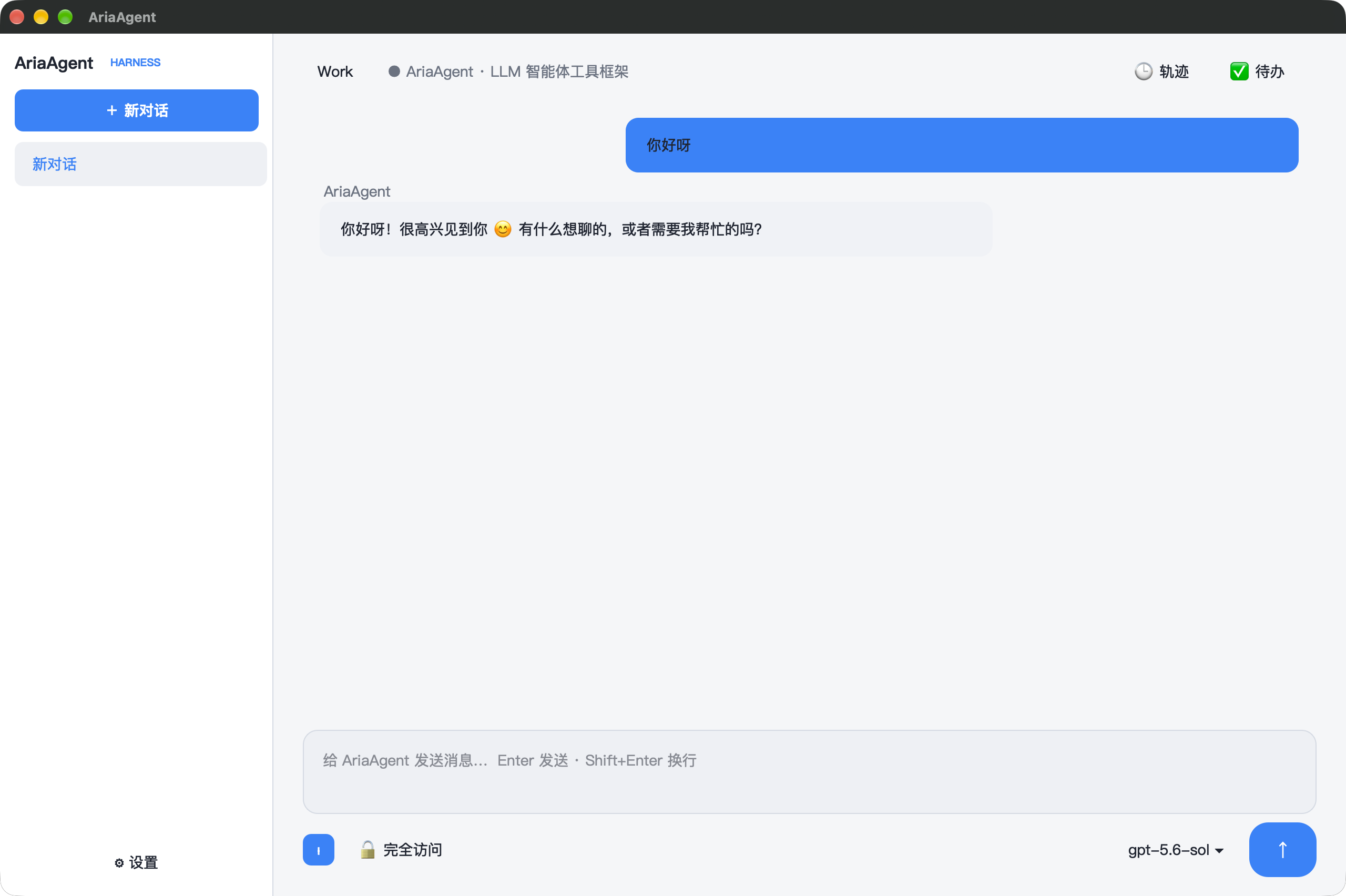 |
| Settings (General / Model / Plugins / Agent Presets) | 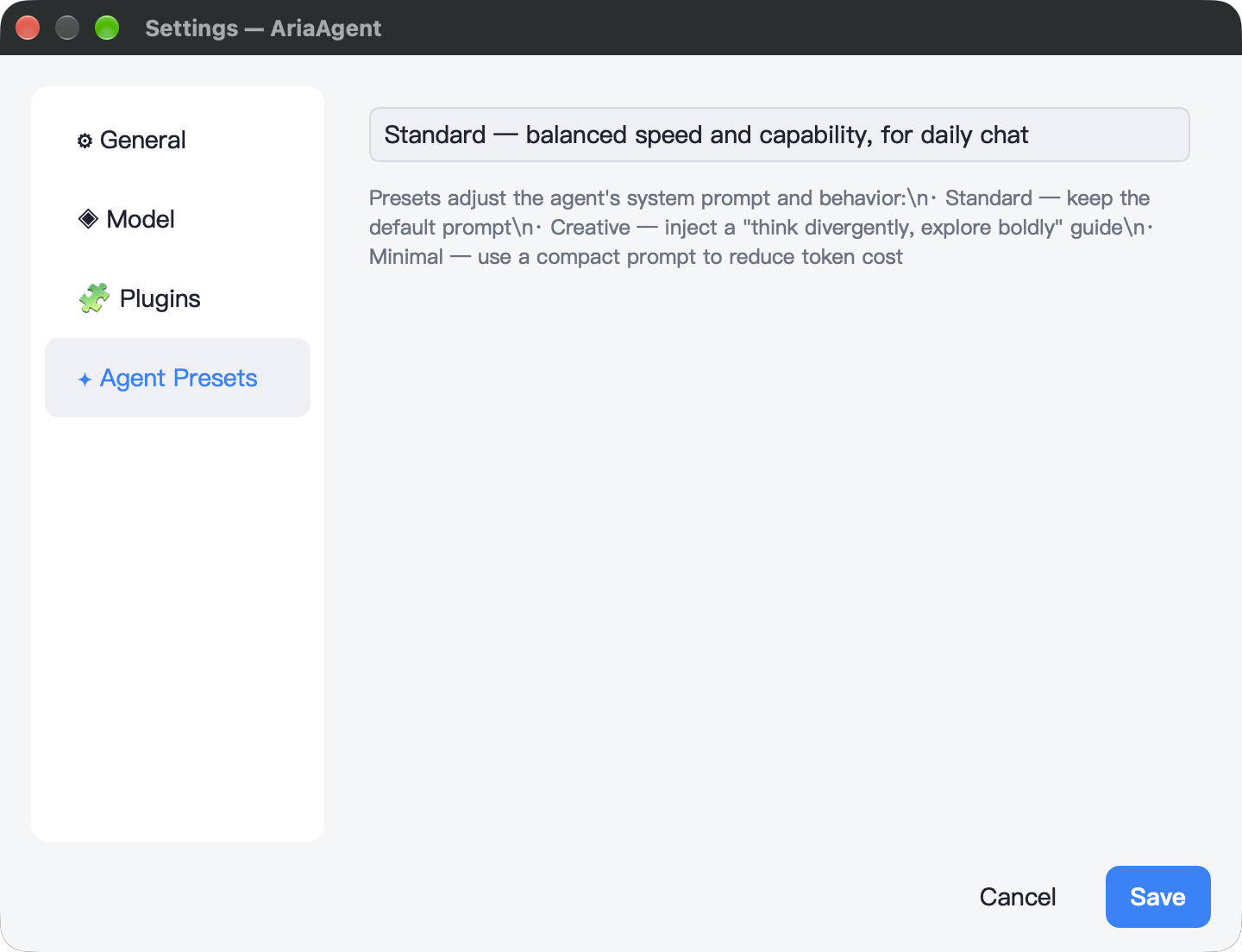 |
Why no Windows / Linux screenshots? The macOS shell is built on the Aria framework + the Qt6 adapter; the Windows and Linux builds look identical to the macOS one (same Qt widgets + the same C++ ViewModel), so duplicate screenshots would add nothing. Windows additionally has two independently validated toolchains — MSVC + Qt6 and MSYS2 UCRT64.
🚀 Quick start
Prerequisites
- Windows UCRT64: MSYS2 UCRT64 (GCC 14+), Qt6, CMake ≥ 3.21, and the MSYS
makeandperlpackages (pacman -S make perl) for the source OpenSSL build. - Windows MSVC: run CMake in an x64 Developer PowerShell with
cl,nmake, Perl, and NASM onPATH. Selecting a Visual Studio generator does not initialize the developer environment for the external OpenSSL build. - macOS: Xcode CommandLineTools, Qt6 (
brew install qt), CMake ≥ 3.21 - All platforms: a C++23 compiler, Git, and Python 3.14+.
- Resolve and verify Aria before configuring CMake manually:
Install the build tools and register one workspace shared by your projects:
python -m pip install -r requirements-build.txt
python -m forgedeps init /path/to/ForgeDepsWorkspace
python scripts/build.py --test
Builds use the recorded dependencies.json selection without selecting new releases. FORGEDEPS_HOME overrides the registered workspace. Sources live in sources/; Aria and third-party SDKs live in build/<name>/<target>/. Applications link those prefixes directly. Each target keeps one current artifact; changes to versions, compilers, ABI, source contents or recipes rebuild it transactionally and preserve the previous artifact on failure.
--aria-root /path/to/Aria (CMake ARIA_DIR, or Tutorial ARIA_ROOT) selects editable sources which are still content-hashed and built into the shared SDK. Qt, NDK and Apple SDKs are installed separately; actual toolchain and Qt contents participate in artifact identity. Use scripts/ci/update_dependencies.py to change versions, then review and commit the lock.
The Python entry holds reader leases through configure, build, tests and deployment. For manual commands use python -m forgedeps.build_kit.session --configure -- cmake -S ... -B ..., then python -m forgedeps.build_kit.session --build-dir <build> -- <command>. Offline builds require prepared sources/downloads and the toolchain; incompatible or modified artifacts fail verification.
fetch_aria.py is optional shared-source preparation. Local mirror development checkouts require --source <repo> --destination <path>. Application builds prepare their SDK automatically.
Portable Python entry
python scripts/build.py --test prepares the shared Qt/HTTP/TLS SDK and holds its reader lease through configure, build, tests and deployment. Options include --qt-dir, --aria-root, --build-dir, --jobs, --generator, --generator-platform and --offline. Use the debug command for Debug. Windows OpenSSL requires Developer PowerShell and Perl/NASM. Only the Qt desktop shell is implemented.
Build (macOS)
cmake -S . -B build/flavors/debug -DCMAKE_BUILD_TYPE=Debug \
      -DCMAKE_PREFIX_PATH="$(brew --prefix qt)"
cmake --build build/flavors/debug -j 8
./build/flavors/debug/bin/aria_agent
Build (Windows)
python scripts/build.py             # Release build and deploy runtime DLLs
python scripts/build.py debug       # Debug build and deploy runtime DLLs
python scripts/build.py run         # Debug build, deploy, and launch
The runner finds MSYS2 UCRT64, Qt6, and Ninja. Set $env:MSYS2_ROOT or
$env:QT_DIR for a nonstandard installation.
Verify
ctest --test-dir build/flavors/debug --output-on-failure
The tests cover dependency-fetch safety and llm_client_smoke, which exercises ordinary completions and SSE streaming against a local HTTP server. No LLM API key is required.
Configure & run
Use the built-in settings dialog (⚙ bottom-left) or environment variables:
| Variable | Description | Default |
|---|---|---|
ARIA_LLM_API_KEY |
API key | — |
ARIA_LLM_BASE_URL |
OpenAI-compatible endpoint | https://api.deepseek.com |
ARIA_LLM_MODEL |
Model name | deepseek-chat |
ARIA_LLM_SYSTEM_PROMPT |
System prompt | default assistant prompt |
$env:ARIA_LLM_API_KEY  = "sk-..."
$env:ARIA_LLM_BASE_URL = "https://api.deepseek.com"
$env:ARIA_LLM_MODEL    = "deepseek-chat"
./build/flavors/debug/bin/aria_agent.exe
Switch providers: point
BASE_URLathttps://api.openai.com+gpt-4o-mini, orhttps://api.moonshot.cn+kimi-k2-0711-preview— no recompile needed.
Release build
python scripts/build.py release
🧩 Extending
Registering a new tool (one line)
reg.register_tool({
    "web_search",                            // name
    "Search the web for a query.",           // description
    {                                        // JSON Schema parameters
        {"type", "object"},
        {"properties", {{"query", {{"type", "string"}}}}},
        {"required", json::array({"query"})}
    },
    /*concurrency_safe=*/true,               // may run in parallel
    /*requires_approval=*/true,              // needs user approval
    web_search_impl                          // implementation fn
});
Switching model vendors
See the env table above. ARIA_LLM_BASE_URL + ARIA_LLM_MODEL is all you
need — the LlmClient abstraction guarantees zero code changes.
📚 Design provenance
The architecture draws heavily on the core ideas of the official deepseek-ai/deepseek-harness:
- Event log = single source of truth — sessions can be replayed, compacted, and synchronized across views
- Tool = schema + fn — plug-and-play registration
- UI never touches the engine directly — only reactive state in between
- Fail-closed permissions — dangerous operations need explicit approval
- Replayable — any state can be rebuilt from the log
📄 License
MIT © 2026 dqsjqian
Own code is MIT-licensed; third-party components retain their licenses. See Third-Party Notices for distribution requirements.
Related plugins
dsh-plugin-reasonix
 esengine
/DeepSeek-Reasonix/integrations/dsh-plugin
把 Reasonix 作为 dsh 子智能体接入:一层配置补丁让 subagent-acp 提供方启动 reasonix acp,并以 reasonix 工具暴露给模型。纯配置、无代码、不在 npm;接入的是子智能体,不是模型服务商。
dsh plugin --profile web add 'github:esengine/DeepSeek-Reasonix#af0e954f5629492980718fc0e36030fec0abc682&path:/integrations/dsh-plugin'dsh-purge
 YuJunZhiXue
/dsh-purge
DeepSeek Harness 破甲:让所有模型都能破甲,不同模型可换不同提示词;默认提示词面向国模「小码酱」。Jailbreak for every model — swap prompts per model. 求 Star 收藏 ⭐ 如要二开,请查看署名要求部分
dsh-purge-mmparko
 mmparko
/dsh-purge
DeepSeek Harness 破甲:让所有模型都能破甲,不同模型可换不同提示词;默认提示词面向国模「小码酱」。Jailbreak for every model — swap prompts per model. 求 Star 收藏 ⭐ 如要二开,请查看署名要求部分
dsh plugin --profile web add 'github:mmparko/dsh-purge#033e6bd1e0f101352b39075ecd0d758ffef26b76'dsh-connect-workbuddy
 dingminhua
/dsh-connect-workbuddy
把本机登录的 WorkBuddy 模型(国内版与国际版)接入 DeepSeek Harness:每次刷新按上游目录自动读取每个模型的积分倍率,支持逐模型图片输入开关、多账号切换与账号池自动换号,并提供每日签到、卡片与输入框里的胶囊积分读数等只读积分概览。
dsh plugin --profile web add 'dsh-connect-workbuddy@5.15.0'dsh-image-gen
 shanliuling
/dsh-image-gen
让 DeepSeek Harness 像 ChatGPT 一样,在对话里直接生成图片。
dsh plugin --profile web add github:shanliuling/dsh-image-genagent-vision-toolkit
 Anionex
/agent-vision-toolkit
为纯文本模型"看图“设计更好的视觉工具箱和技能,支持多图理解,图片问答,前端UI还原、GUI 自动化等,并可选无缝接入多个主流agent,直接识别粘贴图片| A vision toolkit and skill designed for text-only llms — image Q&A, long-screenshot OCR, frontend UI restoration, and GUI automation, with optional seamless integration for Codex, Claude Code, Pi, Oh My Pi, and OpenCode
dsh plugin --profile web add github:Anionex/agent-vision-toolkit