
Development & Runtime
dsh-balance-plugin
francis-xavier-code/dsh-balance-plugin · ★ 64
 francis-xavier-code
DeepSeek Harness plugin for balance monitoring, the official recharge entry, Miyu-style usage statistics, and third-party plugin management.
安装
dsh plugin --profile web add github:francis-xavier-code/dsh-balance-pluginGitHub 源码安装:首次需按提示配置 allowBuilds 构建授权后重试
For install and environment setup, plus plugin development tutorials, see DSH community docs ↗
README
Table of contents
💰 DeepSeek Balance Monitor & Usage Stats
A DeepSeek Harness (DSH) plugin — balance monitoring · official top-up link · Miyu-style usage statistics · third-party plugin manager


✨ Features · 📥 Install · 🖼 Screenshots · ❓ FAQ · 📖 Docs · 🌐 中文
✨ Features
| Module | Capability |
|---|---|
| Balance monitoring | Monitors DeepSeek API balance (CNY / USD dual balance pool) with parallel multi-account queries; auto-reads the DSH credential DEEPSEEK_API_KEY — no manual entry needed |
| Low-balance alerts | Independent CNY / USD thresholds (default ¥10 / $2, configurable); the balance bar turns red when below threshold |
| One-click top-up | Jumps straight to the official DeepSeek top-up page platform.deepseek.com/top_up, plus a usage-details page link |
| Usage statistics | 1:1 recreation of the Miyu WebUI usage page: stat tiles / GitHub-contribution-style usage calendar / three-segment stacked trend bar chart / model consumption donut chart with detail table / recent 50 call records |
| Performance metrics | Turns · steps · LLM duration · tool-call duration · avg first-token latency · tok/s · cache hit rate |
| Third-party plugin manager | Lists unofficial (non-@deepseek-ai) web plugins: package name / local path / Bundle rev / dependencies, with a one-click "Open Directory" to locate source code |
| Model tool | Registers the query_api_quota tool — just ask "How much DeepSeek balance is left?" and get a balance summary |
| Persistent settings | Config auto-saves to config.json in the plugin directory and restores after restart |
| One-click update | Check for updates and update directly in the DSH plugin panel — no manual operations needed |
📥 Install
Prerequisites
- DeepSeek Harness installed and running
- (Optional) DeepSeek API Key — get one at platform.deepseek.com; if
DEEPSEEK_API_KEYis already configured on this machine, the plugin re-reads it on every poll — changing the key needs no restart
One-click install (recommended)
macOS / Linux:
curl -fsSL https://raw.githubusercontent.com/yxxbc/dsh-balance-plugin/main/install.sh | bash
Windows (PowerShell):
irm https://raw.githubusercontent.com/yxxbc/dsh-balance-plugin/main/install.ps1 | iex
Restart DeepSeek Harness after installation — three icon buttons appear on the right of the input box. Use DSH_PROFILE=<name> to target another profile.
Update the plugin
# macOS / Linux
curl -fsSL https://raw.githubusercontent.com/yxxbc/dsh-balance-plugin/main/install.sh | UPDATE=1 bash

# Windows PowerShell
irm https://raw.githubusercontent.com/yxxbc/dsh-balance-plugin/main/install.ps1 | iex
# Then in PowerShell run: $env:UPDATE='1'; irm https://raw.githubusercontent.com/yxxbc/dsh-balance-plugin/main/install.ps1 | iex
Or click "Check Update" → "Update" in the DSH plugin panel (recommended).
Uninstall the plugin
# macOS / Linux
curl -fsSL https://raw.githubusercontent.com/yxxbc/dsh-balance-plugin/main/uninstall.sh | bash

# Windows PowerShell
irm https://raw.githubusercontent.com/yxxbc/dsh-balance-plugin/main/uninstall.ps1 | iex
🖼 Screenshots
| Screenshot | Description |
|---|---|
 |
Three icon entries on the right of the input toolbar plus a persistent balance bar below |
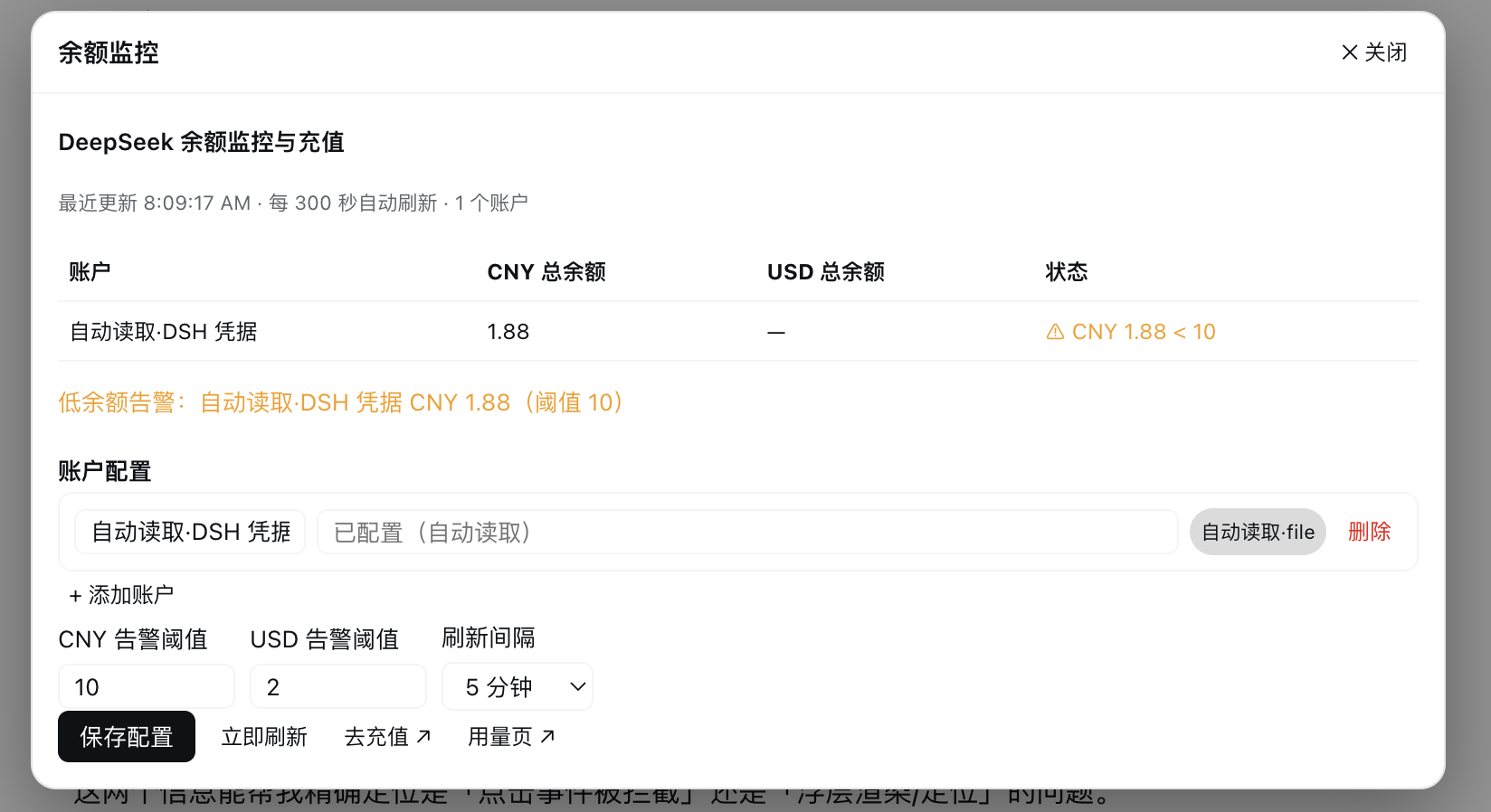 |
Balance monitoring panel: balance table, low-balance alerts, account config, thresholds & refresh interval, top-up entry |
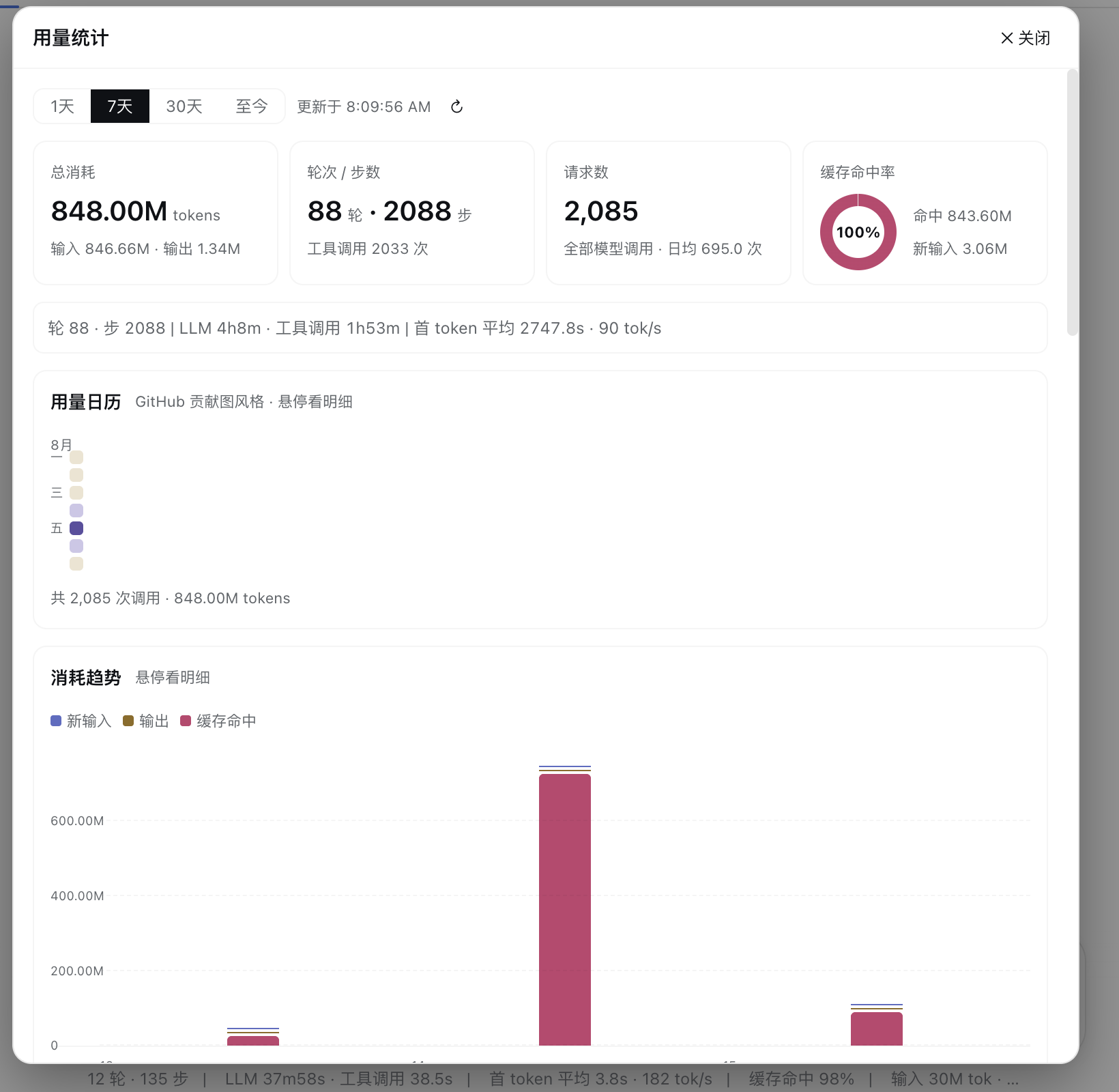 |
Usage page top: range switcher, stat tiles, live performance metric bar, GitHub-style usage calendar |
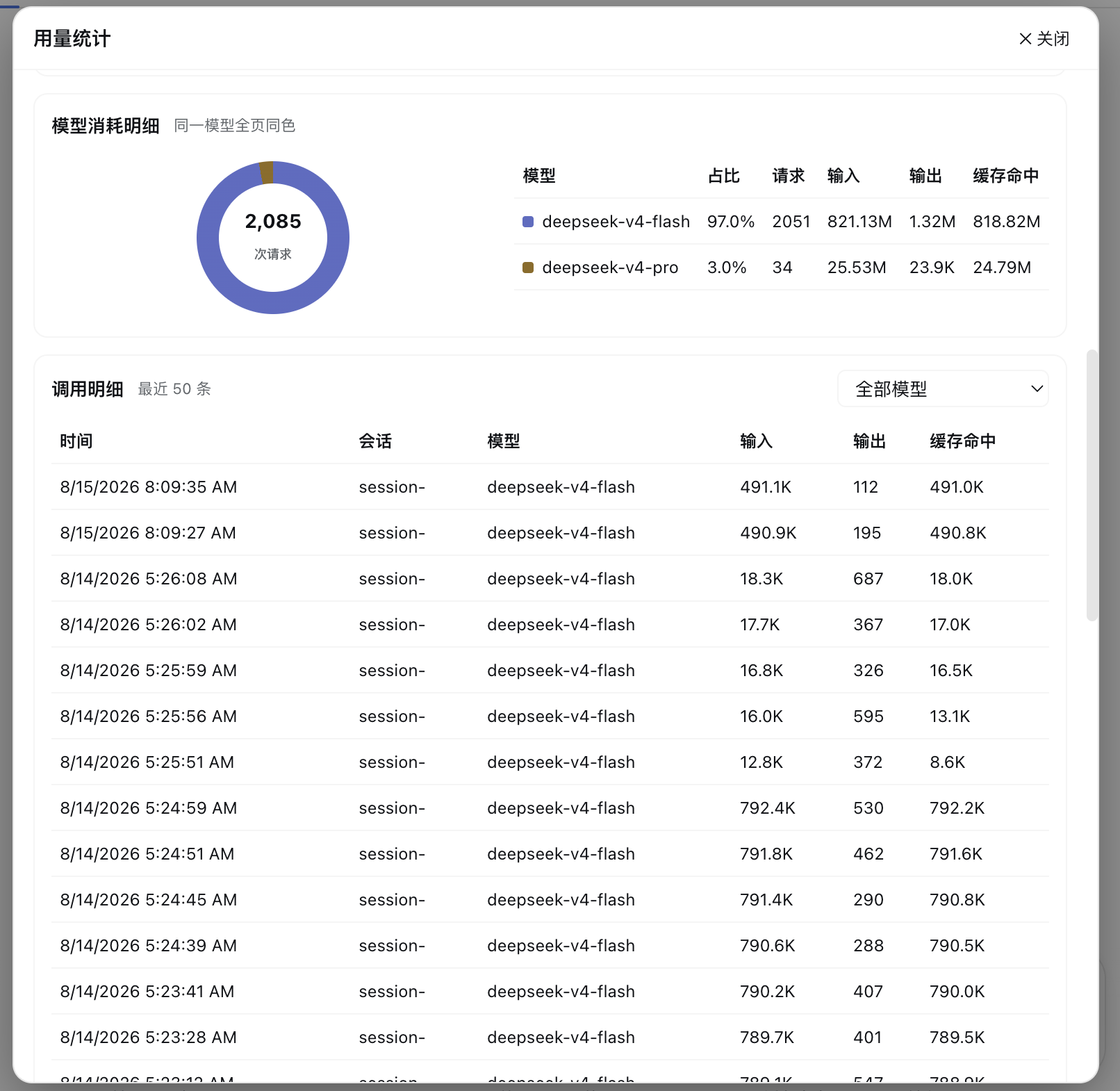 |
Usage page bottom: trend bar chart, model consumption details, call record details |
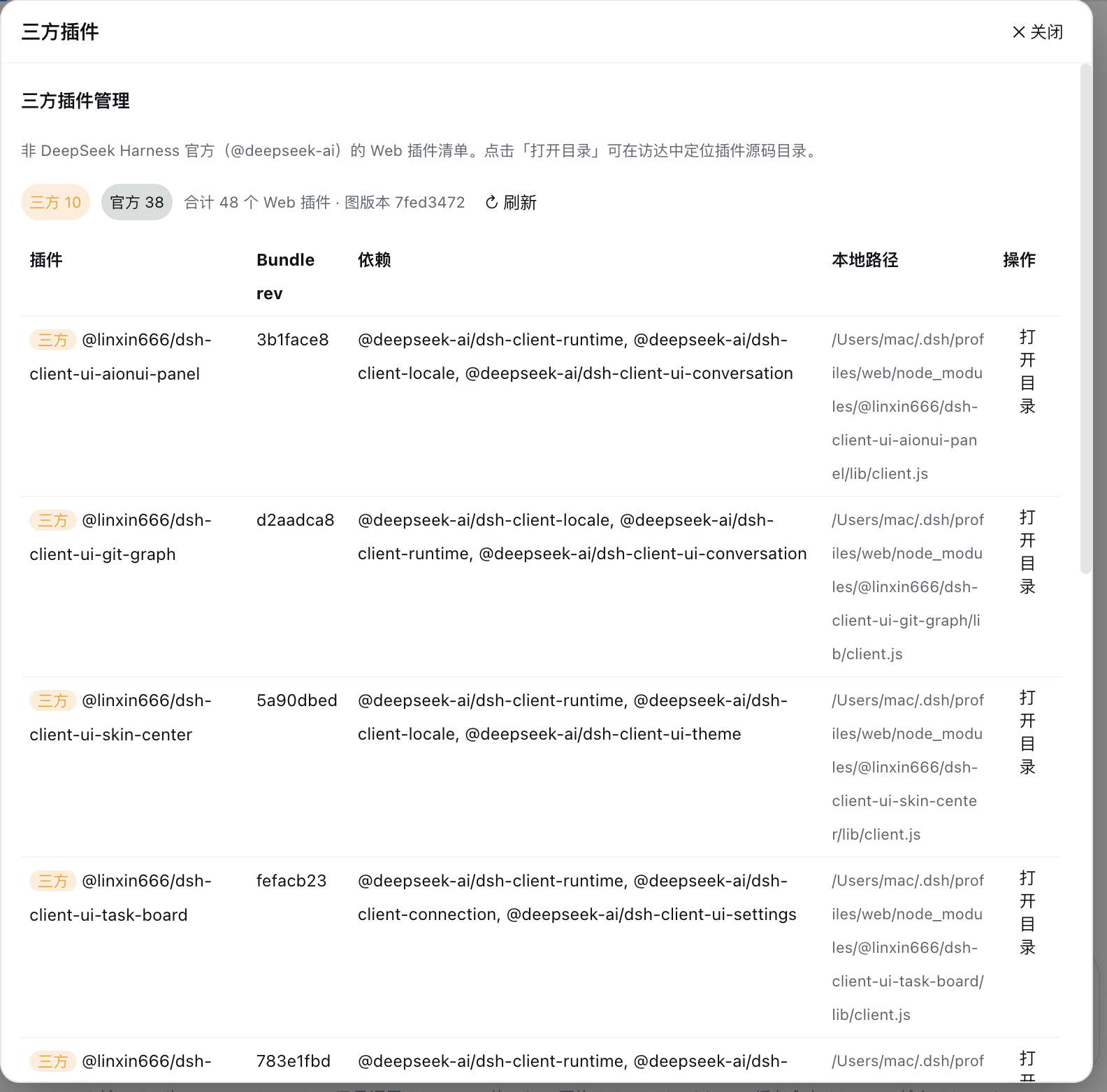 |
Third-party plugin manager: stat badges, plugin list, "Open Directory" action |
❓ FAQ
Q: Are my settings preserved after restart?
A: Settings are automatically persisted to config.json in the plugin directory and restore after restart.
Q: Will the plugin still be there after a restart?
A: Yes — static plugins are installed persistently and survive restarts. The auto-read DEEPSEEK_API_KEY account needs no reconfiguration and restores automatically after restart.
Q: I can't see the entry button at the bottom of the sidebar? A: The DSH sidebar bottom slot is exclusively occupied by the official Cordis panel plugin. This plugin's entry is fixed on the right of the input toolbar and does not depend on that slot.
Q: Will my Key leak?
A: No. Keys are saved only in config.json in the plugin directory on your machine and the UI only shows masked values; neither the source code nor the README contains any secrets.
Q: Why not use dsh plugin add dsh-balance-plugin?
A: A third party owns a same-named package on npm (dsh-balance-plugin@0.1.0), so the bare name would install the wrong one. Use the one-click script or the github: source.
See the full FAQ for more questions.
📖 Docs
| Document | Description |
|---|---|
| Configuration | Detailed settings, persistence, update methods |
| Architecture | Dual-face architecture, RPC routes, persistence |
| FAQ | Full FAQ, troubleshooting, installation issues |
| Contributing | How to contribute |
💬 Community
👥 Contributors
Made with contrib.rocks.
📄 License
MIT © 2026 Black Cat (yxxbc)
Related plugins
DSH-better-sidebar
 dsh-external
/DSH-better-sidebar
右侧侧边栏增强:文件预览/终端/Git,可拖拽自定义位置
dsh plugin --profile web add github:dsh-external/DSH-better-sidebarmirage#dsh
 strukto-ai
/mirage/typescript/packages/dsh
把文件系统与 bash 提供者换成 mirage 虚拟工作区:文件工具与 shell 命令作用于挂载的资源(RAM、S3、Redis、Slack、Gmail、Notion、Postgres)而非宿主磁盘,支持按挂载点设置读/写/执行模式、按命令选择沙箱(进程内 monty、pyodide、quickjs;远程 docker、e2b、daytona),并可在虚拟终端中安装 CLI(git、gh、slack、linear、ntn、gws,或自行注册的程序树)作为命令头词。
dsh plugin --profile web add github:strukto-ai/mirage#path:/typescript/packages/dshdeepseek-harness-desktop
 hairyf
/deepseek-harness-desktop
DeepSeek Harness Tauri 桌面版 | Only 5mb installer, zero environment setup. Windows / macOS / Linux.
dsh plugin --profile web add github:hairyf/deepseek-harness-desktopcc-safety-net
 kenryu42
/cc-safety-net
A coding agent CLI hook - block destructive commands and secret file access
dsh plugin --profile web add 'github:kenryu42/cc-safety-net#ae8af0330308ad0bc24b5389709060c7a07a6b8d'hol-guard
 hashgraph-online
/hol-guard
开源AI代理防病毒:运行时拦截风险工具、秘密访问、提示注入、恶意软件包、MCP服务器、插件和技能。
dsh plugin --profile web add github:hashgraph-online/hol-guarddsh-mobile
 saya-ch
/dsh-mobile
DeepSeek Harness 移动端适配与安全局域网访问插件,支持 Android App 和手机浏览器。
dsh plugin --profile web add github:saya-ch/dsh-mobile