
Models & Providers
dsh-model-provider-label
haiyoucuv/dsh-model-provider-label · ★ 0
 haiyoucuv
DeepSeek Harness plugin that disambiguates same-named models by showing their provider
Archived repository
Repository is no longer available (checked 2026-11-15). This entry is retained for tracking and cannot be installed.
README
Table of contents
⚠️ Deprecated
This plugin is deprecated. The "show provider name" feature has been merged into the new plugin dsh-chat-tweaks (a DSH UI-customization collection with a dedicated Settings page, more switches, and ongoing updates).
New plugin repository: https://github.com/haiyoucuv/dsh-chat-tweaks
Install the new plugin:
dsh plugin --profile web add https://github.com/haiyoucuv/dsh-chat-tweaks/archive/refs/tags/v0.1.0.tar.gzAfter installing the new plugin, remove this one (both shadow the same UI slot; coexistence throws):
dsh plugin --profile web remove dsh-model-provider-labelThe content below is kept for historical reference.
Show the provider display name next to the model name in the DeepSeek Harness composer model seat, so identical model names from different providers become distinguishable.
在 DeepSeek Harness 对话框模型选择器同时显示 provider 显示名 与 模型名, 让不同 provider 下的同名模型一眼可辨。


中文 | English
The stock model selector only shows the model name (e.g. DeepSeek V4 Flash). When you configure multiple providers that expose identically
named models, you cannot tell them apart. This plugin also shows the
provider's display name: DeepSeek · DeepSeek V4 Flash.
Effect
| Default | With this plugin |
|---|---|
DeepSeek V4 Flash |
DeepSeek · DeepSeek V4 Flash |
GPT-5 (provider A) |
ProviderA · GPT-5 |
GPT-5 (provider B) |
ProviderB · GPT-5 |
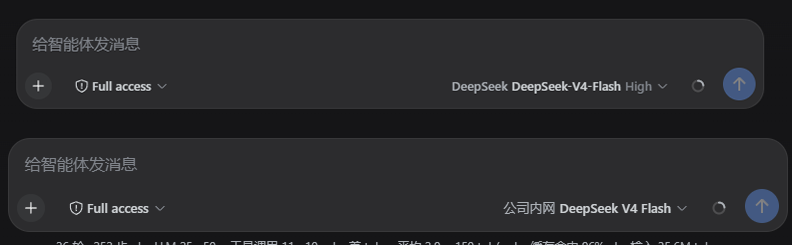
The dropdown menu, reasoning-effort selection, model catalog loading and
error surfaces behave exactly like the stock implementation — this plugin
only shadows the conversation.input.model UI slot with a lower-priority
component and reuses the host's modelDirectories service for all data.
Install
# From GitHub (recommended)
dsh plugin --profile web add https://github.com/haiyoucuv/dsh-model-provider-label/archive/refs/tags/v0.1.0.tar.gz

# Or from a local directory (development)
dsh plugin --profile web add link:/path/to/dsh-model-provider-label
Restart dsh web after installing so the browser client loads the
plugin bundle.
Tip: you can also install it with pnpm directly in the profile directory:
cd ~/.dsh/profiles/web && pnpm add https://github.com/haiyoucuv/dsh-model-provider-label/archive/refs/tags/v0.1.0.tar.gz
Development
pnpm install          # installs esbuild / typescript dev deps
pnpm build            # builds lib/client.js (ModuleLoader format) + lib/index.js
- Source:
src/client/index.tsx(apply / inject + slot shadowing),src/client/ModelSelect.tsx(the modified model selector) - Styles:
src/client/ModelSelect.module.css - The built
lib/output is committed, so installing does not require a local build
How it works
DSH's conversation.input.model is a single-kind UI slot. It is
registered by the stock dsh-client-ui-model-selection plugin at
priority: 0. The slot system allows only one registration per priority
and lets a lower priority shadow the default (lowest renders). This
plugin registers the same slot at priority: -100, so our component is
rendered instead. The catalog data still comes from the host-injected
modelDirectories service (shared per session, same state as the /model
command), and translations reuse the host's model locale namespace
(not re-registered, to avoid a locale conflict).
Customizing the display format
Edit the providerLabel / modelLabel / triggerLabel composition in
src/client/ModelSelect.tsx, then pnpm build and restart.
License
MIT — see LICENSE
Related plugins
dsh-plugin-reasonix
 esengine
/DeepSeek-Reasonix/integrations/dsh-plugin
把 Reasonix 作为 dsh 子智能体接入:一层配置补丁让 subagent-acp 提供方启动 reasonix acp,并以 reasonix 工具暴露给模型。纯配置、无代码、不在 npm;接入的是子智能体,不是模型服务商。
dsh plugin --profile web add 'github:esengine/DeepSeek-Reasonix#af0e954f5629492980718fc0e36030fec0abc682&path:/integrations/dsh-plugin'dsh-purge
 YuJunZhiXue
/dsh-purge
DeepSeek Harness 破甲:让所有模型都能破甲,不同模型可换不同提示词;默认提示词面向国模「小码酱」。Jailbreak for every model — swap prompts per model. 求 Star 收藏 ⭐ 如要二开,请查看署名要求部分
dsh-purge-mmparko
 mmparko
/dsh-purge
DeepSeek Harness 破甲:让所有模型都能破甲,不同模型可换不同提示词;默认提示词面向国模「小码酱」。Jailbreak for every model — swap prompts per model. 求 Star 收藏 ⭐ 如要二开,请查看署名要求部分
dsh plugin --profile web add 'github:mmparko/dsh-purge#033e6bd1e0f101352b39075ecd0d758ffef26b76'dsh-connect-workbuddy
 dingminhua
/dsh-connect-workbuddy
把本机登录的 WorkBuddy 模型(国内版与国际版)接入 DeepSeek Harness:每次刷新按上游目录自动读取每个模型的积分倍率,支持逐模型图片输入开关、多账号切换与账号池自动换号,并提供每日签到、卡片与输入框里的胶囊积分读数等只读积分概览。
dsh plugin --profile web add 'dsh-connect-workbuddy@5.15.0'dsh-image-gen
 shanliuling
/dsh-image-gen
让 DeepSeek Harness 像 ChatGPT 一样,在对话里直接生成图片。
dsh plugin --profile web add github:shanliuling/dsh-image-genagent-vision-toolkit
 Anionex
/agent-vision-toolkit
为纯文本模型"看图“设计更好的视觉工具箱和技能,支持多图理解,图片问答,前端UI还原、GUI 自动化等,并可选无缝接入多个主流agent,直接识别粘贴图片| A vision toolkit and skill designed for text-only llms — image Q&A, long-screenshot OCR, frontend UI restoration, and GUI automation, with optional seamless integration for Codex, Claude Code, Pi, Oh My Pi, and OpenCode
dsh plugin --profile web add github:Anionex/agent-vision-toolkit